RAD529GSM quad band mobile phone
TCT Mobile Limited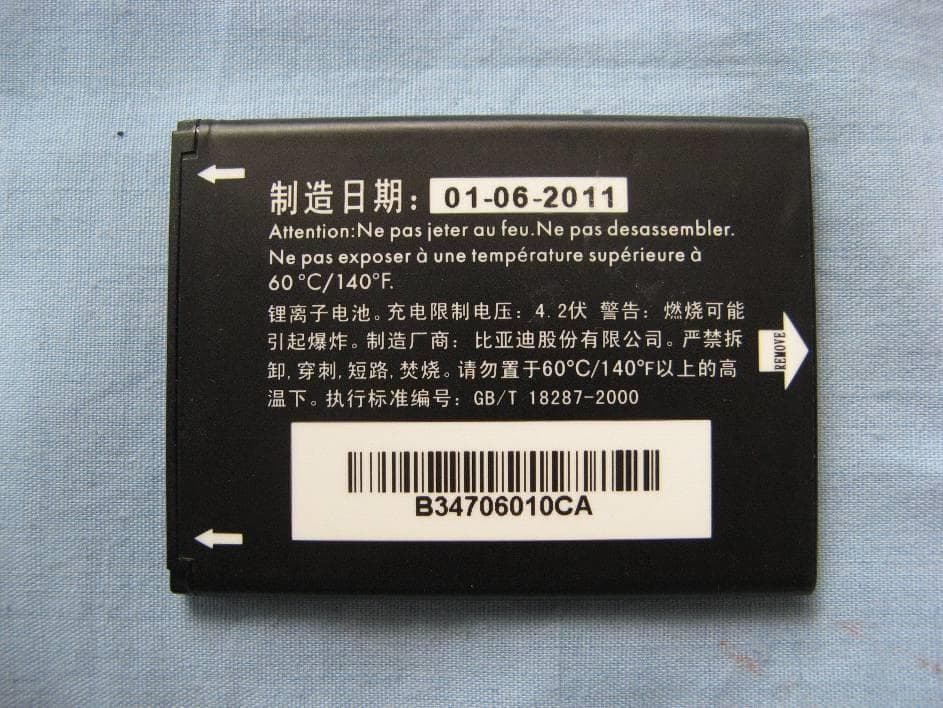
Click to zoom
Application Details
- Equipment Class
- JBP - Part 15 Class B Computing Device Peripheral
- Date of Grant
- Oct 27, 2014
- Application Purpose
- Original Equipment
- Date of Application
- Oct 22, 2014
- Equipment Note
- GSM quad band mobile phone
- Company
- TCT Mobile Limited
- Country
- China
Documents & Files
Document Text
Text extracted from the exhibit documents filed with the FCC. Open a document above to read the original.
Users Manual
1 Quick Start Guide For more information about how to use the phone, please go to www.alcatelonetouch.com to download complete user manual. Moreover, from the website you can also consult FAQ, realize software upgrade, etc. English - CJB284AALAAN 4C 23 www.sar-tick.com This product meets applicable national SAR limits of 2.0 W/kg. The specific maximum SAR values can be found on page 28 of this user guide. When carrying the product or using it while worn on your body, either use an approved accessory such as a holster or otherwise maintain a distance of 1.0 cm from the body to ensure compliance with RF exposure requirements. Note that the product may be transmitting even if you are not making a phone call. PROTECT YOUR HEARING To prevent possible hearing damage, do not listen at high volume levels for long periods. Exercise caution when holding your device near your ear while the loudspeaker is in use. 1 Your mobile ............................ 1.1 Keys Menu/ Direction key Back/ End call key Select/ Call key Voicemail key Torch Headset connector 45 Torch key Lock key Volume up Volume down Camera From Idle screen: • Press: Access Main menu Call key • Pick up/Send a call • Press: Enter Call log (From Idle screen) • Press: End a call Return to the Home screen Delete character (In Edit mode) • Press and hold: Power on/off From Idle screen • Press: 0 • Press and hold: “+/p/w” In Edit mode • Press: Access symbols table • Press and hold: 0 From Idle screen • Press: * In Edit mode: • Press: Change input methods • Press and hold: Access language list 67 1.2 Status bar icons (1) Battery charge level. Vibrate alert Call forwarding activated Alarm or appointments programmed. Level of network reception. Radio is on. Roaming. SMS unread. (1) The icons and illustrations in this guide are provided for informational purposes only. Headset mode Flight mode. Bluetooth status (Activated). Bluetooth status (Connected to an audio device). GPRS connection status (Activated). GPRS connecting. 2 Getting started ................... 2.1 Set-up Removing or installing the back cover 89 Inserting or removing the SD card Charging the battery Connect battery charger to your phone and plug into the socket. Installing or removing the battery Insert and click the battery into place, then close the telephone cover. Unclip the cover, then remove the battery. Inserting or removing the SIM card You must insert your SIM card to make phone calls. 1011 3.3 Calling your voicemail (1) To access your voicemail, hold down the key. 3.4 Receiving a call When you receive an incoming call, press the key to talk and then hang up using the key. 4 Main Menu .......................... Press from the Idle screen to enter the main menu. The main menu can be used to select your favourites by pressing in the left or right direction. To access the submenu, press upwards or dowards from menu screen. (1) Contact your network operator to check service availability. To reduce power consumption and energy waste, switch off Bluetooth when not in use; reduce the backlight time, etc. 2.2 Power on your phone Hold down the key until the telephone powers on. 2.3 Power off your phone Hold down the key from the Home screen. 3 Calls ..................................... 3.1 Making a call Dial the desired number then press the key to place the call or make an emergency call. To hang up the call, press the key. 3.2 Call log You can access your call memory by pressing from the idle screen, and you will see Outgoing call(s), Missed call(s) and Answered call(s). 1213 6 Messages ............................. From the main menu screen, right-click on to access Messages. While viewing and writing a message, press to check and create SMS. 5 Contacts .............................. You can access this function by pressing from Idle screen. You can add a new contact to phone or SIM card by pressing OK, and select New to enter the "Add contact" screen. 1415 8 Alarm .................................. Your mobile phone has a built-in alarm clock with a snooze feature. You can set up your time when you access above screen, and press to enter Edit screen. 7 FM Radio ............................. From below screen, select OK to access the channel screen, turn on/ off the radio by pressing . You can use the application as a traditional radio with saved channels. You can listen to it while running other applications. 1617 10 Tools ................................. When you enter this menu, select OK to choose your preferences. You can select the following features: Calculator, Calendar, Music, Camera, Images, Videos, Voice alarm, My Files, Bluetooth, and Sevices. 9 Weather .............................. Your phone is equipped with a weather function for consulting up to 3-day forecast of favourite cities. From above screen, select OK/Options/Forecast to view specific information. 1819 12 Making the most of your mobile ............................... Mobile Upgrade Using Mobile Upgrade tool you can update your phone’s software from your PC. Download Mobile Upgrade from ALCATEL ONE TOUCH website (www.alcatelonetouch.com) and install it on your PC. Launch the tool and update your phone by following the step by step instructions (refer to the User Guide provided together with the tool). Your phone’s software will now have the latest software. All personal information will be permanently lost following the update process. Supported Operating Systems Windows XP/Vista/Windows 7. 11 Settings ............................. To customise your telephone, you can enter Settings from main menu screen. Functions that can be customized are: General, Sound, Display, Call settings, Assistance, Connectivity, etc. 2021 ALCATEL is a trademark of Alcatel-Lucent and is used under license by TCT Mobile Limited All rights reserved © Copyright 2014 TCT Mobile Limited TCT Mobile Limited reserves the right to alter material or technical specification without prior notice. Safety and use ........…
Text truncated - open the document above for the full version.
Cover Letter(s)
5F, C building, No. 232, Liang Jing Road ZhangJiang High-Tech Park, Pudong Area Shanghai, P.R. China. 201203 TEL: +86(0)21 61460666 FAX: +86(0)21 61460602 2014-09-24 Federal Communications Commission Office of Engineering and Technology Equipment Authorization Division 7345 Oakland Mills Road Columbia, Maryland 21046 Subject: Permanent Confidentiality request for FCC ID: RAD529 To Whom It May Concern, Pursuant to sections 0.457 and 0.459 of CFR 47, the applicant requests permanent confidential treatment of the following information accompanying this application: - Block Diagram - Schematics - Operational Description - BOM list/Tune-Up-Procedure The above materials contain trade secrets and proprietary information not customarily released to the public. The public disclosure of these matters might be harmful to the applicant and provide unjustified benefits to its competitors. Yours Sincerely, Zhizhou Gong Approval Team Leader TCT Mobile Limited
External Photos
External Photo Pic A-1 Mobile Phone Pic A-2 Mobile Phone Pic A-3 Mobile Phone Pic A-4 Mobile Phone Pic A-5 Mobile Phone Pic A-6 Mobile Phone Pic A-7 Battery AE1 Pic A-8 Battery AE1 Pic A-9 Charger AE1 Pic A-10 Label of Charger AE1 Pic A-11 Charger AE2 Pic A-12 Label of Charger AE2 Pic A-13 Charger AE3 Pic A-14 Label of Charger AE3 Pic A-15 Charger AE4 Pic A-16 Label of Charger AE4 Pic A-17 Charger AE5 Pic A-18 Label of Charger AE5 Pic A-19 Charger AE6 Pic A-20 Label of Charger AE6 Pic A-21 Charger AE7 Pic A-22 Label of Charger AE7 Pic A-23 Charger AE8 Pic A-24 Label of Charger AE8 Pic A-25 Charger AE8 Pic A-26 USB Cable AE1 Pic A-27 USB Cable AE2 Pic A-28 USB Cable AE3 Pic A-29 USB Cable AE4 Pic A-30 Headset AE1 Pic A-31 Headset AE2 Pic A-32 Headset AE3 Pic A-33 Headset AE4
Internal Photos
Internal Photo Mobile phone Disassembly Mobile phone Disassembly Mobile phone Disassembly Mobile phone Disassembly
Test Report
No.I14Z47556-EMC02 Page 1 of 20 ©Copyright. All rights reserved by TMC Beijing. TEST REPORT No. I14Z47556-EMC02 for TCT Mobile Limited GSM quad band mobile phone Model Name: 2004C FCC ID: RAD529 with Hardware Version: PIO Software Version: SWC41 Issued Date: Sep.25 th , 2014 Note: The test results in this test report relate only to the devices specified in this report. This report shall not be reproduced except in full without the written approval of TMC Beijing. Test Laboratory: FCC 2.948 Listed: No.733176 IC O.A.T.S listed: No.6629A-1 TMC Beijing, Telecommunication Metrology Center of Ministry of Industry and Information Technology No. 52, Huayuan Bei Road, Haidian District, Beijing, P. R. China 100191 Tel: +86(0)10-62304633-2561, Fax: +86(0)10-62304633-2504 Email:[email protected]. www.emcite.com No.I14Z47556-EMC02 Page 2 of 20 ©Copyright. All rights reserved by TMC Beijing. CONTENTS 1. TEST LABORATORY ............................................................................................................... 3 1.1. TESTING LOCATION ........................................................................................................... 3 1.2. TESTING ENVIRONMENT ................................................................................................... 3 1.3. PROJECT DATA ................................................................................................................... 3 1.4. SIGNATURE .......................................................................................................................... 3 2. CLIENT INFORMATION ........................................................................................................... 4 2.1. APPLICANT INFORMATION ................................................................................................ 4 2.2. MANUFACTURER INFORMATION ...................................................................................... 4 3. EQUIPMENT UNDER TEST (EUT) AND ANCILLARY EQUIPMENT (AE) ............................ 5 3.1. ABOUT EUT .......................................................................................................................... 5 3.2. INTERNAL IDENTIFICATION OF EUT USED DURING THE TEST ................................... 5 3.3. INTERNAL IDENTIFICATION OF AE USED DURING THE TEST ...................................... 5 3.4. EUT SET-UPS ....................................................................................................................... 6 4. REFERENCE DOCUMENTS .................................................................................................... 7 4.1. REFERENCE DOCUMENTS FOR TESTING....................................................................... 7 5. LABORATORY ENVIRONMENT .............................................................................................. 8 6. SUMMARY OF TEST RESULTS .............................................................................................. 9 7. TEST EQUIPMENTS UTILIZED ............................................................................................. 10 ANNEX A: MEASUREMENT RESULTS ....................................................................................... 11 No.I14Z47556-EMC02 Page 3 of 20 ©Copyright. All rights reserved by TMC Beijing. 1. Test Laboratory 1.1. Testing Location Location A Company Name: TMC Beijing, Telecommunication Metrology Center of MIIT Address: No 52, Huayuan Bei Road, Haidian District, Beijing, P.R. China Postal Code: 100191 1.2. Testing Environment Normal Temperature: 15-35°C Relative Humidity: 20-75% 1.3. Project data Testing Start Date: Sep. 9 th , 2014 Testing End Date: Sep. 12 th , 2014 1.4. Signature Qu Pengfei (Prepared this test report) Sun Xiangqian (Reviewed this test report) Lu Bingsong Deputy Director of the laboratory (Approved this test report) No.I14Z47556-EMC02 Page 4 of 20 ©Copyright. All rights reserved by TMC Beijing. 2. Client Information 2.1. Applicant Information Company Name: TCT Mobile Limited Address /Post: 5F, C building, No. 232, Liang Jing Road ZhangJiang High-Tech Park, Pudong Area Shanghai, P.R. China. City: Shanghai Postal Code: 201203 Country: China Contact Person: Gong Zhizhou Contact Email [email protected] Telephone: 0086-21-61460890 Fax: 0086-21-61460602 2.2. Manufacturer Information Company Name: TCT Mobile Limited Address /Post: 5F, C building, No. 232, Liang Jing Road ZhangJiang High-Tech Park, Pudong Area Shanghai, P.R. China. City: Shanghai Postal Code: 201203 Country: China Telephone: 0086-21-61460890 Fax: 0086-21-61460602 No.I14Z47556-EMC02 Page 5 of 20 ©Copyright. All rights reserved by TMC Beijing. 3. Equipment Under Test (EUT) and Ancillary Equipment (AE) 3.1. About EUT Description GSM quad band mobile phone Model Name 2004C FCC ID RAD529 Extreme vol. Limits 3.5VDC to 4.2VDC (nominal: 3.8VDC) Note: Components list, please refer to documents of the manufacturer; it is also included in the original test record of Telecommunication Metrology Center of MIIT of People’s Republic of China. 3.2. Internal Identification of EUT used during the test EUT ID* SN or IMEI HW Version SW Version EUT3 014253000000173 PIO SWC41 *EUT ID: is used to identify the test sample in the lab internally. 3.3. Internal Identification of AE used during the test AE ID* Description SN Remarks AE1 Battery / 14TCT-BA-0128 AE2 Battery / 14TCT-BA-1095 AE3 USB cable / 14TCT-DC-0638 AE4 USB cable / 14TCT-DC-0649 AE5 USB cable / / AE6 USB cable / / AE18 Travel charger / 14TCT-CH-0237 AE19 Travel charger / 14TCT-CH-0315 AE20 Charger Cradle / / AE1,AE2 Model CAB31L0000C1 Manufacturer BYD Capacitance 1000mAh Nominal voltage 3.7V AE3 Model CDA3122002C1 Manufacturer JUWEI Length of cable 99cm AE4 Model CDA3122002C2 Manufacturer SHENGHUA Length of cable 97.5cm AE5 Model CDA3122005C1 Manufacturer JUWEI No.I14Z47556-EMC02 Page 6 of 20 ©Copyright. All rights reserved by TMC Beijing. Length of cable / AE6 Model CDA3122005C2 Manufacturer SHENGHUA Le…
Text truncated - open the document above for the full version.
Test Setup Photos
Cond Cond ducted emis ducted emis ssion ssion Cond Rad ducted emis diated emis ssion ssion Rad Rad diated Spur diated emis rious Emiss sion sion Test Laayout Rad Rad iated Spuri iated Spuri ious Emiss ious Emiss ion Test La ion Test La ayout ayout
Contact Information
Applicant
Zhizhou Gong
Technical Contact
TMC Beijing, Telecommunication Metrology Center ofXue Zhen
[email protected]86-10-62304633
No. 52, Huayuan Bei Road, Haidian District, · Bei Jing · China
Test Firm
TMC-Telecommunication Metrology Center of M.I.I.TChongwen Song
Technical Specifications
| # | Rule Parts | Frequency Range | Power Output |
|---|---|---|---|
| 1 | 15B | - | - |
Other Applications from TCT Mobile Limited

RAD558
Nov 15, 2015HSUPA/HSDPA/UMTS tribands / GSM quadbands/LTE 6-band mobile phone
Equipment Class
JBP - Part 15 Class B Computing Device Peripheral
RAD556
Sep 08, 2015CDMA 1X BC0/BC1/BC10 mobile phone
Equipment Class
PCE - PCS Licensed Transmitter held to ear
RAD552
Jun 20, 2015GSM Quadband / UMTS Triband mobile phone
Equipment Class
PCE - PCS Licensed Transmitter held to ear
RAD550
Jun 06, 2015HSDPA/HSUPA/HSPA+/UMTS quad band /GSM quad band/LTE 4 band mobile phone
Equipment Class
DSS - Part 15 Spread Spectrum Transmitter
RAD549
May 13, 2015WCDMA tri band / GSM quad band Moblie phone with BT, Wi-Fi functionality.
Equipment Class
DSS - Part 15 Spread Spectrum Transmitter