RAD533HSDPA/HSUPA/HSPA+/UMTS Quad band/GSM Quad band / LTE 6 band mobile phone
TCT Mobile Limited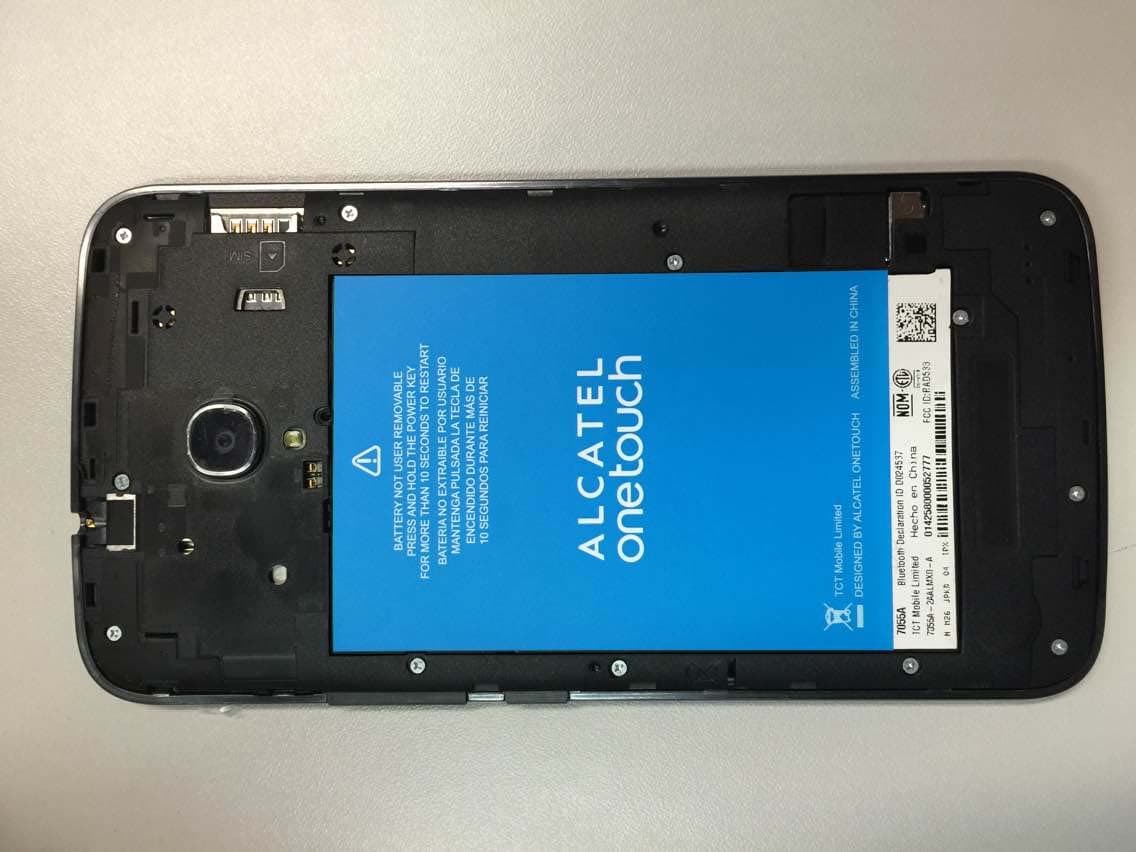
Click to zoom
Application Details
- Equipment Class
- JBP - Part 15 Class B Computing Device Peripheral
- Date of Grant
- Jan 20, 2015
- Application Purpose
- Original Equipment
- Date of Application
- Jan 18, 2015
- Equipment Note
- HSDPA/HSUPA/HSPA+/UMTS Quad band/GSM Quad band / LTE 6 band mobile phone
- Company
- TCT Mobile Limited
- Country
- China
Documents & Files
Document Text
Text extracted from the exhibit documents filed with the FCC. Open a document above to read the original.
Users Manual
English - CJB6181ALAAA Quick Start Guide Important: Please note your phone is battery embedded design with removable back cover and non-removable battery. Unauthorized personnel are strictly prohibited from disassembling the phone. If your phone isn’t working properly, try to restart it by pressing and holding the Power key for at least 9 seconds until the startup screen appears. If your phone develops a serious error and can’t be restored by restarting it, you may need to restore factory settings by pressing and holding the Power key and Volume up key until the startup screen appears. Then select "reboot system now" and press the Power key to confirm. Note: Please take care when performing such operations because they will erase personalized settings and data saved in your phone, such as SMS, Contacts, Music, etc. For more information about how to use this device, please go to www.alcatelonetouch.com to download the complete user manual. From the website, you can also consult the FAQ, upgrade software, etc. 1 1 Your mobile ������������������ 1�1 Keys and connectors Micro-USB Connector Front camera Headset connector Home key Touch screen Back key Menu key PROTECT YOUR HEARING To prevent possible hearing damage, do not listen at high volume levels for long periods. Exercise caution when holding your device near your ear while the loudspeaker is in use. Table of contents 1 Your mobile ��������������������������������������������������������������������1 2 Text input ����������������������������������������������������������������������11 3 Phone call ����������������������������������������������������������������������12 4 Contacts ������������������������������������������������������������������������14 5 Messaging ����������������������������������������������������������������������15 6 Email ������������������������������������������������������������������������������16 7 Getting connected ��������������������������������������������������������17 8 Find my location using GPS satellites ������������������������20 9 Data backup ������������������������������������������������������������������21 10 Factory data reset ��������������������������������������������������������21 11 Applications & Internal storage ����������������������������������22 12 Making the most of your phone ����������������������������������23 Safety and use�������������������������������������������������������������������������25 General information ��������������������������������������������������������������32 TCT Mobile (US), Inc�Warranty ������������������������������������������33 Troubleshooting ���������������������������������������������������������������������35 www.sar-tick.com This product meets applicable national SAR limits of 1.6 W/kg. The specific maximum SAR values can be found on page 29 of this user guide. When carrying the product or using it while worn on your body, either use an approved accessory such as a holster or otherwise maintain a distance of 1.0 cm from the body to ensure compliance with RF exposure requirements. Note that the product may be transmitting even if you are not making a phone call. 23 Power key • Press: Lock the screen/Light up the screen. • Press and hold: Show the pop-up menu to select Power off/Restart/Airplane mode/Quick start. • Press the Power key for more than 9s to restart. • Press the Power key and Volume up key to reset. • Press the Power key and Volume down key to capture a screenshot. Volume Keys • In call mode, adjusts the earpiece or headset volume. • In Music/Video/Streaming mode, adjusts the media volume. • In general mode, adjusts the ringtone volume. • Mutes the ringtone of an incoming call. 1�2 Getting started 1�2�1 Set-up Removing or installing the back cover Inserting or removing the SIM card You must insert your SIM card to make phone calls. Please power off your phone before inserting or removing the SIM card. Camera Camera Flash/ Flashlight Volume key Power key Menu key • Touch to access settings options. • Touch and hold to open a list of thumbnail images of apps you've worked with recently. Home key • From any application or screen, touch to return to the Home screen. Back key • Touch to go back to the previous screen, or to close a dialog box, options menu, the notification panel, etc. These keys are visible when the screen lights up. 45 To install, place the SIM card with the chip facing down into the housing, and then slide it into its slot. Make sure that it is correctly inserted. To remove the card, press and slide it out. Your phone only supports micro-SIM cards. To avoid damaging your phone, do not attempt to insert other SIM types, such as mini and nano cards. Installing and removing the microSD card Insert the microSD card with golden contact facing down into the slot. To remove the microSD card, gently press and slide it out. To avoid data loss and SD card damage, please ensure that the SD card is unmounted before removing it (Settings\ Storage\Unmount SD card). Charging the battery Connect the battery charger to your phone and wall socket respectively, the LED indicator will light while charging. To reduce power consumption and energy waste, when the battery is fully charged, disconnect your charger from the plug; switch off Wi-Fi, GPS, Bluetooth or background- running applications when not in use; reduce the backlight time, etc. 1�2�2 Power on your phone Hold down the Power key until the phone powers on. It may take a few seconds before the screen lights up. Set up your phone for the first time The first time you power on the phone, you should set the following options: language, input method, date & time, etc. Even if no SIM card is installed, your phone will still power on and you will be able to connect to a Wi-Fi network, sign into your Google account and use some of the phone's features. 1�2�3 Power off your phone Hold down the Power key from the Home screen until the phone options appear, select Power off. 1�3 Home screen Y…
Text truncated - open the document above for the full version.
Cover Letter(s)
Date To: An d To W CT T Rese appl We bene Furt fede Tha n Reg Go n App TCT e 2015-01-1 Federal Com Authorizat 7345 Oakl Columbia, d American 6731 Whi t Suite C110 McLean, V Whom It Ma TL, Telecom earch, MII lications to A certify that efits, pursua ther, no part eral benefits nk you. ards, ng Zhizhou proval Team T Mobile L 12 mmunicatio tion & Evalu land Mills R , MD 21046 Certificatio ttier Avenue 0 VA 22101 ay Concern mmunicatio IT is authori American C we are not ant to Sectio ty, as define s, that includ m Leader Limited ons Commis uation Divis Road 6 n Body, In c e : on Technol ized to act o Certification subject to d on 5301 of t ed in 47 CFR des FCC ben 5F, C Zhang ssion, sion, c. logy labs, A on our behal n Body, Inc. denial of fed the Anti-Dru R1.2002 (b) nefits. C building, Jiang Hig h Shan Academy of lf, until othe (ACB). deral benefit ug Abuse A ) to the appl , No. 232, L h-Tech Par nghai, P.R T F f Telecomm erwise notifi ts, which inc Act of 1988, lication is su Liang Jing rk, Pudong R. China. 20 TEL: +86(0)2 FAX: +86(0)2 munication fied, for cludes FCC U.S.C. 862 ubject to den Road Area 01203 21 61460666 21 61460602 . nial of 6 2
Cover Letter(s)
5F, E building, No. 232, Liang Jing Road ZhangJiang High-Tech Park, Pudong Area Shanghai, P.R. China. 201203 TEL: +86(0)21 61460666 FAX: +86(0)21 61460602 1/16/2015 Federal Communications Commission Office of Engineering and Technology Equipment Authorization Division 7345 Oakland Mills Road Columbia, Maryland 21046 Subject: Permanent Confidentiality request for FCC ID: RAD533 To Whom It May Concern, Pursuant to sections 0.457 and 0.459 of CFR 47, the applicant requests permanent confidential treatment of the following information accompanying this application: - Block Diagram - Schematics - Operational Description - BOM list/Tune-Up-Procedure The above materials contain trade secrets and proprietary information not customarily released to the public. The public disclosure of these matters might be harmful to the applicant and provide unjustified benefits to its competitors. Yours Sincerely, Zhizhou Gong Approval Team Leader TCT Mobile Limited
External Photos
EUT photograph Mobile Phone Mobile Phone Mobile Phone Mobile Phone Mobile Phone Mobile Phone Mobile Phone
Internal Photos
UT Interior photograph Mobile Phone Mobile Phone Disassembly Mobile Phone Disassembly Mobile Phone Disassembly Mobile Phone Disassembly Mobile Phone Disassembly
Test Report
©Copyright. All rights reserved by CTTL. TEST REPORT No. I14Z48012-EMC01 for TCT Mobile Limited HSDPA/HSUPA/HSPA+/UMTS Quad band /GSM quad band/LTE 6 band mobile phone Model Name: 7055A FCC ID: RAD533 with Hardware Version: PIO Software Version: 9M27 Issued Date: 2015-01-16 Note: The test results in this test report relate only to the devices specified in this report. This report shall not be reproduced except in full without the written approval of CTTL. Test Laboratory: FCC 2.948 Listed: No. 525429 CTTL, Telecommunication Technology Labs, Academy of Telecommunication Research, MIIT No. 52, Huayuan North Road, Haidian District, Beijing, P. R. China 100191. Tel: +86(0)10-62304633-2512, Fax: +86(0)10-62304633-2504 Email: [email protected], website: www.chinattl.com No.I14Z48012-EMC01 Page 2 of 19 ©Copyright. All rights reserved by CTTL. REPORT HISTORY Report Number Revision Description Issue Date I14Z48012-EMC01 Rev.0 1st edition 2015-01-16 No.I14Z48012-EMC01 Page 3 of 19 ©Copyright. All rights reserved by CTTL. CONTENTS 1. TEST LABORATORY .............................................................................................................. 4 1.1. TESTING LOCATION .......................................................................................................... 4 1.2. TESTING ENVIRONMENT .................................................................................................. 4 1.3. PROJECT DATA .................................................................................................................. 4 1.4. SIGNATURE ........................................................................................................................ 4 2. CLIENT INFORMATION .......................................................................................................... 5 2.1. APPLICANT INFORMATION............................................................................................... 5 2.2. MANUFACTURER INFORMATION ..................................................................................... 5 3. EQUIPMENT UNDER TEST (EUT) AND ANCILLARY EQUIPMENT (AE) ............................ 6 3.1. ABOUT EUT ........................................................................................................................ 6 3.2. INTERNAL IDENTIFICATION OF EUT USED DURING THE TEST ................................... 6 3.3. INTERNAL IDENTIFICATION OF AE USED DURING THE TEST ...................................... 6 3.4. EUT SET-UPS ..................................................................................................................... 7 4. REFERENCE DOCUMENTS .................................................................................................. 8 4.1. REFERENCE DOCUMENTS FOR TESTING ...................................................................... 8 5. LABORATORY ENVIRONMENT ............................................................................................ 9 6. SUMMARY OF TEST RESULTS ........................................................................................... 10 7. TEST EQUIPMENTS UTILIZED ............................................................................................ 11 ANNEX A: MEASUREMENT RESULTS ...................................................................................... 12 No.I14Z48012-EMC01 Page 4 of 19 ©Copyright. All rights reserved by CTTL. 1. Test Laboratory 1.1. Testing Location Location 1: CTTL(huayuan North Road) Address: No. 52, Huayuan North Road, Haidian District, Beijing, P. R. China 100191 1.2. Testing Environment Normal Temperature: 15-35°C Relative Humidity: 20-75% 1.3. Project data Testing Start Date: 2014-12-28 Testing End Date: 2015-01-04 1.4. Signature Qu Pengfei (Prepared this test report) Sun Xiangqian (Reviewed this test report) Lu Bingsong Director of the laboratory (Approved this test report) No.I14Z48012-EMC01 Page 5 of 19 ©Copyright. All rights reserved by CTTL. 2. Client Information 2.1. Applicant Information Company Name: TCT Mobile Limited Address /Post: 5F, C building, No. 232, Liang Jing Road ZhangJiang High-Tech Park, Pudong Area Shanghai, P.R. China. City: Shanghai Postal Code: 201203 Country: China Contact Person: Gong Zhizhou Contact Email [email protected] Telephone: 0086-21-61460890 Fax: 0086-21-61460602 2.2. Manufacturer Information Company Name: TCT Mobile Limited Address /Post: 5F, C building, No. 232, Liang Jing Road ZhangJiang High-Tech Park, Pudong Area Shanghai, P.R. China. City: Shanghai Postal Code: 201203 Country: China Telephone: 0086-21-61460890 Fax: 0086-21-61460602 No.I14Z48012-EMC01 Page 6 of 19 ©Copyright. All rights reserved by CTTL. 3. Equipment Under Test (EUT) and Ancillary Equipment (AE) 3.1. About EUT Description HSDPA/HSUPA/HSPA+/UMTS Quad band /GSM quad band/LTE 6 band mobile phone Model Name 7055A FCC ID RAD533 Extreme vol. Limits 3.5VDC to 4.2VDC (nominal: 3.9VDC) Note: Components list, please refer to documents of the manufacturer; it is also included in the original test record of Telecommunication Metrology Center of MIIT of People’s Republic of China. 3.2. Internal Identification of EUT used during the test EUT ID* SN or IMEI HW Version SW Version EUT1 014258000004182 PIO 9M27 *EUT ID: is used to identify the test sample in the lab internally. 3.3. Internal Identification of AE used during the test AE ID* Description SN Remarks AE1 Battery / Inbuilt AE2 Travel charger / 14TCT-CH-2464 AE3 Travel charger / 14TCT-CH-2461 AE4 USB cable / 14TCT-DC-0827 AE1 Model CAC3380001C2 Manufacturer SCUD Capacitance 3400mAh Nominal voltage 3.8V AE2, AE3 Model CBA0015AG1C1 Manufacturer BYD Length of cable / AE4 Model CDA0000024C2 Manufacturer JUWEI Length of cable 101cm *AE ID: is used to identify the test sample in the lab internally. No.I14Z48012-EMC01 Page 7 of 19 ©Copyright. All rights reserved by CTTL. 3.4. EUT set-ups EUT set-up No. Combination of EUT and AE Remarks Set.1 EUT1+ AE1 + AE2 +AE4 Charger Set.2 EU…
Text truncated - open the document above for the full version.
Test Setup Photos
FDD Con D ID RAD53 nducted em 33 mission RE Rad diated Spurrious Emisssion
Contact Information
Applicant
Zhizhou Gong
Technical Contact
TMC Beijing, Telecommunication Metrology Center ofXue Zhen
[email protected]86-10-62304633
No. 52, Huayuan Bei Road, Haidian District, · Bei Jing · China
Test Firm
TMC-Telecommunication Metrology Center of M.I.I.TChongwen Song
Technical Specifications
| # | Rule Parts | Frequency Range | Power Output |
|---|---|---|---|
| 1 | 15B | - | - |
Other Applications from TCT Mobile Limited

RAD558
Nov 15, 2015HSUPA/HSDPA/UMTS tribands / GSM quadbands/LTE 6-band mobile phone
Equipment Class
JBP - Part 15 Class B Computing Device Peripheral
RAD556
Sep 08, 2015CDMA 1X BC0/BC1/BC10 mobile phone
Equipment Class
PCE - PCS Licensed Transmitter held to ear
RAD552
Jun 20, 2015GSM Quadband / UMTS Triband mobile phone
Equipment Class
PCE - PCS Licensed Transmitter held to ear
RAD550
Jun 06, 2015HSDPA/HSUPA/HSPA+/UMTS quad band /GSM quad band/LTE 4 band mobile phone
Equipment Class
DSS - Part 15 Spread Spectrum Transmitter
RAD549
May 13, 2015WCDMA tri band / GSM quad band Moblie phone with BT, Wi-Fi functionality.
Equipment Class
DSS - Part 15 Spread Spectrum Transmitter