RJAI-2100E-GSM1900 GPRS Terminal Equipment
Innostream Inc.
Click to zoom
Application Details
- Equipment Class
- PCE - PCS Licensed Transmitter held to ear
- Date of Grant
- Oct 20, 2003
- Application Purpose
- Original Equipment
- Date of Application
- Oct 20, 2003
- Equipment Note
- E-GSM1900 GPRS Terminal Equipment
- Frequency Range
- 1850.20000000 - 1909.80000000
- Company
- Innostream Inc.
- Country
- South Korea
Documents & Files
Document Text
Text extracted from the exhibit documents filed with the FCC. Open a document above to read the original.
Users Manual
Colour Mobile Phone Dualband i2100 User’s Guide INNOSTREAM Confidential PAGE : 1 of 1 Colour Mobile Phone Dualband GSM/DCS I-2100 User’s Guide Colour Mobile Phone Dualband i2100 User’s Guide INNOSTREAM Confidential PAGE : 2 of 2 Colour Mobile Phone Dualband i2100 User’s Guide INNOSTREAM Confidential PAGE : 3 of 3 Colour Mobile Phone Dualband i2100 User’s Guide INNOSTREAM Confidential PAGE : 4 of 4 1. Before You Start 1.1 Phone Layout and Icons < Icons in the main display screen > < Icons in the sub display screen > < Network status images in the sub display screen > < Event images in the sub display screen > Colour Mobile Phone Dualband i2100 User’s Guide INNOSTREAM Confidential PAGE : 5 of 5 1.2 Keys Description [VOL-UP] [VOL-DOWN] Colour Mobile Phone Dualband i2100 User’s Guide INNOSTREAM Confidential PAGE : 6 of 6 [NAVI-LEFT] [NAVI-RIGHT] [NAVI-LEFT] and [NAVI-RIGHT] [NAVI-UP] [NAVI-DOWN] [NAVI-UP] and [NAVI-DOWN] [NAVI-CENTRE] 1.3 Silent Mode 1.4 Using the Navigation Keys 1.5 Using the Earphone Colour Mobile Phone Dualband i2100 User’s Guide INNOSTREAM Confidential PAGE : 7 of 7 1.6 Display Screens in the Idle Mode Colour Mobile Phone Dualband i2100 User’s Guide INNOSTREAM Confidential PAGE : 8 of 8 2. Getting Started 2.1 How to attach the battery 2.2 How to remove the battery 2.3 How to charge the battery Colour Mobile Phone Dualband i2100 User’s Guide INNOSTREAM Confidential PAGE : 9 of 9 2.4 How to place the SIM card 2.5 How to remove the SIM card 2.6 How to switch your phone On and Off Colour Mobile Phone Dualband i2100 User’s Guide INNOSTREAM Confidential PAGE : 10 of 10 3. Security Codes 3.1 PIN 3.2 PUK Colour Mobile Phone Dualband i2100 User’s Guide INNOSTREAM Confidential PAGE : 11 of 11 3.3 PIN2 3.4 PUK2 3.5 SIM Lock Code 3.6 Lock Code 3.7 Password 4. Making and Receiving a Call 4.1 Making a call Colour Mobile Phone Dualband i2100 User’s Guide INNOSTREAM Confidential PAGE : 12 of 12 4.2 Answering a call Colour Mobile Phone Dualband i2100 User’s Guide INNOSTREAM Confidential PAGE : 13 of 13 : indicates Group3 (User defined group 3). 4.3 Making the emergency call Colour Mobile Phone Dualband i2100 User’s Guide INNOSTREAM Confidential PAGE : 14 of 14 4.4 Making an international call 4.5 Entering a “Pause” Character in a Dial String 4.6 Notification of Missed Call 5. In-Call Options Colour Mobile Phone Dualband i2100 User’s Guide INNOSTREAM Confidential PAGE : 15 of 15 5.1 Putting a call on hold/unhold 5.2 Making a second call 5.3 Swapping between active calls and held calls 5.4 Answering a second incoming call • • Colour Mobile Phone Dualband i2100 User’s Guide INNOSTREAM Confidential PAGE : 16 of 16 5.5 Adjusting the earpiece volume 5.6 Muting the microphone 5.7 Sending DTMF 5.8 Storing a number on the scratchpad 5.9 Using the SMS function 5.10 Using the loudspeaker 5.11 Making a conference call Colour Mobile Phone Dualband i2100 User’s Guide INNOSTREAM Confidential PAGE : 17 of 17 6. Phonebook Colour Mobile Phone Dualband i2100 User’s Guide INNOSTREAM Confidential PAGE : 18 of 18 6.1 Storing a phone number with a name : Colour Mobile Phone Dualband i2100 User’s Guide INNOSTREAM Confidential PAGE : 19 of 19 6.2 Quick searching for a number in the phonebook 6.3 Storing a number of the recent calls to the phonebook 6.4 Speed List Colour Mobile Phone Dualband i2100 User’s Guide INNOSTREAM Confidential PAGE : 20 of 20 6.5 Using the Phonebook options 7. Text Editing 7.1 Input Mode Colour Mobile Phone Dualband i2100 User’s Guide INNOSTREAM Confidential PAGE : 21 of 21 Colour Mobile Phone Dualband i2100 User’s Guide INNOSTREAM Confidential PAGE : 22 of 22 7.2 T9 English input mode Colour Mobile Phone Dualband i2100 User’s Guide INNOSTREAM Confidential PAGE : 23 of 23 7. 3 Multi-tap input mode 0 SPACE Colour Mobile Phone Dualband i2100 User’s Guide INNOSTREAM Confidential PAGE : 24 of 24 1 . / : ? _ - = # & @ 2 A B C Γ a b c β 3 D E F Φ d e f 4 G H I Θ g h i ì 5 J K L Ξ j k l 6 M N O Ω m n o 7 P Q R S Π Σ p q r s 8 T U V t u v 9 W X Y Z Ψ Ω w x y z * , ! ( ) ; % + * < > 7. 4 Numeric input mode Colour Mobile Phone Dualband i2100 User’s Guide INNOSTREAM Confidential PAGE : 25 of 25 7. 5 Symbols input mode . / : @ , ? ! - _ ( ) ; & % + * # < = > $ € Γ Θ Λ Ξ Π Σ Φ Ψ Ω 8. The Menu Map Colour Mobile Phone Dualband i2100 User’s Guide INNOSTREAM Confidential PAGE : 26 of 26 Colour Mobile Phone Dualband i2100 User’s Guide INNOSTREAM Confidential PAGE : 27 of 27 Colour Mobile Phone Dualband i2100 User’s Guide INNOSTREAM Confidential PAGE : 28 of 28 Colour Mobile Phone Dualband i2100 User’s Guide INNOSTREAM Confidential PAGE : 29 of 29 Colour Mobile Phone Dualband i2100 User’s Guide INNOSTREAM Confidential PAGE : 30 of 30 9. The Menu Functions Colour Mobile Phone Dualband i2100 User’s Guide INNOSTREAM Confidential PAGE : 31 of 31 9.1 Messages 9.1.1 SMS 9.1.1.1 Inbox Colour Mobile Phone Dualband i2100 User’s Guide INNOSTREAM Confidential PAGE : 32 of 32 9.1.1.2 Outbox 9.1.1.3Create Message 9.1.1.4 Template Colour Mobile Phone Dualband i2100 User’s Guide INNOSTREAM Confidential PAGE : 33 of 33 9.1.1.5 SMS settings Colour Mobile Phone Dualband i2100 User’s Guide INNOSTREAM Confidential PAGE : 34 of 34 9.1.1.6 Chat 9.1.2 MMS 9.1.2.1 Inbox Colour Mobile Phone Dualband i2100 User’s Guide INNOSTREAM Confidential PAGE : 35 of 35 9.1.2.2 Outbox 9.1.2.3 Create Message The user is presented with a screen showing the first page in a blank MMS message. The screen displays the page with an informational/status bar above the message showing: . The presence of any sounds or attachments on the current page. . The size of the whole MMS in bytes or kilobytes. . The current page number/total number of pages. . . Colour Mobile Phone Dualband i2100 User’s Guide INNOSTREAM Confidential PAGE : 36 of 36 9.1.2.4 Drafts With this menu, you can view a list of any draft messages which have been created, but are not ready to be sent 9.1.2.5 Sent With this menu, you can view a list of sent messages 9.1.2.6 Archive With this m…
Text truncated - open the document above for the full version.
Cover Letter(s)
6F, Daewoo Telecom. Bldg. 265-3, Seohyeon-dong, Bundang-gu, Sungnam-shi, Kyunggi-do, Korea Tel : +82-31-707-3860 / Fax :+82-31-703-7352 Home : www. Innostream.com /e-mail : [email protected] Federal Communications Commission Equipment Authorization Branch 7435 Oakland Mills Road Columbia, MD 21046 Request for Confidentiality RJAI-2100
External Photos
ELECTRONIC TECHNOLOGY SYSTEMS DR.GENZ GMBH ETS Dr. Genz GmbH, GermanyRegistration number: G0M203070135-P-24Page 1 of 18 Appendix A. Pictures ELECTRONIC TECHNOLOGY SYSTEMS DR.GENZ GMBH ETS Dr. Genz GmbH, GermanyRegistration number: G0M203070135-P-24Page 2 of 18 ELECTRONIC TECHNOLOGY SYSTEMS DR.GENZ GMBH ETS Dr. Genz GmbH, GermanyRegistration number: G0M203070135-P-24Page 3 of 18 ELECTRONIC TECHNOLOGY SYSTEMS DR.GENZ GMBH ETS Dr. Genz GmbH, GermanyRegistration number: G0M203070135-P-24Page 4 of 18 ELECTRONIC TECHNOLOGY SYSTEMS DR.GENZ GMBH ETS Dr. Genz GmbH, GermanyRegistration number: G0M203070135-P-24Page 5 of 18 ELECTRONIC TECHNOLOGY SYSTEMS DR.GENZ GMBH ETS Dr. Genz GmbH, GermanyRegistration number: G0M203070135-P-24Page 10 of 18
ID Label/Location Info
6F, Daewoo Telecom. Bldg. 265-3, Seohyeon-dong, Bundang-gu, Sungnam-shi, Kyunggi-do, Korea Tel : +82-31-707-3860 / Fax :+82-31-703-7352 Home : www. Innostream.com /e-mail : [email protected] E-GSM1900 Band GPRS Terminal Equipment RJAI-2100
ID Label/Location Info
6F, Daewoo Telecom. Bldg. 265-3, Seohyeon-dong, Bundang-gu, Sungnam-shi, Kyunggi-do, Korea Tel : +82-31-707-3860 / Fax :+82-31-703-7352 Home : www. Innostream.com /e-mail : [email protected] [FCC ID Label sample] FCC ID: RJAI-2100
Internal Photos
ELECTRONIC TECHNOLOGY SYSTEMS DR.GENZ GMBH ETS Dr. Genz GmbH, GermanyRegistration number: G0M203070135-P-24Page 6 of 18 ELECTRONIC TECHNOLOGY SYSTEMS DR.GENZ GMBH ETS Dr. Genz GmbH, GermanyRegistration number: G0M203070135-P-24Page 7 of 18 ELECTRONIC TECHNOLOGY SYSTEMS DR.GENZ GMBH ETS Dr. Genz GmbH, GermanyRegistration number: G0M203070135-P-24Page 8 of 18 ELECTRONIC TECHNOLOGY SYSTEMS DR.GENZ GMBH ETS Dr. Genz GmbH, GermanyRegistration number: G0M203070135-P-24Page 9 of 18 ELECTRONIC TECHNOLOGY SYSTEMS DR.GENZ GMBH ETS Dr. Genz GmbH, GermanyRegistration number: G0M203070135-P-24Page 11 of 18 ELECTRONIC TECHNOLOGY SYSTEMS DR.GENZ GMBH ETS Dr. Genz GmbH, GermanyRegistration number: G0M203070135-P-24Page 12 of 18
Operational Description
6F, Daewoo Telecom. Bldg. 265-3, Seohyeon-dong, Bundang-gu, Sungnam-shi, Kyunggi-do, Korea Tel : +82-31-707-3860 / Fax :+82-31-703-7352 Home : www. Innostream.com /e-mail : [email protected] [OPERATIONAL DESCRIPTION] Description: E-GSM1900 Band GPRS Terminal Equipment FCC ID: RJAI-2100 Baseband Design Description T HIS DOCUMENT PROVIDES A SHORT DESCRIPTION OF THE BASEBAND SECTION OF THE I-2100. M OST DESIGN DECISIONS ARE EXPLAINED, BUT NO DETAILED CALCULATIONS ARE INCLUDED. 1. Control section T HE CONTROL SECTION IS DESIGNED AROUND THE ANALOG DEVICES AD20MSP430 CHIP GSM CHIPSET. THIS CHIPSET COMPRISES THE AD6526 ADVANCED DIGITAL BASEBAND PROCESSOR (ADBP), THE AD6535 ANALOG BASEBAND PROCESSOR (ABP). 1.1 The AD6526 Advanced Digital Baseband Processor T HE AD6526 ADVANCED DIGITAL BASEBAND PROCESSOR (ADBP) CONTAINS BOTH THE MICROPROCESSOR CORE AND THE DSP RUNNING THE EQUALISATION AND SPEECH CODING ALGORITHMS. A THIRD SECTION CONTAINS THE CHANNEL CODEC FUNCTIONS . IN ADDITION TO CONTROLLING THE PHONE THE ADBP IS RESPONSIBLE FOR ALL SYSTEM TIMING . THE CHANNEL CODEC UNDERTAKES THE SIGNAL PROCESSING FUNCTIONS ASSOCIATED WITH CHANNEL CODING AND DECODING , AND THE CONTROL PROCESSOR OPERATES THE REMAINING LAYER 1 FUNCTIONS, LAYER 2 AND 3 PROTOCOL, AND ALL THE REMAINING SOFTWARE OF THE PHONE. Figure 1 Block diagram for key functions of the AD6526 T HE MCU CORE IS THE ARM7TDMI DEVICES, FROM ADVANCED RISC MACHINES LTD, WHICH INCLUDES THUMB 6F, Daewoo Telecom. Bldg. 265-3, Seohyeon-dong, Bundang-gu, Sungnam-shi, Kyunggi-do, Korea Tel : +82-31-707-3860 / Fax :+82-31-703-7352 Home : www. Innostream.com /e-mail : [email protected] CODE EXECUTION CAPABILITY, DEBUG INTERFACE, MULTIPLIER (32X8), ICE VIA EMBEDDEDICE MACROCELL. A SMALL BUILT-IN ROM CONTAINING A BOOT CODE WHICH MAKES IT POSSIBLE TO DOWNLOAD AND RUN CODE IN THE RAM, E.G. FOR DOWNLOADING CODE INTO THE FLASH A JTAG INTERFACE MAKES IT POSSIBLE TO PERFORM BOUNDARY SCAN AS TEST PADS ARE PLACED ON THE PCB. T HIS INTERFACE CONSISTS OF A TOTAL OF 5 SIGNALS: A JTAG ENABLE LINE (JTAGEN), A CLOCK STROBE (TCK), A TEST MODE SELECT PIN (TMS) AND 2 UNIDIRECTIONAL DATA LINES, ONE FOR DATA IN (TDI) AND ONE FOR READING DATA OUT (TDO). 1.1.1 Microprocessor section T HE 32 BIT MECROPROCESSOR CORE, THE ARM7TDME DEVICES,CONTAINS VARIOUS SUPPORT CIRCUITS SUCH AS SERIAL AND PARALLEL I/O, MEMORY AND INTERRUPT CONTROL AND A WATCHDOG TIMER. T HE ADBP IS EQUIPPED WITH A 16-BIT DATA BUS (D0-D15) AND A 24-BIT ADDRESS BUS (A0-A23) FOR A MAXIMUM OF 16MB PER CONNECTED DEVICE. A21 AND A22 HAS AN ALTERNATIVE FUNCTION AS A GPIO LINE (GPIO15,GPIO14). THE MICROPROCESSOR HAS 5 DEDICATED CHIP SELECTS. ONE OF THESE CHIP SELECTS IS DEDICATED TO ROM/FLASH (NROMCS), ONE TO RAM (NRAMCS, MAY BE PLACED ON TWO DIFFERENT ADDRESS RANGES ), TWO FOR GENERAL PURPOSE CHIP SELECT (NGPCS0,NGPCS1) AND A23 IS USED FOR SELECTION OF THE LCD (NDISPLAYCS). OF THE REMAINING ADDRESS SPACE A FEW HUNDRED BYTES ARE USED FOR INTERNAL SUPPORT CIRCUITS AND THE CHANNEL CODEC INTERFACE . F OUR CONTROL SIGNALS ARE RESPONSIBLE FOR CONTROLLING DATA TRANSFERS ON THE DATA BUS. THEY COMPRISE A READ STROBE (NRD), A WRITE STROBE (NWR) AND UPPER AND LOWER BYTE WRITE STROBES FOR 8-BIT ACCESS (NLWR/LBS AND NHWR/UBS). THE INTERFACE CAN BE SWITCHED BY SOFTWARE BETWEEN TWO DIFFERENT MODES , ALLOWING GLUELESS INTERFACING TO BOTH 8-BIT AND 16-BIT WIDE SRAM MEMORY CHIPS. T HE LCD MAY BE CONTROLLED THROUGH A 8-BIT OR 16-BIT PARALLEL INTERFACE USING THE DATA AND ADDRESS LINES , A WRITE STROBE, A DISPLAY CHIP SELECT (NGPCS1) AND THE LCDCTL CONTROL OUTPUT. WHEN USED IN THIS MODE A HARDWIRED WAIT -STATE GENERATOR ENSURES CORRECT TIMING. WHEN INTERFACING TO A UNIVERSAL SYSTEM CONNECTOR (USC) INTERFACE ALLOWS A RANGE OF DIFFERENT TYPES OF SERIAL CONNECTIONS TO BE MULTIPLEXED THROUGH A COMMON INTERFACE . THE USC CONSISTS OF 7 PINS AND CAN AMONG OTHERS SUPPORT PROGRAMMING , DATA TRANSFERS OR PHONE BOOK UPDATES. THE FOLLOWING FUNCTIONS HAVE BEEN CHOSEN FOR THE USC: TWO SERIAL COMMUNICATION PORTS, IMPLEMENTED VIA GENERIC SERIAL PORTS, WHICH CAN BE CONFIGURED IN DIFFERENT MODES , E.G. RS-232 OR SYNCHRONOUS COMMUNICATION. A JTAG INTERFACE TO SUPPORT IN -CURCUIT EMULATION OR THE EMBEDDED ARM PROCESSOR. A HIGH SPEED LOGGING AND TRACE INTERFACE FOR MONITORING DATA FLOWING IN THE DSP SYSTEM. A DAI INTERFACE, ALLOWING THE USER TO 6F, Daewoo Telecom. Bldg. 265-3, Seohyeon-dong, Bundang-gu, Sungnam-shi, Kyunggi-do, Korea Tel : +82-31-707-3860 / Fax :+82-31-703-7352 Home : www. Innostream.com /e-mail : [email protected] DIRECTLY CONNECT THE SYSTEM SIMULATOR FOR FULL TYPE APPROVAL. A DIRECT INTERFACE FOR MONITORING THE RX I/Q SIGNAL, TO PERMIT MEASUREMENT OF SIGNAL TO NOISE RATIO (SNR) OF THE RADIO DURING PRODUCTION TEST . A second serial port, modified for GSM purposes, is dedicated to the SIM interface. A total of 5 signals are provided for it: One data lines (SIMDATAOP), a clock strobe output (SIMCLK), two power control outputs (SIMSUPPLY and SIMPROG/SIMDATAIP) and a reset output (SIMRESET). As SIMRESET, SIMSUPPLY and SIMPROG can be used as a general-purpose output. SIMPROG is used for switching between 1.8V and 3V SIM operation. The SIM interface supports the functionality of the GSM Phase 1 specification and also supports the functionality of the new GSM Phase 2+ specification for FAST 64 kbps SIM. T HE INTERRUPT CONTROLLER HANDLES ALL INTERRUPT SOURCES AND INTERRUPT DESTINATIONS OF THE AD6526 ARCHITECTURE. THERE ARE 3 INDEPENDENT SUB-INTERRUPT CONTROLLER. EACH SUB-INTERRUPT CONTROLLER HAS FOLLOWING CAPABILITIES : AN INTERRUPT LEVEL ASSOCIATED WITH EACH INTERRUPT. INTERRUPT MASK, ENABLE/DISABLE OF INTERRUPT SIGNAL. SUPPORTING INTERRUPT MASK BASED ON PRIORITY LEVEL. SUPPORT OF NON MASKABLE INTERRUPTS. INTERRUPT DEFINITION (EDGE, LEVEL AND POLARITY) USED FOR INTERRUPTS EXTERNAL TO THE CHIP . T HE 26MHZ SYSTEM CLOCK IS TIED TO THE CLKIN PIN. A BAND-PASS FILTER CONSISTING OF R707 AND C713 HAS BEEN INSERTED BETWEEN THE REFERENCE OSCILLATOR AND THE…
Text truncated - open the document above for the full version.
Parts List/Tune Up Info
Colour Mobile Phone Dualband i2100 User’s Guide INNOSTREAM Confidential PAGE : 1 of 1 Colour Mobile Phone Dualband GSM/DCS I-2100 User’s Guide Colour Mobile Phone Dualband i2100 User’s Guide INNOSTREAM Confidential PAGE : 2 of 2 Colour Mobile Phone Dualband i2100 User’s Guide INNOSTREAM Confidential PAGE : 3 of 3 Colour Mobile Phone Dualband i2100 User’s Guide INNOSTREAM Confidential PAGE : 4 of 4 1. Before You Start 1.1 Phone Layout and Icons < Icons in the main display screen > < Icons in the sub display screen > < Network status images in the sub display screen > < Event images in the sub display screen > Colour Mobile Phone Dualband i2100 User’s Guide INNOSTREAM Confidential PAGE : 5 of 5 1.2 Keys Description [VOL-UP] [VOL-DOWN] Colour Mobile Phone Dualband i2100 User’s Guide INNOSTREAM Confidential PAGE : 6 of 6 [NAVI-LEFT] [NAVI-RIGHT] [NAVI-LEFT] and [NAVI-RIGHT] [NAVI-UP] [NAVI-DOWN] [NAVI-UP] and [NAVI-DOWN] [NAVI-CENTRE] 1.3 Silent Mode 1.4 Using the Navigation Keys 1.5 Using the Earphone Colour Mobile Phone Dualband i2100 User’s Guide INNOSTREAM Confidential PAGE : 7 of 7 1.6 Display Screens in the Idle Mode Colour Mobile Phone Dualband i2100 User’s Guide INNOSTREAM Confidential PAGE : 8 of 8 2. Getting Started 2.1 How to attach the battery 2.2 How to remove the battery 2.3 How to charge the battery Colour Mobile Phone Dualband i2100 User’s Guide INNOSTREAM Confidential PAGE : 9 of 9 2.4 How to place the SIM card 2.5 How to remove the SIM card 2.6 How to switch your phone On and Off Colour Mobile Phone Dualband i2100 User’s Guide INNOSTREAM Confidential PAGE : 10 of 10 3. Security Codes 3.1 PIN 3.2 PUK Colour Mobile Phone Dualband i2100 User’s Guide INNOSTREAM Confidential PAGE : 11 of 11 3.3 PIN2 3.4 PUK2 3.5 SIM Lock Code 3.6 Lock Code 3.7 Password 4. Making and Receiving a Call 4.1 Making a call Colour Mobile Phone Dualband i2100 User’s Guide INNOSTREAM Confidential PAGE : 12 of 12 4.2 Answering a call Colour Mobile Phone Dualband i2100 User’s Guide INNOSTREAM Confidential PAGE : 13 of 13 : indicates Group3 (User defined group 3). 4.3 Making the emergency call Colour Mobile Phone Dualband i2100 User’s Guide INNOSTREAM Confidential PAGE : 14 of 14 4.4 Making an international call 4.5 Entering a “Pause” Character in a Dial String 4.6 Notification of Missed Call 5. In-Call Options Colour Mobile Phone Dualband i2100 User’s Guide INNOSTREAM Confidential PAGE : 15 of 15 5.1 Putting a call on hold/unhold 5.2 Making a second call 5.3 Swapping between active calls and held calls 5.4 Answering a second incoming call • • Colour Mobile Phone Dualband i2100 User’s Guide INNOSTREAM Confidential PAGE : 16 of 16 5.5 Adjusting the earpiece volume 5.6 Muting the microphone 5.7 Sending DTMF 5.8 Storing a number on the scratchpad 5.9 Using the SMS function 5.10 Using the loudspeaker 5.11 Making a conference call Colour Mobile Phone Dualband i2100 User’s Guide INNOSTREAM Confidential PAGE : 17 of 17 6. Phonebook Colour Mobile Phone Dualband i2100 User’s Guide INNOSTREAM Confidential PAGE : 18 of 18 6.1 Storing a phone number with a name : Colour Mobile Phone Dualband i2100 User’s Guide INNOSTREAM Confidential PAGE : 19 of 19 6.2 Quick searching for a number in the phonebook 6.3 Storing a number of the recent calls to the phonebook 6.4 Speed List Colour Mobile Phone Dualband i2100 User’s Guide INNOSTREAM Confidential PAGE : 20 of 20 6.5 Using the Phonebook options 7. Text Editing 7.1 Input Mode Colour Mobile Phone Dualband i2100 User’s Guide INNOSTREAM Confidential PAGE : 21 of 21 Colour Mobile Phone Dualband i2100 User’s Guide INNOSTREAM Confidential PAGE : 22 of 22 7.2 T9 English input mode Colour Mobile Phone Dualband i2100 User’s Guide INNOSTREAM Confidential PAGE : 23 of 23 7. 3 Multi-tap input mode 0 SPACE Colour Mobile Phone Dualband i2100 User’s Guide INNOSTREAM Confidential PAGE : 24 of 24 1 . / : ? _ - = # & @ 2 A B C Γ a b c β 3 D E F Φ d e f 4 G H I Θ g h i ì 5 J K L Ξ j k l 6 M N O Ω m n o 7 P Q R S Π Σ p q r s 8 T U V t u v 9 W X Y Z Ψ Ω w x y z * , ! ( ) ; % + * < > 7. 4 Numeric input mode Colour Mobile Phone Dualband i2100 User’s Guide INNOSTREAM Confidential PAGE : 25 of 25 7. 5 Symbols input mode . / : @ , ? ! - _ ( ) ; & % + * # < = > $ € Γ Θ Λ Ξ Π Σ Φ Ψ Ω 8. The Menu Map Colour Mobile Phone Dualband i2100 User’s Guide INNOSTREAM Confidential PAGE : 26 of 26 Colour Mobile Phone Dualband i2100 User’s Guide INNOSTREAM Confidential PAGE : 27 of 27 Colour Mobile Phone Dualband i2100 User’s Guide INNOSTREAM Confidential PAGE : 28 of 28 Colour Mobile Phone Dualband i2100 User’s Guide INNOSTREAM Confidential PAGE : 29 of 29 Colour Mobile Phone Dualband i2100 User’s Guide INNOSTREAM Confidential PAGE : 30 of 30 9. The Menu Functions Colour Mobile Phone Dualband i2100 User’s Guide INNOSTREAM Confidential PAGE : 31 of 31 9.1 Messages 9.1.1 SMS 9.1.1.1 Inbox Colour Mobile Phone Dualband i2100 User’s Guide INNOSTREAM Confidential PAGE : 32 of 32 9.1.1.2 Outbox 9.1.1.3Create Message 9.1.1.4 Template Colour Mobile Phone Dualband i2100 User’s Guide INNOSTREAM Confidential PAGE : 33 of 33 9.1.1.5 SMS settings Colour Mobile Phone Dualband i2100 User’s Guide INNOSTREAM Confidential PAGE : 34 of 34 9.1.1.6 Chat 9.1.2 MMS 9.1.2.1 Inbox Colour Mobile Phone Dualband i2100 User’s Guide INNOSTREAM Confidential PAGE : 35 of 35 9.1.2.2 Outbox 9.1.2.3 Create Message The user is presented with a screen showing the first page in a blank MMS message. The screen displays the page with an informational/status bar above the message showing: . The presence of any sounds or attachments on the current page. . The size of the whole MMS in bytes or kilobytes. . The current page number/total number of pages. . . Colour Mobile Phone Dualband i2100 User’s Guide INNOSTREAM Confidential PAGE : 36 of 36 9.1.2.4 Drafts With this menu, you can view a list of any draft messages which have been created, but are not ready to be sent 9.1.2.5 Sent With this menu, you can view a list of sent messages 9.1.2.6 Archive With this m…
Text truncated - open the document above for the full version.
RF Exposure Info
ETS Dr. Genz GmbH, GermanyRegistration number: G5M203070135-S-8Appendix B ELECTRONIC TECHNOLOGY SYSTEMS DR.GENZ GMBH Appendix B Measurement Plots Date/Time: 08/13/03 13:55:52 Test Laboratory: ELECTRONIC TECHNOLOGY SYSTEMS DR. GENZ GMBH File Name: Dipol Valid.1900(h)_13.08.03.da4 Dipol Valid.1900(h)_13.08.03 DUT: Dipole 1900 MHz; Type: D1900V2; Serial: 5d025 Program: Dipol Valid 1900 Communication System: CW; Frequency: 1900 MHz;Duty Cycle: 1:1 Medium: Head 1900 MHz (σ = 1.41529 mho/m, ε r = 39.8679, ρ = 1000 kg/m 3 ) Phantom section: Flat Section DASY4 Configuration: z Probe: ET3DV6 - SN1711; ConvF(5.3, 5.3, 5.3); Calibrated: 11/29/2002 z Sensor-Surface: 4mm (Mechanical And Optical Surface Detection) z Electronics: DAE3 Sn522; Calibrated: 9/11/2002 z Phantom: SAM 12; Type: TP-1217; Serial: QD000P40CA z Measurement SW: DASY4, V4.1 Build 47; Postprocessing SW: SEMCAD, V1.6 Build 115 Dipol 1900 (17dBm)/Area Scan (81x81x1): Measurement grid: dx=10mm, dy=10mm Reference Value = 43.3 V/m Power Drift = 0.05 dB Maximum value of SAR = 2.54 mW/g Dipol 1900 (17dBm)/Zoom Scan (7x7x7)/Cube 0: Measurement grid: dx=5mm, dy=5mm, dz=5mm Peak SAR (extrapolated) = 4.28 W/kg SAR(1 g) = 2.11 mW/g; SAR(10 g) = 1.05 mW/g Reference Value = 43.3 V/m Power Drift = 0.05 dB Maximum value of SAR = 2.58 mW/g 0 dB = 2.58mW/g Page 1 of 1 8/13/2003file://C:\TEMP\Dipol%20Valid.1900(h)_13.08.03-1.htm Date/Time: 08/14/03 13:22:32 Test Laboratory: ELECTRONIC TECHNOLOGY SYSTEMS DR. GENZ GMBH File Name: Dipol Valid.1900(h)_14.08.03.da4 Dipol Valid.1900(h)_14.08.03 DUT: Dipole 1900 MHz; Type: D1900V2; Serial: 5d025 Program: Dipol Valid 1900 Communication System: CW; Frequency: 1900 MHz;Duty Cycle: 1:1 Medium: Head 1900 MHz (σ = 1.41529 mho/m, ε r = 39.8679, ρ = 1000 kg/m 3 ) Phantom section: Flat Section DASY4 Configuration: z Probe: ET3DV6 - SN1711; ConvF(5.3, 5.3, 5.3); Calibrated: 11/29/2002 z Sensor-Surface: 4mm (Mechanical And Optical Surface Detection) z Electronics: DAE3 Sn522; Calibrated: 9/11/2002 z Phantom: SAM 12; Type: TP-1217; Serial: QD000P40CA z Measurement SW: DASY4, V4.1 Build 47; Postprocessing SW: SEMCAD, V1.6 Build 115 Dipol 1900 (17dBm)/Area Scan (81x81x1): Measurement grid: dx=10mm, dy=10mm Reference Value = 44.5 V/m Power Drift = -0.003 dB Maximum value of SAR = 2.54 mW/g Dipol 1900 (17dBm)/Zoom Scan (7x7x7)/Cube 0: Measurement grid: dx=5mm, dy=5mm, dz=5mm Peak SAR (extrapolated) = 4.06 W/kg SAR(1 g) = 2.09 mW/g; SAR(10 g) = 1.08 mW/g Reference Value = 44.5 V/m Power Drift = -0.003 dB Maximum value of SAR = 2.53 mW/g 0 dB = 2.53mW/g Page 1 of 1 8/14/2003file://C:\TEMP\Dipol%20Valid.1900(h)_14.08.03-1.htm Date/Time: 08/18/03 10:26:23 Test Laboratory: ELECTRONIC TECHNOLOGY SYSTEMS DR. GENZ GMBH File Name: Dipol Valid.1900 (m)_11.08.03.da4 Dipol Valid.1900 (m)_18.08.03 DUT: Dipole 1900 MHz; Type: D1900V2; Serial: 5d025 Program: Dipol Valid 1900 Communication System: CW; Frequency: 1900 MHz;Duty Cycle: 1:1 Medium: Muscle 1900 MHz (σ = 1.58 mho/m, ε r = 51.02, ρ = 1000 kg/m 3 ) Phantom section: Flat Section DASY4 Configuration: z Probe: ET3DV6 - SN1711; ConvF(5, 5, 5); Calibrated: 11/29/2002 z Sensor-Surface: 4mm (Mechanical And Optical Surface Detection) z Electronics: DAE3 Sn522; Calibrated: 9/11/2002 z Phantom: SAM 12; Type: TP-1217; Serial: QD000P40CA z Measurement SW: DASY4, V4.1 Build 47; Postprocessing SW: SEMCAD, V1.6 Build 115 Dipol 1900 (17dBm)/Area Scan (81x81x1): Measurement grid: dx=10mm, dy=10mm Reference Value = 42.1 V/m Power Drift = 0.02 dB Maximum value of SAR = 2.56 mW/g Dipol 1900 (17dBm)/Zoom Scan (7x7x7)/Cube 0: Measurement grid: dx=5mm, dy=5mm, dz=5mm Peak SAR (extrapolated) = 4.16 W/kg SAR(1 g) = 2.06 mW/g; SAR(10 g) = 1.06 mW/g Reference Value = 42.1 V/m Power Drift = 0.02 dB Maximum value of SAR = 2.56 mW/g 0 dB = 2.56mW/g Page 1 of 1 8/18/2003file://C:\TEMP\Dipol%20Valid.1900%20(m)_18.08.03-1.htm Date/Time: 08/13/03 18:54:35 Test Laboratory: ELECTRONIC TECHNOLOGY SYSTEMS DR. GENZ GMBH File Name: 1900_right_ch512_cheek.da4 1900_right_ch512_cheek DUT: E-GSM900/GSM1800/GSM1900 Triple Band GPRS Terminal Equipment; Type: -; Serial: I-2100 Program: GSM 1900 Communication System: GSM 1900; Frequency: 1850.2 MHz;Duty Cycle: 1:8 Medium: Head 1900 MHz (σ = 1.3685 mho/m, ε r = 39.9283, ρ = 1000 kg/m 3 ) Phantom section: Right Section DASY4 Configuration: z Probe: ET3DV6 - SN1711; ConvF(5.3, 5.3, 5.3); Calibrated: 11/29/2002 z Sensor-Surface: 4mm (Mechanical And Optical Surface Detection) z Electronics: DAE3 Sn522; Calibrated: 9/11/2002 z Phantom: SAM 12; Type: TP-1217; Serial: QD000P40CA z Measurement SW: DASY4, V4.1 Build 47; Postprocessing SW: SEMCAD, V1.6 Build 115 right_ch512/Area Scan (81x141x1): Measurement grid: dx=10mm, dy=10mm Reference Value = 16.3 V/m Power Drift = 0.01 dB Maximum value of SAR = 1.17 mW/g right_ch512/Zoom Scan (7x7x7)/Cube 0: Measurement grid: dx=5mm, dy=5mm, dz=5mm Peak SAR (extrapolated) = 1.7 W/kg SAR(1 g) = 1.08 mW/g; SAR(10 g) = 0.63 mW/g Reference Value = 16.3 V/m Power Drift = 0.01 dB Maximum value of SAR = 1.17 mW/g 0 dB = 1.17mW/g Page 1 of 1 8/13/2003file://C:\TEMP\1900_right_ch512_cheek-2.htm Date/Time: 08/14/03 07:01:45 Test Laboratory: ELECTRONIC TECHNOLOGY SYSTEMS DR. GENZ GMBH File Name: 1900_right_ch512_tilted.da4 1900_right_ch512_tilted DUT: E-GSM900/GSM1800/GSM1900 Triple Band GPRS Terminal Equipment; Type: -; Serial: I-2100 Program: GSM 1900 Communication System: GSM 1900; Frequency: 1850.2 MHz;Duty Cycle: 1:8 Medium: Head 1900 MHz (σ = 1.3685 mho/m, ε r = 39.9283, ρ = 1000 kg/m 3 ) Phantom section: Right Section DASY4 Configuration: z Probe: ET3DV6 - SN1711; ConvF(5.3, 5.3, 5.3); Calibrated: 11/29/2002 z Sensor-Surface: 4mm (Mechanical And Optical Surface Detection) z Electronics: DAE3 Sn522; Calibrated: 9/11/2002 z Phantom: SAM 12; Type: TP-1217; Serial: QD000P40CA z Measurement SW: DASY4, V4.1 Build 47; Postprocessing SW: SEMCAD, V1.6 Build 115 right_ch512/Area Scan (101x141x1): Measurement grid: dx=10mm, dy=10mm Reference Value = 15.4 V/m Power…
Text truncated - open the document above for the full version.
RF Exposure Info
ETS Dr. Genz GmbH, GermanyRegistration number: G5M203070135-S-8Appendix C ELECTRONIC TECHNOLOGY SYSTEMS DR.GENZ GMBH Appendix C Pictures ELECTRONIC TECHNOLOGY SYSTEMS DR.GENZ GMBH ETS Dr. Genz GmbH, GermanyRegistration number : G5M203070135-S-8Page 1 of 12 Appendix A. Pictures ELECTRONIC TECHNOLOGY SYSTEMS DR.GENZ GMBH ETS Dr. Genz GmbH, GermanyRegistration number : G5M203070135-S-8Page 2 of 12 ELECTRONIC TECHNOLOGY SYSTEMS DR.GENZ GMBH ETS Dr. Genz GmbH, GermanyRegistration number : G5M203070135-S-8Page 3 of 12 ELECTRONIC TECHNOLOGY SYSTEMS DR.GENZ GMBH ETS Dr. Genz GmbH, GermanyRegistration number : G5M203070135-S-8Page 4 of 12 ELECTRONIC TECHNOLOGY SYSTEMS DR.GENZ GMBH ETS Dr. Genz GmbH, GermanyRegistration number : G5M203070135-S-8Page 5 of 12 ELECTRONIC TECHNOLOGY SYSTEMS DR.GENZ GMBH ETS Dr. Genz GmbH, GermanyRegistration number : G5M203070135-S-8Page 6 of 12 ELECTRONIC TECHNOLOGY SYSTEMS DR.GENZ GMBH ETS Dr. Genz GmbH, GermanyRegistration number : G5M203070135-S-8Page 7 of 12 ELECTRONIC TECHNOLOGY SYSTEMS DR.GENZ GMBH ETS Dr. Genz GmbH, GermanyRegistration number : G5M203070135-S-8Page 8 of 12 ELECTRONIC TECHNOLOGY SYSTEMS DR.GENZ GMBH ETS Dr. Genz GmbH, GermanyRegistration number : G5M203070135-S-8Page 9 of 12 ELECTRONIC TECHNOLOGY SYSTEMS DR.GENZ GMBH ETS Dr. Genz GmbH, GermanyRegistration number : G5M203070135-S-8Page 10 of 12 ELECTRONIC TECHNOLOGY SYSTEMS DR.GENZ GMBH ETS Dr. Genz GmbH, GermanyRegistration number : G5M203070135-S-8Page 11 of 12 ELECTRONIC TECHNOLOGY SYSTEMS DR.GENZ GMBH ETS Dr. Genz GmbH, GermanyRegistration number : G5M203070135-S-8Page 12 of 12
Test Report
ELECTRONIC TECHNOLOGY SYSTEMS DR. GENZ GMBH TEST - REPORT FCC RULES PART 24 Test report no.: G5M203070135-P-24 FCC ID: RJAi-2100 FCC ELECTRONIC TECHNOLOGY SYSTEMSSTORKOWER STRASSE 38C, D-15526 REICHENWALDE B. BERLIN DR. GENZ GMBHPHONE +49-33631-888 00 FAX +49-33631-888 66 ETS Dr. Genz GmbH, GermanyRegistration number: G5M203070135-P-24Page 1 of 25 ELECTRONIC TECHNOLOGY SYSTEMS DR.GENZ GMBH TABLE OF CONTENTS 1General information 1.1Notes 1.2Testing laboratory 1.3Details of approval holder 1.4Application details 1.5Test item 1.6Test standards 2Technical test 2.1Summary of test results 2.2Test environment 2.3Test equipment utilized 3 Test Results 4 RF Power Output, FCC 2.1046 4.1 Test Procedure 4.2 Test Results 5 Radiated Power, FCC 24.232 5.1 Test Procedure 5.2 Test Results 6 Occupied Bandwidth, FCC 2.1049 6.1 Test Procedure 6.2 Test Results 7 Field Strength of Spurious Radiations, FCC 2.1053, 24.238 7.1 Test Procedure 7.2 Test Results 8 Line Conducted Emissions, FCC 15.207 8.1 Test Procedure 8.2 Test Results 9 Frequency Stability vs Temperature, FCC 2.1055, 24.235 9.1 Test Procedure 9.2 Test Results 10 Frequency Stability vs Voltage, FCC 2.1055, 24.235 10.1 Test Procedure 10.2 Test Equipment ETS Dr. Genz GmbH, GermanyRegistration number: G5M203070135-P-24Page 2 of 25 ELECTRONIC TECHNOLOGY SYSTEMS DR.GENZ GMBH 1General Information 1.1Notes The purpose of conformity testing is to increase the probability of adherence to the essential requirements or conformity specifications, as appropriate. The complexity of the technical specifications, however, means that full and thorough testing is impractical for both technical and economic reasons. Furthermore, there is no guarantee that a test sample which has passed all the relevant tests conforms to a specification. Neither is there any guarantee that such a test sample will interwork with other genuinely open systems. The existence of the tests nevertheless provides the confidence that the test sample possesses the qualities as maintained and that is performance generally conforms to representative cases of communications equipment. The test results…
Text truncated - open the document above for the full version.
Contact Information
Applicant
Si�Chul Kim
Technical Contact
Innostream Inc.Erin Cha
[email protected]82317073860
6F, Daewoo Telecom. Bldg. 265-3, Seohyeon-dong, · Sungnam-shi, Kyunggi-do · South Korea
Test Firm
Eurofins Product Service GmbHRobert Kschiwan-Kaspar
Technical Specifications
| # | Rule Parts | Frequency Range | Power Output | Emission | Tolerance |
|---|---|---|---|---|---|
| 1 | 24E | 1.85 GHz - 1.91 GHz | 843.00 mW | 251KGXW | 1.0000000000 ppm |
Other Applications from Innostream Inc.

RJAINNO-A21
Aug 25, 2005GSM/GPRS 850/1800/1900 MHz Mobile Phone
Equipment Class
PCE - PCS Licensed Transmitter held to ear
RJAINNO-P11
Aug 23, 2005GSM/GPRS 850/1900 Mobile Phone
Equipment Class
PCE - PCS Licensed Transmitter held to ear
RJAINNO-A20
Apr 19, 2005Single-Band PCS GSM Phone
Equipment Class
PCE - PCS Licensed Transmitter held to ear
RJAINNO-P10
Mar 31, 2005Single-Band PCS GSM Phone
Equipment Class
PCE - PCS Licensed Transmitter held to ear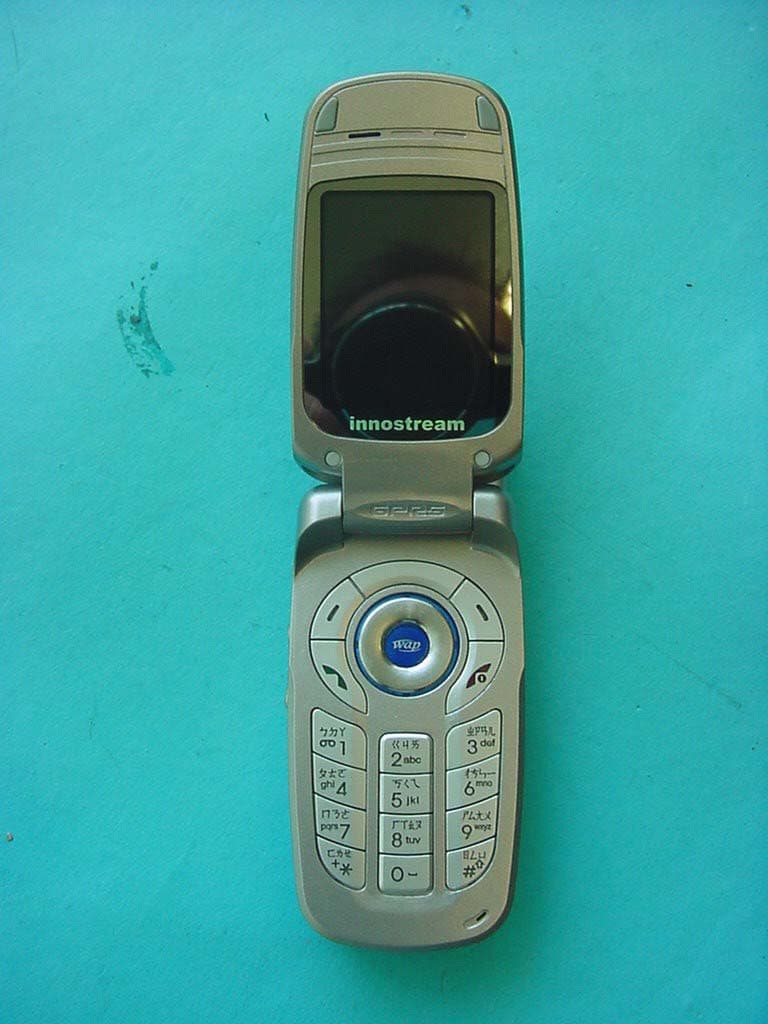
RJAINNO30
Jun 13, 2004GSM 900/1800/1900 Mobile Phone
Equipment Class
PCE - PCS Licensed Transmitter held to ear