RPZSFK1000Keyboard
Dobbs-Stanford Corporation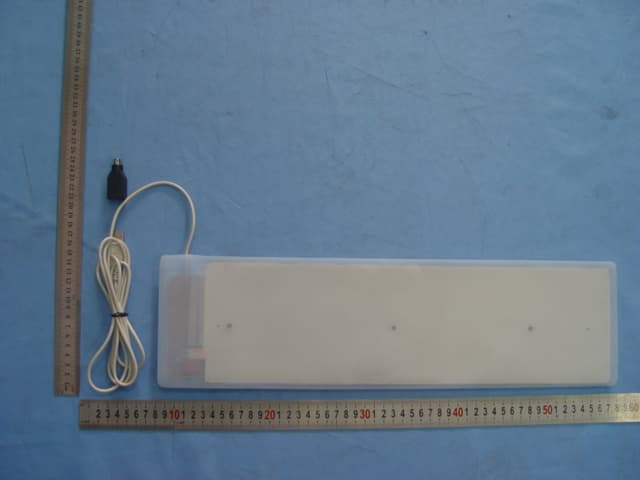
Click to zoom
Application Details
- Equipment Class
- JBP - Part 15 Class B Computing Device Peripheral
- Date of Grant
- May 02, 2005
- Application Purpose
- Original Equipment
- Date of Application
- May 02, 2005
- Equipment Note
- Keyboard
- Company
- Dobbs-Stanford Corporation
- Country
- United States
Documents & Files
Document Text
Text extracted from the exhibit documents filed with the FCC. Open a document above to read the original.
Users Manual
User’Guide Federal Communications Commission (FCC) Notice This device complies with Part 15 of the FCC Rules. Operation is subject to the following two conditions:(1)this device may not cause harmful interference,and(2) this device must accept any interference received,including interference that may cause undesired operation. This equipment has been tested and found to comply with the limits of a Class B digital device,pursuant to Part 15 of the FCC Rules.These limits are designed to provide reasonable protection against harmful interference in a residential installation.This equipment generates,uses and can radiate radio frequency energy and,if not installed and used in accordance with the instructions,may cause harmful interference to radio communications.However,there is no guarantee that interference will not occur in particular installations,if this equipment does cause harmful interference to radio and television reception,which can be determined by turning the equipment off and on,the user is encouraged to try to correct the interference by one of more of the following measures: 1) Re-orient/Relocate the receiving antenna. 2) Increase the separation between equipment and receiver. 3) Connect the equipment into an outlet on a circuit different from that the receiver is connected. 4) Consult the dealer or an experienced radio/TV technician to help. CAUTION:Changes or modifications not expressly approved by the manufacturer responsible for compliance could void the user’s authority to operate the equipment I. Welcome to the Virtually Indestructible Keyboard The Virtually Indestrucible Keyboard is a revolution in computer keyboards.From the silicon-based flexible material to thesilent-type”feel,the VIK will change the way you type forever.Please note that,as with anythingnew”,there is a short learning curve as you adjust to the keyboard.After just a short time,you too will understand why the Virtually Indestructible Keyboard issimply the best thing to happen to keyboards since the backspace key.” II. Connecting the Virtually Indestructible Keyboard NOTE: Always turn off the power to your PC before connecting Or disconnecting any hardware. 1. Insert the VIK’sUSB or 6 pin mini-DIN connector(adapter included)connector to the corresponding port on the back of your PC. 2. Turn on your PC. 3. Depending upon the version of your operating system,the keyboard will be auto detected as new hardware and will install itself.If you are prompted to insert your CD-ROM for the operating system,please do so as the necessary drivers likely are on the CD-ROM(typically limited to versions of Windows pre-dating Windows 2000Professional). 4. GrandTec does not include drivers for the keyboard as they are included with any compatible operating system. 5. 109-key version onlyFor instructions on using the Windows power management keys(Sleep,Wake Up,and Power),please refer to the user’s guide that is specific to your version of Microsoft Windows. 6. 85-key version onlyTo use the function keys(printed in biue),hold down the Fn key and press the corresponding funcion. III. Health Warning Use of a keyboard may be linked to serious injuries or disorders.When using a computer,you may experience discomfort in your hands,wrist,shoulders or other parts of your body.If the discomfort continues and is persistent,promptly see a qualified professional.Such symptoms can be associated with such musculoskeletal disorders(MSDs)as carpal tunnel syndrome and tendonitis. While research is not conclusive,typically MSDs are believed to be caused in part by various factors relating to length of time of use and specific postures used when interfacing with a keyboard.For additional information,call 1-800-356-4674 and speak to a representative of the National Institute for Occupational Safety and Health or visit their site at:www.cdc.gov. Windows is a registered trademark of Microsoft Corporation in the United States and/or other countries.The names of actual companies and products mentioned herein may be the trademarks of their respective owners. Information in this document is subject to change without notice. IV. US and International Patents Pending. Taking Care of the Virtually Indestructible Keyboard 1 .Do not at any time submerge the keyboard connector in any type of liquid,including water.If this occurs do not plug the keyboard in to the computer until it is 100% dry.Not complying with this instruction may lead to damage to your computer,the keyboard and may present a fire hazard. 2. Recommended cleaning methods include washing the silicone-based portion of the keyboard in warm water and soap or some other non-abrasive cleaning solution such as a liquid disinfectant.A spray disinfectant that is not harmful when in contact with the skin may also be used. 3. DO NOT CRUSH,KRINKLE OR CREASE THE KEYBOARD.DO NOT FOLD THE KEYBOARD AS IF FOLDING A PIECE OF PAPER.ROLLING THE KEYBOARD FOR STORAGE IS RECOMMENDED. Have you discovered a beyond-the-ordinary application in which only the Virtually Indestructible Keyboard can survive?Email us at [email protected] may be eligible to win a prize. V, Technical Support If you have difficulties installing or using the Virtually Indestructible Keyboard,please contact Grand Tec Technical [email protected] Support is available during business hours(M-F:10:00-6:30 est)and voicemail is available 24 hours a day. Additional technical support is available via Email:[email protected] or online:www.GrandTec.com VI. Warranty We warrant that the Virtually Indestructible Keyboard shall,for a period of one year from the date of purchase,be free of any defect in material and workmanship and that it will perform in accordance with specifications.The sole obligation of this warranty shall be to either repair or replace at our expense the product,at manufacturer’s option. The original sales receipt must be supplied for warranty repair.The original box is not needed for warranty service. There…
Text truncated - open the document above for the full version.
Block Diagram
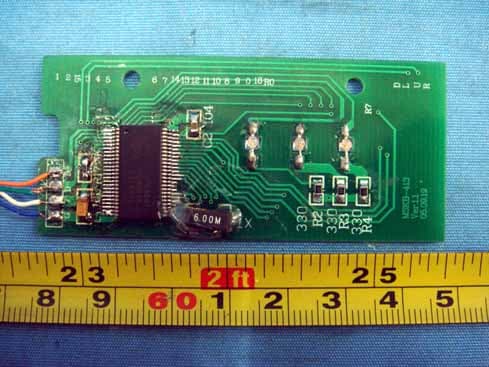
Block drawing OSC 6M Input M C U D a t a o u t P C to pc( USB&PS/2 ) Power 5V S w i t c h E L D r i v e r E L
Operational Description
Operation Description 1. Plug in keyboard to computer interface USB or PS/2. 2. Computer supplies the keyboard with 5V, MCU of the keyboard works and system reset. MCU works with frequency 6MHz of Crystal oscillator. 3. Input orders to MCU via keyboard. MCU starts process and sends control orders to computer. 4. Keyboard MCU complete one order then system reset until next order. 5. Press key “ON/OFF” at down-left corner to switch on / off back light.
Schematics
CIRCUIT 1 2 34 A BC D 4 3 2 1 D CB A T itle N u m b er R e vision Size A4 D a te: 15-A p r-2005 Sheet of F i l e : E : \ X MDA\ XMDAEL. S C H D r a wn By : 1 2 3 4 5 6 7 8 9 10 11 12 13 14 15 16 17 18 19 20 21 22 23 24 25 26 27 28 29 30 31 32 33 34 35 36 37 38 39 40 41 42 43 44 U1 E K K 8011B VDDVS S VP / C LK VM/ DATA R5680 R478K R14.7K R320K R24.7K C1 4.7U F/16V C2104 C310U F/16V XT6M C520P C420P LED1CAP S LED2NUM LED3S CROLL VDD C0 C1C2C3C4C5C6 C7 C8 C9 C10 C11 C12 C13 C14 C15 C16 C1 7 R0R1R2R3R4R5R6R7 Q19015 VDD Q29014 SW C6 47U F Q39014 EL
Test Report
Page 1 of 17 FCC ID: RPZSFK1000 Accurate Technology Co., Ltd. Report No. ATE2005511 FCC CERTIFICATION On Behalf of DOBBS -STANFORD CORPORATION PC Silicone Flexible Keyboard With Back Light Model No.: GLW-1000 FCC ID: RPZSFK1000 Equipment Class: FCC Part 15 Subpart B Class B Prepared for : DOBBS -STANFORD CORPORATION Address : 2715 ELECTRONIC LANE DALLAS, TX 75220, USA Prepared by : Accurate Technology Co., Ltd. Address : F1, Bldg. A, Changyuan New Material Port, Keyuan Rd. Science & Industry Park, Nanshan, Shenzhen, Guangdong P.R. China Tel : +86-755-26503290 Fax : +86-755-26503396 Report No. : ATE2005511 Date of Test : Apr. 13, 2005 Date of Report : Apr. 28, 2005 Page 2 of 17 FCC ID: RPZSFK1000 Accurate Technology Co., Ltd. Report No. ATE2005511 TABLE OF CONTENTS Description Page Test Report Declaration 1. GENERAL INFORMATION............................................................................................................ 4 1.1. Description of Device (EUT)................................................................................................................. 4 1.2. Description of Test Facility................................................................................................................... 5 1.3. Measurement Uncertainty.................................................................................................................... 5 1.4. Test Equipment...................................................................................................................................... 5 2. CONDUCTED EMISSION MEASUREMENT FOR FCC PART 15 SECTION 15.107(A).... 6 2.1. Block Diagram of Test Setup............................................................................................................... 6 2.2. The Emission Limit For Section 15.107(a)......................................................................................... 7 2.3. EUT Configuration on Measurement.................................................................................................. 7 2.4. Operating Condition of EUT................................................................................................................. 7 2.5. Test Procedure....................................................................................................................................... 7 2.6. Power Line Conducted Emission Measurement Results................................................................ 8 3. RADIATED EMISSION MEASUREMENT FOR FCC PART 15 SECTION 15.109(A)......... 9 3.1. Block Diagram of Test Setup............................................................................................................... 9 3.2. Radiated Emission Limit For Section 15.109(A)............................................................................. 10 3.3. EUT Configuration on Measurement................................................................................................ 10 3.4. Operating Condition of EUT............................................................................................................... 10 3.5. Test Procedure..................................................................................................................................... 11 3.6. Measuring Results...............................................................................................................................12 Appendix I (Test Curves) (4 pages) Page 3 of 17 FCC ID: RPZSFK1000 Accurate Technology Co., Ltd. Report No. ATE2005511 Test Report Declaration Applicant : DOBBS -STANFORD CORPORATION Manufacturer : DOBBS -STANFORD CORPORATION Product : PC Silicone Flexible Keyboard With Back Light (A) Model No.: GLW-1000 (B) Serial No.: N/A (C) Rating: DC 5V Measurement Procedure Used: FCC Rules and Regulations Part 15 Section 15.107(a), 15.109(a) November 2004 & ANSI C63.4: 2003 The device described above is tested by Accurate Technology Co., Ltd. To determine the maximum emission levels emanating from the device. The maximum emission levels are compared to the FCC Part 15 Section 15.107(a), 15.109(a) limits. The measurement results are contained in this test report and Accurate Technology Co., Ltd. Is assumed full responsibility for the accuracy and completeness of these measurements. Also, this report shows that the Equipment Under Test (EUT) is to be technically compliant with the FCC requirements. This report applies to above tested sample only. This report shall not be reproduced in part without written approval of Accurate Technology Co., Ltd. Date of Test : Apr. 13, 2005 Prepared by : (Engineer) Reviewer : (Quality Manager) Approved & Authorized Signer : (Manager) Page 4 of 17 FCC ID: RPZSFK1000 Accurate Technology Co., Ltd. Report No. ATE2005511 1. GENERAL INFORMATION 1.1.Description of Device (EUT) Product : PC Silicone Flexible Keyboard With Back Light Model Number : GLW-1000 Rating : DC 5V USB Cable : Non-shielded, Non-Detachable, 1.8m≤3.0m USB to PS/2 Adapter Detachable PC : Manufacturer: DELL (CE, FCC: DOC, VCCI) Model No.: DMC Serial No.: 3R7LF1X LCD Monitor : Manufacturer: DELL (CE, FCC: DOC, VCCI) Model No.: E172FPt Serial No.: 434 Keyboard : Manufacturer: DELL (CE, FCC: DOC, VCCI) Model No.: SK-8110 Serial No.: LR86682 Mouse : Manufacturer: DELL (CE, FCC: DOC, VCCI) Model No.: M071KC Serial No.: 410042355 Printer (CE, FCC: DOC) : Manufacturer: Canon Model No.: BJC-1000SP Applicant : DOBBS -STANFORD CORPORATION Address : 2715 ELECTRONIC LANE DALLAS, TX 75220, USA MANUFACTURER : Shenzhen Xinmaoda Electronic Tech Co., Ltd. ADDRESS : No.287, Guxu One Rd., Guxu, Xixiang Town, Baoan District, Shenzhen, Guangdong, China Date of sample received : Apr. 13, 2005 Date of Test : Apr. 13, 2005 Page 5 of 17 FCC ID: RPZSFK1000 Accurate Technology Co., Ltd. Report No. ATE2005511 1.2.Description of Test Facility EMC Lab : Accredited by TUV Rheinland Shenzhen, May 10, 2004 Accredited by FCC, May 10, 2004 The Certificate Registration Number is 253065 Accr…
Text truncated - open the document above for the full version.
Contact Information
Applicant
Oiling Soon
Test Firm
Accurate Technology Co., Ltd.Sean Liu
Technical Specifications
| # | Rule Parts | Frequency Range | Power Output |
|---|---|---|---|
| 1 | 15B | - | - |
Other Applications from Dobbs-Stanford Corporation
RPZMED-1000
Jan 24, 2006KEYBOARD
Equipment Class
JBP - Part 15 Class B Computing Device Peripheral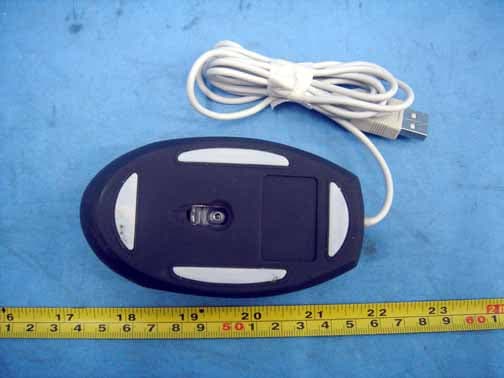
RPZMOU500
Jan 24, 2006MOUSE
Equipment Class
JBP - Part 15 Class B Computing Device Peripheral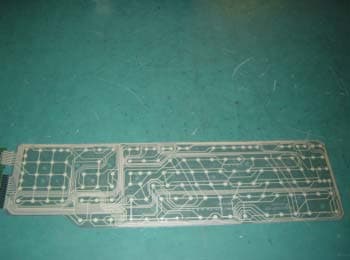
RPZAIR10903108
Dec 22, 2003Keyboard
Equipment Class
JBP - Part 15 Class B Computing Device Peripheral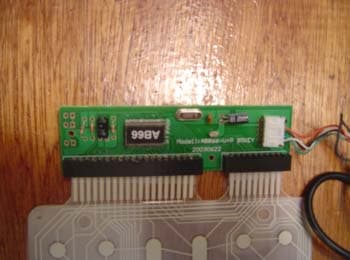
RPZAIR85031033
Dec 22, 2003Keyboard
Equipment Class
JBP - Part 15 Class B Computing Device Peripheral