SIO-NSHP102.4GHz Bluetooth Ipod Headphone
TEN Technology, Inc.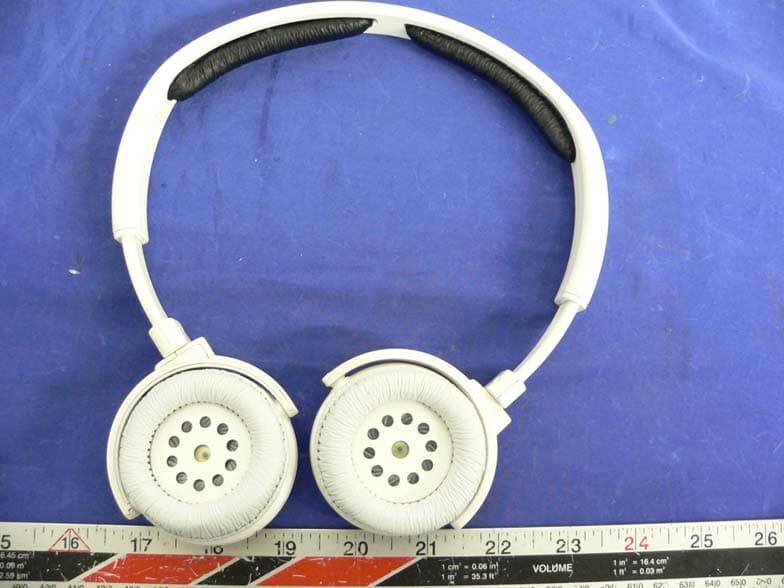
Click to zoom
Application Details
- Equipment Class
- DSS - Part 15 Spread Spectrum Transmitter
- Date of Grant
- Sep 13, 2005
- Application Purpose
- Original Equipment
- Date of Application
- Sep 13, 2005
- Equipment Note
- 2.4GHz Bluetooth Ipod Headphone
- Frequency Range
- 2402.00000000 - 2480.00000000
- Company
- TEN Technology, Inc.
- Country
- United States
Documents & Files
Document Text
Text extracted from the exhibit documents filed with the FCC. Open a document above to read the original.
Users Manual
User Manual naviPlay Bluetooth Stereo Headset NSH.P10 Read these instructions before operating. Follow all instructions. Heed all warnings. Keep these instructions for future reference. Bluetooth ® Stereo Headset Handsfree Headset +Stereo Headphones +Remote Control Contents 2 Important Safety Information Lithium Battery Safety Precautions Requirements Quick Start naviPlay Stereo Headset Contents Stereo Headset at a Glance Setting Up naviPlay Using naviPlay naviPlay Remote Controls Status Indicator Chart Using the naviPlay iPod Adapter as an iPod Dock Using the naviPlay Headset with Other Bluetooth Devices Using the naviPlay Headset with Bluetooth-Enabled Mobile Phones Using naviPlay with Self-Powered Speakers or Stereo Using the naviPlay Adpater with Other Bluetooth Devices 3 3 6 7 8 9 10 13 13 14 16 16 16 19 19 Using the naviPlay Remote with Other Bluetooth-Enabled Devices Updating naviPlay Firmware Setting Up the naviPlay Device for Firmware Update Updating naviPlay Firmware from a Bluetooth-Enabled PC Updating naviPlay Firmware from a Bluetooth-Enabled Macintosh Firmware Update Tips (Windows + Mac) Troubleshooting About the Technology Behind the naviPlay Stereo Headset Improving Wireless Effectiveness Technical Specifications Model NSH.P10 Regulatory Information 20 22 22 22 22 23 24 25 25 26 26 27 Contents Read these instructions before operating. Follow all instructions. Heed all warnings. Keep these instructions for future reference Caution:Risk of electric shock. Do not tamper with, modify, open or disassemble. Do not use near water or in wet environment. Do not immerse in water or any liquid. Clean only with dry cloth. Use only as directed in this user manual or as instructed by manufacturer. Do not install or use near any heat sources such as radiators, heat registers, stoves, or other apparatus (including amplifiers) that produce heat. Refer all servicing to qualified service personnel. 3 Important Safety Information Important Safety Information Lithium Battery Safety Precautions For the safe use of lithium-polymer and lithium-ion batteries, always follow the instructions provided below. Improper handling of lithium batteries may result in injury or damage from electrolyte leakage, heating, ignition, or explosion. Danger: • Never use the batteries with anything other than specifically designed equipment. •Always use the battery charger provided with the device. • Never impact, pierce, or crush the battery. • Handle a damaged or leaking battery with extreme care. If you come in contact with the electrolyte,wash the exposed area with soap and water. If it contacts the eye, flush the eye with water for 15 minutes and seek medical attention. • When discarding a battery, contact your local waste disposal provider regarding local restrictions on the disposal or recycling of batteries. •Never disassemble or modify the battery. The battery contains a circuit designed to enhance safety. Damaging this circuit may cause overheating, fire, or bursting. • Never expose or charge a battery under high-temperature conditions, such as near a fire or in the direct sunlight. If the ambient temperature is too high, the protection circuit may be actuated,preventing further charging,or damaged. •Never short-circuit the battery by connecting the positive and negative terminals with a metal material. Do not store or carry the battery where it could come into contact with metal objects such as a key chain or necklace. • Never allow the battery to get wet or be immersed in water. •Do not place the battery in a microwave oven or high-pressure container. • Stop charging if the battery is not charged after the prescribed charge time. • If leakage of the electrolyte occurs, or if there is an offensive odor, immediately keep the battery away from any source if fire or spark. Important Safety Information 4 If, during use, charging, or storage, you become aware of any abnormal phenomena, such as odor, discoloration, or deformation, disconnect the device or from charger and stop using immediately. 5 Important Safety Information Requirements 6 The naviPlay Bluetooth Stereo Headset requires the following types of devices for proper function: For Handsfree/Headset function:a Bluetooth-enabled mobile phone supporting Handsfree or Headset profiles For stereo music streaming:a Bluetooth-enabled stereo music source supporting A2DP profile (Advance Audio Distribution Protocol) For remote control:a Bluetooth-enabled stereo music source supporting AVRCP profile (Audio Video Remote Control Protocol) There are other requirements for updating the software on the naviPlay Bluetooth Stereo Headset.See “Updating naviPlay Firmware.” Requirements 7 Quick Start Congratulations and thank you for purchasing the naviPlay Bluetooth Stereo Headset, designed specifically for enjoying your music free from any wire or cable, and free from worry of missing a phone call. Using wireless Bluetooth technology, the naviPlay Stereo Headset and a Bluetooth- enabled music source work together to provide digital audio streaming, giving you untethered use and control of your music. The naviPlay Stereo Headset is designed for active listeners, freeing you from the cumbersome cable connection between your iPod and headphones. The naviPlay Stereo Headset can also be used as a wireless headset with your Bluetooth-enabled mobile phone.* Effortlessly switch between listening to music to taking calls without having to remove your headphones or scramble for your phone.Use it on a treadmill at the gym, take it with you cycling...anytime being tied to your iPod would limit your range of motion or expose the iPod to risk. The possibilities are limitless. The great thing about naviPlay is that it's ready to use right out of the box. There's no software to load, nothing to configure to enjoy your music wirelessly. Just charge the adapter and remote and travel with your tunes. *Setup required to use with mobile phone. Does not work with all Bluetooth-enabled phone…
Text truncated - open the document above for the full version.
Block Diagram
antenna BPF T/R switch DAC X’tal DAC Oscillator LO Generation Baseband Core RF Block diagram Digital Demod Bit Sync BPF BPF LPFLPF Amp BPF AmpAmp Digital Mod BPF PLL Frac N Digital PLL Control and Data Interface 12MHz, 20ppm 2.402GHz to 2.480GHz2.402GHz to 2.480GHz Control Rx Data1Mbps Tx Data1Mbps Amp DC Power Supply:3.0V
External Photos
EXHIBIT C - EUT EXTERNAL PHOTOGRAPHS EUT – Front View EUT – Rear View
ID Label/Location Info
EXHIBIT A - FCC ID LABEL INFORMATION Proposed FCC ID Label Specifications: Text is black or white in color and is left justified. Labels are silk- screened and shall be “permanently affixed” at a conspicuous location on the EUT. Proposed Label Location on EUT EUT Front View/Proposed FCC ID Label
Internal Photos
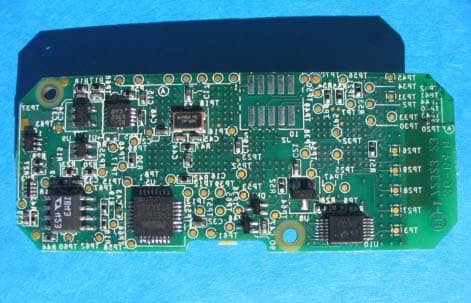
EXHIBIT C - EUT INTERNAL PHOTOGRAPHS EUT – Component View EUT – Solder View
Test Report
Note: This test report is specially limited to the above client company and this particular sample only. It may not be duplicated without prior written consent of Bay Area Compliance Laboratory Corporation. This report must not be used by the client to claim product certification, approval, or endorsement by NVLAP, NIST or any agency of the U.S. Government. FCC PART 15.247 EMI MEASUREMENT AND TEST REPORT For TEN TECHNOLOGY, INC. 568 Weddell Drive, Suite 6 Sunnyvale, CA 94089 FCC ID: SIO-NSHP10 This Report Concerns: Original Report Equipment Type: 2.4GHz Bluetooth Ipod Headphone Test Engineer: Snell Leong Report No.: R0508041 Report Date: 2005-09-01 Reviewed By: Daniel Deng Prepared By: Bay Area Compliance Laboratory Corporation (BACL) 230 Commercial Street Sunnyvale, CA 94085 Tel: (408) 732-9162 Fax: (408) 732 9164 TEN TECHNOLOGY, INC. FCC ID: SIO-NSHP10 Report # R0508041Rpt-a Page 2 of 36 FCC Part 15.247 Test Report TABLE OF CONTENTS GENERAL INFORMATION.......................................................................................................................................4 PRODUCT DESCRIPTION FOR EQUIPMENT UNDER TEST (EUT) ....................................................................................4 OBJECTIVE...................................................................................................................................................................4 RELATED SUBMITTAL(S)/GRANT(S).............................................................................................................................4 TEST METHODOLOGY..................................................................................................................................................4 TEST FACILITY.............................................................................................................................................................4 SYSTEM TEST CONFIGURATION ..........................................................................................................................5 JUSTIFICATION.............................................................................................................................................................5 EUT EXERCISE SOFTWARE..........................................................................................................................................5 SPECIAL ACCESSORIES.................................................................................................................................................5 SCHEMATICS / BLOCK DIAGRAM.................................................................................................................................5 EQUIPMENT MODIFICATIONS.......................................................................................................................................5 LOCAL SUPPORT EQUIPMENT LIST AND DETAILS........................................................................................................5 CONFIGURATION OF TEST SYSTEM..............................................................................................................................6 TEST SETUP BLOCK DIAGRAM.....................................................................................................................................6 SUMMARY OF TEST RESULTS FOR FCC PART 15............................................................................................7 ANTENNA REQUIREMENT ......................................................................................................................................8 §15.205 & §15.209 - RADIATED EMISSION.............................................................................................................9 MEASUREMENT UNCERTAINTY....................................................................................................................................9 TEST SETUP..................................................................................................................................................................9 SPECTRUM ANALYZER SETUP......................................................................................................................................9 TEST EQUIPMENT LIST AND DETAILS...........................................................................................................................9 ENVIRONMENTAL CONDITIONS..................................................................................................................................10 TEST PROCEDURE......................................................................................................................................................10 CORRECTED AMPLITUDE & MARGIN CALCULATION.................................................................................................10 SUMMARY OF TEST RESULTS.....................................................................................................................................10 3 METERS RADIATED EMISSION TEST DATA..............................................................................................................11 §15.247 (A) (1) - HOPPING CHANNEL SEPARATION ........................................................................................13 STANDARD APPLICABLE............................................................................................................................................13 MEASUREMENT PROCEDURE......................................................................................................................................13 TEST EQUIPMENT.......................................................................................................................................................13 ENVIRONMENTAL CONDITIONS..................................................................................................................................13 MEASUREMENT RESULTS..........…
Text truncated - open the document above for the full version.
Test Setup Photos
EXHIBIT B - TEST SETUP PHOTOGRAPHS Radiated Emission - Front View Radiated Emission - Rear View
Contact Information
Applicant
John G. Lin(CEO)
Test Firm
Bay Area Compliance LaboratoryJohn Chan
Technical Specifications
| # | Rule Parts | Frequency Range | Power Output |
|---|---|---|---|
| 1 | 15C | 2.40 GHz - 2.48 GHz | 1.51 mW |
Other Applications from TEN Technology, Inc.
SIO-NIAS10
Dec 21, 2004NIA.S10 (naviPlay iPod Adapter)
Equipment Class
DTS - Digital Transmission SystemSIO-NSRH100
Dec 21, 2004NSR.H100 (naviPlay Stereo Remote)
Equipment Class
DTS - Digital Transmission System