SLQF8E846Wireless Multimedia Keyboard
Sonnenschein Ind. Co., Ltd.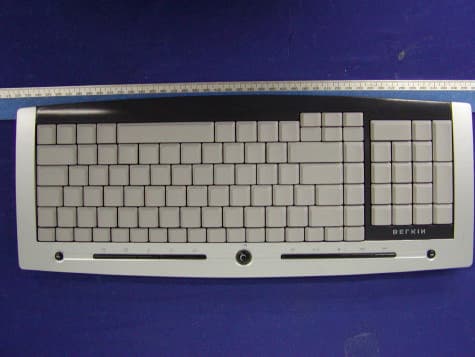
Click to zoom
Application Details
- Equipment Class
- DXX - Part 15 Low Power Communication Device Transmitter
- Date of Grant
- Oct 11, 2004
- Application Purpose
- Original Equipment
- Date of Application
- Oct 11, 2004
- Equipment Note
- Wireless Multimedia Keyboard
- Frequency Range
- 27.04500000 - 27.04500000
- Company
- Sonnenschein Ind. Co., Ltd.
- Country
- Taiwan
Documents & Files
Document Text
Text extracted from the exhibit documents filed with the FCC. Open a document above to read the original.
Users Manual
1 ___ 2 ___ 3 ___ 4 ___ 5 ___ 6 ___ 7 1. Introduction ...........................................................................................1 Compatible Equipment .............................................................................. 1 Operating Systems ................................................................................... 1 Package Contents ..................................................................................... 1 2. Quick Installation Guide for USB Connection ................................... 2 3. Software Installation for Windows 98, Me, 2000, and XP .............. 3 4. USB-PS/2 Standard Keyboard Hot Key Functions .......................... 4 5. Troubleshooting .................................................................................... 5 6. Uninstallation process for Windows 98, Me, 2000, and XP ............ 7 7. Information ............................................................................................ 8 Table of Contents 1 ___ 2 ___ 3 ___ 4 ___ 5 ___ 6 ___ 7 1 ___ 2 ___ 3 ___ 4 ___ 5 ___ 6 ___ 7 Introduction EN 1 Congratulations Congratulations and thank you for purchasing the Wireless Slim Keyboard and Optical MiniMouse bundle from Sonnenschein. We appreciate your business and are sure you will enjoy years of reliable use with these high-quality, input devices. Please review this entire User Manual so you can be sure to get the most reliable performance from your new equipment. Compatible Equipment Works with all PCs that are compatible with IBM®and equipped with USB interface Note: Use of these products on a desk made of iron, or other metal, will negatively impact the operation of your Wireless Keyboard and Mouse. Operating Systems Windows®XP, Me, 2000, 98 SE Package Contents Wireless Keyboard Wireless Optical Mouse Receiver 4 AAA batteries User Manual Please read the instructions for installing, operating, and using the wireless desktop. 1 1 ___ 2 ___ 3 ___ 4 ___ 5 ___ 6 ___ 7 2 EN 1. Be sure that your computer is turned on. If you are running Windows 98, Me, or 2000, you will need to keep your old keyboard and mouse connected for installation. 2. Connect the receiver to your computer through the USB port. Note : When connecting the USB receiver to your computer, Windows will start a New Hardware Wizard. In Windows XP, it will complete the Wizard automatically. In Windows 98, Me, and possibly 2000, you will need to follow through the New Hardware Wizard with your old keyboard and mouse. 3. Install the batteries into your Keyboard and Mouse. Please make sure you follow the indication on the inside compartment for correct positioning of the batteries. 4) To set up the wireless keyboard link, press the reset button on the bottom of the keyboard. Press the connection button “connect” on the receiver simultaneously. The indicator light will turn on. Hold both buttons for approximately 30 seconds. Release the buttons. The indicator light will turn off and your keyboard will be operational. 5) Turn on the mouse. To set up the wireless Minimouse link, press the reset button on the bottom of the mouse. Press the connection button “connect” on the receiver simultaneously. The indicator light will turn on. Hold both buttons for approximately 30 seconds. Release the buttons. The indicator light will turn off and your mouse will be operational. Quick Installation Guide 2 1 ___ 2 ___ 3 ___ 4 ___ 5 ___ 6 ___ 7 EN 3 Note: The Keyboard and Mouse should now be functioning. If they are not, repeat the setup instructions and refer to the“Troubleshooting” section for help. When the Mouse and Keyboard are operational, the software can be installed. Warning: It is recommended that you uninstall any previously installed keyboard and mouse software prior to installing your new Belkin software. 1. Be sure your computer is powered on. 2. Insert the CD into your computer’s CD-ROM drive. 3. If you have not previously installed Keyboard and Mousesoftware, click “OK” and the installation will begin. Follow the on-screen instructions. 4. Upon completion of installation, you will be prompted torestart your computer. You must restart at this time in order for the software to function. Software Installation for Windows 98, ME, 2000, and XP 3 1 ___ 2 ___ 3 ___ 4 ___ 5 ___ 6 ___ 7 4 EN Play/Pause Start and stop the playback of your audio and video applications. Stop Volume Down Decrease your system volume. Volume Mute Mute your system volume. Volume Up Increase your system volume. Previous Track Back to the previous track. Next Track Go to the next track. Mail Open your system’s defaulte-mail application. WWW Open your system’s default Internet browser. Back Prior Internet page. Forward Next Internet page. Search Activate the search function of your Internet browser. 4 USB Standard Keyboard Hot Key Functions 1 ___ 2 ___ 3 ___ 4 ___ 5 ___ 6 ___ 7 EN 5 The Keyboard and/or Mouse is/are not detected or do not work after installation. • Make sure the receiver is plugged into the computer's USB port. • For optimal performance, place the receiver at least eight inches (20cm) away from the computer monitor, any external storage devices, or other electrical devices. • Make sure you have properly installed the batteries. Test the batteries to make sure they are not dead (you can do this by installing them into another device). • You may have other system devices that are conflicting with the Mouse and/or the Keyboard. Check the IRQ/address setting of these devices for conflicts and change the settings as required. Please refer to your computer documentation or the manufacturer’s technical support for assistance in making these changes. • Make sure you have properly established communication/synchronization between the receiver and the Mouse and Keyboard. • If your Mouse pointer becomes choppy on-screen or the Keyboard does not register keystrokes, replace batteries swith a fresh set. • Make sure the mouse is switched on. If you do not use the mouse for several mi…
Text truncated - open the document above for the full version.
Block Diagram
1234 A B C D 4321 D C B A Date: Filename: E:\tcx\k28\F8E846\F8E846-blk.sch Drawn TITLE:F8E846 block diagram Approved Confirmed by: by: by: Version 1.0 文 件 编 号 GT-R0101-A Key Input Data output VCC Data out Oscillator1 Power Amplification ANT Power control Key output K e y M a t r i x Reset Power control MCU Low Voltage Detector LED Power control VCC DC/DC Convertor BATTERY Channel Control Channel1 Reset GND ID ID KEY VCC 27.045M 27.045M PDF created with FinePrint pdfFactory trial version http://www.fineprint.com
Cover Letter(s)
F8E846 Multimedia keyboard Technical Specification 1 Keys: 104standard keys 13 multimedia keys 2 Key Stoke life time: 10,000,000 Cycles 3 Contact method: Membrane 4 Security Code: 4096 different security code 5 RF Transmission mode 1 channel FSK RF Transmission 27.045MHz channel bandwidth: 25KHZ 6 Tx Emission Level: 60dBuV/m≤E 3m ≤80dBuV/m at 3m 7 Batteries: 2 x AAA Size 8 Power comsumption Keyboard ≤10mA(Active) ≤50uA(Idle) 9 Battery life ≥240 hours at Active mode with Alkaline Batter 10 Low battery indicator: 2.1V 11 Operating Distance 2m in normal environment 12 System Requirement Windows 95/Windows 98/WinNT /Windows me /WinXP /Windows 2000 (Driver required in Win95 /Win98 /WinNT 13 Storage temperature: -40°C~55°C 14 Working temperature: 0°C~40°C 15 Operating humidity: 40%~90% 16 Net weight 809g
External Photos
EXHIBIT C - EUT PHOTOGRAPHS Chassis - Top View Chassis - Back View
ID Label/Location Info
EXHIBIT A - FCC PRODUCT LABELING AND WARNING STATEMENT FCC ID Label Specifications: Text is black in color and is left justified. Labels are printed in indelible ink on permanent adhesive backing and shall be affixed at a conspicuous location on the EUT. Proposed Label Location on EUT Chassis Rear of EUT/FCC ID Label Proposed Location FCC ID: SLQF8E846 This device complies with Part 15 of the FCC Rules. Operation is subject to the following two conditions: (1) this device may not cause harmful interference, and (2) this device must accept any interference received, including interference that may cause undesired operation. 2.1875" 1.0"
Internal Photos
EUT – Cover Off View EUT – Component View EUT – Solder View EUT – Board Component View EUT – Board Solder View
Operational Description
Description of the Wireless Keyboard F8E846 Circuit The circuit major constitute by DC-DC (IC-U5) converter circuit, MCU( IC-U1) and Low Voltage detector Circuit (IC-U2) and RF FSK Circuit (Q5、Q6、Q7). +3.3V direct current voltage has been provided by IC-U5 and others electronic materials on the keyboard. MCU-U1 will be identified which key did you press. The principle is that 32 and 33 feet IC output TXD and TXP signal to RF FSK circuit. Capacitance three modal of RF Surge frequency signal Data constitute by Data signal TXD processed by Q6, then transmit to Q5 . The Data signal TXD will be transmit from ANT1 by Q7 as magnified. The Q1 is Reset circuit of MCU, and U2 is IC for inspection low voltage. When the IC inspected batteries as low voltage on 2.1V or less that the D4 indicator LED will light. IC-U4 as an EPROM Memorizer for storage ID code and when we change batteries need not reset it. PDF created with FinePrint pdfFactory trial version http://www.fineprint.com
Parts List/Tune Up Info
1 F8E846-KEYBOARD VER:F8E846V11-PCB/BOM FILE:GT-R0100-A IDVALUEREFUNIT Remark 1Resistor 2 RR0603L100JTR281 3 RR0603L470JTR29 1 4 RR0603L221JTR201 5 RR0603L102JTR261 6 RR0603L103JTR6,R8,R9,R10,R195 7 RR0603L223JT R3,R4,R5,R15,R25,R27 6 8 RR0603L273JT R18 1 9 RR0603L473JTR21 10 RR0603L222JTR7,R112 11 Capacitor 12 C1608C0G1H150JT000AC291 13 C1608C0G1H300JT000AC20,C21,C31,C32,C335 14 C1608C0G1H470JT000AC261 15 C1608C0G1H101JT000AC9,C252 16 C1608C0G1H221JT000AC281 17 C1608X7R1H102KT000NC271 18 C1608Y5V1H104ZT000NC1,C3,C4,C5,C75 19 C1608Y5V1C105ZT000NC21 20 C1608COG1H330JT000A C11,C12,C13,C14,C15,C16,C17,C18 8 21 Electro-capacitor 22 CD11X-16V-22uF±20%C301 23 CD288H-25V-47UF±20%C191 24 CD11X-10V-100UF±20%C61 25 Inductor 26 CMI3216U112R2KTL61 27 EC36-6R8JL71 28PK0406-221K L51 29 Diode 30 LED 3R2SD LED11 31 Schottky diode 1N5819D71 32 Transistor 33 KSC2223YMTFQ5,Q72 34 9014Q1,Q62 35 IC 36 TP331AU51 37 RT9808-21CXU21 38 KS24C010U41 39 HT82K68E-DICE+GT-124102U11 40 Ceramic resonator 41 XZT2.00MzX31 1/2 2 F8E846-KEYBOARD VER:F8E846V11-PCB/BOM FILE:GT-R0100-A 42 Crystal Oscillator 43 HC-49U/S 27.045MHzX11 44 Switch 45 Switch TS-06V-80SW201 46 Other 47 MEMBRANE JACK 18PIN,PH1.0MM CLUBFOO P11 48 MEMBRANE JACK 10PIN,PH1.0MM CLUBFOO P21 49 platoon line B-BPPX-12-25P3,P42 50 B-DYX-24-140-2J31 51 B-DYX-24-140-1J41 52ANT B-DYX-24-320-3 ANT11 55 Structural member 56 K28 Keyboard Topper CoverK28-011 set 57 59 GW-K1801 Batery CoverGW-K1801-031 60 K28 Bosom SubassemblyK28-041 set 61 ScrewPB3X57 62 ScrewPTPW 2 * 8 * 510 63 ScrewFB2X42 64 ScrewM2 * 2.22 65 ScrewBB2X82 66 Hot Key RubberGW-K1801DMTDDJ13 67 HOTKEY1K28-HOTKEY-16 68 HOTKEY2K28-HOTKEY-24 69 HOTKEY3K28-HOTKEY-32 70 HOTKEY4K28-HOTKEY-41 71 AAA Batteries(7#)AAA2 72 K35 Battery Unite Plate -BB-JP-NJDCP-7#1 73 K35 Battery Positive Plate-7#B-JP-ZJDCP-7#1 74 K35 Battery Negative Plate-BB-JP-FJDCP-7#1 75 F8E846 labelF8E846-MP1 53K2801V11-PCB1 1 54K2801V12-PCB2 1 K2801 Keyboard Bottom CoverK2801-021 set 2/2
Schematics
1 2 3 4 56 ABCD 6 5 4 3 2 1 D CBA D a t e : F i l e n a m e : E:\tcx\k28\认证文件\F8E846-SCH.sch D r a w n T I T L E : F8E846-SCH A p p r o v e d C o n f i r m e d b y : b y : b y : V e r s i o n V10 文件 编号 G T - R 0 1 0 1 - A 1 J3 BAT+ 1 J4 BAT- L5 0406-220uH C6 100uF/10V C19 47uF/25V D7 1N5819 VCC BAT+ T1 T2 Vout 2 Vin 3 GND 1 U5 TP331A R322K VCC C2030pFC2130pF XTAL2XTAL1 XTAL1XTAL2 1 23 Q1 9014 R422K R5 22K C2 1uF X32M T3 A0 1 A1 2 A2 3 VSS 4 SDA 5 SCL 6 WP 7 VCC 8 U4 KS24C010 VCC C1 0.1uF VCC C1833pFC1733pFC1633pFC1533pFC1433pFC1333pFC1233pFC1133pF VCC R1910K R20220R LED1 3R2SD GND 3 VCC 2 OUT 1 U2 RT9808-21CX BAT+ C70.1uF R15 22K C25 100pF R2522K 1 23 Q5 KSC2223Y C40.1uF C5 0.1uF R247K R261K C27 1000pF 1 23 Q6 9014 C26 47pF C2915pF VCC X1 27.045M C9 100pF R29 47R CH1 TXD T6 1 23 Q7 KSC2223Y R27 22K R28 10R L6 SMD-2.2uH C31 30pF C32 30pF C33 30pF C28 220pF C30 22uF R18 27K T4 T7 1 ANT1 L7 0410-6.8uH R18C4C8C5R17C1R12C7R8 R6 10K R8 10K VCC VCC 12 SW20SW-RST R910K PE3(LED) 19 PE2(LED) 18 PB1 9 VSS 17 PD4 16 NC 12 PD7 13 PD6 14 PD75 15 PB5 1 PB4 2 PA3 3 PA2 4 PA1 5 PA0 6 PB3 7 PB2 8 NC 11 PB0 10 PC0 20 PC1 21 PC2 22 PE0 23 PE1 24 PC3 25 PC4 26 PC5 27 PC6 28 PC7 29 PD0 30 PD1 31 PD2 32 PD3 33 PE4(LED) 34 RESET 35 VDD 36 OSC1 37 OSC2 38 NC 39 NC 40 NC 41 NC 42 PA7 43 PA6 44 PA5 45 PA4 46 PB7 47 PB6 48 U1HT82K68E C1C2C3C4 C5C6C7C8 R13R14R15R16R17R18 R1R2 R12R11R10 R9 R8R7R6R5R4R3 SCL LED2/SDA LED1/ID_KEY XTAL1XTAL2 /RST WHL2WHL1 C30.1uF VCC CH1 ch_check WHL_COM CH2 TXD R19 123456789101112131415161718 P118PIN R16R13R15 R9 R14 R7R6 R11 R5 R10 R4R8R3 R12 R2R1 R18R17 12 SW1 Web 12 SW2 Email C7 C1 R17 R18 12 SW4 Vol+ R12 C5 12 SW5 Search R17 C8 12 SW6 Blackward R17 C5 12 SW9 Vol- R12 C4 12 SW7 Forward R17 C3 12 SW13 Sleep R16 C4 PCB2 BUTTON 12 SW16 Stop R18 C5 12 SW15 Play/Pase R8 C5 12 SW14 Mute R17 C7 12 SW18 Next R12 C6 12 SW17 Prev R12 C7 VCC R1010K LED2/SDA LED1/ID_KEY SCL LED2/SDA C1C2C3C4C5C6C7C8 WHL2WHL1 T8T9T10T11T12T13T14T15 T16 /RST T19 ch_check R1R2R3R4R5R6R7R8R9R10R11R12R13R14R15R16R17R18 TXD /RST SCLSDA LED LED TXD LED 123456789101112 JP112PIN 123456789 101112 JP212PIN R16 12345678910 P210PIN R9C6C5C4C3C2C1C7C8R8 C1C2C3C4C5C6C7C8R8R9
Test Report
Note: The test report is specially limited to the above company and the product model only. It may not be duplicated without prior written consent of Bay Area Compliance Laboratory Corporation. This report must not be used by the client to claim product certification, approval, or endorsement by NVLAP, NIST or any agency of the US Government. FCC PART 15.227 EMI MEASUREMENT AND TEST REPORT For Sonnenschein Ind. Co., Ltd. 2F, No.1-1, Alley 2, Lane 217, Sec. 3, Chung Hsiao E. Rd., Taipei, Taiwan FCC ID: SLQF8E846 This Report Concerns: Original Report Equipment Type: Transmitter, Wireless Multimedia Keyboard Test Engineer: Jerry Wang Report No.: R0408236 Report Date: 2004-09-15 Reviewed By: Ling Zhang Prepared By: Bay Area Compliance Laboratory Corporation 230 Commercial Street Sunnyvale, CA 94085 Tel: (408) 732-9162 Fax: (408) 732-9164 Sonnenschein Ind. Co., Ltd. FCC ID: SLQF8E846 Report # R0408236Rpt Page 2 of 14 FCC ID Per 15.227 Report TABLE OF CONTENTS GENERAL INFORMATION......................................................................................................................................................3 PRODUCT DESCRIPTION FOR EQUIPMENT UNDER TEST (EUT)...............................................................................................3 OBJECTIVE.......................................................................................................................................................................................3 RELATED SUBMITTAL(S)/GRANT(S)............................................................................................................................................3 TEST METHODOLOGY....................................................................................................................................................................3 TEST FACILITY................................................................................................................................................................................3 SYSTEM TEST CONFIGURATION........................................................................................................................................5 JUSTIFICATION................................................................................................................................................................................5 SCHEMATICS AND BLOCK DIAGRAM...........................................................................................................................................5 EQUIPMENT MODIFICATIONS........................................................................................................................................................5 TEST SETUP CONFIGURATION.......................................................................................................................................................5 SUMMARY OF TEST RESULTS..............................................................................................................................................6 §15.203 - ANTENNA REQUIREMENT...................................................................................................................................7 STANDARD APPLICABLE................................................................................................................................................................7 §15.205, §15.209, §15.227(B) - RADIATED EMISSIONS TEST.......................................................................................8 MEASUREMENT UNCERTAINTY....................................................................................................................................................8 EUT SETUP......................................................................................................................................................................................8 TEST EQUIPMENT LIST AND DETAILS..........................................................................................................................................8 TEST PROCEDURE...........................................................................................................................................................................9 CORRECTED AMPLITUDE & MARGIN CALCULATION.............................................................................................................11 SUMMARY OF TEST RESULTS......................................................................................................................................................11 RADIATED EMISSIONS TEST RESULT DATA.............................................................................................................................12 §15.227(B) - OUT OF BAND EMISSION...............................................................................................................................13 TEST EQUIPMENT LIST AND DETAILS........................................................................................................................................13 TEST RESULT.................................................................................................................................................................................13 Sonnenschein Ind. Co., Ltd. FCC ID: SLQF8E846 Report # R0408236Rpt Page 3 of 14 FCC ID Per 15.227 Report GENERAL INFORMATION Product Description for Equipment Under Test (EUT) The Sonnenschein Ind. Co., Ltd ’s product, FCC ID: SLQF8E846 or the "EUT" as referred to in this report is a transmitter, Wireless Multimedia Keyboard. The EUT is measured approximately 420mm L x 165mmW x 20mm H. * The test data gathered are from production sample, serial number: KF0700285, provided by the manufacturer. Objective This Type approval report is prepared on behalf of Sonnenschein Ind. Co., Ltd in accordance with Part 2, Subpart J, and Part 15, Subparts A, B and C of the Federal Communication Commissions rules. T…
Text truncated - open the document above for the full version.
Test Setup Photos
EXHIBIT B - TEST SETUP PHOTOGRAPHS Transmitter Radiated Emission
Contact Information
Applicant
Tony Chung
Test Firm
Bay Area Compliance LaboratoryJohn Chan
Technical Specifications
| # | Rule Parts | Frequency Range | Power Output |
|---|---|---|---|
| 1 | 15C | 27.045 MHz - 27.045 MHz | - |
Other Applications from Sonnenschein Ind. Co., Ltd.

SLQ-E01303-ABK-1
Jan 31, 2007Wireless Laser Mouse
Equipment Class
DXX - Part 15 Low Power Communication Device Transmitter
SLQ-E01502-BBK-1
Jan 21, 2007WIRELESS KEYPAD SLIM
Equipment Class
DXX - Part 15 Low Power Communication Device Transmitter
SLQ-E01903-ABK-1
Nov 19, 2006MINI WIRELESS OPTICAL MOUSE
Equipment Class
DXX - Part 15 Low Power Communication Device Transmitter
SLQ-RFNBKPD
Aug 23, 2006ROCEKFISH WIRELESS NB KEYPAD
Equipment Class
DXX - Part 15 Low Power Communication Device Transmitter