T5HBM101KIJAKABluetooth Stereo Headset
Victorwood Holdings Limited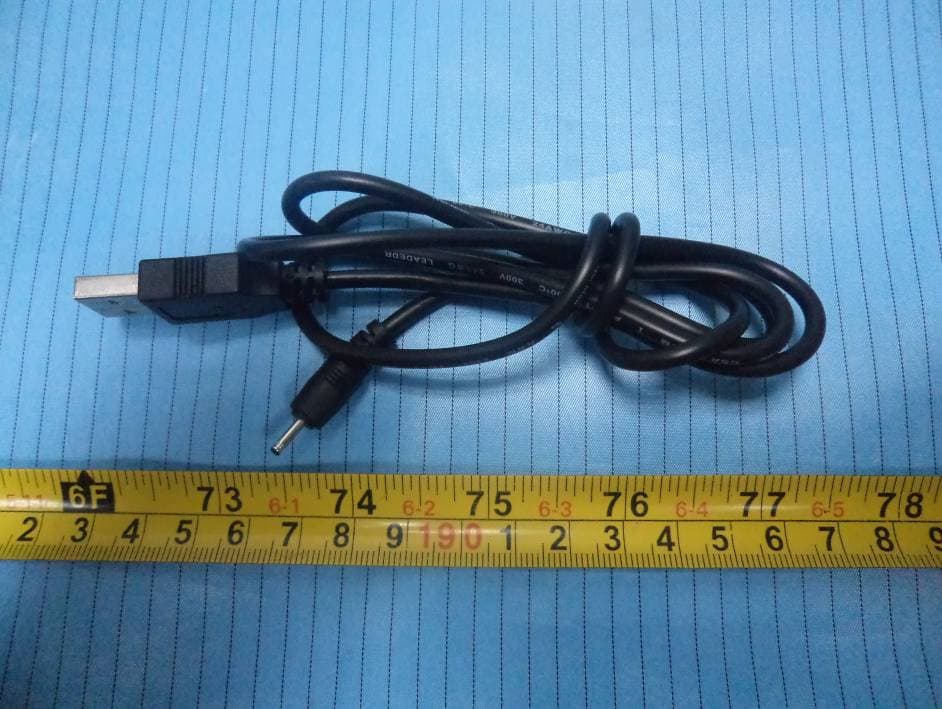
Click to zoom
Application Details
- Equipment Class
- DSS - Part 15 Spread Spectrum Transmitter
- Date of Grant
- Aug 28, 2012
- Application Purpose
- Original Equipment
- Date of Application
- Aug 28, 2012
- Equipment Note
- Bluetooth Stereo Headset
- Frequency Range
- 2402.00000000 - 2480.00000000
- Company
- Victorwood Holdings Limited
- Country
- China
Documents & Files
Document Text
Text extracted from the exhibit documents filed with the FCC. Open a document above to read the original.
Users Manual
BM-101 User Manual Before Use Charge the battery as follows: 1. Connect the USB Cable to your computer’s USB port. Connect the 2mm jack on the other end into the Headset. 2. The red LED will light up during charging. 3. When charging is complete, the red LED will turn off. If you are experiencing any static or problems with operation, the battery is probably low and needs to be re-charged. Power On and Power Off the Bluetooth Headset 1. Press the button for 1 second. An alert tone will beep once and the blue LED will blink in sequence (1 second on, 1 second off). 2. Press the button for 3 seconds. An alert tone will beep and the red LED will flash twice and then go off. Pairing the Bluetooth Headset with a Mobile Phone Make sure your mobile phone is Bluetooth-enabled. Specific pairing steps may vary with different cell phones. Refer to the User Guide for your mobile phone for further information. The general pairing steps are as follows: 1. Keep the Bluetooth Headset close to your mobile phone. 2. Press and hold the button over 6 seconds. The alert tone will beep twice and the red and blue LED lights will quickly blink in an alternating pattern. The Bluetooth Headset is in pairing mode at the moment. 3. Search for the Bluetooth Device under the pairing mode in the mobile phone. 4. Once the search is completed, “BM101” will appear in the Bluetooth device list. 5. Select “BM101” to connect and enter the matching code “0000”. 6. Pairing will then complete and the blue LED of the Bluetooth Headset will blink in sequence. Note: • If pairing is unsuccessful, switch off the Bluetooth Headset and repeat the pairing procedure. • If pairing is successful, the paired devices will remember each other. Unless the pairing information is deleted, because of a new pairing, there is no need to go through the pairing procedure again when using the same devices next time. • When power on and not done any pairing, the Bluetooth Headset wait for 10 minutes will power off automatically to save the power. Playing Music Under the paired and connected status, the function will be as follows: 1. Press the button to play or pause music. 2. Press the + button once to increase the volume level one step. 3. Press the - button once to reduce the volume level one step. 4. Press and hold the + button to skip to the next track. 5. Press and hold the - button to skip to the previous track. Receive Calls and End Calls Under the paired and connected status, when there is an incoming call from your mobile phone, you will hear an alert tone from the Headset and you can receive a call as follows: 1. Press the button once to receive the call. 2. Press the button once again to end the call. Notice: • The blue LED will blink twice every second when not pairing or connected. • The blue LED and red LED will blink quickly, in an alternating pattern, during pairing status. • The blue LED will blink once every 3 seconds when connected to the Mobile phone. • The red LED will turn on during charging and turn off after charging is complete. • When the battery is low, the RED LED will blink once every 30 seconds and you will hear three beeps to remind you to recharge the battery. FCC STATEMENT Warning: Changes or modifications to this unit not expressly approved by the party responsible for compliance could void the user authority to operate the equipment. FCC ID: T5HBM101KIJAKA This device complies with Part 15 of the FCC Rules. Operation is subject to the following two conditions: (1) This device may not cause harmful interference, and (2) this device must accept any interference received, including interference that may cause undesired operation. This equipment complies with FCC RF radiation exposure limit set forth for an uncontrolled environment. This transmitter must not be co-located or operated in conjunction with any other antenna or transmitters.
External Photos
EXHIBIT B - EUT EXTERNAL PHOTOGRAPHS EUT – Front View EUT – Side View 1 EUT – Side View 1 EUT – Front without Outer View EUT – Side without Outer View EUT – Cable View
ID Label/Location Info
Label position 37 10 FCC ID : T5HBM101KIJAKA 1KIJAKA
Internal Photos
EXHIBIT C - EUT INTERNAL PHOTOGRAPHS EUT – Cover off View EUT – Main Board Top View BT Antenna EUT – Main Board Bottom View EUT – Power Board Top View EUT – Power Board Bottom View EUT – Battery View
Test Report
Note: This test report is prepared for the customer shown above and for the equipment described herein. It may not be duplicated or used in part without prior written consent from Bay Area Compliance Laboratories Corp. This report must not be used by the customer to claim product certification, approval, or endorsement by NVLAP*, or any agency of the Federal Government. * This report contains data that are not covered by the NVLAP accreditation and are marked with an asterisk “★” (Rev.2) FCC PART 15.247 TEST REPORT For Victorwood Holdings Limited Unit 15, 8/F., Block B, Sun Fung Centre, 88 Kwok Shui Road, Kwai Chung, N.T., Hong Kong FCC ID: T5HBM101KIJAKA Report Type: Original Report Product Type: Bluetooth Stereo Headset Test Engineer: Eric Lee Report Number: RSZ120807001-00 Report Date: 2012-08-22 Reviewed By: Alvin Huang RF Leader Test Laboratory: Bay Area Compliance Laboratories Corp. (Shenzhen) 6/F, the 3rd Phase of WanLi Industrial Building ShiHua Road, FuTian Free Trade Zone Shenzhen, Guangdong, China Tel: +86-755-33320018 Fax: +86-755-33320008 www.baclcorp.com.cn Bay Area Compliance Laboratories Corp. (Shenzhen) Report No.: RSZ120807001-00 FCC Part15.247 Page 2 of 62 TABLE OF CONTENTS GENERAL INFORMATION.......................................................................................................................................4 PRODUCT DESCRIPTION FOR EQUIPMENT UNDER TEST (EUT) .....................................................................................4 OBJECTIVE...................................................................................................................................................................4 RELATED SUBMITTAL(S)/GRANT(S).............................................................................................................................4 TEST METHODOLOGY..................................................................................................................................................4 TEST FACILITY.............................................................................................................................................................4 SYSTEM TEST CONFIGURATION ..........................................................................................................................6 DESCRIPTION OF TEST CONFIGURATION......................................................................................................................6 EQUIPMENT MODIFICATIONS.......................................................................................................................................6 SUPPORT EQUIPMENT LIST AND DETAILS....................................................................................................................6 EXTERNAL I/O CABLE..................................................................................................................................................6 BLOCK DIAGRAM OF TEST SETUP................................................................................................................................7 SUMMARY OF TEST RESULTS ...............................................................................................................................8 FCC §15.247 (i) & §2.1093 – RF EXPOSURE EVALUATION....................................................................................9 STANDARD APPLICABLE..............................................................................................................................................9 FCC §15.203 – ANTENNA REQUIREMENT ..........................................................................................................10 APPLICABLE STANDARD............................................................................................................................................10 ANTENNA CONNECTOR CONSTRUCTION....................................................................................................................10 FCC §15.207 (a) – AC LINE CONDUCTED EMISSIONS .....................................................................................11 APPLICABLE STANDARD............................................................................................................................................11 MEASUREMENT UNCERTAINTY..................................................................................................................................11 EUT SETUP................................................................................................................................................................11 EMI TEST RECEIVER SETUP.......................................................................................................................................12 TEST PROCEDURE......................................................................................................................................................12 TEST EQUIPMENT LIST AND DETAILS.........................................................................................................................12 TEST RESULTS SUMMARY..........................................................................................................................................12 TEST DATA................................................................................................................................................................12 FCC §15.205, §15.209 & §15.247(d) – RADIATED EMISSIONS...........................................................................15 APPLICABLE STANDARD............................................................................................................................................15 MEASUREMENT UNCERTAINTY..................................................................................................................................15 EUT SETUP.....................................................................................…
Text truncated - open the document above for the full version.
Test Setup Photos
EXHIBIT D - TEST SETUP PHOTOGRAPHS Conducted Emissions - Front View Conducted Emissions - Side View Radiated Emissions View – Front View Radiated Emissions View – Rear View
Contact Information
Applicant
Norman Yiu(R&D Manager)
Test Firm
Bay Area Compliance Laboratory Corp. (Shenzhen)John Chan
Technical Specifications
| # | Rule Parts | Frequency Range | Power Output |
|---|---|---|---|
| 1 | 15C | 2.40 GHz - 2.48 GHz | 1.00 mW |
Other Applications from Victorwood Holdings Limited
T5HBS-216
Nov 24, 2013Bluetooth Stereo Speaker
Equipment Class
DSS - Part 15 Spread Spectrum Transmitter
T5HUP90R00
Jun 05, 2006USB Phone
Equipment Class
JBP - Part 15 Class B Computing Device Peripheral