TC2-R1005IP-STB
Roku, Inc.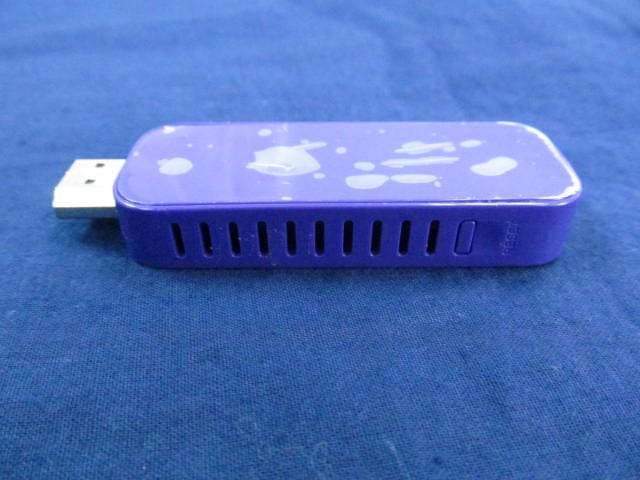
Click to zoom
Application Details
- Equipment Class
- NII - Unlicensed National Information Infrastructure TX
- Date of Grant
- Sep 23, 2012
- Application Purpose
- Original Equipment
- Date of Application
- Aug 27, 2012
- Equipment Note
- IP-STB
- Frequency Range
- 5180.00000000 - 5240.00000000
- Company
- Roku, Inc.
- Country
- United States
Documents & Files
Document Text
Text extracted from the exhibit documents filed with the FCC. Open a document above to read the original.
Users Manual
1 Hi! Let’s get started. 3 What’s in the box Enhanced remote control 2 x AA batteries for remote Roku Streaming Stick High speed Internet Know your Streaming Stick [MHL CONNECTOR] Plugs into the MHL port on the back of your TV. [STATUS LIGHT] Signifies it is on when lit. [RESET BUTTON] Used to reset your Streaming Stick (you probably won’t ever have to use this). What you need TV with MHL port Wireless Router A B C 5 Power up First, power your Roku remote by inserting the included batteries: • Locate and open the rectangular battery door on the rear of the unit. • Insert the batteries into their slots, making sure to match the positive (+) and negative (-) signs. • Place the battery door back over the compartment and press it gently down until the latch snaps securely into place. Complete guided setup It’s the final stretch and hooray—it’s a breeze! Continue following the on-screen instructions and you’ll: • Get the latest software. • Select the video output resolution. • Link the Roku player to your Roku account on your computer. Your Roku account: During Guided Setup, you’ll be prompted to create your Roku account online at roku.com/link. Your Roku player will generate a unique code that links your player to your new account. Roku accounts are free and secure. And while a valid credit card number is required to create your account, rest assured you will only be charged if you authorize purchases of apps and games from the Roku Channel Store. Connect to network Now you can grab that Roku remote and jump right into Guided Setup. When prompted, select “Wireless” as your network connection and have your network name and password ready to do the following: • Select your network from the list of available networks. • Enter your network password, if you use one. Remember, network passwords are case sensitive. What to do Plug it in Plug your Roku Streaming Stick into the MHL port on the back of your HDTV. Simple as that! HDMI/MHL HDMI 7 Know your Roku remote The Roku remote should feel right at home in your hand. We designed it to be incredibly intuitive for watching TV and great for gaming, too! B K J F A E H I C D G Cool: Because your enhanced remote uses radio frequency instead of infrared, you don’t need to have a direct line of sight to your Roku! [BACK] Return to previous screen [HOME] Return to Roku home screen [INSTANT REPLAY] Replay last 7 seconds of video [UP] or [DOWN] Move up or down; [LEFT] or [RIGHT] Move left or right [PLAY/PAUSE] Start or pause playback [A & B] Action buttons for gaming [FWD SCAN] Fast forward, scroll right one page at a time [OK] Select an option from a menu [REV SCAN] Rewind, scroll left one page at a time [OPTIONS] View more options [Status LED] Displays remote usage information 9 Troubleshooting Having trouble completing Guided Setup? Don’t worry: it’s usually an easy fix. If you cannot see a picture on your TV: • Make sure your TV is turned on. (This tip could save you some embarrassment.) • Make sure the video input on your TV or home theater receiver is set to match the output (usually HDMI or MHL) used with the Roku Streaming Stick. Most TVs have an Input button on the remote control to change video inputs. If you cannot connect to your wireless home network during guided setup: • If you are not getting 3 or more signal-strength bars above your wireless network, adjust the location of your Roku Streaming Stick and/or wireless router. Make sure there are no obstructions, like cement walls, between your Roku Streaming Stick and your wireless router. • Make sure you select the correct wireless router name on the “Wireless” screen. • Make sure you input the correct password, if your network is security-enabled (password is case sensitive). • If you have turned off SSID broadcasting on your wireless router, you can add your network by selecting “Add network” from the “Wireless” screen. Get your game on! Just a couple of fun-facts about your Roku enhanced remote. • It’s sensitive and smart. The Roku remote incorporates motion-sensing technology, allowing more precise and detailed control of gameplay. • It comes with an adjustable wrist strap—for good reason. Since some games make you sweat, sporting the wrist strap is a very good idea. You don’t want to crack the screen of your beautiful TV—or harm anyone or anything around you. Buckle up: Open the lever on the strap lock and place your hand through the wrist strap. Hold the remote firmly in your hand. Slide the strap lock up so that the strap will not fall off your wrist. Do not over-tighten the strap lock so that it’s uncomfortable. 11 It’s unlikely but if your remote becomes warm or hot to the touch after inserting the batteries, immediately discontinue use. Do not attempt to remove the batteries while the unit is hot. Contact Roku Customer Support immediately at 888-600-7658 If you cannot hear sound: • Make sure the connectors on the cables between your TV and home theater receiver are pushed in all the way. • Make sure the volume on your TV or home theater receiver is turned up and isn’t on mute. • Make sure the input on your TV or home theater receiver matches the output (HDMI or MHL) used with your Roku Streaming Stick. If the Roku remote control is not functioning: • Try moving closer to your Roku Streaming Stick. • Make sure the batteries are working and inserted properly. • Make sure your remote is paired (see next section) with the Roku Streaming Stick. • If the Status Light on the front of your Roku Streaming Stick flashes once each time you press a remote button, the problem is not with the remote. Pairing your remote control: The Roku remote should automatically pair with your Roku Streaming Stick at the beginning of Guided Setup. If you are not able to use the remote to navigate through Guided Setup, you can manually pair the Roku remote by following these steps: Pairing button (in battery compartment) 1 Be sure to turn off or move other devices that are near the Roku Streaming Stick. 2 Open th…
Text truncated - open the document above for the full version.
Cover Letter(s)
ROKU lnc. Attestation for FGC Declaration of Conformity FCC lD: TC2-R'1005 Date:2012108102 Please be notified that we, the undersigned, ROKU lnc. declares that the product which bears the above FCC lD is also compliant with the FCC requirements for DOC. And the DoC procedure shall be carried out prior to marketing the device in the US. Sincerely, Greg Garner/Principal Engineer ROKU lnc.
Cover Letter(s)
ROKU Inc. Attestation for FCC Declaration of Conformity FCC ID: TC2-R1005 Date: 2012/08/2 Please be notified that we, the undersigned, ROKU Inc. declares that the product which bears the above FCC ID is also compliant with the FCC requirements for DOC. The test report number supporting the DOC is 128099R-ITUSP01V02Testing in regards to this report was done by QuieTek Corp., located at No.5-22, Rueishu Keng, Rueiping Tsuen, Linkou Shiang, Taipei County 244, Taiwan, which has been accredited in accordance to all of the requirements of 47CFR 2.948 (d) and (e) of the FCC rules and KDB349827. Sincerely, Greg Garner/Director of Hardware Engineering ROKU Inc.
External Photos
1. EUT Photograph (1) EUT Photo (2) EUT Photo Report No: 126S063R-RF-US-P05V01 Page: 2 of 2 (3) EUT Photo (4) EUT Photo
Internal Photos
(1) EUT Photo (2) EUT Photo (3) Report No: 126S063R-RF-US-P05V01 Page: 2 of 3 (4) EUT Photo (5) EUT Photo Report No: 126S063R-RF-US-P05V01 Page: 3 of 3 (6) EUT Photo
RF Exposure Info
Report No.: 126S063R-HP-US-P03V01 Page: 1 of 108 SAR Test Report Product Name : IP-STB Model No. : 3400, 3420 FCC ID : TC2-R1005 Applicant : Roku Inc. Address : 12980 Saratoga Ave, Suite D Saratoga, CA 95070 Date of Receipt : 25/06/2012 Test Date : 18/09/2012~19/09/2012 Issued Date : 20/09/2012 Report No. : 126S063R-RF-US-P09V01 Report Version : V1.1 The test results relate only to the samples tested. The test report shall not be reproduced except in full without the written approval of QuieTek Corporation. Report No.: 126S063R-HP-US-P03V01 Page: 2 of 108 Test Report Certification Issued Date: 20/09/2012 Report No: 126S063R-HP-US-P03V01 Product Name : IP-STB Applicant : Roku Inc. Address : 12980 Saratoga Ave, Suite D Saratoga, CA 95070 Manufacturer : Ambit Mircosystems (Shanghai) LTD. Address : 1925, Nanle Road, Songjiang Export Processing Zone, Shanghai, China 201613 FCC ID : TC2-R1005 Model No. : 3400, 3420 Brand Name : Roku EUT Voltage : 5V Applicable Standard : FCC OET65 Supplement C June 2001 IEEE Std. 1528-2003, 47CFR § 2.1093 Test Result : Max. SAR Measurement (1g) 802.11b (2.4GHz): 1.020 W/kg 802.11a (5GHz): 0.727 W/kg Performed Location : Suzhou EMC Laboratory No.99 Hongye Rd., Suzhou Industrial Park Loufeng Hi-Tech Development Zone., Suzhou, China TEL: +86-512-6251-5088 / FAX: +86-512-6251-5098 FCC Registration Number: 800392 Documented By : (Engineering ADM: Alice Ni) Reviewed By : (Engineering Supervisor: Robin Wu) Approved By : (Manager: Marlin Chen) Report No.: 126S063R-HP-US-P03V01 Page: 3 of 108 Laboratory Information We, QuieTek Corporation, are an independent EMC and safety consultancy that was established the whole facility in our laboratories. The test facility has been accredited/accepted(audited or listed) by the following related bodies in compliance with ISO 17025, EN 45001 and specified testing scope: The related certificate for our laboratories about the test site and management system can be downloaded from QuieTek Corporation’s Web Site :http://www.quietek.com/tw/ctg/cts/accreditations.htm The address and introduction of QuieTek Corporation’s laboratories can be founded in our Web site : http://www.quietek.com/ If you have any comments, Please don’t hesitate to contact us. Our contact information is as below: HsinChu Testing Laboratory : No.75-2, 3rd Lin, Wangye Keng, Yonghxing Tsuen, Qionglin Shiang, Hsinchu County 307, Taiwan, R.O.C. TEL:+886-3-592-8858 / FAX:+886-3-592-8859 E-Mail : [email protected] LinKou Testing Laboratory : No.5-22, Ruishukeng, Linkou Dist., New Taipei City 24451, Taiwan, R.O.C. TEL : 886-2-8601-3788 / FAX : 886-2-8601-3789 E-Mail : [email protected] Suzhou Testing Laboratory : No.99 Hongye Rd., Suzhou Industrial Park Loufeng Hi-Tech Development Zone., SuZhou, China TEL : +86-512-6251-5088 / FAX : 86-512-6251-5098 E-Mail : [email protected] Taiwan R.O.C. :BSMI, NCC, TAF Germany :TUV Rheinland Norway :Nemko, DNV USA :FCC, NVLAP Japan :VCCI China :CNAS Report No.: 126S063R-HP-US-P03V01 Page: 4 of 108 TABLE OF CONTENTS Description Page 1. General Information ....................................................................................................6 1.1. EUT Description ..................................................................................................6 1.2. Test Environment.................................................................................................8 2. SAR Measurement System ........................................................................................9 2.1. DASY5 System Description.................................................................................9 2.1.1. Applications ...................................................................................................10 2.1.2. Area Scans ....................................................................................................10 2.1.3. Zoom Scan (Cube Scan Averaging) ..............................................................10 2.1.4. Uncertainty of Inter-/Extrapolation and Averaging .........................................10 2.2. DASY5 E-Field Probe........................................................................................ 11 2.2.1. Isotropic E-Field Probe Specification ............................................................. 11 2.3. Boundary Detection Unit and Probe Mounting Device ......................................12 2.4. DATA Acquisition Electronics (DAE) and Measurement Server ........................12 2.5. Robot.................................................................................................................13 2.6. Light Beam Unit .................................................................................................13 2.7. Device Holder ....................................................................................................14 2.8. SAM Twin Phantom...........................................................................................14 3. Tissue Simulating Liquid...........................................................................................15 3.1. The composition of the tissue simulating liquid .................................................15 3.2. Tissue Calibration Result...................................................................................15 3.3. Tissue Dielectric Parameters for Head and Body Phantoms .............................16 4. SAR Measurement Procedure..................................................................................17 4.1. SAR System Validation......................................................................................17 4.1.1. Validation Dipoles ..........................................................................................17 4.1.2. Validation Result ............................................................................................17 4.2. SAR Measurement Procedure...........................................................................19 5. SAR …
Text truncated - open the document above for the full version.
RF Exposure Info
Report No.: 126S063R-HP-US-P03V01 Page: 73 of 108 Report No.: 126S063R-HP-US-P03V01 Page: 74 of 108 Report No.: 126S063R-HP-US-P03V01 Page: 75 of 108 Report No.: 126S063R-HP-US-P03V01 Page: 76 of 108 Report No.: 126S063R-HP-US-P03V01 Page: 77 of 108 Report No.: 126S063R-HP-US-P03V01 Page: 78 of 108 Report No.: 126S063R-HP-US-P03V01 Page: 79 of 108 Report No.: 126S063R-HP-US-P03V01 Page: 80 of 108 Report No.: 126S063R-HP-US-P03V01 Page: 81 of 108 Report No.: 126S063R-HP-US-P03V01 Page: 82 of 108 Report No.: 126S063R-HP-US-P03V01 Page: 83 of 108 Appendix E. Dipole Calibration Data Report No.: 126S063R-HP-US-P03V01 Page: 84 of 108 Report No.: 126S063R-HP-US-P03V01 Page: 85 of 108 Report No.: 126S063R-HP-US-P03V01 Page: 86 of 108 Report No.: 126S063R-HP-US-P03V01 Page: 87 of 108 Report No.: 126S063R-HP-US-P03V01 Page: 88 of 108 Report No.: 126S063R-HP-US-P03V01 Page: 89 of 108 Report No.: 126S063R-HP-US-P03V01 Page: 90 of 108 Report No.: 126S063R-HP-US-P03V01 Page: 91 of 108 Report No.: 126S063R-HP-US-P03V01 Page: 92 of 108 Report No.: 126S063R-HP-US-P03V01 Page: 93 of 108 Report No.: 126S063R-HP-US-P03V01 Page: 94 of 108 Report No.: 126S063R-HP-US-P03V01 Page: 95 of 108 Report No.: 126S063R-HP-US-P03V01 Page: 96 of 108 Report No.: 126S063R-HP-US-P03V01 Page: 97 of 108 Report No.: 126S063R-HP-US-P03V01 Page: 98 of 108 Report No.: 126S063R-HP-US-P03V01 Page: 99 of 108 Report No.: 126S063R-HP-US-P03V01 Page: 100 of 108 Report No.: 126S063R-HP-US-P03V01 Page: 101 of 108 Report No.: 126S063R-HP-US-P03V01 Page: 102 of 108 Report No.: 126S063R-HP-US-P03V01 Page: 103 of 108 Appendix F. DAE Calibration Data Report No.: 126S063R-HP-US-P03V01 Page: 104 of 108 Report No.: 126S063R-HP-US-P03V01 Page: 105 of 108 Report No.: 126S063R-HP-US-P03V01 Page: 106 of 108 Report No.: 126S063R-HP-US-P03V01 Page: 107 of 108 Report No.: 126S063R-HP-US-P03V01 Page: 108 of 108
Test Report
Test Report Industry Canada RSS-Gen Issue 3/RSS-210 Issue 8 FCC Part15 Subpart E Product Name : IP-STB Model No. : 3400, 3420 FCC ID : TC2-R1005 IC : 5959A-R1005 Applicant : Roku Inc. Address : 12980 Saratoga Ave, Suite D Saratoga, CA 95070 Date of Receipt : 25/06/2012 Test Date : 26/06/2012~19/09/2012 Issued Date : 20/09/2012 Report No. : 126S063R-RF-US-P09V01 Report Version : V2.1 The test results relate only to the samples tested. The test results shown in the test report are traceable to the national/international standard through the calibration of the equipment and evaluated measurement uncertainty herein. This report must not be used to claim product endorsement by TAF, CNAS or any agency of the Government. The test report shall not be reproduced except in full without the written approval of QuieTek Corporation. Report No: 126S063R-RF-US-P09V01 Page: 2 of 168 Test Report Certification Issued Date : 20/09/2012 Report No. : 126S063R-RF-US-P09V01 Product Name : IP-STB Applicant : Roku Inc. Address : 12980 Saratoga Ave, Suite D Saratoga, CA 95070 Manufacturer : Ambit Mircosystems (Shanghai) LTD. Address : 1925, Nanle Road, Songjiang Export Processing Zone, Shanghai, China 201613 Model No. : 3400, 3420 FCC ID : TC2-R1005 IC : 5959A-R1005 EUT Voltage : 5V Brand Name : Roku Applicable Standard : FCC CFR Title 47 Part 15 Subpart E: 2011 ANSI C63.4: 2009; ANSI C63.10: 2009 Industry Canada RSS-Gen Issue 3/RSS-210 Issue 8 Test Result : Complied Performed Location : Suzhou EMC Laboratory No.99 Hongye Rd., Suzhou Industrial Park Loufeng Hi-Tech Development Zone., Suzhou, China TEL: +86-512-6251-5088 / FAX: +86-512-6251-5098 FCC Registration Number: 800392; IC Lab Code: 4075B Documented By : (Engineering ADM: Alice Ni) Reviewed By : (Senior Engineer: Jame Yuan) Approved By : (Manager: Marlin Chen) Report No: 126S063R-RF-US-P09V01 Page: 3 of 168 Laboratory Information We, QuieTek Corporation, are an independent EMC and safety consultancy that was established the whole facility in our laboratories. The test facility has been accredited/accepted(audited or listed) by the following related bodies in compliance with ISO 17025, EN 45001 and specified testing scope: The related certificate for our laboratories about the test site and management system can be downloaded from QuieTek Corporation’s Web Site :http://www.quietek.com/tw/ctg/cts/accreditations.htm The address and introduction of QuieTek Corporation’s laboratories can be founded in our Web site : http://www.quietek.com/ If you have any comments, Please don’t hesitate to contact us. Our contact information is as below: HsinChu Testing Laboratory : No.75-2, 3rd Lin, Wangye Keng, Yonghxing Tsuen, Qionglin Shiang, Hsinchu County 307, Taiwan, R.O.C. TEL:+886-3-592-8858 / FAX:+886-3-592-8859 E-Mail : [email protected] LinKou Testing Laboratory : No.5-22, Ruishukeng, Linkou Dist., New Taipei City 24451, Taiwan, R.O.C. TEL : 886-2-8601-3788 / FAX : 886-2-8601-3789 E-Mail : [email protected] Suzhou Testing Laboratory : No.99 Hongye Rd., Suzhou Industrial Park Loufeng Hi-Tech Development Zone., SuZhou, China TEL : +86-512-6251-5088 / FAX : 86-512-6251-5098 E-Mail : [email protected] Taiwan R.O.C. :BSMI, NCC, TAF Germany :TUV Rheinland Norway :Nemko, DNV USA :FCC, NVLAP Japan :VCCI China :CNAS Report No: 126S063R-RF-US-P09V01 Page: 4 of 168 TABLE OF CONTENTS Description Page 1. General Information ....................................................................................................................7 1.1. EUT Description ......................................................................................................................7 1.2. Mode of Operation ..................................................................................................................9 1.3. Tested System Details...........................................................................................................10 1.4. Configuration of Tested System ............................................................................................11 1.5. EUT Exercise Software .........................................................................................................12 2. Technical Test............................................................................................................................13 2.1. Summary of Test Result ........................................................................................................13 2.2. Test Environment ..................................................................................................................15 3. Conducted Emission .................................................................................................................16 3.1. Test Equipment .....................................................................................................................16 3.2. Test Setup .............................................................................................................................16 3.3. Limit.......................................................................................................................................17 3.4. Test Procedure ......................................................................................................................17 3.5. Uncertainty ............................................................................................................................17 3.6. Test Result ............................................................................................................................18 4. Radiated Emission ....................................................................................................................20 4.1. Test Equipment .....................................................................................................................20 4.2. Test Setup ......................................................................................…
Text truncated - open the document above for the full version.
Test Setup Photos
Test Setup Photograph Test Mode: Transmitting Description: Front View of Conducted Emission Test Setup Test Mode: Transmitting Description: Back View of Conducted Emission Test Setup Test Mode : Transmitting Description : Radiated Emission Test Setup for Below 1GHz Test Mode : Transmitting Description : Radiated Emission Test Setup for 1~18GHz Test Mode : Transmitting Description : Radiated Emission Test Setup for Above 18GHz Report No.: 126S063R-HP-US-P03V01 Page: 1 of 3 Test Setup Photographs (Horizontal Up) (Horizontal Down) Report No.: 126S063R-HP-US-P03V01 Page: 2 of 3 (Vertical Front) (Vertical Back) Report No.: 126S063R-HP-US-P03V01 Page: 3 of 3 (Tip) Depth of the liquid in the phantom – Zoom in Note: The position used in the measurements were according to IEEE 1528 - 2003
Contact Information
Applicant
Robert Curtis(VP Engineering)
Technical Contact
QuieTek Technology (Suzhou) Co.,Ltd.Malin Chen
[email protected]86-0512-6251-5088
No.99 Hongye RD.Suzhou Industrial Park, · Suzhou · China
Non-Technical Contact
QuieTek Technology (Suzhou) Co.,Ltd.Stella Lu
[email protected]86-0512-6251-5088
Test Firm
DEKRA Testing and Certification (Suzhou) Co., Ltd.Jerry Pan
Technical Specifications
| # | Rule Parts | Frequency Range | Power Output |
|---|---|---|---|
| 1 | 15E | 5.18 GHz - 5.24 GHz | 8.00 mW |
Other Applications from Roku, Inc.
TC2-R1053
Aug 03, 2026Enhanced Voice Remote
Equipment Class
DTS - Digital Transmission SystemTC2-R1050
Sep 23, 2024Streaming Player
Equipment Class
DSS - Part 15 Spread Spectrum Transmitter
TC2-R1043
Nov 19, 2023Streaming Player with Built-in Speaker
Equipment Class
DTS - Digital Transmission System
TC2-R1040
Apr 12, 2021Set-top-box
Equipment Class
NII - Unlicensed National Information Infrastructure TX
TC2-R1039
Nov 22, 2020Remote Control
Equipment Class
NII - Unlicensed National Information Infrastructure TX