TC2-R1028WiFi remote control
Roku, Inc.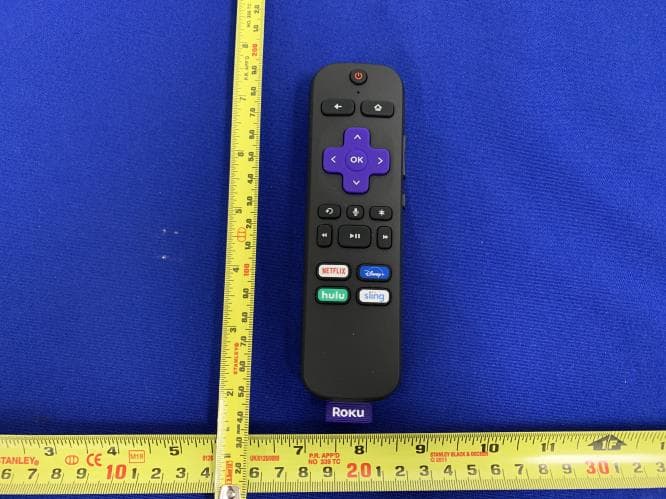
Click to zoom
Application Details
- Equipment Class
- DTS - Digital Transmission System
- Date of Grant
- Mar 18, 2020
- Application Purpose
- Original Equipment
- Date of Application
- Mar 09, 2020
- Equipment Note
- WiFi remote control
- Frequency Range
- 2412.00000000 - 2462.00000000
- Company
- Roku, Inc.
- Country
- United States
Documents & Files
Document Text
Text extracted from the exhibit documents filed with the FCC. Open a document above to read the original.
Users Manual
5 © 2019 Roku, Inc. All rights reserved. ROKU, ROKU logo and STREAMING STICK are the registered trademarks of Roku, Inc. All other logos and trademarks herein not owned by Roku, Inc. are the property of their respective owners. Video tutorials Add channels Wireless help Mobile app Need more help getting started? go.roku.com/rssplus Getting the most out of your Roku streaming player. go.roku.com/usingroku Tips, what’s streaming for free, and more... blog.roku.com STEP 5: On-screen setup and activation Follow the instructions on your TV screen. Activate your streaming player by using your computer or smartphone to link to a Roku account. Roku Blog Let’s get started English Deutsch Español Français 12:40 pm | Options Quick Start Guide + Common questions Why do I need to create a Roku account? Before you can start streaming, channels must be downloaded and installed on your streaming player. You’ll need a Roku account to access the Roku Channel Store, manage your subscriptions, view your purchase history, and add a payment method. For more info, visit go.roku.com/whyaccount Why do I need to enter a credit card? Saving a payment method makes it easy to rent or buy movies on demand, subscribe to popular services, and enroll in free trials. Charges will not be made without your authorization. For more information, visit go.roku.com/paymenthelp What should I do if my streaming player is not connecting to my wireless network? Your streaming player connects to your wireless network the same as your laptop or smartphone. If these other devices can access the internet, then your streaming player should be able to do the same. Make sure to select the same network name, and enter the same password you use with the other devices. Remember that passwords are case- sensitive and easy to enter incorrectly. For more help, visit go.roku.com/wireless Can I take my Roku streaming player with me when I travel? Yes. You can bring your streaming player and watch your favorite entertainment when you travel. Remember to also bring a USB power adaptor (like your phone charger), remote, and any cables you use to connect your streaming player at home. Make sure your destination has a good internet connection. You may need a computer or smartphone to help connect your streaming player to a new wireless network. For more details, visit go.roku.com/travelwithroku 4100000578_1 NOTE: Roku does not charge for activation support – beware of scams. 1 OR 3 4 2 OR What’s includedSetup STEP 1: Connect to TV HDTVs: Plug your streaming player into an HDMI® port on your TV. 4K and HDR TVs: To stream 4K or HDR, choose an HDMI port that supports HDCP 2.2. For help determining which port supports HDCP 2.2, visit go.roku.com/hdcp STEP 2: Connect to power For the best streaming experience, use the included USB power cable, power extender cable and power adaptor to connect your streaming player to a wall outlet. STEP 3: Power on TV and select input Use your TV remote to power on your TV and select the input you used to connect your streaming player. For help on how to select the correct input, visit go.roku.com/selectinput STEP 4: Insert batteries On the back side of the remote, slide open the battery cover. Insert included Duracell® batteries placing the negative (-) ends in fi rst. Your remote should pair with your streaming player automatically. For help pairing your remote, visit go.roku.com/remotehelp Doesn’t fi t? Order a free HDMI extender cable at my.roku.com/HDMI Or use the included USB power cable to connect to the USB port on your TV. NOTE: See a red light on your streaming player? That means the USB port on your TV is not providing enough power. Use the included power adaptor instead. For help, visit go.roku.com/lowpower Roku® Streaming Stick®+ USB power cable with long-range wireless receiver Power adaptor Two AAA Duracell® batteries Remote USB power extender cable Power and status light USB power Reset HDMI® connector USB HDMI USB HDMI USB HDMI FREE USB HDMI Antenna A/V 1 HDMI 1 HDMI 2 Input Volume Mute Channel shortcuts Options TV power Instant replay Voice Features
Users Manual
Roku® Streaming Player Important Product Information Introduction The Roku streaming player which accompanies this Important Product Information (“Player”) allows you to stream online entertainment to your TV. A Roku account is required to activate your Player. When you sign up for a Roku account, you will be asked to provide your contact information and a payment method so that you can easily rent movies or sign-up for additional services. Your authorization is required for any such charges. There are no equipment rental fees for owning a Player. However, a paid subscription or other form of payment may be required to access some channels or content. Channel availability is subject to change and varies by country. Check with each channel provider for specific bandwidth requirements to stream SD, 720p, 1080p HD, 4K and HDR (if your player supports 4K and/or HDR) content. Safety Precautions The Player has been designed with the highest concern for safety. However, any electrical device, if used improperly, has the potential for causing fire, electrical shock, property damage or personal injury. To help ensure accident-free operation, follow these guidelines: •• Observe all warnings, precautions and instructions. •• Regularly inspect the AC power adaptor for damage. •• Stop use, unplug the AC power adaptor (if applicable) from the electrical outlet and disconnect any other cables immediately, if the Player has been damaged, cracked or punctured, or if the Player functions in an abnormal manner, produces unusual sounds or smells or becomes too hot to touch. •• For more information on product safety and troubleshooting, please go to www.roku.com/ support. Use and Handling •• Do not operate the remote using any vigorous or forceful motions or gestures. •• If your Player comes with a remote control and/ or headphones, keep them both out of reach of children. They are not toys. •• The product packaging may include plastic bags, cable ties and fasteners. Dispose of these properly and keep them out of reach of children, as they could present a choking hazard. •• Do not touch the Player or connected cables during an electrical storm. •• Do not allow liquid, small particles or other foreign objects to get into the Player or accessories. •• Do not expose the Player or accessories to liquid, smoke or steam. •• Do not expose the Player or accessories to high temperatures, high humidity or direct sunlight. •• Do not place the Player, remote, or AC adaptor on the floor or in a place where they may cause someone to trip or stumble. •• Permanent hearing loss may occur if the Player or headphones are used at high volume. To prevent possible hearing loss, limit the amount of time you use the Player or any headphones at high volume. •• Do place your Player within range of your wireless network. •• Do not place your Player in an enclosed cabinet; it may interfere with the wireless signal or cause it to overheat. •• Do not place anything on top of your Player; it may cause the Player to overheat. •• Do not drop, crush or disassemble the Player. •• Do not attempt to repair your Player yourself. Disassembling the Player may cause damage not covered by the warranty. Important Tips About Battery Handling Inserting batteries: Be sure to insert each battery negative (-) side first, pushing it into the coil and then into the compartment. Never insert batteries positive (+) side first. Replacing batteries: Always replace dead batteries with two brand-new batteries from the same manufacturer. Never use damaged batteries. Disposal of batteries: Always dispose of batteries following federal guidelines or local ordinances. Do not dispose of used batteries in an open fire. Warning Signs: If your remote gets warm/hot during use, discontinue use and contact Roku Customer Support immediately at www.roku.com/ support. There is a risk of explosion if a battery is replaced by an incorrect type. Voice Services For players and geographies which support voice search, please see the End User License Agreement and Privacy Policy for further information located at www.roku.com/legal. The License Agreement The applicable software license terms for the Player is at www.roku.com/legal. Use of the Player constitutes your agreement to those license terms and the limited warranty set forth below for your country. If you disagree and you are within the allowable time period for returns under Roku’s return policy (if purchased from Roku) or the applicable return policy of the authorized distributor (if purchased from such distributor), you may return the Player to the place where you obtained it for a refund, subject to the terms of the applicable return policy. Limited Warranty & Warranty Service Process Limited Warranty For any Player purchased and delivered to end users in the US, go to www.roku.com/support for the warranty terms and conditions. You may also request a copy of such terms by mail by contacting Roku, Inc. at 150 Winchester Circle, Los Gatos, CA 95032. Automatic Software Updates Roku reserves the right to automatically update the software on the Player from time to time in its sole discretion, including adding, changing or removing channels, functionalities and features (including but not limited to, changing the user interface or the manner in which you are able to access content via the Player). For further information please see www.roku.com/support. Additional Legal Notices Federal Communication Commission Interference Statement This equipment has been tested and found to comply with the limits for a Class B digital device, pursuant to Part 15 of the FCC Rules. These limits are designed to provide reasonable protection against harmful interference in a residential installation. This equipment generates, uses and can radiate radio frequency energy and, if not installed and used in accordance with the instructions, may cause harmful interference to radio communications. However, there is no guarantee that interference will n…
Text truncated - open the document above for the full version.
External Photos
EUT Photo External View EUT – Front View EUT – Rear View EUT – Top View EUT – Bottom View EUT – Left View EUT – Right View
ID Label/Location Info
46.00mm 422 CBlack C 27.40mm NOTES UNLESS OTHERWISE SPECIFIED 1 2 3 4 5 DO NOT SCALE; ARTWORK PLACEMENT 1:1 LABEL MATERIAL: MYLAR CENTER ARTWORK OVER CENTERLINE COLOR: PMS BLACK C PMS 422 C PRINTING TOLERANCE ± 0.2MM 1.11mm 3.50mm 3.50mm REV.DRAWN BYCHECKED BYDATEDATEDESCRIPTION SHEETS REV’D A1WOLFWOLF022119022119INITIAL RELEASEALL A2WOLFWOLF032719032719UPDATED DRAWINGS TO MATCH SUPPLIER REQUESTSALL 032719SHEET 1 OF 1 ROKU PN 7031001127 DESCRIPTION LABEL, BATTERY, ELK-1 ROKU REV. A2 1:1 46 27.4 8.5 Ø1.7 10.55 13.2 3 2-Ø2 +0.1 0 2.54 27.28 C3
Internal Photos
EUT Photo Internal View EUT – Uncover View Main board Front View Main board Rear View Antenna
RF Exposure Info
Report No.: FCC_RF_SL19040901-ROK-004_RF Exposure Page No. 1 / 6 Report Format Version: 6.1.1 RF Exposure Report Report No.: FCC_RF_SL19040901-ROK-004_RF Exposure FCC ID: TC2-R1028 Test Model: RC-EL1 Series Model: N/A Received Date: 12/17/2019 Test Date: 12/30/2019/-01/28/2020 Issued Date: 01/29/2020 Applicant: Roku, Inc. Address: 150 Winchester Circle, Los Gatos CA 95032 Manufacturer: Roku, Inc. Address: 150 Winchester Circle, Los Gatos CA 95032 Issued By: Bureau Veritas Consumer Products Services, Inc. Lab Address: 775 Montague Expressway, Milpitas, CA 95035 Test Location (1): 775 Montague Expressway, Milpitas, CA 95035 FCC Registration / Designation Number: 540430 This report is for your exclusive use. Any copying or replication of this report to or for any other person or entity, or use of our name or trademark, is permitted only with our prior written permission. This report sets forth our findings solely with respect to the test samples identified herein. The results set forth in this report are not indicative or representative of the quality or characteristics of the lot from which a test sample was taken or any similar or identical product unless specifically and expressly noted. Our report includes all of the tests requested by you and the results thereof based upon the information that you provided to us. You have 60 days from date of issuance of this report to notify us of any material error or omission caused by our negligence, provided, however, that such notice shall be in writing and shall specifically address the issue you wish to raise. A failure to raise such issue within the prescribed time shall constitute your unqualified acceptance of the completeness of this report, the tests conducted and the correctness of the report contents. Unless specific mention, the uncertainty of measurement has been explicitly taken into account to declare the compliance or non-compliance to the specification. The report must not be used by the client to claim product certification, approval, or endorsement by A2LA or any government agencies. Report No.: FCC_RF_SL19040901-ROK-004_RF Exposure Page No. 2 / 6 Report Format Version: 6.1.1 Table of Contents Release Control Record .................................................................................................................................. 3 1 Certificate of Conformity ...................................................................................................................... 4 2 Evaluation Result .................................................................................................................................. 5 3 SAR Test Exclusion Thresholds .......................................................................................................... 6 4 Conclusion ............................................................................................................................................ 6 Report No.: FCC_RF_SL19040901-ROK-004_RF Exposure Page No. 3 / 6 Report Format Version: 6.1.1 Release Control Record Issue No. Description Date Issued FCC_RF_SL19040901-ROK-004_RF Exposure Orignal Release 01/29/2020 Report No.: FCC_RF_SL19040901-ROK-004_RF Exposure Page No. 4 / 6 Report Format Version: 6.1.1 1 Certificate of Conformity Product: WiFi Remote Control Brand: Roku, Inc. Test Model: RC-EL1 Series Model: N/A Sample Status: Engineering sample Applicant: Roku, Inc. Test Date: 12/30/2019/-01/28/2020 Standards: FCC Part 2 (Section 2.1093) KDB 447498 D01 General RF Exposure Guidance v06 IEEE C95.1-1992 The above equipment has been tested by Bureau Veritas Consumer Products Services, Inc., Milpitas Branch, and found compliance with the requirement of the above standards. The test record, data evaluation & Equipment Under Test (EUT) configurations represented herein are true and accurate accounts of the measurements of the sample’s EMC characteristics under the conditions specified in this report. Prepared by : , Date: 01/29/2020 Deon Dai / Test Engineer Approved by : , Date: 01/29/2020 Chen Ge / Engineer Reviewer Report No.: FCC_RF_SL19040901-ROK-004_RF Exposure Page No. 5 / 6 Report Format Version: 6.1.1 2 Evaluation Result Following FCC KDB 447498 D01 “General SAR test exclusion guidance” The corresponding SAR Exclusion Threshold condition, listed below: 1) The 1-g and 10-g SAR test exclusion thresholds for 100 MHz to 6 GHz at test separation distances ≤ 50 mm are determined by: [(max. power of channel, including tune-up tolerance, mW)/(min. test separation distance, mm)] ·[√f(GHz)] ≤ 3.0 for 1-g SAR and ≤ 7.5 for 10-g extremity SAR, where in GHz. Power and distance are rounded to the nearest mW and mm before calculation. The result is rounded to one decimal place for comparison The test exclusions are applicable only when the minimum test separation distance is ≤ 50 mm and for transmission frequencies between 100 MHz and 6 GHz. When the minimum test separation distance is < 5 mm, a distance of 5 mm is applied to determine SAR test exclusion. 2) At 100 MHz to 6 GHz and for test separation distances > 50 mm, the SAR test exclusion threshold is determined according to the following: a) [Threshold at 50 mm in step 1) + (test separation distance - 50mm)·( f(MHz)/150)] mW, at 100MHz to 1500 MHz b) [Threshold at 50 mm in step 1) + (test separation distance - 50 mm)·10] mW at > 1500 MHz and ≤ 6 GHz 3) At frequencies below 100 MHz, the following may be considered for SAR test exclusion. a) The threshold at the corresponding test separation distance at 100 MHz in step 2) is multiplied by [1 + log(100/f(MHz))] for test separation distances > 50 mm and < 200 mm. b) The threshold determined by the equation in a) for 50 mm and 100 MHz is multiplied by ½ for test separation distances ≤ 50 mm. c) SAR measurement procedures are not established below 100 MHz. When SAR test exclusion cannot be applied, a KDB inquiry is required to determine SAR evaluation requirements for any test results to be acceptable.…
Text truncated - open the document above for the full version.
Test Report
Report No.: FCC_IC_RF_SL19040901-ROK-004_2.4G Rev 2.0 Page No. 1 / 57 Report Format Version: 6.1.1 RF Test Report Report No.: FCC_IC_RF_SL19040901-ROK-004_2.4G Rev 2.0 FCC ID: TC2-R1028 IC: 5959A-1026 Test Model: RC-EL1 Received Date: 12/17/2019 Test Date: 12/30/2019/-01/29/2020 Issued Date: 03/17/2020 Applicant: Roku, Inc. Address: 150 Winchester Circle, Los Gatos CA 95032 Manufacturer: Roku, Inc. Address: 150 Winchester Circle, Los Gatos CA 95032 Issued By: Bureau Veritas Consumer Products Services, Inc. Lab Address: 775 Montague Expressway, Milpitas, CA 95035 Test Location (1): 775 Montague Expressway, Milpitas, CA 95035 FCC Registration / Designation Number: 540430 ISED# / CAB identifier: 4842D This report is for your exclusive use. Any copying or replication of this report to or for any other person or entity, or use of our name or trademark, is permitted only with our prior written permission. This report sets forth our findings solely with respect to the test samples identified herein. The results set forth in this report are not indicative or representative of the quality or characteristics of the lot from which a test sample was taken or any similar or identical product unless specifically and expressly noted. Our report includes all of the tests requested by you and the results thereof based upon the information that you provided to us. You have 60 days from date of issuance of this report to notify us of any material error or omission caused by our negligence, provided, however, that such notice shall be in writing and shall specifically address the issue you wish to raise. A failure to raise such issue within the prescribed time shall constitute your unqualified acceptance of the completeness of this report, the tests conducted and the correctness of the report contents. Unless specific mention, the uncertainty of measurement has been explicitly taken into account to declare the compliance or non-compliance to the specification. The report must not be used by the client to claim product certification, approval, or endorsement by A2LA or any government agencies. Report No.: FCC_IC_RF_SL19040901-ROK-004_2.4G Rev 2.0 Page No. 2 / 57 Report Format Version: 6.1.1 Table of Contents Release Control Record .................................................................................................................................. 4 1 Certificate of Conformity ...................................................................................................................... 5 2 Summary of Test Results ..................................................................................................................... 6 2.1 Measurement Uncertainty ................................................................................................................... 6 2.2 Modification Record ............................................................................................................................ 6 3 General Information .............................................................................................................................. 7 3.1 General Description of EUT ................................................................................................................ 7 3.2 Description of Test Modes ................................................................................................................... 8 3.2.1 Test Mode Applicability and Tested Channel Detail ............................................................................. 9 3.3 Description of Support Units ............................................................................................................. 10 3.3.1 Duty Cycle of Test Signal .................................................................................................................... 11 3.4 General Description of Applied Standards ........................................................................................ 12 4 Test Types and Results ...................................................................................................................... 13 4.1 Radiated Emission and Bandedge Measurement ............................................................................. 13 4.1.1 Limits of Radiated Emission and Bandedge Measurement .............................................................. 13 4.1.2 Test Instruments ................................................................................................................................ 14 4.1.3 Test Procedures ................................................................................................................................. 15 4.1.4 Deviation from Test Standard ............................................................................................................ 16 4.1.5 Test Setup .......................................................................................................................................... 16 4.1.6 EUT Operating Conditions ................................................................................................................. 17 4.1.7 Test Results ....................................................................................................................................... 18 4.2 Conducted Emission Measurement .................................................................................................. 28 4.2.1 Limits of Conducted Emission Measurement .................................................................................... 28 4.2.2 Test Instruments ................................................................................................................................ 28 4.2.3 Test Procedures ................................................................................................................................. 29 4.2.4 Deviation from Test Standard ......................................................................…
Text truncated - open the document above for the full version.
Test Setup Photos
Radiated Emission Test below 1GHz Front View Radiated Emission Test below 1GHz Rear View Radiated Emission Test above 1GHz Front View Radiated Emission Test above 1GHz Rear View
Contact Information
Applicant
Robert Curtis(VP Engineering)
Test Firm
Bureau Veritas Consumer Products Services, Inc.Sarb Shelopal
[email protected]+1 925 963 4420
Technical Specifications
| # | Rule Parts | Frequency Range | Power Output |
|---|---|---|---|
| 1 | 15C | 2.41 GHz - 2.46 GHz | 7.60 mW |
Other Applications from Roku, Inc.
TC2-R1053
Aug 03, 2026Enhanced Voice Remote
Equipment Class
DTS - Digital Transmission SystemTC2-R1050
Sep 23, 2024Streaming Player
Equipment Class
DSS - Part 15 Spread Spectrum Transmitter
TC2-R1043
Nov 19, 2023Streaming Player with Built-in Speaker
Equipment Class
DTS - Digital Transmission System
TC2-R1040
Apr 12, 2021Set-top-box
Equipment Class
NII - Unlicensed National Information Infrastructure TX
TC2-R1039
Nov 22, 2020Remote Control
Equipment Class
NII - Unlicensed National Information Infrastructure TX