TC2-RC03RF Remote control
Roku, Inc.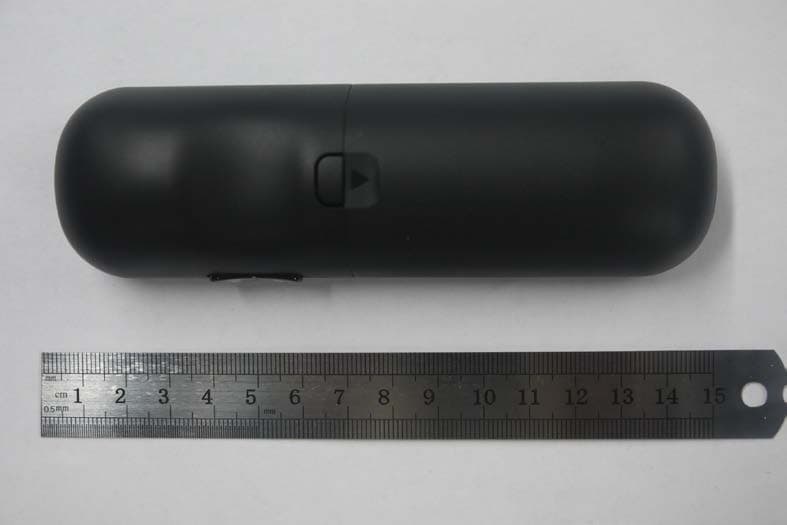
Click to zoom
Application Details
- Equipment Class
- NII - Unlicensed National Information Infrastructure TX
- Date of Grant
- Oct 07, 2012
- Application Purpose
- Original Equipment
- Date of Application
- Oct 07, 2012
- Equipment Note
- RF Remote control
- Frequency Range
- 5180.00000000 - 5240.00000000
- Company
- Roku, Inc.
- Country
- United States
Documents & Files
Document Text
Text extracted from the exhibit documents filed with the FCC. Open a document above to read the original.
Users Manual
Roku Player Important Product Information The License Agreement The Roku and third-party software license terms can be found at: www.roku.com/license. Use of the Roku player constitutes acceptance of as well as agreement to those license terms. Ninety (90) Day Limited Hardware Warranty Subject to the additional terms and conditions set forth below, Roku provides this Limited Warranty: • Only to the person or entity that originally purchased the Player from Roku or from one of its authorized resellers or distributors; and • Only for Players purchased and delivered to the end user within the United States and Canada. Limited Warranty Roku warrants the Roku Player (“Player”) hardware against defects in materials and workmanship under normal use for a period of ninety (90) days from the date of purchase (“Warranty Period”). If Roku determines that the Player’s hardware is defective, Roku will either repair the unit or replace the unit with either a new or rebuilt Player, at its option. If the Warranty Period has expired or is otherwise not applicable (see Scope and Limitation on Warranty below), we will return the Player to you. More information about this warranty can be found at www.roku.com/support. THE FOREGOING SETS FORTH ROKU’S SOLE OBLIGATION AND YOUR EXCLUSIVE REMEDY IN THE EVENT OF ANY BREACH OF THIS LIMITED WARRANTY. Return and Warranty Service Process Please access and review the online help resources at www.roku.com/support before seeking warranty service. To return or obtain warranty service for a Player, you must first obtain a Return Merchandise Authorization (RMA) number from a Customer Support Representative (CSR) at Roku. Customer Support contact information can be found by visiting www.roku.com/support. RMA numbers expire thirty days from issuance. Roku may attempt to troubleshoot a warranty-related problem prior to issuing a RMA number. Please be prepared to provide additional information upon request. Once a RMA number is obtained, you must ship your Player, freight prepaid, together with proof of purchase and all accessories, in either the original packaging or packaging affording an equal degree of protection, to the Roku authorized distribution facility identified by the CSR. Failure to return any of the accessories could result in a delay and/or result in an invoice to you or credit to Roku for the missing accessories. Important: When emailing for a RMA number, please provide the following information with your request: (a) model number, (b) serial number, (c) problem description, (d) software version (located in the System Configuration menu), (e) date of purchase, (f) place of purchase (reseller or online place of purchase), and (g) return shipping address (P.O. boxes are not accepted). Scope of and Limitation on Warranty The warranty on the Player is limited to the repair or replacement of defective units as described in the Limited Warranty section above. This warranty does not cover customer training or education, installation, set up adjustments, or signal reception problems. This warranty also does not cover any issue related to the service provided by your Service Provider, including but not limited to service disruption, changes in service terms, changes in offerings, changes in format, or technical problems. This warranty does not cover damage due to acts of God, accident, misuse, abuse, negligence, commercial use or modification of, or to any part of, your Player. This warranty does not cover damage due to improper operation or maintenance, connection to improper voltage supply or attempted repair by anyone other than a facility authorized by Roku to service your Player. This warranty does not cover consumables (such as fuses and batteries). Legal Notices Federal Communication Commission Interference Statement This equipment has been tested and found to comply with the limits for a Class B digital device, pursuant to Part 15 of the FCC Rules. These limits are designed to provide reasonable protection against harmful interference in a residential installation. This equipment generates, uses and can radiate radio frequency energy and, if not installed and used in accordance with the instructions, may cause harmful interference to radio communications. However, there is no guarantee that interference will not occur in a particular installation. If this equipment does cause harmful interference to radio or television reception, which can be determined by turning the equipment off and on, the user is encouraged to try to correct the interference by one of the following measures: • Reorient or relocate the receiving antenna. • Increase the separation between the equipment and receiver. • Connect the equipment into an outlet on a circuit different from that to which the receiver is connected. • Consult the dealer or an experienced radio/TV technician for help. This device complies with Part 15 of the FCC Rules. Operation is subject to the following two conditions: (1) This device may not cause harmful interference, and (2) this device must accept any interference received, including interference that may cause undesired operation. FCC Caution: Any changes or modifications not expressly approved by the party responsible for compliance could void the user’s authority to operate this equipment. IEEE 802.11b or 802.11g operation of this product in the U.S.A. is firmware-limited to channels 1 through 11. Wireless Radio Use: This device is restricted to indoor use when operating in the 5.15 to 5.25 GHz frequency band. IMPORTANT NOTE: FCC Radiation Exposure Statement: This equipment complies with FCC radiation exposure limits set forth for an uncontrolled environment. This equipment should be installed and operated with minimum distance 20cm between the radiator and your body. This transmitter must not be co-located or operating in conjunction with any other antenna or transmitter. Note to US model owner: To comply with US FCC regulation, the country selection function …
Text truncated - open the document above for the full version.
Users Manual
1 Hi! Let’s get started. What’s in the box Enhanced remote control 2 x AA Alkaline batteries Roku Streaming Stick TM High speed Internet What you need Roku Ready TM TV (or other device) Wireless Router 3 Know your Streaming Stick [MHL CONNECTOR] Plugs into the MHL port on the back of your TV. [STATUS LIGHT] Signifies it is on when lit, or activity when flashing. [RESET BUTTON] Used to reset your Streaming Stick (you probably won’t ever have to use this). A B C Power up First, power your Roku remote by inserting the included batteries: • Locate and open the rectangular battery door on the rear of the unit. • Insert the batteries into their slots, making sure to match the positive (+) and negative (-) signs. • Place the battery door back over the compartment and press it gently down until the latch snaps securely into place. • If the LED on the front of the remote is blinking, it means it is trying to pair to the Roku Streaming Stick. The remote is ready for use when the LED stops blinking and turns off. What to do Plug it in Plug your Roku Streaming Stick into the MHL port of your TV or other Roku Ready device. Simple as that! HDMI/MHL HDMI 5 Complete guided setup It’s the final stretch and hooray—it’s a breeze! Continue following the on-screen instructions and you’ll: • Get the latest software. • Link the Roku Streaming Stick to your Roku account on your computer. Your Roku account: During setup, you’ll be prompted to create your Roku account online at roku.com/link. Your Roku Streaming Stick will generate a unique code that links your player to your new account. Roku accounts are free and secure. And while a valid credit card number is required to create your account, rest assured you will only be charged if you authorize purchases of apps and games from the Roku Channel Store. Connect to network Now you can grab that Roku remote and jump right into guided setup. When prompted, select “Wireless” as your network connection and have your network name and password ready to do the following: • Select your network from the list of available networks. • Enter your network password, if you use one. Remember, network passwords are case sensitive. Know your Roku remote The Roku remote should feel right at home in your hand. We designed it to be incredibly intuitive for watching TV and great for gaming, too! B L K G C A F I J D E H 7 Know your Roku remote Cool: Because your enhanced remote uses radio frequency instead of infrared, you don’t need to have a direct line of sight to your Roku! [BACK] Return to previous screen [HOME] Return to Roku home screen [INSTANT REPLAY] Replay last 7 seconds of video [UP] or [DOWN] Move up or down; [LEFT] or [RIGHT] Move left or right [PLAY/PAUSE] Start or pause playback [A & B] Action buttons for gaming [FWD SCAN] Fast forward, scroll right one page at a time [OK] Select an option from a menu [REV SCAN] Rewind, scroll left one page at a time [OPTIONS] View more options [STATUS LED] Displays remote usage information [VOLUME +/-] Increase/Decrease the volume of your TV when using your Roku Streaming Stick L Get your game on! Just a couple of fun-facts about your Roku enhanced remote. • It’s sensitive and smart. The Roku remote incorporates motion-sensing technology, allowing more precise and detailed control of gameplay. • It comes with an adjustable wrist strap—for good reason. Since some games make you sweat, sporting the wrist strap is a very good idea. You don’t want to crack the screen of your beautiful TV—or harm anyone or anything around you. Buckle up: Open the lever on the strap lock and place your hand through the wrist strap. Hold the remote firmly in your hand. Slide the strap lock up so that the strap will not fall off your wrist. Do not over-tighten the strap lock so that it’s uncomfortable. 9 Troubleshooting Having trouble completing setup? Don’t worry: it’s usually an easy fix. If you cannot see a picture on your TV: • Make sure your TV is turned on. (This tip could save you some embarrassment.) • Make sure the video input on your TV or home theater receiver is set to match the output (usually HDMI or MHL) used with the Roku Streaming Stick. Most TVs have an Input button on the remote control to change video inputs. If you cannot connect to your wireless home network during guided setup: • If you are not getting 3 or more signal-strength bars above your wireless network, adjust the location of your Roku Streaming Stick and/or wireless router. Make sure there are no obstructions, like cement walls, between your Roku Streaming Stick and your wireless router. • Make sure you select the correct wireless router name on the “Wireless” screen. • Make sure you enter the correct password, if your network is security-enabled (password is case sensitive). • If you have turned off SSID broadcasting on your wireless router, you can add your network by selecting “My network is not shown” from the “Wireless” screen. It’s unlikely but if your remote becomes warm or hot to the touch after inserting the batteries, immediately discontinue use. Do not attempt to remove the batteries while the unit is hot. Contact Roku Customer Support immediately at 888-600-7658 If you cannot hear sound: • Make sure the connectors on the cables between your TV and home theater receiver are pushed in all the way. • Make sure the volume on your TV or home theater receiver is turned up and isn’t on mute. • Make sure the input on your TV or home theater receiver matches the output (HDMI or MHL) used with your Roku Streaming Stick. If the Roku remote control is not functioning: • Try moving closer to your Roku Streaming Stick. • Make sure the batteries are fresh (or new) and inserted properly. • Make sure your remote is paired (see next section) with the Roku Streaming Stick. • If the Status Light on the front of your Roku Streaming Stick flashes once each time you press a remote button, the problem is not with the remote. Troubleshooting (continued) 11 Pairing your remote control: The R…
Text truncated - open the document above for the full version.
Attestation Statements
DATE :101112012 BABT FCB Forsyth House, Churchfield Road, Walton-on-Thames, Surrey, KT122TD FCC lD: TC2-RC03 Attestation for US frequencv bands usaqe please be notified that we do not provide any controls or software to allow operation outside the USA frequency bands when we sell this product in USA. Director of Hardware Engineering Roku lnc. Phone: 479-871-1 148 Sincerely,
Attestation Statements
DATE :10/1/2012 BABT FCB Forsyth House, Churchfield Road, Walton-on-Thames, Surrey, KT122TD FCC lD: TC2-RC03 Attestation for FCC Paft 158 Declaration of Conformitv Please be notified that we, the undersigned, ROKU lnc. declares that the product, which bears the above FCC lD is compliant with the FCC Part 158 requirements for DoC. Tre DoC procedure shall be carried out prior to marketing the device in the US. Sincerely,. .I Greg Garner Director of Hardware fngineering Roku lnc. Phone: 479-871-1148 Yr-U
Attestation Statements
DATE :101112012 BABT FCB Forsyth House, Churchfield Road, Walton-on-Thames, SurreY, KT122TD FCC lD: TC2-RC03 Attestation for FCC label location please be notified that we, the undersigned, ROKU lnc. declares that the product is compliant with the FCC labelling requirements since the following conditions are met: a) The device is handheld' ni rn. FCC lD is visible at the time of purchase. The device is sold without the batte'v installed hence the FCC label located is in the battery compartment is visible to the u,,er" c) The FCC label area does not require any specialtool for access. The FCC label i: piaceO on the pCB assembly, which is a fixed part of the device. Director of Hardware Engineering Roku lnc. Phone: 479-871-1148
Cover Letter(s)
DATE :812912012 BABT FCB Forsyth House, Churchfield Road, Walton-on-Thames, SurreY, KT122TD FCC lD: TC2-RC03 i.', 3.1,1,3X[i;:T3;.:iffi ilifi"r".Uq'lr.^'1.^"'rnc, itirr resides with Roku, rnc'-e- 20 12 Agency agre^ement expi ration date : i, I It By: on our behalf, lappoint Nikolay shtin of sMK Manufacturing lnc'' 1055 Tierra del l{ey' suite H, chula vista, cA 91910, usA to act as our agent in the preparation of this application to,. "qrtr.nt -cerlifibation. I certify that s-ubmitted documents pro'* 'rrly describe the device or system for which "qrp*Lnt certification is sought' I also ctr''tify that each unit manufactured, imported or marketed, as defined in the 69611-pi55r')fl's regurations wirr rrave attixeo to it a raber identicar to that submitted for approval with ihis ?3? iiSlil;es where our authorized asent signs the, application for certification or-: our beharr, I acknowled;. il"t;li i.w"'16[vioi c91 9t',hn^.H'11]ll'^:',:T: '1L-:?'fl:'?; 3 Titte: Director of Hardware Engineering On behalf of : Roku lnc. 1 D. Saratoqa, uA 95u/u. Telephone: 479-871-1148
Cover Letter(s)
DATE : 9/3/2012 BABT FCB Forsyth House, Churchfield Road, Walton-on-Thames, Surrey, KT12 2TD FCC ID: TC2-RC03 Confidential Statement We have understood that the following request for confidential documents has been and viewable since the date of grant, since it has been granted. Confidentiality Request Pursuant to Sections 0.457 and 0.459 of the Commission's Rules, the Applicant Hereby requests confidential treatment of information accompanying this Application as outlined below: Schematics, Parts List, Operating Description, Block Diagrams Above mentioned document contains detailed system and equipment description are considered as proprietary information in operation of the equipment. The public disclosure of above documents might be harmful to our company and would give competitor an unfair advantage in the market. In additional to above mentioned documents, pursuant to Public Notice DA 04- 1705 of the Commission's policy, in order to comply with the marketing regulations in 47 DFR $2.803 and the importation rules in 47 CFR 52.1204, while ensuring that business sensitive information remains confidential until the actual marketing of newly authorized devices. We are requesting the commission to grant short-term confidentiality request for 90 days on the following attachments: External Photos, Internal Photos, Test Setup Photos, User Manual It is our understanding that all measurement test reports, FCC ID label format and correspondent during certification review process cannot be granted as confidential documents and those information will be available for public review once the grant of equipment authorization is issued. Sincerely, Nikolay Shtin RF Engineer SMK Electronics Corp. Phone: 619-216-6400
External Photos
FCC ID TC2-RC03 IC: 5959A- RC03
ID Label/Location Info
FCC ID TC2-RC03 IC: 5959A- RC03
Internal Photos
FCC ID TC2-RC03 IC: 5959A- RC03
RF Exposure Info
TÜV SÜD AMERICA INC 10040 Mesa Rim Road San Diego, CA 92121-2912 Phone: 858 678 1400 FAX: 858 546 0364 September 29, 2012 BABT FCB Forsyth House, Churchfield Road, Walton-on-Thames, Surrey, KT12 2TD Attention: Director of Certification RE: Prediction of MPE limit at a given distance as per KDB 447498 D01 Mobile Portable RF Exposure V04 IC: 8655A-5959A-RC03 FCC ID: TC2-RC03 Equation from page 18 of OET Bulletin 65, Edition 97-01 S= PG 4πR where: S = power density P = power input to the antenna G = power gain of the antenna in the direction of interest relative to isotropic R = distance to the center of radiation of the antenna Maximum peak output power at antenna input terminal: 5.60 (dBm) Maximum peak output power at antenna input terminal: 3.63 (mW) Antenna gain (typical): 4.9 (dBi) Maximum antenna gain: 3.090 (numeric) Prediction distance: 20 (cm) Source Based Time Average Duty Cycle: 100 (%) Prediction frequency: 5745.00 (MHz) MPE limit for uncontrolled exposure at prediction frequency: 1.000 (mW/cm2) Power density at prediction frequency: 0.0022 (mW/cm2) Power density at prediction frequency: 0.022 (W/m2) Margin of Compliance: -26.51 (dB) Sincerely, Ferdie S. Custodio Name Authorized Signatory Title: EMC/Wireless Test Engineer
RF Exposure Info
TÜV SÜD AMERICA INC 10040 Mesa Rim Road San Diego, CA 92121-2912 Phone: 858 678 1400 FAX: 858 546 0364 September 29, 2012 BABT FCB Forsyth House, Churchfield Road, Walton-on-Thames, Surrey, KT12 2TD Attention: Director of Certification RE: Prediction of MPE limit at a given distance as per KDB 447498 D01 Mobile Portable RF Exposure V04 IC: 8655A-5959A-RC03 FCC ID: TC2-RC03 Equation from page 18 of OET Bulletin 65, Edition 97-01 S= PG 4πR where: S = power density P = power input to the antenna G = power gain of the antenna in the direction of interest relative to isotropic R = distance to the center of radiation of the antenna Maximum peak output power at antenna input terminal: 7.48 (dBm) Maximum peak output power at antenna input terminal: 5.60 (mW) Antenna gain (typical): 1.77 (dBi) Maximum antenna gain: 1.503 (numeric) Prediction distance: 20 (cm) Source Based Time Average Duty Cycle: 100 (%) Prediction frequency: 2462.00 (MHz) MPE limit for uncontrolled exposure at prediction frequency: 1.000 (mW/cm2) Power density at prediction frequency: 0.0017 (mW/cm2) Power density at prediction frequency: 0.017 (W/m2) Margin of Compliance: -27.76 (dB) Sincerely, Ferdie S. Custodio Name Authorized Signatory Title: EMC/Wireless Test Engineer
Test Report
Report No. SC1208772A Rev. 1 September 2012 America Report On Application for Grant of Equipment Authorization of the SMK Electronics Corp. RC04 RF Remote Control FCC Part 15 Subpart C §15.247 IC RSS-Gen and RSS-210 Issue 8 December 2010 FCC ID TC2-RC03 IC: 5959A-RC03 Report No. SC1208772A Rev. 1 Page 2 of 76 TÜV SÜD AMERICA INC 10040 Mesa Rim Road San Diego, CA 92121-2912 Phone: 858 678 1400 FAX: 858 546 0364 REPORT ON TEST REPORT NUMBER PREPARED FOR Radio Testing of the SMK Electronics Corp. RF Remote Control SC1208772A Rev. 1 SMK Electronics Corp. 1055 Tierra Del Rey, Suite H Chula Vista, CA 91910 CONTACT PERSON Nikolay Shtin RF Engineer (619) 216-6400 [email protected] PREPARED BY Ferdinand S. Custodio Name Authorized Signatory Title: EMC/Wireless Test Engineer APPROVED BY Chip R. Fleury Name Authorized Signatory DATED September 10, 2012 FCC ID TC2-RC03 IC: 5959A-RC03 Report No. SC1208772A Rev. 1 Page 3 of 76 TÜV SÜD AMERICA INC 10040 Mesa Rim Road San Diego, CA 92121-2912 Phone: 858 678 1400 FAX: 858 546 0364 Revision History SC1208772A Rev. 1 SMK Electronics Corp. RC04 RF Remote Control DATE OLD REVISION NEW REVISION REASON PAGES AFFECTED APPROVED BY 09/10/12 Initial Release Ferdinand Custodio 09/27/12 Initial Release Rev. 1 Removed all pictures referencing the EUT Ferdinand Custodio FCC ID TC2-RC03 IC: 5959A-RC03 Report No. SC1208772A Rev. 1 Page 4 of 76 TÜV SÜD AMERICA INC 10040 Mesa Rim Road San Diego, CA 92121-2912 Phone: 858 678 1400 FAX: 858 546 0364 CONTENTS Section Page No 1 REPORT SUMMARY ............................................................................................................................... 5 1.1 Introduction ................................................................................................................................................ 6 1.2 Brief Summary Of Results ........................................................................................................................... 7 1.3 Product Information ................................................................................................................................... 8 1.4 EUT Test Configuration ............................................................................................................................. 10 1.5 Deviations From The Standard ................................................................................................................. 11 1.6 Modification Record ................................................................................................................................. 11 1.7 Test Methodology ..................................................................................................................................... 11 1.8 Test Facility ............................................................................................................................................... 11 2 TEST DETAILS ...................................................................................................................................... 12 2.1 Peak Output Power ................................................................................................................................... 13 2.2 Conducted Emissions ................................................................................................................................ 16 2.3 99% Emission Bandwidth .......................................................................................................................... 17 2.4 Minimum 6 dB RF Bandwidth ................................................................................................................... 23 2.5 Out-Of-Band Emissions - Conducted ........................................................................................................ 29 2.6 Band-Edge Compliance Of RF Conducted Emissions ................................................................................ 35 2.7 Spurious Radiated Emissions .................................................................................................................... 39 2.8 Power Spectral Density ............................................................................................................................. 63 3 TEST EQUIPMENT USED ...................................................................................................................... 69 3.1 Test Equipment Used ................................................................................................................................ 70 3.2 Measurement Uncertainty ....................................................................................................................... 71 4 DIAGRAM OF TEST SETUP ................................................................................................................... 72 4.1 Test Setup Diagram ................................................................................................................................... 73 5 ACCREDITATION, DISCLAIMERS AND COPYRIGHT ............................................................................... 75 5.1 Accreditation, Disclaimers and Copyright ................................................................................................. 76 FCC ID TC2-RC03 IC: 5959A-RC03 Report No. SC1208772A Rev. 1 Page 5 of 76 TÜV SÜD AMERICA INC 10040 Mesa Rim Road San Diego, CA 92121-2912 Phone: 858 678 1400 FAX: 858 546 0364 SECTION 1 REPORT SUMMARY Radio Testing of the SMK Electronics Corp. RF Remote Control FCC ID TC2-RC03 IC: 5959A-RC03 Report No. SC1208772A Rev. 1 Page 6 of 76 TÜV SÜD AMERICA INC 10040 Mesa Rim Road San Diego, CA 92121-2912 Phone: 858 678 1400 FAX: 858 546 0364 1.1 INTRODUCTION The information contained in this report is intended to show verification of the SMK Electronics Corp. RF Remote Control to the requirements of FCC Part 15 Subpart C §15.247 and IC RSS-Gen and RSS-210 Issue 8 December 2010. Objective To perfo…
Text truncated - open the document above for the full version.
Test Report
Report No. SC1208772B Rev. 1 September 2012 America Report On Application for Grant of Equipment Authorization of the SMK Electronics Corp RC04 RF Remote Control FCC Part 15 Subpart E §15.407 IC RSS-210 Issue 8 December 2010 FCC ID TC2-RC03 IC: 5959A-RC03 Report No. SC1208772B Rev. 1 Page 2 of 49 REPORT ON TEST REPORT NUMBER PREPARED FOR Radio Testing of the SMK Electronics Corp RF Remote Control SC1208772B Rev. 1 SMK Electronics Corp 1055 Tierra Del Rey, Suite H Chula Vista, CA 91910 CONTACT PERSON Nikolay Shtin RF Engineer (619) 216-6400 [email protected] PREPARED BY Ferdinand S. Custodio Name Authorized Signatory Title: EMC/Wireless Test Engineer APPROVED BY Chip R. Fleury Name Authorized Signatory DATED September 20, 2012 FCC ID TC2-RC03 IC: 5959A-RC03 Report No. SC1208772B Rev. 1 Page 3 of 49 Revision History SC1208772B Rev. 1 SMK Electronics Corp RC04 RF Remote Control DATE OLD REVISION NEW REVISION REASON PAGES AFFECTED APPROVED BY 09/20/12 Initial Release Ferdinand Custodio 09/27/12 Initial Release Rev. 1 Removed all pictures referencing the EUT Ferdinand Custodio FCC ID TC2-RC03 IC: 5959A-RC03 Report No. SC1208772B Rev. 1 Page 4 of 49 CONTENTS Section Page No 1 REPORT SUMMARY ............................................................................................................................... 5 1.1 Introduction ................................................................................................................................................ 6 1.2 Brief Summary Of Results ........................................................................................................................... 7 1.3 Product Information ................................................................................................................................... 8 1.4 EUT Test Configuration ............................................................................................................................... 9 1.5 Deviations From The Standard ................................................................................................................. 10 1.6 Modification Record ................................................................................................................................. 10 1.7 Test Methodology ..................................................................................................................................... 10 1.8 Test Facility ............................................................................................................................................... 10 2 TEST DETAILS ...................................................................................................................................... 11 2.1 Indoor Operation Only .............................................................................................................................. 12 2.2 26 dB Bandwidth ....................................................................................................................................... 13 2.3 Output Power ........................................................................................................................................... 16 2.4 Power Spectral Density ............................................................................................................................. 20 2.5 Out-Of-Band Emission Limits .................................................................................................................... 25 2.6 Band-Edge Compliance Of RF Conducted Emissions ................................................................................ 28 2.7 Spurious Radiated Emissions .................................................................................................................... 31 2.8 Peak Excursion Ratio ................................................................................................................................. 39 3 TEST EQUIPMENT USED ...................................................................................................................... 42 3.1 Test Equipment Used ................................................................................................................................ 43 3.2 Measurement Uncertainty ....................................................................................................................... 44 4 DIAGRAM OF TEST SETUP ................................................................................................................... 45 4.1 Test Setup Diagram ................................................................................................................................... 46 5 ACCREDITATION, DISCLAIMERS AND COPYRIGHT ............................................................................... 48 5.1 Accreditation, Disclaimers and Copyright ..................................................................................…
Text truncated - open the document above for the full version.
Contact Information
Applicant
Robert Curtis(VP Engineering)
Test Firm
TUV SUD America, Inc.Chip Fleury
Technical Specifications
| # | Rule Parts | Frequency Range | Power Output | Emission |
|---|---|---|---|---|
| 1 | 15E | 5.18 GHz - 5.24 GHz | 2.60 mW | 25M7G1D |
Other Applications from Roku, Inc.
TC2-R1053
Aug 03, 2026Enhanced Voice Remote
Equipment Class
DTS - Digital Transmission SystemTC2-R1050
Sep 23, 2024Streaming Player
Equipment Class
DSS - Part 15 Spread Spectrum Transmitter
TC2-R1043
Nov 19, 2023Streaming Player with Built-in Speaker
Equipment Class
DTS - Digital Transmission System
TC2-R1040
Apr 12, 2021Set-top-box
Equipment Class
NII - Unlicensed National Information Infrastructure TX
TC2-R1039
Nov 22, 2020Remote Control
Equipment Class
NII - Unlicensed National Information Infrastructure TX