THX-CPID03Bluetooth Security Biometric Device
Privaris Inc.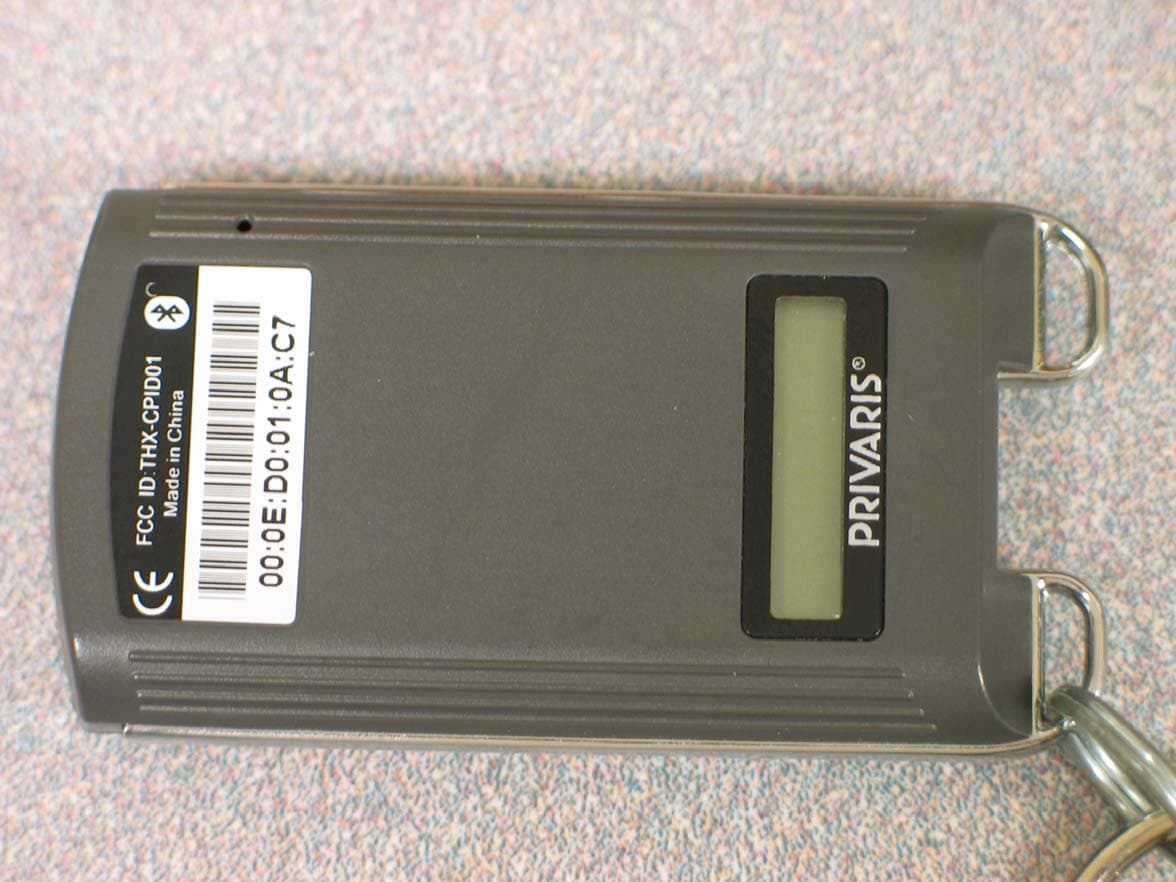
Click to zoom
Application Details
- Equipment Class
- DTS - Digital Transmission System
- Date of Grant
- Feb 07, 2008
- Application Purpose
- Original Equipment
- Date of Application
- Feb 06, 2008
- Equipment Note
- Bluetooth Security Biometric Device
- Frequency Range
- 2402.00000000 - 2480.00000000
- Company
- Privaris Inc.
- Country
- United States
Documents & Files
Document Text
Text extracted from the exhibit documents filed with the FCC. Open a document above to read the original.
Users Manual
plusID Manager Operators Manual for use with plusID personal identity verification devices Version 1.2 December 2007 Privaris plusID Manager Operators Manual V1.1 Table of Contents Section I: GETTING STARTED...............................................................4 Introduction........................................................................... 4 What is a plusID Device?................................................................4 What is Enrollment?.................................................................... 4 System Components...................................................................... 4 How It Works........................................................................... 4 Securing plusID Devices................................................................. 5 The Administrator PIN & Device Registration.......................................... 5 Single Administrative Authority...................................................... 5 plusID Manager Installation............................................................. 6 Connecting a plusID Device.............................................................. 7 Starting the Application................................................................7 Section II: PLUSID MANAGER MENU OPTIONS................................................. 10 Application Settings.................................................................. 10 Default Device Settings................................................................11 Timout Settings..................................................................... 12 Security Settings................................................................... 13 User Logon Settings................................................................. 13 Sound Settings...................................................................... 14 Long Range Settings................................................................... 14 Keys................................................................................ 15 Transceivers........................................................................ 17 Reports............................................................................... 19 Section III: DEVICES MENU OPTIONS....................................................... 21 plusID Device Registration............................................................. 22 Overview............................................................................ 22 Device Registration................................................................... 23 Use of the Administrator PIN with Previously Registered Devices........................ 24 Incorrect PIN Entry................................................................. 24 Issuing More than One Device per User............................................... 25 Device Status......................................................................... 25 Enrollment............................................................................ 27 Enrollment Administrator Guidelines................................................. 27 Device User Guidelines.............................................................. 28 How to Swipe: Fingerprint Instructions............................................. 29 Enrollment Set-Up................................................................... 30 Enroll the First Thumb.............................................................. 30 1 11.08.07 Privaris plusID Manager Operators Manual V1.1 Enroll the Second Thumb............................................................. 32 Completing Device Issuance.......................................................... 32 Verification........................................................................ 33 Failed Enrollment................................................................... 33 Erasing a Finger/Enrollment......................................................... 34 Fingerprint Augmentation............................................................ 34 User Info............................................................................. 34 Credentials: Using the plusID for Physical Access..................................... 35 Overview............................................................................ 36 Loading Door Access Credentials onto a plusID....................................... 38 Loading Long Range Credentials onto a plusID........................................ 39 Loading a Stored Credential from the Database onto a plusID......................... 42 Loading a Recycled Credential onto a plusID......................................... 42 Loading a Credential from the File Tab onto a plusID................................ 43 Loading a Demo or Practice Credential onto a plusID................................. 43 Removing a Card Format.............................................................. 43 Credentials: Using the plusID for Windows® Computer Logon............................. 43 Settings.............................................................................. 44 Device Settings..................................................................... 44 Timeout Settings.............................................................. 45 Security Settings............................................................. 46 User Logon Settings........................................................... 46 Device Utilities.................................................................... 47 Extract Certificate File...................................................... 48 Extract Device Log............................................................ 48 Device Firmware............................................................... 48 Device Reset........................................................................ 50 PINs.................................................................................. 51 Changing the Admi…
Text truncated - open the document above for the full version.
Block Diagram
Secure CPU (BCM5890KFBG) Bluetooth Radio (BCM2045) Finger Print Sensor (AES2510) 32.768KHz Oscillator 12.000KHz Oscillator Power Management Unit (BCM59001) 32.768KHz Oscillator 26.000MHz Oscillator Privaris, Inc. 650 Peter Jefferson Parkway Suite 330 Charlottesville, VA 22911 Jan. 16, 2008 Antenna
Cover Letter(s)
Privaris, Inc. 650 Peter Jefferson Parkway Suite 330 Charlottesville, VA 22911 tel: 434.293.4033 www.privaris.com Security with personal privacy Date: 01/15/07 Federal Communications Commission Authorization & Evaluation Division 7345 Oakland Mills Road Columbia, Maryland 21046 Gentlemen: This letter will authorize the appointment of M. FLOM ASSOCIATES, INC. to act as our Agent in all FCC matters. This appointment is affective until otherwise notified by us. This is to advise that we are in full compliance with the Anti-Drug Abuse Act. The Applicant is not subject to a denial of federal benefits pursuant to Section 5301 of the Anti-Drug Abuse Act of 1988, 21 USC 862, and no party to the application is subject to a denial of federal benefits pursuant to that section. Privaris, Inc. Michael Cherniawski V.P. of Engineering
Cover Letter(s)
01/22/07 Federal Communications Commission, EQUIPMENT APPROVAL SERVICES, P. O. Box 358315 Pittsburgh, PA 15251-5315 ATTN: Authorization & Evaluation Division PER: 47 CFR 0.457 and 0.459 RE: FCC 1D: THX-BLT03 Pursuant to Sections 0.457(d)(1)(ii) and 0.459 of the Commission's Rules, the Applicant hereby requests confidential treatment of some of the information accompanying this Application as listed below, i.e. We have requested that the schematic diagrams and the bill of materials required to be submitted with this application be withheld from public review. These materials contain trade secrets and proprietary information not customarily released to the public and the public disclosure of these matters might be harmful to the Applicant and provide unjustified benefits to its competitors. The Applicant understands that pursuant to Rule 0.457(d)(1)(ii) disclosure ofthis Application and all accompanying documentation will not be made before the date of the Grant for this Application. Sincerely, Privaris, Inc. Michael Cherniawski VP. ofEngineering
External Photos
90 External Photo (top) May 18, 2007 Mini-USB Port 90 External Photo (bottom) May 18, 2007
Internal Photos
90 Internal Photo (top) May 18, 2007 90 Internal Photo (bottom) May 18, 2007 90 Internal Stack-Up May 18, 2007
Operational Description
Operational Description Privaris, Inc. The plusID 75, Equipment Under Test (EUT), is a personal handheld biometric security device. A fingerprint sensor is used to capture the user’s finger print which is stored in encrypted, on-board memory for later use. Once programmed, the fingerprint sensor is used to take an image which is checked for a match with the stored image in memory. On a successful match, an RF connection is established with a host machine and credentials are sent. The RF transmissions (class B) are sent via a Broadcom 2045 BT radio and antenna system with the software utilizing a Teleca BT stack. The plusID 75 Security Device has three functions: enrollment, verification, and transmission. Enrollment Enrollment is the device activation and issuance process and generally occurs only once. It is what assigns or “marries” the device to its user. During enrollment, numeric representations of the unique features of a fingerprint (i.e. the ridges, valleys and whorls) are encoded and securely stored on the device. The actual fingerprint is not stored on the device. The fingerprint features are encoded and securely stored so that the device will function only for its authorized user. Also during enrollment, the user’s credentials (e.g. a facility entrance code, a password, or personal identity document) are encrypted and transferred to the plusID 90 via a USB connection. Verification After the initial enrollment process, each time a finger is swiped over the finger print sensor on the plusID 90, the device will attempt to match that print’s features to an originally enrolled fingerprint. This is the verification, or matching, process. A match is indicated by a green light and means that the user has been verified as the authorized owner of the device. If a user attempts to verify a non-enrolled finger, a match will not be found and access to the specified resource will not be granted. Failed verification attempts are indicated by a red light. Transmission Upon verification, which is the matching of a live finger to the template of an enrolled finger, the plusID 75 wirelessly transmits the user’s credentials that were stored during enrollment (e.g. a facility entrance code, a password, or personal identity documents). The transmission is verification of the user’s identity. The credentials are transferred typically as an encrypted data stream, depending on the application. Only the authorized user’s finger can trigger the release of their credentials, and only the user’s credentials are transferred - the stored fingerprint is never transferred and never released from the device. The plusID 75 Security Device can store and transmit any number of user credentials including digital certificates. It supports both bluetooth and passive RFID wireless communication protocols for data transmission.
RF Exposure Info
Date: January 31, 2008 Applicant: Privaris, Inc. 11208 Waples Mill Road, Suite 103 Fairfax, VA 22030 Attention of: Michael Cherniawski 434-244-4207; fax: 434-293-4033 E-mail: [email protected] Equipment: plusID 75 FCC ID: THX-CPID03 FCC Rules: Radio Frequency Radiation Exposure Limits 47 CFR 1.1307 RF Exposure Statement 1. Standard Applicable According to 1.1307 (b)(1), systems operating under the provisions of this section shall be operated in a manner that ensure that the public is not exposed to radio frequency energy level in excess of the Commission’s guideline. This is a portable device. 2. Measurement Result: This is a portable device and the max peak output power is –10.6 dBm (0.000087 W). Lower than the low threshold 60/f GHz = (24.99 mW), d<2.5 cm general population category. The SAR/MPE measurement is not necessary. Flom Test Labs 3356 N. San Marcos Place, Suite 107 Chandler, Arizona 85225-7176 p07c0001 (866) 311-3268 phone, (480) 926-3598 fax
Test Report
Flom Test Labs 3356 N. San Marcos Place, Suite 107 Chandler, Arizona 85225-7176 p07c0001, d0810003 (866) 311-3268 phone, (480) 926-3598 fax Date: January 8, 2008 Federal Communications Commission Via: Electronic Filing Attention: Authorization & Evaluation Division Applicant: Privaris, Inc. Equipment: plusID 75 FCC ID: THX-CPID03 FCC Rules: 15.247 Gentlemen: On behalf of the Applicant, enclosed please find Application Form 731, Engineering Test Report and all pertinent documentation, the whole for approval of the referenced equipment as shown. We trust the same is in order. Should you need any further information, kindly contact the writer who is authorized to act as agent. Sincerely yours, Hoosamuddin S. Bandukwala, Lab Director Flom Test Labs 3356 N. San Marcos Place, Suite 107 Chandler, Arizona 85225-7176 p07c0001, d0810003 (866) 311-3268 phone, (480) 926-3598 fax List Of Exhibits (FCC Certification (Transmitters) - Revised 9/28/98) Applicant: Privaris, Inc. FCC ID: THX-CPID03 By Applicant: 1. Letter Of Authorization 2. Identification Drawings Id Label Location Info Attestation Statement(S) Location of Compliance Statement 3. Documentation: 2.1033(B) (3) User Manual(S) (4) Operational Description (5) Block Diagram (5) Schematic Diagram (7) External Photographs Internal Photographs Parts List Active Devices By F.T.L. Inc. A. Testimonial & Statement of Certification B. Statement of Qualifications Flom Test Labs 3356 N. San Marcos Place, Suite 107 Chandler, Arizona 85225-7176 p07c0001, d0810003 (866) 311-3268 phone, (480) 926-3598 fax Transmitter Certification of FCC ID: THX-CPID03 Model: plusID 75 to Federal Communications Commission Rule Part(s) 15.247 Date Of Report: January 8, 2008 On the Behalf of the Applicant: Privaris, Inc. 11208 Waples Mill Road, Suite 103 Fairfax, VA 22030 Attention of: Michael Cherniawski 434-244-4207; fax: 434-293-4033 E-mail: [email protected] Supervised By: Hoosamuddin S. Bandukwala, Lab Director Flom Test Labs 3356 N. San Marcos Place, Suite 107 Chandler, Arizona 85225-7176 p07c0001, d0810003 (866) 311-3268 phone, (480) 926-3598 fax The applicant has been cautioned as to the following: 15.21 Information to User. The users manual or instruction manual for an intentional radiator shall caution the user that changes or modifications not expressly approved by the party responsible for compliance could void the user's authority to operate the equipment. 15.27(a) Special Accessories. Equipment marketed to a consumer must be capable of complying with the necessary regulations in the configuration in which the equipment is marketed. Where special accessories, such as shielded cables and/or special connectors are required to enable an unintentional or intentional radiator to comply with the emission limits in this part, the equipment must be marketed with, i.e. shipped and sold with, those special accessories. However, in lieu of shipping or packaging the special accessories with the unintentional or intentional radiator, the responsible party may employ other methods of ensuring that the special accessories are provided to the consumer, without additional charge. Information detailing any alternative method used to supply the special accessories for a grant of equipment authorization or retained in the verification records, as appropriate. The party responsible for the equipment, as detailed in § 2.909 of this chapter, shall ensure that these special accessories are provided with the equipment. The instruction manual for such devices shall include appropriate instructions on the first page of text concerned with the installation of the device that these special accessories must be used with the device. It is the responsibility of the user to use the needed special accessories supplied with the equipment. Flom Test Labs 3356 N. San Marcos Place, Suite 107 Chandler, Arizona 85225-7176 p07c0001, d0810003 (866) 311-3268 phone, (480) 926-3598 fax Testimonial And Statement Of Certification This is to certify that: 1. That the application was prepared either by, or under the direct supervision of, the undersigned. 2. That the technical data supplied with the application was taken under my direction and supervision. 3. That the data was obtained on representative units, randomly selected. 4. That, to the best of my knowledge and belief, the facts set forth in the application and accompanying technical data are true and correct. Certifying Engineer: Hoosamuddin S. Bandukwala, Lab Director Flom Test Labs 3356 N. San Marcos Place, Suite 107 Chandler, Arizona 85225-7176 p07c0001, d0810003 (866) 311-3268 phone, (480) 926-3598 fax Table Of Contents Rule Description Page Test Report 1 2.1033(c) General Information Required 2 . Standard Test Conditions and Engineering Practices 4 Test Results Summary 5 15.247(b). Peak Output Power 6 15.247(d) Conducted Spurious Emissions 6 15.247(d), Radiated Spurious Emissions 11 15.247(d), . Emissions At Band Edges 12 15.247(a). Occupied Bandwidth 16 15.247(a). Dwell Time 19 15.247(a). Number of Hopping Channels 20 15.207. A/C Powerline Conducted Emissions 21 . Test Equipment Utilized 22 Flom Test Labs 3356 N. San Marcos Place, Suite 107 Chandler, Arizona 85225-7176 p07c0001, d0810003 (866) 311-3268 phone, (480) 926-3598 fax Page 1 of 22 Required information per ISO 17025-2005, paragraph 5.10.2: a) Test Report b) Laboratory: (FCC: 31040/SIT) (Canada: IC 2044A-1) Flom Test Lab, Inc. 3356 N. San Marcos Place, Suite 107 Chandler, AZ 85225 c) Report Number: d0810003 d) Client: Privaris, Inc. e) Identification: plusID 75 Description: bluetooth security biometric device f) EUT Condition: Not required unless specified in individual tests. g) Report Date: January 8, 2008 EUT Received: h, j, k): As indicated in individual tests. i) Sampling method: No sampling procedure used. l) Uncertainty: In accordance with FTL internal quality manual. m) Supervised by: Hoosamuddin S. Bandukwala, Lab Director n) Results: The results presented in this report r…
Text truncated - open the document above for the full version.
Contact Information
Applicant
Larry Yost(Director, Product Development)
Technical Contact
Flom Test LabHoosamuddin Bandukwala
[email protected]480-926-3100
3356 S. San Marcos Pl. · Chandler, Arizona · United States
Test Firm
Compliance Testing, LLCMichael Schafer
Technical Specifications
| # | Rule Parts | Frequency Range | Power Output |
|---|---|---|---|
| 1 | 15C | 2.40 GHz - 2.48 GHz | 80.00 µW |
Other Applications from Privaris Inc.
THX-CPID01
Jul 31, 2007Fingerprint Sensor
Equipment Class
DTS - Digital Transmission System
THX-LFBT1-01
Nov 06, 2005A personal handheld biometric security device
Equipment Class
DSS - Part 15 Spread Spectrum Transmitter