UJA0001ASound Rocker Transmitter
Pyramat LLC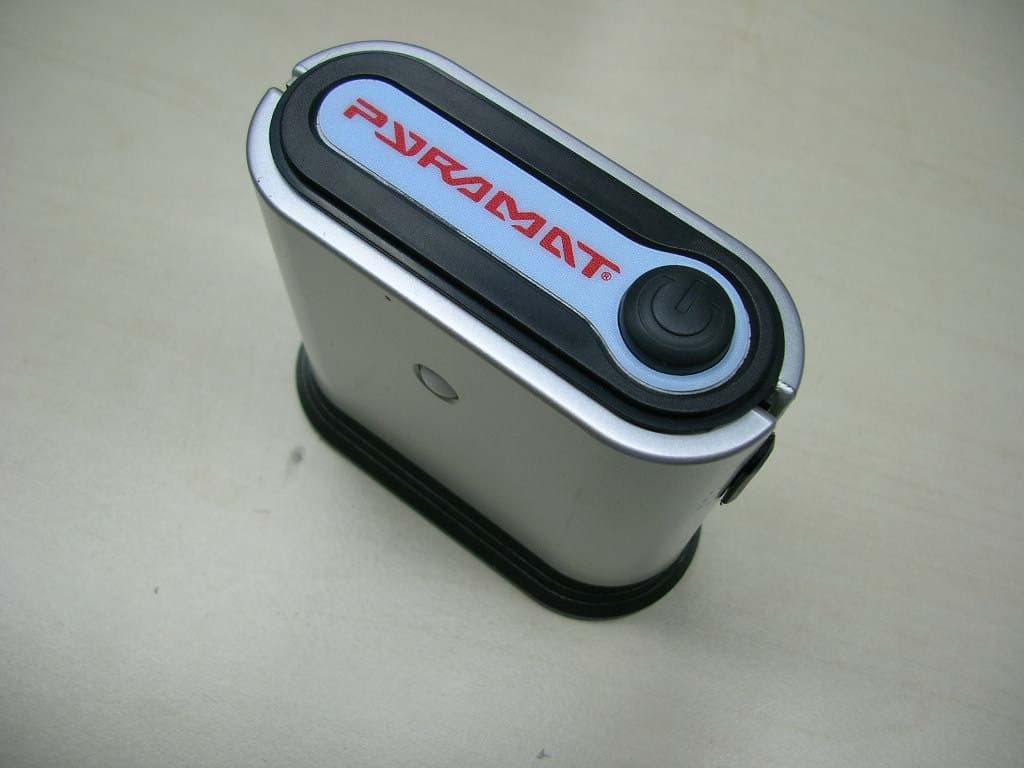
Click to zoom
Application Details
- Equipment Class
- DXX - Part 15 Low Power Communication Device Transmitter
- Date of Grant
- Apr 26, 2007
- Application Purpose
- Original Equipment
- Date of Application
- Apr 26, 2007
- Equipment Note
- Sound Rocker Transmitter
- Frequency Range
- 88.10000000 - 88.70000000
- Company
- Pyramat LLC
- Country
- United States
Documents & Files
Document Text
Text extracted from the exhibit documents filed with the FCC. Open a document above to read the original.
Users Manual
OWNER’S MANUAL Read and understand this entire manual before using! For assistance contact Pyramat. DO NOT RETURN TO STORE. Item Number: 10174502 S2500-W WIRELESS SOUND ROCKER WARNING: The Pyramat Sound Rocker is intended for indoor use only. TO REDUCE THE RISK OF FIRE OR SHOCK HAZARD, DO NOT EXPOSE THIS PRODUCT TO RAIN OR MOISTURE. • Do not expose to direct sunlight or extreme temperatures. • Adult supervision is required for set-up. • Use only with the supplied power adapter. The power adapter is not a toy. • Do not mix old and new batteries. Do not mix alkaline, standard (carbon-zinc), or rechargeable (nickel-cadmium) batteries. • Excessive use of audio equipment at high volume may lead to hearing loss. Listen responsibly and use common sense. • Children under 13 should not use this product without parental supervision. • DO NOT wash or soak the Sound Rocker with water. If cover becomes wet, disconnect power immediately and don’t use until totally dry. • To avoid injury or death from electrical shock, NEVER open the electrical cabinet or remove the cover. The Sound Rocker is compatible with: • All gaming consoles (including Xbox 360 and Playstation 3) • MP3 players • TVs, DVDs, VCRs • Portable gaming devices (including Nintendo DS, Nintendo DS Lite, and PSP) SAFETY WARNINGS Safety Warnings ............................................................1 Before You Begin ...........................................................2 Features .........................................................................2 Set-Up ............................................................................3 Wireless Connection Methods ......................................4 Wireless Transmitter Set-up ..........................................5 Direct Connection Methods .......................................6-7 Troubleshooting Guide ...................................................8 Warranty ........................................................................9 1 Need Help?Visit our website atwww.pyramat.com, send an e-mail to [email protected] or call toll-free at 877-591-1012. CONTENTS Congratulations on the purchase of your Pyramat S2500-W Wireless Sound Rocker. The Sound Rocker is a comfortable, rockable chair that delivers a powerful audio experience designed to intensify your enjoyment of games, movies, music and more. To ensure the best results, please read this manual completely before operating your Sound Rocker, and retain it for future reference. 1 2 3 Remove the foam separators from the Sound Rocker and take unit out of box. Check to make sure you have all the parts shown below and that all items are in good condition. BEFORE YOU BEGIN 2 11 ft. red and white RCA audio cable 11 ft. 12-volt AC power adapter (2) RCA audio cable extenders FEATURES S OU N D FU R N IT U RE Control panel Volume/power knob Twist to click on and power up and adjust the volume level. Bass knob Twist to adjust the bass to your preference. MP3 pocket Illuminating speakers Source knob Select IN for direct connections to the control panel. Select W for wireless transmission. W for wireless transmission. W Select MP3 for MP3 and portable CD player connections to the MP3 and portable CD player plug. Multi-player RCA audio output ports Connect up to four Sound Rockers together for multi-user fun. Input RCA audio ports Connect red and white RCA audio cable here from game consoles, home theater, satellite receiver and stereo receiver. Headphone port Connect headphones here. Channel selector button Select the same channel as the transmitter by pressing the channel selector button. Power AC port Connect supplied 12-volt power adapter here. CAUTION:Keep fi ngers clear of the folding seam when opening the unit. Note: Replacement cables and mini adapters can be purchased at your local audio accessory dealer. MP3 and portable CD player plug RCA to mini audio cable Wireless transmitter SET-UP 1Unfold the top portion of the Sound Rocker until the backrest is fl ush with the seat portion. 2Place the Sound Rocker so that the control panel is less than 11 ft./3.5 meters from the power source. 3Connect the 12-volt AC power adapter to the electrical outlet and then to the power AC port on the control panel. 4Twist the volume knob on the control panel to click on the power. 5Check the speakers on top to see if the Pyramat logo is lit up. Twist volume knob to power off the Sound Rocker, then proceed to the connection method shown below for your audio/video device. 11 FE E T OR LESS 3 CAUTION:Keep fi ngers clear of the folding seam when folding or unfolding the rocker. WIRELESS CONNECTION METHODS Video Game Console Connection XBOX 360 TM , PLAYSTATION 2 TM , PLAYSTATION 3 TM , GAMECUBE TM ANDOTHERS There are four types of audio/video cables that come with video game consoles: 1. 1.Standard AV/RCA Cable 2. S-Video AV/RCA Cable (red, white–audio; yellow–video) (red, white–audio; yellow, black–S-video) 3. 3. High Defi nition AV/RCA Cable 4.Coaxial Connection ( (red, white–audio; yellow, blue, red, green–video) ) ) ) ) ) Audio/Video Device Connection TV, DVD PLAYER, VCR, SATELLITE RECEIVER, STEREO 1 RCA Audio Cable Connection For standard AV/RCA Cable, S-Video AV/RCA Cable and High Defi nition AV/RCA Cable Connect the supplied RCA to mini audio cable to the red and white audio cable from the video game console. Follow the instructions from the video game console’s manufacturer to connect the yellow video cable to your television. OR 1Coaxial Cable Connection If your video game console has a coaxial cable instead of an RCA audio cable, then use the instructions provided by the video game console’s manufacturer to hook up the video game console through an intermediary device (such as a TV, DVD, VCR, satellite receiver, etc.). Your intermediary device must have both a coaxial input jack (the standard jack for cable TV) and an RCA audio output jack, or you can purchase an RCA replacement cable directly from the console manu- facturer. The…
Text truncated - open the document above for the full version.
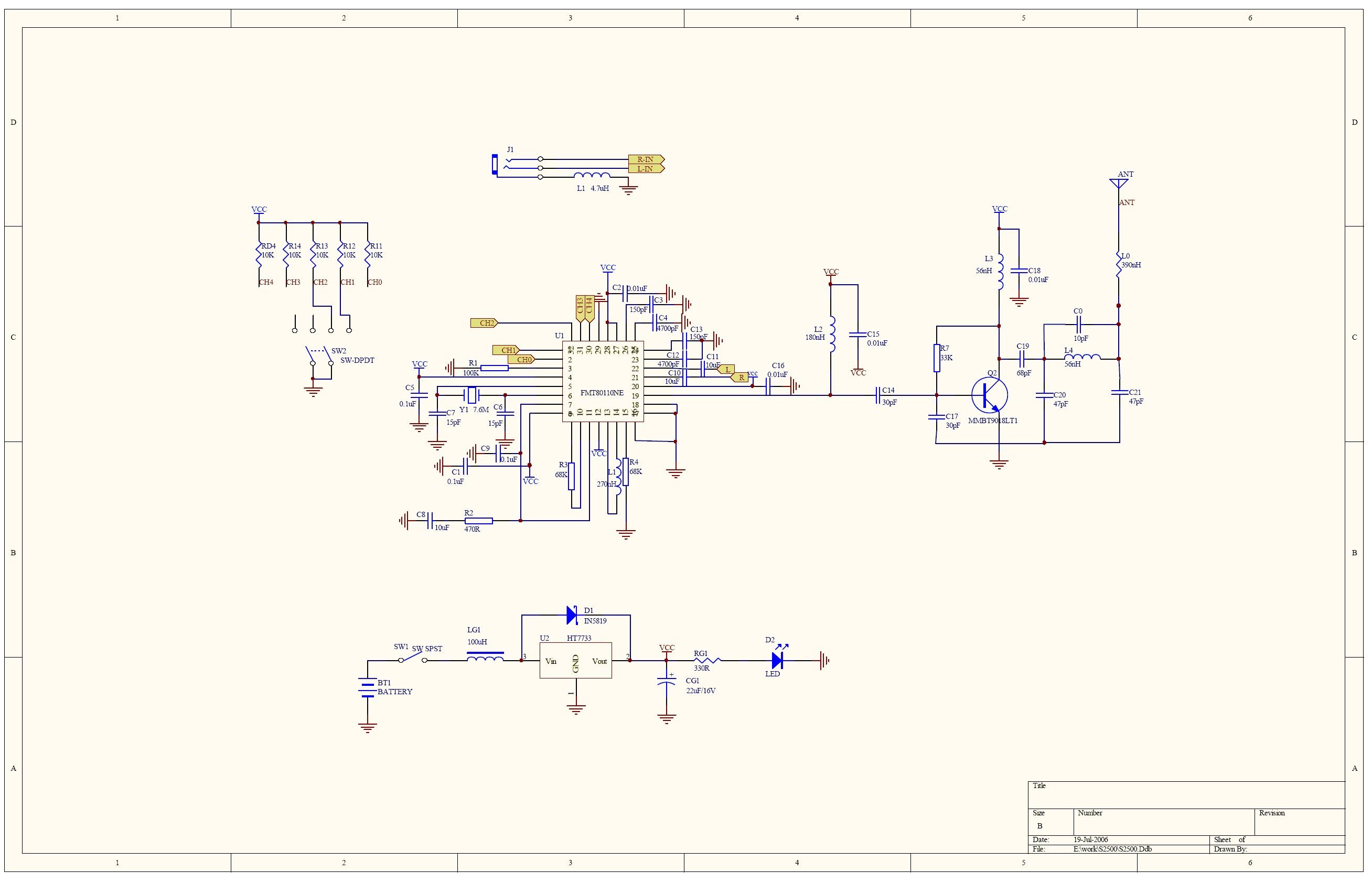
Block Diagram
S2500 BLOCK.sch-1 - Sat Oct 07 12:08:00 2006 PDF created with pdfFactory Pro trial version www.pdffactory.com
Cover Letter(s)
Inquiry: New Application Grantee: Pyramat LLC FCC ID: UJA0001A EUT Description: Sound Rocker Transmitter Equipment Class: DXX Rule part: 15.239 1) How does the device operate? This is powered through AC adopter. And it is mostly operated indoors. 2) Provide information about the device and its antenna The device is Sound Rocker with FM transmitter and is designed to work all gaming consoles, MP3 Players, TVs, DVDs, VCRs and all portable gaming devices. The antenna is internal to the Transmitter module. 3) How it is installed? Step1. Connect Sound rocker to power and turn on Volume. Step2. Connect Transmitter to the Audio/Video device. Turn Power Switch on Transmitter. Select Transmit channel 1, 2 or 3. Step3. Select same channel on receiver. Step4. Turn source knob on Receiver control panel to W. 4) What test Procedure was used? ANSI C3.4 5) If tested in car, how it was configured /tested? It was tested in car; it was tested in open area test site and chamber 6) Was the tuning range properly verified? Yes, the device has three fixed channels lowest 88.1 MHz, mid 88.5, 88.7 MHz highest channel. 7) Was the bandwidth properly verified for maximum audio input? Yes, EUT has audio input port; White noise source was connected audio input port. In order to get maximum bandwidth level of modulation signal (White Noise) was adjusted. 8) Provide test report. Test report is attached Please advise if it is OK to file 731 form Thank you, Suresh Kondapalli, Intertek Testing Services
External Photos
FCC ID:UJA0001A Page 1 of 4 External Picture FCC ID:UJA0001A Page 2 of 4 FCC ID:UJA0001A Page 3 of 4 FCC ID:UJA0001A Page 4 of 4
ID Label/Location Info
FCC ID: UJA0001A Page 1 of 2 FCC ID Label FCC ID: UJA0001A Page 2 of 2
Internal Photos
FCC ID: UJA0001A Page 1 of 3 Internal Picture FCC ID: UJA0001A Page 2 of 3 FCC ID: UJA0001A Page 3 of 3
Operational Description
S2500 Transmitter Circuit Description 1、Power Supply:2*AA BATTERIES is the power supply of this transmitter. 2、FM Modulation IC:FMT80110FN, The FM modulation IC FMT80110FN can finish modulating the audio signal to the FM carriers with 88.1MHz,88.5MHz, 88.7MHz,and the IC can putout a perfect stereo audio. It’s content include the Pre-emphasis, MPX, Stereo Audio Band Passed Filters, Audio divider. 3、PLL: The PLL was included in the RF IC, and it used few electronic parts except a exactitude inductance with 270nH,and it can supply a exactitude frequency of ± 5KHz 4、Crystal: The 7.6000MHz crystal can supply the basic timer norm of the whole system 5、The Amplifier:Q2. The amplifier at the end would be used to magnify the IC’s output RF signal, and the parts about the amplifier will act the BPF, they can let the band of the FM’s frequency passed. 6、ANTENNA:A FM antenna is used to transmit FM carrier signal.
Operational Description
S2500 Transmitter Circuit Description 1、Power Supply:2*AA BATTERIES is the power supply of this transmitter. 2、FM Modulation IC:FMT80110FN, The FM modulation IC FMT80110FN can finish modulating the audio signal to the FM carriers with 88.1MHz,88.5MHz, 88.7MHz,and the IC can putout a perfect stereo audio. It’s content include the Pre-emphasis, MPX, Stereo Audio Band Passed Filters, Audio divider. 3、PLL: The PLL was included in the RF IC, and it used few electronic parts except a exactitude inductance with 270nH,and it can supply a exactitude frequency of ± 5KHz 4、Crystal: The 7.6000MHz crystal can supply the basic timer norm of the whole system 5、The Amplifier:Q2. The amplifier at the end would be used to magnify the IC’s output RF signal, and the parts about the amplifier will act the BPF, they can let the band of the FM’s frequency passed. 6、ANTENNA:A FM antenna is used to transmit FM carrier signal.
Parts List/Tune Up Info
NOMaterial's nameSpecification Image No./Positio n No. UnitQuantity 1 PCB Board S2500TRANS V1.1 2006-08-16 half- PCS1 2ICFMT80110FNU1PCS1 3Slide Switch SK-13D03 height of the knob:3.5mm SW2PCS1 4Push Button SwitchPS-22E50SW1PCS1 5SP Connector SocketST-3531PJ1PCS1 6Crystal7.6000MHzY1PCS1 7LED Φ3,Red,Nomal light D2PCS1 8Paste Resistance10K R11 R12 R13 PCS3 9Paste Resistance68KR3 R4PCS2 10Paste Resistance470ΩR2PCS1 11Paste Resistance330ΩRG1PCS1 12Paste Resistance33KR7PCS1 13Paste Resistance100KR1PCS1 Paste Resistance5.6KR14,R15PCS1 14Paste Capacitance1μF C10 C11PCS2 Paste Capacitance10μFC8PCS1 15Paste Capacitance0.1μFC1 C5 C9PCS3 16Paste Capacitance0.01μF C2 C16 C18 C15 PCS4 17Paste Capacitance15PFC6 C7PCS2 18Paste Capacitance150PFC3 C13PCS2 19Paste Capacitance4700PFC4 C12PCS2 20Paste Capacitance30PFC14 C17PCS2 21Paste Capacitance47PFC20 C21PCS2 22Paste Capacitance68PFC19PCS1 23Paste Capacitance10PFC0PCS1 24 Electrolytic Capacitance 100μF/16V Φ6*12mmCG1PCS1 25 Paste Peristyle Inductance 270nHL1PCS1 26Paste Inductance180nHL2PCS1 27 Paste Peristyle Inductance 56nHL4PCS1 Paste Inductance56nHL3PCS1 28Paste AudionMMBT9018LT1 SOT-23Q1PCS1 29Paste Diode1N4148D1PCS1 S2500 PART LIST
Test Report
Test report no. JSH006070510-001 Page 1 of 14 EMC TEST REPORT No. JSH006070510-001 Applicant : Pyramat LLC 16200A Carmenita Road., Cerritos, CA90703-2213, U.S.A Manufacturer :Xiamen Comfort Science and Technology Co., Ltd. No. 18 Longshan South Road, Xiamen 361009, China Equipment : Sound Rocker Type/Model :S2500 Summary The test report is to certify that the tested equipment properly complies with the requirements of: FCC Rules and Regulations: 47CFR Part 15: Radio Frequency Devices: 2006 ANSIC63.4 (2003): American National Standard for Methods of Measurement of Radio-Noise Emissions from Low-Voltage Electrical and Electronic Equipment in the Range of 9 kHz to 40 GHz Description The appliances were tested by Intertek Testing Services Limited Shanghai and found compliance with relevant requirements described in FCC Part 15: Radio Frequency Devices. Test results are contained in this test report and Intertek Testing Services Limited Shanghai is assumed full responsibility for the accuracy and completeness of these measurements. The test report shall not be reproduced in part without written approval of Intertek Testing Services Limited Shanghai. Date of issue: November 30, 2006 Prepared by: Approved by: Daniel Zhao( Project engineer) Steve Li (Reviewer) Test report no. JSH006070510-001 Page 2 of 14 Description of Test Facility Name: Intertek Testing Services Limited Shanghai Address: Building No.86, 1198 Qinzhou Road(North), Shanghai 200233, P.R. China FCC Registration Number: 236597 Name of contact: Steve Li Tel: +86 21 64956565 ext. 214 Fax: +86 21 54262335 ext. 214 Test report no. JSH006070510-001 Page 3 of 14 Content S UMMARY ............................................................................................................................................ 1 DESCRIPTION................................................................................................................................... 1 D ESCRIPTION OF T EST F ACILITY................................................................................ 2 C ONTENT............................................................................................................................................. 3 1.APPLICANT INFORMATION......................................................................................................................... 4 2.INFORMATION OF EQUIPMENT UNDER TEST (EUT) ................................................................................. 4 2.1 Identification of the EUT ............................................................................................................ 4 2.2 Technical specification ................................................................................................................ 4 2.3 Mode of operation during the test / Test peripherals used ................................................. 4 2.4 Related Grant and test Standard ................................................................................................ 5 2.5 Instrument list ................................................................................................................................. 5 3. TEST SUMMARY......................................................................................................................................... 7 4. CONDUCTED EMISSIONS TEST (NOT APPLICABLE IN THIS REPORT)........................................................ 8 4.1 Limits ................................................................................................................................................ 8 4.2 Test Procedure: ...............................................................................................................................8 4.3 Test SET-UP (Block Diagram of Configuration) ................................................................ 8 4.4 Test Result: ...................................................................................................................................... 8 5. RADIATED EMISSION TEST........................................................................................................................ 9 5.1 Limits ................................................................................................................................................ 9 5.2 Test Procedure: ...............................................................................................................................9 5.3 Test SET-UP (Block Diagram of Configuration) ...............................................................10 5.4 Test result. ......................................................................................................................................11 6. EMISSION BANDWIDTH.............................................................................................................................12 6.1 Limits ...............................................................................................................................................12 6.2 Test Procedure ...............................................................................................................................12 6.3 Test Configuration ........................................................................................................................12 6.4 Test Results ....................................................................................................................................12 7. DUTY CYCLE MEASUREMENT..............................................................ERROR! BOOKMARK NOT DEFINED. 7.1 Measurement Procedure .............................................................Error! Bookmark not defined. 7.2 Test SET-UP (Block Diagram of Configuration) ...............Error! Bookmark not defined. 7.3 Test results ......................................................................................Error! Bookmark not defined. Test report no. JSH006070510-001 Page 4 of 14…
Text truncated - open the document above for the full version.
Test Report
FCC ID: UJA0001A Page 1 of 4 Test Data FCC ID: UJA0001A Page 2 of 4 1. Radiation emission Antenna Polarization: Horizontal; EUT: X orientation 0 10 20 30 40 50 60 70 80 Level [dB /m] 礦 30M50M70M100M200M300M500M700M1G Frequency [Hz] x x x x x x x MES 06070510-6H_red MES 06070510-6H_pre LIM FCC 15 F 3 QP Field Strength QP FCC ID: UJA0001A Page 3 of 4 Antenna Polarization: Vertical; EUT: X orientation 0 10 20 30 40 50 60 70 80 Level [dB /m] 礦 30M50M70M100M200M300M500M700M1G Frequency [Hz] x x x x x MES 06070510-6V_red MES 06070510-6V_pre LIM FCC15F3QPField Strength QP FCC ID: UJA0001A Page 4 of 4 2. Emission bandwidth
Test Setup Photos
FCC ID: UJA0001A Page 1 of 3 Test Setup FCC ID: UJA0001A Page 2 of 3 1. Radiation emission Antenna polarization: Horizontal FCC ID: UJA0001A Page 3 of 3 Antenna polarization: Vertical
Contact Information
Applicant
Mike Hsia
Technical Contact
IntertekDaniel Zhao
[email protected]86-21-64956565
Building 86, 1198 Qinzhou Road ( North) · Shanghai · China
Test Firm
Intertek Testing Services Limited ShanghaiJonny Jing
Technical Specifications
| # | Rule Parts | Frequency Range | Power Output |
|---|---|---|---|
| 1 | 15C | 88.1 MHz - 88.7 MHz | - |
Other Applications from Pyramat LLC
UJA0001B
Nov 01, 2007FM Transmitter
Equipment Class
DXX - Part 15 Low Power Communication Device Transmitter
UJA0002B
Oct 02, 2007Spread Spectrum Transmitter
Equipment Class
DSS - Part 15 Spread Spectrum Transmitter