UZ7EC500KEnterprise Computer
Zebra Technologies Corporation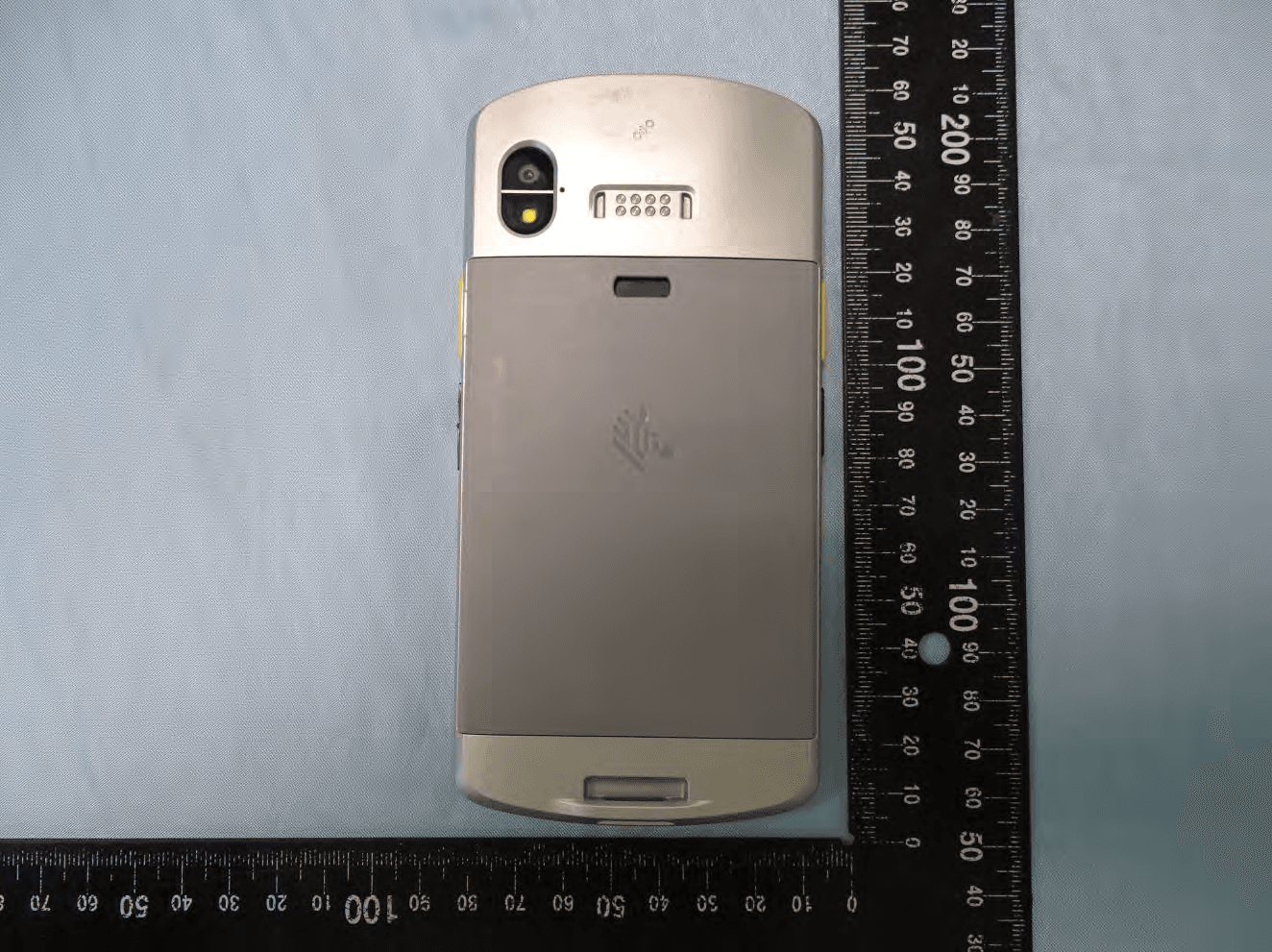
Click to zoom
Application Details
- Equipment Class
- DSS - Part 15 Spread Spectrum Transmitter
- Date of Grant
- Sep 21, 2020
- Application Purpose
- Original Equipment
- Date of Application
- Sep 16, 2020
- Equipment Note
- Enterprise Computer
- Frequency Range
- 2402.00000000 - 2480.00000000
- Country
- United States
Documents & Files
Document Text
Text extracted from the exhibit documents filed with the FCC. Open a document above to read the original.
Users Manual
EC50 Enterprise Computer P1234567-001 Quick Start Guide REVIEW ONLY8/7/20 2 ZEBRA and the stylized Zebra head are trademarks of Zebra Technologies Corporation, registered in many jurisdictions worldwide. All other trademarks are the property of their respective owners. © 2020 Zebra Technologies Corporation and/or its affiliates. All rights reserved. Information in this document is subject to change without notice. The software described in this document is furnished under a license agreement or nondisclosure agreement. The software may be used or copied only in accordance with the terms of those agreements. For further information regarding legal and proprietary statements, please go to: SOFTWARE: http://www.zebra.com/linkoslegal COPYRIGHTS: http://www.zebra.com/copyright WARRANTY: http://www.zebra.com/warranty END USER LICENSE AGREEMENT: http://www.zebra.com/eula Terms of Use Proprietary Statement This manual contains proprietary information of Zebra Technologies Corporation and its subsidiaries (“Zebra Technologies”). It is intended solely for the information and use of parties operating and maintaining the equipment described herein. Such proprietary information may not be used, reproduced, or disclosed to any other parties for any other purpose without the express, written permission of Zebra Technologies. Product Improvements Continuous improvement of products is a policy of Zebra Technologies. All specifications and designs are subject to change without notice. Liability Disclaimer Zebra Technologies takes steps to ensure that its published Engineering specifications and manuals are correct; however, errors do occur. Zebra Technologies reserves the right to correct any such errors and disclaims liability resulting therefrom. Limitation of Liability In no event shall Zebra Technologies or anyone else involved in the creation, production, or delivery of the accompanying product (including hardware and software) be liable for any damages whatsoever (including, without limitation, consequential damages including loss of business profits, business interruption, or loss of business information) arising out of the use of, the results of use of, or inability to use such product, even if Zebra Technologies has been advised of the possibility of such damages. Some jurisdictions do not allow the exclusion or limitation of incidental or consequential damages, so the above limitation or exclusion may not apply to you. Publication Date August 7, 2020 REVIEW ONLY 8/7/20 EC50 Enterprise Computer Quick Start Guide 10 Unpacking To unpack the device: 1.Carefully remove all protective material from the device and save the shipping container for later storage and shipping. 2.Verify that the following items were received: •Touch computer •Regulatory Guide. 3.Inspect the equipment for damage. If any equipment is missing or damaged, contact Customer Support center immediately. See Service Information. 4.Prior to using the device for the first time, remove the protective shipping film that covers the exit window, touch screen, and rear camera. Device Features Figure 1 Front View ItemNameDescription 1Touch ScreenDisplays all information needed to operate the device. 2Front CameraTakes photos and videos (available on some models). 3ReceiverUse for audio playback in Handset mode. 4MicrophoneUse for communications in Speakerphone mode. 5Exit WindowProvides data capture using the imager. 6Power ButtonTurns the display on and off. Press and hold to reset the device or power off. 7Proximity/Light Sensor Determines proximity for turning off display when in Handset mode. Determines ambient light for controlling display backlight intensity. 8Data Capture LEDIndicates data capture status. 1 2 4 3 5 6 7 9 10 11 8 REVIEW ONLY 8/7/20 EC50 Enterprise Computer Quick Start Guide 11 Figure 2 Rear View 9Charging/Notification LED Indicates battery charging status while charging and application generated notifications. 10Scan ButtonInitiates data capture (programmable). 11Volume Up/Down Button Increase and decrease audio volume (programmable). ItemNameDescription 12Camera FlashProvides illumination for the camera. 13Rear CameraTakes photos and videos. 14NFC AntennaProvides communication with other NFC-enabled devices. 15SIM/SD Card DrawerProvides access to SD card and SIM card. 16Scan ButtonInitiates data capture (programmable). 17PTT ButtonInitiates push-to-talk communications (programmable). 18MicrophoneUse for communications in Handset mode. 19Hand Strap MountProvides mounting point for Hand Strap accessory. 20USB-C ConnectorProvides USB host and client communications, and device charging via cables and accessories. 21SpeakerProvides audio output for video and music playback. Provides audio in speakerphone mode. ItemNameDescription 12 13 14 15 16 17 18 19 20 21 REVIEW ONLY 8/7/20 EC50 Enterprise Computer Quick Start Guide 12 Setting Up the Device To start using the device for the first time: 1.Install a micro secure digital (SD) card (optional). 2.Installing a nano SIM card (optional) 3.Charge the device. 4.Power on the device. Installing or Replacing a microSD Card The microSD card slot provides secondary non-volatile storage. For more information, refer to the documentation provided with the card and follow the manufacturer’s recommendations for use. CAUTION: Follow proper electrostatic discharge (ESD) precautions to avoid damaging the microSD card. Proper ESD precautions include, but are not limited to, working on an ESD mat and ensuring that the operator is properly grounded. 1.Pull out the microSD/SIM card access drawer. 2.Insert the microSD card into the access drawer. REVIEW ONLY 8/7/20 EC50 Enterprise Computer Quick Start Guide 13 3. Insert the microSD/SIM card access drawer into the device. Device Charging Before using the device for the first time, charge the device until the green Charging/Notification light emitting diode (LED) remains lit. To charge the device use a cable or a cradle with the appropriate power …
Text truncated - open the document above for the full version.
Users Manual
ZEBRA and the stylized Zebra head are trademarks of Zebra Technologies Corp., registered in many jurisdictions worldwide. All other trademarks are the property of their respective owners. © 2020 Zebra Technologies Corp. and/or its affiliates. All rights reserved. | www.zebra.com partnumber-xxEN Rev. A EC500K Regulatory Guide Regulatory Information This device is approved under Zebra Technologies Corporation. This guide applies to the following model number: EC500K All Zebra devices are designed to be compliant with the rules and regulations in the locations they are sold and will be labeled as required. Local language translation / Tradução do idioma local / Übersetzung in die lokale Sprache / Raduccion de idioma local / Traduction en langue locale / Prijevod na lokalni jezik / Traduzione in lingua locale / 現地語 の翻訳 / 현지 언어 번역 / Перевод на местный язык / 本地語言翻譯 / 本地语言翻译 / Yerel dil çeviri /Tłumaczenie na język lokalny : www.zebra.com/support Any changes or modifications to Zebra equipment not expressly approved by Zebra could void the user’s authority to operate the equipment. Declared maximum operating temperature: 50°C Bluetooth ® Wireless Technology This is an approved Bluetooth ® product. For more information on the Bluetooth SIG listing, please visit www.bluetooth.com. 不在中国之外销售服务和使用 Regulatory Markings Regulatory markings subject to certification are applied to the device signifying the radio(s) is/are approved for use. Refer to the Declaration of Conformity (DoC) for details of other country markings. The DOC is available at: www.zebra.com/doc. The regulatory marks specific to this device (including FCC and ISED) are available on the screen of the device by following these instructions: Go to Settings > Regulatory. Health and Safety Recommendations Ergonomic Recommendations In order to avoid or minimize the potential risk of ergonomic injury, always follow good ergonomic workplace practices. Consult with your local Health and Safety Manager to ensure that you are adhering to your company’s safety programs to prevent employee injury. Vehicle Installation RF signals may affect improperly installed or inadequately shielded electronic systems in motor vehicles (including safety systems). Check with the manufacturer or its representative regarding your vehicle. Ensure the equipment is installed to avoid driver distractions. You should also consult the manufacturer about any equipment that has been added to your vehicle. Position the device within easy reach. User should be able to access the device without removing their eyes from the road. REVIEW ONLY 8/31/20 EC500K Regulatory Guide 2 IMPORTANT: Before installing or using, check national and local laws regarding distracted driving. Safety on the Road Give your full attention to driving. Obey the laws and regulations on the use of wireless devices in the areas where you drive. The wireless industry reminds you to use your device / phone safely when driving. Restricted Use Locations Remember to observe restrictions and obey all signs and instructions on the use of electronic devices in restricted use locations. Safety in Hospitals and Aircraft NOTE: Wireless devices transmit radio frequency energy that may affect medical electrical equipment and aircraft’s operation. Wireless devices should be switched off wherever you are requested to do so in hospitals, clinics, healthcare facilities or by airline staff. These requests are designed to prevent possible interference with sensitive equipments. RF Exposure Guidelines Safety Information Reducing RF Exposure – Use Properly Only operate the device in accordance with the instructions supplied. The device complies with internationally recognized standards covering human exposure to electromagnetic fields. For information on international human exposure to electromagnetic fields, refer to the Zebra Declaration of Conformity (DoC) at www.zebra.com/doc. Use only Zebra tested and approved headset, belt-clips, holsters, and similar accessories to ensure RF exposure compliance. If applicable, follow the instructions for use as detailed in the accessory guide. The use of third-party belt clips, holsters, and similar accessories may not comply with RF exposure compliance requirements and should be avoided. For further information on the safety of RF energy from wireless devices, refer to RF exposure and assessment standards section at www.zebra.com/responsibility. Handheld or Body-Worn Devices To satisfy RF exposure requirements, this device must operate with a minimum separation distance of 1.5 cm or more from a user's body and nearby persons. LED Devices Classified as ‘EXEMPT RISK GROUP’ according to IEC 62471:2006 and EN 62471:2008. Pulse Duration: 22.8 ms (SE4100) REVIEW ONLY 8/31/20 EC500K Regulatory Guide 3 Power Supply WARNING ELECTRICAL SHOCK: Use only a Zebra approved, Certified ITE [SELV] power supply with appropriate electrical ratings. Use of alternative power supply will invalidate any approvals given to this unit and may be dangerous. Batteries and Power Packs This information applies to Zebra-approved batteries and power packs containing batteries. Battery Information CAUTION: Risk of explosion if battery is replaced by an incorrect type. Dispose of batteries according to instructions. Use only Zebra approved batteries. Accessories which have battery charging capability are approved for use with the following battery models: •Model BT-000424 (3.85 VDC, 3000 mAh) •Model BT-000424A (3.85 VDC, 4100 mAh) Zebra approved rechargeable battery packs are designed and constructed to the highest standards within the industry. However, there are limitations as to how long a battery can operate or be stored before needing replacement. Many factors affect the actual life cycle of a battery pack such as heat, cold, harsh environmental conditions, and severe drops. When batteries are stored over six months, some irreversible deterioration in overall battery quality may occur. Store batteries at half char…
Text truncated - open the document above for the full version.
Cover Letter(s)
Regulatory Engineering Zebra Technologies Corporation 1 Zebra Plaza, | Holtsville, NY 11742 | 1.631.738.2400 phone | 1.631.627.7179 fax | www.zebra.com Date: August 27, 2020 Federal Communications Commission Office of Engineering and Technology Equipment Authorization Division 7435 Oakland Mills Road Columbia, MD 21046 Ref: FCC ID: UZ7EC500K AUTHORIZATION LETTER We, the undersigned, hereby authorize Jones Tsai in Sporton International Inc. to act on our behalf in all manners relating to FCC application for equipment authorization, including signing of all documents relating to these matters. Any and all acts carried out by Jones Tsai in Sporton International Inc. on our behalf shall have the same effect as acts of our own. If you have any acknowledgement and response, please send it to Sporton International Inc. directly. Confidentiality Request Pursuant to the provisions of Sections 0.457 and 0.459 of Commission’s rules (47CFR§§0.457, 0.459), we are requesting the Commission to withhold the following attachment(s) as confidential document from public disclosure indefinitely. Schematic Diagram Block Diagram Part List Operational Description Tune-up Procedure Above mentioned document contains detailed system and equipment description are considered as proprietary information in operation of the equipment. The public disclosure of above documents might be harmful to our company and would give competitor an unfair advantage in the market. In additional to above mentioned documents, pursuant to Public Notice DA 04-1705 of the Commission’ s policy, in order to comply with the marketing regulations in 47 CFT §2.803 and the importation rules in 47 CFR §2.1204, while ensuring that business sensitive information remains confidential until the actual marketing of newly authorized devices. We are requesting the commission to grant short-term confidentiality request on the following attachment(s) for 180 days after the grant as outlined in Public Notice DA 04-1705. External Photos Internal Photos Regulatory Engineering Zebra Technologies Corporation 1 Zebra Plaza, | Holtsville, NY 11742 | 1.631.738.2400 phone | 1.631.627.7179 fax | www.zebra.com Test Setup Photos User Manual It is our understanding that all measurement test reports, FCC ID label format and correspondent during certification review process cannot be granted as confidential documents and those information will be available for public review once the grant of equipment authorization is issued. Label Location Attestation We attest that the label of device FCC ID: UZ7EC500K is located in the battery room. The label is visible to the users as they purchase the product and install the battery. Sincerely, Signature : _______________________________ Name and Job Title. : Larry (Qianlin) Zhou / Regulatory Specialist E-mail : [email protected] Tel. : 346-260-3543
External Photos
PHOTOGRAPHS OF EUT Report No.: EP070601 Brand Name: Zebra / Model Name: EC500K TEL : 886-3-327-3456 Page Number : 1 of 267 FAX : 886-3-328-4978 Issued Date : Sep. 16, 2020 Report Version : 01 1. External Photograph of EUT Sample 1 PHOTOGRAPHS OF EUT Report No.: EP070601 Brand Name: Zebra / Model Name: EC500K TEL : 886-3-327-3456 Page Number : 2 of 267 FAX : 886-3-328-4978 Issued Date : Sep. 16, 2020 Report Version : 01 PHOTOGRAPHS OF EUT Report No.: EP070601 Brand Name: Zebra / Model Name: EC500K TEL : 886-3-327-3456 Page Number : 3 of 267 FAX : 886-3-328-4978 Issued Date : Sep. 16, 2020 Report Version : 01 PHOTOGRAPHS OF EUT Report No.: EP070601 Brand Name: Zebra / Model Name: EC500K TEL : 886-3-327-3456 Page Number : 4 of 267 FAX : 886-3-328-4978 Issued Date : Sep. 16, 2020 Report Version : 01 PHOTOGRAPHS OF EUT Report No.: EP070601 Brand Name: Zebra / Model Name: EC500K TEL : 886-3-327-3456 Page Number : 5 of 267 FAX : 886-3-328-4978 Issued Date : Sep. 16, 2020 Report Version : 01 PHOTOGRAPHS OF EUT Report No.: EP070601 Brand Name: Zebra / Model Name: EC500K TEL : 886-3-327-3456 Page Number : 6 of 267 FAX : 886-3-328-4978 Issued Date : Sep. 16, 2020 Report Version : 01 720510 PHOTOGRAPHS OF EUT Report No.: EP070601 Brand Name: Zebra / Model Name: EC500K TEL : 886-3-327-3456 Page Number : 7 of 267 FAX : 886-3-328-4978 Issued Date : Sep. 16, 2020 Report Version : 01 Sample 2 PHOTOGRAPHS OF EUT Report No.: EP070601 Brand Name: Zebra / Model Name: EC500K TEL : 886-3-327-3456 Page Number : 8 of 267 FAX : 886-3-328-4978 Issued Date : Sep. 16, 2020 Report Version : 01 PHOTOGRAPHS OF EUT Report No.: EP070601 Brand Name: Zebra / Model Name: EC500K TEL : 886-3-327-3456 Page Number : 9 of 267 FAX : 886-3-328-4978 Issued Date : Sep. 16, 2020 Report Version : 01 PHOTOGRAPHS OF EUT Report No.: EP070601 Brand Name: Zebra / Model Name: EC500K TEL : 886-3-327-3456 Page Number : 10 of 267 FAX : 886-3-328-4978 Issued Date : Sep. 16, 2020 Report Version : 01 PHOTOGRAPHS OF EUT Report No.: EP070601 Brand Name: Zebra / Model Name: EC500K TEL : 886-3-327-3456 Page Number : 11 of 267 FAX : 886-3-328-4978 Issued Date : Sep. 16, 2020 Report Version : 01 PHOTOGRAPHS OF EUT Report No.: EP070601 Brand Name: Zebra / Model Name: EC500K TEL : 886-3-327-3456 Page Number : 12 of 267 FAX : 886-3-328-4978 Issued Date : Sep. 16, 2020 Report Version : 01 PHOTOGRAPHS OF EUT Report No.: EP070601 Brand Name: Zebra / Model Name: EC500K TEL : 886-3-327-3456 Page Number : 13 of 267 FAX : 886-3-328-4978 Issued Date : Sep. 16, 2020 Report Version : 01 Sample 3 PHOTOGRAPHS OF EUT Report No.: EP070601 Brand Name: Zebra / Model Name: EC500K TEL : 886-3-327-3456 Page Number : 14 of 267 FAX : 886-3-328-4978 Issued Date : Sep. 16, 2020 Report Version : 01 PHOTOGRAPHS OF EUT Report No.: EP070601 Brand Name: Zebra / Model Name: EC500K TEL : 886-3-327-3456 Page Number : 15 of 267 FAX : 886-3-328-4978 Issued Date : Sep. 16, 2020 Report Version : 01 PHOTOGRAPHS OF EUT Report No.: EP070601 Brand Name: Zebra / Model Name: EC500K TEL : 886-3-327-3456 Page Number : 16 of 267 FAX : 886-3-328-4978 Issued Date : Sep. 16, 2020 Report Version : 01 PHOTOGRAPHS OF EUT Report No.: EP070601 Brand Name: Zebra / Model Name: EC500K TEL : 886-3-327-3456 Page Number : 17 of 267 FAX : 886-3-328-4978 Issued Date : Sep. 16, 2020 Report Version : 01 PHOTOGRAPHS OF EUT Report No.: EP070601 Brand Name: Zebra / Model Name: EC500K TEL : 886-3-327-3456 Page Number : 18 of 267 FAX : 886-3-328-4978 Issued Date : Sep. 16, 2020 Report Version : 01 PHOTOGRAPHS OF EUT Report No.: EP070601 Brand Name: Zebra / Model Name: EC500K TEL : 886-3-327-3456 Page Number : 19 of 267 FAX : 886-3-328-4978 Issued Date : Sep. 16, 2020 Report Version : 01 Sample 4 PHOTOGRAPHS OF EUT Report No.: EP070601 Brand Name: Zebra / Model Name: EC500K TEL : 886-3-327-3456 Page Number : 20 of 267 FAX : 886-3-328-4978 Issued Date : Sep. 16, 2020 Report Version : 01 PHOTOGRAPHS OF EUT Report No.: EP070601 Brand Name: Zebra / Model Name: EC500K TEL : 886-3-327-3456 Page Number : 21 of 267 FAX : 886-3-328-4978 Issued Date : Sep. 16, 2020 Report Version : 01 PHOTOGRAPHS OF EUT Report No.: EP070601 Brand Name: Zebra / Model Name: EC500K TEL : 886-3-327-3456 Page Number : 22 of 267 FAX : 886-3-328-4978 Issued Date : Sep. 16, 2020 Report Version : 01 PHOTOGRAPHS OF EUT Report No.: EP070601 Brand Name: Zebra / Model Name: EC500K TEL : 886-3-327-3456 Page Number : 23 of 267 FAX : 886-3-328-4978 Issued Date : Sep. 16, 2020 Report Version : 01 PHOTOGRAPHS OF EUT Report No.: EP070601 Brand Name: Zebra / Model Name: EC500K TEL : 886-3-327-3456 Page Number : 24 of 267 FAX : 886-3-328-4978 Issued Date : Sep. 16, 2020 Report Version : 01 PHOTOGRAPHS OF EUT Report No.: EP070601 Brand Name: Zebra / Model Name: EC500K TEL : 886-3-327-3456 Page Number : 25 of 267 FAX : 886-3-328-4978 Issued Date : Sep. 16, 2020 Report Version : 01 Specification of Accessory AC Adapter Brand Name Zebra Part Number PWR-WUA5V15W0US USB TYPE-C to TYPE-C cable Brand Name Zebra Part Number CBL-EC5X-USBC3A-01 Battery 1 Brand Name Zebra Part Number BT-000424-00 Battery 2 Brand Name Zebra Part Number BT-000424-08 Earphone 1 Brand Name Zebra Part Number HDST-35MM-PTVP-01 Earphone 2 Brand Name Zebra Part Number HS2100-OTH USB TYPE C to 3.5mm audio connector Brand Name Symbol Part Number ADP-USBC-35MM1-01 3.5mm Jack 43"(1.1m) Standard Cable Brand Name Zebra Part Number CBL-HS2100-3MS1-01 Trigger Handle Brand Name Zebra Part Number TRG-EC5X-SNP1-01 Soft Holster Brand Name Zebra Part Number SG-EC5X-HLSTR1-01 Protective Boot Brand Name Zebra Part Number SG-EC5X-BOOT1-01 Remark: For accessories equipped with this EUT, please refer to the following photos. 2. Photograph of Accessory PHOTOGRAPHS OF EUT Report No.: EP070601 Brand Name: Zebra / Model Name: EC500K TEL : 886-3-327-3456 Page Number : 26 of 267 FAX : 886-3-328-4978 Issued Date : Sep. 16, 2020 Report Version : 01 720510 Sample 1, Sample 2, Sample 3 and Sample 4 PHOTOGRAPHS OF EUT Report No.: EP0…
Text truncated - open the document above for the full version.
ID Label/Location Info
Back of the device Battery compartment Label location
Internal Photos
PHOTOGRAPHS OF EUT Report No.: EP070601 Brand Name: Zebra / Model Name: EC500K TEL : 886-3-327-3456 Page Number : 70 of 267 FAX : 886-3-328-4978 Issued Date : Sep. 16, 2020 Report Version : 01 PHOTOGRAPHS OF EUT Report No.: EP070601 Brand Name: Zebra / Model Name: EC500K TEL : 886-3-327-3456 Page Number : 71 of 267 FAX : 886-3-328-4978 Issued Date : Sep. 16, 2020 Report Version : 01 PHOTOGRAPHS OF EUT Report No.: EP070601 Brand Name: Zebra / Model Name: EC500K TEL : 886-3-327-3456 Page Number : 72 of 267 FAX : 886-3-328-4978 Issued Date : Sep. 16, 2020 Report Version : 01 PHOTOGRAPHS OF EUT Report No.: EP070601 Brand Name: Zebra / Model Name: EC500K TEL : 886-3-327-3456 Page Number : 73 of 267 FAX : 886-3-328-4978 Issued Date : Sep. 16, 2020 Report Version : 01 PHOTOGRAPHS OF EUT Report No.: EP070601 Brand Name: Zebra / Model Name: EC500K TEL : 886-3-327-3456 Page Number : 74 of 267 FAX : 886-3-328-4978 Issued Date : Sep. 16, 2020 Report Version : 01 PHOTOGRAPHS OF EUT Report No.: EP070601 Brand Name: Zebra / Model Name: EC500K TEL : 886-3-327-3456 Page Number : 75 of 267 FAX : 886-3-328-4978 Issued Date : Sep. 16, 2020 Report Version : 01 PHOTOGRAPHS OF EUT Report No.: EP070601 Brand Name: Zebra / Model Name: EC500K TEL : 886-3-327-3456 Page Number : 76 of 267 FAX : 886-3-328-4978 Issued Date : Sep. 16, 2020 Report Version : 01 PHOTOGRAPHS OF EUT Report No.: EP070601 Brand Name: Zebra / Model Name: EC500K TEL : 886-3-327-3456 Page Number : 77 of 267 FAX : 886-3-328-4978 Issued Date : Sep. 16, 2020 Report Version : 01 PHOTOGRAPHS OF EUT Report No.: EP070601 Brand Name: Zebra / Model Name: EC500K TEL : 886-3-327-3456 Page Number : 78 of 267 FAX : 886-3-328-4978 Issued Date : Sep. 16, 2020 Report Version : 01 PHOTOGRAPHS OF EUT Report No.: EP070601 Brand Name: Zebra / Model Name: EC500K TEL : 886-3-327-3456 Page Number : 79 of 267 FAX : 886-3-328-4978 Issued Date : Sep. 16, 2020 Report Version : 01 PHOTOGRAPHS OF EUT Report No.: EP070601 Brand Name: Zebra / Model Name: EC500K TEL : 886-3-327-3456 Page Number : 80 of 267 FAX : 886-3-328-4978 Issued Date : Sep. 16, 2020 Report Version : 01 PHOTOGRAPHS OF EUT Report No.: EP070601 Brand Name: Zebra / Model Name: EC500K TEL : 886-3-327-3456 Page Number : 81 of 267 FAX : 886-3-328-4978 Issued Date : Sep. 16, 2020 Report Version : 01 PHOTOGRAPHS OF EUT Report No.: EP070601 Brand Name: Zebra / Model Name: EC500K TEL : 886-3-327-3456 Page Number : 82 of 267 FAX : 886-3-328-4978 Issued Date : Sep. 16, 2020 Report Version : 01 PHOTOGRAPHS OF EUT Report No.: EP070601 Brand Name: Zebra / Model Name: EC500K TEL : 886-3-327-3456 Page Number : 83 of 267 FAX : 886-3-328-4978 Issued Date : Sep. 16, 2020 Report Version : 01 PHOTOGRAPHS OF EUT Report No.: EP070601 Brand Name: Zebra / Model Name: EC500K TEL : 886-3-327-3456 Page Number : 84 of 267 FAX : 886-3-328-4978 Issued Date : Sep. 16, 2020 Report Version : 01 PHOTOGRAPHS OF EUT Report No.: EP070601 Brand Name: Zebra / Model Name: EC500K TEL : 886-3-327-3456 Page Number : 85 of 267 FAX : 886-3-328-4978 Issued Date : Sep. 16, 2020 Report Version : 01 PHOTOGRAPHS OF EUT Report No.: EP070601 Brand Name: Zebra / Model Name: EC500K TEL : 886-3-327-3456 Page Number : 86 of 267 FAX : 886-3-328-4978 Issued Date : Sep. 16, 2020 Report Version : 01 PHOTOGRAPHS OF EUT Report No.: EP070601 Brand Name: Zebra / Model Name: EC500K TEL : 886-3-327-3456 Page Number : 87 of 267 FAX : 886-3-328-4978 Issued Date : Sep. 16, 2020 Report Version : 01 PHOTOGRAPHS OF EUT Report No.: EP070601 Brand Name: Zebra / Model Name: EC500K TEL : 886-3-327-3456 Page Number : 88 of 267 FAX : 886-3-328-4978 Issued Date : Sep. 16, 2020 Report Version : 01 PHOTOGRAPHS OF EUT Report No.: EP070601 Brand Name: Zebra / Model Name: EC500K TEL : 886-3-327-3456 Page Number : 89 of 267 FAX : 886-3-328-4978 Issued Date : Sep. 16, 2020 Report Version : 01 PHOTOGRAPHS OF EUT Report No.: EP070601 Brand Name: Zebra / Model Name: EC500K TEL : 886-3-327-3456 Page Number : 90 of 267 FAX : 886-3-328-4978 Issued Date : Sep. 16, 2020 Report Version : 01 PHOTOGRAPHS OF EUT Report No.: EP070601 Brand Name: Zebra / Model Name: EC500K TEL : 886-3-327-3456 Page Number : 91 of 267 FAX : 886-3-328-4978 Issued Date : Sep. 16, 2020 Report Version : 01 PHOTOGRAPHS OF EUT Report No.: EP070601 Brand Name: Zebra / Model Name: EC500K TEL : 886-3-327-3456 Page Number : 92 of 267 FAX : 886-3-328-4978 Issued Date : Sep. 16, 2020 Report Version : 01 PHOTOGRAPHS OF EUT Report No.: EP070601 Brand Name: Zebra / Model Name: EC500K TEL : 886-3-327-3456 Page Number : 93 of 267 FAX : 886-3-328-4978 Issued Date : Sep. 16, 2020 Report Version : 01 PHOTOGRAPHS OF EUT Report No.: EP070601 Brand Name: Zebra / Model Name: EC500K TEL : 886-3-327-3456 Page Number : 94 of 267 FAX : 886-3-328-4978 Issued Date : Sep. 16, 2020 Report Version : 01 WiFi Core 0 2.4G+5G+BT+BLE Antenna PHOTOGRAPHS OF EUT Report No.: EP070601 Brand Name: Zebra / Model Name: EC500K TEL : 886-3-327-3456 Page Number : 95 of 267 FAX : 886-3-328-4978 Issued Date : Sep. 16, 2020 Report Version : 01 WiFi Core 1 2.4G+5G Antenna PHOTOGRAPHS OF EUT Report No.: EP070601 Brand Name: Zebra / Model Name: EC500K TEL : 886-3-327-3456 Page Number : 96 of 267 FAX : 886-3-328-4978 Issued Date : Sep. 16, 2020 Report Version : 01 NFC Antenna PHOTOGRAPHS OF EUT Report No.: EP070601 Brand Name: Zebra / Model Name: EC500K TEL : 886-3-327-3456 Page Number : 97 of 267 FAX : 886-3-328-4978 Issued Date : Sep. 16, 2020 Report Version : 01 Sample 2 PHOTOGRAPHS OF EUT Report No.: EP070601 Brand Name: Zebra / Model Name: EC500K TEL : 886-3-327-3456 Page Number : 98 of 267 FAX : 886-3-328-4978 Issued Date : Sep. 16, 2020 Report Version : 01 PHOTOGRAPHS OF EUT Report No.: EP070601 Brand Name: Zebra / Model Name: EC500K TEL : 886-3-327-3456 Page Number : 99 of 267 FAX : 886-3-328-4978 Issued Date : Sep. 16, 2020 Report Version : 01 PHOTOGRAPHS OF EUT Report No.: EP070601 Brand Name: Zebra / Model Name: EC500K TEL : 886-3-327-3456 Page Number : 100 of 267 F…
Text truncated - open the document above for the full version.
Internal Photos
PHOTOGRAPHS OF EUT Report No.: EP070601 Brand Name: Zebra / Model Name: EC500K TEL : 886-3-327-3456 Page Number : 109 of 267 FAX : 886-3-328-4978 Issued Date : Sep. 16, 2020 Report Version : 01 PHOTOGRAPHS OF EUT Report No.: EP070601 Brand Name: Zebra / Model Name: EC500K TEL : 886-3-327-3456 Page Number : 110 of 267 FAX : 886-3-328-4978 Issued Date : Sep. 16, 2020 Report Version : 01 PHOTOGRAPHS OF EUT Report No.: EP070601 Brand Name: Zebra / Model Name: EC500K TEL : 886-3-327-3456 Page Number : 111 of 267 FAX : 886-3-328-4978 Issued Date : Sep. 16, 2020 Report Version : 01 PHOTOGRAPHS OF EUT Report No.: EP070601 Brand Name: Zebra / Model Name: EC500K TEL : 886-3-327-3456 Page Number : 112 of 267 FAX : 886-3-328-4978 Issued Date : Sep. 16, 2020 Report Version : 01 PHOTOGRAPHS OF EUT Report No.: EP070601 Brand Name: Zebra / Model Name: EC500K TEL : 886-3-327-3456 Page Number : 113 of 267 FAX : 886-3-328-4978 Issued Date : Sep. 16, 2020 Report Version : 01 PHOTOGRAPHS OF EUT Report No.: EP070601 Brand Name: Zebra / Model Name: EC500K TEL : 886-3-327-3456 Page Number : 114 of 267 FAX : 886-3-328-4978 Issued Date : Sep. 16, 2020 Report Version : 01 PHOTOGRAPHS OF EUT Report No.: EP070601 Brand Name: Zebra / Model Name: EC500K TEL : 886-3-327-3456 Page Number : 115 of 267 FAX : 886-3-328-4978 Issued Date : Sep. 16, 2020 Report Version : 01 PHOTOGRAPHS OF EUT Report No.: EP070601 Brand Name: Zebra / Model Name: EC500K TEL : 886-3-327-3456 Page Number : 116 of 267 FAX : 886-3-328-4978 Issued Date : Sep. 16, 2020 Report Version : 01 PHOTOGRAPHS OF EUT Report No.: EP070601 Brand Name: Zebra / Model Name: EC500K TEL : 886-3-327-3456 Page Number : 117 of 267 FAX : 886-3-328-4978 Issued Date : Sep. 16, 2020 Report Version : 01 PHOTOGRAPHS OF EUT Report No.: EP070601 Brand Name: Zebra / Model Name: EC500K TEL : 886-3-327-3456 Page Number : 118 of 267 FAX : 886-3-328-4978 Issued Date : Sep. 16, 2020 Report Version : 01 PHOTOGRAPHS OF EUT Report No.: EP070601 Brand Name: Zebra / Model Name: EC500K TEL : 886-3-327-3456 Page Number : 119 of 267 FAX : 886-3-328-4978 Issued Date : Sep. 16, 2020 Report Version : 01 PHOTOGRAPHS OF EUT Report No.: EP070601 Brand Name: Zebra / Model Name: EC500K TEL : 886-3-327-3456 Page Number : 120 of 267 FAX : 886-3-328-4978 Issued Date : Sep. 16, 2020 Report Version : 01 PHOTOGRAPHS OF EUT Report No.: EP070601 Brand Name: Zebra / Model Name: EC500K TEL : 886-3-327-3456 Page Number : 121 of 267 FAX : 886-3-328-4978 Issued Date : Sep. 16, 2020 Report Version : 01 PHOTOGRAPHS OF EUT Report No.: EP070601 Brand Name: Zebra / Model Name: EC500K TEL : 886-3-327-3456 Page Number : 122 of 267 FAX : 886-3-328-4978 Issued Date : Sep. 16, 2020 Report Version : 01 PHOTOGRAPHS OF EUT Report No.: EP070601 Brand Name: Zebra / Model Name: EC500K TEL : 886-3-327-3456 Page Number : 123 of 267 FAX : 886-3-328-4978 Issued Date : Sep. 16, 2020 Report Version : 01 PHOTOGRAPHS OF EUT Report No.: EP070601 Brand Name: Zebra / Model Name: EC500K TEL : 886-3-327-3456 Page Number : 124 of 267 FAX : 886-3-328-4978 Issued Date …
Text truncated - open the document above for the full version.
Contact Information
Applicant
Qianlin Zhou(Regulatory Specialist)
Test Firm
Sporton International Inc.Alex Chen
Technical Specifications
| # | Rule Parts | Frequency Range | Power Output |
|---|---|---|---|
| 1 | 15C | 2.40 GHz - 2.48 GHz | 2.10 mW |
Other Applications from Zebra Technologies Corporation
UZ7DS8288R
Jun 29, 2026Cordless Scanner
Equipment Class
DTS - Digital Transmission SystemUZ7DS8208R
Jun 29, 2026Cordless Scanner
Equipment Class
DSS - Part 15 Spread Spectrum TransmitterUZ7TCW01G
Jun 23, 2026Touch Computer
Equipment Class
CBE - Citizens Band End User DevicesUZ7TCW010
May 29, 2026Touch Computer
Equipment Class
NII - Unlicensed National Information Infrastructure TXUZ7TC101B
Apr 29, 2026Touch Computer
Equipment Class
DSS - Part 15 Spread Spectrum Transmitter