UZ7ET1N0ENTERPRISE TABLET
Zebra Technologies Corporation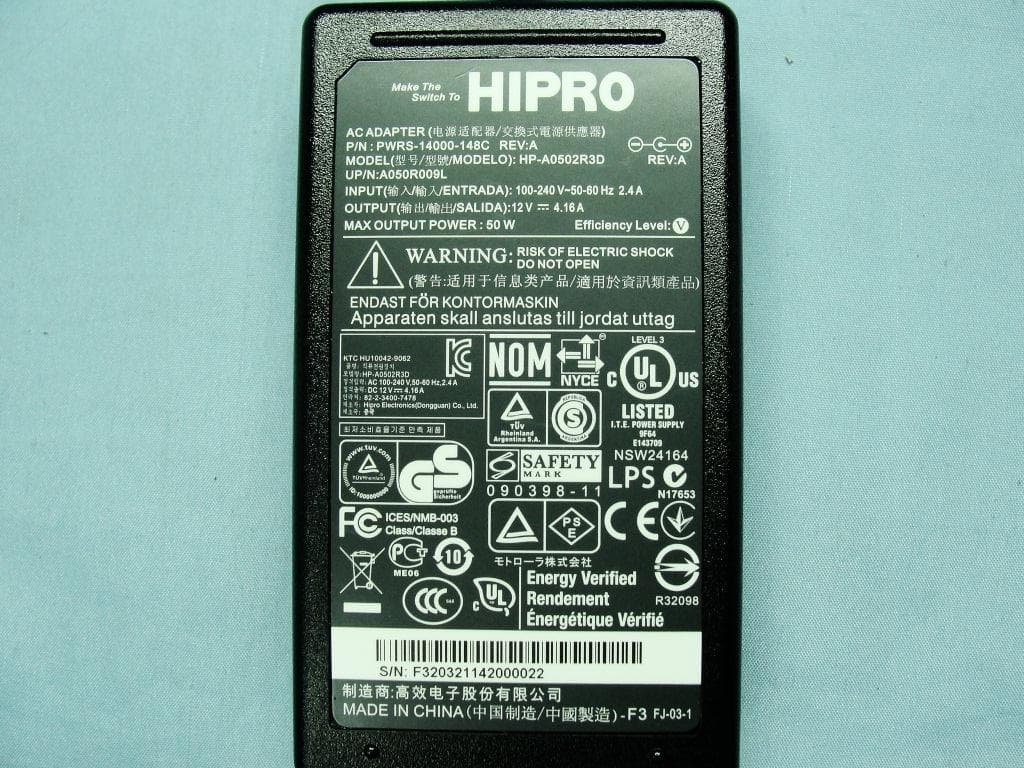
Click to zoom
Application Details
- Equipment Class
- DTS - Digital Transmission System
- Date of Grant
- Dec 01, 2011
- Application Purpose
- Original Equipment
- Date of Application
- Nov 30, 2011
- Equipment Note
- ENTERPRISE TABLET
- Frequency Range
- 5745.00000000 - 5825.00000000
- Country
- United States
Documents & Files
Document Text
Text extracted from the exhibit documents filed with the FCC. Open a document above to read the original.
Users Manual
ET1 ENTERPRISE TABLET QUICK START GUIDE 2 Motorola reserves the right to make changes to any product to improve reliability, function, or design. Motorola does not assume any product liability arising out of, or in connection with, the application or use of any product, circuit, or application described herein. No license is granted, either expressly or by implication, estoppel, or otherwise under any patent right or patent, covering or relating to any combination, system, apparatus, machine, material, method, or process in which Motorola products might be used. An implied license exists only for equipment, circuits, and subsystems contained in Motorola products. Warranty For the complete Motorola hardware product warranty statement, go to: http://www.motorola.com/enterprisemobility/warranty. User Manuals For more information about the ET1 Enterprise Tablet refer to the ET1 Enterprise Tablet User Guide and ET1 Enterprise Tablet Integrator Guide. For the latest version of this guide and all ET1 guides, visit: http://supportcentral.motorola.com. Service Information If you have a problem using the equipment, contact your facility’s Technical or Systems Support. If there is a problem with the equipment, they will contact the Motorola Solutions Global Support Center at: http://www.motorolasolutions.com/support. Software Support Motorola wants to ensure that customers have the latest release of entitled software at the time of product purchase. To confirm that your Motorola Enterprise Mobility device shipped with the latest release of entitled software, visit: www.motorola.com/enterprisemobility/support. Check for the latest software from Software Downloads > Product Line/Product > Go. If your device does not have the latest entitled software release as of your product purchase date, please e-mail a request to Motorola at: [email protected]. You must include the following essential device information with your request: •Model number •Serial number •Proof of purchase •Title of the software download you are requesting. If it is determined by Motorola that your device is entitled to the latest software release, you will receive an e-mail containing a link directing you to a Motorola Web site to download the appropriate software. 3 Touch Screen Decode LED Front-facing Camera Features Menu ButtonProgrammable Buttons Communication LED Light Sensor Microphone Battery Charge LED Home ButtonBack Button 4 Right Scan/Action Button Camera Flash Headset Jack Battery Battery Release Latch Left Scan/Action Button Rear-facing Camera USB Host Expansion Module Secondary Microphone Features HDMI Output Connector Speaker Speaker Battery Charging LED I/O Connector Power Button 5 Getting Started To get started: •Install the battery •Charge the battery •Start the ET1. Install the Battery 1.Remove the battery from the packaging. 2.Align the tracks on the sides of the battery with the rails of the battery compartment. 3.Push the battery in until it snaps into place. Charge the Battery Before using the ET1, charge the battery using one of the following accessories: •Single-slot USB Docking cradle •Four-slot Charge Only Docking cradle •USB/Charge cable and power supply. 1.Ensure that the accessory is connected to power. See the ET1 Enterprise Tablet User Guide for more information. 2.Place the ET1 into a cradle or connect to the USB/Charge cable. The Battery Charge LEDs blinks yellow indicating that the battery is charging. When the battery is fully charged (approximately six hours) the LEDs becomes solid green. Startup Press the Power button to turn on the ET1. As the ET1 starts the splash screen displays and then the Home screen appears. Slide up to unlock the screen. Tracks Rails NOTEThe battery can be charged separately using the Four-slot Battery Charger. 6 Launch Applications To launch an application: 1.Touch the Launcher icon. The Launcher window displays. 2.Touch an application icon to launch the application. Configure the ET1 To configure ET1 settings, touch > Settings. Refer to the ET1 Enterprise Tablet User Guide for information on configuring the ET1. Power Button Use the Power button to place the ET1 in suspend mode, battery swap mode, to reset the ET1 or to power off the ET1. Suspend Mode Press and release the Power button to place the ET1 in suspend mode. In Suspend Mode the ET1 turns off the display and goes into a low power state to conserve battery power. Press and release the Power button to wake the ET1 and then slide up to unlock the screen. Battery Swap Mode Before replacing the battery, place the ET1 in Battery Swap Mode. Press and hold the Power button until the Device options dialog box appears then touch Battery swap. The Decode LED lights red. When the LED turns off, it is safe to remove the battery. Reset Reset the ET1 if applications stop responding. Press and hold the Power button until the Device options dialog box appears then touch Reset. Power Off To power off the ET1, press and hold the Power button until the Device options dialog box appears then touch Power off. When the Power off dialog box appears, touch OK. Launcher 7 Hardware Reset If the ET1 stop responding perform a hardware reset. Simultaneously press the Left Scan/Action, Right Scan/Action and Power buttons. Lock the Screen Lock the screen to protect access to data. When locked, a Pattern, PIN or Password is required to unlock the ET1. Press the Power button to lock the screen. The ET1 also locks after a pre-defined time-out. Press and release the Power button to wake the ET1. The Lock screen displays. Slide up to unlock the screen. If the Pattern screen unlock feature is enabled, the Pattern screen appears instead of the Lock screen. If the PIN or Password screen unlock feature is enabled, enter the PIN or password after unlocking the screen. Refer to the ET1 Enterprise Tablet User Guide for setup instruction for locking the screen. If the Multi-user feature is enabled, contact the system administrator for log…
Text truncated - open the document above for the full version.
Users Manual
ET1 ENTERPRISE TABLET REGULATORY GUIDE 2 Regulatory Information This device is approved under Motorola Solutions, Inc. (“Motorola”). This guide applies to Model Number: ET1N0. All Motorola devices are designed to be compliant with rules and regulations in locations they are sold and will be labeled as required. Local language translations are available at the following website: http://supportcentral.motorola.com Any changes or modifications to Motorola equipment, not expressly approved by Motorola, could void the user's authority to operate the equipment. Declared maximum operating temperature: 50 °C. UL Listed Products with GPS Underwriters Laboratories Inc. (UL) has not tested the performance or reliability of the Global Positioning System (GPS) hardware, operating software or other aspects of this product. UL has only tested for fire, shock or casualties as outlined in UL's Standard(s) for Safety for Information Technology Equipment, UL60950-1. UL Certification does not cover the performance or reliability of the GPS hardware and GPS operating software. UL MAKES NO REPRESENTATIONS, WARRANTIES OR CERTIFICATIONS WHATSOEVER REGARDING THE PERFORMANCE OR RELIABILITY OF ANY GPS RELATED FUNCTIONS OF THIS PRODUCT. Bluetooth ® Wireless Technology This is an approved Bluetooth product. For more information or to view the End Product Listing, please visit http://www.bluetooth.org/tpg/listings.cfm. Wireless Devices Country Approvals Regulatory markings, subject to certification, are applied to the device signifying the radio(s) are approved for use in the following countries: United States, Canada, Japan, China, S. Korea, Australia, and Europe 1 . Please refer to the Declaration of Conformity (DoC) for details of other country markings. This is available at http://www.motorola.com/doc. Note 1: For 2.4 GHz or 5 GHz products, Europe includes Austria, Belgium, Bulgaria, Czech Republic, Cyprus, Denmark, Estonia, Finland, France, Germany, Greece, Hungary, Iceland, Ireland, Italy, Latvia, Liechtenstein, Lithuania, Luxembourg, Malta, Netherlands, Norway, Poland, Portugal, Romania, Slovak Republic, Slovenia, Spain, Sweden, Switzerland and the United Kingdom. Country Roaming This device incorporates the International Roaming feature (IEEE802.11d) which will ensure the product operates on the correct channels for the particular country of use. Ad-Hoc Operation (5 GHz Band) Ad-Hoc operation is limited to Channels 36-48 (5150-5250 MHz). Use of this band is restricted to Indoor Use Only, Any other use will make the operation of this device illegal. CAUTIONOnly use Motorola approved and UL Listed accessories, battery packs and battery chargers. Do NOT attempt to charge damp/wet mobile computers or batteries. All components must be dry before connecting to an external power source. CAUTIONOperation of the device without regulatory approval is illegal. 3 Frequency of Operation – FCC and IC 5 GHz Only The use in the UNII (Unlicensed National Information Infrastructure) band 1 (5150 - 5250 MHz) is restricted to Indoor Use Only; any other use will make the operation of this device illegal. Industry Canada Statement: Caution: The device for the band 5150-5250 MHz is only for indoor usage to reduce potential for harmful interference to co-Channel mobile satellite systems. High power radars are allocated as primary users (meaning they have priority) of 5250-5350 MHz and 5650-5850 MHz and these radars could cause interference and/or damage to LE-LAN devices. Avertissement: Le dispositive fonctionnant dans la bande 5150-5250 MHz est réservé uniquement pour une utilisation à l'intérieur afin de réduire les risques de brouillage préjudiciable aux systèmes de satellites mobiles utilisant les mêmes canaux. Les utilisateurs de radars de haute puissance sont désignés utilisateurs principaux (c.-à-d., qu'ils ont la priorité) pour les bands 5250-5350 MHz et 5650-5850 MHz et que ces radars pourraient causer du brouillage et/ou des dommages aux dispositifs LAN-EL. 2.4 GHz Only The available channels for 802.11 b/g operation in the US are Channels 1 to 11. The range of channels is limited by firmware. Health and Safety Recommendations Ergonomic Recommendations •Reduce or eliminate repetitive motion •Maintain a neutral postures •Reduce or eliminate excessive force •Keep objects that are used frequently within easy reach •Perform tasks at correct heights •Reduce or eliminate vibration •Reduce or eliminate direct pressure •Provide adjustable workstations •Provide adequate clearance •Provide a suitable working environment •Improve work procedures. Please observe all warning notices with regard to the usage of wireless devices. Safety in Aircraft Switch off your wireless device whenever you are instructed to do so by airport or airline staff. If your device offers a 'flight mode' or similar feature, consult airline staff as to its use in flight. Wireless devices transmit radio frequency energy and may affect medical electrical equipment. Wireless devices should be switched off wherever you are requested to do so in hospitals, clinics or healthcare facilities. These requests are designed to prevent possible interference with sensitive medical equipment. CAUTIONIn order to avoid or minimize the potential risk of ergonomic injury follow the recommendations below. Consult with your local Health & Safety Manager to ensure that you are adhering to your company’s safety programs to prevent employee injury. Warnings for Use of Wireless Devices Safety in Hospitals 4 Pacemakers Pacemaker manufacturers recommended that a minimum of 15 cm (6 inches) be maintained between a handheld wireless device and a pacemaker to avoid potential interference with the pacemaker. These recommendations are consistent with independent research and recommendations by Wireless Technology Research. Persons with pacemakers: •Should ALWAYS keep the device more than 15cm (6 inches) from their pacemaker when turned ON. •Should not carry the device in a breast pocket. •Sho…
Text truncated - open the document above for the full version.
Cover Letter(s)
Regulatory Engineering Motorola Solutions, Inc. One Motorola Plaza, | Holtsville, NY 11742 | 1.631.738.2400 phone | 1.631.627.7179 fax | www.motorola.com November 10, 2011 Federal Communications Commission Office of Engineering and Technology Equipment Authorization Division 7345 Oakland Mills Road Columbia MD 21046 Subject: Letter of Authorization To the Commission: I, the undersigned, grant authorization for Andrew Ho to sign the submissions to the FCC for the Motorola Tablet Computer sold under Model Number: ET1N0 and certified by the FCC under FCC ID: UZ7ET1N0. Respectfully, Mark S. Luksich DMTS, Regulatory Engineering 631-738-5134 [email protected]
Cover Letter(s)
Regulatory Engineering Motorola Solutions, Inc. O n e Mo t o r o l a P l a za , | Ho l t s vi l l e , NY 1 1 7 4 2 | 1.631.738.2400 phone | 1.631.627.7179 fax | www.m otorola.com Date: 28 th October, 2011 Federal Communications Commission Authorization and Evaluation Division FCC ID: UZ7ET1N0 To Whom It May Concern: We, Motorola Solutions, Inc. hereby attest to the fact that we will apply the Declaration of Conformity procedure to the class B computer peripheral portion of this composite filing. Yours sincerely, ________________________________ Andrew Ho Regulatory Manager Motorola Solutions - Regulatory Tel: +65 6643 9326 Email: [email protected]
Cover Letter(s)
Regulatory Engineering Motorola Solutions, Inc. O n e Mo t o r o l a P l a za , | Ho l t s vi l l e , NY 1 1 7 4 2 | 1.631.738.2400 phone | 1.631.627.7179 fax | www.m otorola.com Date: 28 th October, 2011 Federal Communications Commission Authorization and Evaluation Division Confidentiality Request FCC ID: UZ7ET1N0 Pursuant to Sections 0.457 and 0.459 of the Commission’s Rules, the Applicant hereby requests confidential treatment of information accompanying this Application as outlined below: Schematics Block Diagram Parts List Operational Description The above materials contain trade secrets and proprietary information not customarily released to the public. The public disclosure of these matters might be harmful to the Applicant and provide unjustified benefits to its competitors. The Applicant understands that pursuant to Rule 0.457, disclosure of this Application and all accompanying documentation will not be made before the date of the Grant for this application. Yours sincerely, ________________________________ Andrew Ho Regulatory Manager Motorola Solutions - Regulatory Tel: +65 6643 9326 Email: [email protected]
Cover Letter(s)
Regulatory Engineering Motorola Solutions, Inc. O n e Mo t o r o l a P l a za , | Ho l t s vi l l e , NY 1 1 7 4 2 | 1.631.738.2400 phone | 1.631.627.7179 fax | www.m otorola.com Date: 28 th October, 2011 P O W E R O F A T T O R N E Y To whom it may concern, Please be notified that we, Motorola Solutions, Inc. have assigned Sporton International Inc., located at No. 52, Hwa Ya 1 st Rd ., Hwa Ya Technology Park, Kwei-Shan Hsiang, Tao Yuan Hsien, Taiwan, R.O.C., as our agent. Any and all acts carried out by Sporton International Inc., on the matters of relating to all processes required in the FCC matters and any communication needed with the national authority, shall have the same legal authority as acts on our own behalf. We further certifies that neither the applicant nor any party to this application, as defined in 47 CFR Ch. 1.2002 (b), is subject to a denial to Federal benefits, that include FCC benefits, pursuant to section 5301 of the Anti-Drug Abuse Act of 1998, 21 U.S.C. 835(a). This authorization is limited to the following product: FCC ID: UZ7ET1N0 Please send any acknowledgement or response to Sporton International Inc. directly. Should you have any questions or comments regarding this matter, please don’t hesitate to contact us. Yours sincerely, ________________________________ Andrew Ho Regulatory Manager Motorola Solutions - Regulatory Tel: +65 6643 9326 Email: [email protected]
Cover Letter(s)
Motorola Solutions, Inc. Company Address :One Symbol Plaza Holtsville, NY 11742-1300 USA Date :November 22, 2011 DTS-UNII Device Declaration Letter To whom it may concern : We have declared below featured for FCC equipment authorization, Device FCC ID :UZ7ET1N0 (1) DFS Device -- Master , Client with Radar detection capability , ■ Client without radar detection capability , N/A (2) Active / Passive Scanning , adhoc mode accesspoint capability Frequency Band (MHz) Active Scanning (the device can transmit a probe (beacon)) passive scanning (where the device is can listen only with no probes) Ad Hoc Modeor WIFI Direct capability Access point capability 2412 – 2462 MHz ■Yes , No Yes , ■No Yes , ■ No Yes , ■ No 5745 – 5825 MHz ■ Yes , No Yes , ■ No Yes , ■ No Yes , ■ No 5180 – 5240 MHz ■ Yes , No Yes , ■ No Yes , ■ No Yes , ■ No 5260 – 5320 MHz Yes , ■ No ■ Yes , No Yes , ■ No Yes , ■ No 5500 – 5700 MHz Yes , ■ No ■ Yes , No Yes , ■ No Yes , ■ No (3) Country code selection ability - Yes , ■No If yes, pls explain how it was implemented : (pls also help to provide detail of options for each country selection) (4) Meet 15.202 requirement - ■ Yes , No , pls check below : A master device is defined as a device operating in a mode in which it has the capability to transmit without receiving an enabling signal. In this mode it is able to select a channel and initiate a network by sending enabling signals to other devices ■A client device is defined as a device operating in a mode in which the transmissions of the device are under control of the master. A device in client mode is not able to initiate a network. (5) For client devices that have software configuration control to operate in different modes (active scanning in some and passive scanning in others) in different bands (devices with multiple equipment classes or those that operate on non-DFS frequencies) or modular devices which configure the modes of operations through software, the application must provide software and operations description on how the software and / or hardware is implemented to ensure that proper operations modes can not be modified by end user or an installer. Apply ,■ No Apply , (If apply , pls help to provide explanation on it was implement , and how software was controlled) _____________________ Andrew Ho / Regulatory Manager Tel: +65 6643 9326 Email: [email protected]
External Photos
Photographs of EUT Report No.: EP1O2207 Brand Name: Motorola / Model Name: ET1N0 SPORTON INTERNATIONAL INC. Page Number : 1 of 16 TEL : 886-3-327-3456 Report Issued Date : Nov. 25, 2011 FAX : 886-3-328-4978 Report Version : Rev. 01 FCC ID : UZ7ET1N0 IC : 109AN-ET1N0 1. External Photograph of EUT Photographs of EUT Report No.: EP1O2207 Brand Name: Motorola / Model Name: ET1N0 SPORTON INTERNATIONAL INC. Page Number : 2 of 16 TEL : 886-3-327-3456 Report Issued Date : Nov. 25, 2011 FAX : 886-3-328-4978 Report Version : Rev. 01 FCC ID : UZ7ET1N0 IC : 109AN-ET1N0 720510 Photographs of EUT Report No.: EP1O2207 Brand Name: Motorola / Model Name: ET1N0 SPORTON INTERNATIONAL INC. Page Number : 3 of 16 TEL : 886-3-327-3456 Report Issued Date : Nov. 25, 2011 FAX : 886-3-328-4978 Report Version : Rev. 01 FCC ID : UZ7ET1N0 IC : 109AN-ET1N0 List of Accessory: Specification of Accessory AC Adapter Brand Name Motorola Model Name PWRS-14000-148C Battery Brand Name Motorola Model Name 82-149690-01 USB Charging Cable Brand Name Motorola Model Name 25-153149-01R LCD Panel Brand Name INNOLUX Model Name EJ070NA-01C Camera 1 (Front Side) Brand Name SAMSUNG Model Name NB101 Camera 2 (Back Side) Brand Name SAMSUNG Model Name NB901 Remark: For accessories equipped with this EUT, please refer to the following photos. 2. Photograph of Accessory Photographs of EUT Report No.: EP1O2207 Brand Name: Motorola / Model Name: ET1N0 SPORTON INTERNATIONAL INC. Page Number : 4 of 16 TEL : 886-3-327-3456 Report Issued Date : Nov. 25, 2011 FAX : 886-3-328-4978 Report Version : Rev. 01 FCC ID : UZ7ET1N0 IC : 109AN-ET1N0 Photographs of EUT Report No.: EP1O2207 Brand Name: Motorola / Model Name: ET1N0 SPORTON INTERNATIONAL INC. Page Number : 5 of 16 TEL : 886-3-327-3456 Report Issued Date : Nov. 25, 2011 FAX : 886-3-328-4978 Report Version : Rev. 01 FCC ID : UZ7ET1N0 IC : 109AN-ET1N0 AC Adapter Photographs of EUT Report No.: EP1O2207 Brand Name: Motorola / Model Name: ET1N0 SPORTON INTERNATIONAL INC. Page Number : 6 of 16 TEL : 886-3-327-3456 Report Issued Date : Nov. 25, 2011 FAX : 886-3-328-4978 Report Version : Rev. 01 FCC ID : UZ7ET1N0 IC : 109AN-ET1N0 Battery Photographs of EUT Report No.: EP1O2207 Brand Name: Motorola / Model Name: ET1N0 SPORTON INTERNATIONAL INC. Page Number : 7 of 16 TEL : 886-3-327-3456 Report Issued Date : Nov. 25, 2011 FAX : 886-3-328-4978 Report Version : Rev. 01 FCC ID : UZ7ET1N0 IC : 109AN-ET1N0 Photographs of EUT Report No.: EP1O2207 Brand Name: Motorola / Model Name: ET1N0 SPORTON INTERNATIONAL INC. Page Number : 8 of 16 TEL : 886-3-327-3456 Report Issued Date : Nov. 25, 2011 FAX : 886-3-328-4978 Report Version : Rev. 01 FCC ID : UZ7ET1N0 IC : 109AN-ET1N0 720510 USB Charging Cable
ID Label/Location Info
Regulatory Engineering Motorola Solutions, Inc. O n e Mo t o r o l a P l a za , | Ho l t s vi l l e , NY 1 1 7 4 2 | 1.631.738.2400 phone | 1.631.627.7179 fax | www.m otorola.com Rear side of EUT FCC Label Battery compartment
ID Label/Location Info
Emma_FengV3 Paper / Other TBT0720-D97(RoHS) Label(外購+自印) 100#白色特多龍 (亮面壓花膠) PART NO. DRAFTER PART NAME MODEL NO. MATERIAL 材質 代號 Product Unit 100.10.18 Notes: 1.供應商:華冠 2.被貼物材質:不銹鋼3040 3.黏貼位置:機器凹槽(平滑鐵件) 4.PGJI2的UL原材代碼: 5.碳帶型號: 1510- V1 1510-0L35000修改刀模 2011/10/12 V2 取消CCC認證符號、DV改為NPI 2011/10/17 V3 依客戶提供圖面排板 2011/10/18 2 P/N: ET1N0-7G2V1UWW SN: XXXXXXXXXXXX MFD: XXXXXXX Motorola Solutions, Inc.Holtsville, N.Y. 11742MODEL( 型号 ): ET1N0 MADE IN CHINA( 中国制造 ) 12V 4.16A R32626 5.2/5.3GHz 屋内使用限定 COMPLIES WITH IEC/EN 62471:2006 移动式电脑/ 移動式電腦 ICES/NMB-003 CLASS BFCC ID: UZ7ET1N0IC: 109AN-ET1N0 E188325 6.黑色印刷+Pantone cool gray9c+Pantone cool gray5c
Internal Photos
Photographs of EUT Report No.: EP1O2207 Brand Name: Motorola / Model Name: ET1N0 SPORTON INTERNATIONAL INC. Page Number : 9 of 16 TEL : 886-3-327-3456 Report Issued Date : Nov. 25, 2011 FAX : 886-3-328-4978 Report Version : Rev. 01 FCC ID : UZ7ET1N0 IC : 109AN-ET1N0 3. Internal Photograph of EUT Photographs of EUT Report No.: EP1O2207 Brand Name: Motorola / Model Name: ET1N0 SPORTON INTERNATIONAL INC. Page Number : 10 of 16 TEL : 886-3-327-3456 Report Issued Date : Nov. 25, 2011 FAX : 886-3-328-4978 Report Version : Rev. 01 FCC ID : UZ7ET1N0 IC : 109AN-ET1N0 Photographs of EUT Report No.: EP1O2207 Brand Name: Motorola / Model Name: ET1N0 SPORTON INTERNATIONAL INC. Page Number : 11 of 16 TEL : 886-3-327-3456 Report Issued Date : Nov. 25, 2011 FAX : 886-3-328-4978 Report Version : Rev. 01 FCC ID : UZ7ET1N0 IC : 109AN-ET1N0 WLAN (2.4G) & WLAN (5G) & Bluetooth Antenna <Tx / Rx> Photographs of EUT Report No.: EP1O2207 Brand Name: Motorola / Model Name: ET1N0 SPORTON INTERNATIONAL INC. Page Number : 12 of 16 TEL : 886-3-327-3456 Report Issued Date : Nov. 25, 2011 FAX : 886-3-328-4978 Report Version : Rev. 01 FCC ID : UZ7ET1N0 IC : 109AN-ET1N0 Photographs of EUT Report No.: EP1O2207 Brand Name: Motorola / Model Name: ET1N0 SPORTON INTERNATIONAL INC. Page Number : 13 of 16 TEL : 886-3-327-3456 Report Issued Date : Nov. 25, 2011 FAX : 886-3-328-4978 Report Version : Rev. 01 FCC ID : UZ7ET1N0 IC : 109AN-ET1N0 WLAN (2.4G) & Bluetooth Antenna <Tx / Rx> Photographs of EUT Report No.: EP1O2207 Brand Name: Motorola / Model Name: ET1N0 SPORTON INTERNATIONAL INC. Page Number : 14 of 16 TEL : 886-3-327-3456 Report Issued Date : Nov. 25, 2011 FAX : 886-3-328-4978 Report Version : Rev. 01 FCC ID : UZ7ET1N0 IC : 109AN-ET1N0 WLAN (5G) Antenna <Tx / Rx> Photographs of EUT Report No.: EP1O2207 Brand Name: Motorola / Model Name: ET1N0 SPORTON INTERNATIONAL INC. Page Number : 15 of 16 TEL : 886-3-327-3456 Report Issued Date : Nov. 25, 2011 FAX : 886-3-328-4978 Report Version : Rev. 01 FCC ID : UZ7ET1N0 IC : 109AN-ET1N0 GPS Antenna <Rx> Photographs of EUT Report No.: EP1O2207 Brand Name: Motorola / Model Name: ET1N0 SPORTON INTERNATIONAL INC. Page Number : 16 of 16 TEL : 886-3-327-3456 Report Issued Date : Nov. 25, 2011 FAX : 886-3-328-4978 Report Version : Rev. 01 FCC ID : UZ7ET1N0 IC : 109AN-ET1N0 720510
RF Exposure Info
Test Laboratory: Sporton International Inc. SAR/HAC Testing Lab Date: 2011/11/2 System Check_Body_2450MHz_111102 DUT: Dipole 2450 MHz Communication System: CW; Frequency: 2450 MHz;Duty Cycle: 1:1 Medium: MSL_2450_111102 Medium parameters used: f = 2450 MHz; σ = 2.02 mho/m; ε r = 53.9; ρ = 1000 kg/m 3 Ambient Temperature:22.5 °C; Liquid Temperature:21.5 °C DASY4 Configuration: - Probe: ET3DV6 - SN1788; ConvF(4.01, 4.01, 4.01); Calibrated: 2011/9/28 - Sensor-Surface: 4mm (Mechanical Surface Detection) - Electronics: DAE3 Sn495; Calibrated: 2011/4/28 - Phantom: ELI 4.0_Front; Type: QDOVA001BB; Serial: 1026 - Measurement SW: DASY4, V4.7 Build 80; Postprocessing SW: SEMCAD, V1.8 Build 186 Pin=250mW/Area Scan (91x91x1): Measurement grid: dx=10mm, dy=10mm Maximum value of SAR (interpolated) = 16.8 mW/g Pin=250mW/Zoom Scan (7x7x7)/Cube 0: Measurement grid: dx=5mm, dy=5mm, dz=5mm Reference Value = 91.7 V/m; Power Drift = -0.100 dB Peak SAR (extrapolated) = 33.2 W/kg SAR(1 g) = 14.1 mW/g; SAR(10 g) = 6.68 mW/g Maximum value of SAR (measured) = 15.3 mW/g 0 dB = 15.3mW/g Test Laboratory: Sporton International Inc. SAR/HAC Testing Lab Date: 2011/11/3 System Check_Body_2450MHz_111103 DUT: Dipole 2450 MHz Communication System: CW; Frequency: 2450 MHz;Duty Cycle: 1:1 Medium: MSL_2450_111103 Medium parameters used: f = 2450 MHz; σ = 1.96 mho/m; ε r = 51.5; ρ = 1000 kg/m 3 DASY5 Configuration: - Probe: EX3DV4 - SN3792; ConvF(6.67, 6.67, 6.67); Calibrated: 2011/6/20 - Sensor-Surface: 4mm (Mechanical Surface Detection) - Electronics: DAE3 Sn577; Calibrated: 2011/6/20 - Phantom: ELI 4.0_Front; Type: QD 0VA 002 AA; Serial: TP-1131 - ; SEMCAD X Version 13.4 Build 125 Pin=250mW/Area Scan (91x91x1): Measurement grid: dx=10mm, dy=10mm Maximum value of SAR (interpolated) = 15.6 mW/g Pin=250mW/Zoom Scan (7x7x7)/Cube 0: Measurement grid: dx=5mm, dy=5mm, dz=5mm Reference Value = 86 V/m; Power Drift = 0.143 dB Peak SAR (extrapolated) = 30.1 W/kg SAR(1 g) = 13.7 mW/g; SAR(10 g) = 6.53 mW/g Maximum value of SAR (measured) = 15.2 mW/ g 0 dB = 15.2mW/g Test Laboratory: Sporton International Inc. SAR/HAC Testing Lab Date: 2011/11/5 System Check_Body_5200MHz_111105 DUT: Dipole 5GHz Communication System: CW; Frequency: 5200 MHz;Duty Cycle: 1:1 Medium: MSL_5G_111105 Medium parameters used: f = 5200 MHz; σ = 5.28 mho/m; ε r = 47.6; ρ = 1000 kg/m 3 DASY5 Configuration: - Probe: EX3DV4 - SN3792; ConvF(4.22, 4.22, 4.22); Calibrated: 2011/6/20 - Sensor-Surface: 2.5mm (Mechanical Surface Detection) - Electronics: DAE3 Sn577; Calibrated: 2011/6/20 - Phantom: ELI 4.0; Type: QDOVA001BA; Serial: 1029 - ; SEMCAD X Version 13.4 Build 125 Pin=250mW/Area Scan (91x91x1): Measurement grid: dx=10mm, dy=10mm Maximum value of SAR (interpolated) = 33.3 mW/g Pin=250mW/Zoom Scan (8x8x8)/Cube 0: Measurement grid: dx=4.3mm, dy=4.3mm, dz=3mm Reference Value = 82.4 V/m; Power Drift = 0.037 dB Peak SAR (extrapolated) = 61.2 W/kg SAR(1 g) = 18.5 mW/g; SAR(10 g) = 5.24 mW/g Maximum value of SAR (measured) = 30.8 mW/g 0 dB = 30.8mW/g Test Laboratory: Sporton International Inc. SAR/HAC Testing Lab Date: 2011/11/7 System Check_Body_5200MHz_111107 DUT: Dipole 5GHz Communication System: CW; Frequency: 5200 MHz;Duty Cycle: 1:1 Medium: MSL_5G_111107 Medium parameters used: f = 5200 MHz; σ = 5.36 mho/m; ε r = 48.7; ρ = 1000 kg/m 3 Ambient Temperature:22.5 °C; Liquid Temperature:21.5 °C DASY4 Configuration: - Probe: EX3DV4 - SN3792; ConvF(4.22, 4.22, 4.22); Calibrated: 2011/6/20 - Sensor-Surface: 2.5mm (Mechanical Surface Detection) - Electronics: DAE3 Sn577; Calibrated: 2011/6/20 - Phantom: ELI 4.0_Front; Type: QDOVA001BB; Serial: 1026 - Measurement SW: DASY4, V4.7 Build 80; Postprocessing SW: SEMCAD, V1.8 Build 186 Pin=250mW/Area Scan (91x91x1): Measurement grid: dx=10mm, dy=10mm Maximum value of SAR (interpolated) = 34.3 mW/g Pin=250mW/Zoom Scan (8x8x8)/Cube 0: Measurement grid: dx=4.3mm, dy=4.3mm, dz=3mm Reference Value = 82.2 V/m; Power Drift = -0.002 dB Peak SAR (extrapolated) = 59.7 W/kg SAR(1 g) = 18.7 mW/g; SAR(10 g) = 5.34 mW/g Maximum value of SAR (measured) = 31.2 mW/g 0 dB = 31.2mW/g Test Laboratory: Sporton International Inc. SAR/HAC Testing Lab Date: 2011/11/7 System Check_Body_5500MHz_111107 DUT: Dipole 5GHz Communication System: CW; Frequency: 5500 MHz;Duty Cycle: 1:1 Medium: MSL_5G_111107 Medium parameters used: f = 5500 MHz; σ = 5.8 mho/m; ε r = 48; ρ = 1000 kg/m 3 Ambient Temperature:22.5 °C; Liquid Temperature:21.5 °C DASY4 Configuration: - Probe: EX3DV4 - SN3792; ConvF(3.76, 3.76, 3.76); Calibrated: 2011/6/20 - Sensor-Surface: 2.5mm (Mechanical Surface Detection) - Electronics: DAE3 Sn577; Calibrated: 2011/6/20 - Phantom: ELI 4.0_Front; Type: QDOVA001BB; Serial: 1026 - Measurement SW: DASY4, V4.7 Build 80; Postprocessing SW: SEMCAD, V1.8 Build 186 Pin=250mW/Area Scan (91x91x1): Measurement grid: dx=10mm, dy=10mm Maximum value of SAR (interpolated) = 40.3 mW/g Pin=250mW/Zoom Scan (8x8x8)/Cube 0: Measurement grid: dx=4.3mm, dy=4.3mm, dz=3mm Reference Value = 85.7 V/m; Power Drift = 0.086 dB Peak SAR (extrapolated) = 73.1 W/kg SAR(1 g) = 21.6 mW/g; SAR(10 g) = 6.07 mW/g Maximum value of SAR (measured) = 38.1 mW/g 0 dB = 38.1mW/g Test Laboratory: Sporton International Inc. SAR/HAC Testing Lab Date: 2011/11/2 System Check_Body_5800MHz_111102 DUT: Dipole 5GHz Communication System: CW; Frequency: 5800 MHz;Duty Cycle: 1:1 Medium: MSL_5G_111102 Medium parameters used: f = 5800 MHz; σ = 6 mho/m; ε r = 46.6; ρ = 1000 kg/m 3 DASY5 Configuration: - Probe: EX3DV4 - SN3792; ConvF(3.78, 3.78, 3.78); Calibrated: 2011/6/20 - Sensor-Surface: 2.5mm (Mechanical Surface Detection) - Electronics: DAE3 Sn577; Calibrated: 2011/6/20 - Phantom: ELI 4.0; Type: QDOVA001BA; Serial: 1029 - ; SEMCAD X Version 13.4 Build 125 Pin=250mW/Area Scan (91x91x…
Text truncated - open the document above for the full version.
Contact Information
Applicant
Qianlin Zhou(Regulatory Specialist)
Test Firm
Sporton International Inc.Alex Chen
Technical Specifications
| # | Rule Parts | Frequency Range | Power Output |
|---|---|---|---|
| 2 | 15C | 5.75 GHz - 5.83 GHz | 291.00 mW |
Other Applications from Zebra Technologies Corporation
UZ7DS8288R
Jun 29, 2026Cordless Scanner
Equipment Class
DTS - Digital Transmission SystemUZ7DS8208R
Jun 29, 2026Cordless Scanner
Equipment Class
DSS - Part 15 Spread Spectrum TransmitterUZ7TCW01G
Jun 23, 2026Touch Computer
Equipment Class
CBE - Citizens Band End User DevicesUZ7TCW010
May 29, 2026Touch Computer
Equipment Class
NII - Unlicensed National Information Infrastructure TXUZ7TC101B
Apr 29, 2026Touch Computer
Equipment Class
DSS - Part 15 Spread Spectrum Transmitter