UZ7MC4597ENTERPRISE DIGITAL ASSISTANT (EDA)
Zebra Technologies Corporation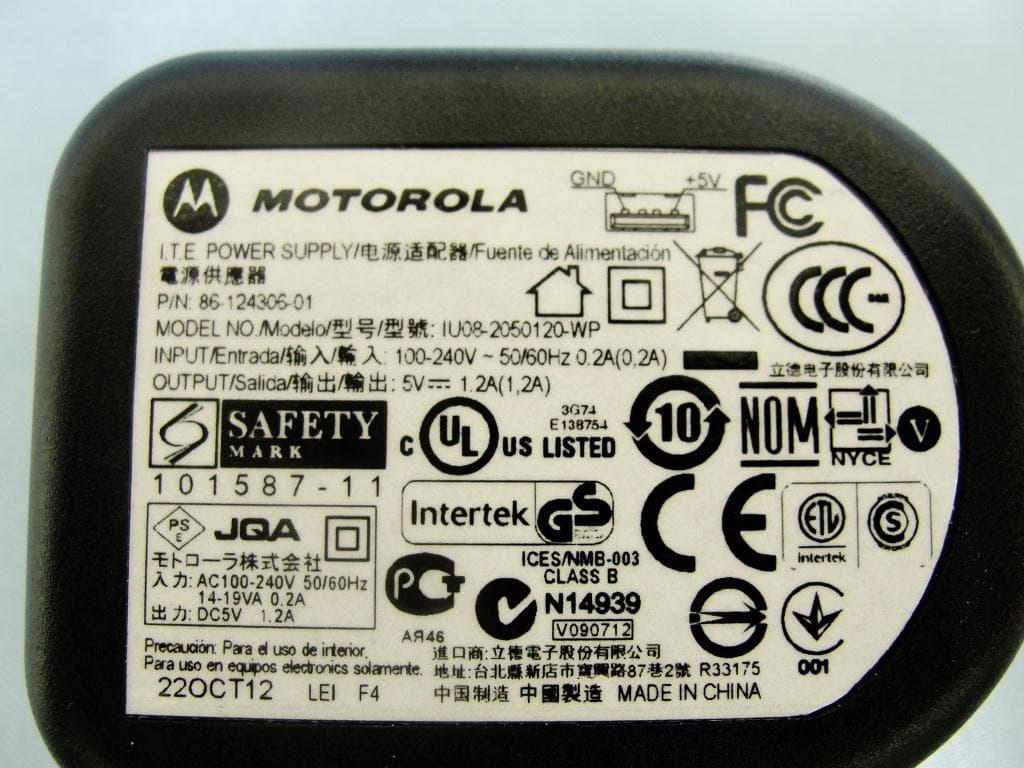
Click to zoom
Application Details
- Equipment Class
- DTS - Digital Transmission System
- Date of Grant
- Dec 11, 2012
- Application Purpose
- Original Equipment
- Date of Application
- Dec 09, 2012
- Equipment Note
- ENTERPRISE DIGITAL ASSISTANT (EDA)
- Frequency Range
- 5745.00000000 - 5825.00000000
- Country
- United States
Documents & Files
Document Text
Text extracted from the exhibit documents filed with the FCC. Open a document above to read the original.
Users Manual
DRAFT 9 b MC45 USER GUIDE DRAFT 9 DRAFT 9 MC45 User Guide 72 E-164159-01 Rev. 1 August 2012 DRAFT 9 ii MC45 User Guide No p art of this publication may be reproduced or used in any form, or by any electrical or mechanical means, without permission in writing from Motorola. This includes electronic or mechanical means, such as photocopying, recording, or information storage and retrieval systems. The material in this manual is subject to change without notice. The software is provided strictly on an “as is” basis. All software, including firmware, furnished to the user is on a licensed basis. Motorola grants to the user a non-transferable and non-exclusive license to use each software or firmware program delivered hereunder (licensed program). Except as noted below, such license may not be assigned, sublicensed, or otherwise transferred by the user without prior written consent of Motorola. No right to copy a licensed program in whole or in part is granted, except as permitted under copyright law. The user shall not modify, merge, or incorporate any form or portion of a licensed program with other program material, create a derivative work from a licensed program, or use a licensed program in a network without written permission from Motorola. The user agrees to maintain Motorola’s copyright notice on the licensed programs delivered hereunder, and to include the same on any authorized copies it makes, in whole or in part. The user agrees not to decompile, disassemble, decode, or reverse engineer any licensed program delivered to the user or any portion thereof. Motorola reserves the right to make changes to any software or product to improve reliability, function, or design. Motorola does not assume any product liability arising out of, or in connection with, the application or use of any product, circuit, or application described herein. No license is granted, either expressly or by implication, estoppel, or otherwise under any Motorola, Inc., intellectual property rights. An implied license only exists for equipment, circuits, and subsystems contained in Motorola products. Motorola Solutions, Inc. 1301 E. Algonquin Rd. Schaumburg, IL 60196-1078, U.S.A. http://www.motorolasolutions.com DRAFT 9 iii Revision History Cha nges to the original manual are listed below: ChangeDateDescription -0 1 Rev. 108/2012Draft. DRAFT 9 iv MC45 User Guide DRAFT 9 Table of Contents Revision History .................................................................................................................................... iii About This Guide Introduction ........................................................................................................................................... xi Documentation Set ......................................................................................................................... xi Configurations ............................................................................................................................................ xii Software Versions........................................................................................................................... xii Chapter Descriptions ............................................................................................................................ xiv Notational Conventions .............................................................................................................................. xv Related Documents .............................................................................................................................. xv Service Information .................................................................................................................................... xvi Chapter 1: Getting Started Introduction .......................................................................................................................................... 1-1 Unpacking ............................................................................................................................................ 1-2 Getting Started ..................................................................................................................................... 1-2 Installing the Micro Secure Digital (microSD) Card ........................................................................ 1-3 Installing the SIM Card ................................................................................................................... 1-4 Installing the Battery ...................................................................................................................... 1-5 Charging the Battery ...................................................................................................................... 1-6 Charging the Battery ................................................................................................................ 1-6 Charging Spare Batteries ......................................................................................................... 1-7 Charging Temperature ............................................................................................................. 1-7 Powering On the MC45 .................................................................................................................. 1-7 Calibrating the Screen ................................................................................................................... 1-8 Checking Battery Status ................................................................................................................ 1-8 Replacing the Battery ......................................................................................................................... 1-8 First-time Network Activation ............................................................................................................... 1-9 GSM/UMTS Activation .............…
Text truncated - open the document above for the full version.
Users Manual
DRAFT 9 Using WLAN5 - 3 T o switch from WZC to Fusion: 1. T ap the Start > > Wireless Launcher > Options. 2. Select WLAN Management from the drop-down list. 3. Select Fusion Manages WLAN radio button. 4. Ta p Save. 5. Ta p OK. 6. Per form a reset. Supported Applications T he Fusion menu items and their corresponding applications are summarized in Table 5-1. T able 5-1 Sup ported Applications ApplicationDescription Fusion Support WZC Support F ind WLANsInvokes the Find WLANs application which displays a list of the WLANs active in your area. Ye sN o Manage ProfilesInvokes the Manage Profiles application (which includes the Profile Editor Wizard) to manage and edit your list of WLAN profiles. Ye sN o Wireless Zero ConfigInvokes the Wireless Zero Config application to configure the WLAN. NoYes Manage CertsInvokes the Certificate Manager application which allows you to manage certificates used for authentication. Ye sYe s Manage PACsInvokes the PAC Manager application which helps you manage the list of Protected Access Credentials used with EAP-FAST authentication. Ye sN o OptionsInvokes the Options application which allows you to configure the Fusion option settings. Ye sYe s Wireless StatusInvokes the Wireless Status application which allows you to view the status of the current wireless connection. Ye sYe s Wireless DiagnosticsInvokes the Wireless Diagnostics application which provides tools with which to diagnose problems with the wireless connection. Ye sYe s Log On/OffInvokes the Network Login dialog which allows you to log on to a particular profile or to log off from the currently active profile Ye sN o Fusion HelpInvokes the Fusion Help application which provides detailed explanations on all the available Fusion applications Ye sN o DRAFT 9 5 - 4MC45 User Guide Fusion Setup T o setup WLAN using Fusion refer to the Wireless Fusion Enterprise Mobility Suite User Guide for Version H3.40 for detailed information on using and configuring Fusion. To setup WLAN using Fusion: 1. T ap the Start > > Wireless Configuration Editor > Manage Profiles. The Manage Profiles window appears. 2. T ap and hold in the window and select Add from the pop-up menu. The Wireless LAN Profile Entry window appears. 3. In the Profile Name text box enter a name for the profile. 4. In the ESSID text box enter the ESSID. Fi gure 5-2 Pr ofile ID Dialog Box 5. Ta p Next. The Operating Mode dialog box displays. 6. In the Op erating Mode drop-down list, select Infrastructure or Ad-hoc. Fi gure 5-3 Op erating Mode Dialog Box 7. Ta p Next. The Security Mode dialog box displays. 8. In the Sec urity Mode drop-down list, select Legacy (Pre-WPA). NOT EObt ain the proper WLAN configuration information from your system administrator prior to performing the Fusion setup procedures. The following setup procedure example shows setup of a WLAN using WEP encryption. DRAFT 9 Using WLAN5 - 5 Fi gure 5-4 Security/Authentic ation Dialog Box 9. In the Aut hentication drop-down list, select None. 10. Tap Next. The Encryption dialog box displays. 11 . In the Enc ryption Type drop-down list, select WEP-40 (40/24). Fi gure 5-5 Encryption D ialog Box 12. Sele ct the Pass-phrase or Hexadecimal Keys radio button to indicate whether a pass-phrase or hexadecimal keys will be entered on the next page. 13. Sele ct the For added security - Mask characters entered check box to hide characters entered. Deselect this to show characters entered. 14. Ta p Next. Figure 5-6 WE P-40 WEP Keys Dialog Box 15. In the Edit Key drop-down list, select the key to enter. 16.In the Key field, enter 10 hexadecimal characters. 17. In the Conf irm field, re-enter the key. When the keys match, a message appears indicating that the keys match. 18. Rep eat for each WEP key. 19.In the T ransmit Key drop-down list, select the key to transmit. 20.Ta p Next. The IPv4 Address Entry dialog box displays. DRAFT 9 5 - 6MC45 User Guide Figure 5-7 IP Address Entry Dialog Box 21. Ensu re that all three check boxes are selected. 22. Ta p Next. The Battery Usage dialog box appears. 23. In the Bat tery Usage Mode dialog box select a power consumption option. Figure 5-8 Battery Us age Dialog Box 24. Ta p Save. W ireless Zero Config Setup T o setup WLAN using WZC: 1. Ta p Start > > Wireless Launcher > Wireless Zero Config. NOT E Ob tain the proper WLAN configuration information from your system administrator prior to performing the WZC setup procedures. The following setup procedure example shows setup of a WLAN using WEP encryption. DRAFT 9 Using WLAN5 - 7 Figure 5-9 W ireless Zero Config Window 2. Th e MC45 searches for wireless networks in the area and displays them in the window. 3. T ap a network name. Fi gure 5-10 Con figure Wireless Network Window 4. In the Conne cts to drop-own list, select either The Internet or Work. 5. Chec k the This is a hidden network checkbox if the network is a hidden network. 6. Ta p Next. DRAFT 9 5 - 8MC45 User Guide Fi gure 5-11 Co nfigure Network Authentication Window 7. In the Aut hentication drop-down list, select the authentication type. 8. In the Dat a Encryption drop-down list, select the data encryption type. 9. If WEP e ncryption is selected, enter an encryption key in the Network key text box. 10.Ta p Next. Fi gure 5-12 Con figure Network Authentication Window 11 . If required, select Use IEEE 802.1x network access control check box. 12.In the EAP type drop-down list box, select the EAP type. 13. Ta p Finish. More Information on WZC Fo r more information on Microsoft Wireless Zero Config, see the Microsoft Software Developer Network (MSDN) at http://msdn.microsoft.com. DRAFT 9 Chapter 6 Using GPS Navigation Introduction T he MC45 includes Global Positioning System (GPS) technology using the QC Modem Solution chipset. GPS technology is based on a worldwide system of GPS satellites orbiting the earth that continuously transmit digital radio signals. These radio signals contain data on the satellites’ locations and their exact clock time and are us…
Text truncated - open the document above for the full version.
Users Manual
Motorola reserves the right to make changes to any product to improve reliability, function, or design. Motorola does not assume any product liability arising out of, or in connection with, the application or use of any product, circuit, or application described herein. No license is granted, either expressly or by implication, estoppel, or otherwise under any patent right or patent, covering or relating to any combination, system, apparatus, machine, material, method, or process in which Motorola products might be used. An implied license exists only for equipment, circuits, and subsystems contained in Motorola products. Warranty For the complete Motorola hardware product warranty statement, go to: http://www.motorolasolutions.com/warranty. Service Information If you have a problem using the equipment, contact your facility’s Technical or Systems Support. If there is a problem with the equipment, they will contact the Motorola Support Center at: http://www.motorolasolutions.com/support. For the latest version of this guide go to: http://supportcentral.motorola.com. Motorola Solutions, Inc. 1301 E. Algonquin Rd. Schaumburg, IL 60196-1078, U.S.A. http://www.motorolasolutions.com MOTOROLA, MOTO, MOTOROLA SOLUTIONS and the Stylized M Logo are trademarks or registered trademarks of Motorola Trademark Holdings, LLC and are used under license. All other trademarks are the property of their respective owners. © 2012 Motorola, Inc. All Rights Reserved. 72-164158-01 Revision A — August 2012 123 MC45 REGULATORY GUIDE b Regulatory Information This device is approved under Motorola Solutions, Inc. This guide applies to the following Model Numbers: MC4587, MC4597. All Motorola devices are designed to be compliant with rules and regulations in locations they are sold and will be labeled as required. Local language translations are available at the following website: http://supportcentral.motorola.com. Any changes or modifications to Motorola equipment, not expressly approved by Motorola, could void the user’s authority to operate the equipment. Declared maximum operating temperature: 50°C. UL Listed Products with GPS Underwriters Laboratories Inc. (UL) has not tested the performance or reliability of the Global Positioning System (GPS) hardware, operating software or other aspects of this product. UL has only tested for fire, shock or casualties as outlined in UL’s Standard(s) for Safety for Information Technology Equipment, UL60950-1. UL Certification does not cover the performance or reliability of the GPS hardware and GPS operating software. UL MAKES NO REPRESENTATIONS, WARRANTIES OR CERTIFICATIONS WHATSOEVER REGARDING THE PERFORMANCE OR RELIABILITY OF ANY GPS RELATED FUNCTIONS OF THIS PRODUCT. Bluetooth ® Wireless Technology This is an approved Bluetooth ® product. For more information or to view End Product Listing, please visit https://www.bluetooth.org/tpg/ listings.cfm. Wireless Devices Country Approvals Regulatory markings, subject to certification, are applied to the device signifying the radio(s) is/are approved for use in the following countries: United States, Canada, Japan, China, S. Korea, Australia, and Europe. Please refer to the Declaration of Conformity (DoC) for details of other country markings. This is available at http://www.motorola.com/doc. Note : Europe includes, Austria, Belgium, Bulgaria, Czech Republic, Cyprus, Denmark, Estonia, Finland, France, Germany, Greece, Hungary, Iceland, Ireland, Italy, Latvia, Liechtenstein, Lithuania, Luxembourg, Malta, Netherlands, Norway, Poland, Portugal, Romania, Slovak Republic, Slovenia, Spain, Sweden, Switzerland and the United Kingdom. Country Roaming This device incorporates the International Roaming feature (IEEE802.11d) which will ensure the product operates on the correct channels for the particular country of use. Ad-Hoc Operation (5 GHz band) Ad-Hoc operation is limited to Channels 36-48 (5150-5250 MHz). Use of this band is restricted to Indoor Use Only, any other use will make the operation of this device illegal. Frequency of Operation – FCC and IC 5 GHz Only The use in the UNII (Unlicensed National Information Infrastructure) band 1 (5150-5250 MHz) is restricted to Indoor Use Only; any other use will make the operation of this device illegal. Industry Canada Statement CAUTIONOnly use Motorola approved and UL Listed accessories, battery packs and battery chargers. Do NOT attempt to charge damp/wet mobile computers or batteries. All components must be dry before connecting to an external power source. Operation of the device without regulatory approval is illegal. CAUTIONThe device for the band 5150-5250 MHz is only for indoor usage to reduce potential for harmful interference to co-Channel mobile satellite systems. High power radars are allocated as primary users (meaning they have priority) of 5250-5350 MHz and 5650-5850 MHz and these radars could cause interference and/or damage to LE-LAN devices. AVERTISSEMENT Le dispositive fonctionnant dans la bande 5150-5250 MHz est réservé uniquement pour une utilisation à l'intérieur afin de réduire les risques de brouillage préjudiciable aux systèmes de satellites mobiles utilisant les mêmes canaux. Les utilisateurs de radars de haute puissance sont désignés utilisateurs principaux (c.-à-d., qu'ils ont la priorité) pour les bands 5250-5350 MHz et 5650-5850 MHz et que ces radars pourraient causer du brouillage et/ou des dommages aux dispositifs LAN-EL. 2.4 GHz Only The available channels for 802.11 b/g operation in the US are Channels 1 to 11. The range of channels is limited by firmware. Health and Safety Recommendations Ergonomic Recommendations •Reduce or eliminate repetitive motion •Maintain a natural position •Reduce or eliminate excessive force •Keep objects that are used frequently within easy reach •Perform tasks at correct heights •Reduce or eliminate vibration •Reduce or eliminate direct pressure •Provide adjustable workstations •Provide adequate clearance •Provide a suitable wo…
Text truncated - open the document above for the full version.
Cover Letter(s)
Regulatory Engineering Motorola Solutions, Inc., One Motorola Plaza, | Holtsville, NY 11742 | 1.631.738.2400 phone | 1.631.627.7179 fax | www.motorolasolutions.com November 30, 2012 Federal Communications Commission Office of Engineering and Technology Equipment Authorization Division 7345 Oakland Mills Road Columbia MD 21046 Subject: Power of Attorney To the Commission, We, the undersigned, have designated Jones Tsai of Sporton International Inc. as signing authority responsible for this project MC4597 with FCC ID: UZ7MC4597 and to sign the form 731 and other documentation. Any and all acts carried out by Jones Tsai of Sporton International Inc. on the matters of relating to all processes required by the FCC and any communication needed with the national authority, shall have the same legal authority as acts on our behalf. We further certify that neither the applicant nor any party to this application, as defined in 47 CFR Ch. 1.2002 (b), is subject to a denial to Federal benefits, that include FCC benefits, pursuant to section 5301 of the Anti-Drug Abuse Act of 1998, 21 U.S.C. 835(a). This authorization is limited to the product of as following: FCC ID: UZ7MC4597 If you have any questions, please send it to Sporton International Inc. directly with a cc to the undersigned. Should you have any questions or comments regarding this matter, please contact me. Respectfully, Mark S. Luksich DMTS, Regulatory Engineering 631-738-5134 [email protected]
Cover Letter(s)
Regulatory Engineering Motorola Solutions, Inc., O n e Mo t o r o l a P l a za , | Ho l t s vi l l e, NY 11742 | 1.631.738.2400 phone | 1.631.627.7179 fax | www.m otorolasolutions.com November 30, 2012 Federal Communications Commission Office of Engineering and Technology Equipment Authorization Division 7345 Oakland Mills Road Columbia MD 21046 Subject: FCC Attestations, Authorizations, Declarations are limited to the following product: MODEL: MC4597 approved under IC: UZ7MC4597 To the Commission: We, the undersigned, attest that this device does not support access, by any party (End User or Professional Installer), to set the frequency or disable DFS. There are no controls or selections in the product firmware that can turn off / disable DFS. We, the undersigned, attest that the label of our device, FCC ID: UZ7MC4597, will be put inside the battery compartment. The label is visible to the users as they purchase the products and install the battery. We, the undersigned, attest to the fact that we will apply the Declaration of Conformity procedure to the class B computer peripheral portion of this composite filing. We, the undersigned, request Permanent Confidentiality Request regarding application for certification of FCC ID: UZ7MC4597 Pursuant to Sections 0.457 and 0.459 of the Commission’s Rules, we hereby request Permanent Confidential treatment of information accompanying this application as outlined below: Schematics Block Diagram Parts List Operation Description Tune up Procedure The above materials contain trade secrets and proprietary information not customarily released to the public. The public disclosure of these materials may be harmful to the applicant and provide unjustified benefits to its competitors. We, the undersigned, request pursuant to sections 0.457 and 0.459 of CFR 47 and to avoid premature release of sensitive information prior to marketing or release of the product to the public, the applicant requests the following documents contained in this certification application be temporarily withheld from public disclosure for an initial period of 180 days: External Photos Regulatory Engineering Motorola Solutions, Inc., O n e Mo t o r o l a P l a za , | Ho l t s vi l l e, NY 11742 | 1.631.738.2400 phone | 1.631.627.7179 fax | www.m otorolasolutions.com Internal Photos Test Setup Photos User Manual The application contains technical information, which we deem to be trade secrets and proprietary. If made public, the information might be used to the disadvantage of the applicant in the market place. We declare below the features for MC4597 with FCC ID: UZ7MC4597 DFS Device Master, Client with Radar detection capability , Client without radar detection capability N/A Active / Passive Scanning , adhoc mode access point capability Frequency Band (MHz) Active Scanning (the device can transmit a probe (beacon) passive scanning (where the device is can listen only with no probes) Ad Hoc Mode capability Access point capability 2412 – 2462 MHz Yes, No Yes, No Yes, No Yes, No 2422 – 2452 MHz Yes, No Yes, No Yes, No Yes, No 5745 – 5825 MHz Yes, No Yes, No Yes, No Yes, No 5755 – 5795 MHz Yes, No Yes, No Yes, No Yes, No 5180 – 5240 MHz Yes, No Yes, No Yes, No Yes, No 5190 – 5230 MHz Yes, No Yes, No Yes, No Yes, No 5260 – 5320 MHz Yes, No Yes, No Yes, No Yes, No 5270 – 5310 MHz Yes, No Yes, No Yes, No Yes, No 5500 – 5700 MHz Yes, No Yes, No Yes, No Yes, No 5510 – 5670 MHz Yes, No Yes, No Yes, No Yes, No Country code selection ability - Yes , No Meet 15.202 requirement - Yes , No , A client device is defined as a device operating in a mode in which the transmissions of the device are under control of the master. A device in client mode is not able to initiate a network. Regulatory Engineering Motorola Solutions, Inc., O n e Mo t o r o l a P l a za , | Ho l t s vi l l e, NY 11742 | 1.631.738.2400 phone | 1.631.627.7179 fax | www.m otorolasolutions.com For client devices that have software configuration control to operate in different modes (active scanning in some and passive scanning in others) in different bands (devices with multiple equipment classes or those that operate on non-DFS frequencies) or modular devices which configure the modes of operations through software, the application must provide software and operations description on how the software and / or hardware is implemented to ensure that proper operations modes can not be modified by end user or an installer. Apply , No Apply , We, the undersigned, attest that this device does not support operation in the 5.60 – 5.65 GHz band. The firmware on the device restricts the operation in this frequency band and does not utilize the channels in this band. Respectfully, Mark S. Luksich DMTS, Regulatory Engineering 631-738-5134 [email protected]
External Photos
Photographs of EUT Report No.: EP250901 Brand Name: Motorola / Model Name: MC4597 SPORTON INTERNATIONAL INC. Page Number : 1 of 21 TEL : 886-3-327-3456 Report Issued Date : Dec. 05, 2012 FAX : 886-3-328-4978 Report Version : Rev. 01 FCC ID : UZ7MC4597 IC : 109AN-MC4597 720510 1. External Photograph of EUT Photographs of EUT Report No.: EP250901 Brand Name: Motorola / Model Name: MC4597 SPORTON INTERNATIONAL INC. Page Number : 2 of 21 TEL : 886-3-327-3456 Report Issued Date : Dec. 05, 2012 FAX : 886-3-328-4978 Report Version : Rev. 01 FCC ID : UZ7MC4597 IC : 109AN-MC4597 Photographs of EUT Report No.: EP250901 Brand Name: Motorola / Model Name: MC4597 SPORTON INTERNATIONAL INC. Page Number : 3 of 21 TEL : 886-3-327-3456 Report Issued Date : Dec. 05, 2012 FAX : 886-3-328-4978 Report Version : Rev. 01 FCC ID : UZ7MC4597 IC : 109AN-MC4597 List of Accessory: Specification of Accessory AC Adapter Brand Name MOTOROLA Model Name IU08-2050120-WP Battery Brand Name MOTOROLA Model Name 82-118524-03 (Rev A) Battery Brand Name MOTOROLA Model Name 82-118524-01 (Rev C) USB Cable Brand Name MOTOROLA Model Name 25-128458-01R Holster Brand Name Motorola Solutions Model Name N/A LCD Panel Brand Name Truly Model Name CSHMDS7960 Camera Brand Name Motorola Jabil Model Name PD6234B Scanner Brand Name Motorola Solutions Model Name SE965 Remark: For accessories equipped with this EUT, please refer to the following photos. 2. Photograph of Accessory Photographs of EUT Report No.: EP250901 Brand Name: Motorola / Model Name: MC4597 SPORTON INTERNATIONAL INC. Page Number : 4 of 21 TEL : 886-3-327-3456 Report Issued Date : Dec. 05, 2012 FAX : 886-3-328-4978 Report Version : Rev. 01 FCC ID : UZ7MC4597 IC : 109AN-MC4597 720510 Photographs of EUT Report No.: EP250901 Brand Name: Motorola / Model Name: MC4597 SPORTON INTERNATIONAL INC. Page Number : 5 of 21 TEL : 886-3-327-3456 Report Issued Date : Dec. 05, 2012 FAX : 886-3-328-4978 Report Version : Rev. 01 FCC ID : UZ7MC4597 IC : 109AN-MC4597 AC Adapter Photographs of EUT Report No.: EP250901 Brand Name: Motorola / Model Name: MC4597 SPORTON INTERNATIONAL INC. Page Number : 6 of 21 TEL : 886-3-327-3456 Report Issued Date : Dec. 05, 2012 FAX : 886-3-328-4978 Report Version : Rev. 01 FCC ID : UZ7MC4597 IC : 109AN-MC4597 Battery Model Name: 82-118524-03 (Rev A) Photographs of EUT Report No.: EP250901 Brand Name: Motorola / Model Name: MC4597 SPORTON INTERNATIONAL INC. Page Number : 7 of 21 TEL : 886-3-327-3456 Report Issued Date : Dec. 05, 2012 FAX : 886-3-328-4978 Report Version : Rev. 01 FCC ID : UZ7MC4597 IC : 109AN-MC4597 Model Name: 82-118524-01 (Rev C) Photographs of EUT Report No.: EP250901 Brand Name: Motorola / Model Name: MC4597 SPORTON INTERNATIONAL INC. Page Number : 8 of 21 TEL : 886-3-327-3456 Report Issued Date : Dec. 05, 2012 FAX : 886-3-328-4978 Report Version : Rev. 01 FCC ID : UZ7MC4597 IC : 109AN-MC4597
ID Label/Location Info
Battery Compartment Label Location Back of EUT
Internal Photos
Photographs of EUT Report No.: EP250901 Brand Name: Motorola / Model Name: MC4597 SPORTON INTERNATIONAL INC. Page Number : 9 of 21 TEL : 886-3-327-3456 Report Issued Date : Dec. 05, 2012 FAX : 886-3-328-4978 Report Version : Rev. 01 FCC ID : UZ7MC4597 IC : 109AN-MC4597 720510 3. Internal Photograph of EUT Photographs of EUT Report No.: EP250901 Brand Name: Motorola / Model Name: MC4597 SPORTON INTERNATIONAL INC. Page Number : 10 of 21 TEL : 886-3-327-3456 Report Issued Date : Dec. 05, 2012 FAX : 886-3-328-4978 Report Version : Rev. 01 FCC ID : UZ7MC4597 IC : 109AN-MC4597 Photographs of EUT Report No.: EP250901 Brand Name: Motorola / Model Name: MC4597 SPORTON INTERNATIONAL INC. Page Number : 11 of 21 TEL : 886-3-327-3456 Report Issued Date : Dec. 05, 2012 FAX : 886-3-328-4978 Report Version : Rev. 01 FCC ID : UZ7MC4597 IC : 109AN-MC4597 Photographs of EUT Report No.: EP250901 Brand Name: Motorola / Model Name: MC4597 SPORTON INTERNATIONAL INC. Page Number : 12 of 21 TEL : 886-3-327-3456 Report Issued Date : Dec. 05, 2012 FAX : 886-3-328-4978 Report Version : Rev. 01 FCC ID : UZ7MC4597 IC : 109AN-MC4597 Photographs of EUT Report No.: EP250901 Brand Name: Motorola / Model Name: MC4597 SPORTON INTERNATIONAL INC. Page Number : 13 of 21 TEL : 886-3-327-3456 Report Issued Date : Dec. 05, 2012 FAX : 886-3-328-4978 Report Version : Rev. 01 FCC ID : UZ7MC4597 IC : 109AN-MC4597 Photographs of EUT Report No.: EP250901 Brand Name: Motorola / Model Name: MC4597 SPORTON INTERNATIONAL INC. Page Number : 14 of 21 TEL : 886-3-327-3456 Report Issued Date : Dec. 05, 2012 FAX : 886-3-328-4978 Report Version : Rev. 01 FCC ID : UZ7MC4597 IC : 109AN-MC4597 Photographs of EUT Report No.: EP250901 Brand Name: Motorola / Model Name: MC4597 SPORTON INTERNATIONAL INC. Page Number : 15 of 21 TEL : 886-3-327-3456 Report Issued Date : Dec. 05, 2012 FAX : 886-3-328-4978 Report Version : Rev. 01 FCC ID : UZ7MC4597 IC : 109AN-MC4597 WWAN Antenna <Tx / Rx> Photographs of EUT Report No.: EP250901 Brand Name: Motorola / Model Name: MC4597 SPORTON INTERNATIONAL INC. Page Number : 16 of 21 TEL : 886-3-327-3456 Report Issued Date : Dec. 05, 2012 FAX : 886-3-328-4978 Report Version : Rev. 01 FCC ID : UZ7MC4597 IC : 109AN-MC4597 Photographs of EUT Report No.: EP250901 Brand Name: Motorola / Model Name: MC4597 SPORTON INTERNATIONAL INC. Page Number : 17 of 21 TEL : 886-3-327-3456 Report Issued Date : Dec. 05, 2012 FAX : 886-3-328-4978 Report Version : Rev. 01 FCC ID : UZ7MC4597 IC : 109AN-MC4597 WLAN Antenna <Tx / Rx> Photographs of EUT Report No.: EP250901 Brand Name: Motorola / Model Name: MC4597 SPORTON INTERNATIONAL INC. Page Number : 18 of 21 TEL : 886-3-327-3456 Report Issued Date : Dec. 05, 2012 FAX : 886-3-328-4978 Report Version : Rev. 01 FCC ID : UZ7MC4…
Text truncated - open the document above for the full version.
Contact Information
Applicant
Qianlin Zhou(Regulatory Specialist)
Test Firm
Sporton International Inc.Alex Chen
Technical Specifications
| # | Rule Parts | Frequency Range | Power Output |
|---|---|---|---|
| 2 | 15C | 5.75 GHz - 5.83 GHz | 135.50 mW |
Other Applications from Zebra Technologies Corporation
UZ7DS8288R
Jun 29, 2026Cordless Scanner
Equipment Class
DTS - Digital Transmission SystemUZ7DS8208R
Jun 29, 2026Cordless Scanner
Equipment Class
DSS - Part 15 Spread Spectrum TransmitterUZ7TCW01G
Jun 23, 2026Touch Computer
Equipment Class
CBE - Citizens Band End User DevicesUZ7TCW010
May 29, 2026Touch Computer
Equipment Class
NII - Unlicensed National Information Infrastructure TXUZ7TC101B
Apr 29, 2026Touch Computer
Equipment Class
DSS - Part 15 Spread Spectrum Transmitter