UZ7RS2100Bar Code Scanner
Zebra Technologies Corporation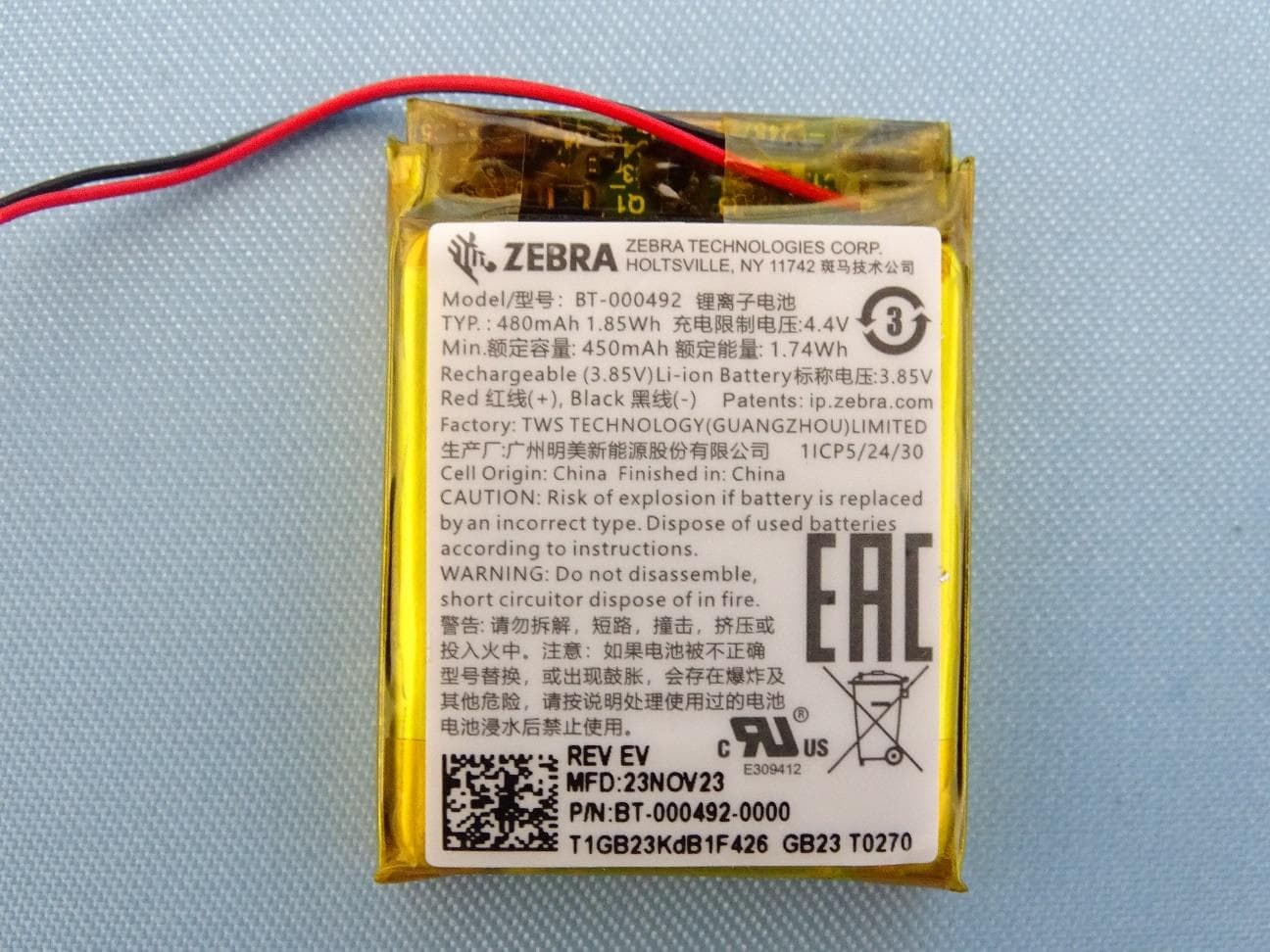
Click to zoom
Application Details
- Equipment Class
- DTS - Digital Transmission System
- Date of Grant
- Feb 18, 2024
- Application Purpose
- Original Equipment
- Date of Application
- Feb 14, 2024
- Equipment Note
- Bar Code Scanner
- Frequency Range
- 2402.00000000 - 2480.00000000
- Country
- United States
Documents & Files
Document Text
Text extracted from the exhibit documents filed with the FCC. Open a document above to read the original.
Users Manual
RS5100 / RSBT5/RS2100 Regulatory Guide ZEBRA and the stylized Zebra head are trademarks of Zebra Technologies Corporation, registered in many jurisdictions worldwide. All other trademarks are the property of their respective owners. ©2023 Zebra Technologies Corporation and/or its affiliates. All rights reserved. MN-003560-05 EN Rev. A - 3/7/24 Zebra Technologies | 3 Overlook Point | Lincolnshire, IL 60069 USA www.zebra.com Warranty For the complete Zebra hardware product warranty statement, go to: zebra.com/warranty. Service Information Before you use the unit, it must be configured to operate in your facility’s network and run your applications. If you have a problem running your unit or using your equipment, contact your facility’s Technical or Systems Support. If there is a problem with the equipment, they will contact the Zebra Global Customer Support at zebra.com/support. For the latest version of this guide go to: zebra.com/support. Regu latory Infor mati on This device is approved under Zebra Technologies Corporation. This guide applies to Model Numbers RS5100, RSBT5 and RS2100. All Zebra devices are designed to be compliant with the rules and regulations in the locations they are sold and will be labeled as required. Local language translations are available at the following website: zebra.com/support. Any changes or modifications to Zebra equipment, not expressly approved by Zebra could void the user’s authority to operate the equipment. Declared maximum operating temperature: 50°C. CAUTION: Only use Zebra approved and UL Listed accessories, battery packs and battery chargers. Do NOT attempt to charge damp/wet mobile computers or batteries. All components must be dry before connecting to an external power source. Bluetooth ® Wireless Technology This is an approved Bluetooth ® product. For more information or to view the End Product Listing, please visit bluetooth.org/tpg/listings.cfm. Frequency of Operation – FCC and IC Health and Safety Recommendations Ergonomic Recommendations CAUTION In order to avoid or minimize the potential risk of ergonomic injury, follow the recommendations below. Consult with your local Health & Safety Manager to ensure that you are adhering to your company's safety programs to prevent employee injury. • Reduce or eliminate repetitive motion • Maintain a natural position • Reduce or eliminate excessive force • Keep objects that are used frequently within easy reach • Perform tasks at correct heights • Reduce or eliminate vibration • Reduce or eliminate direct pressure • Provide adjustable workstations • Provide adequate clearance • Provide a suitable working environment • Improve work procedures. Warnings for Use of Wireless Devices CAUTION Please observe all warning notices with regard to the usage of wireless devices. Potentially Hazardous Atmospheres – Vehicles Use You are reminded of the need to observe restrictions on the use of radio devices in fuel depots, chemical plants etc. and areas where the air contains chemicals or particles such as grain, dust, or metal powders and any other area where you would normally be advised to turn off your vehicle engine. Safety in Hospitals Wireless devices transmit radio frequency energy and may affect medical electrical equipment. Wireless devices should be switched off wherever you are requested to do so in hospitals, clinics or healthcare facilities. These requests are designed to prevent possible interference with sensitive medical equipment. Pacemakers Pacemaker manufacturers recommended that a minimum of 15 cm (6 inches) be maintained between a handheld wireless device and a pacemaker to avoid potential interference with the pacemaker. These recommendations are consistent with independent research and recommendations by Wireless Technology Research. Persons with Pacemakers: • Should ALWAYS keep the device more than 15cm (6 inches) from their pacemaker when turned ON. • Should not carry the device in a breast pocket. • Should use the ear furthest from the pacemaker to minimise the potential for interference. • If you have any reason to suspect that interference is taking place, turn OFF your device. Other Medical Devices Please consult your physician or the manufacturer of the medical device to determine if the operation of your wireless product may interfere with the medical device. RF Exposure Guidelines Safety Information Reducing RF Exposure – Use Properly Only operate the device in accordance with the instructions supplied. International The device complies with internationally recognized standards covering human exposure to electromagnetic fields from radio devices. For information on “International” human exposure to electromagnetic fields refer to the Zebra Declaration of Conformity (DoC) at: zebra.com/doc . For further information on the safety of RF energy from wireless devices - see zebra.com/responsibility located under Corporate Responsibility. Europe Handheld Devices This device was tested for typical body worn operation. Use only Zebra tested and approved belt-clips, holsters, and similar accessories to ensure EU Compliance. US and Canada Handheld Devices This device was tested for typical body worn operation. Use only Zebra tested and approved belt-clips, holsters, and similar accessories to ensure FCC Compliance. The use of third-party belt-clips, holsters, and similar accessories may not comply with FCC RF exposure compliance requirements, and should be avoided. Laser Devices Class 2 laser scanners use a low power, visible light diode. As with any very bright light source such as the sun, the user should avoid staring directly into the light beam. Momentary exposure to a Class 2 laser is not known to be harmful. Caution: Use of controls, adjustments or performance of procedures other than those specified herein may result in hazardous laser light exposure. SE5500 • Wavelength: 500-570 nm • Maximum Output: 1 mW • Pulse Duration: 4 ms • Beam Divergence: 18° • Repetition Rate: 16.7 ms Scanne…
Text truncated - open the document above for the full version.
Users Manual
RS2100 Quick Start Guide MN-004872-01EN Rev A DRAFT Copyright 2024/01/08 ZEBRA and the stylized Zebra head are trademarks of Zebra Technologies Corporation, registered in many jurisdictions worldwide. All other trademarks are the property of their respective owners. ©2023 Zebra Technologies Corporation and/or its affiliates. All rights reserved. Information in this document is subject to change without notice. The software described in this document is furnished under a license agreement or nondisclosure agreement. The software may be used or copied only in accordance with the terms of those agreements. For further information regarding legal and proprietary statements, please go to: SOFTWARE: zebra.com/linkoslegal. COPYRIGHTS: zebra.com/copyright. PATENTS: ip.zebra.com. WARRANTY: zebra.com/warranty. END USER LICENSE AGREEMENT: zebra.com/eula. Terms of Use Proprietary Statement This manual contains proprietary information of Zebra Technologies Corporation and its subsidiaries (“Zebra Technologies”). It is intended solely for the information and use of parties operating and maintaining the equipment described herein. Such proprietary information may not be used, reproduced, or disclosed to any other parties for any other purpose without the express, written permission of Zebra Technologies. Product Improvements Continuous improvement of products is a policy of Zebra Technologies. All specifications and designs are subject to change without notice. Liability Disclaimer Zebra Technologies takes steps to ensure that its published Engineering specifications and manuals are correct; however, errors do occur. Zebra Technologies reserves the right to correct any such errors and disclaims liability resulting therefrom. Limitation of Liability In no event shall Zebra Technologies or anyone else involved in the creation, production, or delivery of the accompanying product (including hardware and software) be liable for any damages whatsoever (including, without limitation, consequential damages including loss of business profits, business interruption, or loss of business information) arising out of the use of, the results of use of, or inability to use such product, even if Zebra Technologies has been advised of the possibility of such damages. Some jurisdictions do not allow the exclusion or limitation of incidental or consequential damages, so the above limitation or exclusion may not apply to you. DRAFT RS2100 Quick Start Guide Features This section lists the features of the RS2100. Figure 1 RS2100 Features Feature Callout Feature Name 1Imager Window 2NFC Icon 3System LED 4Mounting Tabs 5Charging Contacts Table 1 Features Top View 3 DRAFT RS2100 Quick Start Guide Placing the Mount on Your Hand Slide the scanner mount onto your hand with the Scan Trigger next to your thumb. 1.Loosen the finger and wrist straps. Figure 2 2.Slide your hand through the wrist strap, and your index finger through the finger strap. Figure 3 4 DRAFT RS2100 Quick Start Guide 3.Pull the mount onto your hand until the wrist strap sits comfortably on your wrist and the finger strap is at the base of your finger. Secure the straps. Figure 4 Mounting the Scanner Mount the scanner onto the Mounting Accessory. 1.Place the tail end of the scanner in the mount. 5 DRAFT RS2100 Quick Start Guide 2.Press the front end of the scanner into the mount. Push down firmly until the latches close around the scanner. Figure 5 1 2 The back-of-hand mount is ready to be worn. Pairing using NFC Tap-to-Pair The RS2100 is NFC-enabled and supports Bluetooth Tap-to-Pair. To connect with an NFC-enabled device such as the WT6300 or TC52: 1.Ensure NFC is enabled on the device. 2.Align the NFC icon on the RS2100 with the NFC icon on the device. The Status LED blinks blue, indicating that the RS2100 is attempting to establish a connection with the device. When a connection is established, the Status LED turns off, and the RS2100 emits a single string of low/high beeps. 6 DRAFT RS2100 Quick Start Guide NOTE: Not all Zebra devices support NFC readers and the Tap-to-Pair feature. Pairing to a Mobile Device via Bluetooth To pair the RS2100 with a mobile device using a Simple Serial Interface (SSI): 1.On the device, open Settings > Bluetooth Pairing Utility. The Bluetooth Pairing Utility opens. 2.Using the RS2100, scan the barcode on the screen. The Status LED blinks blue, indicating that the RS2100 is attempting to establish a connection with the device. When a connection is established, the Status LED turns off, and the RS2100 emits a single string of low/high beeps. The device indicates a successful pairing attempt with a toast notification (audio and visual). When the Bluetooth connection is established, dialog box notifications display on the device’s screen. 3.On the device, touch to return to the main screen. Pairing With a Bluetooth Adapter To pair the RS2100 with a host computer using a Bluetooth Adapter (BT-RS5X6-DNGL-01): 1.Ensure the scanner is in factory default mode. Scan the factory default barcode to return the scanner to its factory default settings. 7 DRAFT RS2100 Quick Start Guide 2.Using the RS2100, scan the pairing code (1) on the adapter. The Status LED blinks blue, indicating that the RS2100 is attempting to establish a connection with the device. When a connection is established, the Status LED turns off, and the RS2100 emits a single string of low/high beeps. Scanning The scanner uses digital camera technology to take an image of a barcode, and software algorithms to extract barcode data from that image. the RS2100 uses the SE4770 scan image, which displays a red crosshair aimer. Scanning with SE4770 To scan a barcode: 1.Press the Trigger and aim the Scan Window at the barcode. 8 DRAFT RS2100 Quick Start Guide 2.Adjust the scanner's position so that the red cross-hair appears at the center of the barcode. Figure 6 The Status LED illuminates red. Upon successful decoding, the Status LED changes from red to green, and an audible beep s…
Text truncated - open the document above for the full version.
Attestation Statements
Regulatory Engineering Zebra Technologies Corporation 1 Zebra Plaza, | Holtsville, NY 11742 | 1.631.738.2400 phone | 1.631.627.7179 fax | www.zebra.com Federal Communications Commission Authorization and Evaluation Division 7435 Oakland Mills Road Columbia, MD 21046 USA Date: February 17, 2023 Ref: Attestation Statements Part 2.911(d)(7) Filing Grantee Code: UZ7 Zebra Technologies Corporation (“the applicant”) certifies that, as of the date of the filing of the application, [Zebra Technologies Corporation] is our designated U.S. agent for service of process for the above referenced grantee code. Zebra Technologies Corporation accepts to maintain an agent for no less than one year after the grantee has terminated all marketing and importation or the conclusion of any Commission-related proceeding involving the equipment. The applicant further acknowledges their responsibility to inform the FCC whenever the agent information changes. [Zebra Technologies Corporation] accepts, as of the date of the filing of the application, the obligation of the designated U.S. agent for service of process for the above referenced grantee code. Designated U.S. Agent Information: Name: Zebra Technologies Corporation FRN: 0015642663 Address: 1 Zebra Plaza, Holtsville, New York, United States, 11742 Contact Person: Larry (Qianlin) Zhou Tel.: 346-260-3543 Email: [email protected] Sincerely, Applicant U.S. Agent Zebra Technologies Corporation Zebra Technologies Corporation Larry (Qianlin) Zhou Larry (Qianlin) Zhou
Cover Letter(s)
Regulatory Engineering Zebra Technologies Corporation 1 Zebra Plaza, | Holtsville, NY 11742 | 1.631.738.2400 phone | 1.631.627.7179 fax | www.zebra.com Date: January 18, 2024 Federal Communications Commission Office of Engineering and Technology Equipment Authorization Division 7435 Oakland Mills Road Columbia, MD 21046 Ref: FCC ID: UZ7RS2100 AUTHORIZATION LETTER We, the undersigned, hereby authorize Jones Tsai in Sporton International Inc. to act on our behalf in all manners relating to FCC application for equipment authorization, including signing of all documents relating to these matters. Any and all acts carried out by Jones Tsai in Sporton International Inc. on our behalf shall have the same effect as acts of our own. If you have any acknowledgement and response, please send it to Sporton International Inc. directly. Confidentiality Request Pursuant to the provisions of Sections 0.457 and 0.459 of Commission’s rules (47CFR§§0.457, 0.459), we are requesting the Commission to withhold the following attachment(s) as confidential document from public disclosure indefinitely. Schematic Diagram Block Diagram Part List Operational Description Tune-up Procedure Above mentioned document contains detailed system and equipment description are considered as proprietary information in operation of the equipment. The public disclosure of above documents might be harmful to our company and would give competitor an unfair advantage in the market. In additional to above mentioned documents, pursuant to Public Notice DA 04-1705 of the Commission’ s policy, in order to comply with the marketing regulations in 47 CFT §2.803 and the importation rules in 47 CFR §2.1204, while ensuring that business sensitive information remains confidential until the actual marketing of newly authorized devices. We are requesting the commission to grant shot-term confidentiality request on the following attachment(s) for 180 days after the grant as outlined in Public Notice DA 04-1705. Regulatory Engineering Zebra Technologies Corporation 1 Zebra Plaza, | Holtsville, NY 11742 | 1.631.738.2400 phone | 1.631.627.7179 fax | www.zebra.com Internal Photos External Photos Test Setup Photos User Manual It is our understanding that all measurement test reports, FCC ID label format and correspondent during certification review process cannot be granted as confidential documents and those information will be available for public review once the grant of equipment authorization is issued. If you have any questions regarding this authorization, please contact me directly. Signature : _______________________________ Name and Job Title. : Larry (Qianlin) Zhou / Regulatory Specialist E-mail : [email protected] Tel. : 346-260-3543
Cover Letter(s)
Regulatory Engineering Zebra Technologies Corporation 1 Zebra Plaza, | Holtsville, NY 11742 | 1.631.738.2400 phone | 1.631.627.7179 fax | www.zebra.com Date: January 18, 2024 Federal Communications Commission Office of Engineering and Technology Equipment Authorization Division 7435 Oakland Mills Road Columbia, MD 21046 Ref: FCC ID: UZ7RS2100 AUTHORIZATION LETTER We, the undersigned, hereby authorize Jones Tsai in Sporton International Inc. to act on our behalf in all manners relating to FCC application for equipment authorization, including signing of all documents relating to these matters. Any and all acts carried out by Jones Tsai in Sporton International Inc. on our behalf shall have the same effect as acts of our own. If you have any acknowledgement and response, please send it to Sporton International Inc. directly. Confidentiality Request Pursuant to the provisions of Sections 0.457 and 0.459 of Commission’s rules (47CFR§§0.457, 0.459), we are requesting the Commission to withhold the following attachment(s) as confidential document from public disclosure indefinitely. Schematic Diagram Block Diagram Part List Operational Description Tune-up Procedure Above mentioned document contains detailed system and equipment description are considered as proprietary information in operation of the equipment. The public disclosure of above documents might be harmful to our company and would give competitor an unfair advantage in the market. In additional to above mentioned documents, pursuant to Public Notice DA 04-1705 of the Commission’ s policy, in order to comply with the marketing regulations in 47 CFT §2.803 and the importation rules in 47 CFR §2.1204, while ensuring that business sensitive information remains confidential until the actual marketing of newly authorized devices. We are requesting the commission to grant shot-term confidentiality request on the following attachment(s) for 180 days after the grant as outlined in Public Notice DA 04-1705. Regulatory Engineering Zebra Technologies Corporation 1 Zebra Plaza, | Holtsville, NY 11742 | 1.631.738.2400 phone | 1.631.627.7179 fax | www.zebra.com Internal Photos External Photos Test Setup Photos User Manual It is our understanding that all measurement test reports, FCC ID label format and correspondent during certification review process cannot be granted as confidential documents and those information will be available for public review once the grant of equipment authorization is issued. If you have any questions regarding this authorization, please contact me directly. Signature : _______________________________ Name and Job Title. : Larry (Qianlin) Zhou / Regulatory Specialist E-mail : [email protected] Tel. : 346-260-3543
External Photos
PHOTOGRAPHS OF EUT Report No.: EP410609 TEL : 886-3-327-3456 Page Number : 1 of 29 FAX : 886-3-328-4978 Issue Date : Feb. 08, 2024 Report Version : 01 1. External Photograph of EUT Brand Name: Zebra / Model Name: RS2100 / HVIN: RS2100 / PMN: RS2100 PHOTOGRAPHS OF EUT Report No.: EP410609 TEL : 886-3-327-3456 Page Number : 2 of 29 FAX : 886-3-328-4978 Issue Date : Feb. 08, 2024 Report Version : 01 PHOTOGRAPHS OF EUT Report No.: EP410609 TEL : 886-3-327-3456 Page Number : 3 of 29 FAX : 886-3-328-4978 Issue Date : Feb. 08, 2024 Report Version : 01 PHOTOGRAPHS OF EUT Report No.: EP410609 TEL : 886-3-327-3456 Page Number : 4 of 29 FAX : 886-3-328-4978 Issue Date : Feb. 08, 2024 Report Version : 01 PHOTOGRAPHS OF EUT Report No.: EP410609 TEL : 886-3-327-3456 Page Number : 5 of 29 FAX : 886-3-328-4978 Issue Date : Feb. 08, 2024 Report Version : 01 PHOTOGRAPHS OF EUT Report No.: EP410609 TEL : 886-3-327-3456 Page Number : 6 of 29 FAX : 886-3-328-4978 Issue Date : Feb. 08, 2024 Report Version : 01 PHOTOGRAPHS OF EUT Report No.: EP410609 TEL : 886-3-327-3456 Page Number : 7 of 29 FAX : 886-3-328-4978 Issue Date : Feb. 08, 2024 Report Version : 01 2. Photograph of Accessory Brand Name: Zebra / Model Name: RS2100 / HVIN: RS2100 / PMN: RS2100 Specification of Accessory Battery Brand Name Zebra Model Name BT-000492 Remark: For accessories equipped with this EUT, please refer to the following photos. PHOTOGRAPHS OF EUT Report No.: EP410609 TEL : 886-3-327-3456 Page Number : 8 of 29 FAX : 886-3-328-4978 Issue Date : Feb. 08, 2024 Report Version : 01 Battery
ID Label/Location Info
Labellocation on the bottom of thedevice
Internal Photos
PHOTOGRAPHS OF EUT Report No.: EP410609 TEL : 886-3-327-3456 Page Number : 9 of 29 FAX : 886-3-328-4978 Issue Date : Feb. 08, 2024 Report Version : 01 3. Internal Photograph of EUT Brand Name: Zebra / Model Name: RS2100 / HVIN: RS2100 / PMN: RS2100 PHOTOGRAPHS OF EUT Report No.: EP410609 TEL : 886-3-327-3456 Page Number : 10 of 29 FAX : 886-3-328-4978 Issue Date : Feb. 08, 2024 Report Version : 01 PHOTOGRAPHS OF EUT Report No.: EP410609 TEL : 886-3-327-3456 Page Number : 11 of 29 FAX : 886-3-328-4978 Issue Date : Feb. 08, 2024 Report Version : 01 PHOTOGRAPHS OF EUT Report No.: EP410609 TEL : 886-3-327-3456 Page Number : 12 of 29 FAX : 886-3-328-4978 Issue Date : Feb. 08, 2024 Report Version : 01 PHOTOGRAPHS OF EUT Report No.: EP410609 TEL : 886-3-327-3456 Page Number : 13 of 29 FAX : 886-3-328-4978 Issue Date : Feb. 08, 2024 Report Version : 01 PHOTOGRAPHS OF EUT Report No.: EP410609 TEL : 886-3-327-3456 Page Number : 14 of 29 FAX : 886-3-328-4978 Issue Date : Feb. 08, 2024 Report Version : 01 PHOTOGRAPHS OF EUT Report No.: EP410609 TEL : 886-3-327-3456 Page Number : 15 of 29 FAX : 886-3-328-4978 Issue Date : Feb. 08, 2024 Report Version : 01 PHOTOGRAPHS OF EUT Report No.: EP410609 TEL : 886-3-327-3456 Page Number : 16 of 29 FAX : 886-3-328-4978 Issue Date : Feb. 08, 2024 Report Version : 01 PHOTOGRAPHS OF EUT Report No.: EP410609 TEL : 886-3-327-3456 Page Number : 17 of 29 FAX : 886-3-328-4978 Issue Date : Feb. 08, 2024 Report Version : 01 PHOTOGRAPHS OF EUT Report No.: EP410609 TEL : 886-3-327-3456 Page Number : 18 of 29 FAX : 886-3-328-4978 Issue Date : Feb. 08, 2024 Report Version : 01 PHOTOGRAPHS OF EUT Report No.: EP410609 TEL : 886-3-327-3456 Page Number : 19 of 29 FAX : 886-3-328-4978 Issue Date : Feb. 08, 2024 Report Version : 01 PHOTOGRAPHS OF EUT Report No.: EP410609 TEL : 886-3-327-3456 Page Number : 20 of 29 FAX : 886-3-328-4978 Issue Date : Feb. 08, 2024 Report Version : 01 PHOTOGRAPHS OF EUT Report No.: EP410609 TEL : 886-3-327-3456 Page Number : 21 of 29 FAX : 886-3-328-4978 Issue Date : Feb. 08, 2024 Report Version : 01 PHOTOGRAPHS OF EUT Report No.: EP410609 TEL : 886-3-327-3456 Page Number : 22 of 29 FAX : 886-3-328-4978 Issue Date : Feb. 08, 2024 Report Version : 01 PHOTOGRAPHS OF EUT Report No.: EP410609 TEL : 886-3-327-3456 Page Number : 23 of 29 FAX : 886-3-328-4978 Issue Date : Feb. 08, 2024 Report Version : 01 PHOTOGRAPHS OF EUT Report No.: EP410609 TEL : 886-3-327-3456 Page Number : 24 of 29 FAX : 886-3-328-4978 Issue Date : Feb. 08, 2024 Report Version : 01 PHOTOGRAPHS OF EUT Report No.: EP410609 TEL : 886-3-327-3456 Page Number : 25 of 29 FAX : 886-3-328-4978 Issue Date : Feb. 08, 2024 Report Version : 01 PHOTOGRAPHS OF EUT Report No.: EP410609 TEL : 886-3-327-3456 Page Number : 26 of 29 FAX : 886-3-328-4978 Issue Date : Feb. 08, 2024 Report Version : 01 PHOTOGRAPHS OF EUT Report No.: EP410609 TEL : 886-3-327-3456 Page Number : 27 of 29 FAX : 886-3-328-4978 Issue Date : Feb. 08, 2024 Report Version : 01 PHOTOGRAPHS OF EUT Report No.: EP410609 TEL : 886-3-327-3456 Page Number : 28 of 29 FAX : 886-3-328-4978 Issue Date : Feb. 08, 2024 Report Version : 01 Bluetooth Antenna PHOTOGRAPHS OF EUT Report No.: EP410609 TEL : 886-3-327-3456 Page Number : 29 of 29 FAX : 886-3-328-4978 Issue Date : Feb. 08, 2024 Report Version : 01 ─────THE END──── NFC Antenna
RF Exposure Info
SPORTON INTERNATIONAL INC. Page Number : 1 of 4 TEL : 886-3-327-3456 Report Issued Date : Feb. 08, 2024 FAX : 886-3-328-4978 Report Version : Rev. 01 FCC ID : UZ7RS2100 RF Exposure Evaluation Report Report No. : FA410609 RF Exposure Evaluation Report FCC ID : UZ7RS2100 Equipment : Bar Code Scanner Brand Name : Zebra Model Name : RS2100 Applicant : Zebra Technologies Corporation 1 Zebra Plaza, Holtsville, NY 11742 Manufacturer : Zebra Technologies Corporation 1 Zebra Plaza, Holtsville, NY 11742 Standard : 47 CFR Part 2.1093 We, SPORTON INTERNATIONAL INC has been evaluated this product in accordance with 47 CFR Part 2.1093 and it complies with applicable limit. Sporton Lab is accredited to ISO 17025 by Taiwan Accreditation Foundation (TAF code: 1190) and the FCC designation No. TW1190 under the FCC 2.948(e) by Mutual Recognition Agreement (MRA) in FCC evaluation. The results in this report apply exclusively to the tested model / sample. Without written approval of SPORTON INTERNATIONAL INC. Laboratory, the test report shall not be reproduced except in full SPORTON INTERNATIONAL INC. EMC & Wireless Communications Laboratory No. 52, Huaya 1st Rd., Guishan Dist., Taoyuan City, Taiwan (R.O.C.) Approved by: Cona Huang / Deputy Manager SPORTON INTERNATIONAL INC. Page Number : 2 of 4 TEL : 886-3-327-3456 Report Issued Date : Feb. 08, 2024 FAX : 886-3-328-4978 Report Version : Rev. 01 FCC ID : UZ7RS2100 RF Exposure Evaluation Report Report No. : FA410609 Table of Contents 1. General Information ........................................................................................................................... 3 1.1 Description of Device Under Test (DUT) ........................................................................................... 3 2. Maximum RF output power among production units ......................................................................... 3 3. RF Exposure Evaluation .................................................................................................................... 4 Revision History REPORT NO. VERSION DESCRIPTION ISSUED DATE FA410609 Rev. 01 Initial issue of report Feb. 08, 2024 SPORTON INTERNATIONAL INC. Page Number : 3 of 4 TEL : 886-3-327-3456 Report Issued Date : Feb. 08, 2024 FAX : 886-3-328-4978 Report Version : Rev. 01 FCC ID : UZ7RS2100 RF Exposure Evaluation Report Report No. : FA410609 1. General Information 1.1 Description of Device Under Test (DUT) Product Feature & Specification DUT Type Bar Code Scanner Brand Name Zebra Model Name RS2100 FCC ID UZ7RS2100 Wireless Technology and Frequency Range Bluetooth: 2400 MHz ~ 2483.5 MHz Mode Bluetooth BR/EDR/LE Antenna Type Chip Antenna HW Version EV FW Version N07 MFD 19DEC23 DUT Stage Identical Prototype 2. Maximum RF output power among production units Band / Mode Average Power (dBm) BR / EDR BLE LE 1M 2M 3M 0-2M GFSK Bluetooth 4.5 6 6 0.5 2.5 SPORTON INTERNATIONAL INC. Page Number : 4 of 4 TEL : 886-3-327-3456 Report Issued Date : Feb. 08, 2024 FAX : 886-3-328-4978 Report Version : Rev. 01 FCC ID : UZ7RS2100 RF Exposure Evaluation Report Report No. : FA410609 3. RF Exposure Evaluation Bluetooth Max Power (dBm) mW Separation Distance (mm) Frequency (GHz) Exclusion Thresholds 6 3.98 5 2.48 1.25 Note: 1. Per KDB 447498 D01v06 the 1-g and 10-g SAR test exclusion thresholds for 100 MHz to 6 GHz at test separation distances ≤ 50 mm are determined by: [(max. power of channel, including tune-up tolerance, mW)/(min. test separation distance, mm)] ·[√f(GHz)] ≤ 3.0 for 1-g SAR and ≤ 7.5 for 10-g extremity SAR f(GHz) is the RF channel transmit frequency in GHz Power and distance are rounded to the nearest mW and mm before calculation The result is rounded to one decimal place for comparison Conclusion: Per KDB 447498 D01v06, when the minimum test separation distance is < 5 mm, a distance of 5 mm is applied to determine SAR test exclusion. The test exclusion threshold is 1.25 which is <= 3, SAR testing is not required.
Test Report
© 2019 Zebra Technologies Inc. All rights reserved Page 1 of 5 Printed and downloaded copies of this document are considered non-controlled Zebra Technologies Corporation BT-RS2100 Antenna SPECIFICATION Antenna Manufacturer Name Universal Global Technology Co., Ltd. Address No. 141, Lane 351, Sec. 1, Taiping Road, Tsaotuen, Nantou County 542007, Taiwan P/N: 46-500111-02 Manufacture P/N: ANT016008LCS2442MA1 Test DATE 2024/01/08 DATASHEET REVISION v01 ______ Test Engineer: Sam Liu © 2019 Zebra Technologies Inc. All rights reserved Page 2 of 5 Printed and downloaded copies of this document are considered non-controlled Zebra Technologies Corporation Description of Antenna Frequency Range 2400~2484MHz Impedance 50Ω Peak Gain 1.80dBi @2442MHz (test in ETS chamber) Antenna type Bluetooth chip antenna Manufacturing Process MLCC Antenna Return Loss: Antenna Peak Gain: © 2019 Zebra Technologies Inc. All rights reserved Page 3 of 5 Printed and downloaded copies of this document are considered non-controlled Zebra Technologies Corporation Antenna 3D Radiation Pattern: - 2402MHz - 2441MHz - 2480MHz
Test Report
TEL : 886-3-327-0868 Page Number : 1 of 24 FAX : 886-3-327-0855 Issue Date : Feb. 15, 2024 Report Template No.: BU5-FR15CBT4.0 Version 2.4 Report Version : 02 FCC RADIO TEST REPORT Report No. : FR410609B FCC RADIO TEST REPORT FCC ID : UZ7RS2100 Equipment : Bar Code Scanner Brand Name : Zebra Model Name : RS2100 Applicant : Zebra Technologies Corporation 1 Zebra Plaza, Holtsville, NY 11742 Manufacturer : Zebra Technologies Corporation 1 Zebra Plaza, Holtsville, NY 11742 Standard : FCC Part 15 Subpart C §15.247 The product was received on Jan. 08, 2024 and testing was performed from Jan. 12, 2024 to Jan. 29, 2024. We, Sporton International Inc. Wensan Laboratory, would like to declare that the tested sample has been evaluated in accordance with the test procedures and has been in compliance with the applicable technical standards. The test results in this report apply exclusively to the tested model / sample. Without written approval from…
Text truncated - open the document above for the full version.
Contact Information
Applicant
Dharmajit Solanki(Principal Regulatory Specialist)
Test Firm
Sporton International Inc.Alex Chen
Technical Specifications
| # | Rule Parts | Frequency Range | Power Output |
|---|---|---|---|
| 1 | 15C | 2.40 GHz - 2.48 GHz | 3.50 mW |
Other Applications from Zebra Technologies Corporation
UZ7DS8288R
Jun 29, 2026Cordless Scanner
Equipment Class
DTS - Digital Transmission SystemUZ7DS8208R
Jun 29, 2026Cordless Scanner
Equipment Class
DSS - Part 15 Spread Spectrum TransmitterUZ7TCW01G
Jun 23, 2026Touch Computer
Equipment Class
CBE - Citizens Band End User DevicesUZ7TCW010
May 29, 2026Touch Computer
Equipment Class
NII - Unlicensed National Information Infrastructure TXUZ7TC101B
Apr 29, 2026Touch Computer
Equipment Class
DSS - Part 15 Spread Spectrum Transmitter