UZ7WT41N0Wearable Terminal
Zebra Technologies Corporation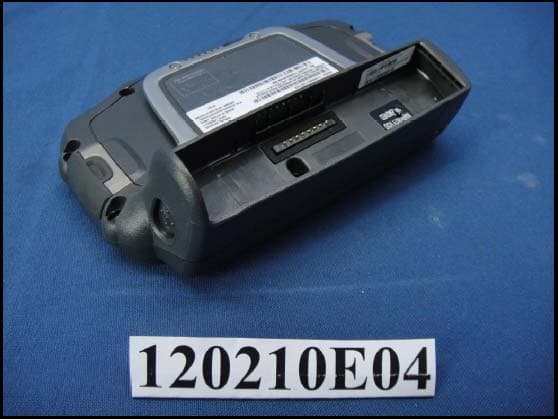
Click to zoom
Application Details
- Equipment Class
- DTS - Digital Transmission System
- Date of Grant
- Nov 11, 2012
- Application Purpose
- Original Equipment
- Date of Application
- Nov 11, 2012
- Equipment Note
- Wearable Terminal
- Frequency Range
- 5745.00000000 - 5825.00000000
- Country
- United States
Documents & Files
Document Text
Text extracted from the exhibit documents filed with the FCC. Open a document above to read the original.
Users Manual
WT41N0 WEARABLE TERMINAL USER GUIDE DRAFT DRAFT WT41N0 WEARABLE TERMINAL USER GUIDE 72E-159561-01 Rev. 1 February 2012 DRAFT iiWT41N0 User Guide No part of this publication may be reproduced or used in any form, or by any electrical or mechanical means, without permission in writing from Motorola. This includes electronic or mechanical means, such as photocopying, recording, or information storage and retrieval systems. The material in this manual is subject to change without notice. The software is provided strictly on an “as is” basis. All software, including firmware, furnished to the user is on a licensed basis. Motorola grants to the user a non-transferable and non-exclusive license to use each software or firmware program delivered hereunder (licensed program). Except as noted below, such license may not be assigned, sublicensed, or otherwise transferred by the user without prior written consent of Motorola. No right to copy a licensed program in whole or in part is granted, except as permitted under copyright law. The user shall not modify, merge, or incorporate any form or portion of a licensed program with other program material, create a derivative work from a licensed program, or use a licensed program in a network without written permission from Motorola. The user agrees to maintain Motorola’s copyright notice on the licensed programs delivered hereunder, and to include the same on any authorized copies it makes, in whole or in part. The user agrees not to decompile, disassemble, decode, or reverse engineer any licensed program delivered to the user or any portion thereof. Motorola reserves the right to make changes to any software or product to improve reliability, function, or design. Motorola does not assume any product liability arising out of, or in connection with, the application or use of any product, circuit, or application described herein. No license is granted, either expressly or by implication, estoppel, or otherwise under any Motorola, Inc., intellectual property rights. An implied license only exists for equipment, circuits, and subsystems contained in Motorola products. DRAFT iii Revision History Changes to the original manual are listed below: ChangeDateDescription DRAFT ivWT41N0 User Guide DRAFT TABLE OF CONTENTS Revision History .............................................................................................................................. iii About This Guide Introduction ..................................................................................................................................... ix Documentation Set ................................................................................................................... ix Configurations................................................................................................................................. x Software Versions ..................................................................................................................... x Chapter Descriptions ...................................................................................................................... xi Notational Conventions................................................................................................................... xi Related Documents and Software .................................................................................................. xii Service Information ......................................................................................................................... xii Chapter 1: Getting Started Introduction .................................................................................................................................... 1-1 Unpacking the Wearable Terminal ................................................................................................. 1-3 Getting Started ............................................................................................................................... 1-6 Installing and Removing the Main Battery ..................................................................................... 1-6 Installing the Main Battery ........................................................................................................ 1-6 Charging the Battery ...................................................................................................................... 1-7 Charging the Main Battery and Memory Backup Battery ......................................................... 1-7 Charging Spare Batteries ......................................................................................................... 1-8 Removing the Main Battery ...................................................................................................... 1-8 Installing the Wrist Mount ............................................................................................................... 1-9 Install a Hip Mount ......................................................................................................................... 1-11 Routing an Extended Cable Scanner ....................................................................................... 1-12 Connecting a Scanner ................................................................................................................... 1-13 Starting the Wearable Terminal ..................................................................................................... 1-13 WT41N0 Boot Up ..................................................................................................................... 1-13 Voice Only WT41N0 Boot Up .................................................................................................. 1-14 Chapter 2: Using the Wearable Terminal Introduction .................................................................................................................................... 2-1 DRAFT viW…
Text truncated - open the document above for the full version.
Users Manual
CHAPTER 5 ACCESSORIES Introduction The wearable terminal accessories provide a variety of product support capabilities. Accessories include cradles, cables and scanners. Table 5-1 lists the major accessories available for the wearable terminal: Table 5-1Wearable Terminal Accessories AccessoryDescription Single Slot USB CradleCharges the wearable terminal main battery and a spare battery. It also synchronizes the wearable terminal with a host computer through a USB connection. Four Slot Ethernet CradleCharges up to four wearable terminals (with main battery installed) and provides communication through an Ethernet connection. Four Slot Spare Battery Charger Charges up to four spare batteries. RS409 ScannerProvides 1D scanning capability. RS419 ScannerProvides 1D scanning capability. RS309 ScannerProvides 1D scanning capability. RS507 ScannerProvides wired or wireless imaging capability. Wrist MountProvides a means for wearing the wearable terminal on the arm for hands-free applications. Hip MountProvides a means for wearing the wearable terminal on a belt for hands-free applications. HeadsetFor audio playback/recording during voice-enabled applications. Headset AdaptersConnect an optional headset to the wearable terminal. Replacement BatteriesStandard Capacity Battery: 2330 mAh (minimum) Extended Capacity Battery: 4600 mAh (minimum) DRAFT 5 - 2 WT41N0 User Guide Standard Capacity Battery Freezer Pouch Allows the user to use the wearable terminal with standard capacity battery in a freezer environment on the hip or wrist for use in voice picking applications. Extended Capacity Battery Freezer Pouch Allows the user to use the wearable terminal with extended capacity battery in a freezer environment on the hip or wrist for use in voice picking applications. USB AdapterConnects the Single-slot cradle to USB hubs, mice, keyboards and memory. The adapter has a USB mini-A connector on the cradle side and a USB A Female connector on the other side. Connector ShroudProtects the connector of an accessory that connects to the wearable computer. Screen ProtectorsPackage of 3 screen protectors. Arm SleeveExtra layer sleeve to wear under wrist mount for extra comfort and hygiene. RCH50 Rugged Cabled Headset Enables hands-free voice-directed mobility communication. An audible mono headset with noise cancelling boom microphone helps survive harsh environments. SoftwareEnterprise Mobility Developer Kits available at: http://www.motorola.com/enterprisemobility/support. Device Configuration Package (DCPforWT41x0c50) and Platform SDK (PSDK41x0c50) for WT41x0, available at: http://www.motorola.com/enterprisemobility/support. Table 5-1Wearable Terminal Accessories (Continued) AccessoryDescription DRAFT Getting Started 5 - 3 Single Slot USB Cradle This section describes how to use a Single Slot USB cradle (Figure 5-1) with the wearable terminal. For USB communication setup procedures refer to the WT41N0 Integrator Guide. Figure 5-1Single Slot USB Cradle The Single Slot USB Cradle: •Provides 5.4 VDC power for operating the wearable terminal. •Provides USB port for data communication between the wearable terminal and a host computer or other serial devices (e.g., a printer). •Synchronizes information between the wearable terminal and a host computer. (With customized or third party software, it can also be used to synchronize the wearable terminal with corporate databases.) •Charges the wearable terminal’s battery and a spare battery. •Provides a location for storing a scanner when a wearable terminal is docked in the cradle. CAUTIONEnsure that you follow the guidelines for battery safety described in Battery Safety Guidelines on page 6-3. NOTEThe normal function of the product may be disturbed by Strong Electro Magnetic Interference (for example, static electricity). If so, simply remove and re-insert the terminal to resume normal operation. In case the function does not resume, please use the product in another location. 1 2 Spare Battery Spare Battery Charging LED Scanner Placed in Well DRAFT 5 - 4 WT41N0 User Guide Battery Charging Indicators The Single Slot USB cradle can charge the wearable terminal’s main battery and a spare battery simultaneously. The wearable terminal’s amber Charge Status LED indicates the status of the battery charging in the wearable terminal. See Table 1-2 on page 1-7 for charging status indications. The amber Spare Battery Charging LED on the cradle (see Figure 5-1 on page 5-3) indicates the status of the spare battery charging in the cradle. See Table 5-2 for charging status indications. The standard capacity battery fully charges in less than four hours and the extended capacity battery fully charges in less than eight hours. Table 5-2 Spare Battery LED Charging Indicators Spare Battery LED (on cradle) Indication OffNo spare battery in well; spare battery not placed correctly; cradle is not powered. Fast Blinking AmberCharging error: •Temperature is too low or too high. •Charging has gone on too long without completing (typically eight hours). Slow Blinking AmberSpare battery is charging. Solid AmberCharging complete. DRAFT Getting Started 5 - 5 Four Slot Ethernet Cradle This section describes how to use a Four Slot Ethernet cradle (Figure 5-2) with the wearable terminal. For Ethernet communication setup procedures refer to the WT41N0 Integrator Guide. Figure 5-2Four Slot Ethernet Cradle The Four Slot Ethernet cradle: •Connects up to four wearable terminals to an Ethernet network. •Provide 5.4 VDC power for operating the wearable terminal and charging the battery. •Simultaneously charges up to four wearable terminals (with batteries installed). You cannot ActiveSync using the Four Slot Ethernet cradle. To ActiveSync with a host computer use the Single Slot USB cradle. Battery Charging The four slot Ethernet cradle can charge up to four wearable terminals simultaneously. To charge the wearable terminal: CAUTIONEnsure that you follow the guidelines for battery safety described in Ba…
Text truncated - open the document above for the full version.
Users Manual
Motorola reserves the right to make changes to any product to improve reliability, function, or design. Motorola does not assume any product liability arising out of, or in connection with, the application or use of any product, circuit, or application described herein. No license is granted, either expressly or by implication, estoppel, or otherwise under any patent right or patent, covering or relating to any combination, system, apparatus, machine, material, method, or process in which Motorola products might be used. An implied license exists only for equipment, circuits, and subsystems contained in Motorola products. Warranty For the complete Motorola hardware product warranty statement, go to: http://www.motorolasolutions.com/warranty. Service Information If you have a problem using the equipment, contact your facility’s Technical or Systems Support. If there is a problem with the equipment, they will contact the Motorola Enterprise Mobility Support at: http://www.motorolasolutions.com/support. For the latest version of this guide go to: http:// supportcentral.motorola.com. Motorola Solutions, Inc. 1301 E. Algonquin Rd. Schaumburg, IL 60196-1078, U.S.A. http://www.motorolasolutions.com MOTOROLA, MOTO, MOTOROLA SOLUTIONS and the Stylized M Logo are trademarks or registered trademarks of Motorola Trademark Holdings, LLC and are used under license. All other trademarks are the property of their respective owners. © 2012 Motorola Solutions, Inc. All Rights Reserved. 72-159559-01 Rev. B — November 2012 WT41N0 REGULATORY GUIDE Regulatory Information This device is approved under Motorola Solutions, Inc. This guide applies to the following Model Numbers: WT41N0. All Motorola/Symbol devices are designed to be compliant with rules and regulations in locations they are sold and will be labeled as required. Local language translations are available at the following website: http://supportcentral.motorola.com. Any changes or modifications to Motorola/Symbol Technologies equipment, not expressly approved by Motorola/Symbol Technologies, could void the user's authority to operate the equipment. Declared maximum operating temperature: 50°C. Bluetooth ® Wireless Technology This is an approved Bluetooth product. For more information or to view the End Product Listing, please visit http:// www.bluetooth.org/tpg/listings.cfm. Wireless Devices Country Approvals Regulatory markings, subject to certification, are applied to the device signifying the radio(s) is/are approved for use in the following countries: United States, Canada, Japan, China, S. Korea, Australia, and Europe 1 . Please refer to the Motorola / Symbol Declaration of Conformity (DoC) for details of other country markings. This is available at http://www.motorola.com/doc. Note 1 : For 2.4GHz or 5GHz Products: Europe includes, Austria, Belgium, Bulgaria, Czech Republic, Cyprus, Denmark, Estonia, Finland, France, Germany, Greece, Hungary, Iceland, Ireland, Italy, Latvia, Liechtenstein, Lithuania, Luxembourg, Malta, Netherlands, Norway, Poland, Portugal, Romania, Slovak Republic, Slovenia, Spain, Sweden, Switzerland and the United Kingdom. Country Roaming This device incorporates the International Roaming feature (IEEE802.11d) which will ensure the product operates on the correct channels for the particular country of use. Ad-Hoc Operation (5 GHz band) Ad-Hoc operation is limited to Channels 36-48 (5150-5250 MHz). Use of this band is restricted to Indoor Use Only, any other use will make the operation of this device illegal. Frequency of Operation - FCC and IC 5 GHz Only The use in the UNII (Unlicensed National Information Infrastructure) band 1 (5150 - 5250 MHz) is restricted to Indoor Use Only; any other use will make the operation of this device illegal. Industry Canada Statement: Caution: The device for the band 5150 - 5250 MHz is only for indoor usage to reduce potential for harmful interference to co-Channel mobile satellite systems. High power radars are allocated as primary users (meaning they have priority) of 5250 - 5350 MHz and 5650-5850 MHz and these radars could cause interference and/or damage to LE-LAN devices. Avertissement: Le dispositive fonctionnant dans la bande 5150 - 5250 MHz est réservé uniquement pour une utilisation à l'intérieur afin de réduire les risques de brouillage préjudiciable aux systèmes de satellites mobiles utilisant les mêmes canaux. Les utilisateurs de radars de haute puissance sont désignés utilisateurs principaux (c.-à-d., qu'ils ont la priorité) pour les bands 5250 - 5350 MHz et 5650 - 5850 MHz et que ces radars pourraient causer du brouillage et/ou des dommages aux dispositifs LAN-EL. 2.4 GHz Only The available channels for 802.11 b/g operation in the US are Channels 1 to 11. The range of channels is limited by firmware. Health and Safety Recommendations Ergonomic Recommendations • Reduce or eliminate repetitive motion • Maintain a neutral postures • Reduce or eliminate excessive force • Keep objects that are used frequently within easy reach • Perform tasks at correct heights • Reduce or eliminate vibration • Reduce or eliminate direct pressure • Provide adjustable workstations • Provide adequate clearance • Provide a suitable working environment • Improve work procedures. Vehicle Installation RF signals may affect improperly installed or inadequately shielded electronic systems in motor vehicles (including safety systems). Check with the manufacturer or its representative regarding your vehicle. You should also consult the manufacturer of any equipment that has been added to your vehicle. An air bag inflates with great force. DO NOT place objects, including either installed or portable wireless equipment, in the area over the air bag or in the air bag deployment area. If in-vehicle wireless equipment is improperly installed and the air bag inflates, serious injury could result. Position your device within easy reach. Be able to access your device without removing your eyes from the road. Note: Con…
Text truncated - open the document above for the full version.
Cover Letter(s)
SYMBOL TECHNOLOGIES, INC. One Symbol Plaza, Holtsville, NY 11742-1300 • 516-738-2400 Website: http://www.symbol.com Symbol Technologies, Inc., a wholly owned subsidiary of Motorola, Inc. Regulatory Engineering Date: 2012/10/26 Federal Communications Commission Office of Engineering and Technology Equipment Authorization Division 7345 Oakland Mills Road Columbia MD 21046 Subject: Attestations and Requests for FCC ID: UZ7WT41N0 To the Commission: The transmitter power is fixed at the factory and in the firmware, there are no controls that allow the End User to adjust or change the transmitter power beyond what is listed on the FCC Grant, this includes 2.4 GHz, channels 12 and 13. Further, we attest that this device does not support “Ad-Hoc or Peer to Peer on DFS frequencies. Further, pursuant to Section 0.459 of the Commission’s Rules, and Section 552(b)(4) of the Freedom of Information Act, Motorola Solutions hereby requests short term confidential treatment of information accompanying this Application for Equipment Authorization with FCC ID: UZ7WT41N0 for Exhibits as outlined below: 1. Internal Photographs 2. External Photographs 3. Test Setup Photographs 4. User’s Manual The above materials contain images, trade secrets, and proprietary information not customarily released to the public prior to offering for sale. The public disclosure of these matters might be harmful to Motorola Solutions and provide unjustified benefits to its competitors. Pursuant to Sections 0.457 and 0.459 of the Commission’s Rules, the Applicant we request confidential treatment of information accompanying this application as outlined below: EXHIBIT (1) Operational Description EXHIBIT (2) Block Diagram SYMBOL TECHNOLOGIES, INC. One Symbol Plaza, Holtsville, NY 11742-1300 • 516-738-2400 Website: http://www.symbol.com Symbol Technologies, Inc., a wholly owned subsidiary of Motorola, Inc. EXHIBIT (3) Schematic Diagrams The above materials contain trade secrets and proprietary information not customarily released to the public. The public disclosure of these matters might be harmful to the Applicant and provide unjustified benefits to its competitors. The Applicant understands that pursuant to Rule 0.457, disclosure of this Application and all accompanying documentation will not be made before the date of the Grant for this application. We, the undersigned, attest that this device does not support access, by any party (End User or Professional Installer), to set the frequency or disable DFS. There are no controls or selections in the product firmware that can turn off / disable DFS. We, the undersigned, attest that this device does not function as an access Point in the 5.15 to 5.25 GHz band. We, the undersigned, attest that this device does not support access, by any party (End User or Professional Installer) to make adjustments to which channels support active or passive scanning, enabling or disabling channels to support Ad-Hoc operations. There are no controls or selections in the product firmware that can add or subtract support of these functions on additional channels. Channel Plan SYMBOL TECHNOLOGIES, INC. One Symbol Plaza, Holtsville, NY 11742-1300 • 516-738-2400 Website: http://www.symbol.com Symbol Technologies, Inc., a wholly owned subsidiary of Motorola, Inc. Respectfully, Mark Luksich DMTS, Regulatory Engineering 631-738-5134 [email protected]
Cover Letter(s)
Regulatory Engineering Motorola Inc., O n e M o t o r o l a P l a za , | Ho l t s vi l l e , NY 1 1 7 4 2 | 1 . 6 3 1 . 7 3 8 . 2 4 0 0 p h o n e | 1 . 6 3 1 . 6 2 7 . 7 1 7 9 f a x | www. m o t o r o l a . c o m October 12, 2012 Federal Communications Commission Office of Engineering and Technology Equipment Authorization Division 7345 Oakland Mills Road Columbia MD 21046 Subject: FCC - Authorization to act as Agent Letter To the Commission: We, the undersigned, hereby authorize Bureau Veritas Consumer Products Services (H.K.) Ltd., Taoyuan Branch (BV CPS Taoyuan) of Taiwan to act on our behalf, as our agent, in the following matters related to the FCC approval of the WT41N0 under FCC ID: UZ7WT41N0: report submittal, related correspondence, the signing of all documents relating to these matters, and any other lawful activity necessary to obtain such certification. Any act carried out by BV CPS Taoyua within the scope of this authorization shall have the same effects as our own. Respectfully, Mark S. Luksich DMTS, Regulatory Engineering 631-738-5134 [email protected]
External Photos
Report No.: 120210E04 1 CONSTRUCTION PHOTOS OF EUT Model No.: WT41N0 (VOW version) Report No.: 120210E04 2 Report No.: 120210E04 3 Model No.: WT41N0 (Touch version) Report No.: 120210E04 4 Report No.: 120210E04 5 Model No.: WT41N0 (Non-Touch version) Report No.: 120210E04 6
External Photos
Label Location
ID Label/Location Info
): USI DATE USI P/N UNIT: 1 mm APP BY 6 ) 0560 N410 5mm* 5mm* Approximate minimum Approximate minimum *THE 5MM INCLUDE THE MANDATORY QUIET ZONES *SIZE OF THE DATAMATRIX WILL VARY DEPENDS OF THE SERIAL POLL NUMBER SEE SOLID DARK L FINDER PATTERN FOR ORIENTATION OF THE SYMBOL CHANGE: CE size and 0560 proportion Australian C-Tick with N410 proportion AS PER RED LOGOS SC: 1/ 1 GRAY LINE FOR SIZE REFERENCES ONLY (DO NOT PRINT) BD_ADDR:1CE2CCC3D15D (S)SN:11227521121322 DataMatrix barcode (DataMatrix barcode) 1 Seven Chen Randall 11/5'12 11/5'12 2D Barcode
Internal Photos
Report No.: 120210E04 1 CONSTRUCTION PHOTOS OF EUT Model No.: WT41N0 (Non-Touch version) Report No.: 120210E04 2 Report No.: 120210E04 3 Report No.: 120210E04 4 Report No.: 120210E04 5 Report No.: 120210E04 6 Report No.: 120210E04 7 Report No.: 120210E04 8 Report No.: 120210E04 9 Report No.: 120210E04 10 Report No.: 120210E04 11 Battery 1_Part No.: 82-90005-05 Rev. A (1X LiION) Report No.: 120210E04 12 Report No.: 120210E04 13 Battery 2_Part No.: 82-90005-04 Rev. D (2X LiION) Report No.: 120210E04 14
Internal Photos
Report No.: 120210E04 1 CONSTRUCTION PHOTOS OF EUT Model No.: WT41N0 (VOW version) Report No.: 120210E04 2 Report No.: 120210E04 3 Report No.: 120210E04 4 Report No.: 120210E04 5 Report No.: 120210E04 6 Report No.: 120210E04 7 Report No.: 120210E04 8 Report No.: 120210E04 9 Model No.: WT41N0 (Touch version) Report No.: 120210E04 10 Report No.: 120210E04 11 Report No.: 120210E04 12 Report No.: 120210E04 13 Report No.: 120210E04 14 Report No.: 120210E04 15 Report No.: 120210E04 16 Report No.: 120210E04 17 Report No.: 120210E04 18
RF Exposure Info
Report No.: SA120210E04-1 R1 1 of 5 Report Format Version 5.0.0 Cancels and replaces the report No.: SA120210E04-1 dated Nov. 01, 2012 RF EXPOSURE REPORT REPORT NO.: SA120210E04-1 R1 MODEL NO.: WT41N0 FCC ID: UZ7WT41N0 RECEIVED: Feb. 10, 2012 TESTED: Mar. 12, 2012 ISSUED: Nov. 09, 2012 APPLICANT: Motorola Solutions, Inc. ADDRESS: One Motorola Plaza Holtsville NY 11742-1300 USA ISSUED BY: Bureau Veritas Consumer Products Services (H.K.) Ltd., Taoyuan Branch Hsin Chu Laboratory LAB ADDRESS: No. 81-1, Lu Liao Keng, 9th Ling,Wu Lung Tsuen, Chiung Lin Hsiang, Hsin Chu Hsien 307, Taiwan, R.O.C. This report should not be used by the client to claim product certification, approval, or endorsement by any government agencies. This report is for your exclusive use. Any copying or replication of this report to or for any other person or entity, or use of our name or trademark, is permitted only with our prior written permission. This report sets forth our findings solely with respect to the test samples identified herein. The results set forth in this report are not indicative or representative of the quality or characteristics of the lot from which a test sample was taken or any similar or identical product unless specifically and expressly noted. Our report includes all of the tests requested by you and the results thereof based upon the information that you provided to us. You have 60 days from date of issuance of this report to notify us of any material error or omission caused by our negligence, provided, however, that such notice shall be in writing and shall specifically address the issue you wish to raise. A failure to raise such issue within the prescribed time shall constitute your unqualified acceptance of the completeness of this report, the tests conducted and the correctness of the report contents. Unless specific mention, the uncertainty of measurement has been explicitly taken into account to declare the compliance or non-compliance to the specification Report No.: SA120210E04-1 R1 2 of 5 Report Format Version 5.0.0 Cancels and replaces the report No.: SA120210E04-1 dated Nov. 01, 2012 TABLE OF CONTENTS RELEASE CONTROL RECORD .................................................................................... 3 1. CERTIFICATION .............................................................................................. 4 2. EVALUATION RESULT ................................................................................... 5 Report No.: SA120210E04-1 R1 3 of 5 Report Format Version 5.0.0 Cancels and replaces the report No.: SA120210E04-1 dated Nov. 01, 2012 RELEASE CONTROL RECORD ISSUE NO. REASON FOR CHANGE DATE ISSUED SA120210E04-1 Original release Nov. 01, 2012 SA120210E04-1 R1 Modified the test sample to ENGINEERING SAMPLE_DV3 for section 1. Nov. 09, 2012 Report No.: SA120210E04-1 R1 4 of 5 Report Format Version 5.0.0 Cancels and replaces the report No.: SA120210E04-1 dated Nov. 01, 2012 1. CERTIFICATION PRODUCT: Wearable Terminal BRAND: MOTOROLA MODEL: WT41N0 TEST SAMPLE: ENGINEERING SAMPLE_DV3 APPLICANT: Motorola Solutions, Inc. TESTED: Mar. 12, 2012 STANDARDS: FCC Part 2 (Section 2.1091) FCC OET Bulletin 65, Supplement C (01-01) IEEE C95.1 The above equipment (Model: WT41N0) has been tested by Bureau Veritas Consumer Products Services (H.K.) Ltd., Taoyuan Branch, and found compliance with the requirement of the above standards. The test record, data evaluation & Equipment Under Test (EUT) configurations represented herein are true and accurate accounts of the measurements of the sample’s EMC characteristics under the conditions specified in this report. PREPARED BY : , DATE: Nov. 01, 2012 ( Phoenix Huang, Specialist ) APPROVED BY : , DATE: Nov. 01, 2012 ( May Chen, Deputy Manager ) Report No.: SA120210E04-1 R1 5 of 5 Report Format Version 5.0.0 Cancels and replaces the report No.: SA120210E04-1 dated Nov. 01, 2012 2. EVALUATION RESULT There are Bluetooth technology and WLAN technology used for the EUT. This report has recorded the No SAR evaluation at the Bluetooth technology. FOR BLUETOOTH FUNCTION No SAR Evaluation Required if power is below the following threshold: Tunable Range F(GHz) Low F(GHz) High 60/f SAR Limitation (mW) 2.402 2.480 24.19 Maximum measured transmitter power: Pout Conducted (dBm) Pout Conducted (mW) Maximum Antenna Gain (dBi) Pout EIRP (mW) 9.12 8.166 1.47 11.455 Threshold for no SAR evaluation is 24.19 mW Maximum TX Power is 8.166 mW Conducted and 11.455 mW EIRP Conclusion: No SAR evaluation required since maximum Transmitter Pout (both conducted and EIRP) is below FCC threshold --- END ---
RF Exposure Info
FCC SAR Test Report Report Format Version 4.1.0 Page No. : 1 of 24 Report No. : SA120210E04 Issued Date : Mar. 28, 2012 Revision : R01 FCC SAR Test Report Report No. : SA120210E04 Applicant : Motorola Solutions, Inc. Address : One Motorola Plaza Holtsville NY 11742-1300 USA Product : Wearable Terminal FCC ID : UZ7WT41N0 Brand : MOTOROLA Model No. : WT41N0 Standards : FCC 47 CFR Part 2 (2.1093) / IEEE C95.1:1991 / IEEE 1528:2003 FCC OET Bulletin 65 Supplement C (Edition 01-01) KDB 248227 D01 v01r02 / KDB 447498 D01 v04 Date of Testing : Mar. 09, 2012 CERTIFICATION: The above equipment have been tested by Bureau Veritas Consumer Products Services (H.K.) Ltd., Taoyuan Branch - Taiwan HwaYa Lab, and found compliance with the requirement of the above standards. The test record, data evaluation & Equipment Under Test (EUT) configurations represented herein are true and accurate accounts of the measurements of the sample’s SAR characteristics under the conditions specified in this report. This…
Text truncated - open the document above for the full version.
Contact Information
Applicant
Qianlin Zhou(Regulatory Specialist)
Test Firm
Bureau Veritas CPS (H.K.) Ltd., Taoyuan BranchRichard Chen
Technical Specifications
| # | Rule Parts | Frequency Range | Power Output |
|---|---|---|---|
| 2 | 15C | 5.75 GHz - 5.83 GHz | 204.00 mW |
Other Applications from Zebra Technologies Corporation
UZ7DS8288R
Jun 29, 2026Cordless Scanner
Equipment Class
DTS - Digital Transmission SystemUZ7DS8208R
Jun 29, 2026Cordless Scanner
Equipment Class
DSS - Part 15 Spread Spectrum TransmitterUZ7TCW01G
Jun 23, 2026Touch Computer
Equipment Class
CBE - Citizens Band End User DevicesUZ7TCW010
May 29, 2026Touch Computer
Equipment Class
NII - Unlicensed National Information Infrastructure TXUZ7TC101B
Apr 29, 2026Touch Computer
Equipment Class
DSS - Part 15 Spread Spectrum Transmitter