V37-PTT9726DTablet PC
WIN ACCORD LTD.,
Click to zoom
Application Details
- Equipment Class
- DTS - Digital Transmission System
- Date of Grant
- Mar 14, 2013
- Application Purpose
- Original Equipment
- Date of Application
- Mar 13, 2013
- Equipment Note
- Tablet PC
- Frequency Range
- 2412.00000000 - 2462.00000000
- Company
- WIN ACCORD LTD.,
- Country
- Taiwan
Documents & Files
Document Text
Text extracted from the exhibit documents filed with the FCC. Open a document above to read the original.
Users Manual
- 1 - winaccord Personal Touch Tablet Preliminary Spec 2012-08-21 - 2 - Table of content I- GETTING STARTED Important Safety Precautions 3 Cleaning the Panel 3 Cleaning the Personal Touch Tablet 3 Introduction 4 Buttons Overview 5 Accessories 5 What’s in the Box 6 Charging the Battery 6 Power On/Off and Unlock Personal Touch Tablet 6 II-FUNCTIONING OF THE TABLET Navigation 7 Home Screen 7 Application Launcher Screen 7 Status Bar 8 Onscreen Keyboard 9 III- SETTINGS Set Up Wi-Fi Connection 10 Set Date and Time 11 Set Up Email 12 Set Up Calendar 13 Widgets 14 Change Wallpapers 14 Use folders 14 Install Third-Part Applications from micro SD 15 IV- CONNECTIONS Browser 16 Wi-Fi 17 Bluetooth 17 PC Connection 18 Connect to TV set (optional) 19 V- APPLICATIONS Camera 20 Clock 21 Calculator 22 Downloads 23 Gallery 24 Music 25 MoviePlayer 26 File Browser 27 VI-PRODUCT SPECIFICATION 28 VII FCC Statement 29 - 3 - I- GETTING STARTED Important Safety Precautions Always follow these basic safety precautions when using your Personal Touch Tablet. This will reduce the risk of fire, electric shock and injury. Warning: To reduce the risk of fire of shock hazard, do not expose this product to rain or water. Warning: To prevent the risk of electric shock, do not remove the cover. There are no user-serviceable parts inside. Opening will void your warranty. ● Unplug the Personal Touch Tablet before performing maintenance. ● Keep your Personal Touch Tablet out of direct sunlight and heat sources. ● Protect the power cord. Route power cords so that they are not likely to be walked on or pinched by items placed on or against them. Pay particular attention to the point where the power cord is attached to the Personal Touch Tablet. ● Only use the AC adapter included with the Personal Touch Tablet. Using any other power adapter will void your warranty. ● Unplug the power cord from the outlet when the unit is not in charging condition. Cleaning the Panel Treat the screen gently. The screen is made of glass and can be scratched or broken. To clean fingerprints or dust from the screen, it is recommended to use a soft, non-abrasive cloth such as a camera lens cloth to clean the screen. If you use a commercial Cleaning Kit, do not apply the cleaning liquid directly to the screen. Clean the screen with cleaning cloth moistened with the liquid. Cleaning the Personal Touch Tablet Clean the outer surface of the Personal Touch Tablet (excluding the screen) with a soft cloth dampened with water. - 4 - Introduction Welcome to the Personal Touch Tablet! The Personal Touch Tablet includes these key features: ● Displays Alarm, AppInstaller, Browser, Calculator, Calendar, Camera, Clock, Email, File Browser, Gallery, HDMI Switch, Music, Setting, Video Player and etc ● Displays digital photos, Play Music and Video ● Wi-Fi function to connect with your AP router for internet browsing ● Micro Secure Digital™ (micro SD) slot for external storage ● Capacitive touch screen for all user operations ● 4GB Internal Memory ● USB2.0 OTG for connection to the PC or USB flash drive - 5 - Buttons Overview Accessories Power Adapter (depending on the regional requirement, the plug may look different) - 6 - USB Cable What’s in the Box Personal Touch Tablet AC Power Adapter (5V/2A) USB Cable Quick Start Guide Charging the Battery Plug the AC power adapter into the Personal Touch Tablet and into a wall outlet. Icon will turn to icon while the battery is charging. When charging is completed, the battery icon will turn into a steady blue. * It is strongly recommended you fully charge the device for about 4-6 hours before use. * When charging battery, the better indicator for a fully charged battery is a steady blue battery icon on the notification bar. icon means the battery is still being charged, even when 100% has been displayed for battery level on the Settings → About tablet→ Status screen. Power on/off and Unlock Personal Touch Tablet The Personal Touch Tablet is easy to set up. Just follow these steps: 1. To power on: Press and hold Power button for 2 seconds. 2. To unlock: Wait until a screen with a lock icon shows up, gently tap the “Lock” icon and slide it toward the unlock icon. 3. To power off: Press and hold the Power button for 2 seconds until “Power off” window pops up on screen where you can choose OK option to power off the device. 4. To reset:Press the power button for 6 to 8 seconds. Note: The screen with the lock icon will time out in 10 seconds if you do not unlock it. In case it happens, the Power button can be pressed briefly to make it show up again. - 7 - II- FUNCTIONING OF THE TABLET Navigation Tablet has five home screens by default. The first time you turn on the tablet or after having factory data reset, you will see a navigation screen. * To see all you applications, touch inside the circle. * You can put your favorite applications on Home screen. Home Screen A typical Home screen with wallpaper, status bar, and few applications on the screen. * The background wallpaper may be different from model to model ◆ A shortcut to Google search ◆ A shortcut to application Launcher screen. Application Launcher Screen A typical application Launcher screen is shown below. One icon represents one application which can be run by tapping on the icon. - 8 - *The screen icon may be different from model to model Status Bar At the bottom of the screen, the status bar mainly indicates Back icon, Home icon, Recent viewed applications icon, Current time, Wi-Fi status, Bluetooth status and battery level, etc. Icon Action / On any functional screen, tap this icon to go back one screen or exit application. On any functional screen, tap this icon to go to Home screen Shows a list of thumbnail images of applications you’ve work with recently. To open an application, touch it. To remove a thumbnail from the list, swipe it left or right. Current time Wi-Fi connection and signal strength Shows Bluetooth status Battery level. Will turn orange when battery …
Text truncated - open the document above for the full version.
Cover Letter(s)
Win Accord Ltd.FCC Confidentiality Request Number: CF303 Version: V02 Date:17-06-2011 To: Federal Communications Commission Equipment Authorization Branch 7435 Oakland Mills Road Columbia, MD 21046 Pursuant to 47 CFR Section 0.459(a) & (b), we, (the applicant / grantee) Company nameWin Accord Ltd. Address12F., No. 225, Sec. 5, Nanjing E. Rd., Songshan Dist, CityTaipei City 105, CountryTaiwan request for this certification filing under: Grantee CodeProduct Number FCC ID:V37 -PTT9726D to maintain permanent confidentiality for the following documents submitted within this application: (please cross what is applicable, or add other documents, provide the file name and description) ExhibitFile NameDescription VOperational DescriptionPTT-9726D _Operational Description VBlock DiagramsPTT-9726D _Block Diagram VSchematics DiagramsPTT-9726D _Schematics VBill of MaterialsPTT-9726D_Parts List Above materials contain secrets, proprietary and technical information, which would customarily be guarded from competitors under 47 CFR, section 0.457(d)(2). Disclosure or publication or any portion of this company confidential material to other parties could cause substantial competitive harm and provide unjustified benefits for competitors. We understand that pursuant to 47 CFR section 0.457(d)(1)(ii) disclosure of the applicant and all accompanying documentation will not be made before the date of the grant. The documents indicated as confidential above, are not publicly available elsewhere. Attestation: City and Country:Date:Name: (this must be a person) Function:Signature: (or official company stamp) Taipei, Taiwan2012-10-11Kelly ChenBoard Chairman
Cover Letter(s)
Rietven 31 7534NH Enschede The Netherlands URL: www.teleconformity.com Date:2013-02-27 FCC ID: V37-PTT9726D Subject: Attestation Letter “Declaration of Conformity” Dear Sirs, Our products with the above FCC ID are defined as composite device. We are planning to perform Doc testing at Hong Kong Standards and Testing centre, Address: 10 Dai Wang Street, Tai Po Industrial Estate, Tai Po, N.T., HK. The transmitter is authorized under the “Certification” procedure. The device is also defined as “PC Periphery” acc to §15.101 Equipment authorization of unintentional radiators, where we hereby declare, that we apply and follow the “Declaration of Conformity” procedure. If you have any questions, please feel free to contact me at the address shown below. Yours sincerely, Signatory Signature Name Kelly Chen Title Board Chairman Win Accord Ltd.
Cover Letter(s)
Win Accord Ltd. To: Federal Communications Commission 7345 Oakland Mills Road Columbia MD 21046 Attention: Application Examiner / Review Engineer Subject: Explanation for WIFI and GSM support The Tablet PC filed under FCC ID: V37-PTT9726D within this filing supports WIFI and GSM Transmitter. The device can’t transmit simultaneously WIFI and GSM. Name: Kelly Chen Function: Board Chairman Date:2012-10-11 Signature:
Cover Letter(s)
Ersteller: D. Brandhorst Revision: 00 Erstelldatum: 21.06.07 Datum: 00.00.00 Seite 1 von 1 Win Accord Ltd. Date: 2012-11-06 Subject: Ad Hoc Mode Function Declaration FCC ID: V37-PTT9726D To Whom it may concern, This device is acting as slave and operating in the 2.4 GHz \(2412 – 2462 MHz\) band. Ad Hoc function is supported but not able to operate on non-US frequencies. Please contact the one signed below or the authorized agent for this filing. Thank you. Regards, (YOUR CONTACT DETAILS) Name: Mark Wen Position: General Manager Company: Most Technology Service Co., Ltd. Shenzhen,Guangdong, China Tel.: +86-755-2601 3588 Fax.: +86-755-8617 0310 E-Mail: [email protected] Adress: No.5, Langshan 2nd Rd., North Hi-Tech Industrial park, Nanshan,
Cover Letter(s)
Win Accord Ltd.FCC Authorization Letter Number: CF304 Version: V03 Date: 01-08-2011 We, (the approval holder) Company nameWin Accord Ltd. Address12F., No. 225, Sec. 5, Nanjing E. Rd., Songshan Dist, CityTaipei City 105, CountryTaiwan declare that the following representative (agent): Name (person)Mark Wen Company nameMost Technology Service Co., Ltd. AddressNo.5, 2nd Langshan Road, North District, Hi-Tech Industrial Park, Nanshan CityShenzhen, Guangdong CountryChina is hereby authorized to apply the following equipment for certification on our behalf: Product DescriptionTablet PC Type or Model(s)PTT-9726D, PTT-9726DC, CT1010, PT09702-51-XXX(X=0-9, a-z, A-Z), IDxD10 3G, AT197F, xTAB-100dc Tradename or Brand(s)N/A We also authorize Teleconformity (Mr. M. Koop, Manager Certification, Address: Rietven 31, 7534NH Enschede, the Netherlands) to apply and sign this application for certification, registration or filing on our behalf (as representative agent or certifier). Attestation: City and Country:Date:Name: (this must be a person) Function:Signature: (or official company stamp) Taipei, Taiwan2012-10-11Kelly ChenBoard Chairman
External Photos
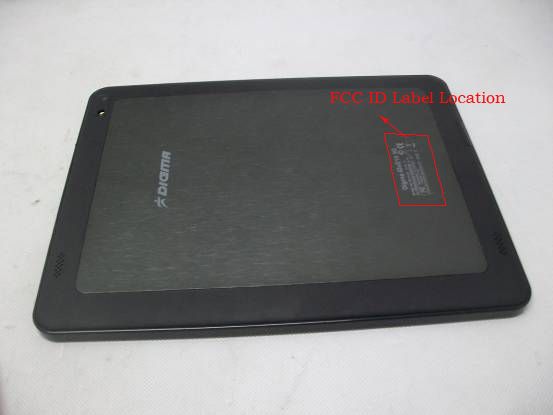
FRONT VIEW OF SAMPLE BACK VIEW OF SAMPLE UP VIEW OF SAMPLE DOWN VIEW OF SAMPLE LEFT VIEW OF SAMPLE RIGHT VIEW OF SAMPLE PHOTO OF POWER SUPPLY1 PHOTO OF POWER SUPPLY2 PHOTO OF THE ENTIRE SAMPLE PHOTO OF THE ENTIRE SAMPLE PHOTO OF THE ENTIRE SAMPLE PHOTO OF THE ENTIRE SAMPLE
ID Label/Location Info
FCC ID: V37-PTT9726D This device complies with part 15 of the FCC rules.Operation is subject to the following two conditions:(1)this device may not cause harmful interference,and (2)this device must accept any interference received,including interference that may causeundesired operation
Internal Photos
INTERNAL PHOTO OF SAMPLE - 1 INTERNAL PHOTO OF SAMPLE - 2 INTERNAL PHOTO OF SAMPLE - 3 INTERNAL PHOTO OF SAMPLE - 4 INTERNAL PHOTO OF SAMPLE - 5 INTERNAL PHOTO OF SAMPLE - 6 INTERNAL PHOTO OF SAMPLE - 7 INTERNAL PHOTO OF SAMPLE - 8 INTERNAL PHOTO OF SAMPLE - 9 INTERNAL PHOTO OF SAMPLE - 10 INTERNAL PHOTO OF SAMPLE - 11 INTERNAL PHOTO OF SAMPLE - 12 INTERNAL PHOTO OF SAMPLE - 13 INTERNAL PHOTO OF SAMPLE - 14 INTERNAL PHOTO OF SAMPLE - 15 INTERNAL PHOTO OF SAMPLE - 16 INTERNAL PHOTO OF POWER SUPPLY1 - 1 INTERNAL PHOTO OF POWER SUPPLY1 - 2 INTERNAL PHOTO OF POWER SUPPLY1 - 3 INTERNAL PHOTO OF POWER SUPPLY2 - 1 INTERNAL PHOTO OF POWER SUPPLY2 - 2 INTERNAL PHOTO OF POWER SUPPLY2 - 3
RF Exposure Info
FCC RF Exposure FCC ID: V37-PTT9726D Frequency: 2412-2462 MHz (11 channels) Modulation: DSSS, OFDM Mid-Channel: 2.437 GHz (channel 6) Highest Channel Peak Power, Conducted: 4.553 dBm == 0.29 mW Antenna Gain: G = 3 dBi Peak, Radiated = 4.553 dBm + 3 dBi = 7.553 dBm = 5.69 mW SAR Test Exclusion Thresholds specified in KDB447498 Appendix A: Evaluation: The Calculated Radiated Peak output power is taken as worst case, and this emission level appears to be far under the maximum allowed emission level at even the closest distance for 2.4G device specified in this table. Conclusion: The emitted power appears to be (far) below the required limit, so PASS.
Test Report
FCC 47 CFR PART 15 SUBPART C TEST REPORT For Applicant : Win Accord Ltd. Address : 12F., No. 225, Sec. 5, Nanjing E. Rd., Songshan Dist, Taipei City 105, Taiwan Product Name : Tablet PC Model Name : PTT-9726D, PTT-9726DC, CT1010, PT09702-51-XXX(X=0-9, a-z, A-Z), IDxD10 3G, AT197F, xTAB-100dc Brand Name : N/A FCC ID : V37-PTT9726D Report No. : MTE/DAL/D12111671 Date of Issue : Mar. 14, 2013 Issued by : Most Technology Service Co., Ltd. Address : No.5, Langshan 2nd Rd., North Hi-Tech Industrial park, Nanshan, Shenzhen, Guangdong, China Tel : 86-755-8617 0306 Fax : 86-755-8617 0310 The report consists 70 pages in total. It may be duplicated completely for legal use with the approval of the applicant. It should not be reproduced except in full, without the written approval of our laboratory. The client should not use it to claim product endorsement by MOST. The test results in the report only apply to the tested sample. The test report shall be invalid without all the signatures of testing engineers, reviewer and approver. FCC ID: V37-PTT9726D Report No.: MTE/DAL/D12111671 Page 2 of 70 TABLE OF CONTENTS 1. VERIFICATION OF CONFORMITY ....................................................................................... 4 2. GENERAL INFORMATION.................................................................................................... 5 2.1 Product Information..................................................................................................................................... 5 2.2 Objective ..................................................................................................................................................... 6 2.3 Test Standards and Results ........................................................................................................................ 6 2.4 Environmental Conditions ........................................................................................................................... 6 2.5 MEASUREMENT UNCERTAINTY ............................................................................................................... 6 3. TEST FACILITY ..................................................................................................................... 7 3.2 Test Conditions ............................................................................................................................................. 8 3.3 Channel List ................................................................................................................................................. 8 3.4 Description of Test Modes ............................................................................................................................ 8 3.5 Table of Parameters of Text Software Setting............................................................................................... 8 4. TEST EQUIPMENT LIST ....................................................................................................... 9 5. 47 CFR Part 15 C 15.247 Requirements............................................................................ 10 5.1 6dB Bandwidth ........................................................................................................................................ 10 5.1.1 Definition ......................................................................................................................................... 10 5.1.2 Limit................................................................................................................................................. 10 5.1. 3 Test Configuration............................................................................................................................ 10 5.1.4 Test Procedure.................................................................................................................................. 10 5.1.5 Test Result........................................................................................................................................ 10 5.2 Peak Output Power ................................................................................................................................. 16 5.2.1 Definition ......................................................................................................................................... 16 5.2.2 Limit................................................................................................................................................. 16 5.2.3 Test Configuration............................................................................................................................ 16 5.2.4 Test Procedure.................................................................................................................................. 16 5.2.5 Test Result........................................................................................................................................ 16 5.3 Conducted Spurious Emission .............................................................................................................. 18 5.3.1 Definition ......................................................................................................................................... 18 5.3.2 Test Description ............................................................................................................................... 18 5.3.3 Test Result........................................................................................................................................ 18 5.4 Band Edge ............................................................................................................................................... 28 5.4.1 Definition ......................................................................................................................................... 28 5.4.2 Test Configuration...........…
Text truncated - open the document above for the full version.
Test Setup Photos
CONDUCTED TEST SETUP CE TEST SETUP RE TEST SETUP
Contact Information
Applicant
Kelly Chen(Board Chairman)
Technical Contact
Test Firm
Most Technology Service Co., Ltd.Mark Wen
Technical Specifications
| # | Rule Parts | Frequency Range | Power Output |
|---|---|---|---|
| 1 | 15C | 2.41 GHz - 2.46 GHz | 2.90 mW |
Other Applications from WIN ACCORD LTD.,

V37-PTT826D
Dec 19, 2012Tablet PC
Equipment Class
DTS - Digital Transmission System
V37-PTT-9726D
Nov 15, 2012Tablet
Equipment Class
DTS - Digital Transmission System
V37-PTT-1026
Jul 25, 2011Mobile internet device
Equipment Class
DTS - Digital Transmission System
V37-LIBAR7DWHSD
Aug 12, 2010Digital Photo Frame
Equipment Class
JBP - Part 15 Class B Computing Device Peripheral
V37-DF1130-XX-XX
Jul 29, 201011.3 Digital Photo Frame
Equipment Class
JBP - Part 15 Class B Computing Device Peripheral