VLJ-FOCUS73WIFI Home Video Baby Camera
Binatone Electronics International Ltd.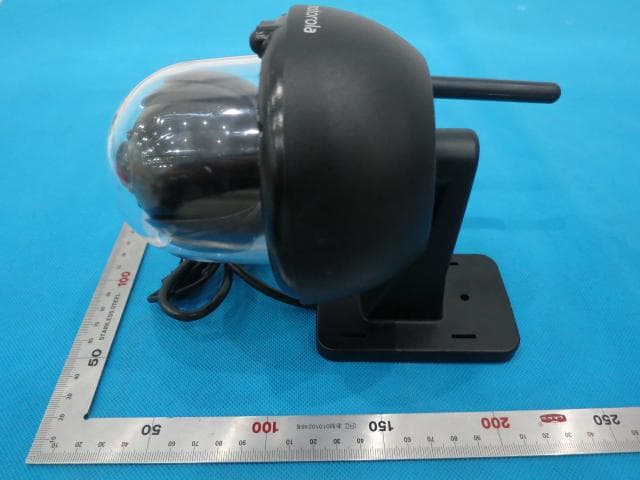
Click to zoom
Application Details
- Equipment Class
- DTS - Digital Transmission System
- Date of Grant
- Nov 04, 2014
- Application Purpose
- Original Equipment
- Date of Application
- Nov 04, 2014
- Equipment Note
- WIFI Home Video Baby Camera
- Frequency Range
- 2422.00000000 - 2452.00000000
- Country
- China
Documents & Files
Document Text
Text extracted from the exhibit documents filed with the FCC. Open a document above to read the original.
Users Manual
Home Video Camera USER’S GUIDE Wi-Fi ® Model: FOCUS73, FOCUS73-2, FOCUS73-3, FOCUS73-4 The features described in this user’s guide are subject to modifications without prior notice. This User’s Guide has all the information you need to make the most out of your product. Please read the Safety Instructions on pages 5 - 6 before you install the unit. Inside the Box • 1 x Wi-Fi ® Camera Unit • 1 x Power Adapter • 1 x Quick Start Guide • 1 x User Guide • 4 x Mounting Screws and Dry Wall Plugs • 1 x Tamper-proof Screw • 1 x Metal Bracket • 1 x Wrench Key Welcome... to your new Motorola Wi-Fi ® Thank you for purchasing your new Motorola Wi-Fi ® Home Video Camera. If you have always wondered what happens when you are away, wonder no more. Now you can monitor your children, pets or property with this easy to use system. You can install the Camera only from your iPhone ® /iPad ® or devices for Android™ and view the Camera video from your PC or Notebook, as well as devices for Android™ or iPhone ® /iPad ® . Please keep your original dated sales receipt for your records. For warranty service of your Motorola product, you will need to provide a copy of your dated sales receipt to confirm warranty status. Registration is not required for warranty coverage. For product related questions, please call: Home Video Camera! US and Canada 1-888-331-3383 Email: [email protected] Overview of your Camera * It is for LAN cable (not included) connection when Wi-Fi connection is reachable. The LAN connection is not applicable for smart device App setting up. Important guidelines for installing your Wi-Fi ® Camera Unit • Use of other 2.4 GHz products, such as other wireless networks, Bluetooth ® systems or microwave ovens may cause interference with this product. Keep the Wi-Fi ® Camera Unit away from these types of products, or turn them off if they appear to be causing interference. • Always ensure that you have a good Wi-Fi ® connection available. 1 2 3 6 7 8 4 5 9 10 1. Antenna 2. Wall mount base 3. Infrared LEDs (for night vision) 4. Camera Lens 5. Light Sensor (for night mode detection) 6. PAIR Button 7. Dome Shape Cover 8. Power / Status Indicator 9. Power connection socket 10. LAN interface* (Adaptive Enthernet Interface for connecting with various network devices,such as hub,touter,etc.) 8.Technical Specifications ......................................................................... 50 7.General Information ................................................................................ 44 6.Help.......................................................................................................... 38 5.Procedure for resetting the Camera....................................................... 37 Working with PC/Notebook .................................................................... 36 torola Monitors Application .... 34 4.3.6Hubble for Motorola Monitors Settings .................................... 34 4.3.5General settings ........................................................................ 33 4.3.4Camera settings ........................................................................ 32 4.3.3Change your Account Information .......................................... 31 4.3.2Remove a camera ..................................................................... 31 4.3.1Add more cameras ................................................................... 30 ............................................... 30 4.2.5General setting ......................................................................... 27 Application ..........27 4.2.4Camera settings ........................................................................ 26 4.2.3Change your Account Information .......................................... 25 4.2.2Remove a camera ..................................................................... 24 4.2.1Add more cameras ................................................................... 24 Working with devices for Android™ ...................................................... 24 4.Camera .................................................................................................... 22 3.3.4Add FOCUS73 Camera to your account ................................. 18 ... 17 4Table of contents Table of contents 1.Safety Instructions.....................................................................................5 2.System Requirements ............................................................................... 9 3.Getting started - Connecting Devices.................................................... 10 3.1Setup.......................................................................................................... 10 3.2User Account and Camera Setup on Android™ Devices ....................... 11 3.2.1Power on and connect the FOCUS73 camera ........................ 11 3.2.2Download the Hubble for Motorola Monitors application ...... 11 3.2.3Run Hubble for Motorola Monitors App on Android™ device ........................................................................................ 12 3.2.4Add FOCUS73 Camera to your account ................................. 13 3.3User Account and Camera Setup: Working with iPhone ® /iPad ® ................................................................... 17 3.3.1Power ON and Connect FOCUS73 camera ........................... 17 3.3.2Download Hubble for Motorola Monitors App ........................ 17 3.3.3Run Hubble for Motorola Monitors on your iPhone ® /iPad ® 4.1Install your Camera and setting up ........................................................... 24 4.2Camera Functions: 4.2.6Features of Hubble for Motorola Monitors 4.3Camera Functions: Working with devices for iPhone ® /iPad ® 4.3.7Features of the Hubble for Mo 4.4Camera Functions: Safety Instructions5 ENGLISH 1. Safety Instructions WARNING: STRANGULATION HAZARD - In case this unit is being used to monitor infants or children, keep the unit and adapter cord more than 1 metre from…
Text truncated - open the document above for the full version.
Users Manual
A17 26Camera 4.2.4Camera settings You can change the Camera settings by tapping the Setting icon on the Camera page. (Picture A18) • Tap on Camera Details to review Camera Name, Change Image & Firmware version. (Picture A19) A19 A18 Camera ENGLISH 4.2.5General setting • Tap Settings on General page. • Tap on General Settings to shift the format of Clock (12hr/24hr). (Picture A21) • Tap on Do Not Disturb, set the timer which you prefer and select ON, the Camera will not send any alert to your Android™ device in the duration of your setting. A21 • Tap on Notification Sensitivity to set the sensitivity of motion detection. (Picture A20) A20 4.2.6Features of Hubble for Motorola Monitors Application On Camera view, tap the viewing area, Function Icons will appear as following, Pan and Tilt Function: Tap the up and down buttons to tilt, the left and right buttons to pan. (Pictures A22, A23) 27 Camera A22A23 Photo/Video - Take a photo or record a video from your Camera. Tap Video icon to activate the video function and press the red dot to start and release to stop recording. (Pictures A24, A25) A24A25 28 Camera ENGLISH A26 Note: Photos and videos will be stored in the internal flash memory of your device for Android™, they can be accessed from Gallery or Media Player. To play videos, please use the “Hubble for Motorola Monitors” application or a 3rd party application, such as MX player (i.e. Google Play™ Store), which is able to play MJPG (Motionjpeg). Tap Camera icon to switch to Camera mode, you can capture photos from camera view. (Picture A26) 29 i16i15 setup 3.3.4. (Picture i16) (Picture i15) 30Camera 4.3Camera Functions: Working with devices for iPhone ® /iPad ® • Run the Hubble for Motorola Monitors application on your iPhone ® /iPad ® . • The Camera view appears on the screen. 4.3.1Add more cameras • On Camera view, tap on the Motorola logo to go to Add Camera page. • Tap on Add Camera to add one more camera follow steps of iPhone ® /iPad ® • Once the Camera has been added, the Camera view will be automatically displayed. Note: You can ONLY add up to 4 cameras in one account. (Picture i19) i18i17 to delete the unit from camera list. (Picture i18) (Picture i17) Camera ENGLISH 4.3.2Remove a camera You can remove a camera from your account by following these steps: • Tap the Setting icon on General page, then tap on Remove Camera. • Select Remove 4.3.3Change your Account Information You can change the account information using iPhone ® /iPad ® . • Tap Account on General page, the account setting appears on screen. • Tap on Change Password to change your password following the instruction. • Tap on Log Out to leave the account. • Tap on Current plan, it will go to the link of Cloud Video Recording Service, to obtain more information, please visit our website www.hubbleconnected.com/motorola/plans . • Tap on Send app log to send your Hubble for Motorola Monitors App report to our server via e-mail; this should be sent if requested by a customer service agent. 31 i21 i20 (Picture i21), page (Picture i20), to review i19 Camera 4.3.4Camera settings You can change the Camera settings to tap the Setting icon on General Camera Name and Firmware version also you are allow to change camera name when tap on existing name following the instruction. 32 duration of your setting. (Picture i25) i24i25 to set motion detection. (Picture i24) i22 i23 (12hr/24hr). (Picture i23) on General page. (Picture i22) Camera ENGLISH 4.3.5General settings • Tap Settings • Tap on General Settings to shift the format of Clock • Tap on Notification Sensitivity • Tap on Do Not Disturb, set the timer which you prefer and select ON, the Camera will not send any sound or alert to your iPhone ® /iPad ® in the 33 i27 (Picture i27) i26 for Motorola Monitors app will be shown on screen. (Picture i26) camera view. Tap Camera icon to capture photos from Take Picture memory of your iPhone Photos will be stored in The internal flash Camera 4.3.6Hubble for Motorola Monitors Settings • Tap on Settings on your iPhone ® /iPad ® , and the applications will appear, tap on Hubble for Motorola Monitors App , the settings in the Hubble 4.3.7Features of the Hubble for Motorola Monitors Application On Camera view, tap the viewing area, Function Icons will appear as following, Note: ® /iPad ® . 34 i29i28 i28, i29) Pan and Tilt Function Camera ENGLISH Tap the up and down buttons to tilt, the left and right buttons to pan. (Pictures 35 Camera 4.4Camera Functions: Working with PC/Notebook • Go to URL: http://www.hubbleconnected.com/motorola/login/ • Enter your User Name and Password and then click Login if you have already created an account. • Click on the Camera list paired in your account via Android™ device or iPhone ® /iPad ® , and the Camera view will appear on screen. You can easily stay connected with your favorite people, places and pets with live video streaming. • At the website, you can change the settings by following the Menu instruction steps. 36 reset procedure, the LED indicator will turn Off. the Power Adapter to the mains power socket, the LED indicator turns ON. the underside of the Camera, then plug 1.Unplug the Power Adapter. 2.Press and hold the PAIR button on 37 ENGLISH Procedure for resetting the Camera 5. Procedure for resetting the Camera Note: If your Camera is moved from one router (e.g. home) to another router (e.g. office) or you have Camera setup issues, then this Camera must be reset again. Please reset the Camera with the following procedure: 3.Release the PAIR button and wait for the Camera to complete the internal 4.You can add your camera again by following the steps 3.2.4 for Android device or 3.3.4 of iOS device. Trouble Shooting device and the Wi-Fi sure that there is enough distance between your To avoid video interruption, en Help 6. Help Noise interference ® Camera Unit. Use of other 2.4 GHz products, such as Bluetooth ® systems or microwave ovens, may cause interference with this product. Keep the Wi-Fi ®…
Text truncated - open the document above for the full version.
Attestation Statements
Declaration letter for multiple models We, Binatone Electronics International Limited Floor 23A, 9 Des Voeux Road West, Sheung Wan, Hong Kong declare that the following product(s): Product Description:Wi-Fi Home Video Camera (Baby Unit) Model Number:FOCUS73utilize the identical circuit design, PCB layout, shielding and interface with (FOCUS73-2,FOCUS73-3,FOCUS73-4, SCOUT73, SCOUT73-2,SCOUT73-3, SCOUT73-4), only the cosmetic and the series name will be difference. Therefore this application can be regarded as identical in performance to the submitted test sample. The manufacturer would take all the responsibilities for the above product(s). For and on behalf of Authorized person Location Name:Karl Heinz Mueller Position:Chief Technical Officer Date of issue: 22 Oct,2014 *I hereby declare that I am entitled to sign on behalf of the applicant and that the information supplied is correct and complet e.
Cover Letter(s)
Date (21/Oct/t2014) TUV SUD BABT TCB Octagon House, Segensworth Road, Fareham, Hampshire, PO15 5RL Dear Sir or Madam, We,(Binatone Electronics International Limited),hereby authorize Ray Cheung (TUV SUD HK LTD) to act as our agent in all matters relating to applications for equipment authorization, including the signing of all documents relating to these matters. This authorization expires on(21/Apr /2015]). Sincerely, Company Officer:Karl Heinz Muller Telephone Number: 852 2802 7388 Email:[email protected]
Cover Letter(s)
Date (21/10/2014) TUV SUD BABT TCB Octagon House, Segensworth Road, Fareham, Hampshire, PO15 5RL Confidentiality Request FCC ID:VLJ-FOCUS73 Pursuant to Sections 0.457(d)(1)(ii) and 0.459 of the Commission’s Rules,(Binatone Electronics International Limited)hereby requests permanent confidential treatment of information accompanying this application as outlined below: Schematics Block Diagrams Theory of Operation (Binatone Electronics International Limited) alsohereby requests short-term confidential treatment of information accompanying this application as outlined below for a period of 180days: 18-04-2015 Internal Photos External Photos User Manual Test Set-up Photographs The above materials contain trade secrets and proprietary information not customarily released to the public. The public disclosure of these matters might be harmful to the Applicant and provide unjustified benefits to its competitors. The Applicant understands that pursuant to Rule 0.457(d)(1)(ii), disclosure of this Application and all accompanying materials will not be made before the date of the Grant for this Application. Yours sincerely, Company Officer:Karl Heinz Mueller Telephone Number: 852 2802 7388 Email:852 2802 8138
External Photos
Appendix B Date: 2014-09-16 Report No.: 60.870.14.015.01F Model No.: FOCUS73 Page 1 of 3 TÜV SÜD Hong Kong Ltd. 3/F, West Wing, Phase 2, 10 Science Park West Avenue, Shatin, Hong Kong. Appendix B Date: 2014-09-16 Report No.: 60.870.14.015.01F Model No.: FOCUS73 Page 2 of 3 TÜV SÜD Hong Kong Ltd. 3/F, West Wing, Phase 2, 10 Science Park West Avenue, Shatin, Hong Kong. Appendix B Date: 2014-09-16 Report No.: 60.870.14.015.01F Model No.: FOCUS73 Page 3 of 3 TÜV SÜD Hong Kong Ltd. 3/F, West Wing, Phase 2, 10 Science Park West Avenue, Shatin, Hong Kong.
ID Label/Location Info
Your factory code is IC: 4522A-FOCUS73 FCC ID: VLJ-FOCUS73 FOCUS73 US/Canada Product Label FOCUS73-4 - Camera x 4PCS FOCUS73-3 - Camera x 3PCS FOCUS73-2 - Camera x 2PCS FOCUS73 - Camera x 1PC : DC5V 2000mA 3) Size:30 x 10mm Information of Label - MAC Information of Label - serial number Stick on Camera bottom. 3) Size:30 x 10mm(on Unit and Gift box), 60x25mm(on Carton box) Camera HD-0073XXXXXX Stick on Camera bottom, Gift box and Carton box. # 3) Size: 33 x 20mm A A 1403000001G FOCUS73 2) Material: 50 Polyester Model: FOCUS73 Camera ID: (6 digits) Product Rating Label 1) Colour: White background black letters 14=Year (2014), 03=Month (March) Serial no. start from ‘000001’ (6 digits) Code Format: code 128 Produce date: 1) Colour: White background black letters 2) Material: adhesive label with plastic lamination on top "G" for RoHS INPUT Use Only Power Supplies listed in the user’s guide. MADE IN CHINA Camera HD-0073XXXXXX 1) Colour: White background black letters 2) Material: adhesive label with plastic lamination on top FOCUS73 Code Format: code 128 4) Model name defination as below,
ID Label/Location Info
A Your factory code is SCOUT73 US/Canada Product Label SCOUT73-2 - Camera x 2PCS SCOUT73-3 - Camera x 3PCS SCOUT73-4 - Camera x 4PCS SCOUT73 - Camera x 1PC 4) Model name defination as below, : DC5V 2000mA SCOUT73 SCOUT73 Model: SCOUT73 3) Size:30 x 10mm Information of Label - MAC Information of Label - serial number Stick on Camera bottom. 3) Size:30 x 10mm(on Unit and Gift box), 60x25mm(on Carton box) Camera HD-0073XXXXXX Stick on Camera bottom, Gift box and Carton box. # 3) Size: 33 x 20mm A 1403000001G 2) Material: 50 Polyester Camera ID: (6 digits) Product Rating Label 1) Colour: White background black letters 14=Year (2014), 03=Month (March) Serial no. start from ‘000001’ (6 digits) Code Format: code 128 Produce date: 1) Colour: White background black letters 2) Material: adhesive label with plastic lamination on top "G" for RoHS INPUT Use Only Power Supplies listed in the user’s guide. Camera HD-0073XXXXXX 1) Colour: White background black letters 2) Material: adhesive label with plastic lamination on top Code Format: code 128 IC: 4522A-FOCUS73 FCC ID: VLJ-FOCUS73 MADE IN CHINA
ID Label/Location Info
Label Position on the unit A 1403000001G Camera HD-0073XXXXXX IC: 4522A-FOCUS73 FCC ID: VLJ-FOCUS73 : DC5V 2000mA Model: FOCUS73 INPUT Use Only Power Supplies listed in the user’s guide. MADE IN CHINA
Internal Photos
Appendix C Date: 2014-09-16 Report No.: 60.870.14.015.01F Model No.: FOCUS73 Page 1 of 10 TÜV SÜD Hong Kong Ltd. 3/F, West Wing, Phase 2, 10 Science Park West Avenue, Shatin, Hong Kong. Appendix C Date: 2014-09-16 Report No.: 60.870.14.015.01F Model No.: FOCUS73 Page 2 of 10 TÜV SÜD Hong Kong Ltd. 3/F, West Wing, Phase 2, 10 Science Park West Avenue, Shatin, Hong Kong. Appendix C Date: 2014-09-16 Report No.: 60.870.14.015.01F Model No.: FOCUS73 Page 3 of 10 TÜV SÜD Hong Kong Ltd. 3/F, West Wing, Phase 2, 10 Science Park West Avenue, Shatin, Hong Kong. Appendix C Date: 2014-09-16 Report No.: 60.870.14.015.01F Model No.: FOCUS73 Page 4 of 10 TÜV SÜD Hong Kong Ltd. 3/F, West Wing, Phase 2, 10 Science Park West Avenue, Shatin, Hong Kong. Appendix C Date: 2014-09-16 Report No.: 60.870.14.015.01F Model No.: FOCUS73 Page 5 of 10 TÜV SÜD Hong Kong Ltd. 3/F, West Wing, Phase 2, 10 Science Park West Avenue, Shatin, Hong Kong. Appendix C Date: 2014-09-16 Report No.: 60.870.14.015.01F Model No.: FOCUS73 Page 6 of 10 TÜV SÜD Hong Kong Ltd. 3/F, West Wing, Phase 2, 10 Science Park West Avenue, Shatin, Hong Kong. Appendix C Date: 2014-09-16 Report No.: 60.870.14.015.01F Model No.: FOCUS73 Page 7 of 10 TÜV SÜD Hong Kong Ltd. 3/F, West Wing, Phase 2, 10 Science Park West Avenue, Shatin, Hong Kong. Appendix C Date: 2014-09-16 Report No.: 60.870.14.015.01F Model No.: FOCUS73 Page 8 of 10 TÜV SÜD Hong Kong Ltd. 3/F, West Wing, Phase 2, 10 Science Park West Avenue, Shatin, Hong Kong. Appendix C Date: 2014-09-16 Report No.: 60.870.14.015.01F Model No.: FOCUS73 Page 9 of 10 TÜV SÜD Hong Kong Ltd. 3/F, West Wing, Phase 2, 10 Science Park West Avenue, Shatin, Hong Kong. Appendix C Date: 2014-09-16 Report No.: 60.870.14.015.01F Model No.: FOCUS73 Page 10 of 10 TÜV SÜD Hong Kong Ltd. 3/F, West Wing, Phase 2, 10 Science Park West Avenue, Shatin, Hong Kong.
RF Exposure Info
Date: 2014-09-05 Report No.: 60.870.14.015.01S Model No.:FOCUS73 Page 1 of 1 TÜV SÜD Hong Kong Ltd. 3/F, West Wing, Phase 2, 10 Science Park West Avenue, Shatin, Hong Kong. SAR Evaluation Exemption Compliance Information The device has a standalone transmission. According to KDB 447498 section 4.3.1, the 1-g SAR test exclusion thresholds at test separation distances 50 mm are determined by: [(max. power of channel, including tune-up tolerance, mW)/(min. test separation distance, mm)]·[ ¥f(GHz)] 3.0 The maximum tune-up limit power is 140.6 mW @ 2.437GHz For the head and body SAR, use 50mm as the conservative minimum test separation distance, [(max. power of channel, including tune-up tolerance, mW)/(min. test separation distance, mm)]·[ ¥f(GHz)] = 1.80 3.0 So standalone SAR measurements are not required for both head and body
Test Report
TEST REPORT Date: 2014-09-05 Report No.: 60.870.14.015.01F Page 1 of 70 TUV SUD Hong Kong Ltd. 3/F, West Wing, Phase 2, 10 Science Park West Avenue, Shatin, Hong Kong Applicant:Binatone Electronics International Limited Floor 23, 9 Des Voeux Road West, Sheung Wan, Hong Kong Description of Samples:Model name: WiFi Home Video Camera Brand name: motorola Model no.:FOCUS73, FOCUS73-2, FOCUS73-3, FOCUS73-4, SCOUT73, SCOUT73-2, SCOUT73-3, SCOUT73-4 FCCID:VLJ-FOCUS73 Date Samples Received:2014-07-22 Date Tested:2014-07-23 to 2014-09-04 Investigation Requested:FCC Part 15 Subpart C, Section 15.247 Conclusions:The submitted product COMPLIED with the requirements of Federal Communications Commission [FCC] Rules and Regulations Part 15. The tests were performed in accordance with the standards described above and on Section 2.2 in this Test Report. Remarks:--- Checked by:Approved by:- Ray CheungJeff Pong Project EngineerManager Wireless & Telecom departmentWireless & Telecom department Report No.:60.870.14.015.01F Page 2 of 70 TÜV SÜD Hong Kong Ltd. 3/F, West Wing, Phase 2, 10 Science Park West Avenue, Shatin, Hong Kong CONTENT: Cover Page 1 of 70 Content Page 2-3 of 70 1.0General Details 1.1Test Laboratory Page 4 of 70 1.2Applicant Details Page 4 of 70 1.3Equipment Under Test [EUT] Page 5 of 70 1.4 Related Submittal(s) Grants Page 5 of 70 2.0Technical Details 2.1Investigations Requested Page 6 of 70 2.2Test Standards and Results Summary Page 6 of 70 3.0Test Methodology 3.1Radiated Emission Page 7 of 70 3.2Field Strength Calculation Page 7 of 70 3.3Conducted Emission Page 7 of 70 4.0Test Results 4.1 6dB Bandwidth MeasurementPage 9-16 of 70 4.2 Power Spectral Density Page 17-25 of 70 4.3 Band Edge MeasurementPage 26-28 of 70 4.4 Maximum Output Power Page 29-38 of 70 4.5 Out of Band Emissions and Emissions in Restricted BandsPage 39-66 of 70 4.6 Conducted Emission on AC MainsPage 67-69 of 70 Report No.:60.870.14.015.01F Page 3 of 70 TÜV SÜD Hong Kong Ltd. 3/F, West Wing, Phase 2, 10 Science Park West Avenue, Shatin, Hong Kong 5.0List of Measurement Equipments Page 70 of 70 Appendix A Photos of Test Setup Appendix B External EUT Photos Appendix C Internal EUT Photos Report No.:60.870.14.015.01F Page 4 of 70 TÜV SÜD Hong Kong Ltd. 3/F, West Wing, Phase 2, 10 Science Park West Avenue, Shatin, Hong Kong 1.0General Details 1.1Test Laboratory Attestation of Global Compliance SZ Co Ltd. 2/F, Building 2,No.1-No.4,Chaxi Sanwei, Technical Industrial Park, Gushu, Xixiang, Shenzhen, China. Registration Number: 259865 Tested By: John Zhi 1.2Applicant Details Applicant Binatone Electronics International Limited Floor 23A, 9 Des Voeux Road West, Sheung Wan, Hong Kong Manufacturers Alford Industrial Ltd Unit 02, 6 th Floor, Yen Sheng Centre, 64 Hoi Yuen Road, Kwun Tong, Kowloon, Hong Kong Report No.:60.870.14.015.01F Page 5 of 70 TÜV SÜD Hong Kong Ltd. 3/F, West Wing, Phase 2, 10 Science Park West Avenue, Shatin, Hong Kong 1.3Equipment Under Test [EUT] Description of EUT Product Description:Wifi Home Video Camera Model No.:FOCUS73, FOCUS73-2, FOCUS73-3, FOCUS73-4, SCOUT73, SCOUT73-2, SCOUT73-3, SCOUT73-4 Brand Name: motorola FCCID: VLJ-FOCUS73 Rating:DC5.0V, 2000mA powered by AC/DC power adaptor Operated Frequency:2412 – 2462 MHz 2422 – 2452 MHz No. of Operated Channel:11 CH / (802.11b/g/n – HT20) ; 9CH / (802.11n – HT40) Data Rate:802.11b: 1, 2, 5.5, 11Mbps 802.11g: 6, 9, 12, 18, 24, 36, 48, 54Mbps 802.11n: MCS0-7, up to 150Mbps Modulation:DSSS (BPSK, QPSK, CCK)and OFDM (BPSK/QPSK/16-QAM/ 64-QAM) Accessories and Auxiliary Equipments: AC/DC power adaptor,ThinkPad Notebook Antenna Type:Integral Manufacture of Antenna:CVSION HK LTD Antenna Gain:1.5 dBi Antenna Model:--- General Operation of EUT The Equipment Under Test (EUT) is a Camera of Wireless Monitoring System, which include of a FHSS Module and an 802.11b/g/n module. As per Client Declaration, FOCUS73 & all multi-list models (multi-list model listed on above) have the same technical construction including Software design, RF module, PCB layout, Circuit design, all electrical construction and basic mechanical construction. Only the system grouping is different between the models, so we use FOCUS73 as a representative model to perform all testing. Report No.:60.870.14.015.01F Page 6 of 70 TÜV SÜD Hong Kong Ltd. 3/F, West Wing, Phase 2, 10 Science Park West Avenue, Shatin, Hong Kong Description of Test Modes The EUT has been tested under operating condition. Software used to control the EUT for staying in continuous transmitting and receiving mode is programmed. IEEE802.11b: Channel 1(2412MHz), Channel 6(2437MHz) and Channel 11(2462MHz) with 1Mbps data rate (worst case) are chosen for the final testing. IEEE802.11g: Channel 1(2412MHz), Channel 6(2437MHz) and Channel 11(2462MHz) with 6Mbps data rate (the worst case) are chosen for the final testing. IEEE802.11n – HT20: Channel 1(2412MHz), Channel 6 (2437MHz) and Channel 11 (2462MHz) with MSC0 (worst case) are chosen for the final testing. IEEE802.11n – HT40: Channel 3(2422MHz), Channel 6 (2437MHz) and Channel 9 (2452MHz) with MSC0 (worst case) are chosen for the final testing. 1.4Related Submittal(s) Grants This is a signal application subject to CertificateAuthorization. Report No.:60.870.14.015.01F Page 7 of 70 TÜV SÜD Hong Kong Ltd. 3/F, West Wing, Phase 2, 10 Science Park West Avenue, Shatin, Hong Kong 2.0Technical Details 2.1Investigations Requested Perform ElectroMagnetic Interference measurement in accordance with FCC 47CFR [Codes of Federal Regulations] Part 15 and ANSI C63.4: 2009 2.2Test Standards and Results Summary Tables Test ConditionTest RequirementTest Result PassN/A Number of Frequency Hopping Section 15.247 ( a1 ) 6dB Bandwidth MeasurementSection 15.247 ( a2 ) Power Spectral Density Section 15.247 ( e ) Pseudorandom Hopping AlgorithmSection 15.247 ( a1 ) Band Edge Measurement Section 15.247 Maximum Output PowerSection 15.247 ( b3 ) Out of Band EmissionSection 15.247 ( d ) Radiated Emission in Rest…
Text truncated - open the document above for the full version.
Test Setup Photos
Appendix A Date: 2014-09-16 Report No.: 60.870.14.015.01F Model No.: FOCUS73 Page 1 of 2 TÜV SÜD Hong Kong Ltd. 3/F, West Wing, Phase 2, 10 Science Park West Avenue, Shatin, Hong Kong. Radiated Emission Appendix A Date: 2014-09-16 Report No.: 60.870.14.015.01F Model No.: FOCUS73 Page 2 of 2 TÜV SÜD Hong Kong Ltd. 3/F, West Wing, Phase 2, 10 Science Park West Avenue, Shatin, Hong Kong. Conducted Emission
Contact Information
Applicant
Sam Lee(Product Director)
Test Firm
Attestation of Global Compliance Shenzhen Co. Ltd.Forrest Lei
Technical Specifications
| # | Rule Parts | Frequency Range | Power Output |
|---|---|---|---|
| 2 | 15C | 2.42 GHz - 2.45 GHz | 8.00 mW |
Other Applications from Binatone Electronics International Ltd.

VLJ-NV531BU
Jul 03, 2022Video Baby Monitor
Equipment Class
DSS - Part 15 Spread Spectrum Transmitter
VLJ-MH002W
Mar 02, 2021Bluetooth Headset
Equipment Class
DSS - Part 15 Spread Spectrum Transmitter
VLJ-ST600
Feb 09, 20215-in-1 Nursery Humidifier
Equipment Class
DSS - Part 15 Spread Spectrum Transmitter
VLJ-SP025
Feb 01, 2021Portable Bluetooth Music Speaker
Equipment Class
DCD - Part 15 Low Power Transmitter Below 1705 kHz
VLJ-MBP855BU
Dec 17, 20205inch Wi-Fi Video Baby Monitor
Equipment Class
DSS - Part 15 Spread Spectrum Transmitter