VLJ-FOCUS86WIFI Home Video Camera
Binatone Electronics International Ltd.
Click to zoom
Application Details
- Equipment Class
- DSS - Part 15 Spread Spectrum Transmitter
- Date of Grant
- Oct 26, 2015
- Application Purpose
- Original Equipment
- Date of Application
- Oct 26, 2015
- Equipment Note
- WIFI Home Video Camera
- Frequency Range
- 2402.00000000 - 2480.00000000
- Country
- China
Documents & Files
Document Text
Text extracted from the exhibit documents filed with the FCC. Open a document above to read the original.
Users Manual
USER’S GUIDE Wi-Fi ® Home Video Camera Models: FOCUS86, FOCUS86-2, FOCUS86-B, FOCUS86-B2, FOCUS86-W, FOCUS86-W2 The features described in this user’s guide are subject to modifications without prior notice. This User’s Guide has all the information you need to make the most out of your product. Please read the Safety Instructions on pages 5 - 6 before you install the unit. Inside the Box • 1 x Wi-Fi ® Camera Unit with Micro SD Card Installed • 1 x Power Adapter • 1 x Quick Start Guide In multi-camera packs, you will find one or more additional Camera Units with power adapter units. Welcome... to your new Motorola Wi-Fi ® Home Video Camera! Thank you for purchasing your new Motorola Wi-Fi ® Home Video Camera. If you have always wondered what happens when you are away, wonder no more. Now you can monitor your children, pets or property with this easy to use system. You can install the Camera only from your iPhone ® /iPad ® or Android™ devices and view the Camera video from your PC or Notebook, as well as from your iPhone ® /iPad ® or Android™ devices. Please keep your original dated sales receipt for your records. For warranty service of your Motorola product, you will need to provide a copy of your dated sales receipt to confirm warranty status. Registration is not required for warranty coverage. For product related questions, please call: US and Canada 1-888-331-3383 Email: [email protected] On the Web: www.motorolahome.com 1.Light Sensor (for night mode detection) 2.Camera Lens 3.Microphone 4.Infrared LEDs (for night vision) 5.Temperature Sensor 6.Power / Status indicator 7.Speaker 8.Micro SD Card Slot 9.ON/OFF Switch 10.Micro USB socket 11.PAI R B ut ton Overview of your Camera 1 2 3 5 7 8 9 10 11 4 6 Important guidelines for installing your Wi-Fi ® Camera Unit • Use of other 2.4 GHz products, such as other wireless networks, Bluetooth ® systems or microwave ovens may cause interference with this product. Keep the Wi-Fi ® Camera Unit away from these types of products, or turn them off if they appear to be causing interference. • Always ensure that you have a good Wi-Fi ® connection available. 4Table of contents Table of contents 1.Safety Instructions.....................................................................................5 2.System Requirements ............................................................................... 7 3.Getting Started - Connecting Devices ..................................................... 8 3.1Setup............................................................................................................ 8 3.2User Account and Camera Setup on Android™ Devices ......................... 9 3.2.1Power ON and Connect the Camera ........................................ 9 3.2.2Download Hubble for Motorola Monitors App .......................... 9 3.2.3Run Hubble for Motorola Monitors App on Android™ device . 9 3.2.4Add the Camera to your account ............................................. 10 3.3User Account and Camera Setup on iPhone ® /iPad ® ............................. 13 3.3.1Power ON and Connect the Camera ...................................... 13 3.3.2Download Hubble for Motorola Monitors App ........................ 13 3.3.3Run Hubble for Motorola Monitors App on iPhone ® /iPad ® ... 13 3.3.4Add the Camera to your account ............................................. 14 4.Camera Functions: .................................................................................. 19 4.1Connecting the Camera Unit to power ................................................... 19 4.2Overview of the Features on Hubble App ............................................... 19 4.3Free Motion Recording with 24 Hour Video History ............................... 22 5.Working with PC/Notebook ................................................................... 23 6.Procedure for Resetting the Camera...................................................... 23 7.Help.......................................................................................................... 24 8.General Information ................................................................................ 30 9.Technical Specifications ......................................................................... 36 Safety Instructions5 ENGLISH 1. Safety Instructions WARNING: STRANGULATION HAZARD - In case this unit is being used to monitor infants or children, keep the unit and adapter cord more than 3 feet away from the crib and out of their reach. Never place the Camera or cords within a crib or near a bed. Secure the cord away from children's reach. Never use extension cords with AC Adapters. Only use the AC Adapters provided. As with any electrical device, supervision of your pet's usage should be exercised until your pet is acclimated to the product. If your pet is prone to chewing, we strongly recommend you keep this and all other electrical devices out of its reach. Wi-Fi ® CAMERA UNIT SETUP & USE: •Place the Wi-Fi ® Camera Unit on a flat surface, such as a chest of drawers, desk, shelf or wall-mount it using the keyhole slot in the Camera base. •NEVER place the Wi-Fi ® Camera Unit or cords within the crib. 6Safety Instructions WARNING This Wi-Fi ® Camera Unit is compliant with all relevant electromagnetic field standards and is, when handled as described in the User’s Guide, safe to use. Therefore, always read the instructions in this User’s Guide carefully before using the device. • Adult assembly is required due to small parts. Keep all small parts away from children. • This product is not a toy. Do not allow children to play with it. • This Wi-Fi ® Camera Unit is not a substitute for responsible adult supervision. • Keep this User’s Guide for future reference. • Do not place the Wi-Fi ® Camera Unit or cords in the crib or within reach of the baby (the unit should be at least 3 feet away). • Keep the cords out of reach of children. • Do not cover the Wi-Fi ® Camera Unit with a towel or b…
Text truncated - open the document above for the full version.
Users Manual
USER’S GUIDE Wi-Fi ® Home Video Camera Models: FOCUS86, FOCUS86-2, FOCUS86-B, FOCUS86-B2, FOCUS86-W, FOCUS86-W2 The features described in this user’s guide are subject to modifications without prior notice. This User’s Guide has all the information you need to make the most out of your product. Please read the Safety Instructions on pages 5 - 6 before you install the unit. Inside the Box • 1 x Wi-Fi ® Camera Unit with Micro SD Card Installed • 1 x Power Adapter • 1 x Quick Start Guide In multi-camera packs, you will find one or more additional Camera Units with power adapter units. Welcome... to your new Motorola Wi-Fi ® Home Video Camera! Thank you for purchasing your new Motorola Wi-Fi ® Home Video Camera. If you have always wondered what happens when you are away, wonder no more. Now you can monitor your children, pets or property with this easy to use system. You can install the Camera only from your iPhone ® /iPad ® or Android™ devices and view the Camera video from your PC or Notebook, as well as from your iPhone ® /iPad ® or Android™ devices. Please keep your original dated sales receipt for your records. For warranty service of your Motorola product, you will need to provide a copy of your dated sales receipt to confirm warranty status. Registration is not required for warranty coverage. For product related questions, please call: US and Canada 1-888-331-3383 Email: [email protected] On the Web: www.motorolahome.com 1.Light Sensor (for night mode detection) 2.Camera Lens 3.Microphone 4.Infrared LEDs (for night vision) 5.Temperature Sensor 6.Power / Status indicator 7.Speaker 8.Micro SD Card Slot 9.ON/OFF Switch 10.Micro USB socket 11.PAI R B ut ton Overview of your Camera 1 2 3 5 7 8 9 10 11 4 6 Important guidelines for installing your Wi-Fi ® Camera Unit • Use of other 2.4 GHz products, such as other wireless networks, Bluetooth ® systems or microwave ovens may cause interference with this product. Keep the Wi-Fi ® Camera Unit away from these types of products, or turn them off if they appear to be causing interference. • Always ensure that you have a good Wi-Fi ® connection available. 4Table of contents Table of contents 1.Safety Instructions.....................................................................................5 2.System Requirements ............................................................................... 7 3.Getting Started - Connecting Devices ..................................................... 8 3.1Setup............................................................................................................ 8 3.2User Account and Camera Setup on Android™ Devices ......................... 9 3.2.1Power ON and Connect the Camera ........................................ 9 3.2.2Download Hubble for Motorola Monitors App .......................... 9 3.2.3Run Hubble for Motorola Monitors App on Android™ device . 9 3.2.4Add the Camera to your account ............................................. 10 3.3User Account and Camera Setup on iPhone ® /iPad ® ............................. 13 3.3.1Power ON and Connect the Camera ...................................... 13 3.3.2Download Hubble for Motorola Monitors App ........................ 13 3.3.3Run Hubble for Motorola Monitors App on iPhone ® /iPad ® ... 13 3.3.4Add the Camera to your account ............................................. 14 4.Camera Functions: .................................................................................. 19 4.1Connecting the Camera Unit to power ................................................... 19 4.2Overview of the Features on Hubble App ............................................... 19 4.3Free Motion Recording with 24 Hour Video History ............................... 22 5.Working with PC/Notebook ................................................................... 23 6.Procedure for Resetting the Camera...................................................... 23 7.Help.......................................................................................................... 24 8.General Information ................................................................................ 30 9.Technical Specifications ......................................................................... 36 Safety Instructions5 ENGLISH 1. Safety Instructions WARNING: STRANGULATION HAZARD - In case this unit is being used to monitor infants or children, keep the unit and adapter cord more than 3 feet away from the crib and out of their reach. Never place the Camera or cords within a crib or near a bed. Secure the cord away from children's reach. Never use extension cords with AC Adapters. Only use the AC Adapters provided. As with any electrical device, supervision of your pet's usage should be exercised until your pet is acclimated to the product. If your pet is prone to chewing, we strongly recommend you keep this and all other electrical devices out of its reach. Wi-Fi ® CAMERA UNIT SETUP & USE: •Place the Wi-Fi ® Camera Unit on a flat surface, such as a chest of drawers, desk, shelf or wall-mount it using the keyhole slot in the Camera base. •NEVER place the Wi-Fi ® Camera Unit or cords within the crib. 6Safety Instructions WARNING This Wi-Fi ® Camera Unit is compliant with all relevant electromagnetic field standards and is, when handled as described in the User’s Guide, safe to use. Therefore, always read the instructions in this User’s Guide carefully before using the device. • Adult assembly is required due to small parts. Keep all small parts away from children. • This product is not a toy. Do not allow children to play with it. • This Wi-Fi ® Camera Unit is not a substitute for responsible adult supervision. • Keep this User’s Guide for future reference. • Do not place the Wi-Fi ® Camera Unit or cords in the crib or within reach of the baby (the unit should be at least 3 feet away). • Keep the cords out of reach of children. • Do not cover the Wi-Fi ® Camera Unit with a towel or b…
Text truncated - open the document above for the full version.
Attestation Statements
Declaration letter for multiple models We, Binatone Electronics International Limited Floor 23A, 9 Des Voeux Road West, Sheung Wan, Hong Kong declare that the following product(s): Product Description: Wi-Fi Home Video Camera Model Numbers: FOCUS86-W , FOCUS86T, FOCUS86-B utilize the identical circuit design, PCB layout, shielding and interface with FOCUS86, only the cos metic is difference. Therefore this application can be regarded as identical in performance to the submitted test sample. The manufacturer would take all the responsibilities for the above product(s). For and on behalf of Hong Kong Authorized person Location Name: Karl Heinz Mueller Position: Chief Technical Officer Date of issue: 18 Sept 15 *I hereby declare that I am entitled to sign on behalf of the applicant and that the information supplied is correct and complete.
Attestation Statements
Declaration letter for multiple models We, Binatone Electronics International Limited Floor 23A, 9 Des Voeux Road West, Sheung Wan, Hong Kong declare that the following product(s): Product Description: Wi-Fi Home Video Camera Model Numbers: FOCUS86-W , FOCUS86T, FOCUS86-B utilize the identical circuit design, PCB layout, shielding and interface with FOCUS86, only the cos metic is difference. Therefore this application can be regarded as identical in performance to the submitted test sample. The manufacturer would take all the responsibilities for the above product(s). For and on behalf of Hong Kong Authorized person Location Name: Karl Heinz Mueller Position: Chief Technical Officer Date of issue: 18 Sept 15 *I hereby declare that I am entitled to sign on behalf of the applicant and that the information supplied is correct and complete.
Cover Letter(s)
Date (18/09/2015) TUV SUD BABT TCB Octagon House, Segensworth Road, Fareham, Hampshire, PO15 5RL Dear Sir or Madam, We, (Binatone Electronics International Limited), hereby authorize John Zhi (TUV SUD LTD) to act as our agent in all matters relating to applications for equipment authorization, including the signing of all documents relating to these matters. This authorization expires on (18/03/2016). Sincerely, Company Officer: Karl Heinz Muller Telephone Number: 852 2802 7388 Email: [email protected]
Cover Letter(s)
Date (18/09/2015) TUV SUD BABT TCB Octagon House, Segensworth Road, Fareham, Hampshire, PO15 5RL Dear Sir or Madam, We, (Binatone Electronics International Limited), hereby authorize John Zhi (TUV SUD LTD) to act as our agent in all matters relating to applications for equipment authorization, including the signing of all documents relating to these matters. This authorization expires on (18/03/2016). Sincerely, Company Officer: Karl Heinz Muller Telephone Number: 852 2802 7388 Email: [email protected]
External Photos
TÜV SÜD Hong Kong Ltd. 3/F, West Wing, Phase 2, 10 Science Park West Avenue, Shatin Hong Kong Page 1 of 3 External Photos TÜV SÜD Hong Kong Ltd. 3/F, West Wing, Phase 2, 10 Science Park West Avenue, Shatin Hong Kong Page 2 of 3 TÜV SÜD Hong Kong Ltd. 3/F, West Wing, Phase 2, 10 Science Park West Avenue, Shatin Hong Kong Page 3 of 3
External Photos
TÜV SÜD Hong Kong Ltd. 3/F, West Wing, Phase 2, 10 Science Park West Avenue, Shatin Hong Kong Page 1 of 3 External Photos TÜV SÜD Hong Kong Ltd. 3/F, West Wing, Phase 2, 10 Science Park West Avenue, Shatin Hong Kong Page 2 of 3 TÜV SÜD Hong Kong Ltd. 3/F, West Wing, Phase 2, 10 Science Park West Avenue, Shatin Hong Kong Page 3 of 3
ID Label/Location Info
FOCUS86_LABEL ARTWORK_NA FOCUS86-B Camera unit rating label 1) Colour: White background black letters 2) Material: label paper with plastic lamination on top 3) Scale: 1:1, size:40 x 20mm 3) Size : 35 x 5mm(On Unit/Gift box). CameraHD-0086xxxxxx Information of UDID label 1) Colour: White background black letters 2) Material: adhesive label with plastic lamination on top 3) Scale: 1:1, size:30 x 10mm 15=Year (2015), 03=Month(March) Your factory code is ‘TT’ Serial no. start from ‘000001’ (6 digits) Serial Number label on Gift box/Carton box Code Format: code 128 Produce date: 1) Colour: White background black letters. 2) Material: adhesive label with plastic lamination on top. Checking digit: Z TT1503Z000001 Input:DC5V 1000mA Model: FOCUS86 Use only Power Supplies listed in the user’s guide. Made in China CameraHD-0086xxxxxx TT1503Z000001 FOCUS86-W FCC ID: VLJ-FOCUS86 IC: 4522A-FOCUS86 Input:DC5V 1000mA Model: FOCUS86 Use only Power Supplies listed in the user’s guide. Made in China FCC ID: VLJ-FOCUS86 IC: 4522A-FOCUS86 WARNING TAG_POWER ADAPTER WARNING TAG PANTONE 151C. Warning Tag (for NA) 3) Size: 45 x 250 MM 2) Material: 50# Polyester Matte, PP COATING. 1) Printing: Orange PANTONE 151C.
ID Label/Location Info
FOCUS86_LABEL ARTWORK_NA FOCUS86-B Camera unit rating label 1) Colour: White background black letters 2) Material: label paper with plastic lamination on top 3) Scale: 1:1, size:40 x 20mm 3) Size : 35 x 5mm(On Unit/Gift box). CameraHD-0086xxxxxx Information of UDID label 1) Colour: White background black letters 2) Material: adhesive label with plastic lamination on top 3) Scale: 1:1, size:30 x 10mm 15=Year (2015), 03=Month(March) Your factory code is ‘TT’ Serial no. start from ‘000001’ (6 digits) Serial Number label on Gift box/Carton box Code Format: code 128 Produce date: 1) Colour: White background black letters. 2) Material: adhesive label with plastic lamination on top. Checking digit: Z TT1503Z000001 Input:DC5V 1000mA Model: FOCUS86 Use only Power Supplies listed in the user’s guide. Made in China CameraHD-0086xxxxxx TT1503Z000001 FOCUS86-W FCC ID: VLJ-FOCUS86 IC: 4522A-FOCUS86 Input:DC5V 1000mA Model: FOCUS86 Use only Power Supplies listed in the user’s guide. Made in China FCC ID: VLJ-FOCUS86 IC: 4522A-FOCUS86 WARNING TAG_POWER ADAPTER WARNING TAG PANTONE 151C. Warning Tag (for NA) 3) Size: 45 x 250 MM 2) Material: 50# Polyester Matte, PP COATING. 1) Printing: Orange PANTONE 151C.
Internal Photos
TÜV SÜD Hong Kong Ltd. 3/F, West Wing, Phase 2, 10 Science Park West Avenue, Shatin Hong Kong Page 1 of 3 Internal Photos TÜV SÜD Hong Kong Ltd. 3/F, West Wing, Phase 2, 10 Science Park West Avenue, Shatin Hong Kong Page 2 of 3 TÜV SÜD Hong Kong Ltd. 3/F, West Wing, Phase 2, 10 Science Park West Avenue, Shatin Hong Kong Page 3 of 3
Internal Photos
TÜV SÜD Hong Kong Ltd. 3/F, West Wing, Phase 2, 10 Science Park West Avenue, Shatin Hong Kong Page 1 of 3 Internal Photos TÜV SÜD Hong Kong Ltd. 3/F, West Wing, Phase 2, 10 Science Park West Avenue, Shatin Hong Kong Page 2 of 3 TÜV SÜD Hong Kong Ltd. 3/F, West Wing, Phase 2, 10 Science Park West Avenue, Shatin Hong Kong Page 3 of 3
RF Exposure Info
Page 1 of 1 MPE Evaluation Information The device has a standalone transmission. The minimum separation distance between a transmitter and nearby persons is more than 20 cm under normal operating conditions,compliance with MPE limits may be determined at such distance from the transmitter The maximum tune-up limit power is 212 mW @ 2.412 GHz, Antenna Gain + 0 dBi EIRP = the maximum output power + antenna gain The power density at 20cm from the antenna: = EIRP / 4ʌ R² = 0.0422 mW / cm²
RF Exposure Info
Page 1 of 1 MPE Evaluation Information The device has a standalone transmission. The minimum separation distance between a transmitter and nearby persons is more than 20 cm under normal operating conditions,compliance with MPE limits may be determined at such distance from the transmitter The maximum tune-up limit power is 212 mW @ 2.412 GHz, Antenna Gain + 0 dBi EIRP = the maximum output power + antenna gain The power density at 20cm from the antenna: = EIRP / 4ʌ R² = 0.0422 mW / cm²
Test Report
Report Number: 60.790.15.023.02R EMC_SZ_FR_21.00 FCC Release 2014-03-20 TÜV SÜD Hong Kong Ltd. 3/F, West Wing, Phase 2, 10 Science Park West Avenue, Shatin Hong Kong Page 1 of 42 FCC/IC - TEST REPORT Report Number: 60.790.15.023.02R Date of Issue: 2015-09-30 Model: FOCUS86,FOCUS86-W, FOCUS86-B, FOCUS86T Product Type:WiFi Home Video Camera Applicant:Binatone Electronics International Limited Address:Floor 23A, 9 Des Voeux Road West, Sheung Wan, Hong Kong. Production Facility:TATUNG COMPANY Address:22 Chungshan N. Rd. 3 rd Sec. Taipei 104 Taiwan. Test Result: PositiveNegative Total pages including Appendices: 42 TÜV SÜD Hong Kong Co., Ltd is a subcontractor to TÜV SÜD Product Service GmbH according to the principles outlined in ISO 17025. TÜV SÜD Hong Kong Co., Ltd reports apply only to the specific samples tested under stated test conditions. Construction of the actual test samples has been documented. It is the manufacturer's responsibility to assure that additional production units of this model are manufactured with identical electrical and mechanical components. The manufacturer/importer is responsible to the Competent Authorities in Europe for any modifications made to the production units which result in non-compliance to the relevant regulations. TÜV SÜD Hong Kong Co., Ltd shall have no liability for any deductions, inferences or generalizations drawn by the client or others from TÜV SÜD Hong Kong Co., Ltd issued reports. This report is the confidential property of the client. As a mutual protection to our clients, the public and ourselves, extracts from the test report shall not be reproduced except in full without our written approval Report Number: 60.790.15.023.02R EMC_SZ_FR_21.00 FCC Release 2014-03-20 TÜV SÜD Hong Kong Ltd. 3/F, West Wing, Phase 2, 10 Science Park West Avenue, Shatin Hong Kong Page 2 of 42 1 Table of Contents 1Table of Contents ............................................................................................................................................ 2 2Details about the Test Laboratory .................................................................................................................... 3 3Description of the Equipment Under Test ......................................................................................................... 4 4Summary of Test Standards ............................................................................................................................ 5 5Summary of Test Results ................................................................................................................................ 6 6General Remarks ............................................................................................................................................ 7 7Test Setups ..................................................................................................................................................... 8 8Systems test configuration ............................................................................................................................... 9 9Technical Requirement .................................................................................................................................. 10 9.1Conducted Emission............................................................................................................................... 10 9.2Conducted peak output power ................................................................................................................ 15 9.320 dB bandwidth..................................................................................................................................... 18 9.4Carrier Frequency Separation ................................................................................................................. 21 9.5Number of hopping frequencies .............................................................................................................. 24 9.6Dwell Time ............................................................................................................................................. 26 9.7Spurious RF conducted emissions .......................................................................................................... 29 9.8Band edge testing .................................................................................................................................. 31 9.9Spurious radiated emissions for transmitter ............................................................................................ 33 10Test Equipment List ................................................................................................................................... 41 11System Measurement Uncertainty .............................................................................................................. 42 Report Number: 60.790.15.023.02R EMC_SZ_FR_21.00 FCC Release 2014-03-20 TÜV SÜD Hong Kong Ltd. 3/F, West Wing, Phase 2, 10 Science Park West Avenue, Shatin Hong Kong Page 3 of 42 2 Details about the Test Laboratory Details about the Test Laboratory Test Site 1 Company name: TÜV SÜD Certification and Testing (China) Co., Ltd. Shenzhen Branch Building 12&13, Zhiheng Wisdomland Business Park, Nantou Checkpoint Road 2, Nanshan District, Shenzhen City, 518052, P. R. China Telephone:86 755 8828 6998 Fax:86 755 8828 5299 Report Number: 60.790.15.023.02R EMC_SZ_FR_21.00 FCC Release 2014-03-20 TÜV SÜD Hong Kong Ltd. 3/F, West Wing, Phase 2, 10 Science Park West Avenue, Shatin Hong Kong Page 4 of 42 3 Description of the Equipment Under Test Product:WiFi Home Video Camera Model no.:FOCUS86 Listed Models:FOCUS86-B, FOCUS86-W, FOCUS86T FCC ID:VLJ-FOCUS86 IC:4522A-FOCUS86 Options and accessories:AC/DC Adapter, Mobile Phone Rating:DC5V, 1000mA powered by AC/DC power adaptor RF Transmission Frequency: 2402MHz – 2480 MHz No. of Operated Channel:40 Modulation…
Text truncated - open the document above for the full version.
Test Report
Report Number: 60.790.15.023.02R EMC_SZ_FR_21.00 FCC Release 2014-03-20 TÜV SÜD Hong Kong Ltd. 3/F, West Wing, Phase 2, 10 Science Park West Avenue, Shatin Hong Kong Page 1 of 42 FCC/IC - TEST REPORT Report Number: 60.790.15.023.02R Date of Issue: 2015-09-30 Model: FOCUS86,FOCUS86-W, FOCUS86-B, FOCUS86T Product Type:WiFi Home Video Camera Applicant:Binatone Electronics International Limited Address:Floor 23A, 9 Des Voeux Road West, Sheung Wan, Hong Kong. Production Facility:TATUNG COMPANY Address:22 Chungshan N. Rd. 3 rd Sec. Taipei 104 Taiwan. Test Result: PositiveNegative Total pages including Appendices: 42 TÜV SÜD Hong Kong Co., Ltd is a subcontractor to TÜV SÜD Product Service GmbH according to the principles outlined in ISO 17025. TÜV SÜD Hong Kong Co., Ltd reports apply only to the specific samples tested under stated test conditions. Construction of the actual test samples has been documented. It is the manufacturer's responsibility to assure that additional production units of this model are manufactured with identical electrical and mechanical components. The manufacturer/importer is responsible to the Competent Authorities in Europe for any modifications made to the production units which result in non-compliance to the relevant regulations. TÜV SÜD Hong Kong Co., Ltd shall have no liability for any deductions, inferences or generalizations drawn by the client or others from TÜV SÜD Hong Kong Co., Ltd issued reports. This report is the confidential property of the client. As a mutual protection to our clients, the public and ourselves, extracts from the test report shall not be reproduced except in full without our written approval Report Number: 60.790.15.023.02R EMC_SZ_FR_21.00 FCC Release 2014-03-20 TÜV SÜD Hong Kong Ltd. 3/F, West Wing, Phase 2, 10 Science Park West Avenue, Shatin Hong Kong Page 2 of 42 1 Table of Contents 1Table of Contents ............................................................................................................................................ 2 2Details about the Test Laboratory .................................................................................................................... 3 3Description of the Equipment Under Test ......................................................................................................... 4 4Summary of Test Standards ............................................................................................................................ 5 5Summary of Test Results ................................................................................................................................ 6 6General Remarks ............................................................................................................................................ 7 7Test Setups ..................................................................................................................................................... 8 8Systems test configuration ............................................................................................................................... 9 9Technical Requirement .................................................................................................................................. 10 9.1Conducted Emission............................................................................................................................... 10 9.2Conducted peak output power ................................................................................................................ 15 9.320 dB bandwidth..................................................................................................................................... 18 9.4Carrier Frequency Separation ................................................................................................................. 21 9.5Number of hopping frequencies .............................................................................................................. 24 9.6Dwell Time ............................................................................................................................................. 26 9.7Spurious RF conducted emissions .......................................................................................................... 29 9.8Band edge testing .................................................................................................................................. 31 9.9Spurious radiated emissions for transmitter…
Text truncated - open the document above for the full version.
Contact Information
Applicant
Sam Lee(Product Director)
Test Firm
TUV SUD Certification and Testing (China) Co., LtdRadu Cristian Gosav
Technical Specifications
| # | Rule Parts | Frequency Range | Power Output |
|---|---|---|---|
| 1 | 15C | 2.40 GHz - 2.48 GHz | 6.00 mW |
Other Applications from Binatone Electronics International Ltd.

VLJ-NV531BU
Jul 03, 2022Video Baby Monitor
Equipment Class
DSS - Part 15 Spread Spectrum Transmitter
VLJ-MH002W
Mar 02, 2021Bluetooth Headset
Equipment Class
DSS - Part 15 Spread Spectrum Transmitter
VLJ-ST600
Feb 09, 20215-in-1 Nursery Humidifier
Equipment Class
DSS - Part 15 Spread Spectrum Transmitter
VLJ-SP025
Feb 01, 2021Portable Bluetooth Music Speaker
Equipment Class
DCD - Part 15 Low Power Transmitter Below 1705 kHz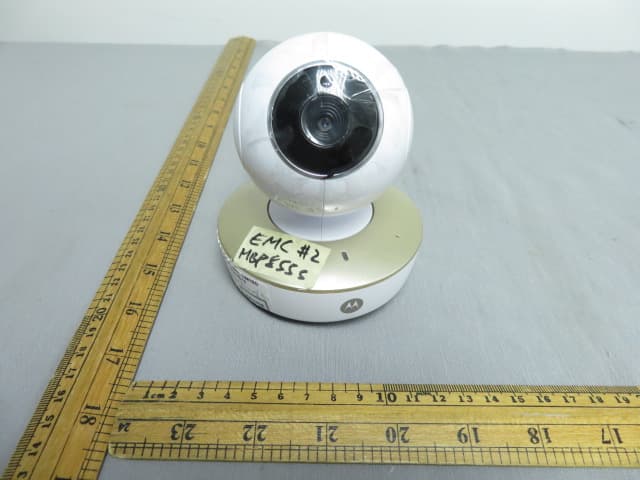
VLJ-MBP855BU
Dec 17, 20205inch Wi-Fi Video Baby Monitor
Equipment Class
DSS - Part 15 Spread Spectrum Transmitter