VLJ-MBP33SPUDigital Video Baby Monitor (Parent Unit)
Binatone Electronics International Ltd.
Click to zoom
Application Details
- Equipment Class
- DSS - Part 15 Spread Spectrum Transmitter
- Date of Grant
- Jul 02, 2014
- Application Purpose
- Original Equipment
- Date of Application
- Jul 02, 2014
- Equipment Note
- Digital Video Baby Monitor (Parent Unit)
- Frequency Range
- 2402.00000000 - 2479.00000000
- Country
- China
Documents & Files
Document Text
Text extracted from the exhibit documents filed with the FCC. Open a document above to read the original.
Users Manual
Models: MBP33S, MBP33S-2, MBP33S-3, MBP33S-4 User’s Guide Digital Video Baby Monitor The features described in this User’s Guide are subject to modifications without prior notice. Welcome... to your new Motorola Video Baby Monitor! Thank you for purchasing the Motorola Video Baby Monitor. Now you can see and hear your baby sleeping in another room or you can monitor your older children in their playroom. Please retain your original dated sales receipt for your records. For warranty service of your Motorola product, you will need to provide a copy of your dated sales receipt to confirm warranty status. Registration is not required for warranty coverage. For product related questions, please call: This User's Guide provides you with all the information you need to get the most from your product. Before you can use the baby monitor, we recommend you insert and fully charge the battery in the parent unit, so that it continues to work if you disconnect it from the power supply to carry it to another location. Please read the Safety Instructions on page 6 before you install the units. Got everything? • 1 x Parent unit • 1 x Baby unit (Camera) • 1 x Rechargeable Ni-MH battery pack • 1 x Power adapter for the Parent unit • 1 x Power adapter(s) for the Baby unit In multi-camera packs, you will find one or more additional camera units with power adapter units and battery packs. US and Canada 1-888-331-3383 Email: [email protected] Overview of the Parent Unit 1. Display (LCD screen) 2. Vo l + Key Normal Mode: Vol Up Menu Mode: Up 3. Vo l - Key Normal Mode: Vol Down Menu Mode: Down 4. Brightness + Key Normal Mode: Brightness up Menu Mode: Right 5. Brightness - Key Normal Mode: Brightness down Menu Mode: Left 6. Menu Key M Press to open the Menu options 7. OK Key O 8. Video ON/OFF Key V Press to turn OFF the LCD display Press again to turn ON the LCD display 9. Ta l k K e y T Press and hold to speak to your baby 10. Power Adapter / Battery LED BLUE when the adapter is powered on. RED when battery low. 11. Unit ON/OFF LED (Green) 12. Audio Level LED (Green, Orange, Red, Red) 13. Microphone 14. Power Key P Press and Hold to turn the unit ON/OFF 15. Antenna Lift the antenna for optimal reception 16. Battery cover 17. Stand 18. Speaker 19. USB power adapter socket 20. AV out / Audio out * AV Cable/Audio Cable (Optional accessory, to be purchased separately) POWER 18 15 11 14 13 16 17 19 20 6 7 8 9 2 3 4 5 1012 1 Parent unit menu icons Signal Level (4 Levels) Night Vision Mode (Screen changes to Black/White) Ta l k M o d e Battery Level Control (4 Levels) Volume Level Control (8 Levels) Zoom Level Control (1X, 2X) Important guidelines for installing your Baby Monitor • To use your Video Monitor Baby and Parent Units together, you must be able to establish a radio link between them, and the range will be affected by environmental conditions. • Any large metal object, like a refrigerator, a mirror, a filing cabinet, metallic doors or reinforced concrete between the Baby and Parent Unit may block the radio signal. • The signal strength may also be reduced by other solid structures, like walls, or by radio or electrical equipment, such as TVs, computers, cordless or mobile phones, fluorescent lights or dimmer switches. • Use of other 2.4 GHz products, such as wireless networks (Wi-Fi ® routers), Bluetooth ® systems, or microwave ovens, may cause interference with this product, so keep the baby monitor away at least 5ft (1.5m) from these types of products, or turn them off if they appear to be causing interference. • If the signal is weak, try lifting up the Parent Unit Antenna, moving the Parent and/or the Baby Unit to different positions in the rooms. 1. Photo Sensor (Night Vision Mode) 6. Speaker 7. ON/OFF Switch 2. Camera Lens8. Power Adapter Socket 3. Infrared LEDs9. Antenna 4. Power LED10. Temperature Sensor 5. Microphone 11. Pair Key Parent unit menu icons (cont’d) Overview of Your Baby Unit Brightness Level Control (8 Levels) Lullaby Control (5 Song Selections) Alarm Setting (6h, 4h, 2h, Off ) Temperature Reading (HH ºC / ºF or LL ºC / ºF) Icon & readings turn RED > 29ºC / 84ºF, and reading display HH ºC / ºF > 36ºC / 97 ºF) Icon & readings turn RED < 14ºC / 57ºF, and reading display LL ºC / ºF < 1ºC / 34 ºF) Cam Control (scan, view, add, delete) Screen viewing mode control (Single Screen, 4-split Screen) Set Video On Timer (5 min, 30 min, 60 min) V 1 9 11 10 8 2 3 6 5 4 7 PAIR Table of contents5 ENGLISH Table of contents 1.Safety Instructions ..................................................................................... 6 2.Getting Started .......................................................................................... 9 2.1Baby Unit Power Supply .............................................................................. 9 2.2Parent Unit Battery Installation .................................................................... 9 2.3Parent Unit Power Supply ......................................................................... 10 2.4Registration (Pairing)................................................................................. 11 2.5View Video Through TV ............................................................................ 11 3.Using the Baby Monitor ........................................................................... 12 3.1Setting up................................................................................................... 12 3.2Night Vision Mode..................................................................................... 12 3.3Talk Mode .................................................................................................. 12 3.4Video ON/OFF.......................................................................................... 12 3.5Temperature Display (HH °C / °F or LL °C / °F) ...................................... 12 4.Parent Unit Menu Options....................................................................... …
Text truncated - open the document above for the full version.
External Photos
Appendix B Date: 2014-06-30 Report No.: 60.870.14.012.02F Model No.: MBP33SPU Page 1 of 3 TÜV SÜD Hong Kong Ltd. 3/F, West Wing, Phase 2, 10 Science Park West Avenue, Shatin, Hong Kong. Appendix B Date: 2014-06-30 Report No.: 60.870.14.012.02F Model No.: MBP33SPU Page 2 of 3 TÜV SÜD Hong Kong Ltd. 3/F, West Wing, Phase 2, 10 Science Park West Avenue, Shatin, Hong Kong. Appendix B Date: 2014-06-30 Report No.: 60.870.14.012.02F Model No.: MBP33SPU Page 3 of 3 TÜV SÜD Hong Kong Ltd. 3/F, West Wing, Phase 2, 10 Science Park West Avenue, Shatin, Hong Kong.
ID Label/Location Info
Information of Label -MBP33S serial number IC: 4522A-MBP33SBU VLJ-MBP33SBU odel: MBP33SBU IC: 4522A-MBP33SPU VLJ-MBP33SPU odel: MBP33SPU MBP33S US Product Label M Input: DC5V Use Only Power Supplies listed in the user’s guide. FCC ID: MADE IN CHINA Input: DC5V 600mA M Ni-MH Battery pack 3.6V, 900mAh Rechargeable Batteries only Use Only Batteries and Power Supplies listed in the user’s guide. FCC ID: MADE IN CHINA VT 1403000001G Baby unit rating label 1) Colour: White background black letters 2) Material: label paper with plastic lamination on top 3) Scale: 1:1, size:40 x 24mm Parent unit battery compartment label 1) Colour: White background black letters 2) Material: adhesive label with plastic lamination 3) Scale: 1:1, size:40 x 24mm Date code and serial no. label on Baby unit back, Parent unit battery compartment, Gift box and Carton. 1) Colour: White background black letters 2) Material: adhesive label with plastic lamination on top 3) Scale: 1:1, size:40 x 6mm Your factory code is ‘VT’ Serial no. start from ‘000001’ (6 digits) Code Format: code 128 Produce date: 14=Year (2014), 03=March (Mar) “G” for GoHS 600mA
ID Label/Location Info
Label Location
Internal Photos
Appendix C Date: 2014-06-30 Report No.: 60.870.14.012.02F Model No.: MBP33SPU Page 1 of 3 TÜV SÜD Hong Kong Ltd. 3/F, West Wing, Phase 2, 10 Science Park West Avenue, Shatin, Hong Kong. Appendix C Date: 2014-06-30 Report No.: 60.870.14.012.02F Model No.: MBP33SPU Page 2 of 3 TÜV SÜD Hong Kong Ltd. 3/F, West Wing, Phase 2, 10 Science Park West Avenue, Shatin, Hong Kong. Appendix C Date: 2014-06-30 Report No.: 60.870.14.012.02F Model No.: MBP33SPU Page 3 of 3 TÜV SÜD Hong Kong Ltd. 3/F, West Wing, Phase 2, 10 Science Park West Avenue, Shatin, Hong Kong.
RF Exposure Info
Date: 2014-06-30 Report No.: 60.870.14.012.02F Model No.: MBP33SPU Page 1 of 1 TÜV SÜD Hong Kong Ltd. 3/F, West Wing, Phase 2, 10 Science Park West Avenue, Shatin, Hong Kong. SAR Evaluation Exemption Compliance Information The device has a standalone transmission. According to KDB 447498 section 4.3.1, the 1-g SAR test exclusion thresholds at test separation distances 50 mm are determined by: [(max. power of channel, including tune-up tolerance, mW)/(min. test separation distance, mm)]·[ ¥f(GHz)] 3.0 The maximum tune-up limit power is 74 mW @ 2.402GHz For the head and body SAR, use 50mm as the conservative minimum test separation distance, [(max. power of channel, including tune-up tolerance, mW)/(min. test separation distance, mm)]·[ ¥f(GHz)] = 0.95 3.0 So standalone SAR measurements are not required for both head and body
Test Report
TEST REPORT Date: 2014-06-30 Report No.: 60.870.14.012.02F Page 1 of 29 TUV SUD Hong Kong Ltd. 3/F, West Wing, Phase 2, 10 Science Park West Avenue, Shatin, Hong Kong Applicant:Binatone Electronics International Ltd. Floor 23A, 9 Des Voeux Road West, Sheung Wan, Hong Kong Description of Samples:Model name: DigitalVideoBaby Monitor(ParentUnit) Brand name: motorola Model no.:MBP33SPU FCCID:VLJ-MBP33SPU Date Samples Received:2014-06-01 Date Tested:2014-06-02 to 2014-06-30 Investigation Requested:FCC Part 15 Subpart C, Section 15.247 Conclusions:The submitted product COMPLIED with the requirements of Federal Communications Commission [FCC] Rules and Regulations Part 15. The tests were performed in accordance with the standards described above and on Section 2.2 in this Test Report. Remarks:--- Checked by:Approved by:- Ray CheungJeff Pong Project EngineerManager Wireless & Telecom DepartmentWireless & Telecom Department ReportNo.: 60.870.14.012.02F Page 2 of 29 TÜV SÜD Hong Kong Ltd. 3/F, West Wing, Phase 2, 10 Science Park West Avenue, Shatin, Hong Kong CONTENT: Cover Page 1 of 29 Content Page 2-3 of 29 1.0General Details 1.1Test Laboratory Page 4 of 29 1.2Applicant Details Page 4 of 29 1.3Equipment Under Test [EUT] Page 5 of 29 1.4 Related Submittal(s) Grants Page 5 of 29 2.0Technical Details 2.1Investigations Requested Page 6 of 29 2.2Test Standards and Results Summary Page 6 of 29 3.0Test Methodology 3.1Radiated Emission Page 7 of 29 3.2Field Strength Calculation Page 7 of 29 3.3Conducted Emission Page 7 of 29 4.0Test Results 4.1 Number of Frequency Hopping Page 8 of 29 4.2 20dB Bandwidth Measurement Page 9-10 of 29 4.3 Hopping Channel Carrier Frequency Separation Page 11 of 29 4.4 Average Time of Occupancy Page 12-14 of 29 4.5 Pseudorandom Hopping Algorithm Page 15 of 29 4.6 Band Edge Measurement Page 16-17 of 29 4.7 Maximum Output Power Page 18-20 of 29 4.8 Out ofBand Emissionsand Emissions in Restricted Bands Page 21-25 of 29 4.9 Conducted Emission on AC Mains Page 26-28 of 29 ReportNo.: 60.870.14.012.02F Page 3 of 29 TÜV SÜD Hong Kong Ltd. 3/F, West Wing, Phase 2, 10 Science Park West Avenue, Shatin, Hong Kong 5.0List of Measurement Equipments Page 29 of 29 Appendix A Photos of Test Setup Appendix B External EUT Photos Appendix C Internal EUT Photos ReportNo.: 60.870.14.012.02F Page 4 of 29 TÜV SÜD Hong Kong Ltd. 3/F, West Wing, Phase 2, 10 Science Park West Avenue, Shatin, Hong Kong 1.0General Details 1.1Test Laboratory Attestation of Global ComplianceSZCoLtd. 2/F, Building 2,No.1-No.4,Chaxi Sanwei, Technical Industrial Park, Gushu, Xixiang, Shenzhen, China. Registration Number: 259865 Tested by: John Zhi 1.2Applicant Details Applicant Binatone Electronics International Ltd. Floor 23A, 9 Des Voeux Road West, Sheung Wan Hong Kong Manufacturer VTech (Dongguan) Telecommunication Limited VTEch Science Park, Xia Ling Bei Management Zone, Liaobu, Dongguan, Guangdong, China ReportNo.: 60.870.14.012.02F Page 5 of 29 TÜV SÜD Hong Kong Ltd. 3/F, West Wing, Phase 2, 10 Science Park West Avenue, Shatin, Hong Kong 1.3Equipment Under Test [EUT] Description of EUT Product Description:DigitalVideoBaby Monitor(ParentUnit) ModelNo.:MBP33SPU Brand Name: motorola FCCID:VLJ-MBP33SPU Rating:DC5.0V,600mApowered by AC/DC power adaptor Or DC 3.6V 900mAh (Ni-MH package rechargeable battery) Operated Frequency:2402– 2479 MHz No. of Operated Channel:23 Accessories and Auxiliary Equipments:AC/DC Switching Adaptor Antenna Type:Integral Manufacture of Antenna:CVISION HK LTD Antenna Gain:1 dBi Antenna Model:N/A General Operation of EUT The Equipment Under Test (EUT) is a Monitor of Wireless Monitoring System. FHSS Operation Principle: This module is controlled by microchip to generate Pseudorandom Frequency Hopping Sequence, this module support 23 hopping channels. Refer to section 4.5 of this report to have more detail of Pseudorandom Hopping Algorithm. 1.4Related Submittal(s) Grants This is a signal application subjected to Certificate Authorization. ReportNo.: 60.870.14.012.02F Page 6 of 29 TÜV SÜD Hong Kong Ltd. 3/F, West Wing, Phase 2, 10 Science Park West Avenue, Shatin, Hong Kong 2.0TechnicalDetails 2.1Investigations Requested Perform ElectroMagnetic Interference measurement in accordance with FCC 47CFR [Codes of Federal Regulations] Part 15:2012 and ANSI C63.4: 2009 2.2Test Standards and Results Summary Tables Test ConditionTest RequirementTest Result PassN/A Number of Frequency Hopping Section 15.247 ( a1 ) 20dB Bandwidth Measurement Section 15.247 ( a1 ) Hopping Channel Carrier Frequency Separation Section 15.247 ( a1 ) Average Time of Occupancy Section 15.247 ( a1 ) Pseudorandom Hopping Algorithm Section 15.247 ( a1 ) Band Edge Measurement Section 15.247 Maximum Output PowerSection 15.247 ( b1 ) Out of Band EmissionSection 15.247 ( d ) Radiated Emission in Restricted Band Section 15.247 ( d ) Conducted Emission on AC Mains Section 15.207 Antenna RequirementSection 15.203 See note 1 Note 1 :The EUT uses a permanently attached antenna, which in accordance to Section 15.203, is considered sufficient to comply with the provisions of this section. Remark: N/A - Not Applicable ReportNo.: 60.870.14.012.02F Page 7 of 29 TÜV SÜD Hong Kong Ltd. 3/F, West Wing, Phase 2, 10 Science Park West Avenue, Shatin, Hong Kong 3.0Test Methodology 3.1Radiated Emission The sample was placed 0.8m above the ground plane on a standard emission test site *. Measurements in both horizontal and vertical polarities were performed. During the test, each emission was maximized by: having the EUT continuously working, investigated all operating modes, rotated about all 3 axis (X, Y & Z) and considered typical configuration to obtain worst position, manipulating interconnecting cables, rotating turntable, varying antenna height from 1m to 4m in both horizontal and vertical polarizations. The emissions worst-case are shown in Test Results of the following pages. 3.2Field Strength Calculation The field strength at 3 m was established by add…
Text truncated - open the document above for the full version.
Test Setup Photos
Appendix A Date: 2014-06-30 Report No.: 60.870.14.012.02F Model No.: MBP33SPU Page 1 of 2 TÜV SÜD Hong Kong Ltd. 3/F, West Wing, Phase 2, 10 Science Park West Avenue, Shatin, Hong Kong. Radiated Emission Appendix A Date: 2014-06-30 Report No.: 60.870.14.012.02F Model No.: MBP33SPU Page 2 of 2 TÜV SÜD Hong Kong Ltd. 3/F, West Wing, Phase 2, 10 Science Park West Avenue, Shatin, Hong Kong. Conducted Emission
Contact Information
Applicant
Sam Lee(Product Director)
Test Firm
Attestation of Global Compliance Shenzhen Co. Ltd.Forrest Lei
Technical Specifications
| # | Rule Parts | Frequency Range | Power Output |
|---|---|---|---|
| 1 | 15C | 2.40 GHz - 2.48 GHz | 59.00 mW |
Other Applications from Binatone Electronics International Ltd.

VLJ-NV531BU
Jul 03, 2022Video Baby Monitor
Equipment Class
DSS - Part 15 Spread Spectrum Transmitter
VLJ-MH002W
Mar 02, 2021Bluetooth Headset
Equipment Class
DSS - Part 15 Spread Spectrum Transmitter
VLJ-ST600
Feb 09, 20215-in-1 Nursery Humidifier
Equipment Class
DSS - Part 15 Spread Spectrum Transmitter
VLJ-SP025
Feb 01, 2021Portable Bluetooth Music Speaker
Equipment Class
DCD - Part 15 Low Power Transmitter Below 1705 kHz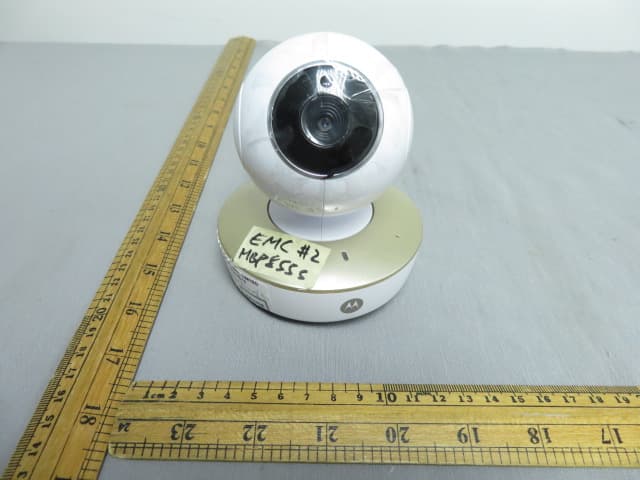
VLJ-MBP855BU
Dec 17, 20205inch Wi-Fi Video Baby Monitor
Equipment Class
DSS - Part 15 Spread Spectrum Transmitter