VLJ80-9617-00Video Baby Monitor (Baby Unit)
Binatone Electronics International Ltd.
Click to zoom
Application Details
- Equipment Class
- DSS - Part 15 Spread Spectrum Transmitter
- Date of Grant
- Mar 19, 2014
- Application Purpose
- Original Equipment
- Date of Application
- Mar 19, 2014
- Equipment Note
- Video Baby Monitor (Baby Unit)
- Frequency Range
- 2407.50000000 - 2475.00000000
- Country
- China
Documents & Files
Document Text
Text extracted from the exhibit documents filed with the FCC. Open a document above to read the original.
Users Manual
User’s Guide Video Baby Monitor Models: MBP421, MBP421/2, MBP421/3, MBP421/4 The features described in this User’s Guide are subject to modifications without prior notice. Welcome... to your new Motorola Video Baby Monitor! Thank you for purchasing the MBP421. Now you can view and hear your baby sleeping in another room or you can monitor your older children in their play room. Please retain your original dated sales receipt for your records. For warranty service of your Motorola product, you will need to provide a copy of your dated sales receipt to confirm warranty status. Registration is not required for warranty coverage. For product-related questions, please call: This User's Guide provides you with all the information you need to get the most from your product. Before you use the baby monitor, we recommend you insert and fully charge the battery in the parent unit, so that it continues to work if you disconnect it from the electrical outlet to carry it to another location. Please read the Safety Instructions on page 7 before you install the units. Got everything? • 1 x Parent unit • 1 x Baby unit (camera) • 1 x Rechargeable Ni-MH battery pack for the Parent unit • 1 x Battery door for Parent unit • 1 x Belt clip/stand for Parent unit • 1 x Power adapter for the Parent unit • 1 x Power adapter for the Baby unit In multi-camera packs, you will find one or more additional Camera units with power adapter units. US and Canada 1-888-331-3383 Email: [email protected] Overview of the Parent Unit 1.LCD display 2.Battery level indicator On when the parent unit battery is being charged. Flashes when the parent unit battery is low and needs charging. Off when the parent unit battery is fully charged, or when the battery is not installed. 3.Power ON/OFF indicator On when the parent unit is turned on. Off when the parent unit battery is fully charge Flashes when in pairing process, or when searching for a baby unit. 4.Control key panel UP / VOLUME + Press to increase the speaker volume. While in the menu, press to scroll up. While viewing a zoomed image, press and hold to move the image upward. DOWN / VOLUME - Press to decrease the speaker volume. While in the menu, press to scroll down. While viewing a zoomed image, press and hold to move the image downward. LEFT/- < While in a menu, press to choose the option on the left side. While viewing a zoomed image, press to zoom out; or press and hold to move the image leftward. RIGHT/+ > While in a menu, press to choose the option on the right side. While viewing a zoomed image, press to zoom in; or press and hold to move the image rightward. Power ON/OFF button P Press and hold to turn on or off. Press to turn on or off the screen. MENU/SELECT Press to enter the menu. While in a menu, press to choose an item, or save a setting. 5.Belt clip/stand 6.Battery compartment cover 7.Power jack 1 25 6 3 7 4 Parent Unit menu icons Connection status - displays when a strong signal strength is detected between the baby unit and the parent unit. - , or displays when a moderate signal strength is detected between the baby unit and the parent unit. - displays when the link between the baby unit and the parent unit is lost. - displays when the parent unit is searching for a baby unit. Current view status - Displays the number of which baby unit that is being viewed. Zoom - Displays when the camera on the baby unit is zoomed in. Vol um e o f f - Displays when the volume is turned off. Sound activation - You can turn on or off the sound activation feature to check on your baby whenever there is sound in the baby room. - Displays when the sound activation is on. The baby unit detects the sound in the baby room, and it automatically goes on to show the baby on the video display. Battery status - animates when the battery is charging. - displays solid when the battery is fully charged. - displays when the battery is low and needs charging. - displays when you do not have a battery installed but operates using AC power, or the battery has been installed incorrectly. Camera selection - You can select the screen to view images from a particular baby unit, or view all baby units in Scan Mode. Brightness - You can change the brightness of the screen. Sensitivity - You can change the sound sensitivity level of the baby unit. It monitors by picking up any sound activities in your baby's room. Pairing - The baby unit and parent unit provided are already paired. You can add or replace baby units (purchased separately) to your baby monitor system. Overview of Your Baby Unit 1 2 3 7 8 4 5 6 Important guidelines for installing your baby monitor • To use your baby unit and parent unit together, you must be able to establish a radio link between them, and the range will be affected by environmental conditions. • Any large metal object, like a refrigerator, a mirror, a filing cabinet, a metallic door or reinforced concrete, between the baby unit and parent unit may block the radio signal. • The signal strength may also be reduced by other solid structures, like walls, or by radio or electrical equipment, such as TVs, computers, cordless or mobile phones, fluorescent lights or dimmer switches. • If the signal is poor, try moving the parent unit and/or the baby unit to different positions in the rooms. 1.Camera lens 2.Infrared lights 4 x infra-red LEDs for night vision illumination. 3.Power/Link indicator On steadily when the baby unit is powered on and currently linked to parent unit. Flashes when the baby unit is not linked to a parent unit; or the pairing process is in progress; or the parent unit is not viewing this baby unit. 4.Microphone 5.Control key panel PAIR Press and hold to pair to the parent unit. Power ON/OFF button P Press and hold to turn on or off. 6.Stand Tilt to adjust the camera angle. 7.Power jack 8.Base 6Table of contents Table of contents 1.Safety Instructions ..................................................................................... 7 2.Getting Sta…
Text truncated - open the document above for the full version.
Cover Letter(s)
Date: 6 March, 2014 The authorization expires on 6 August, 2014
Cover Letter(s)
Date: 7 March, 2014 FCC ID: VLJ80-9617-01, VLJ80-9617-00
Cover Letter(s)
VTech Telecommunications Ltd FCC Multiple Models Confirmation Letter-BU I, the undersigned, hereby confirm that the family models are listed in the following table. These models areidentical as follows: Electronics/electrical designs, including software & firmware Construction design/Physical design/Enclosure PCB layout The onlydifferences between these models are the follows for marketing purpose: Color Model Number Suffix (“ X”) represents (Others, please specify) X=any alphanumeric character or blank is presenting number of Baby unit. Item No.New modelModelNumberTrade NameRemarks 1YESMBP421 BUmotorola1Baby Unit 2YESMBP421/2 BUmotorola2 Baby Unit 3YESMBP421/3 BUmotorola3Baby Unit 4YESMBP421/4 BUmotorola4 Baby Unit 5YESMBP421/X BUmotorolaXBaby Unit 6YESFOCUS421 BUmotorola1 Baby Unit 7YESFOCUS421/2 BUmotorola2Baby Unit 8YESFOCUS421/3 BUmotorola3 Baby Unit 9YESFOCUS421/4 BUmotorola4 Baby Unit 10YESFOCUS421/X BUmotorolaXBaby Unit 11YESSCOUT421 BUmotorola1 Baby Unit 12YESSCOUT421/2 BUmotorola2Baby Unit 13YESSCOUT421/3 BUmotorola3 Baby Unit 14YESSCOUT421/4 BUmotorola4Baby Unit 15YESSCOUT421/X BUmotorolaX Baby Unit Sincerely Michael Tsui Approbation Supervisor
External Photos
Appendix B Date: 2014-02-27 Report No.: 60.870.14.001.01F Model No.: MBP421BU Page 1 of 3 TÜV SÜD Hong Kong Ltd. 3/F, West Wing, Phase 2, 10 Science Park West Avenue, Shatin, Hong Kong. Appendix B Date: 2014-02-27 Report No.: 60.870.14.001.01F Model No.: MBP421BU Page 2 of 3 TÜV SÜD Hong Kong Ltd. 3/F, West Wing, Phase 2, 10 Science Park West Avenue, Shatin, Hong Kong. Appendix B Date: 2014-02-27 Report No.: 60.870.14.001.01F Model No.: MBP421BU Page 3 of 3 TÜV SÜD Hong Kong Ltd. 3/F, West Wing, Phase 2, 10 Science Park West Avenue, Shatin, Hong Kong. Adaptor
ID Label/Location Info
MBP421 PU Engraved in glossy Raised 0.3mm Engraving Raised 0.2mm Engraving Raised 0.2mm Engraving Raised 0.1mm Engraved in glossy Raised 0.3mm MBP421 BU label area MBP421 PU-(US/CA) MBP421/2 BU-(US/CA) MBP421/3 BU-(US/CA) MBP421/4 BU-(US/CA) MBP421/2 PU-(US/CA)MBP421/3 PU-(US/CA)MBP421/4 PU-(US/CA) MBP421 BU-(US/CA) SIZE: 40X20MM 50# PET MATTE 92-026507-010-100 SIZE: 24X20MM 50# PET MATTE 92-026506-010-100 SIZE: 28X10MM 50# PET MATTE S/N: VT1403000001G S/N: VT1403000001G S/N: VT1403000001G SIZE: 40X20MM 50# PET MATTE SIZE: 40X20MM 50# PET MATTE SIZE: 40X20MM 50# PET MATTE Model : MBP421 BU Made in China IC : 4522A-80961700 FCC I D : VLJ80-9617-00 Input : DC 6V 600mA Use only power supplies listed in the user’s guide Model : MBP421 BU Made in China IC : 4522A-80961700 FCC I D : VLJ80-9617-00 Input : DC 6V 600mA Use only power supplies listed in the user’s guide Model : MBP421/2 BU Made in China IC : 4522A-80961700 FCC I D : VLJ80-9617-00 Input : DC 6V 600mA Use only power supplies listed in the user’s guide Model : MBP421/3 BU Made in China IC : 4522A-80961700 FCC I D : VLJ80-9617-00 Input : DC 6V 600mA Use only power supplies listed in the user’s guide Model : MBP421/4 BU Made in China IC : 4522A-80961700 FCC I D : VLJ80-9617-00 Input : DC 6V 600mA Use only power supplies listed in the user’s guide IC : 4522A-80961701 FCC I D : VLJ80-9617-01 Use only battery and power supplies listed in the user’s guide Model : MBP421 PU Made in China Input : DC6V 600mA BC IC : 4522 A-80961701 FCC I D : V LJ80-9617-0 1 Use only battery and power supplies listed in the user’s guide Model : MBP421 PU Made in China Inpu t : DC6 V 600mA BC SIZE: 24X20MM 50# PET MATTE 92-026506-010-100 IC : 4522A-80961701 FCC I D : VLJ80-9617-01 Use only battery and power supplies listed in the user’s guide Model : MBP421/2 PU Made in China Input : DC6V 600mA BC SIZE: 24X20MM 50# PET MATTE 92-026506-010-100 IC : 4522A-80961701 FCC I D : VLJ80-9617-01 Use only battery and power supplies listed in the user’s guide Model : MBP421/3 PU Made in China Input : DC6V 600mA BC SIZE: 24X20MM 50# PET MATTE 92-026506-010-100 IC : 4522A-80961701 FCC I D : VLJ80-9617-01 Use only battery and power supplies listed in the user’s guide Model : MBP421/4 PU Made in China Input : DC6V 600mA BC
Internal Photos
Appendix C Date: 2014-02-27 Report No.: 60.870.14.001.01F Model No.: MBP421BU Page 1 of 3 TÜV SÜD Hong Kong Ltd. 3/F, West Wing, Phase 2, 10 Science Park West Avenue, Shatin, Hong Kong. Appendix C Date: 2014-02-27 Report No.: 60.870.14.001.01F Model No.: MBP421BU Page 2 of 3 TÜV SÜD Hong Kong Ltd. 3/F, West Wing, Phase 2, 10 Science Park West Avenue, Shatin, Hong Kong. Appendix C Date: 2014-02-27 Report No.: 60.870.14.001.01F Model No.: MBP421BU Page 3 of 3 TÜV SÜD Hong Kong Ltd. 3/F, West Wing, Phase 2, 10 Science Park West Avenue, Shatin, Hong Kong.
RF Exposure Info
Date: 2014-02-27 Report No.: 60.870.14.001.01F Model No.: MBP421BU Page 1 of 1 TÜV SÜD Hong Kong Ltd. 3/F, West Wing, Phase 2, 10 Science Park West Avenue, Shatin, Hong Kong. SAR Evaluation Exemption Compliance Information The device has a standalone transmission. According to KDB 447498 section 4.3.1, the 1-g SAR test exclusion thresholds at test separation distances 50 mm are determined by: [(max. power of channel, including tune-up tolerance, mW)/(min. test separation distance, mm)]·[ ¥f(GHz)] 3.0 The maximum tune-up limit power is 57mW @ 2.4075GHz For the head and body SAR, use 50mm as the conservative minimum test separation distance, [(max. power of channel, including tune-up tolerance, mW)/(min. test separation distance, mm)]·[ ¥f(GHz)] = 1.77 3.0 So standalone SAR measurements are not required for both head and body
Test Report
TEST REPORT Date: 2014-02-27 Report No.: 60.870.14.001.01F Page 1 of 29 TUV SUD Hong Kong Ltd. 3/F, West Wing, Phase 2, 10 Science Park West Avenue, Shatin, Hong Kong Applicant:Binatone Electronics International Ltd. Floor 23A, 9 Des Voeux Road West, Sheung Wan, Hong Kong Description of Samples:Model name: VideoBaby Monitor(BabyUnit) Brand name: motorola Model no.:MBP421 BU Multi-list Model(s): FOCUS421BU, SCOUT421BU, MBP421/X BU, FOCUS421/X BU, SCOUT421/X BU (“X” can be any alphanumeric character or blank for the number of Baby Unit of the system.) FCCID:VLJ80-9617-00 Date Samples Received:2014-01-25 Date Tested:2014-01-25 to 2014-02-21 Investigation Requested:FCC Part 15 Subpart C, Section 15.247 Conclusions:The submitted product COMPLIED with the requirements of Federal Communications Commission [FCC] Rules and Regulations Part 15. The tests were performed in accordance with the standards described above and on Section 2.2 in this Test Report. Remarks:--- Checked by:Approved by:- Ray CheungJeff Pong Project EngineerOperation Manager Wireless & Telecom DepartmentWireless & Telecom Department ReportNo.: 60.870.14.001.01F Page 2 of 29 TÜV SÜD Hong Kong Ltd. 3/F, West Wing, Phase 2, 10 Science Park West Avenue, Shatin, Hong Kong CONTENT: Cover Page 1 of 29 Content Page 2-3 of 29 1.0General Details 1.1Test Laboratory Page 4 of 29 1.2Applicant Details Page 4 of 29 1.3Equipment Under Test [EUT] Page 5 of 29 1.4 Related Submittal(s) Grants Page 5 of 29 2.0Technical Details 2.1Investigations Requested Page 6 of 29 2.2Test Standards and Results Summary Page 6 of 29 3.0Test Methodology 3.1Radiated Emission Page 7 of 29 3.2Field Strength Calculation Page 7 of 29 3.3Conducted Emission Page 7 of 29 4.0Test Results 4.1 Number of Frequency Hopping Page 8 of 29 4.2 20dB Bandwidth Measurement Page 9-10 of 29 4.3 Hopping Channel Carrier Frequency Separation Page 11 of 29 4.4 Average Time of Occupancy Page 12-14 of 29 4.5 Pseudorandom Hopping Algorithm Page 15 of 29 4.6 Band Edge Measurement Page 16-17 of 29 4.7 Maximum Output Power Page 18-20 of 29 4.8 Out ofBand Emissionsand Emissions in RestrictedBands Page 21-25 of 29 4.9 Conducted Emission on AC Mains Page 26-28 of 29 ReportNo.: 60.870.14.001.01F Page 3 of 29 TÜV SÜD Hong Kong Ltd. 3/F, West Wing, Phase 2, 10 Science Park West Avenue, Shatin, Hong Kong 5.0List of Measurement Equipments Page 29 of 29 Appendix A Photos of Test Setup Appendix B External EUT Photos Appendix C Internal EUT Photos ReportNo.: 60.870.14.001.01F Page 4 of 29 TÜV SÜD Hong Kong Ltd. 3/F, West Wing, Phase 2, 10 Science Park West Avenue, Shatin, Hong Kong 1.0General Details 1.1Test Laboratory Attestation of Global ComplianceSZCoLtd. 2/F, Building 2,No.1-No.4,Chaxi Sanwei, Technical Industrial Park, Gushu, Xixiang, Shenzhen, China. Registration Number: 259865 Tested by: John Zhi 1.2Applicant Details Applicant Binatone Electronics International Ltd. Floor 23A, 9 Des Voeux Road West, Sheung Wan Hong Kong Manufacturer VTech(Dongguan) Telecommunications Limted VTech Science Park, Xia Ling Bei Management Zone, Liaobu, Dongguan, Guandong, China ReportNo.: 60.870.14.001.01F Page 5 of 29 TÜV SÜD Hong Kong Ltd. 3/F, West Wing, Phase 2, 10 Science Park West Avenue, Shatin, Hong Kong 1.3Equipment Under Test [EUT] Description of EUT Product Description:VideoBaby Monitor(BabyUnit) ModelNo.:MBP421BU Multi-List model(s):FOCUS421 BU, SCOUT421 BU, MBP421/X BU, FOCUS421/X BU, SCOUT421/X BU (“X” can be any alphanumeric character or blank for the number of Baby Unit of the system.) Brand Name: motorola FCCID:VLJ80-9617-00 Rating:DC 6.0V, 600mA powered by AC/DC power adaptor Operated Frequency:2407.5 – 2475 MHz No. of Operated Channel:21 Accessories and Auxiliary Equipments:Switching Adaptor Model: 1. S004LU0600060 (Tested adaptor) 2. RJ-AS060600U501 Antenna Type:Integral Manufacture of Antenna:VTech(Dongguan) Telecommunications Limted Antenna Gain:0 dBi Antenna Model:N/A General Operation of EUT The Equipment Under Test (EUT) is a Camera of Wireless Monitoring System. As per Client Declaration, the circuit design, PCB Layout, shielding and interface of MBP421 BU, MBP421/X BU, FOCUS421 BU, FOCUS421/X BU, SCOUT421 BU and SCOUT421/X BU are identical, only the number of baby unit of the system grouping. So we use MBP421BU as a representative model to perform all testing. FHSS Operation Principle: This module is controlled by microchip to generate Pseudorandom Frequency Hopping Sequence, this module support 21 hopping channels. Refer to section 4.5 of this report to have more detail of Pseudorandom Hopping Algorithm. 1.4Related Submittal(s) Grants This is a signal application subjected to Certificate Authorization. ReportNo.: 60.870.14.001.01F Page 6 of 29 TÜV SÜD Hong Kong Ltd. 3/F, West Wing, Phase 2, 10 Science Park West Avenue, Shatin, Hong Kong 2.0Technical Details 2.1Investigations Requested Perform ElectroMagnetic Interference measurement in accordance with FCC 47CFR [Codes of Federal Regulations] Part 15:2012 and ANSI C63.4: 2009 2.2Test Standards and Results Summary Tables Test ConditionTest RequirementTest Result PassN/A Number of Frequency Hopping Section 15.247 ( a1 ) 20dB Bandwidth Measurement Section 15.247 ( a1 ) Hopping Channel Carrier Frequency Separation Section 15.247 ( a1 ) Average Time of Occupancy Section 15.247 ( a1 ) Pseudorandom Hopping Algorithm Section 15.247 ( a1 ) Band Edge Measurement Section 15.247 Maximum OutputPowerSection 15.247 ( b1 ) Out of Band EmissionSection 15.247 ( d ) Radiated Emission in Restricted Band Section 15.247 ( d ) Conducted Emission on AC Mains Section 15.207 Antenna RequirementSection 15.203 See note 1 Note 1 : The EUT uses a permanently attached antenna, which in accordance to Section 15.203, is considered sufficient to comply with the provisions of this section. Remark: N/A - Not Applicable ReportNo.: 60.870.14.001.01F Page 7 of 29 TÜV SÜD Hong Kong Ltd. 3/F, West Wing, Phase 2, 10 Science Park West Avenue, Shatin, Hong Kong 3.0Test Methodology 3.1R…
Text truncated - open the document above for the full version.
Test Setup Photos
Appendix A Date: 2014-02-27 Report No.: 60.870.14.001.01F Model No.: MBP421BU Page 1 of 2 TÜV SÜD Hong Kong Ltd. 3/F, West Wing, Phase 2, 10 Science Park West Avenue, Shatin, Hong Kong. Radiated Emission Appendix A Date: 2014-02-27 Report No.: 60.870.14.001.01F Model No.: MBP421BU Page 2 of 2 TÜV SÜD Hong Kong Ltd. 3/F, West Wing, Phase 2, 10 Science Park West Avenue, Shatin, Hong Kong. Conducted Emission
Contact Information
Applicant
Sam Lee(Product Director)
Test Firm
Attestation of Global Compliance Shenzhen Co. Ltd.Forrest Lei
Technical Specifications
| # | Rule Parts | Frequency Range | Power Output |
|---|---|---|---|
| 1 | 15C | 2.41 GHz - 2.48 GHz | 57.00 mW |
Other Applications from Binatone Electronics International Ltd.

VLJ-NV531BU
Jul 03, 2022Video Baby Monitor
Equipment Class
DSS - Part 15 Spread Spectrum Transmitter
VLJ-MH002W
Mar 02, 2021Bluetooth Headset
Equipment Class
DSS - Part 15 Spread Spectrum Transmitter
VLJ-ST600
Feb 09, 20215-in-1 Nursery Humidifier
Equipment Class
DSS - Part 15 Spread Spectrum Transmitter
VLJ-SP025
Feb 01, 2021Portable Bluetooth Music Speaker
Equipment Class
DCD - Part 15 Low Power Transmitter Below 1705 kHz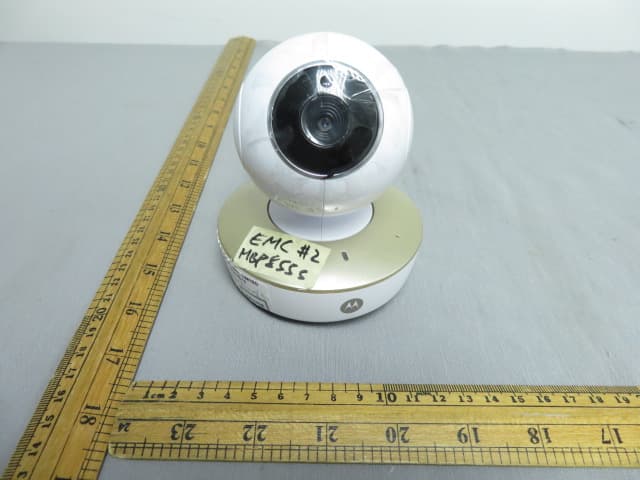
VLJ-MBP855BU
Dec 17, 20205inch Wi-Fi Video Baby Monitor
Equipment Class
DSS - Part 15 Spread Spectrum Transmitter