VLJMBP10SBU2.4GHz FHSS Baby Unit
Binatone Electronics International Ltd.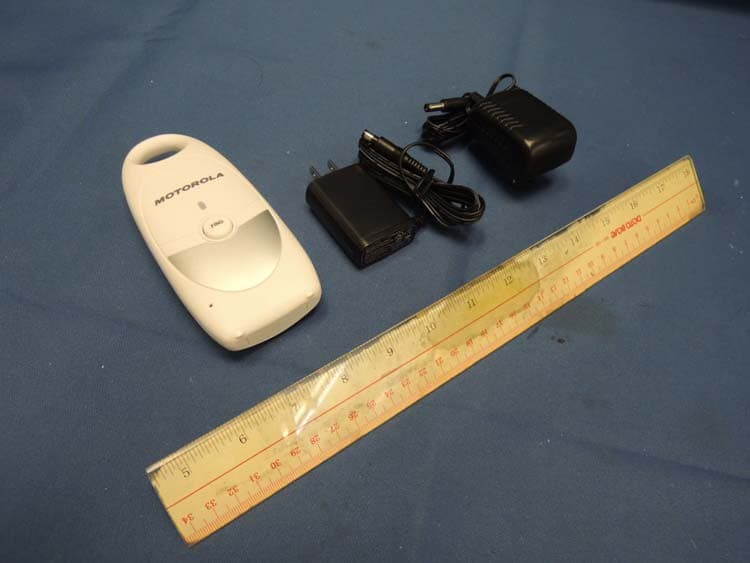
Click to zoom
Application Details
- Equipment Class
- DXX - Part 15 Low Power Communication Device Transmitter
- Date of Grant
- Sep 25, 2012
- Application Purpose
- Original Equipment
- Date of Application
- Sep 25, 2012
- Equipment Note
- 2.4GHz FHSS Baby Unit
- Frequency Range
- 2402.78400000 - 2479.68000000
- Country
- China
Documents & Files
Document Text
Text extracted from the exhibit documents filed with the FCC. Open a document above to read the original.
Users Manual
8765 15 13 14 12 FIND Overview of your Baby unit C D 12. Power LED 13. Microphone 14. Power adapter connector 15. FIND key 1. Safety Instructions WARNING STRANGULATION HAZARD - Keep the adapter cord out of baby's reach. NEVER place the baby monitor or its cord within the crib. Secure the cord some distance away from baby's reach. Never use extension cords with AC Adapters. Only use the AC Adapters provided. This baby monitor is compliant with all relevant standards regarding electromagnetic fields and is, when handled as described in the Userís Guide, safe to use. Therefore, always read the instructions in this Userís Guide carefully before using the device. ï Adult assembly is required. Keep small parts away from children when assembling. ï This product is not a toy. Do not allow children to play with it. ï This baby monitor is not a substitute for responsible adult supervision. ï Keep this Userís Guide for future reference. ï Do not place the baby unit or cables in the crib or within arm's reach of the baby (the unit should be at 3.5 feet away). ï Keep the cords out of reach of children. ï Do not cover the baby monitor with a towel or blanket. ï Never use extension cords with power adapters. Only use the power adapters provided. ï Test the baby monitor before use. Become familiar with its functions. ï Do not use the baby monitor near water. ï Do not install the baby monitor near a heat source. ï Only use the chargers and power adapters provided. Do not use other chargers or power adapters as this may damage the device and batteries. ï Only insert batteries of the same type. Never use ordinary, nonrechargeable batteries in the parent unit. Insert batteries with the right polarity (indicated in the battery compartment). ï Do not touch the charger or plug contacts with sharp or metal objects. CAUTION Risk of explosion if battery is replaced by an incorrect type. Dispose of used batteries according to the instructions. 2. Getting Started 2.1Baby unit power supply 2.1.1Connect the small plug of the power adapter to the power connector on the baby unit and the other end of the adapter to an electrical outlet (100-240Vac~50/60Hz). NOTE Only use the enclosed power adapter (5V DC /600mA). 2.2Parent unit battery installation The Parent unit can be used with either the rechargeable battery pack (2.4V 600mAh Ni-MH rechargeable battery pack supplied) or via the power adapter supplied. Black Red WARNING Never use ordinary, non-rechargeable batteries. The power outlet adapter provides a charging function, and non-rechargeable batteries may explode and cause damage! NOTE The Ni-MH rechargeable batteries must be charged for 16 hours before using the Parent unit without the power outlet. We recommend the rechargeable batteries are installed, so that the unit continues to work in the event of a power failure. 1.Using a screwdriver, turn the screw of the battery cover on the back of the parent unit 90 degrees in a counterclockwise direction. Remove the battery cover NOTE Rotate the belt clip to its hanging position to make it easier to access the battery compartment. Do not try to turn the screw further beyond the OPEN position marked on the cover. 2.Insert one battery pack with 2 AAA size Ni-MH rechargeable batteries. 3.Close the battery compartment and turn the screw back 90 degrees back in a clockwise direction. 4.Press and hold P. The Power (ON / ) LED will illuminate red if it only has battery power. 5.Press and hold P to switch off the parent unit. NOTE When the battery level is low, the green power LED will flash and the parent unit will emit a warning beep once every minute. If the baby unit loses power or goes out of range, the link will be lost and the parent unit will emit a warning beep every 20 seconds and the green link LED on the parent unit will continue to flash. WARNING Do not mix old batteries with new ones. Keep batteries away from small children. Do not short-circuit batteries or dispose of in fire. Remove the batteries if this device is not going to be used for a long period of time. Table of contents 1. Safety Instructions........................................................................ 6 2. Getting Started .............................................................................. 7 2.1Baby unit power supply ................................................................ 7 2.2Parent unit battery installation ...................................................... 7 2.3Parent unit power supply .............................................................. 9 2.4Link ............................................................................................... 9 2.5Paging ........................................................................................ 10 3. Using the MBP10S ...................................................................... 10 3.1Volume adjustment on the Parent unit ....................................... 10 4. Disposal of the Device in the Environment .............................. 10 5. Cleaning ....................................................................................... 11 6. Help .............................................................................................. 11 7. General Information .................................................................... 12 1 2 3 4 5 6 7 8 1. Link indicator LED 2. Volume down button M 3. Power On/Off button P 4. Speaker 5. Volume up button O 6. Power (ON / ) LED 7. Volume indicator LEDs 8. Power adapter connector Overview of your Parent unit B 9. Belt clip 10. Battery cover screw 11. Battery cover A This Userís Guide provides you with all the information you need to get the most from your product. Before you can use the baby monitor, youíll need to insert and fully charge the battery on the Parent unit. Please read the Safety Instructions in section 1 ìSafety Instructionsî before you install the units. Got everything? ï 1 x Parent unit ï 1 x Baby unit ï 1 x Rechargeable battery pack for…
Text truncated - open the document above for the full version.
Cover Letter(s)
Binatone Electronics International Limited Floor 23A, 9 Des Voeux Road West, Hong Kong Tel: (852) 2802 7388 Fax: (852) 2802 8138 _______________________________________ . Appendix B1 Letter of Agency for FCC Certification 08 Jun 2012 To whom it may concern, Letter of Agency I, an officer of Binatone Electronics International Ltd do hereby authorize Intertek Testing Services (Mr. Ken Sit/Mr. Melvin Nip) to act on our behalf in front of the Federal Communications Commission with respect to all matters relating to certification of equipment under Part 15 and/or Part 95 of the FCC Rules until further notice. I further certify that no party (as defined in §1.2002(b) of CFR 47, 2004) to this application, including myself, is subject to a denial of federal benefits, that includes FCC benefits, pursuant to Section 5301 of the Anti-Drug Abuse Act of 1988, 21 U.S.C., 862. Regards, __________________ Paul Tsui Product Operation Director
Cover Letter(s)
Binatone Electronics International Limited Floor 23A, 9 Des Voeux Road West, Hong Kong Tel: (852) 2802 7388 Fax: (852) 2802 8138 ________________________________________ . [4 July 2012] To whom it may concern, Request for Permanent Confidentiality Under FCC Part 15 Certification FCC ID: VLJMBP10SBU Request is hereby submitted by [Binatone Electronics International Ltd] to withhold permanently from public review certain portions of the application for equipment certification for the referenced FCC identifiers. This request for confidentiality is made pursuant to 47 CFR § 0.457(d) and 0.459 of the FCC Rules. In particular, the following sections of the application are to be kept permanently confidential and [Binatone Electronics International Ltd] reserves the right to discern which parties can obtain access to these information: Schematics Detailed Block diagrams Detailed Operational/Functional Description The rationale for request for confidentiality is as followings: This information represents intellectual property of [Binatone Electronics International Ltd] and it is subject to competition. We have invested considerable time and materials in research and development to produce the referenced product. Disclosure of the permanently confidential portions of this application to competitors would not only give them significant competitive advantages in developing similar products, but would also disclose successful implementation of unpublished, leading edge technology developed by us. If you have questions or need further information, please contact the undersigned. Regards, __________________ Paul Tsui Product OperationS Director
External Photos
INTERTEK TESTING SERVICES External Photos FCC ID: VLJMBP10SBU IC: 4522A-MBP10SBU external photos - 1 of 1 HK12041325 Job Number HK12041325 Job Number
ID Label/Location Info
MBP10SPU MBP10SPU FCC ID: VLJMBP10SBU IC: 4522A-MBP10SBU Model:MBP10SBU F C C I D : V L J M B P 1 0 S B U I C : 4 5 2 2 A - M B P 1 0 S B U M o d e l : M B P 1 0 S B U
Internal Photos
INTERTEK TESTING SERVICES Internal photos FCC ID: VLJMBP10SBU IC: 4522A-MBP10SBU internal photos - 1 of 3 Baby Unit assembly Baby Unit Main PCB comp side INTERTEK TESTING SERVICES Internal photos FCC ID: VLJMBP10SBU IC: 4522A-MBP10SBU internal photos - 2 of 3 Baby Unit Main PCB solder side Baby Unit Antenna INTERTEK TESTING SERVICES Internal photos FCC ID: VLJMBP10SBU IC: 4522A-MBP10SBU internal photos - 3 of 3 Baby Unit Oscillator PCB comp side
Test Report
Issuing Laboratory: Intertek Testing Services Hong Kong Limited Hong Kong Accreditation Service (HKAS) has accredited this laboratory under the Hong Kong Laboratory Accreditation Scheme (HOKLAS) for specific laboratory activities as listed in the HOKLAS directory of accredited laboratories. The results shown in this report were determined by this laboratory in accordance with its terms of accreditation. Test Report Number: HK12041325-1 Page 1 of 32 FCC ID: VLJMBP10SBU IC: 4522A-MBP10SBU Intertek Testing Services Hong Kong Ltd. 2/F., Garment Centre, 576 Castle Peak Road, Kowloon, Hong Kong. Tel: (852) 2173 8888 Fax: (852) 2785 5487 Website: www.hk.intertek-etlsemko.com GENERAL INFORMATION Applicant Name: Binatone Electronics International Ltd. Applicant Address: Floor 23A, 9 Des Voeux Road West, Sheung Wan, Hong Kong. FCC Specification Standard: FCC Part 15, October 1, 2010 Edition FCC ID: VLJMBP10SBU FCC Model(s): MBP10SBU, MBP10S/2BU IC Specification Standard: RSS-210 Issue 8, December 2010 RSS-Gen Issue 3, December 2010 IC: 4522A-MBP10SBU IC Model(s): MBP10SBU, MBP10S/2BU Type of EUT: Transceiver Description of EUT: 2.4GHz Frequency Hopping Spread Spectrum Baby Unit Serial Number: N/A Sample Receipt Date: April 27, 2012 Date of Test: August 10 - 13, 2012 Report Date: September 05, 2012 Environmental Conditions: Temperature: +10 to 40°C Humidity: 10 to 90% Issuing Laboratory: Intertek Testing Services Hong Kong Limited Hong Kong Accreditation Service (HKAS) has accredited this laboratory under the Hong Kong Laboratory Accreditation Scheme (HOKLAS) for specific laboratory activities as listed in the HOKLAS directory of accredited laboratories. The results shown in this report were determined by this laboratory in accordance with its terms of accreditation. Test Report Number: HK12041325-1 Page 2 of 32 FCC ID: VLJMBP10SBU IC: 4522A-MBP10SBU Intertek Testing Services Hong Kong Ltd. 2/F., Garment Centre, 576 Castle Peak Road, Kowloon, Hong Kong. Tel: (852) 2173 8888 Fax: (852) 2785 5487 Website: www.hk.intertek-etlsemko.com Table of Contents 1.0 Test Results Summary & Statement of Compliance.............................................. 4 1.1 Summary of Test Results ........................................................................................ 4 1.2 Statement of Compliance ........................................................................................ 4 2.0 General Description................................................................................................. 6 2.1 Product Description ................................................................................................. 6 2.2 Test Methodology.................................................................................................... 6 2.3 Test Facility............................................................................................................. 6 3.0 System Test Configuration...................................................................................... 8 3.1 Justification ............................................................................................................. 8 3.2 EUT Exercising Software......................................................................................... 9 3.3 Details of EUT and Description of Accessories...................................................... 10 3.4 Measurement Uncertainty ..................................................................................... 10 4.0 Test Results............................................................................................................ 12 4.1 Field Strength Calculation...................................................................................... 12 4.2 Radiated Emissions............................................................................................... 13 4.2.1 Radiated Emission Configuration Photograph ..................................................... 13 4.2.2 Radiated Emission Data ..................................................................................... 13 4.2.3 Transmitter Duty Cycle Calculation ..................................................................... 13 4.3 Radiated Emission on the Bandedge..................................................................... 23 4.4 AC Power Line Conducted Emission ..................................................................... 25 4.4.1 AC Power Line Conducted Emission Configuration Photograph.......................... 25 4.4.2 AC Power Line Conducted Emission Data .......................................................... 25 5.0 Equipment List...................................................................................................... 32 Issuing Laboratory: Intertek Testing Services Hong Kong Limited Hong Kong Accreditation Service (HKAS) has accredited this laboratory under the Hong Kong Laboratory Accreditation Scheme (HOKLAS) for specific laboratory activities as listed in the HOKLAS directory of accredited laboratories. The results shown in this report were determined by this laboratory in accordance with its terms of accreditation. Test Report Number: HK12041325-1 Page 3 of 32 FCC ID: VLJMBP10SBU IC: 4522A-MBP10SBU Intertek Testing Services Hong Kong Ltd. 2/F., Garment Centre, 576 Castle Peak Road, Kowloon, Hong Kong. Tel: (852) 2173 8888 Fax: (852) 2785 5487 Website: www.hk.intertek-etlsemko.com EXHIBIT 1 TEST RESULTS SUMMARY & STATEMENT OF COMPLIANCE Issuing Laboratory: Intertek Testing Services Hong Kong Limited Hong Kong Accreditation Service (HKAS) has accredited this laboratory under the Hong Kong Laboratory Accreditation Scheme (HOKLAS) for specific laboratory activities as listed in the HOKLAS directory of accredited laboratories. The results shown in this report were determined by this laboratory in accordance with its terms of accreditation. Test Report Number: HK12041325-1 Page 4 of 32 FCC ID: VLJMBP10SBU IC: 4522A-MBP10SBU Intertek Testing Servi…
Text truncated - open the document above for the full version.
Test Setup Photos
INTERTEK TESTING SERVICES The Worst Case Configuration Photographs - Mode: Transmission FCC ID: VLJMBP10SBU IC: 4522A-MBP10SBU config photos (radiated emission - baby unit) - 1 of 1 Radiated Emission - Baby Unit (with 5ESP adaptor) Front View Rear View INTERTEK TESTING SERVICES The Worst Case Configuration Photographs - Mode: Transmission FCC ID: VLJMBP10SBU IC: 4522A-MBP10SBU config photos (radiated emission - baby unit) - 1 of 1 Radiated Emission - Baby Unit (with GPE adaptor) Front View Rear View INTERTEK TESTING SERVICES The Worst Case Configuration Photographs - Mode: Talk (with 5ESP adaptor) FCC ID: VLJMBP10SBU IC: 4522A-MBP10SBU config photos (conducted emission) - 1 of 2 Conducted Emission Front View Right Side View INTERTEK TESTING SERVICES The Worst Case Configuration Photographs - Mode: Talk (with 5ESP adaptor) FCC ID: VLJMBP10SBU IC: 4522A-MBP10SBU config photos (conducted emission) - 2 of 2 Conducted Emission Left Side View
Contact Information
Applicant
Sam Lee(Product Director)
Technical Contact
Intertek Testing Services Hong Kong Ltd.Melvin Nip
[email protected]852-2173-8888
Flat D, 5/F., Garment Center · Kowloon · Hong Kong
Non-Technical Contact
Intertek Testing Services Hong Kong Ltd.Melvin Nip
[email protected]852-2173-8888
Test Firm
Intertek Testing Services Hong Kong Ltd.Billy Chow
Technical Specifications
| # | Rule Parts | Frequency Range | Power Output |
|---|---|---|---|
| 1 | 15C | 2.40 GHz - 2.48 GHz | - |
Other Applications from Binatone Electronics International Ltd.

VLJ-NV531BU
Jul 03, 2022Video Baby Monitor
Equipment Class
DSS - Part 15 Spread Spectrum Transmitter
VLJ-MH002W
Mar 02, 2021Bluetooth Headset
Equipment Class
DSS - Part 15 Spread Spectrum Transmitter
VLJ-ST600
Feb 09, 20215-in-1 Nursery Humidifier
Equipment Class
DSS - Part 15 Spread Spectrum Transmitter
VLJ-SP025
Feb 01, 2021Portable Bluetooth Music Speaker
Equipment Class
DCD - Part 15 Low Power Transmitter Below 1705 kHz
VLJ-MBP855BU
Dec 17, 20205inch Wi-Fi Video Baby Monitor
Equipment Class
DSS - Part 15 Spread Spectrum Transmitter