VUI-DWRFID1302RFID 13.56MHz Wirless Module
PEGATRON CORPORATION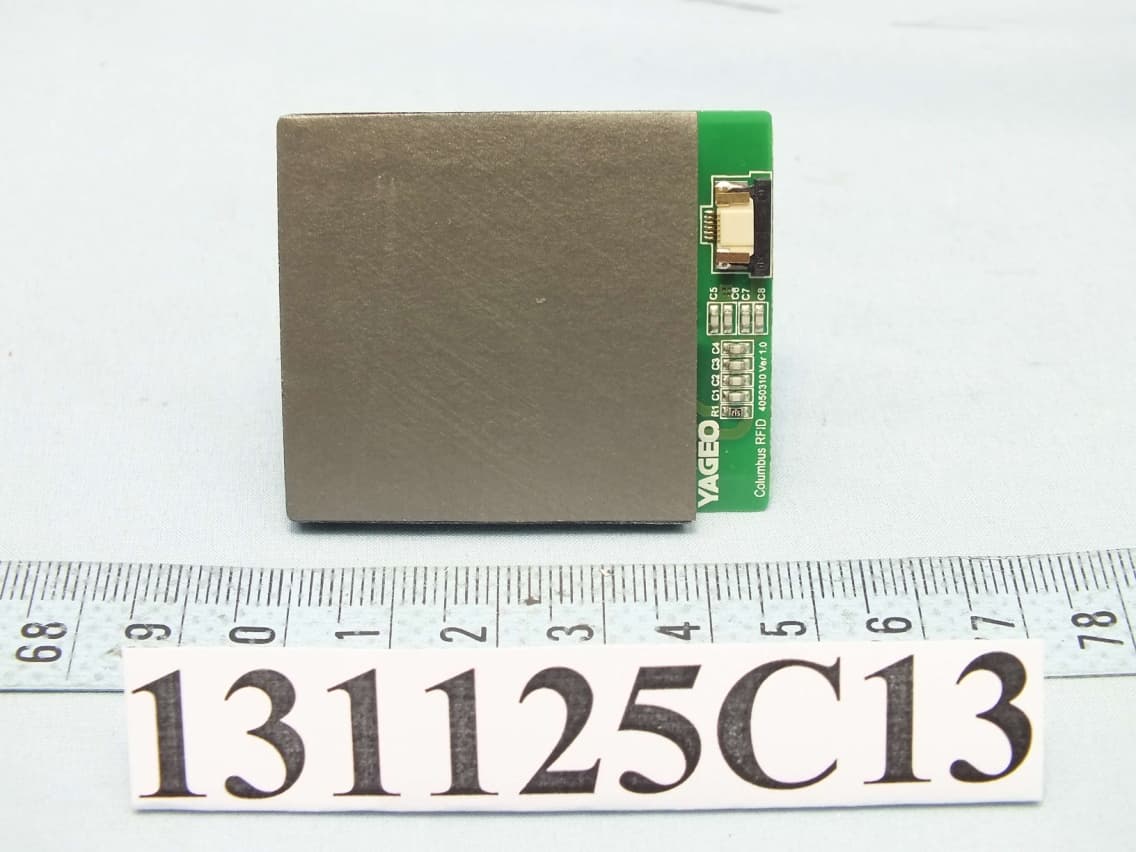
Click to zoom
Application Details
- Equipment Class
- DXX - Part 15 Low Power Communication Device Transmitter
- Date of Grant
- Mar 18, 2014
- Application Purpose
- Original Equipment
- Date of Application
- Mar 12, 2014
- Equipment Note
- RFID 13.56MHz Wirless Module
- Frequency Range
- 13.56000000 - 13.56000000
- Company
- PEGATRON CORPORATION
- Country
- Taiwan
Documents & Files
Document Text
Text extracted from the exhibit documents filed with the FCC. Open a document above to read the original.
Users Manual
FCC Radiation Exposure Statement WARNING: The radiated output power of the Dell Wireless WLAN Card devices is far below the FCC radio frequency exposure limits. Nevertheless, the Dell Wireless WLAN Card devices should be used in such a manner that the potential for human contact during normal operation is minimized. To avoid the possibility of exceeding the FCC radio frequency exposure limits, you should keep a distance of at least 20 cm between you (or any other person in the vicinity) and the antenna that is built into the printer. To determine the location of the antenna within your printer, check the information posted on the general Dell support site at http://support.dell.com . This device has also been evaluated for and shown compliant with the FCC RF exposure limits under portable exposure conditions (antennas are within 20 cm of a person's body) when installed in certain specific OEM configurations. Details of the authorized configurations can be found at http://www.fcc.gov/oet/fccid/help.html by entering the FCC ID number on the device. Interference Statement This equipment generates, uses, and can radiate radio frequency energy and, if not installed and used in accordance with the manufacturer's instruction manual, may cause interference with radio and television reception. This equipment has been tested and found to comply with the limits for a Class B digital device pursuant to Part 15 of the FCC Rules. This device complies with Part 15 of the FCC Rules. Operation is subject to the following two conditions: 1) This device may not cause harmful interference. 2) This device must accept any interference received, including interference that may cause undesired operation. Notice: The FCC regulations provide that changes or modifications not expressly approved by Dell Inc. could void your authority to operate this equipment. These limits are designed to provide reasonable protection against harmful interference in a residential installation. However, there is no guarantee that interference will not occur in a particular installation. If this equipment does cause harmful interference with radio or television reception, which can be determined by turning the equipment off and on, you are encouraged to try to correct the interference by one or more of the following measures: • Reorient the receiving antenna. • Relocate the system with respect to the receiver. • Move the system away from the receiver. • Plug the system into a different outlet so that the system and the receiver are on different branch circuits. If necessary, consult a representative of Dell Inc. or an experienced radio/television technician for additional suggestions. NOTE: This Dell Wireless WLAN Card must be installed and used in strict accordance with the manufacturer's instructions as described in the user documentation that comes with the product. Any other installation or use will violate FCC Part 15 regulations. Modifications not expressly approved by Dell could void your authority to operate the equipment. This device must not be co-located or operating in conjunction with any other antenna or transmitter.
Users Manual
Warranty, Safety, and Regulatory Information Informations sur les réglementations et la sécurité Informações de segurança e de normalização Información reglamentaria, de seguridad y garantía 3 CAUTION: A CAUTION indicates potential damage to hardware or loss of data if instructions are not followed. WARNING: A WARNING indicates a potential for property damage, personal injury, or death. Important Notice for Consumers Your purchase of this product is subject to Dell’s applicable Terms of Sale which will be presented to you at setup and which are available online. If you purchased directly from Dell, your purchase is governed by the U.S. Consumer Terms of Sale at www.dell.com/consumerterms. If you purchased through a retail store, your purchase is governed by the Retail Purchaser End User Agreement at www.dell.com/retailagreement. If you are in Canada, the agreement that governs your purchase can be located at www.dell.ca/terms. YOUR AGREEMENT WITH DELL CONTAINS VERY IMPORTANT INFORMATION ABOUT YOUR RIGHTS AND OBLIGATIONS, AS WELL AS LIMITATIONS AND EXCLUSIONS. THE AGREEMENT REQUIRES THE USE OF ARBITRATION ON AN INDIVIDUAL BASIS TO RESOLVE DISPUTES, and where applicable, specifies arbitration INSTEAD OF JURY TRIALS OR CLASS ACTIONS. PLEASE REVIEW THE TERMS CAREFULLY. (If you are a business purchaser and you purchased from Dell or an authorized Dell reseller, your purchase is governed by the Commercial Terms of Sale: www.dell.com/CTS). Para obtener una versión en español de las condiciones de venta, visite www.dell.com/condicionesdecompra. About Dell’s Limited Hardware Warranty Download or print Dell’s Limited Hardware Warranty at www.dell.com/warranty (United States), www.dell.ca/warranty (Canada-English) and www.dell.ca/garantie (Canada-French), or call to request a hard copy of the Limited Hardware Warranty. U.S. Customers: 1-877-884-3355. Canadian Customers: 1-800-387-5757. What if I purchased a service contract? If your service contract is with Dell or if you purchased a service contract through us with a third-party service provider you may download or print it from www.dell.com/ servicecontracts. Safety and Regulatory Information You can find additional Safety Best Practices and information on REACH, Electromagnetic Compatibility (EMC), Ergonomics, Transportation, and Tuners on the Regulatory Compliance page, www.dell.com/regulatory_compliance. WARNING: Use of controls, adjustments, procedures, connections, or signal types other than those specified in your documentation may result in exposure to shock, electrical hazards, and/or mechanical hazards. CAUTION: Dell products are not certified as medical electrical equipment, and are not intended for use in close proximity to patients or in oxygen rich environments. • Dell products are not designed for use in hazardous environments. • Dell products are not designed or intended for use in operating or calibrating medical devices. When setting up the equipment for use: • Place the equipment on a hard, level surface. • Do not stack the equipment, place it in an enclosed space, or otherwise install it where it is subject to heated air. The equipment should have least 10.2 cm (4 inches) of clearance on all vented sides to permit the airflow required for proper ventilation. Restricting airflow can damage the equipment or cause overheating. • If your product contains a tuner, see www.dell.com/regulatory_compliance for safety instructions for tuners. • If your device includes a modem, the cable used with the modem should be manufactured with a minimum wire size of 26 American Wire Gauge (AWG) and an FCC compliant RJ11 modular plug. WARNING: Do not operate your equipment with any cover(s) (including computer covers, bezels, filler brackets, front-panel inserts, and so on) removed. • Do not use your equipment in a wet environment. Protect equipment from liquid intrusion. • Do not use damaged equipment, including exposed, frayed, or damaged power cords. • Do not push any objects into the air vents or openings of your equipment. Doing so can cause fire or electric shock by shorting out interior components. • Do not allow your portable computer or adapter to operate with the base resting directly on exposed skin for extended periods of time. The surface temperature of the base will rise during normal operation, particularly when AC power is present. Allowing sustained contact with exposed skin can cause discomfort or burn. • To remove a portable computer from all power sources, turn the computer off, disconnect the AC adapter from the electrical outlet, and remove any battery installed in the battery bay or module bay. When Working Inside Your Device WARNING: Hazardous moving parts. Keep away from the moving fan blades. • Do not attempt to service the equipment yourself, except as explained in your Dell documentation or in instructions otherwise provided to you by Dell. Always follow installation and service instructions closely. • Internal components may become very warm during normal operation. Before touching any internal components, allow time for them to cool. • Disconnect all cables from the portable computer including the phone cable before opening the memory/ modem access door. • Check the voltage rating before you connect the equipment to an electrical outlet to ensure that the required voltage and frequency match the available power source. –If your device has a manual voltage-selection switch, your voltage-selection switch on the back panel must be manually set to operate at the correct operating voltage used in your location. • To prevent electric shock, plug the equipment power cables into properly grounded electrical outlets. If the equipment is provided with a 3-prong power cable, do not use adapter plugs that bypass the grounding feature and do not remove the grounding feature from the plug or adapter. 4 Adapter Safety • Use only the Dell-provided AC adapter approved for use with this device. Use of another AC adapter may cause a fire…
Text truncated - open the document above for the full version.
Users Manual
Dell Rugged Extreme 14-7404 Setup And Features Information Notes, Cautions, and Warnings NOTE: A NOTE indicates important information that helps you make better use of your computer. CAUTION: A CAUTION indicates either potential damage to hardware or loss of data and tells you how to avoid the problem. WARNING: A WARNING indicates a potential for property damage, personal injury, or death. © 2013 Dell Inc. All Rights Reserved. Trademarks used in this text: Dell ™ , the Dell logo, Dell Boomi ™ , Dell Precision ™ , OptiPlex ™ , Latitude ™ , PowerEdge ™ , PowerVault ™ , PowerConnect ™ , OpenManage ™ , EqualLogic ™ , Compellent ™ , KACE ™ , FlexAddress ™ , Force10 ™ , Venue ™ and Vostro ™ are trademarks of Dell Inc. Intel ® , Pentium ® , Xeon ® , Core ® and Celeron ® are registered trademarks of Intel Corporation in the U.S. and other countries. AMD ® is a registered trademark and AMD Opteron ™ , AMD Phenom ™ and AMD Sempron ™ are trademarks of Advanced Micro Devices, Inc. Microsoft ® , Windows ® , Windows Server ® , Internet Explorer ® , MS-DOS ® , Windows Vista ® and Active Directory ® are either trademarks or registered trademarks of Microsoft Corporation in the United States and/or other countries. Red Hat ® and Red Hat ® Enterprise Linux ® are registered trademarks of Red Hat, Inc. in the United States and/or other countries. Novell ® and SUSE ® are registered trademarks of Novell Inc. in the United States and other countries. Oracle ® is a registered trademark of Oracle Corporation and/or its affiliates. Citrix ® , Xen ® , XenServer ® and XenMotion ® are either registered trademarks or trademarks of Citrix Systems, Inc. in the United States and/or other countries. VMware ® , vMotion ® , vCenter ® , vCenter SRM ™ and vSphere ® are registered trademarks or trademarks of VMware, Inc. in the United States or other countries. IBM ® is a registered trademark of International Business Machines Corporation. 2014 -01 Rev. A00 Contents 1 Front and Back View.................................................................................................5 2 Quick Setup................................................................................................................7 3 Removing and Installing Components................................................................9 Removing the Battery..........................................................................................................................10 Installing the Battery............................................................................................................................10 Removing the Hard Drive....................................................................................................................11 Installing the Hard Drive......................................................................................................................11 Opening The Press-Latch doors.........................................................................................................12 Closing The Press-Latch doors...........................................................................................................12 Opening The Slide-Latch doors..........................................................................................................12 Closing The Slide-Latch doors............................................................................................................12 4 Smart Cards..............................................................................................................13 5 Specifications...........................................................................................................15 6 Information para NOM (únicamente para México)........................................21 7 Finding More Information and Resources........................................................23 8 Contacting Dell.......................................................................................................25 4 1 Front and Back View Figure 1. Front view 1.Display latch2.Microphone 3.Privacy shutter4.Camera (optional) 5.Camera status light6.Speaker 7.Outdoor readable display/touchscreen (optional) 8.Power button 9.Memory-card reader10.USB 2.0 Connector 11.USB 3.0 Connector12.Optical drive 13.Secure-card reader14.Hard disk 15.PC/Express Card Reader16.Finger Print Reader 17.Status Lights18.Power Connector 5 19.VGA Connector20.Serial Connector 21.USB 2.0 Connector22.Network Connector 23.Touch pad24.Serial Connector 25.Network Connector26.Stylus 27.Battery28.Sealed thermal chamber 29.USB 3.0 connector with PowerShare30.HDMI Connector 31.SIM card connector32.Audio connector Figure 2. Bottom view •33 Radio frequency pass-through connectors •34 Docking device connector WARNING: Do not block, push objects into, or allow dust to accumulate in the air vents. Do not store your Dell computer in a low-airflow environment, such as a closed briefcase, while it is running. Restricting the airflow can damage the computer or cause a fire. The computer turns on the fan when the computer gets hot. Fan noise is normal and does not indicate a problem with the fan or the computer. 6 2 Quick Setup WARNING: Before you begin any of the procedures in this section, read the safety information that shipped with your computer. For additional best practices information, see www.dell.com/ regulatory_compliance WARNING: The AC adapter works with electrical outlets worldwide. However, power connectors and power strips vary among countries. Using an incompatible cable or improperly connecting the cable to the power strip or electrical outlet may cause fire or equipment damage. CAUTION: When you disconnect the AC adapter cable from the computer, grasp the connector, not the cable itself, and pull firmly but gently to avoid damaging the cable. When you wrap the AC adapter cable, ensure that you follow the angle of the connector on the AC adapter to avoid damaging the cable. NOTE: Some devices may …
Text truncated - open the document above for the full version.
Attestation Statements
Justification of Labelling Module FCC ID: VUI-DWRFID1302 Host model name: P45G The label exhibit of this FCC filing showed the loc ation of the label on the inside of the access pane l. According to section 4 in KDB 784748 D01, as an opt ion to placing the FCC label on the exterior of the device, the FCC label may be placed in a user acce ssible area if the following conditions are met: Requirement Justification • The device is handheld (notebook computers are co nsidered as handheld); It's for Dell's notebook • The FCC identifier is visible at the time of purc hase. Marketing the device without the battery installed when the label is in the battery compartment is acceptable. The FCC ID on the box, or additional d ocumentation directing the user where to find the FCC label, also satisfies th is requirement; We provide additional documentation (Warranty, Safety, and Regulatory Information) directing the user where to find the FCC label and meet the requirement. Please refer to page 10 of Warranty, Safety, and Re gulatory Information, and you will find following descriptio n. Location of Radio Regulatory Labels For some portable computers, the radio regulatory l abels may be found either in the battery compartment, or under t he bottom access panel. • The user accessible area must not require any sp ecial tools for access, and the FCC label must not be placed on a removable par t; The access panel where the labels are affixed to is a functional panel because it must be on the notebook for the notebook to function; therefore, it is not considered a “removable” part. Also, the Philip screw driver is not a special tool. • The FCC ID, Model Number, or FCC logo must be on the label and must meet all general labeling requirements or policies that apply for Certification, Verification or DoC. Dell meets all general labeling requirements.
External Photos
Page 1 CONSTRUCTION PHOTOS OF EUT Page 2 Page 3 Page 4 Page 5
Internal Photos
Page 1 CONSTRUCTION PHOTOS OF EUT
Internal Photos
Page 6 Page 7 RFID Module Page 8 Page 9 Antenna Location Page 10 Page 11
Test Report
Report No.: RF131125C13 1 of 31 Report Format Version 5.0.0 FCC TEST REPORT REPORT NO.: RF131125C13 MODEL NO.: DWRFID1302 FCC ID: VUI-DWRFID1302 RECEIVED: Nov. 25, 2013 TESTED: Nov. 26 ~ Nov. 27, 2013 ISSUED: Nov. 29, 2013 APPLICANT: PEGATRON CORPORATION ADDRESS: 5F, No. 76, Ligong St., Bietou, Taipei, Taiwan ISSUED BY: Bureau Veritas Consumer Products Services (H.K.) Ltd., Taoyuan Branch LAB ADDRESS: No. 47, 14th Ling, Chia Pau Vil., Lin Kou Dist., New Taipei City, Taiwan, R.O.C. TEST LOCATION: No. 19, Hwa Ya 2nd Rd, Wen Hwa Tsuen, Kwei Shan Hsiang, Taoyuan Hsien 333, Taiwan, R.O.C. This report is for your exclusive use. Any copying or replication of this report to or for any other person or entity, or use of our name or trademark, is permitted only with our prior written permission. This report sets forth our findings solely with respect to the test samples identified herein. The results set forth in this report are not indicative or representative of the quality or characteristics of the lot from which a test sample was taken or any similar or identical product unless specifically and expressly noted. Our report includes all of the tests requested by you and the results thereof based upon the information that you provided to us. You have 60 days from date of issuance of this report to notify us of any material error or omission caused by our negligence, provided, however, that such notice shall be in writing and shall specifically address the issue you wish to raise. A failure to raise such issue within the prescribed time shall constitute your unqualified acceptance of the completeness of this report, the tests conducted and the correctness of the report contents. Unless specific mention, the uncertainty of measurement has been explicitly taken into account to declare the com pliance or non-compliance to the specification. This report should not be used by the client to claim product certification, approval, or endorsement by TAF or any government agencies. Report No.: RF131125C13 2 of 31 Report Format Version 5.0.0 Table of Contents RELEASE CONTROL RECORD .............................................................................................................. 3 1. CERTIFICATION ........................................................................................................................... 4 2. SUMMARY OF TEST RESULTS .................................................................................................. 5 2.1 MEASUREMENT UNCERTAINTY ................................................................................................ 5 3. GENERAL INFORMATION ........................................................................................................... 6 3.1 GENERAL DESCRIPTION OF EUT ............................................................................................. 6 3.2 DESCRIPTION OF TEST MODES ............................................................................................... 7 3.2.1 TEST MODE APPLICABILITY AND TESTED CHANNEL DETAIL ............................................... 7 3.3 DESCRIPTION OF SUPPORT UNITS ......................................................................................... 9 3.3.1 CONFIGURATION OF SYSTEM UNDER TEST .......................................................................... 9 3.4 GENERAL DESCRIPTION OF APPLIED STANDARDS ............................................................ 10 4. TEST TYPES AND RESULTS .................................................................................................... 11 4.1 RADIATED EMISSION MEASUREMENT .................................................................................. 11 4.1.1 LIMITS OF RADIATED EMISSION MEASUREMENT ............................................................... 11 4.1.2 TEST INSTRUMENTS ................................................................................................................ 12 4.1.3 TEST PROCEDURES ................................................................................................................ 13 4.1.4 DEVIATION FROM TEST STANDARD ...................................................................................... 13 4.1.5 TEST SETUP .............................................................................................................................. 14 4.1.6 EUT OPERATING CONDITIONS ............................................................................................... 14 4.1.7 TEST RESULTS ......................................................................................................................... 15 4.2 CONDUCTED EMISSION MEASUREMENT ............................................................................. 20 4.2.1 LIMITS OF CONDUCTED EMISSION MEASUREMENT .......................................................... 20 4.2.2 TEST INSTRUMENTS ................................................................................................................ 20 4.2.3 TEST PROCEDURES ................................................................................................................ 21 4.2.4 DEVIATION FROM TEST STANDARD ...................................................................................... 21 4.2.5 TEST SETUP .............................................................................................................................. 21 4.2.6 EUT OPERATING CONDITIONS ............................................................................................... 21 4.2.7 TEST RESULTS ......................................................................................................................... 22 4.3 FREQUENCY STABILITY ........................................................................................................... 24 4.3.1 LIMITS OF FREQUENCY STABILITY MEASUREMENT ........................................................... 24 4.3.2 TEST INSTRUMENTS ...........................................…
Text truncated - open the document above for the full version.
Test Setup Photos
1 PHOTOGRAPHS OF THE TEST CONFIGURATION CONDUCTED EMISSION TEST 2 RADIATED EMISSION TEST
Contact Information
Applicant
Nancy Yu(Senior Manager)
Test Firm
Bureau Veritas CPS (H.K.) Ltd. Taoyuan BranchRichard Chen
Technical Specifications
| # | Rule Parts | Frequency Range | Power Output |
|---|---|---|---|
| 1 | 15C | 13.56 MHz - 13.56 MHz | - |
Other Applications from PEGATRON CORPORATION
VUI-TS7A01
Nov 19, 2025Hardware wallet
Equipment Class
DXX - Part 15 Low Power Communication Device TransmitterVUI-M2U350
Sep 09, 20245G FR2 ODU
Equipment Class
DTS - Digital Transmission SystemVUIPR1400-48I
Apr 14, 20245G NR O-RU N48
Equipment Class
CBD - Citizens Band Category A and B Devices
VUI-CFWM
Dec 10, 2022Customer Facing Wi-Fi Module (CFWM)
Equipment Class
NII - Unlicensed National Information Infrastructure TX
VUI-DPCP700X
May 26, 2020IP Desktop Phone
Equipment Class
DTS - Digital Transmission System