VUIPOGOPLUGMultimedia Sharing Device
PEGATRON CORPORATION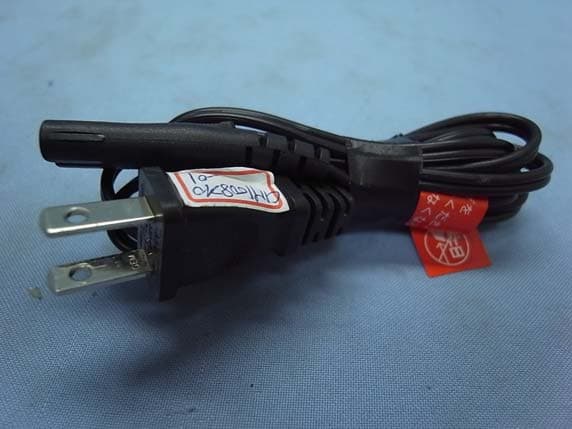
Click to zoom
Application Details
- Equipment Class
- DTS - Digital Transmission System
- Date of Grant
- Oct 12, 2010
- Application Purpose
- Original Equipment
- Date of Application
- Oct 12, 2010
- Equipment Note
- Multimedia Sharing Device
- Frequency Range
- 2422.00000000 - 2452.00000000
- Company
- PEGATRON CORPORATION
- Country
- Taiwan
Documents & Files
Document Text
Text extracted from the exhibit documents filed with the FCC. Open a document above to read the original.
Users Manual
MULTIMEDIA SHARING DEVICE. Learn more at www.pogoplug.com Get plugged in. It’s time to start leaving your external hard drives at home. In just 60 seconds, Pogoplug connects your external hard drives to the Internet so you have full access to your content at home. Be it videos, photos, presentation files or your music library, you have to power to broadcast and share your digital life with ease from wherever life takes you. Pogoplug is a device that lets you connect any external hard drive and then access and share content through the Internet. Pogoplug Highlights • Access and download all of the content on your Pogoplug-connected hard drives from any popular Web browser. • Stream your videos and music directly to your iPhone®, and other mobile devices. • Use Pogoplug just like a drive drive in your computer. Upload content using Windows Explorer and Mac Finder at home or from anywhere on the internet. • Automatically copies and synchronizes photos, videos, music and other selected content from your PC and Mac. • Your email address and user selected password is the only information you need to get secure access to your content. How do you access your content? How do you share your content? • Simple and instant sharing of unlimited amounts of media, including full resolution photos and videos, without uploading files. • Supports the playback of videos taken from the most popular cameras, video cameras, and mobile phones. • Automatically notifies your friends and family when new content is shared with them. • Integrates with your favorite social media websites to always keep people in the loop. • Store and share photos and videos directly from your mobile phone. • 60-second installation. Simply plug Pogoplug into your network router, attach an external hard drive, and activate online. • No need to change your network configuration or firewall settings • Attach up to 4 external hard drives (or more with a USB hub) giving you almost unlimited storage growth. • No monthly fees, ever. How do you install Pogoplug? 60-second installation. © 2009 Cloud Engines, Inc. All rights reserved. Cloud Engines and Pogoplug are registered trademarks of Cloud Engines, Inc in the United States and/or other countries. All other trademarks or registered trademarks are the property of their respective owners. Cloud Engines reserves the right to change, without notice, product offerings or specifications. 1 2 3 4 5 Pogoplug Web Interface* Navigation pane: Quickly find all of your movies, music, photos and other content across any connected hard drive. Viewing area: View high-resolution photos, watch movies, listen to music, or simply browse through the contents of your hard drives. Sharing: Share your content privately, and securely, with a single click, with no uploading required. Social media sharing: Integrates with your favorite social media websites. User permissions: Allow friends and family to contribute content to select folders on your hard drives. 2 1 3 4 5 * to see more screenshots of the user interface visit www.pogoplug.com. Technical Specifications What’s in the box Pogoplug Power cable Ethernet cable Quick start guide Limited warranty Power requirements 100-240V, 50/60HZ Drive connection USB 2.0 Drive Formats NTFS, FAT32, Mac OS Extended Journaled and non-Journaled (HFS+), EXT-2/EXT-3 Network connection Gigabit Ethernet Web browsers Safari, Firefox 3, IE 7, IE 8, Chrome Operating Systems MS Windows XP, Vista, Windows 7, Mac OS X 10.4 and above (Intel and PowerPC), 32bit kernel only, Linux Your Own Personal Cloud! FEDERAL COMMUNICATIONS COMMISSION INTERFERENCE STATEMENT This equipment has been tested and found to comply with the limits for a Class B digital device, pursuant to Part 15 of the FCC Rules. These limits are designed to provide reasonable protection against harmful interference in a residential installation. This equipment generates, uses and can radiate radio frequency energy and, if not installed and used in accordance with the instructions, may cause harmful interference to radio communications. However, there is no guarantee that interference will not occur in a particular installation. If this equipment does cause harmful interference to radio or television reception, which can be determined by turning the equipment off and on, the user is encouraged to try to correct the interference by one or more of the following measures: -- Reorient or relocate the receiving antenna. -- Increase the separation between the equipment and receiver. -- Connect the equipment into an outlet on a circuit different from that to which the receiver is connected. -- Consult the dealer or an experienced radio/TV technician for help. CAUTION: To assure continued FCC compliance: Any changes or modifications not expressly approved by the grantee of this device could void the user's authority to operate the equipment. FCC Label Compliance Statement: This device complies with Part 15 of the FCC Rules. Operation is subject to the following two conditions: (1) this device may not cause harmful interference, and (2) this device must accept any interference received, including interference that may cause undesired operation.
Cover Letter(s)
Request for Confidentiality Federal Communications Commission 7435 Oakland Mills Road Columbia, MD 21046 Gentlemen: This letter is to comply with Sections 0.457 and 0.459 pertaining to confidential material. Pegatron Corporation would like the following documents regarding this submission for FCC ID: VUIPOGOPLUG to be kept confidential. 1. Document (Schematic) 2. Document (Block Diagram) 3. Document (Operational Description) The above material contains trade secrets or technical data, which would customarily be guarded from competitors. We do not want these documents to be accessible to the general public. Sincerely, _______________________________________ Lawrence Yu Pegatron Corporation
External Photos
Pegatron Corporation Multimedia Sharing Device FCC ID. : VUIPOGOPLUG EUT External Photos Figure 1 General Appearance (Front & Side View) Figure 2 General Appearance (Back & Side View) Pegatron Corporation Multimedia Sharing Device FCC ID. : VUIPOGOPLUG Figure 3 Ethernet Cable Figure 4 AC Power Cord
ID Label/Location Info
Pegatron Corporation Multimedia Sharing Device FCC ID. : VUIPOGOPLUG FCC ID Label Location z Label Placement Location z FCC Label Format FCC Label Placement Location
Internal Photos
Pegatron Corporation Multimedia Sharing Device FCC ID. : VUIPOGOPLUG EUT Internal Photos Figure 5 Internal View (Removed Front Cover) Figure 6 Internal View (Removed Cover) Pegatron Corporation Multimedia Sharing Device FCC ID. : VUIPOGOPLUG Figure 7 Internal View (Antenna Board, Front View) Figure 8 Internal View (Antenna Board, Back View) Pegatron Corporation Multimedia Sharing Device FCC ID. : VUIPOGOPLUG Figure 9 Internal View (Removed Main Board) Figure 10 Internal View (Removed Wireless Half Mini Card, Main Board/Back View) Pegatron Corporation Multimedia Sharing Device FCC ID. : VUIPOGOPLUG Figure 11 Internal View (Wireless Half Mini Card, Back View) Figure 12 Internal View (Wireless Half Mini Card/Front View, Label View) Pegatron Corporation Multimedia Sharing Device FCC ID. : VUIPOGOPLUG Figure 13 Internal View (Wireless Half Mini Card, Front View) Figure 14 Internal View (Main Board, Front View) Pegatron Corporation Multimedia Sharing Device FCC ID. : VUIPOGOPLUG Figure 15 Internal View (Power Board, Front View) Figure 16 Internal View (Power Board, Back View)
Test Report
FCC ID. VUIPOGOPLUG Page 1 of 141 AUDIX Technology Corporation Report No. EM-F990975 APPLICATION FOR CERTIFICATION On Behalf of Pegatron Corporation Multimedia Sharing Device Model No. : Pogoplug PRO FCC ID : VUIPOGOPLUG Brand : Pogoplug Prepared for : Pegatron Corporation 5F., No. 76, Ligong ST., Beitou District, Taipei City 112, Taiwan Prepared by : AUDIX Technology Corporation EMC Department No. 53-11, Tin-Fu Tsun, Lin-Kou Hsiang, Taipei Hsien, Taiwan Tel : (02) 2609-9301, 2609-2133 Fax: (02) 2609-9303 File Number : C1M1008210 Report Number : EM-F990975 Date of Test : Aug. 30 ~ Sep. 27, 2010 Date of Report : Sep. 30, 2010 FCC ID. VUIPOGOPLUG Page 2 of 141 AUDIX Technology Corporation Report No. EM-F990975 TABLE OF CONTENTS Description Page TEST REPORT CERTIFICATION ................................................................................................ 4 1. GENERAL INFORMATION .................................................................................................. 5 1.1. Description of Device (EUT)........................................................................................................... 5 1.2. Tested Supporting System Details ................................................................................................... 7 1.3. Description of Test Facility ............................................................................................................. 9 1.4. Measurement Uncertainty.............................................................................................................. 10 2. CONDUCTED EMISSION MEASUREMET...................................................................... 11 2.1. Test Equipment .............................................................................................................................. 11 2.2. Block Diagram of Test Setup......................................................................................................... 11 2.3. Conducted Emission Limits (§15.207) .......................................................................................... 11 2.4. Operating Condition of EUT ......................................................................................................... 12 2.5. Test Procedure ............................................................................................................................... 12 2.6. Conducted Emission Measurement Results................................................................................... 12 3. RADIATED EMISSION MEASUREMENT ....................................................................... 15 3.1. Test Equipment .............................................................................................................................. 15 3.2. Test Setup ...................................................................................................................................... 15 3.3. Radiated Emission Limits (§15.209) .............................................................................................17 3.4. Operating Condition of EUT ......................................................................................................... 17 3.5. Test Procedure ............................................................................................................................... 18 3.6. Test Results.................................................................................................................................... 19 4. 6dB BANDWIDTH MEASUREMENT .............................................................................. 110 4.1. Test Equipment ............................................................................................................................ 110 4.2. Block Diagram of Test Setup....................................................................................................... 110 4.3. Specification Limits (§15.247(a)(2)) ...........................................................................................110 4.4. Operating Condition of EUT ....................................................................................................... 110 4.5. Test Procedure ............................................................................................................................. 110 4.6. Test Results.................................................................................................................................. 111 5. MAXIMUM PEAK OUTPUT POWER MEASUREMENT ............................................ 118 5.1. Test Equipment ............................................................................................................................ 118 5.2. Block Diagram of Test Setup....................................................................................................... 118 5.3. Specification Limits (§15.247(b)-(3))..........................................................................................118 5.4. Operating Condition of EUT ....................................................................................................... 119 5.5. Test Procedure ............................................................................................................................. 119 5.6. Test Results.................................................................................................................................. 119 6. BAND EDGES MEASUREMENT...................................................................................... 122 6.1. Test Equipment ............................................................................................................................ 122 6.2. Block Diagram of Test Setup....................................................................................................... 122 6.3. Specification Limits (§15.247(c))................................................................................................ 122 …
Text truncated - open the document above for the full version.
Test Setup Photos
FCC ID. VUIPOGOPLUG Page 137 of 141 AUDIX Technology Corporation Report No. EM-F990975 9. PHOTOGRAPHS 9.1. Photos of Conducted Disturbance Measurement FRONT VIEW OF CONDUCTED MEASUREMENT BACK VIEW OF CONDUCTED MEASUREMENT FCC ID. VUIPOGOPLUG Page 138 of 141 AUDIX Technology Corporation Report No. EM-F990975 9.2. Photos of Radiated Measurement at Semi-Anechoic Chamber 9.2.1. Frequency Below 1GHz FRONT VIEW OF RADIATED MEASUREMENT BACK VIEW OF RADIATED MEASUREMENT FCC ID. VUIPOGOPLUG Page 139 of 141 AUDIX Technology Corporation Report No. EM-F990975 9.2.2. Frequency Above 1GHz FRONT VIEW OF RADIATED MEASUREMENT BACK VIEW OF RADIATED MEASUREMENT FCC ID. VUIPOGOPLUG Page 140 of 141 AUDIX Technology Corporation Report No. EM-F990975 9.3. Photo of Section RF Conducted Measurement FCC ID. VUIPOGOPLUG Page 141 of 141 AUDIX Technology Corporation Report No. EM-F990975 9.4. Photo of Maximum Peak Output Measurement For 802.11b/802.11g/802.11n-HT20 Only
Contact Information
Applicant
Nancy Yu(Senior Manager)
Test Firm
Audix Technology CorporationLeon Liu
Technical Specifications
| # | Rule Parts | Frequency Range | Power Output |
|---|---|---|---|
| 2 | 15C | 2.42 GHz - 2.45 GHz | 138.00 mW |
Other Applications from PEGATRON CORPORATION
VUI-TS7A01
Nov 19, 2025Hardware wallet
Equipment Class
DXX - Part 15 Low Power Communication Device TransmitterVUI-M2U350
Sep 09, 20245G FR2 ODU
Equipment Class
DTS - Digital Transmission SystemVUIPR1400-48I
Apr 14, 20245G NR O-RU N48
Equipment Class
CBD - Citizens Band Category A and B Devices
VUI-CFWM
Dec 10, 2022Customer Facing Wi-Fi Module (CFWM)
Equipment Class
NII - Unlicensed National Information Infrastructure TX
VUI-DPCP700X
May 26, 2020IP Desktop Phone
Equipment Class
DTS - Digital Transmission System