W5M-TDI15ATobii Dynavox I-15+
Tobii AB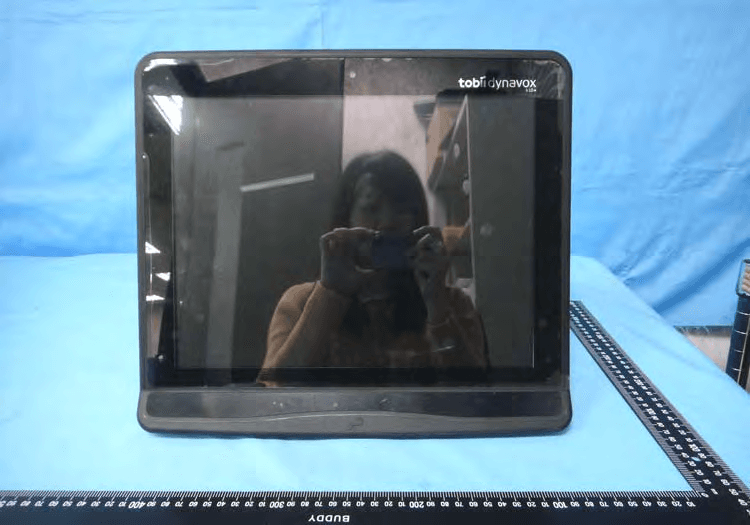
Click to zoom
Application Details
- Equipment Class
- DTS - Digital Transmission System
- Date of Grant
- Apr 27, 2015
- Application Purpose
- Original Equipment
- Date of Application
- Apr 19, 2015
- Equipment Note
- Tobii Dynavox I-15+
- Frequency Range
- 2412.00000000 - 2462.00000000
- Company
- Tobii AB
- Country
- Sweden
Documents & Files
Document Text
Text extracted from the exhibit documents filed with the FCC. Open a document above to read the original.
Users Manual
TobiiDynavoxI-Series+ User͛sManual I–12+ I–15+ User͛smanualTobiiDynavoxI-Series+ Version1.0 03/2015 Allrights reserved. Copyright©Tobii AB (publ) Nopartof thisdocumentmay bereproduced,storedina retrieval system,ortransmittedinanyform,byany means (electronic,photocopying,recording,orotherwise)without the priorwrittenpermissionofthepublisher. Copyrightprotectionclaimedincludesall formsandmatters ofcopyrightablematerialandinformationallowedby statutory orjudiciallaworhereaftergranted, includingwithout limitation,materialgeneratedfrom thesoftwareprograms whicharedisplayed onthe screensuch asscreen displays, menus, etc. Theinformationcontainedinthisdocumentisproprietaryto Tobii Dynavox.Any reproductioninpartorwholewithout priorwrittenauthorizationby Tobii Dynavoxisprohibited. Productsthat arereferredto inthisdocumentmay beeither trademarksand/orregisteredtrademarks oftherespective owners.Thepublisherandthe authormakeno claimto these trademarks. While everyprecautionhasbeentakeninthe preparationof thisdocument,thepublisher andtheauthorassumeno responsibilityforerrorsoromissions, orfor damages resultingfromthe useofinformationcontainedinthis documentorfromthe useofprogramsandsourcecodethat may accompanyit.Inno eventshallthe publisher andthe authorbeliablefor anyloss ofprofitoranyothercommercial damagecausedorallegedtohave been causeddirectlyor indirectlyby thisdocument. Content subjectto changewithoutnotice. PleasecheckTobii Dynavox website www.TobiiDynavox. comforupdatedversions ofthisdocument. Thefollowingproductsare protectedby U.S.Patent7,572,008: ͻIʹ12+ETR ͻIʹ15+ETR You canlocatethe TypeofTobii Dynavox I-Series+deviceon the labelon the backside. TableofContents 1 Introduction....................................................................................................................................7 1.1 ExplanationofAdmonitions......................................................................................................7 1.2 SymbolsandMarkings............................................................................................................7 1.3 IntendedUse ........................................................................................................................9 1.3.1 PortableUse ..........................................................................................................9 1.3.2 Mounted Use........................................................................................................10 1.4 PackageContents................................................................................................................10 1.4.1 TobiiDynavoxI-Series+ withTobii DynavoxCommunicator........................................10 1.4.2 TobiiDynavoxI-Series+ withDynaVox Compass.......................................................10 2 Safety ..........................................................................................................................................12 2.1 AvoidingHearingDamage.....................................................................................................12 2.2 Temperature........................................................................................................................12 2.3 PowerSupplyandBatteries...................................................................................................13 2.4 Mounting.............................................................................................................................13 2.5 Emergency..........................................................................................................................14 2.6 Infrared...............................................................................................................................14 2.7 Epilepsy..............................................................................................................................14 2.8 Electricity............................................................................................................................14 2.9 Child Safety.........................................................................................................................14 2.10 EnvironmentalControl...........................................................................................................14 2.11 GazeInteraction...................................................................................................................14 3 Overviewof theTobiiDynavoxIʹ12+andIʹ15+..........................................................................15 3.1 KeyFeatures........................................................................................................................15 3.2 ProductLayout.....................................................................................................................15 3.2.1 TheTobii DynavoxIʹ12+andTobiiDynavoxIʹ15+....................................................15 3.2.2 Ports,SensorsandDeviceButtons .........................................................................16 3.3 PreinstalledSoftware............................................................................................................18 3.4 Configuringthe Device..........................................................................................................18 3.5 Accessingthe microSD-Card ...............................................................................................19 3.5.1 RemovingthemicroSD-card...................................................................................19 3.5.2 Inserting themicroSD-Card....................................................................................20 3.6 TobiiDynavoxQuickRelease AdapterPlate.............................................................................20 3.6.1 Mountingthe TobiiDynavoxQRAdapterPlate..........................................................21 3.6.2 RemovingtheTobii DynavoxQRAdapterPlate....…
Text truncated - open the document above for the full version.
Users Manual
6 Configuring the Tobii Dynavox I-Series+ with the I-Series Control Center The I-Series Control Center is the program on your Tobii Dynavox I-Series+ Device where you can access and change the set- tings that you have chosen during your first setup with the I-Series Welcome Guide. You can also run the Welcome Guide again at any time of your choosing. To open the I-Series Control Center: ͻDouble-click on theI-Series Control Centershortcut on the desktop, . or 1. Go toStart menu>Control Panel. 2. Double-clickI-Series Control Center,, if the Control Panel is in Classic View. If the Control Panel is in Category view, selectView by: > Smallicons or Large icons, and Double-click I-Series Control Center or 1. Go toStart menu> Tobii Dynavox. 2. ClickI-Series Control Center, . or ͻThrough the communication software installed on the device 46 6 Configuring the Tobii Dynavox I-Series+ with the I-Series Control Center Tobii Dynavox I-Series+ User͛s manual v.1.0 - en-US 6.1 Buttons You can create shortcuts to tasks, called actions, by programming the Quick Access buttons. The Quick Access buttons are lo- cated on the left side of the Tobii Dynavox I-Series+ device, named1,2andMenu. For more information about how to program an action for a button, see6.10 Creating Shortcuts to Actions, page 58 6.1.1 Play Sound when Pressed To enable Play sound when pressed: 1. Open theI-Series Control Center > Button. 2. Select thePlay sound when pressedcheck box to allow Audio feedback when the button is activated. To disable Play sound when pressed: 1. Open theI-Series Control Center > Button. 2. Select to clear thePlay sound when pressedcheck box. 6.1.2 Disable All Buttons To avoid unintentional actions, all buttons on the Tobii Dynavox I-Series+ device can be disabled. To Disable all buttons: 1. Open theI-Series Control Center > Button. 2. Select theDisable All Buttonscheck box. The Power button will work for starting the device even if all buttons are disabled. Pressing the Power button for more than 7 seconds will shut down the device immediately, disregarding any unsaved changes, even if all buttons are disabled. To Enable all buttons: 1. Open theI-Series Control Center >Button. 2. Select to clear theDisable All Buttonscheck box to allow all buttons again. Tobii Dynavox I-Series+ User͛s manual v.1.0 - en-US 6 Configuring the Tobii Dynavox I-Series+ with the I-Series Control Center 47 6.2 Display 6.2.1 Brightness Adjustment There is a sensor on the device which will automatically adjust the screen brightness according to the surrounding light, relative to the selected level fromWindows®. TodisableAutomatic BrightnessAdjustment: 1. Open theI-Series Control Center > Display. 2. Selectto cleartheEnable automatic brightness adjustment(recommended)check box. Toenable AutomaticBrightness Adjustment: 1. Open theI-Series Control Center > Display. 2. SelecttheEnableautomatic brightness adjustment (recommended)checkbox. TomanuallyadjustBrightness: 1. Open theI-Series Control Center > Display. 2. SelecttheWindows Power Optionslink. 3. MaketheBrightness adjustments Usinga darkersettingcan improvebatteryruntime. 6.2.2 DisplayRotation Thedisplaycan rotateautomatically whenturned180degrees,tofacilitate usingdeviceinUprightorientationorRestingon the speakers. Withthe Automaticdisplayrotation activated,itcouldtake acouple ofseconds(the screencouldalsoturnblack)be- forethedisplayis rotated. Toenable Automaticrotationaccordingtodevice position: 1. Open theI-Series Control Center > Display. 2. SelecttheAutomatic rotation according to device orientationradio button. 48 6Configuringthe TobiiDynavoxI-Series+withthe I-Series Control Center TobiiDynavoxI-Series+ User͛smanual v.1.0 - en-US The external display will rotate when the Tobii Dynavox I-Series+ is rotated if the Tobii Dynavox I-Series+ is set up like this: ͻExternal display connected via HDMI ͻThe Tobii Dynavox I-Series+ is set to Automatic rotation in I-Series Control Center ͻDual screens is set to Clone/Duplicate mode in Windows To be able to rotate the Tobii Dynavox I-Series+ without rotating the external display, set the Dual screen to Extended mode in Windows. In Extended mode the rotation function is independent on each display. To set Fixed device position: 1. Open theI-Series Control Center > Display. 2. Select theFixed in upright orientationor theFixed in resting orientationradio button. Gaze Interaction is optimized to work properly in the Upright orientation. For more information about Upright orientation and Resting orientation, see1.3.1 Portable Use, page 9. 6.3 Switches You can enable the switches to act as power ON (see6.3.2 Configuring a Switch to Power On, page 50) or OFF (see6.3.3 Configuring a Switch to Power Off, page 50) button. Select thePlay sound when pressedcheckbox to allow Audio feedback when the switch is activated. Select actions for the switches by selectingSet action. For more information about how to program an action for a Switch, see6.10 Creating Shortcuts to Actions, page 58 6.3.1 Play Sound when Pressed To enable Play sound when pressed: 1. Open theI-Series Control Center >Button. 2. Select thePlay sound when pressedcheck box to allow Audio feedback when the button is activated. To disable Play sound when pressed: 1. Open theI-Series Control Center > Button. Tobii Dynavox I-Series+ User͛s manual v.1.0 - en-US 6 Configuring the Tobii Dynavox I-Series+ with the I-Series Control Center 49 2. Select to clear thePlay sound when pressedcheck box. 6.3.2 Configuring a Switch to Power On To enable a connected Switch to power on the device: 1. Open theI-Series Control Center > Switches. 2. Select theEnableswitch͞1 or 2͟to act as Power On Buttoncheck box. To disable a connected Switch to power on the device: 1. Open theI-Series Control Center > Switches. 2. Select to clear theEnable switch͞1 or 2͟to act as Power On Buttoncheck box. 6.3.3 Configuring a Switch to Power Off To enable a connected Switch to power off the device: 1. Open theI-Series Control C…
Text truncated - open the document above for the full version.
External Photos
1 of 10 External Photos Model Number: 12003612 I-15+ ETR-01, xxxxxxxx I-15+ ETR-xx (x=0~9, A~Z, a~z or blank or slash; for marketing purpose only and no impact safety related constructions and critical components) FCC ID: W5M-TDI15A 2 of 10 EUT Photo 1 ) EUT Photo 2 ) Bluetooth ANT. Wi-Fi(TX) ANT. Wi-Fi(RX) ANT. 3 of 10 EUT Photo 3 ) EUT Photo 4 ) 4 of 10 EUT Photo 5 ) EUT Photo 6 ) 5 of 10 EUT Photo 7 ) EUT Photo 8 ) 6 of 10 EUT Photo 9 ) EUT Photo 10 ) 7 of 10 EUT Photo 11 ) EUT Photo 12 ) 8 of 10 EUT Photo 13 ) EUT Photo 14 ) 9 of 10 EUT Photo 15 ) EUT Photo 16 ) 10 of 10 EUT Photo 17 )
ID Label/Location Info
ID Label info & Label Location FCC ID : W5M-TDI15A IC : 5534A-TDI15
Internal Photos
1 of 36 Internal Photos Model Number: 12003612 I-15+ ETR-01, xxxxxxxx I-15+ ETR-xx (x=0~9, A~Z, a~z or blank or slash; for marketing purpose only and no impact safety related constructions and critical components) FCC ID: W5M-TDI15A 2 of 36 EUT Photo 1 ) EUT Photo 2 ) 3 of 36 EUT Photo 3 ) EUT Photo 4 ) 4 of 36 EUT Photo 5 ) EUT Photo 6 ) 5 of 36 EUT Photo 7 ) EUT Photo 8 ) 6 of 36 EUT Photo 9 ) EUT Photo 10 ) 7 of 36 EUT Photo 11 ) EUT Photo 12 ) 8 of 36 EUT Photo 13 ) EUT Photo 14 ) 9 of 36 EUT Photo 15 ) EUT Photo 16 ) 10 of 36 EUT Photo 17 ) EUT Photo 18 ) 11 of 36 EUT Photo 19 ) EUT Photo 20 ) 12 of 36 EUT Photo 21 ) EUT Photo 22 ) 13 of 36 EUT Photo 23 ) EUT Photo 24 ) 14 of 36 EUT Photo 25 ) EUT Photo 26 ) 15 of 36 EUT Photo 27 ) EUT Photo 28 ) 16 of 36 EUT Photo 29 ) EUT Photo 30 ) 17 of 36 EUT Photo 31 ) EUT Photo 32 ) 18 of 36 EUT Photo 33 ) EUT Photo 34 ) 19 of 36 EUT Photo 35 ) EUT Photo 36 ) 20 of 36 EUT Photo 37 ) EUT Photo 38 ) 21 of 36 EUT Photo 39 ) EUT Photo 40 ) 22 of 36 EUT Photo 41 ) EUT Photo 42 ) 23 of 36 EUT Photo 43 ) EUT Photo 44 ) 24 of 36 EUT Photo 45 ) EUT Photo 46 ) 25 of 36 EUT Photo 47 ) EUT Photo 48 ) 26 of 36 EUT Photo 49 ) EUT Photo 50 ) 27 of 36 EUT Photo 51 ) EUT Photo 52 ) 28 of 36 EUT Photo 53 ) EUT Photo 54 ) 29 of 36 EUT Photo 55 ) EUT Photo 56 ) 30 of 36 EUT Photo 57 ) EUT Photo 58 ) 31 of 36 EUT Photo 59 ) EUT Photo 60 ) 32 of 36 EUT Photo 61 ) EUT Photo 62 ) Wi-Fi(RX) ANT. Bluetooth ANT. Wi-Fi(TX) ANT. 33 of 36 EUT Photo 63 ) EUT Photo 64 ) 34 of 36 EUT Photo 65 ) EUT Photo 66 ) 35 of 36 EUT Photo 67 ) EUT Photo 68 ) 36 of 36 EUT Photo 69 )
RF Exposure Info
A Test Lab Techno Corp. Changan Lab:No. 140 -1, Changan Street, Bade City, Taoyuan County, Taiwan R.O.C. Te l:886-3-271-0188 / Fax:886-3-271-0190 SAR EVALUATION REPORT Te s t R eport No. : 1502FS16-01 Applicant : Tobii Technology AB Product Type : Tobii Dynavox I-15+ Trade Name : tobii dynavox Model Number : 12003612 I-15+ ETR-01, xxxxxxxx I-15+ ETR-xx (x=0~9, A~Z, a~z or blank or slash; for marketing purpose only and no impact safety related constructions and critical components) Date of Received : Dec. 27 , 2014 Test Period : Feb. 13, 2015 Date of Issued : Mar. 27 , 2015 Test Environment : Ambient Temperature:22 ± 2 ° C Relative Humidity:40 - 70 % Standard : KDB 865664 D01 SAR Measurement 100 MHz to 6 GHz v01r03 KDB 865664 D02 RF Exposure Reporting v01r01 KDB 447498 D01 General RF Exposure Guidance v05r02 KDB 248227 D01 SAR meas for 802 11 a b g v01r02 KDB 616217 D04 SAR for laptop and tablets v01r01 ANSI/IEEE C95.1-1999 IEEE Std. 1528-2003 IEEE Std. 1528a-2005 47 CFR Part §2.1093; IEC 62209-2:2010 Test Lab Location : Chang-an Lab 1. The test operations have to be performed with cautious behavior, the test results are as attached. 2. The test results are under chamber environment of A Test Lab Techno Corp. A Test Lab Techno Corp. does not assume responsibility for any conclusions and generalizations drawn from the test results with regard to other specimens or samples. 3. The measurement report has to be written approval of A Test Lab Techno Corp. It may only be reproduced or published in full. This report shall not be reproduced except in full, without the written approval of A Test Lab Techno Corp. The test results in the report only apply to the tested sample. Approved By : Tested By : (Bill Hu) (Sky Chou) Report Number: 1502FS16-01Page 1 of 67 ©2015 A Test Lab Techno Corp. Contents 1. Summary of Maximum Reported SAR Value ................................................................................................. 4 2. Description of Equipment under Test (EUT) .................................................................................................. 5 3. Introduction..................................................................................................................................................... 6 3.1 SAR Definition ..................................................................................................................................... 6 4. SAR Measurement Setup .............................................................................................................................. 7 4.1 DASY E-Field Probe System............................................................................................................... 8 4.2 Data Acquisition Electronic (DAE) System ........................................................................................ 11 4.3 Robot ................................................................................................................................................. 11 4.4 Measurement Server......................................................................................................................... 11 4.5 Device Holder .................................................................................................................................... 12 4.6 Phantom - SAM v4.0 ......................................................................................................................... 12 4.7 Oval Flat Phantom - ELI 4.0 .............................................................................................................. 13 4.8 Data Storage and Evaluation............................................................................................................. 13 5. Tissue Simulating Liquids............................................................................................................................. 16 5.1 Ingredients......................................................................................................................................... 17 5.2 Recipes.............................................................................................................................................. 17 5.3 Liquid Depth ...................................................................................................................................... 18 6. SAR Testing with RF Transmitters ............................................................................................................... 19 6.1 SAR Testing with 802.11 Transmitters............................................................................................... 19 6.2 General Device Setup ....................................................................................................................... 19 6.3 Conducted Power .............................................................................................................................. 21 6.4 Antenna location................................................................................................................................ 23 6.5 Stand-alone SAR Evaluate................................................................................................................ 26 6.6 Simultaneous Transmitting Evaluate ................................................................................................. 27 6.7 SAR test reduction according to KDB ............................................................................................... 29 7. System Verification and Validation ............................................................................................................... 30 7.1 Symmetric Dipoles for System Verification ....................................................................................... 30 7.2 Liquid Parameters ............................................................................................................................. 31 7.3 Verific…
Text truncated - open the document above for the full version.
Test Report
FCC 47 CFR PART 15 SUBPART C Product Type : Tobii Dynavox I-15+ Applicant : Tobii Technology AB Address : Karlsrovagen 2D, 182 53 Danderyd, SWEDEN Trade Name : tobii dynavox Model Number : 12003612 I-15+ ETR-01, xxxxxxxx I-15+ ETR-xx (x=0~9, A~Z, a~z or blank or slash; for marketing purpose only and no impact safety related constructions and critical components) Test Specification : FCC 47 CFR PART 15 SUBPART C: Oct., 2014 ANSI C63.10:2009 Receive Date : Dec. 27, 2014 Test Period : Dec. 29, 2014 ~ Feb. 10, 2015 Issue Date : Mar. 27, 2015 Issue by A Test Lab Techno Corp. No. 140-1, Changan Street, Bade City, Taoyuan County 334, Taiwan R.O.C. Te l:+886-3-2710188 / Fax:+886-3-2710190 T aiwan Accreditation Foundation accreditation number: 1330 Note: This report shall not be reproduced except in full, without the written approval of A Test Lab Techno Corp. This document may be altered or revised by A Test Lab Techno Corp. personnel only, and shall be noted in the revision section of the document. The client should not use it to claim product endorsement by TAF, or any government agencies. The test results in the report only apply to the tested sample. Report Number: 1502FR25-01 1 of 65 A Test Lab Techno Corp. Revision History Rev. Issue Date Revisions Revised By 00 Feb. 26, 2015 Initial Issue 01 Mar. 27, 2015 Revised report Information. Snow Wang Report Number: 1502FR25-01 2 of 65 A Test Lab Techno Corp. Verification of Compliance Issued Date: 03/27/2015 Product Type : Tobii Dynavox I-15+ Applicant : Tobii Technology AB Address : Karlsrovagen 2D, 182 53 Danderyd, SWEDEN Trade Name : tobii dynavox Model Number : 12003612 I-15+ ETR-01, xxxxxxxx I-15+ ETR-xx (x=0~9, A~Z, a~z or blank or slash; for marketing purpose only and no impact safety related constructions and critical components) FCC ID : W5M-TDI15A EUT Rated Voltage : DC 24V, 2.71A Test Voltage : 120 Vac / 60 Hz Applicable Standard : FCC 47 CFR PART 15 SUBPART C: Oct., 2014 ANSI C63.10:2009 Test Result : Complied Performing Lab. : A Test Lab Techno Corp. No. 140-1, Changan Street, Bade City, Taoyuan County 334, Taiwan R.O.C. Te l:+886-3-2710188 / Fax:+886-3-2710190 T aiwan Accreditation Foundation accreditation number: 1330 http://www.atl-lab.com.tw/e-index.htm A Test Lab Techno Corp. tested the above equipment in accordance with the requirements set forth in the above standards. All indications of Pass/Fail in this report are opinions expressed by A Test Lab Techno Corp. based on interpretations and/or observations of test results. Measurement Uncertainties were not taken into account and are published for informational purposes only. The test results show that the equipment tested is capable of demonstrating compliance with the requirements as documented in this report. Approved By : Reviewed By : (Manager) (Fly Lu) (Testing Engineer) (Eric Ou Yang) Report Number: 1502FR25-01 3 of 65 A Test Lab Techno Corp. TABLE OF CONTENTS 1 General Information ....................................................................................................................................... 6 2 EUT Description ............................................................................................................................................. 7 3 Test Methodology .......................................................................................................................................... 8 3.1. Mode of Operation.................................................................................................................................. 8 3.2. EUT Exercise Software.......................................................................................................................... 8 3.3. Configuration of Test System Details ..................................................................................................... 9 3.4. Test Site Environment .......................................................................................................................... 10 4 Conducted Emission Measurement ........................................................................................................... 11 4.1. Limit .......................................................................................................................................................11 4.2. Test Instruments ....................................................................................................................................11 4.3. Test Setup..............................................................................................................................................11 4.4. Test Procedure ..................................................................................................................................... 12 4.5. Test Result............................................................................................................................................ 13 5 Radiated Emission Measurement............................................................................................................... 15 5.1. Limit ...................................................................................................................................................... 15 5.2. Test Instruments ................................................................................................................................... 15 5.3. Setup .................................................................................................................................................... 16 5.4. Test Procedure ..................................................................................................................................... 18 5.5. Test Result............................................................................................................................................ 20 6 Maximum Conducted Output Power Measurement................................................…
Text truncated - open the document above for the full version.
Test Setup Photos
Part 15C Test Setup Photographs Conducted Emissions Test Configuration: Front View Rear View A Test Lab Techno Corp. Report Number: 1502FR25-01 1 of 3 Radiated Emissions Test Configuration: Below 1GHz _ Front View Below 1GHz _ Rear View A Test Lab Techno Corp. Report Number: 1502FR25-01 2 of 3 Above 1GHz _ Front View Above 1GHz _ Rear View A Test Lab Techno Corp. Report Number: 1502FR25-01 3 of 3
Test Setup Photos
SAR Test Setup Photographs EUT Side Definition Mode Side 1 Side 1 2 Side 2 3 Side 3 4 Side 4 5 Side 5 6 Side 6 n o p q r s A Test Lab Techno Corp. Report Number: 1502FS16-01 1 of 2 Phantom Position: Flat EUT side:Side 4 Spacing to phantom: 0 mm Accessory:N/A EUT Side 4 A Test Lab Techno Corp. Report Number: 1502FS16-01 2 of 2
Contact Information
Applicant
Marten Skogo(Manager)
Technical Contact
A Test Lab Techno Corp.Murphy Wang
[email protected]886-3-2710188
NO. 140-1, Changan Street Bade City, · Taiwan
Non-Technical Contact
A Test Lab Techno Corp.Riva Chen
[email protected]886-3-2710188
Test Firm
Eurofins E&E Wireless Taiwan Co., LtdFly LU
Technical Specifications
| # | Rule Parts | Frequency Range | Power Output |
|---|---|---|---|
| 1 | 15C | 2.41 GHz - 2.46 GHz | 258.00 mW |
Other Applications from Tobii AB
W5M-TDI12A
May 06, 2015Tobii Dynavox I-12+
Equipment Class
DSS - Part 15 Spread Spectrum Transmitter
W5M-DMSSE07
Feb 24, 2015DMS-SE07
Equipment Class
DTS - Digital Transmission System
W5M-TOBIII12A
Jun 18, 2013Rugged tablet PC with 12.1 inch screen and an optional eyetracking module integrated
Equipment Class
DSS - Part 15 Spread Spectrum Transmitter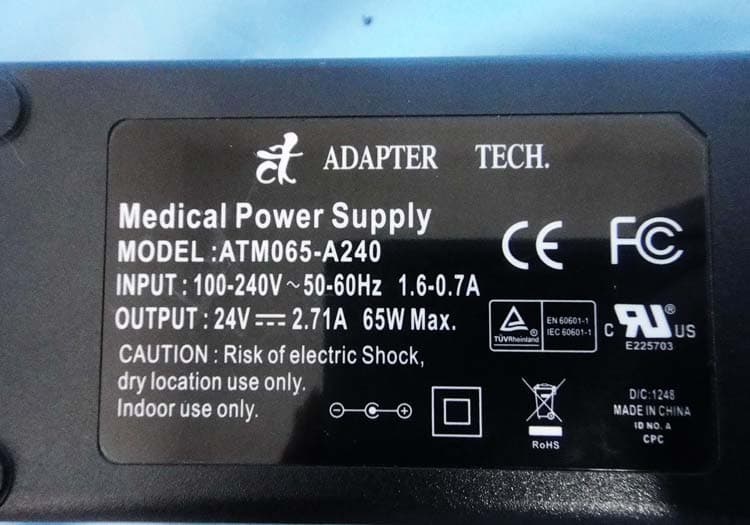
W5M-TOBIII15A
Jun 17, 2013Rugged tablet PC with 15 inch screen and an optional eyetracking module integrated
Equipment Class
DTS - Digital Transmission System
W5MTOBIIC12B
Aug 16, 2012Tablet Communication Device
Equipment Class
DTS - Digital Transmission System