W5MTOBIIC15TOBII C15, Tablet PC with GSM/WiFi/BT Modules
Tobii AB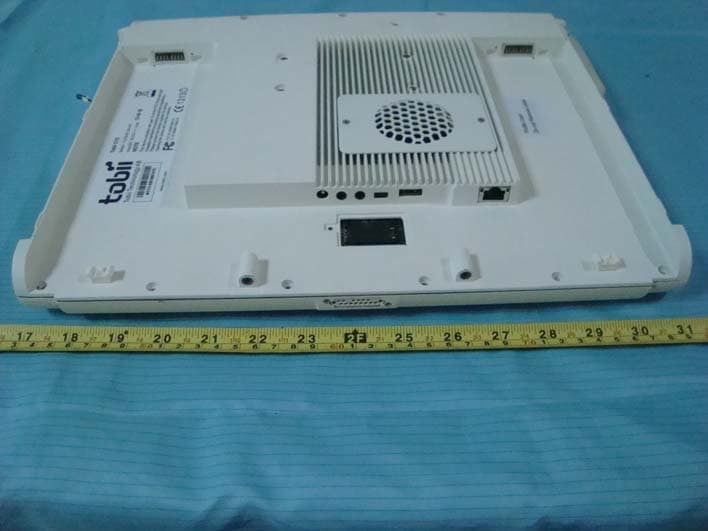
Click to zoom
Application Details
- Equipment Class
- DSS - Part 15 Spread Spectrum Transmitter
- Date of Grant
- Nov 29, 2010
- Application Purpose
- Original Equipment
- Date of Application
- Nov 29, 2010
- Equipment Note
- TOBII C15, Tablet PC with GSM/WiFi/BT Modules
- Frequency Range
- 2402.00000000 - 2480.00000000
- Company
- Tobii AB
- Country
- Sweden
Documents & Files
Document Text
Text extracted from the exhibit documents filed with the FCC. Open a document above to read the original.
Users Manual
User’s Manual Tobii C-Series C8 C12 C15 CEye Celebrating Communication Tobii C-Series User’s Manual Tobii C-Series User’s Manual Content subject to change without notice. Please check Tobii web site www.tobii.com for updated versions of this manual. November 2010 All rights reserved. © Tobii Technology AB The information contained in this document is proprietary to Tobii Technology. Any reproduction in part or whole without prior written authoriztion by Tobii Technology is prohibited. US Patent 7, 572,008 (applies to Tobii CEye) Manual Version 2.1 Tobii_manual_CseriesC8C12C15CEye_V2_1_192010_UsEng Contents Introduction 6 1.1 Intended Use 6 1.2 Package Contents 7 1.3 Customer Support 7 1.4 Warranty 7 Safety 8 2.1 Avoiding Hearing Damage 9 2.2 Mounting Warning 9 2.3 Emergency Warning 10 2.4 Infrared Warning 10 2.5 Epilepsy Warning 10 2.6 Child Safety 10 Overview of the Tobii C8, C12 and C15 11 3.1 Key Features 11 3.2 Product Layout 11 3.2.1 The Tobii C8, Tobii C12 and Tobii C15 11 3.2.2 Ports, Sensors and Device Buttons 12 3.3 Preinstalled Software 13 3.4 Configuring the Device 13 Batteries in the Tobii C-Series 14 4.1 Batteries 14 4.1.1 Hot Swappable 14 4.2 Charging 14 4.2.1 Checking Charge Level 15 4.3 Inserting and Releasing the Batteries 16 Using the Tobii C-Series 18 5.1 Starting the Device 18 5.1.1 Password Information 18 5.1.2 C-Series Welcome Guide 19 5.1.3 C-Series Welcome Center 20 5.1.4 C-Series Update Notifier 21 5.2 Shutting Down the Device 23 5.3 Configuring a Switch to Power On or Off 24 5.3.1 Configuring a Switch to Power On 24 1 2 3 4 5 5.3.2 Configuring a Switch to Power Off 24 5.4 Safety Settings: C-Series Hardware Options 25 5.4.1 Audio Safety 25 5.4.2 Temperature Control Safety 26 5.4.3 Saving Changes for Future Sessions 27 5.4.4 Disabling Safety Page as Default Page on Startup 27 5.5 Adapting the Touch Screen for the User 28 5.5.1 Calibrating the Touch Screen 28 5.6 Adjusting the Backlight 30 5.6.1 Adjusting the Sound 31 5.7 Using Headphones 32 5.8 Using Bluetooth® (optional) 32 5.8.1 Handling Licenses 32 5.8.2 Enabling and Disabling Bluetooth® Communication 32 5.8.3 Connecting to a Bluetooth® Device 33 5.9 Using the WLAN (optional) 33 5.9.1 Handling Licenses 33 5.9.2 Enabling and Disabling the WLAN Communication 33 5.9.3 Connecting to a WLAN 34 5.10 Using the Camera 34 5.11 Using the Mobile Phone (optional) 35 5.11.1 Handling Licenses 35 5.11.2 Enabling and Disabling the Mobile Phone 35 5.12 Using Environmental Control (optional) 36 5.12.1 Handling Licenses 37 5.12.2 Enabling and Disabling Tira 37 5.13 Creating Shortcuts to Actions 37 5.13.1 Available Actions 38 5.13.2 Selecting Actions 39 5.14 Handling Licenses 41 5.15 System Information 42 5.16 Performing Backup and Restore 42 5.16.1 User Profile Card 42 5.16.2 Restoring Backup Files by the User 43 Tobii CEye Module & Eye Control 44 6.1 Installing the Tobii CEye Module 44 6.1.1 Mounting the CEye Module to the Tobii C12 or C15 44 6.1.2 Required Software 45 6.1.3 Installation of Eye Control Software from USB Stick 46 6.2 Using the Tobii CEye Module 47 6 6.2.1 Positioning 47 6.2.2 Track Status Viewer 47 6.2.3 Track Box 48 6.2.4 Accessing the Tobii Eye Control Options 49 6.2.5 Creating a New Profile 50 6.2.6 Selecting Current User Profile 50 6.2.7 Deleting a Profile 51 6.2.8 Customizing the Interaction 51 6.2.9 Customizing the Calibration 53 6.2.10 Customizing the Calibration Area 55 6.2.11 Showing Track Status 56 6.2.12 Calibrating 57 6.2.13 Interrupting Calibration 57 6.2.14 Customizing Active Eye 57 6.2.15 Improving Calibration Point(s) 58 6.2.16 Removing Calibration Point(s) 59 6.2.17 Customizing Windows Control 60 6.2.18 Starting and Disabling Windows Control 62 6.2.19 Placing the Windows Control Menu 62 6.2.20 Clicking with Windows Control 63 6.2.21 Magnifying with Windows Control 63 6.2.22 Selecting Windows Control Functions 63 6.2.23 Pausing Windows Control 63 6.2.24 Scrolling with Windows Control 64 Product Care 65 7.1 Changing the Side Covers 65 7.2 Cleaning 66 7.2.1 Cleaning of the Speaker Mesh 66 7.3 Placement 67 7.4 Transporting the C-Series Device 67 7.5 Disposing of the Batteries 67 7.6 Disposing of the C-Series Device 67 Appendices 68 8.1 Appendix A: Training Resources 68 8.2 Appendix B: CEye - Software License 68 8.3 Appendix C: Technical Specifications 69 8.4 Appendix D: Approved Accessories 70 7 8 6 Tobii C-Series User’s Manual Thank you for purchasing a Tobii C-Series device from Tobii Technology! To ensure the optimal performance of this product, please take the time to read this manual carefully. The C-Series device is available in three different sizes: the Tobii C8 with an 8.4” screen, the Tobii C12 with a 12.1” screen and the Tobii C15 with a 15.0” screen. The Tobii C12 and C15 can be used with the Tobii CEye, to enable eye control of the device. This User’s Manual covers: • The C-Series device, models Tobii C8, Tobii C12 and Tobii C15. • The C-Series Hardware Options program (for controlling the device and licenses). • Tobii CEye (eye tracking module including Windows Control). Tobii CEye is optional equipment and is only used with the Tobii C12 and C15. 1.1 Intended Use A variety of communication methods allow Tobii C-Series users the ability to achieve their full potential. A user can communicate via text or symbols to generate synthesized (computer voice) or digitized (recorded voice) speech for face-to-face communication. A user also has the option of communication through e-mail, text messages and chat. With the Tobii C-Series, users also have the freedom and flexibility to write and edit documents, surf the Internet, play music and games, control a TV, DVD and other household appliances via IR remote control and even plan and manage their time – making independence easy. The C-Series devices are available both as a dedicated Speech Generating Devices, with communications software access only, or as open devices with access to the regular Windows environment. The C-Series device is not in…
Text truncated - open the document above for the full version.
External Photos
EXHIBIT B - EUT EXTERNAL PHOTOGRAPHS EUT – Front View EUT – Rear View (with Batteries) EUT – Rear View (without Batteries) EUT – Port View
ID Label/Location Info
EXHIBIT A - FCC ID LABELING AND LOCATION FCC ID Label FCC ID Location The label shown shall be permanently affixed at a conspicuous location on the device and be readily visible to the user at the time purchase (Labeling requirements per 2.925) Label here
Internal Photos
EXHIBIT C - EUT INTERNAL PHOTOGRAPHS EUT – Battery off View EUT – Cover off View Wi-Fi Antenna BT module With antenna GSM Antenna EUT – Main Board Top View EUT –Main Board Bottom View EUT – Audio Amplifier Board Top View EUT – Audio Amplifier Board Bottom View EUT – Bluetooth Module Top View EUT – Bluetooth Module Bottom View Bluetooth Antenna EUT – Bluetooth Board Top View (without Bluetooth module) EUT – Bluetooth Board Bottom View (without Bluetooth module) EUT – Earphone, Adapter Port and Mini USB Port Board Top View EUT – Earphone, Adapter Port and Mini USB Port Board Top View EUT – GSM Module Top view EUT – GSM Module Bottom view EUT – Power Board Top View (without GSM module) EUT – Power Board Bottom View (without GSM module) EUT –PROMATE Board Top View EUT –PROMATE Board Bottom View EUT – RJ45 Port Board Top View EUT – RJ45 Port Board Bottom View EUT –Touch Controler Board Top View EUT –Touch Controler Board Bottom View EUT – WIFI Module Top View EUT –WIFI Module Bottom View EUT – USB Board Top View EUT – USB Board Bottom View EUT – LCD Top View 1 EUT – LCD Top View 2 EUT – LCD Bottom View 1 EUT – LCD Bottom View 2 EUT – LCD Connect Board Top View EUT –LCD Connect Board Bottom View EUT – Microphone Board Top View EUT – Microphone Board Bottom View EUT – GSM Antenna View EUT – Wi-Fi Antenna View EUT – Speaker View EUT – Battery View
Test Report
Note: This test report is prepared for the customer shown above and for the device described herein. It may not be duplicated or used in part without prior written consent from Bay Area Compliance Laboratories Corp. This report must not be used by the customer to claim product certification, approval, or endorsement by NVLAP*, NIST, or any agency of the Federal Government. * This report may contain data that are not covered by the NVLAP accreditation and are marked with an asterisk “*” (Rev.2) FCC PART 15.247 MEASUREMENT AND TEST REPORT For Tobii Technology AB Karlsrovägen 2D, 18253 Danderyd, Sweden FCC ID: W5MTOBIIC15 Report Type: Original Report Product Type: Tobii C15 Test Engineer: Tim Zhang Report Number: RSZ10062501-BT Report Date: 2010-08-23 Reviewed By: Merry Zhao EMC Engineer Prepared By: Bay Area Compliance Laboratories Corp. (Shenzhen) 6/F, the 3rd Phase of WanLi Industrial Building, ShiHua Road, FuTian Free Trade Zone Shenzhen, Guangdong, China Tel: +86-755-33320018 Fax: +86-755-33320008 Tobii Technology AB FCC ID: W5MTOBIIC15 Report No.: RSZ10062501-BT Page 2 of 26 FCC Part15.247 Test Report TABLE OF CONTENTS GENERAL INFORMATION.......................................................................................................................................4 PRODUCT DESCRIPTION FOR EQUIPMENT UNDER TEST (EUT) .....................................................................................4 OBJECTIVE...................................................................................................................................................................4 RELATED SUBMITTAL(S)/GRANT(S).............................................................................................................................4 TEST METHODOLOGY..................................................................................................................................................4 TEST FACILITY.............................................................................................................................................................4 SYSTEM TEST CONFIGURATION ..........................................................................................................................6 DESCRIPTION OF TEST CONFIGURATION......................................................................................................................6 EQUIPMENT MODIFICATIONS.......................................................................................................................................6 EUT EXERCISE SOFTWARE..........................................................................................................................................6 LOCAL SUPPORT EQUIPMENT LIST AND DETAILS........................................................................................................6 EXTERNAL I/O CABLE..................................................................................................................................................6 CONFIGURATION OF TEST SETUP.................................................................................................................................7 BLOCK DIAGRAM OF TEST SETUP................................................................................................................................7 SUMMARY OF TEST RESULTS ...............................................................................................................................8 FCC §15.247 (i) & §2.1093 - RF EXPOSURE................................................................................................................9 APPLICABLE STANDARD..............................................................................................................................................9 FCC §15.203 – ANTENNA REQUIREMENT ..........................................................................................................10 APPLICABLE STANDARD............................................................................................................................................10 ANTENNA CONNECTOR CONSTRUCTION....................................................................................................................10 FCC §15.207 (a) – AC LINE CONDUCTED EMISSIONS .....................................................................................11 APPLICABLE STANDARD............................................................................................................................................11 MEASUREMENT UNCERTAINTY..................................................................................................................................11 EUT SETUP................................................................................................................................................................11 EMI TEST RECEIVER SETUP.......................................................................................................................................12 TEST EQUIPMENT LIST AND DETAILS.........................................................................................................................12 TEST PROCEDURE......................................................................................................................................................12 TEST RESULTS SUMMARY..........................................................................................................................................12 TEST DATA................................................................................................................................................................12 FCC §15.205, §15.209 & §15.247(d) – RADIATED SPURIOUS EMISSIONS......................................................15 APPLICABLE STANDARD............................................................................................................................................15 MEAS…
Text truncated - open the document above for the full version.
Test Setup Photos
EXHIBIT D - TEST SETUP PHOTOGRAPHS AC Line Conducted Emissions - Front View AC Line Conducted Emissions - Side View Below 1 GHz: Radiated Emissions - Front View Below 1 GHz: Spurious Radiated Emissions - Rear View Above 1 GHz: Spurious Radiated Emissions - Front View Above 1 GHz: Spurious Radiated Emissions - Rear View
Contact Information
Applicant
Marten Skogo(Manager)
Test Firm
Bay Area Compliance Laboratories Corp.John Chan
Technical Specifications
| # | Rule Parts | Frequency Range | Power Output |
|---|---|---|---|
| 1 | 15C | 2.40 GHz - 2.48 GHz | 2.00 mW |
Other Applications from Tobii AB
W5M-TDI12A
May 06, 2015Tobii Dynavox I-12+
Equipment Class
DSS - Part 15 Spread Spectrum Transmitter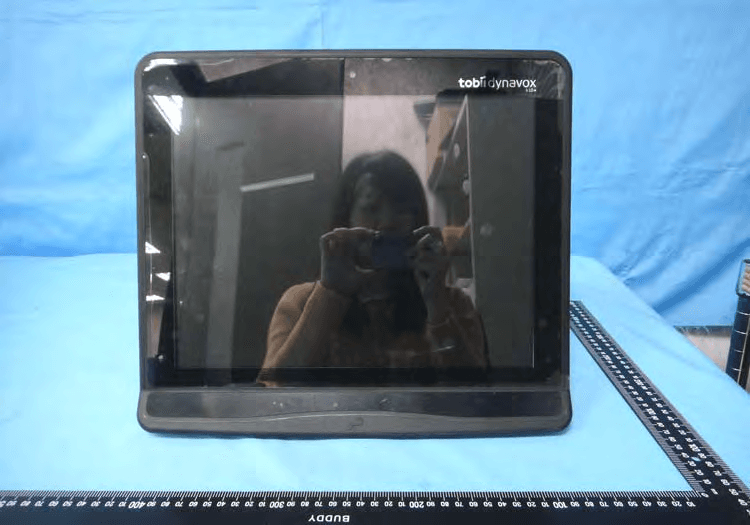
W5M-TDI15A
Apr 27, 2015Tobii Dynavox I-15+
Equipment Class
DTS - Digital Transmission System
W5M-DMSSE07
Feb 24, 2015DMS-SE07
Equipment Class
DTS - Digital Transmission System
W5M-TOBIII12A
Jun 18, 2013Rugged tablet PC with 12.1 inch screen and an optional eyetracking module integrated
Equipment Class
DSS - Part 15 Spread Spectrum Transmitter
W5M-TOBIII15A
Jun 17, 2013Rugged tablet PC with 15 inch screen and an optional eyetracking module integrated
Equipment Class
DTS - Digital Transmission System