WM5UM-1100FHSS SPREAD SPECTRUM DEVICE (BLUETOOTH STEREO HEADSET)
UNEEDS Commerce Co.,Ltd.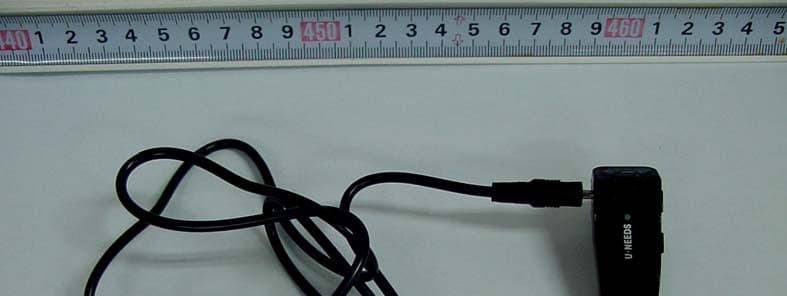
Click to zoom
Application Details
- Equipment Class
- DSS - Part 15 Spread Spectrum Transmitter
- Date of Grant
- Aug 15, 2011
- Application Purpose
- Original Equipment
- Date of Application
- Aug 15, 2011
- Equipment Note
- FHSS SPREAD SPECTRUM DEVICE (BLUETOOTH STEREO HEADSET)
- Frequency Range
- 2402.00000000 - 2480.00000000
- Company
- UNEEDS Commerce Co.,Ltd.
- Country
- South Korea
Documents & Files
Document Text
Text extracted from the exhibit documents filed with the FCC. Open a document above to read the original.
Users Manual
This device complies with part 15 of the FCC Rules. Operation is subject to the following two conditions ; (1) This device may not cause harmful interference. (2) This device must accept any interference received. Including interference that may cause undesired operation. ※ CAUTION THE MANUFACTURER IS NOT RESPONSIBLE FOR ANY RADIO OR TV INTERFERENCE CAUSED BY UNAUTHORIZED MODIFICATIONS TO THIS EQUIPMENT. SUCH MODIFICATIONS COULD VOID THE USER’S AUTHORITY TO OPERATE THE EQUIPMENT. ※ INFROMATION This device and its antenna(s) must not be co-located or operating in conjunction with any other antenna or transmitter except in accordance with FCC multi-transmitter product procedures. UM-1100 User Guide 1. What is Bluetooth? By new concept of Multi‐communicator Link, it has been researched since 1994 by Ericsson, Bluetooth SIC (Special Interest Group), which was composed of Ericsson, Nokia, IBM, Toshiba and Intel in Feb. 1998. Currently, it is defined as the global local wireless communication standard. In addition, Bluetooth technology has been established on the industry standard of the local wireless interface for “the innovation of the wireless communication”, and “no wire world” 2. Introduction of UM‐1100 UM‐1100 is wireless headset product to fit on the Bluetooth standard qualification and is able to enjoy wireless high quality stereo digital music with PC, PDA, mobile phone, and PMP, which is supported by the Bluetooth. 3. Product specification ① Power / call ② Volume + / Volume ‐ ③ Recharge cable connector 4. UM‐1100 ∙ How to recharge ‐ When charger plug is connected, it is lighting on the Blue lamp. ‐ When completed charging, the light is off ‐ Average charging time is about 2 hours (When use standard AC adapter) ‐ In charging: Blue Lamp on ‐ Complete charging: Blue Lamp off Caution – When you use USB recharge cable, recharge hour will be taken more than using AC adapter (About 5 hours). ∙ Turn On‐Off ‐ When push power button for 3 seconds, power is on with “Beep” sound and Blue light on. ‐ In operating, blue colored lamp is flickering in each 2 seconds ‐ In operating, push power button for 3 seconds then Blue light is off and power is off ※ Caution In your first operation, you need to carry out the course of pairing. Pairing is registration procedure between Headset and Dongle, or Headset and Bluetooth mobile phone or other Bluetooth devices. In addition this enables you to recognise designated Bluetooth devices. Through this registration process, you can enjoy the music or talk. Moreover it removes the line interruption and sets up the security as well. After first pairing, you don’t need to do this again. ※ Usually when it is shipped out, UM‐1100 is charged only 30%. After purchase, please use it after completely charging up. 5. Pair Bluetooth Headset · Pairing ‐ When pressing power / Call button for 3 second, power lamp is on with “Beep” sound. ‐ Then you must not release the button until the “Blue” lamp is flickering quickly with the beep sound. ‐ This shows that the product is ready to be paired with other devices. ‐ Select “Search the device”or menu of “Inquiry”to the Bluetooth Mobile phone or PC. ‐ Then you will see the word of the search window “UNEEDS UM‐1100” ‐ Select it then your mobile phone asks PIN number, ‐ Enter the number 0000 and push the“OK”button ‐ Blue lamp of the Headset is begun to flicker out in every 2 seconds and the following message is shown up “to be connected between Headset and PC or Mobile phone”. ‐ It is ready to be used. · Disconnect ‐ Press “Disconnect” to return to stand‐by mode 6. How to use “UM‐1100” · How to talk ‐ “UM‐1100 “supports to voice telecommunication on the mobile phone or VolP of PC. ‐ Turn‐on / off button When you have an incoming call, you will hear ring tone from your speaker then just press the talk button shortly. You can make the last incoming call redial by pressing shortly the talk button. (This function depends on the kind of the mobile phone) To make a call, just follow your normal steps (push the number or select the number) and press the Turn‐on / off button shortly. When you shortly press the talk button on your mobile phone while talking, you can talk by the headset. ‐ You are able to control the volume with Vol‐ / Vol+ button. · Main Function (1) Make a call After entering the number, press the on/off button of the headset shortly. (2) Call the recent talk When you press the on/off button of the headset shortly your mobile shows up the recent talk list. After choosing the number which you want to call, press the on/off button of the headset. (3) Using the Voice Recognition Function If you press the on/off button of the headset for 3 seconds, it operates the voice recognition function. (This function is only operated by the mobile phone supported on the voice recognition function). (4) Receive the incoming call When you have an incoming call, you will hear ring tone from your speaker then just press the on/off button shortly. If you want to reject a call just press the on/off button twice. (5) Convert the Call When you shortly press the on/off button on your Headset while you are talking on the mobile phone, the call is converted to the Headset. When you shortly press on/off button on your Headset twice while you are talking on the Headset, the call is converted to the Mobile phone. (6) Hang up the phone Press the on/off button of the headset shortly during the call. (7) Silent Function The other’s voice can be heard but not mine. It is informed of the silent mode with the beep sound in every 5 second. When you press the Vol(+ or ‐) button for 3 seconds, it is converted to the silent mode with beep sound. When you press the Vol(+ or ‐) button shortly, it stops the silent mode. 7. Frequently Asked Question ⊙ If you cannot hear any sound from the headset” ‐ Check on the power of the Headset or Dongle. ‐ Confirm that the is properly connected with other devices ‐ Check if headset is registered ⊙ Battery life ‐ Batter…
Text truncated - open the document above for the full version.
Cover Letter(s)
Head office & Test Lab: 180-254, Annyeong-dong, Hwaseong-si, Gyeonggi-do, South korea 445-380 Tel: +82-31-222-4251 / Fax: +82-31-222-4252 www.kosteclab.com [email protected] TIMCO ENGINEERING INC. TCB & FCB 849 NW State Road 45 FCC Approvals Newberry, Florida 32669 Industry Canada Approvals http://www.timcoengr.com Notified Body for Europe 888.472.2424 F 352.472.2030 email: [email protected] SUBJECT: UPLOAD FILES TO WEBSITE Applicant: UNEEDS Commerce Co.,Ltd. Product: Bluetooth Mono Headset Model: UM-1100 FCC ID: WM5UM-1100 Dear Sir/Madam As appointed agent for UNEEDS Commerce Co.,Ltd. we submit the application to Timco Engineering Inc, for certification of the above product. Please review all files uploaded to TEI electronic filing site. I you have any queries, please do not hesitate to contact us Yours truly, KOSTEC Co.,Ltd. Gyeong hyeon Park / General Manager e-mail: [email protected]
Cover Letter(s)
UNEEDS Commerce Co., Ltd. Digital Empire II, 486, Shin Dong, Yongtong Gu, Suwon, Gyeonggi Do, Korea Tel No.:82-31-695-7760 Fax No.:82-31-695-7764 Federal Communications Commission Authorization and Evaluation Division 1435 Oakland Mills Road Columbia, MD 21046 SUBJECT: DoC for Computer peripheral portion of Bluetooth Stereo Headset To Whom It May Concern: We, the undersigned, hereby attest to the fact that we has been apply the Declaration of Conformity procedure to the class B, according to this product is a computer peripheral (FCC ID: WM5UM-1100) of this composite filing. Best Regards, Chun IL Yun / Assistance manager
Cover Letter(s)
UNEEDS Commerce Co., Ltd. Digital Empire II, 486, Shin Dong, Yongtong Gu, Suwon, Gyeonggi Do, Korea Tel No.:82-31-695-7760 Fax No.:82-31-695-7764 Federal Communications Commission Authorization and Evaluation Division Confidentiality Request regarding application for certification of FCC ID: WM5UM-1100 Pursuant to Sections 0.457 and 0.459 of the Commission’s Rules, we hereby request confidential treatment of information accompanying this application as outlined below: Exhibit Type File Name Block diagram Schematic diagram PCB Layout Part List Operational Description Block diagram_UM-1100. pdf Schematic diagram_UM-1100. pdf Material Layout_UM-1100. pdf BOM List_UM-1100. pdf Operational description_UM-1100. pdf The above materials contain trade secrets and proprietary information not customarily released to the public. The public disclosure of these materials may be harmful to the applicant and provide unjustified benefits to its competitors. The applicant understands that pursuant to Section 0.457 and 0.459 of the Rules, disclosure of this application and all accompanying documentation will not be made before the date of the Grant for this application. Sincerely, Chun IL Yun / Assistance manager
External Photos
Head office : Digital Empire II, 486, Shin Dong, Yongtong Gu, Suwon, Gyeonggi Do, Korea Tel: +82-31-695-7760 / Fax: +82-31-695-7764 www.u-needs.co.kr [email protected] UNEEDS Commerce co.,Ltd. Page: 1 / 4 Appendix 2. Photographs of EUT [External View] Front Rear Head office : Digital Empire II, 486, Shin Dong, Yongtong Gu, Suwon, Gyeonggi Do, Korea Tel: +82-31-695-7760 / Fax: +82-31-695-7764 www.u-needs.co.kr [email protected] UNEEDS Commerce co.,Ltd. Page: 2 / 4 Appendix 2. Photographs of EUT [External View] Right Left Head office : Digital Empire II, 486, Shin Dong, Yongtong Gu, Suwon, Gyeonggi Do, Korea Tel: +82-31-695-7760 / Fax: +82-31-695-7764 www.u-needs.co.kr [email protected] UNEEDS Commerce co.,Ltd. Page: 3 / 4 Appendix 2. Photographs of EUT [External View] To p Button Head office : Digital Empire II, 486, Shin Dong, Yongtong Gu, Suwon, Gyeonggi Do, Korea Tel: +82-31-695-7760 / Fax: +82-31-695-7764 www.u-needs.co.kr [email protected] UNEEDS Commerce co.,Ltd. Page: 4 / 4 Appendix 2. Photographs of EUT [External View] EUT with connection USB Type cable Blank
ID Label/Location Info
Head office : Digital Empire II, 486, Shin Dong, Yongtong Gu, Suwon, Gyeonggi Do, Korea Tel: +82-31-695-7760 / Fax: +82-31-695-7764 www.u-needs.co.kr [email protected] UNEEDS Commerce Co.,Ltd. Page: 1 / 1 Appendix 4. Sample Label & Location Label Information The following is a sample copy of the label that will be placed on Bottom side of the product. The FCC ID is marked in the product label with model No. The product label is made of plastic material and below information is visible printed on the label. Because attached location label size of this product is better small. FCC Statement described in this label is written the user manual UNEEDS Commerce Co.,Ltd. Product: Bluetooth Mono Headset Model : UM-1100 FCC ID : WM5UM-1100 “Made in KOREA” Label location The label shown above shall be permanently affixed at a conspicuous location on the device and be readily visible to the user at the time purchase. The label is affixed with permanent adhesive to the enclosure and can not be readily detachable. The label is located here. 12 mm 9mm
Internal Photos
Head office : Digital Empire II, 486, Shin Dong, Yongtong Gu, Suwon, Gyeonggi Do, Korea Tel: +82-31-695-7760 / Fax: +82-31-695-7764 www.u-needs.co.kr [email protected] UNEEDS Commerce co.,Ltd. Page: 1 / 3 Appendix 3. Photographs of EUT [Internal View] Main Board (Front) Main Board (Rear1) Head office : Digital Empire II, 486, Shin Dong, Yongtong Gu, Suwon, Gyeonggi Do, Korea Tel: +82-31-695-7760 / Fax: +82-31-695-7764 www.u-needs.co.kr [email protected] UNEEDS Commerce co.,Ltd. Page: 2 / 3 Appendix32. Photographs of EUT [Internal View] Main Board (Rear2) Battery Head office : Digital Empire II, 486, Shin Dong, Yongtong Gu, Suwon, Gyeonggi Do, Korea Tel: +82-31-695-7760 / Fax: +82-31-695-7764 www.u-needs.co.kr [email protected] UNEEDS Commerce co.,Ltd. Page: 3 / 3 Appendix32. Photographs of EUT [Internal View] USB Type connection cable Removed Housing
RF Exposure Info
UNEEDS Commerce Co.,Ltd.. ================================================================================ RF Exposure information Federal Communication Commission Equipment Authorization Division, Application Processing Branch 7435 Oakland Mills Road Columbia, MD 21048 Aug 11, 2011 Attention: Reviewing Engineer RE: RF exposure information for the equipment (Bluetooth Stereo Headset/UM-1100) The device Bluetooth Stereo Headset/ UM-1100 is designed as stand along type and it is to be used for person’s head side and must not be co-located or operating in conjunction with any other antenna or transmitter and also use of a permanently attached antenna that user a unique coupling to the intentional radiator comply with the FCC Rule according to this product’s antenna type is a Chip and it’s gain is 1.0dBi the table below is excepted from Table 1B of 47 CFR 1.1310 titled Limits for Maximum Permissible Exposure (MPE), Limits for General Population /Uncontrolled Exposure Frequency Range (MHz) Powr Density (mW/cm 2 ) Averaging Time (minutes) 300 – 1 500 f/1500 30 1 500 – 10 000 1.0 30 The equipment Bluetooth Stereo Headset/ UNB-2000 transmits in the following frequency ranges So that the applicable limits are: Frequency range Limit 2 402 – 2 480 MHz 1 mW/cm 2 The equipment is a Bluetooth class 0, and it’s duty cycle = 1 Under conditions stated above MPE limits can be guaranteed as the calculation below shows: Maximum conducted output power: 4.71 mW (0.00471 W) measured by test Engineer Duty cycle: 1 Equivalent conducted output power = Maximum conducted output power x Duty cycle = 0.000471 X 1 = 0.000471 = 4.71 mW Maximum antenna gain (as stated in the User manual and test report) = 1.0 dBi (numerical gain) ∴Using the equation: P.G/4.pi.R 2 = 4.71 m W•3/4•pi•(20cm 2 ) =0.00283mW/cm 2 ‹1.0 mW 2 (limit) Where, S = power density in mW/cm 2 P = power input to the antenna in mW G = power gain of the antenna in the direction of interest relative to an isotropic radiation R = distance to the centre of radiation of the antenna in cm (20 cm prediction distance) UNEEDS Commerce Co.,Ltd. Digital Empire II, 486, Shin Dong, Yongtonng Gu, Suwon, Gyeonggi Do, Korea Tel: 82-31-695-7760 Fax: 82-31-695-7764 E-mail: [email protected]
Test Report
Head office & Test Lab: 180-254, Annyeong-dong, Hwaseong-si, Gyeonggi-do, South korea 445-380 Tel: +82-31-222-4251 / Fax: +82-31-222-4252 www.kosteclab.com [email protected] Report No: KST-FCR-110006 Page: 1 / 45 KST-IRF-FCR-Rev.0.2 This report shall not be reproduced except in full without the written approval of KOSTEC Co., Ltd. TEST REPORT Report No: KST-FCR-110006 Applicant Name UNEEDS Commerce Co.,Ltd. Address Digital EmpireII, 486, Shin Dong, Yongtong Gu, Suwon, Gyeonggi Do, Korea Manufacturer Name UNEEDS Commerce Co.,Ltd. Address Digital EmpireII, 486, Shin Dong, Yongtong Gu, Suwon, Gyeonggi Do, Korea Equipment Name Bluetooth Mono Headset Model No UM-1100 Brand None FCC ID WM5UM-1100 Test Standard FCC CFR 47, Part 15. Subpart C-15.247 Test Date(s) 2011. 08. 10 ~ 2011. 08. 12 Issue Date 2011. 08. 12 Test Result Compliance Supplementary Information The device bearing the brand name and FCC ID specified above has been shown to comply with the applicable technical standards as indicated in the measurement report and was tested in accordance with measurement procedures specified in ANSI C 63.4-2003. We attest to the accuracy of data and all measurements reported herein were performed by KOSTEC Co., Ltd. and were made under Chief Engineer’s supervision. We assume full responsibility for the completeness of these measurements and vouch for the qualifications of all persons taking them. Tested by Mi Young, Lee Approved by Gyeong Hyeon, Park Signature Signature Head office & Test Lab: 180-254, Annyeong-dong, Hwaseong-si, Gyeonggi-do, South korea 445-380 Tel: +82-31-222-4251 / Fax: +82-31-222-4252 www.kosteclab.com [email protected] Report No: KST-FCR-110006 Page: 2 / 45 KST-IRF-FCR-Rev.0.2 This report shall not be reproduced except in full without the written approval of KOSTEC Co., Ltd. Table of Contents 1. GENERAL INFORMATION .............................................................................................................. 3 1.1 Test Facility ............................................................................................................................................... 3 1.2 Location .................................................................................................................................................... 3 2. EQUIPMENT DESCRIPTION ........................................................................................................... 4 3. SYSTEM CONFIGURATION FOR TEST ......................................................................................... 5 3.1 Characteristics of equipment .................................................................................................................... 5 3.2 Used peripherals list ................................................................................................................................. 5 3.3 Product Modification ................................................................................................................................. 5 3.4 Operating Mode ........................................................................................................................................ 5 3.5 Test Setup of EUT .................................................................................................................................... 5 3.6 Parameters of Test Software Setting ........................................................................................................ 5 3.7 Table for Test condition ............................................................................................................................. 6 3.8 Used Test Equipment List ......................................................................................................................... 7 4. SUMMARY TEST RESULTS ............................................................................................................ 8 5. MEASUREMENT RESULTS ............................................................................................................ 9 5.1 Carrier Frequency Separation .................................................................................................................. 9 5.2 Number of hopping frequencies ............................................................................................................. 13 5.3 Time of occupancy ( Dwell Time) ........................................................................................................... 15 5.4 Max. Conducted peak output power ...................................................................................................... 17 5.5 Conducted peak power spectral density ................................................................................................ 20 5.6 Band-edge Compliance of RF Conducted emissions ............................................................................ 22 5.7 Band-edge Compliance of RF Radiated emissions ............................................................................... 25 5.8 Spurious RF Conducted emissions ........................................................................................................ 29 5.9 Spurious RF Radiated emissions ........................................................................................................... 35 5.10 Antenna requirement ............................................................................................................................ 40 5.11 AC Power Conducted emissions .......................................................................................................... 41 Head office & Test Lab: 180-254, Annyeong-dong, Hwaseong-si, Gyeonggi-do, South korea 445-380 Tel: +82-31-222-4251 / Fax: +82-31-222-4252 www.kosteclab.com [email protected] Report No: KST-FCR-110006 Page: 3 / 45 KST-IRF-FCR-Rev.0.2 This report shall not be reproduced except in full without the written approval of KOSTEC Co., Ltd. 1. GENERAL …
Text truncated - open the document above for the full version.
Test Setup Photos
Head office & Test Lab: 180-254, Annyeong-dong, Hwaseong-si, Gyeonggi-do, South korea 445-380 Tel: +82-31-222-4251 / Fax: +82-31-222-4252 www.kosteclab.com [email protected] Page: 1 / 3 KST-IRF-FCR-Rev.0.2 This report shall not be reproduced except in full without the written approval of KOSTEC Co., Ltd. Appendix 1. Photographs of test setup Conducted RF measurements Blank Head office & Test Lab: 180-254, Annyeong-dong, Hwaseong-si, Gyeonggi-do, South korea 445-380 Tel: +82-31-222-4251 / Fax: +82-31-222-4252 www.kosteclab.com [email protected] Page: 2 / 3 KST-IRF-FCR-Rev.0.2 This report shall not be reproduced except in full without the written approval of KOSTEC Co., Ltd. Appendix 1. Photographs of test setup Radiated RF measurement (Below 1 ㎓) Radiated RF measurement (Above 1 ㎓) Head office & Test Lab: 180-254, Annyeong-dong, Hwaseong-si, Gyeonggi-do, South korea 445-380 Tel: +82-31-222-4251 / Fax: +82-31-222-4252 www.kosteclab.com [email protected] Page: 3 / 3 KST-IRF-FCR-Rev.0.2 This report shall not be reproduced except in full without the written approval of KOSTEC Co., Ltd. Appendix 1. Photographs of test setup Power line conducted emission_ Front Power line conducted emission_ Rear
Contact Information
Applicant
Chun IL Yun(Assistance Management)
Test Firm
KOSTEC Co., LtdLee Chang-Ho
Technical Specifications
| # | Rule Parts | Frequency Range | Power Output |
|---|---|---|---|
| 1 | 15C | 2.40 GHz - 2.48 GHz | 5.00 mW |
Other Applications from UNEEDS Commerce Co.,Ltd.
WM5UNB-2000
Aug 14, 2011FHSS SPREAD SPECTRUM DEVICE (BLUETOOTH STEREO HEADSET)
Equipment Class
DSS - Part 15 Spread Spectrum Transmitter
WM5UM-1000
Sep 16, 2010PART15 SPREAD SPECTRUM TRANSMITTER (BLUETOOTH MONO HEADSET)
Equipment Class
DSS - Part 15 Spread Spectrum Transmitter
WM5UD-3000TV
Mar 03, 2010PART15 SPREAD SPECTRUM TRANSMITTER (AUDIO DONGLE)
Equipment Class
DSS - Part 15 Spread Spectrum Transmitter