XXAMOTIWEARABLEMOTI Gym Wearable
J-MEX, Inc.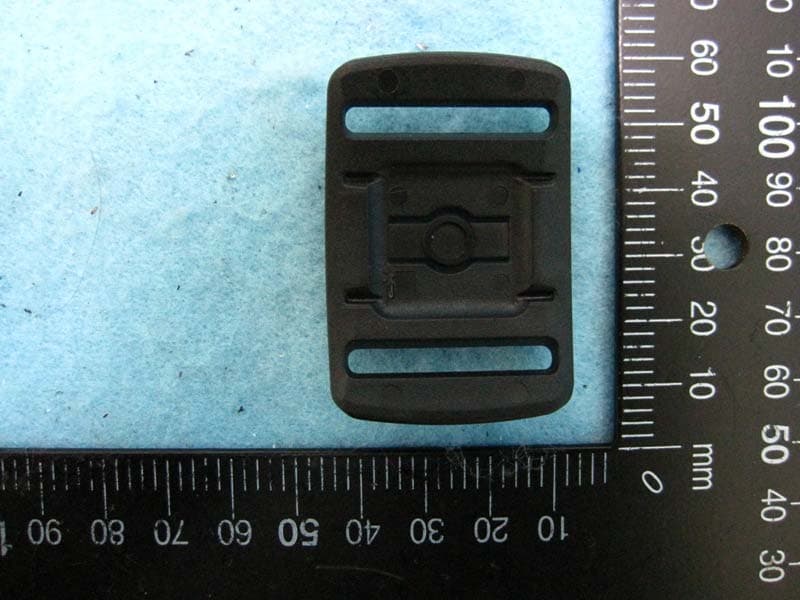
Click to zoom
Application Details
- Equipment Class
- DXX - Part 15 Low Power Communication Device Transmitter
- Date of Grant
- Nov 24, 2015
- Application Purpose
- Original Equipment
- Date of Application
- Nov 24, 2015
- Equipment Note
- MOTI Gym Wearable
- Frequency Range
- 2402.00000000 - 2480.00000000
- Company
- J-MEX, Inc.
- Country
- Taiwan
Documents & Files
Document Text
Text extracted from the exhibit documents filed with the FCC. Open a document above to read the original.
Users Manual
MOTi QSG-R1.3- 2015 EN MOTi Quick Start Guide - MOTi Gym Wearable 1 What’s in the Box MOTi x 1 Base x 1 Strap size-L x 1 (Upper Arm) Strap size-S x 1 (Wrist / Ankle) USB cable x 1 2 MOTi Working Modes 2.1 Two Working Modes: Pedometer Mode and Workout Mode controlled by MOTi Key Workout Mode: press the MOTi Key and MOTi vibrates for 0.5 second Pedometer Mode: press the MOTi Key and hold for 3 seconds or longer time until MOTi vibrates. MOTi will vibrate for 2 times, each time lasts for 0.5 second. 2.2 Please put MOTi on your Left Wrist while using the Device in Pedometer mode Micro USB for Charging LED Indicator Power Key MOTi Key (Button) 1 MOTi QSG-R1.3-2015 EN MOTi toward up Arrow Sign 3 Charging the Battery 3.1 Please charge your MOTi for at least 2 hours before the first time using. The LED Indicator flashes in blue when charging is in progress. The blue light will keep solid when charging is completed. 3.2 Low power alert: If LED Indicator start flashing in Red, which is alert of low battery power. Please immediately charge your MOTi. 3.3 In case MOTi is not in use for a period of time, please still charge MOTi once a month for better sustaining the battery life. 4 How to get your MOTi put on Base Get Base and Strap tied together Along with the Arrow sign on Base, put the MOTi toward up as shown and slide MOTi into Base on position. 2 MOTi QSG-R1.3-2015 EN Position & the direction of wearing MOTi on Left Wrist. Position & the direction of wearing MOTi on Left Arm Position & the direction of wearing MOTi on Right Ankle Put MOTi tied closely on your Left Wrist and get it parallel to the ground; Press the MOTi Key and LED will stay in Red for 2 seconds and then off automatically, MOTi is activated in Workout Mode. MOTi MOTi MOTi 3 MOTi QSG-R1.3-2015 EN Please ensure MOTi surface is parallel tied to Left Arm and perpendicular to the ground Get Left Arm perpendicular to the ground and press the MOTi Key. Purple light keeps on for 2 seconds and then off, MOTi is activated in Workout Mode. Put MOTi on Right Ankle; please make sure it is in the right position and direction as shown in the picture. Press the MOTi Key, the blue light keeps on for 2 seconds then off. MOTi is in Workout Mode. Please note that, in the same wearing position, when pressing the MOTi Key for two or more times, MOTi only vibrates for 0.5 second to get in Workout Mode without any LED light on 4 MOTi QSG-R1.3-2015 EN 5 MOTi APP Start-up MOTi is developed for testing under iOS8.1 and later version with BLE accessibility Please go to App Store and Install MOTi App. Click to Install MOTi APP 5 MOTi QSG-R1.3-2015 EN Click MOTi to run the App after installation is done. Click to Open MOTi APP 6 MOTi QSG-R1.3-2015 EN Start using MOTi App Click to Create Account 7 MOTi QSG-R1.3-2015 EN 6 MOTi Setting and Connecting to Mobile Device 6.1 Searching MOTi device for connecting with Mobile device Click Setting and then Click MOTi, MOTi searching starts as shown below Click for Connecting after MOTi Searching 8 MOTi QSG-R1.3-2015 EN 6.2 Connect MOTi to your mobile device MOTi is connected successfully with mobile device shown as below. You can also disconnect with Mobile by clicking “Disconnect”. Click to disconnect with Mobile 9 MOTi QSG-R1.3-2015 EN 6.3 MOTi Battery Meter After MOTi is connected with mobile device, click “Back”, battery meter/life is shown on the screen as below 7 LED Indication and Vibration 7.1 MOTi turning on Turn on: Press the Power Key, red and blue lights flash in turn for 5 cycles (total in 5 seconds), MOTi is on and the Connecting Mode is activated. Please make sure APP is installed and turned on before connecting. Idle mode: Press the Power Key again, blue lights flash quickly for 5 times following with red lights flash quickly also for 5 times (total 1 second) and then all lights off afterwards, MOTi is now idle in Power saving mode (the connection is still on). MOTi Battery Meter 10 MOTi QSG-R1.3-2015 EN 7.2 Connecting MOTi with Mobile device 7.2.1 In case MOTi is shut down by weak battery power and resumed after charging, but auto timing synchronization is still failed, MOTi will vibrate for 5 seconds once press the MOTi Key and MOTi can’t be functional. 7.2.2 Please move to APP frame as shown as Section 6.1, disconnect and reconnect MOTi with your mobile device, MOTi will start synchronizing the timing with your mobile device and then MOTi is functional when press the MOTi Key. 7.3 If blue LED does not flash or keep solid when charging, please press the Power Key and hold for 10 seconds. MOTi will reboot in 2 seconds after button release. 7.4 Start using MOTi 7.4.1 Workout Mode: Press the MOTi Key and MOTi will vibrate for 0.5 second and start counting the Workout in Fitness training. 7.4.2 Pedometer Mode: Press the MOTi Key and hold for 3 seconds or longer time until MOTi vibrates. MOTi will vibrate for 2 times, each time lasts for 0.5 second and start counting the Steps. 7.5 When Workouts started, MOTi will vibrate for 0.5 second to confirm with the user that the Workout is successfully recognized. After Workouts are done, please press the MOTi Key and release, MOTi will vibrate for 1 second and the Workout data will also synchronize to the mobile device. (Data will be stored in MOTi if it is not in connecting mode with the mobile device) 7.6 Wearing MOTi in right position and direction 3 different colors of LED light will be displayed for 2 seconds to indicate if MOTi is successfully recognized in 3 different wearing positions on your body separately following with 0.5 second of vibration. The LED indication is shown as below: 7.6.1 Wrist: Red light stays on for 2 seconds and then goes off. 7.6.2 Arm: Purple light stays on for 2 seconds then goes off. 7.6.3 Ankle: Blue light stays on for 2 seconds then goes off. 7.7 Disconnecting MOTi with Mobile device Blue lights flash quickly for 5 times following with red lights flash quickly also for 5 times (total 1 second) and then all lights of…
Text truncated - open the document above for the full version.
External Photos
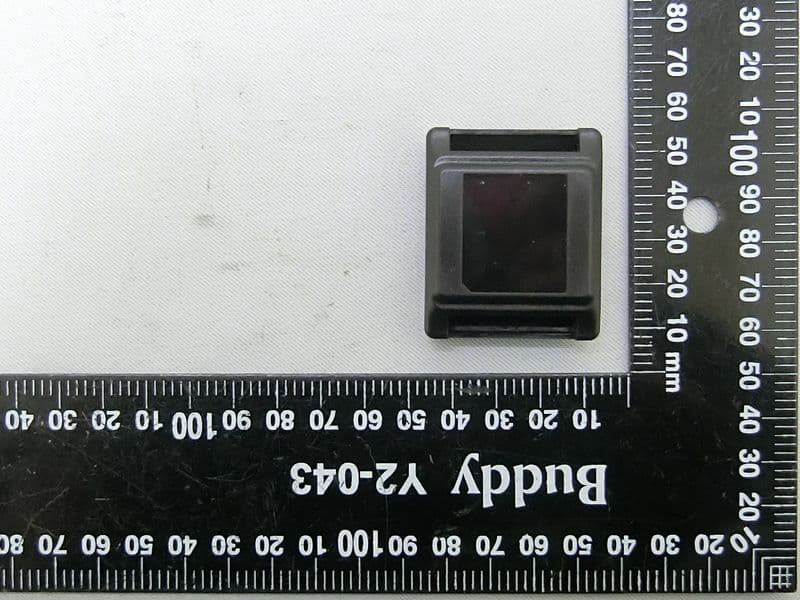
Report No.: 593034 SPORTON International Inc. PAGE NUMBER : 1 of 5 TEL : 886-3-327-3456 ISSUED DATE : Nov. 03, 2015 FAX : 886-3-327-0973 Photographs of EUT Report No.: 593034 SPORTON International Inc. PAGE NUMBER : 2 of 5 TEL : 886-3-327-3456 ISSUED DATE : Nov. 03, 2015 FAX : 886-3-327-0973 Report No.: 593034 SPORTON International Inc. PAGE NUMBER : 3 of 5 TEL : 886-3-327-3456 ISSUED DATE : Nov. 03, 2015 FAX : 886-3-327-0973 USB cable Pedestal Report No.: 593034 SPORTON International Inc. PAGE NUMBER : 4 of 5 TEL : 886-3-327-3456 ISSUED DATE : Nov. 03, 2015 FAX : 886-3-327-0973 Belt Report No.: 593034 SPORTON International Inc. PAGE NUMBER : 5 of 5 TEL : 886-3-327-3456 ISSUED DATE : Nov. 03, 2015 FAX : 886-3-327-0973
ID Label/Location Info
FCC ID:XXAMOTIWEARABLE NCC ID:CCAF15LP2190T7 J-MEX Inc. Label Size: 12 x 9mm
Internal Photos
Report No.: 593034 SPORTON International Inc. PAGE NUMBER : 1 of 7 TEL : 886-3-327-3456 ISSUED DATE : Nov. 03, 2015 FAX : 886-3-327-0973 Photographs of EUT Report No.: 593034 SPORTON International Inc. PAGE NUMBER : 2 of 7 TEL : 886-3-327-3456 ISSUED DATE : Nov. 03, 2015 FAX : 886-3-327-0973 Report No.: 593034 SPORTON International Inc. PAGE NUMBER : 3 of 7 TEL : 886-3-327-3456 ISSUED DATE : Nov. 03, 2015 FAX : 886-3-327-0973 Report No.: 593034 SPORTON International Inc. PAGE NUMBER : 4 of 7 TEL : 886-3-327-3456 ISSUED DATE : Nov. 03, 2015 FAX : 886-3-327-0973 Report No.: 593034 SPORTON International Inc. PAGE NUMBER : 5 of 7 TEL : 886-3-327-3456 ISSUED DATE : Nov. 03, 2015 FAX : 886-3-327-0973 Report No.: 593034 SPORTON International Inc. PAGE NUMBER : 6 of 7 TEL : 886-3-327-3456 ISSUED DATE : Nov. 03, 2015 FAX : 886-3-327-0973 Report No.: 593034 SPORTON International Inc. PAGE NUMBER : 7 of 7 TEL : 886-3-327-3456 ISSUED DATE : Nov. 03, 2015 FAX : 886-3-327-0973
Test Report
SPORTON International Inc. No. 52, Hwa Ya 1st Rd., Hwa Ya Technology Park, Kwei-Shan Hsiang, Tao Yuan Hsien, Taiwan, R.O.C. Ph: 886-3-327-3456 / FAX: 886-3-327-0973 / www.sporton.com.tw Report Format Version: 01 FCC RADIO TEST REPORT Applicant’s company J-MEX Inc. Applicant Address B2, 3F, No. 1, Li-Hsin 1st Road, SBIP Hsin Chu, 300 Taiwan FCC ID XXAMOTIWEARABLE Manufacturer’s company J-MEX Inc. Manufacturer Address B2, 3F, No. 1, Li-Hsin 1st Road, SBIP Hsin Chu, 300 Taiwan Product Name MOTi Gym Wearable Brand Name MOTi Model Name MOTi Gym Wearable Test Rule Part(s) 47 CFR FCC Part 15 Subpart C § 15.249 Test Freq. Range 2402 ~ 2480MHz Received Date Sep. 30, 2015 Final Test Date Nov. 13, 2015 Submission Type Original Equipment Statement The test result in this report refers exclusively to the presented test model / sample. Without written approval of SPORTON International Inc., the test report shall not be reproduced except in full. The measurements and test results shown in this test report were made in accordance with the procedures and found in compliance with the limit given in ANSI C63.10-2013 and 47 CFR FCC Part 15 Subpart C. The test equipment used to perform the test is calibrated and traceable to NML/ROC. Report No.: FR593034 Report Format Version: 01 Page No. : i of ii FCC ID: XXAMOTIWEARABLE Issued Date : Nov. 13, 2015 Table of Contents 1. VERIFICATION OF COMPLIANCE ....................................................................................................................... 1 2. SUMMARY OF THE TEST RESULT .......................................................................................................................... 2 3. GENERAL INFORMATION .................................................................................................................................. 3 3.1. Product Details....................................................................................................................................................................................3 3.2. Accessories .........................................................................................................................................................................................3 3.3. Table for Carrier Frequencies .............................................................................................................................................................3 3.4. Table for Filed Antenna.......................................................................................................................................................................4 3.5. Table for Test Modes ...........................................................................................................................................................................4 3.6. Table for Testing Locations..................................................................................................................................................................5 3.7. Table for Supporting Units ...................................................................................................................................................................5 3.8. Duty Cycle ..........................................................................................................................................................................................5 3.9. Test Configurations .............................................................................................................................................................................6 4. TEST RESULT ..................................................................................................................................................... 9 4.1. AC Power Line Conducted Emissions Measurement...........................................................................................................................9 4.2. Field Strength of Fundamental Emissions Measurement ...................................................................................................................13 4.3. 20dB Spectrum Bandwidth Measurement ........................................................................................................................................16 4.4. Radiated Emissions Measurement ....................................................................................................................................................19 4.5. Band Edge Emissions Measurement .................................................................................................................................................28 4.6. Antenna Requirements .....................................................................................................................................................................30 5. LIST OF MEASURING EQUIPMENTS ................................................................................................................... 31 6. MEASUREMENT UNCERTAINTY.......................................................................................................................... 32 APPENDIX A. TEST PHOTOS ........................................................................................................................ A1 ~ A5 Report No.: FR593034 Report Format Version: 01 Page No. : ii of ii FCC ID: XXAMOTIWEARABLE Issued Date : Nov. 13, 2015 History of This Test Report REPORT NO. VERSION DESCRIPTION ISSUED DATE FR593034 Rev. 01 Initial issue of report Nov. 13, 2015 47 CFR FCC Part 15 Subpart C 15.205(a) 15.209(a) Further, this requirement does not apply to intentional radiators that must be professionally installed. Report No.: FR593034 Report Format Version: 01 Page No. : 1 of 32 FCC ID: XXAMOTIWEARABLE Issued Date : Nov. 13, 2015 1. VERIFICATION OF COMPLIANCE Product Name : MOTi Gym Wearable Brand Name : MOTi Model Name : MOTi Gym Wearable Applicant : J-MEX Inc. Test…
Text truncated - open the document above for the full version.
Test Setup Photos
Report No.: FR593034 FCC ID: XXAMOTIWEARABLE Page No. : A1 of A5 Appendix A. Test Photos Report No.: FR593034 FCC ID: XXAMOTIWEARABLE Page No. : A2 of A5 1. Photographs of Conducted Emissions Test Configuration FRONT VIEW REAR VIEW Report No.: FR593034 FCC ID: XXAMOTIWEARABLE Page No. : A3 of A5 2. Photographs of Radiated Emissions Test Configuration Test Configuration: 9kHz ~30MHz / Test Mode: Mode 1 FRONT VIEW REAR VIEW Report No.: FR593034 FCC ID: XXAMOTIWEARABLE Page No. : A4 of A5 Test Configuration: 30MHz~1GHz / Test Mode: Mode 1 FRONT VIEW REAR VIEW Report No.: FR593034 FCC ID: XXAMOTIWEARABLE Page No. : A5 of A5 Test Configuration: Above 1GHz FRONT VIEW REAR VIEW
Contact Information
Applicant
Fred Huang(PE Manager)
Test Firm
SPORTON International Inc.Leo Huang
Technical Specifications
| # | Rule Parts | Frequency Range | Power Output |
|---|---|---|---|
| 1 | 15C | 2.40 GHz - 2.48 GHz | - |
Other Applications from J-MEX, Inc.
XXAMOTIB
Jul 25, 2023MOTi-B
Equipment Class
DTS - Digital Transmission System
XXANKS-1003
Jun 30, 2014Navii RF Remote Control - 17
Equipment Class
DXX - Part 15 Low Power Communication Device Transmitter
XXANAVIIMOUSE
Jan 25, 20102.4GHz RF Wireless Laser Mouse (3D)
Equipment Class
DXX - Part 15 Low Power Communication Device Transmitter
XXARFDONGLE
Jan 25, 20102.4GHz RF Wireless dongle
Equipment Class
DXX - Part 15 Low Power Communication Device Transmitter