XXL-DGWM-PNDMAGPS Navigator
Dongguan Wanma Electronic and Technology Co., Ltd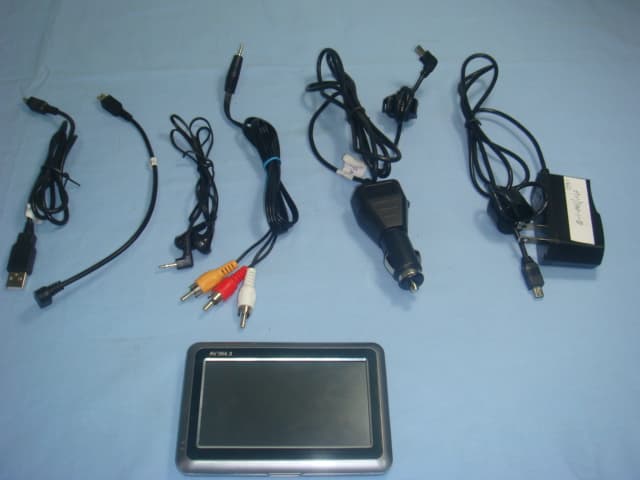
Click to zoom
Application Details
- Equipment Class
- DXX - Part 15 Low Power Communication Device Transmitter
- Date of Grant
- Dec 13, 2009
- Application Purpose
- Original Equipment
- Date of Application
- Dec 13, 2009
- Equipment Note
- GPS Navigator
- Frequency Range
- 88.10000000 - 107.90000000
- Country
- China
Documents & Files
Document Text
Text extracted from the exhibit documents filed with the FCC. Open a document above to read the original.
Users Manual
1 SUMMARY Structure No.Name Function 1 Power button To turn on/off the device 2 Menu button Return to main menu screen 3 Mini USB socket To supply power to PND or communicate when a PC is connected or use as antenna while FM transmission enabled. 2 4 headset jack To connect to stereo headset 5 AV IN Video input socket 6 SD card slot Insert a SD card contains map programs, mp3, etc. press down to the end until firmly locked, press again to eject the card. NOTE: Never eject the card while in use. 7 Reset hole To press the button inside the hole to reset the whole system 8 Recharge indicator To indicate the recharging condition. Red is in process, green for complete. 9 Microphone (optional) Mic for hand free calls(optional) 10 Display screen TFT touch screen 11 Speaker Where Sounds of music and voice from 12 Stylus For hand writing on the screen to input 3 BASIC OPERATION 2.1 Getting‐Started Insert a SD card (optional) into the slot at the left bottom of device. Press the power button on the left top of the device to turn it on. After seconds of starting up, then enters into the main menu screen as below. 4 2.2 Power off /Sleep Press the power button on the top side of your device to turn off your device, the screen prompts "equipment is about to turn off", please tap the icon to select in 20 seconds, the default operation is to turn off. Or select sleep, the device actually enters a suspend state and the system stops operation. Once you turn on the system again, it resumes. 5 PROGRAMMING & SETTINGS Press the power button to turn on the GPS unit. The Main Menu screen will be displayed as below: Tap the icon or to go to next page of menu. 6 3.1 GPS Double tap the GPS icon or to start GPS navigation program. 7 3.2 Music 3.2.1 Music Play Tap the “Music” icon or on the main menu and enter into following interface. 8 : close the window and return. : minimize : order of playback: random, repeat, single, play all, repeat all : equalizer : previous : seek bar : pause/play : next 9 : stop : music list : volume control 3.2.2 Music List Tap the “Music List” icon and enter into the following interface. : close the window and return. : adding single : adding all 10 : delete single : delete all 3.2.3 Equalizer Tap the “Equalizer” icon and enter into the following interface. : close the window and return. : tap it and select preset value : check it to enable the equalizer : reset the equalizer 11 3.3 Movie/video play 3.3.1 video Tap the "video" icon or on the main menu and enter into following interface. 12 : pause/play : seek bar : stop : video list : close the window and return : volume control 3.3.2 video list Tap the icon and enter into the following interface. Double tap to select the movie you want to play and to return. 13 3.4 Photo 3.4.1 photo Tap the Photo icon or on the main menu and enter into following interface. 14 : previous : next : zoom in : zoom out : rotate : full screen : photo list : close window and return 15 3.4.2 photo list Tap the icon and enter into the following interface. 3.4.3 full screen Tap the icon and enter into the full screen mode. 16 Then tap the seek bar to set time of slide show, value from 1s~10s. Double tap to quit full screen mode. 3.5 Ebook 17 3.5.1 Ebook Tap the icon or on the main menu again and enter into following interface. : close the window and return : previous : next : font setting : color setting 18 : bookmark : bookmark list : ebook list 3.5.2 Ebook List Tap the icon and enter into following interface. 3.5.3 Font Setting Tap the icon and enter into following interface. 19 : close the window and return. : save 3.5.4 Color Setting Tap the icon and enter into following interface. 20 : close the window and return. : saving 3.5.5 bookmark list Tap the icon and enter into following interface. : close the window and return. : adding new bookmark : delete bookmark 21 3.6 Flash Tap the icon or on the main menu and enter into following interface. : pause/play 22 : stop : seek bar : flash list : close the window and return. : volume control 3.6.1 Flash List Tap the icon and enter into following interface. 23 3.7 Games Tap the icon or on the main menu again and enter into following interface. 3.7.1 Chinese chess 24 Tap the icon and enter into following interface. 3.7.2 Linlink Tap the icon and enter into following interface. 25 3.7.3 Russia Block Tap the icon and enter into following interface. 3.7.4 JawBreaker Tap the icon and enter into following interface. 3.7.5 BoxMan 26 Tap the icon and enter into following interface. 3.7.6 BreakOut Tap the icon and enter into following interface. 27 3.8 Tools Tap the icon or on the main menu again and enter into following interface. 3.8.1 Calendar Tap the icon and enter into following interface. 28 3.8.2 Calculator Tap the icon and enter into following interface. 3.8.3 Unit 29 Tap the icon and enter into following interface. Unit: Length, Weight Mass, Cubic Capacity, Square Area, Circular Angular, Power, Pressure, Speed, Temperature 3.8.4 GPS info Tap the icon and enter into following interface. 30 3.9 Setting Tap the icon or on the main menu and enter into following interface. 31 3.9.1 Volume Tap the icon in the setting menu and enter into following interface. 32 : close the window and return. : save : volume control : can select "Enable sounds for taps" or not : start music 3.10.2 Backlight Tap the icon on the system meun and enter into following interface. 33 : close the window and return. : save : backlight control : auto dimming if no operation in the time 3.9.3 Language Tap the icon on the system menu and enter into following interface. 34 tap or icon to change the language. : close window and return : save 3.9.4 FM Transmitter Tap the icon in setting menu and enter into following interface. 35 : close window and return : save : check the box to enable FM tap "+"or "‐" icon to increase or decrease the emissive frequency of FM 3.9.5 DateTime Tap the icon in the setting menu and enter into following interface. : close wind…
Text truncated - open the document above for the full version.
Cover Letter(s)
Dongguan Wanma Electronic and Technology CO.,LTD DATE: Dec 10, 2009 FCC DECLARATION OF CONFORMITY (DoC) Model NO.: A43 Our device above has been tested and found to be compliant with the FCC Part 15 Class B limits as a computer peripheral. This device complies with Part 15 of the FCC Rules. Operation is subject to the following two conditions: (1) This device may not cause harmful interference, and (2) this device must accept any interference received, including interference that may cause undesired operation. Details of test lab and documentation Test Lab Name: Bureau Veritas CPS (H.K.) Ltd. Taoyuan Branch FCC Test Site Accreditation Number (as seen on FCC website): TW1050 Test report number and issue date: FD091214A04, 2009-Dec ------------------------------------------------------------------- Senior Manager Email: [email protected]
External Photos
EXT PHOTOS
Internal Photos
INT PHOTOS
Operational Description
OPERATIONAL DESCRIPTION 1. Supply voltage: 5VDC (From vehicle battery or adapter) 2. Frequency of operation: 88.1-107.9MHz 3. Number of channels: 99 4. Antenna type: Wire Antenna 5. Antenna gain: 0dBi 6. Antenna connector: Soldered on PCB 7. Introduction of the device: Device is a GPS navigator unit with an FM transmitter. It can transmit the voice of the GPS navigator to the car’s FM receiver to be heard on speakers. 8. Related antenna connector photo: Antenna
Test Report
FCC ID:XXL-DGWM-PNDMA 1 Report Format Version 3.0.0 FCC TEST REPORT (15.239) REPORT NO.: 091117FIA01 MODEL NO.: A43 RECEIVED: Nov. 13, 2009 TESTED: Nov. 25, 2009 ISSUED: Nov. 25, 2009 APPLICANT: Dongguan Wanma Electronic and Technology CO.,LTD ADDRESS: No.28, South DongShen Road, Zhangyang Fuda Industry Zone, Zhangmutou Town, Dongguan, Guangdong Province, P.R.C ISSUED BY: ADT (Shanghai) Corporation ADDRESS: 2F, Building C, No.1618, Yishan Rd., 201103, Shanghai, China This test report consists of 62 pages in total. It may be duplicated completely for legal use with the approval of the applicant. It should not be reproduced except in full, without the written approval of our laboratory. The client should not use it to claim product endorsement by TAF, A2LA or any government agencies. The test results in the report only apply to the tested sample. FCC ID:XXL-DGWM-PNDMA 2 Report Format Version 3.0.0 Table of Contents 1 CERTIFICATION............................................................................................. 4 2 SUMMARY OF TEST RESULTS .................................................................... 5 2.1 MEASUREMENT UNCERTAINTY...................................................................5 3 GENERAL INFORMATION ............................................................................. 6 3.1 GENERAL DESCRIPTION OF EUT ................................................................6 3.2 DESCRIPTION OF TEST MODES ..................................................................6 3.3 DESCRIPTION OF SUPPORT UNITS ............................................................8 3.4 TEST MODE APPLICABILITY AND TESTED CHANNEL DETAIL.................10 3.5 GENERAL DESCRIPTION OF APPLIED STANDARDS................................ 11 4 EMISSION TEST .......................................................................................... 12 4.1 CONDUCTED EMISSION MEASUREMENT.................................................12 4.1.1 LIMITS OF CONDUCTED EMISSION MEASUREMENT ..............................12 4.1.2 TEST INSTRUMENTS...................................................................................12 4.1.3 TEST PROCEDURE......................................................................................13 4.1.4 DEVIATION FROM TEST STANDARD..........................................................14 4.1.5 TEST SETUP.................................................................................................14 4.1.6 EUT OPERATING CONDITIONS ..................................................................14 4.1.7 TEST RESULTS ............................................................................................16 4.2 RADIATED EMISSION MEASUREMENT......................................................20 4.2.1 LIMITS OF RADIATED EMISSION MEASUREMENT...................................20 4.2.2 TEST INSTRUMENTS...................................................................................20 4.2.3 TEST PROCEDURE......................................................................................22 4.2.4 DEVIATION FROM TEST STANDARD..........................................................22 4.2.5 TEST SETUP.................................................................................................23 4.2.6 EUT OPERATING CONDITIONS ..................................................................23 4.2.7 TEST RESULTS ............................................................................................24 4.3 EMISSION BAND MEASUREMENT .............................................................49 4.3.1 LIMITS OF EMISSION BAND MEASUREMENT...........................................49 4.3.2 TEST INSTRUMENTS...................................................................................49 4.3.3 TEST PROCEDURES ...................................................................................49 4.3.4 DEVIATION FROM TEST STANDARD..........................................................49 4.3.5 TEST SETUP.................................................................................................49 4.3.6 EUT OPERATING CONDITIONS ..................................................................49 4.3.7 TEST RESULTS ............................................................................................50 5 PHOTOGRAPHS OF THE TEST CONFIGURATION ................................... 53 6 PHOTOGRAPHS OF THE eut ...................................................................... 59 7 INFORMATION ON THE TESTING LABORATORIES.................................. 61 FCC ID:XXL-DGWM-PNDMA 3 Report Format Version 3.0.0 8 APPENDIX A – MODIFICATIONS RECORDERS FOR ENGINEERING CHANGES TO THE EUT BY THE LAB ........................................................ 62 FCC ID:XXL-DGWM-PNDMA 4 Report Format Version 3.0.0 1 CERTIFICATION PRODUCT: 3IN1 GPS Navigator (Digital Entertainment Function) BRAND NAME: NA MODEL NO.: A43 APPLICANT: Dongguan Wanma Electronic and Technology CO.,LTD TESTED: Nov. 25, 2009 TEST ITEM: ENGINEERING SAMPLE STANDARDS: FCC Part 15, Subpart C (Section 15.239) ANSI C63.4-2003 The above equipment (Model: A43) has been tested by ADT(Shanghai) Corporation, and found compliance with the requirement of the above standards. The test record, data evaluation & Equipment Under Test (EUT) configurations represented herein are true and accurate accounts of the measurements of the sample’s EMC characteristics under the conditions specified in this report. PREPARED BY : , DATE:Nov. 25, 2009 (Ray Xue / Project Engineer) TECHNICAL ACCEPTANCE : , DATE:Nov. 25, 2009 Responsible for EMI (Joy Zhu / Manager) APPROVED BY : , DATE:Nov. 25, 2009 ( Wallace Pan / Director) FCC ID:XXL-DGWM-PNDMA 5 Report Format Version 3.0.0 2 SUMMARY OF TEST RESULTS The EUT has been tested according to the following specifications: APPLIED STANDARD: FCC Part 15, Subpart C (Section 15.239) Standard Section Test Type and Limit ResultRemark 15.207 AC Power Conducted Emission PASS …
Text truncated - open the document above for the full version.
Test Setup Photos
CONDUCTED EMISSION TEST MODE 1 MODE 2 RADIATED EMISSION TEST MODE 1 MODE 2 MODE 3 MODE 4
Contact Information
Applicant
Wen Chang
Test Firm
BUREAU VERITAS ADT (Shanghai) CorporationZhaoqian YU
Technical Specifications
| # | Rule Parts | Frequency Range | Power Output |
|---|---|---|---|
| 1 | 15C | 88.1 MHz - 107.9 MHz | - |
Other Applications from Dongguan Wanma Electronic and Technology Co., Ltd
XXL-DGWM-AX16X
Feb 13, 2011Radar Detector
Equipment Class
CRD - Part 15 Radar Detector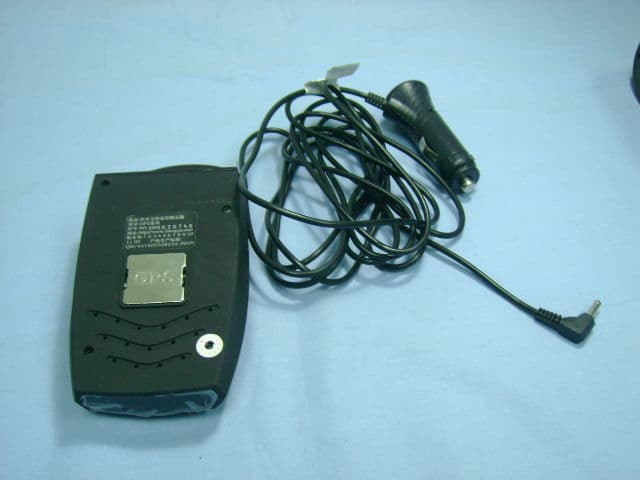
XXL-DGWM-GRD
Dec 16, 2009Radar Detector
Equipment Class
CRD - Part 15 Radar Detector