Y6D-BBHF-RW020RFID Reader
TERTIUM Technology S.r.l.
Click to zoom
Application Details
- Equipment Class
- JBP - Part 15 Class B Computing Device Peripheral
- Date of Grant
- Dec 05, 2012
- Application Purpose
- Original Equipment
- Date of Application
- Dec 05, 2012
- Equipment Note
- RFID Reader
- Company
- TERTIUM Technology S.r.l.
- Country
- Italy
Documents & Files
Document Text
Text extracted from the exhibit documents filed with the FCC. Open a document above to read the original.
Users Manual
Index •Introduction to BlueBerry HF [ 2 ] ◦Contents inside the pack [ 2 ] ◦BlueBerry components [ 2 ] ◦Using function key LED and beeper [ 3 ] ◦Technical specifications [ 4] •Instructions for use [ 4 ] ◦Connection of BlueBerry to the computer [ 4 ] ◦Disconnection of BlueBerry [ 5 ] ◦Connection of BlueBerry through Bluetooth [ 5 ] ◦Charging the battery [ 5 ] ◦Control of the battery level [ 5 ] ◦Reading distance [ 6 ] •Configuration of BlueBerry [ 7 ] ◦Bluetooth [ 8 ] ◦Auto off [ 8 ] ◦Set mode [ 8 ] ◦Speed [ 10] ◦Baudrate [ 10 ] ◦Sending commands with TT_RFID_Configurator [ 10 ] ◦Configuration for TT_RFID_BlackBerryDemo and BlueBerryPC [ 11 ] •Other information and support [ 12 ] BlueBerry HF v.2.0 – User Manual ver. 0.6 June 2011 2 Introduction to BlueBerry HF Contents inside the pack BlueBerry RFID Reader USB cable A-type male - micro USB male CD BlueBerry components Figure 1: BlueBerry components BlueBerry HF v.2.0 – User Manual ver. 0.6 June 2011 3 Key ring Micro USB connector Antenna LED signal light (RFID scanning, results of the RFID commands, Bluetooth connection search...) on/off switch and scanner activation Blue LED: to indicate operation and battery level Button , LED and beeper usage Table 1: Button , LED and beeper usage BlueBerry HF v.2.0 – User Manual ver. 0.6 June 2011 4 Technical specifications Table 2: Technical specifications Instructions for use Installation When BlueBerry is connected to the computer for the first If an internet connection is available, an automatic installation take place. If the internet connection is not available or no suitable driver is automatically found download driver and installation guide at the following link: http://www.ftdichip.com/Drivers/VCP.htm Connection of BlueBerry to the computer Connect BlueBerry to the computer to reload the battery, to configure the device through the TT_RFID_Configurator application, to carry out operation testing through the TT_RFID_PCDemo application or to send commands to it according to the specific TERTIUM Technology protocol ( see TERTIUM_RFID_Reader_Protocol.pdf ). Connect BlueBerry to a high-power USB port. Once connected, the state of the LEDs and the acoustic signal will indicate the state of the RFID reader as explained in the paragraph Charging the battery. BlueBerry HF v.2.0 – User Manual ver. 0.6 June 2011 5 NOTE: when BlueBerry is connected to the computer through USB, the Bluetooth interface is disabled. Disconnection of BlueBerry To disconnect BlueBerry from the computer, simply disconnect the USB cable. The reader switches off automatically. Connection of BlueBerry through Bluetooth To connect BlueBerry through Bluetooth to any device supplied with this kind of interface such as a computer or smartphone, it is necessary to switch on the reader with the button being sure that it is not connected to any terminal by USB. When BlueBerry is connected to the computer through USB, the Bluetooth interface is disabled. Once it is switched on, BlueBerry is visible through Bluetooth with the name TERTIUM_BB_yyyyyH while the pin code in order to access is 0000 by default. The shown name and the pin code are changeable by the user. Charging the battery BlueBerry is equipped with an internal, non-user-replaceable, rechargeable battery. The high performing Li-Ion battery guarantees an extent of 1000-3000 readings. A discharged battery is completely charged in about 3 hours. To recharge BlueBerry, connect it to the computer. The reader automatically switches on and the state of the battery charge is signalled by the blue LED: when the battery is charging, the LED blinks; when it is fully charged, the LED remains on fixed (for further details to see Table 1). Control of the battery level When the BlueBerry is switched on with the button, the following situations related to the battery’s charge level may occur: •an acoustic signal and a fixed blue LED: charged battery •no acoustic signal and quickly blinking blue LED: battery charge very low. No operations are possible in this condition; if the reader is not switched off, it will automatically switch off after 10 sec. It is recommended to charge BlueBerry up to complete recharge. If the blue LED starts to blink slowly during normal use of BlueBerry, it means that very little charge is left. The reader will only have a few minutes of autonomy. If you continue to use it, the LED will begin to blink quickly signalling a very low battery charge as described above. When BlueBerry is connected to the computer, the following situations related to the battery’s charge level may occur: •an acoustic signal and a fixed blue LED: charged battery •an acoustic signal and blinking blue LED: battery charging. In this condition, it is possible to operate with BlueBerry connecting to it with an any serial Terminal program or using the applications provided with the CD (TT_RFID_Configurator or TT_RFID_PCDemo) BlueBerry HF v.2.0 – User Manual ver. 0.6 June 2011 6 In Table 1, you can see the activities of the blue LED and of the acoustic beeper related to the battery level. Reading distance BlueBerry is equipped with an integrated antenna, for the reading of TAG RFID, located above the button as shown in Figure 1. The ideal reading distance and conditions for BlueBerry HF are as follows. NOTE: the reading distance varies based on the type of TAG. Also, metal objects and surfaces located very near BlueBerry can notably invalidate the reader's performance. BlueBerry HF reader supports the ISO 15693 standard and is able to read TAG RFID to a maximum distance of 2cm. The optimal conditions of reading are obtained positioning the TAG inside the field pointed out in Figure 1 (the figure is for example purpose only and doesn't represent the real antenna radiation pattern). Figure 2: read field of BlueBerry HF BlueBerry HF v.2.0 – User Manual ver. 0.6 June 2011 7 Configuration of BlueBerry BlueBerry is an RFID reader able to read one or more TAGs and to transmit data via Bluetooth or U…
Text truncated - open the document above for the full version.
ID Label/Location Info
BlueB err y HF MADE IN IT AL Y ter tium technology .c om BBH-001001 5VDC 500mA FC C ID : Y6D-BBHF-RW020 Contains FCC ID : ED9LMX9838
Test Report
G.S.D. S.r.l. Via Marmiceto, 8 - 56121 Ospedaletto (Pisa) Italy MARKING / FCC ELECTROMAGNETIC COMPATIBILITY ELECTRICAL SAFETY LASER SPECTROSCOPY ENVIRONMENTAL PHYSIC G.S.D. Srl PISA - Italy Test Report n. FCC-12009B Rev. 00 Applicant / Mailing EUT - Test Item Name BlueBerry HF FCC RulesRule Part 15, Subpart B - Unintentional Radiators Class B Limits Testing Laboratory G.S.D. S.r.l. Via Marmiceto, 8 - 56121 Ospedaletto Pisa (PI) Italy FCC listedId nr. 424037 Location and Date of IssuePisa, 2012 November 20 This document may be only fully reproduced. Every partial reproduction is only allowed after written approval released by G.S.D. S.r.l. Report n. FCC-12009B Rev. 00, page 1 / 18 Laboratories G.S.D. S.r.l. Via Marmiceto, 8 - 56121 Ospedaletto (Pisa) Italy INDEX 1. MANUFACTURER AND EUT IDENTIFICATION .............................................................................................3 2. REFERENCE STANDARDS.....................................................................................................................................6 3. TEST GENERALITY.................................................................................................................................................7 4. CONDUCTED EMISSIONS......................................................................................................................................9 5. RADIATED EMISSIONS........................................................................................................................................12 6. PHOTO......................................................................................................................................................................17 This document may be only fully reproduced. Every partial reproduction is only allowed after written approval released by G.S.D. S.r.l. Report n. FCC-12009B Rev. 00, page 2 / 18 G.S.D. S.r.l. Via Marmiceto, 8 - 56121 Ospedaletto (Pisa) Italy 1.MANUFACTURER AND EUT IDENTIFICATION 1 Applicant Mailing TERTIUM Technology S.r.l. Via G. B. Picotti, 8 56124 Pisa Italy EUT CategoryUnintentional Radiator EUT - Test Item Name BlueBerry HF Date of reception2012 May 08 SamplingLaboratory sample for certification Test Item DescriptionRFID Device Nominal Voltage3,7 Vdc Li-ion Batteries rechargeable batteries via micro USB 1 A detailed documentation is preserved in the internal fascicle. This document may be only fully reproduced. Every partial reproduction is only allowed after written approval released by G.S.D. S.r.l. Report n. FCC-12009B Rev. 00, page 3 / 18 G.S.D. S.r.l. Via Marmiceto, 8 - 56121 Ospedaletto (Pisa) Italy Fig. 1.1 Equipment Label This document may be only fully reproduced. Every partial reproduction is only allowed after written approval released by G.S.D. S.r.l. Report n. FCC-12009B Rev. 00, page 4 / 18 G.S.D. S.r.l. Via Marmiceto, 8 - 56121 Ospedaletto (Pisa) Italy Fig. 1.2 Equipment Label Location This document may be only fully reproduced. Every partial reproduction is only allowed after written approval released by G.S.D. S.r.l. Report n. FCC-12009B Rev. 00, page 5 / 18 G.S.D. S.r.l. Via Marmiceto, 8 - 56121 Ospedaletto (Pisa) Italy 2.REFERENCE STANDARDS Tests and measurements are performed accordingly to the reference standards given in the table below: TESTSTANDARD Emissions: Radiated – Section 15.109FCC Rules ad Regulations, Title 47 (2008) Part 15 – Sub part B ANSI C63.4 – American National Standard for Methods of Measuring of Radio-Noise Emissions from Low Voltage Electrical and Electronic Equipment in the Range of 9 kHz – 40 GHz Emissions: Conducted – Section 15.107FCC Rules ad Regulations, Title 47 (2008) Part 15 – Sub part B ANSI C63.4 – American National Standard for Methods of Measuring of Radio-Noise Emissions from Low Voltage Electrical and Electronic Equipment in the Range of 9 kHz – 40 GHz This document may be only fully reproduced. Every partial reproduction is only allowed after written approval released by G.S.D. S.r.l. Report n. FCC-12009B Rev. 00, page 6 / 18 G.S.D. S.r.l. Via Marmiceto, 8 - 56121 Ospedaletto (Pisa) Italy 3.TEST GENERALITY Sub-part 2.1033(b) Test And Measurement Data All tests and measurement data shown were performed in accordance with FCC Rules and Regulations, Volume II; Part 2 and the following individual Parts: 15.109; Unintentional Radiators Standard Test Conditions and Engineering Practices Except as noted herein, the following conditions and procedures were observed during the testing: In accordance with ANSI C63.4-2004, and unless otherwise indicated in the specific measurement results, the ambient temperature of the actual EUT was maintained within the range of 10° to 40°C (50° to 104 °F) unless the particular equipment requirements specify testing over a different temperature range. Also, unless otherwise indicated, the humidity levels were in the range of 10% to 90% relative humidity. Prior to testing, the EUT was tuned up in accordance with the manufacturer's alignment procedures. All external gain controls were maintained at the position of maximum and/or optimum gain throughout the testing. Measurement results, unless otherwise noted, are worst-case measurements. This document may be only fully reproduced. Every partial reproduction is only allowed after written approval released by G.S.D. S.r.l. Report n. FCC-12009B Rev. 00, page 7 / 18 G.S.D. S.r.l. Via Marmiceto, 8 - 56121 Ospedaletto (Pisa) Italy Summary of Test Results TESTRESULT Emissions: radiated Section 15.109 Pass Emissions: conducted Section 15.107 Pass Measurement uncertainty TESTEXPANDED UNCERTAINTY Conducted Emission – 50W/50mH AMN (150 kHz - 30 MHz) ± 3.5 dB Radiated Emission – (OATS) (30 MHz - 6 GHz)± 4.7 dB Climatic Conditions PARAMETERVALUE Temperature (293 ρ 3) K Relative humidity (50 ρ 5) % Extensions The results refer only to the sampled EUT and under the specified conditions. This document may be only fully reproduced. Every partial reproduction is only allowed after…
Text truncated - open the document above for the full version.
Contact Information
Applicant
Marco Consani
Test Firm
G.S.D. S.r.l. Testing LaboratoryDr. Gian Luca Genovesi
Technical Specifications
| # | Rule Parts | Frequency Range | Power Output |
|---|---|---|---|
| 1 | 15B | - | - |
Other Applications from TERTIUM Technology S.r.l.

Y6D-MWSAR010
Nov 11, 2014MWS Reader
Equipment Class
DTS - Digital Transmission System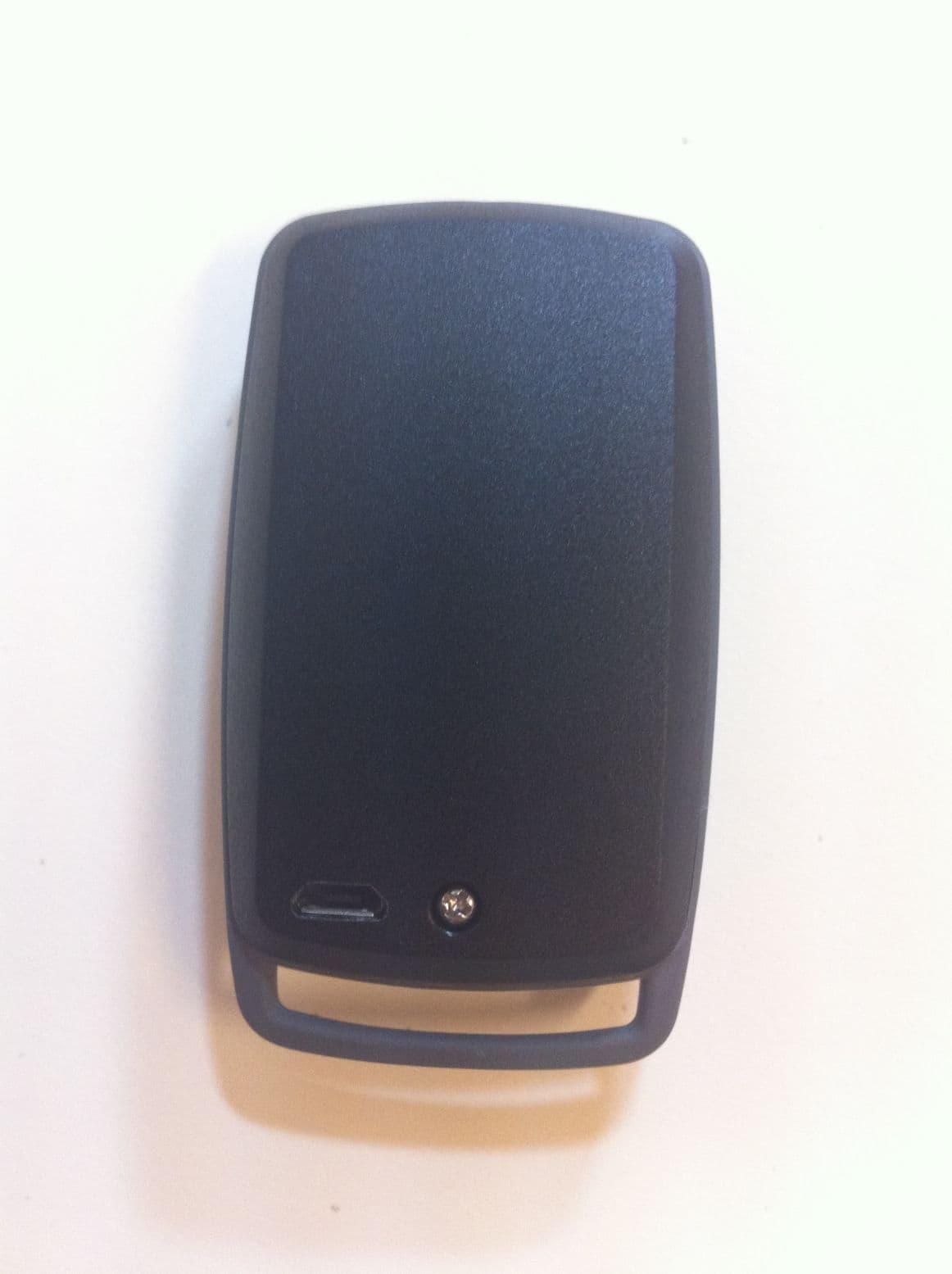
Y6D0793573982315U
Jul 24, 2011SMALL RFID UHF READER/WRITER, BATTERY POWERED, WITH USB AND BLUETOOTH INTERFACE
Equipment Class
DSS - Part 15 Spread Spectrum Transmitter