YDB-SNOMD765VoIP Phone
Snom technology AG
Click to zoom
Application Details
- Equipment Class
- DTS - Digital Transmission System
- Date of Grant
- Oct 06, 2015
- Application Purpose
- Original Equipment
- Date of Application
- Oct 06, 2015
- Equipment Note
- VoIP Phone
- Frequency Range
- 2402.00000000 - 2480.00000000
- Company
- Snom technology AG
- Country
- Germany
Documents & Files
Document Text
Text extracted from the exhibit documents filed with the FCC. Open a document above to read the original.
Users Manual
USB Port 2.0, Type/Typ A (2, 3) (2, 3) (2, 3) (1, 2) (1) If no PoE available - Wenn PoE nicht verfügbar - S'il n'y a pas de PoE - Si no se dispone de PoE - Se non disponibile PoE- (2) Not included in delivery - Nicht im Lieferumfang enthalten - Non inclus - Non incluido - Non incluso (3) Optional - Optionnel - Opzionale - Opcional Connecting · Anschließen · Connecter · Conectar · Collegare C ENGLISH Copyright, Trademarks, Legal Disclaimers © 2015 snom technology Aktiengesellschaft. All Rights Reserved. snom, the names of snom products, and snom logos are trademarks owned by snom technology AG. All product specifications are subject to change without notification. snom technology AG reserves the right to revise and change this document at any time, without being obliged to announce such revisions or changes beforehand or after the fact. Although due care has been taken in the compilation and presentation of the information in this document, the data upon which it is based may have changed in the meantime. snom therefore disclaims all warran- ties and liability for the accurateness, completeness, and currentness of the information published, except in the case of intention or gross negligence on the part of snom or where liability arises due to binding legal provisions. Important Information Please read the instructions on safety and disposal and on how to set up and use the device before using it and also give them to other users to read or inform those users of their contents. Save this manual and do not give the device to third parties without it. Safety Instructions • Follow the instructions in this manual and other applicable documentation of the device. • If the phone is not supplied with power via the Ethernet cable, use only a power adapter expressly recommended by snom technology. Other power supplies may damage or destroy the phone, affect its behavior, or induce noise. • Avoid placing the c ables where people may trip over them or where they may be exposed to mechanical pressure as this may damage them. • This device is for indoor use onl y! NOT FOR OUT- DOOR USE! • Do not install the device in rooms with high humidi- ty (for example, in bathrooms, laundry rooms, damp basements). Do not immerse the device in water and do not spill or pour liquids of any kind onto or into the device. • Do not install the device in surroundings at risk for explosions (paint shops, for example). Do not use the device if you smell gas or other potentially explosive fumes. • Do not use the device during thunderstorms. Lightning striking the po wer grid may cause electric shocks. • Warning: The handset contains a magnet, and its earpiece may attract small dangerous objects such as needles or pins. Please ensure before each use that no such objects are present. SELV (Safety Extra Low Voltage) Compliance Safety status of input/output connections comply with SELV requirements. Warning: To avoid electric shock, do not con- nect safety extra-low voltage (SELV) circuits to telephone-network voltage (TNV) circuits. LAN ports contain SELV circuits, and PSTN ports contain TNV circuits. Some LAN and PSTN ports both use RJ-45 (8P8C) connectors. Use caution when connecting cables. Standards conformance This device complies with the essential health, safety, and environmental require- ments of all relevant European directives. The declaration of conformity can be requested from snom (address see left column). This phone is FCC Class B certified and meets US health, safety, and environmental standards. Unauthorized opening, changing, or modifying the device will cause the warranty to lapse and may also result in the loss of CE conformity and the FCC cer- tification. In case of malfunction contact authorized service personnel, your seller, or snom. • Safety: IEC 60950 • Connectors: ◦2 x RJ45 (Ethernet): 1 x LAN, 1 x PC ◦2 x 4P4C (handset, optional headset) ◦USB port: 1 x type A, USB 2.0 ◦1 proprietary snom connector for EHS Advanced • Ethernet: 2 x IEEE 802.3 / 1 Gigabit Ethernet switch • Compatible with Bluetooth V4.0+EDR, Class 2 • Power over Ethernet (PoE): IEEE 802.3af, Class 2 • If PoE not available: Power adapter PSAC10R-050, 5VDC 10 watts. Not included in delivery, available separately (snom PN 00002730) Disposal of the device This device is subject to European Direc- tive 2002/96/EC and may not be disposed of with general household garbage. If you do not know where to dispose the device at the end of its lifespan, contact your mu- nicipality, local waste management provi- der, or vendor. Cleaning To clean the device, use an anti-static cloth. Please avo- id cleaning liquids as they might damage the surface or internal electronics of the device. Setting up and connecting the phone: See figures B and C. Initializing and registering the phone NOTE: You will need the registration information received from your Internet service provider or your network administrator - normally the phone or extension number, the password, and the registrar. After you have set up the phone and connected it to the network, it will begin to initialize. Normally the initialization is completely automatic, using DHCP. If your network does not support DHCP, you must obtain the IP address, netmask, IP gateway, and DNS server from your Internet service provider or your network administrator and enter them manually when you are asked to do so on the display. Watch the display and, when prompted, select an option by pressing the up or down arrow on the navigation key (Fig. D). Save your selection by pressing the OK key . 1. Language. The default is English. 2. IPv6. The defaul t is IPv4. Press the OK key to continue with the default. 3. VLAN. Press if you are not using VLAN. 4. Time zone. Press the function key underneath to go to the next time zone, then to show all available options within that time zone. 5. Tone scheme (dial tone) 6. The display shows the "Welcome" screen. Press any key to log on. NOTE: To view the phone's IP address at …
Text truncated - open the document above for the full version.
Users Manual
IMPORTANT ADDITIONAL INFORMATION USA This device complies with part 15 of the FCC rules. Operation is subject to the following two conditions: (1) this device may not cause harmful interference, and (2) this device must accept any interference received, including interference that may cause undesired operation. FCC Rules, Part 15 This equipment has been tested and found to comply with the limits for a class B digital device, pursuant to Part 15 of the FCC rules. These limits are designed to provide reasonable protection against harmful interference in a residential installation. This equipment generates, uses and can radiate radio frequency energy and, if not installed and used in accordance with the instructions, may cause harmful interference to radio communications. However, there is no guar- antee that interference will not occur in a particular installation. If this equipment does cause harmful interference to radio or television reception, which can be determined by turning the equipment off and on, the user is encouraged to try to correct the interference by one or more of the following measures: • Reorient or relocate the receiving antenna • Increase the separation between the equipment and receiver • Connect the equipment to an outlet on a circuit different from that to which the receiver is connected • Consult the dealer or an experienced radio/TV technician for help. Changes or modifications not expressly approved by the party responsible for compliance could void the user’s authority to operate the equipment. FCC Radiation Exposure Statement: This equipment complies with FCC radiation exposure limits set forth for an uncontrolled environment. This equipment should be installed and operated with minimum distance 10 mm between the radiator & your body. • This transmitter must not be co-located or operating in conjunction with any other antenna or transmitter. • The antennas used for this transmitter must be installed to provide a separation distance of at least 10 mm from all persons and must not be co-located or operating in conjunction with any other antenna or transmitter. © 2015 snom technology Aktiengesellschaft All Rights Reserved. Snom Technology AG Wittestr. 30 G 13509 Berlin, Deutschland Tel. +49 30 39 83 3-0 [email protected] Snom Technology, Inc. 136 Harvey Road, Suite A102 Londonderry, NH 03053, USA Tel. 1 339 227 6160 [email protected] IMPORTANT ADDITIONAL INFORMATION Canada ICES-003 Class B Notice This Class B digital apparatus complies with Canadian ICES-003. Avis NMB-003, Classe B Cet appareil numérique de la classe B est conforme à la norme NMB-003 du Canada. Industry Canada (IC) Notices This device complies with Industry Canada’s license-exempt RSSs. Operation is subject to the following two conditions: (1) this device may not cause interference, and (2) this device must accept any interference, including interference that may cause undesired operation of the device. Le présent appareil est conforme aux CNR d’Industrie Canada applicables aux appareils radio exempts de license. L’exploitation est autorisée aux deux conditions suivantes: (1) l’apparail ne doit pas produire de brouillage; (2) l’utilisateur de l’appareil doit accepter tout brouillage radioélectrique subi, même si le brouillage est susceptible d’en compromettre le fonctionnement. The device meets the exemption from the routine evaluation limits in section 2.5 of RSS 102 and compliance with RSS- 102 RF exposure, users can obtain Canadian information on RF exposure and compliance. Le dispositif rencontre l’exemption des limites courantes d’évaluation dans la section 2.5 de RSS 102 et la conformité à l’exposition de RSS-102 rf, utilisateurs peut obtenir l’information canadienne sur l’exposition et la conformité de rf. © 2015 snom technology Aktiengesellschaft All Rights Reserved. Snom Technology AG Wittestr. 30 G 13509 Berlin, Deutschland Tel. +49 30 39 83 3-0 [email protected] Snom Technology, Inc. 136 Harvey Road, Suite A102 Londonderry, NH 03053, USA Tel. 1 339 227 6160 [email protected]
Users Manual
USB Port 2.0, Type/Typ A (2, 3) (2, 3) (2, 3) (1, 2) (1) If no PoE available - Wenn PoE nicht verfügbar - S'il n'y a pas de PoE - Si no se dispone de PoE - Se non disponibile PoE- (2) Not included in delivery - Nicht im Lieferumfang enthalten - Non inclus - Non incluido - Non incluso (3) Optional - Optionnel - Opzionale - Opcional Connecting · Anschließen · Connecter · Conectar · Collegare C ENGLISH Copyright, Trademarks, Legal Disclaimers © 2015 snom technology Aktiengesellschaft. All Rights Reserved. snom, the names of snom products, and snom logos are trademarks owned by snom technology AG. All product specifications are subject to change without notification. snom technology AG reserves the right to revise and change this document at any time, without being obliged to announce such revisions or changes beforehand or after the fact. Although due care has been taken in the compilation and presentation of the information in this document, the data upon which it is based may have changed in the meantime. snom therefore disclaims all warran- ties and liability for the accurateness, completeness, and currentness of the information published, except in the case of intention or gross negligence on the part of snom or where liability arises due to binding legal provisions. Important Information Please read the instructions on safety and disposal and on how to set up and use the device before using it and also give them to other users to read or inform those users of their contents. Save this manual and do not give the device to third parties without it. Safety Instructions • Follow the instructions in this manual and other applicable documentation of the device. • If the phone is not supplied with po wer via the Ethernet cable, use only a power adapter expressly recommended by snom technology. Other power supplies may damage or destroy the phone, affect its behavior, or induce noise. • A void placing the cables where people may trip over them or where they may be exposed to mechanical pressure as this may damage them. • This devic e is for indoor use only! NOT FOR OUT- DOOR USE! • Do not install the device in rooms with high humidi- ty (for example, in bathrooms, laundry rooms, damp basements). Do not immerse the device in water and do not spill or pour liquids of any kind onto or into the device. • Do not install the device in surroundings at risk for explosions (paint shops, for example). Do not use the device if you smell gas or other potentially explosive fumes. • Do not use the devic e during thunderstorms. Lightning striking the power grid may cause electric shocks. • W arning: The handset contains a magnet, and its earpiece may attract small dangerous objects such as needles or pins. Please ensure before each use that no such objects are present. SELV (Safety Extra Low Voltage) Compliance Safety status of input/output connections comply with SELV requirements. Warning: To avoid electric shock, do not con- nect safety extra-low voltage (SELV) circuits to telephone-network voltage (TNV) circuits. LAN ports contain SELV circuits, and PSTN ports contain TNV circuits. Some LAN and PSTN ports both use RJ-45 (8P8C) connectors. Use caution when connecting cables. Standards conformance This device complies with the essen- tial health, safety, and environmental requirements of all relevant European directives. The declaration of conformity can be requested from snom (address see left column). This phone is FCC Class B certified and meets US health, safety, and environmental standards. Unauthorized opening, changing, or modifying the device will cause the warranty to lapse and may also result in the loss of CE conformity and the FCC cer- tification. In case of malfunction contact authorized service personnel, your seller, or snom. • Safety: IEC 60950 • Connectors: ◦2 x RJ45 (Ethernet): 1 x LAN, 1 x PC ◦2 x 4P4C (handset, optional headset) ◦USB port: 1 x type A, USB 2.0 ◦1 proprietary snom connector for EHS Advanced • Ethernet: 2 x IEEE 802.3 / 1 Gigabit Ethernet switch • Compatible with Bluetooth V4.0+EDR, Class 2 • Power over Ethernet (PoE): IEEE 802.3af, Class 2 • If PoE not available: Power adapter PSAC10R-050, 5VDC 10 watts. Not included in delivery, available separately (snom PN 00002730) Disposal of the device This device is subject to European Direc- tive 2002/96/EC and may not be disposed of with general household garbage. If you do not know where to dispose the device at the end of its lifespan, contact your mu- nicipality, local waste management provi- der, or vendor. Cleaning To clean the device, use an anti-static cloth. Please avo- id cleaning liquids as they might damage the surface or internal electronics of the device. Setting up and connecting the phone: See figures B and C. Initializing and registering the phone NOTE: You will need the registration information received from your Internet service provider or your network administrator - normally the phone or extension number, the password, and the registrar. After you have set up the phone and connected it to the network, it will begin to initialize. Normally the initialization is completely automatic, using DHCP. If your network does not support DHCP, you must obtain the IP address, netmask, IP gateway, and DNS server from your Internet service provider or your network administrator and enter them manually when you are asked to do so on the display. Watch the display and, when prompted, select an option by pressing the up or down arrow on the navigation key (Fig. D). Save your selection by pressing the OK key . 1. Language. The default is English. 2. IPv6. The default is IPv4. Press the OK key to continue with the default. 3. VLAN. Press if you are not using VLAN. 4. Time zone. Press the function key underneath to go to the next time zone, then to show all available options within that time zone. 5. Tone scheme (dial tone) 6. The display shows the "Welcome" screen. Press any key to log on. NOTE: To view the phone's IP address at…
Text truncated - open the document above for the full version.
Users Manual
USB Port 2.0, Type/Typ A (2, 3) (2, 3) (2, 3) (1, 2) (1) If no PoE available - Wenn PoE nicht verfügbar - S'il n'y a pas de PoE - Si no se dispone de PoE - Se non disponibile PoE- (2) Not included in delivery - Nicht im Lieferumfang enthalten - Non inclus - Non incluido - Non incluso (3) Optional - Optionnel - Opzionale - Opcional Connecting · Anschließen · Connecter · Conectar · Collegare C ENGLISH Copyright, Trademarks, Legal Disclaimers © 2015 snom technology Aktiengesellschaft. All Rights Reserved. snom, the names of snom products, and snom logos are trademarks owned by snom technology AG. All product specifications are subject to change without notification. snom technology AG reserves the right to revise and change this document at any time, without being obliged to announce such revisions or changes beforehand or after the fact. Although due care has been taken in the compilation and presentation of the information in this document, the data upon which it is based may have changed in the meantime. snom therefore disclaims all warran- ties and liability for the accurateness, completeness, and currentness of the information published, except in the case of intention or gross negligence on the part of snom or where liability arises due to binding legal provisions. Important Information Please read the instructions on safety and disposal and on how to set up and use the device before using it and also give them to other users to read or inform those users of their contents. Save this manual and do not give the device to third parties without it. Safety Instructions • Follow the instructions in this manual and other applicable documentation of the device. • If the phone is not supplied with power via the Ethernet c able, use only a power adapter expressly recommended by snom technology. Other power supplies may damage or destroy the phone, affect its behavior, or induce noise. • Av oid placing the cables where people may trip over them or where they may be exposed to mechanical pressure as this may damage them. • This device is f or indoor use only! NOT FOR OUT- DOOR USE! • Do not install the device in rooms with high humidi- ty (for example, in bathrooms, laundry rooms, damp basements). Do not immerse the device in water and do not spill or pour liquids of any kind onto or into the device. • Do not install the device in surroundings at risk for explosions (paint shops, for example). Do not use the device if you smell gas or other potentially explosive fumes. • Do not use the device during thunder storms. Lightning striking the power grid may cause electric shocks. • Warning : The handset contains a magnet, and its earpiece may attract small dangerous objects such as needles or pins. Please ensure before each use that no such objects are present. SELV (Safety Extra Low Voltage) Compliance Safety status of input/output connections comply with SELV requirements. Warning: To avoid electric shock, do not con- nect safety extra-low voltage (SELV) circuits to telephone-network voltage (TNV) circuits. LAN ports contain SELV circuits, and PSTN ports contain TNV circuits. Some LAN and PSTN ports both use RJ-45 (8P8C) connectors. Use caution when connecting cables. Standards conformance This device complies with the essential health, safety, and environmental require- ments of all relevant European directives. The declaration of conformity can be requested from snom (address see left column). This phone is FCC Class B certified and meets US health, safety, and environmental standards. Unauthorized opening, changing, or modifying the device will cause the warranty to lapse and may also result in the loss of CE conformity and the FCC cer- tification. In case of malfunction contact authorized service personnel, your seller, or snom. • Safety: IEC 60950 • Connectors: ◦2 x RJ45 (Ethernet): 1 x LAN, 1 x PC ◦2 x 4P4C (handset, optional headset) ◦USB port: 1 x type A, USB 2.0 ◦1 proprietary snom connector for EHS Advanced • Ethernet: 2 x IEEE 802.3 / 1 Gigabit Ethernet switch • Compatible with Bluetooth V4.0+EDR, Class 2 • Power over Ethernet (PoE): IEEE 802.3af, Class 2 • If PoE not available: Power adapter PSAC10R-050, 5VDC 10 watts. Not included in delivery, available separately (snom PN 00002730) Disposal of the device This device is subject to European Direc- tive 2002/96/EC and may not be disposed of with general household garbage. If you do not know where to dispose the device at the end of its lifespan, contact your mu- nicipality, local waste management provi- der, or vendor. Cleaning To clean the device, use an anti-static cloth. Please avo- id cleaning liquids as they might damage the surface or internal electronics of the device. Setting up and connecting the phone: See figures B and C. Initializing and registering the phone NOTE: You will need the registration information received from your Internet service provider or your network administrator - normally the phone or extension number, the password, and the registrar. After you have set up the phone and connected it to the network, it will begin to initialize. Normally the initialization is completely automatic, using DHCP. If your network does not support DHCP, you must obtain the IP address, netmask, IP gateway, and DNS server from your Internet service provider or your network administrator and enter them manually when you are asked to do so on the display. Watch the display and, when prompted, select an option by pressing the up or down arrow on the navigation key (Fig. D). Save your selection by pressing the OK key . 1. Language. The default is English. 2. IPv6. The default is IPv4. Press the OK key to continue with the default. 3. VLAN. Press if you are not using VLAN. 4. Time zone. Press the function key underneath to go to the next time zone, then to show all available options within that time zone. 5. Tone scheme (dial tone) 6 . The display shows the "Welcome" screen. Press any key to log on. NOTE: To view the phone's IP address a…
Text truncated - open the document above for the full version.
Users Manual
USB Port 2.0, Type/Typ A (2, 3) (2, 3) (2, 3) (1, 2) (1) If no PoE available - Wenn PoE nicht verfügbar - S'il n'y a pas de PoE - Si no se dispone de PoE - Se non disponibile PoE- (2) Not included in delivery - Nicht im Lieferumfang enthalten - Non inclus - Non incluido - Non incluso (3) Optional - Optionnel - Opzionale - Opcional Connecting · Anschließen · Connecter · Conectar · Collegare C ENGLISH Copyright, Trademarks, Legal Disclaimers © 2015 snom technology Aktiengesellschaft. All Rights Reserved. snom, the names of snom products, and snom logos are trademarks owned by snom technology AG. All product specifications are subject to change without notification. snom technology AG reserves the right to revise and change this document at any time, without being obliged to announce such revisions or changes beforehand or after the fact. Although due care has been taken in the compilation and presentation of the information in this document, the data upon which it is based may have changed in the meantime. snom therefore disclaims all warran- ties and liability for the accurateness, completeness, and currentness of the information published, except in the case of intention or gross negligence on the part of snom or where liability arises due to binding legal provisions. Important Information Please read the instructions on safety and disposal and on how to set up and use the device before using it and also give them to other users to read or inform those users of their contents. Save this manual and do not give the device to third parties without it. Safety Instructions • Follow the instructions in this manual and other applicable documentation of the device. • If the phone is not supplied with po wer via the Ethernet cable, use only a power adapter expressly recommended by snom technology. Other power supplies may damage or destroy the phone, affect its behavior, or induce noise. • A void placing the cables where people may trip over them or where they may be exposed to mechanical pressure as this may damage them. • This devic e is for indoor use only! NOT FOR OUT- DOOR USE! • Do not install the device in rooms with high humidi- ty (for example, in bathrooms, laundry rooms, damp basements). Do not immerse the device in water and do not spill or pour liquids of any kind onto or into the device. • Do not install the device in surroundings at risk for explosions (paint shops, for example). Do not use the device if you smell gas or other potentially explosive fumes. • Do not use the devic e during thunderstorms. Lightning striking the power grid may cause electric shocks. • W arning: The handset contains a magnet, and its earpiece may attract small dangerous objects such as needles or pins. Please ensure before each use that no such objects are present. SELV (Safety Extra Low Voltage) Compliance Safety status of input/output connections comply with SELV requirements. Warning: To avoid electric shock, do not con- nect safety extra-low voltage (SELV) circuits to telephone-network voltage (TNV) circuits. LAN ports contain SELV circuits, and PSTN ports contain TNV circuits. Some LAN and PSTN ports both use RJ-45 (8P8C) connectors. Use caution when connecting cables. Standards conformance This device complies with the essential health, safety, and environmental require- ments of all relevant European directives. The declaration of conformity can be requested from snom (address see left column). This phone is FCC Class B certified and meets US health, safety, and environmental standards. Unauthorized opening, changing, or modifying the device will cause the warranty to lapse and may also result in the loss of CE conformity and the FCC cer- tification. In case of malfunction contact authorized service personnel, your seller, or snom. • Safety: IEC 60950 • Connectors: ◦2 x RJ45 (Ethernet): 1 x LAN, 1 x PC ◦2 x 4P4C (handset, optional headset) ◦USB port: 1 x type A, USB 2.0 ◦1 proprietary snom connector for EHS Advanced • Ethernet: 2 x IEEE 802.3 / 1 Gigabit Ethernet switch • Compatible with Bluetooth V4.0+EDR, Class 2 • Power over Ethernet (PoE): IEEE 802.3af, Class 2 • If PoE not available: Power adapter PSAC10R-050, 5VDC 10 watts. Not included in delivery, available separately (snom PN 00002730) Disposal of the device This device is subject to European Direc- tive 2002/96/EC and may not be disposed of with general household garbage. If you do not know where to dispose the device at the end of its lifespan, contact your mu- nicipality, local waste management provi- der, or vendor. Cleaning To clean the device, use an anti-static cloth. Please avo- id cleaning liquids as they might damage the surface or internal electronics of the device. Setting up and connecting the phone: See figures B and C. Initializing and registering the phone NOTE: You will need the registration information received from your Internet service provider or your network administrator - normally the phone or extension number, the password, and the registrar. After you have set up the phone and connected it to the network, it will begin to initialize. Normally the initialization is completely automatic, using DHCP. If your network does not support DHCP, you must obtain the IP address, netmask, IP gateway, and DNS server from your Internet service provider or your network administrator and enter them manually when you are asked to do so on the display. Watch the display and, when prompted, select an option by pressing the up or down arrow on the navigation key (Fig. D). Save your selection by pressing the OK key . 1. Language. The default is English. 2. IPv6. The default is IPv4. Press the OK key to continue with the default. 3. VLAN. Press if you are not using VLAN. 4. Time zone. Press the function key underneath to go to the next time zone, then to show all available options within that time zone. 5. Tone scheme (dial tone) 6. The display shows the "Welcome" screen. Press any key to log on. NOTE: To view the phone's IP address at…
Text truncated - open the document above for the full version.
Cover Letter(s)
CERTIFICATEOF COMPLIANCE Authorized under Declaration of Conformity according to 47 CFR, Part 2 and Part 15 of the FCC Rules. The product listed in follows was (were) tested in the BTL EMC Laboratory to comply with the criteria limits Class B of conducted and radiated emissions of the Technical Standards FCC Part 15, Subpart B, established by the FCC, USA. Equipment VoIP Phone Model Name D765, snom D765, snom 765, 765 Brand Name Snom Applicant Snom technology AG Address Wittestr. 30 G, Berlin, Germany 13509. Standard(s) FCC Part 15, Subpart B: 2014 ANSI C63.4-2014 Report(s) BTL-FCCE-1-1506143 The test data, data evaluation, and equipment configuration contained in our test report(s) above was (were) obtained utilizing the test procedures, test instruments, test sites that has been accredited by the Authority of TAF according to the ISO-17025 quality assessment standard and technical standard(s). The test data contained in the referenced test report relate only to the EUT sample and item(s) tested. Andy Chiu Authorized Signatory BTL INC. B1, No. 37, Lane 365, Yang-Guang St., Nei-Hu District, Taipei City 114, Taiwan. TEL:+886-2-2657-3299 FAX:+886-2-2657-3331
Cover Letter(s)
Model Declaration Letter We, the undersigning company Company Name: Sercomm Corporation Address: 8F, No. 3-1, YuanQu St. NanKang, Taipei City, 115 Taiwan Hereby confirm that the following products: Product description: VoIP Phone Type designation: D765, snom D765, snom 765, 765 Trademark: Snom That All models of D765, snom D765, snom 765 and 765 are electrically equal and only differ in model names due to marketing purpose. Signature: Kevin Kuo / Sr. Manager [email protected] Tel: 886-2-25663988 Fax: 886-2-26557379
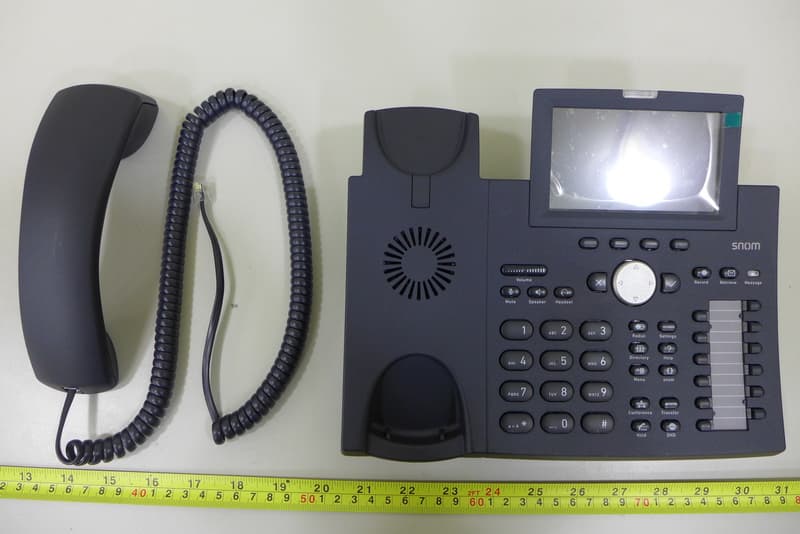
External Photos
Project No.: 1506143 Page 2 of 24 Project No.: 1506143 Page 3 of 24 Project No.: 1506143 Page 4 of 24 Project No.: 1506143 Page 5 of 24
ID Label/Location Info
snom technical datasheet (P-DIN_A4) Version 2.0. /// September 2014 companysnom technology AG revisionPS No.ERP …
Text truncated - open the document above for the full version.
Contact Information
Applicant
Fabian Bess
Technical Contact
Non-Technical Contact
BTL Inc.Cathy Wang
[email protected]86-769-83183000
Test Firm
BTL Inc.Andy Chiu
Technical Specifications
| # | Rule Parts | Frequency Range | Power Output |
|---|---|---|---|
| 1 | 15C | 2.40 GHz - 2.48 GHz | 5.00 mW |
Other Applications from Snom technology AG
YDB-SNOMD375
Oct 07, 2015VoIP Phone
Equipment Class
DSS - Part 15 Spread Spectrum Transmitter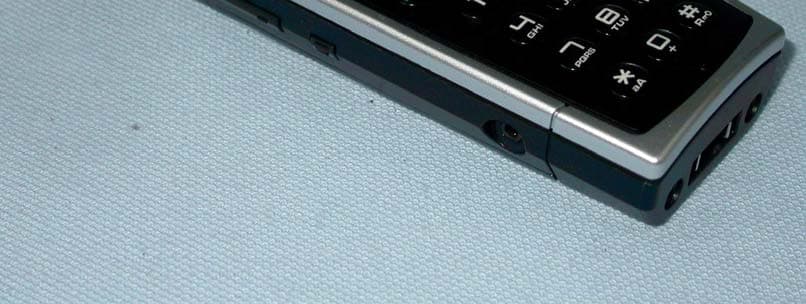
YDBM9HS2
Nov 27, 2011DECT VOIP PHONE
Equipment Class
PUE - Part 15 Unlicensed PCS portable Tx held to ear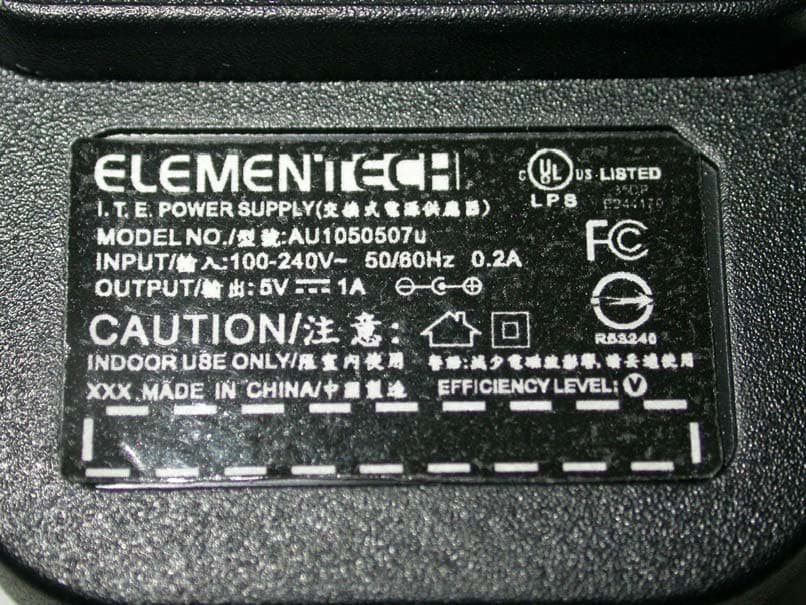
YDBM9BS1
Dec 29, 2010DECT VOIP PHONE
Equipment Class
PUB - Part 15 Unlicensed PCS Base Station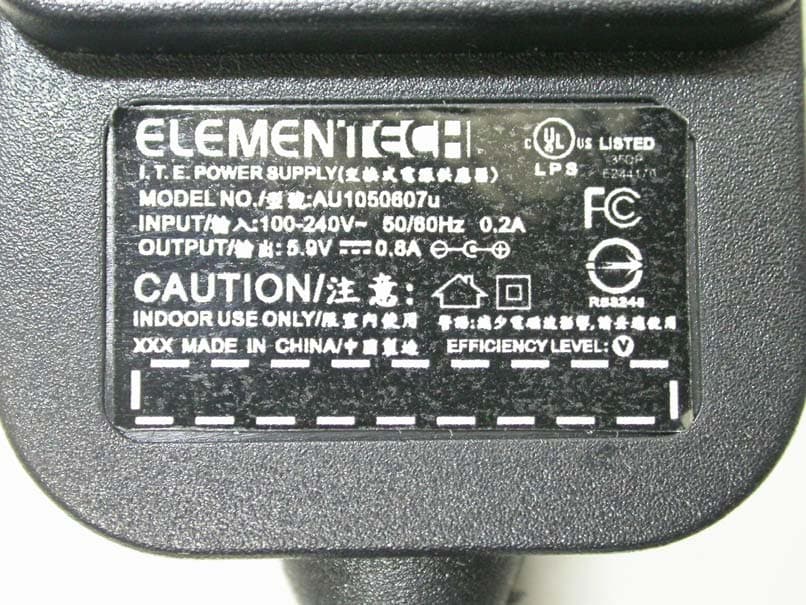
YDBM9HS1
Dec 29, 2010DECT VOIP PHONE
Equipment Class
PUE - Part 15 Unlicensed PCS portable Tx held to ear