YHLBLUARIAPDTrue Wireless Stereo
BLU Products, Inc.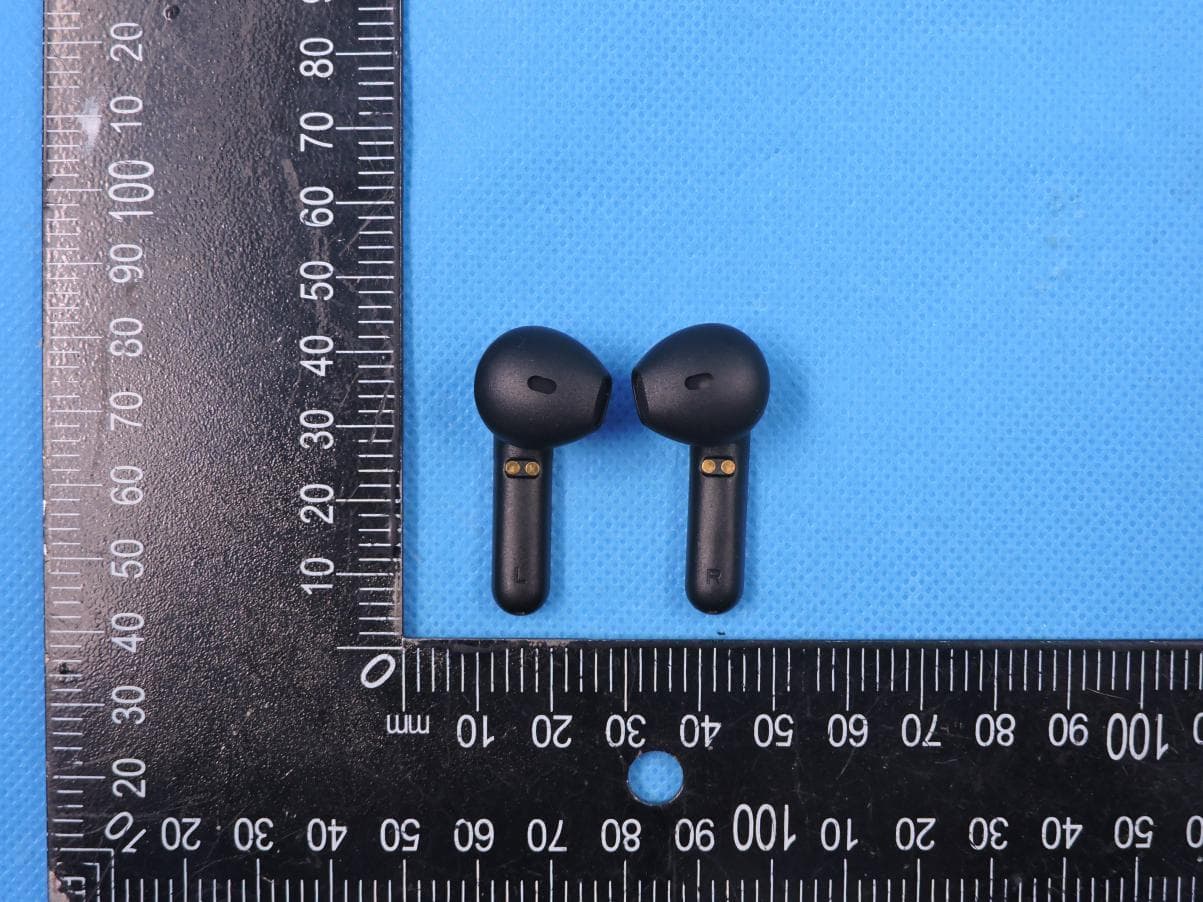
Click to zoom
Application Details
- Equipment Class
- DTS - Digital Transmission System
- Date of Grant
- May 06, 2021
- Application Purpose
- Original Equipment
- Date of Application
- May 06, 2021
- Equipment Note
- True Wireless Stereo
- Frequency Range
- 2402.00000000 - 2480.00000000
- Company
- BLU Products, Inc.
- Country
- United States
Documents & Files
Document Text
Text extracted from the exhibit documents filed with the FCC. Open a document above to read the original.
Users Manual
BLU ARIA POD+ Quick Guide Dual-ear mode: Initial use of headsets Take out both left and right earphones from the charging box when using it for the first time. Tear off the film. Put both earphones back into the charging box. The two earphone indicator lights is on. The headset is activated. Basic Operations Automatic power on/off: Open the lid of the charging box, the headset will automatically turn on and the TWS connection is successful. The headsets automatically shut down after 3 minutes of pairing timeout. Put the earphone back into the charging box and close the charging cover. The earphone will automatically shut down after disconnecting the phone and enter the charging state. Product overview 1. Headsets 2. Multifunction key 3. Charging contacts 4. Sound hole 5. Microphone 6. Charging box 7. Charging interface 8. Indicator light Connection: After the left and right earphones are paired, open the cover of the charging box, the white LED of the earphone is flashing quickly. Search for the pairing name on your mobile phone, click Connect, and the phone will have an electronic alert tone if it is successfully connected. Apparel Please follow the diagram to penetrate the earphone into the ear, press the R<> right ear and LRR<> ear correspondence. Please rotate the headset slightly and adjust to a comfortable angle to ensure that the headset is stable and tight to prevent the headset from falling off. Receive a call: When there is an incoming call, you can double-tap either the left earphone (L) or the right earphone (R) to receive the call. Terminate a call: During a call, you can double-tap the left earphone (L) or right earphone (R) to terminate the call. Cancel outgoing call: When the call is made, double-tap the left earphone (L) or right earphone (R) to cancel the outgoing call. Music play/pause: When the music is being played, you can double-tap the left earphone (L) or right earphone (R) to pause the music, or repeat the same action to start playing the music again. Previous Track: Long touch the left earphone (L) for 3 seconds. Next Track: Long touch the right earphone (R) for 3 seconds. Game mode: Touch the headset 3 times to turn on the low-latency mode, accompanied by a "beep-beep" tone, repeat the operation to turn off the low-latency mode, accompanied by a "beep-beep-beep" tone. Automatic re-connection: After the earphone are powered on, they are actively re-connected to the last paired one devices. iOS battery level display: After the earphone is connected to the iOS, the battery level of the earphone can be displayed. Charger and Battery Before using any charger to charge this earphone, check whether the specifications of the charger meet requirements. The recommended output voltage of the charger is DC5V+/-0.25V, and the recommended output current is 100 mA to 500 mA. An over-high charging voltage may damage the earphone. Warning: Use the recommended charger whenever possible. Use of other types of chargers may violate the warranty terms of the equipment and results in danger. If the charging cable is delivered with the earphone, connect the cable to a CCC-certified charger or computer to charge the earphone. Charging the Battery The earphone use embedded charging battery that cannot be removed. Do not attempt to remove the battery from the earphone or the charging box; otherwise, the earphone may be damaged. If the earphone is not used in a long time, keep it in a cool and well-ventilated place, and charge the earphone once every two months. 1.When the white LED light of the connected headset flashes with a "beep" tone, it indicates that the headset is low on power. If you continue to use it, it will automatically shut down. At this time, you need to put the headset back into the charging box to charge. 2.If both the earphone and charging box are out of power, plug in the cable of the charger into the TYP-C USB port on the charging box, and plug the charger into the AC socket. The charging box and earphone will be charged simultaneously. 3.The earphones are charged in the charging box through two metal contacts. The white LED lights of the earphones are on when charging. It may take about 2 hours to fully charge the battery. After the battery is fully charged, the white LED lights are off. The earphones are ready for use at this time. When the charging box is charging, the white LED light flashes. It may take about 2 hours to fully charge the battery. After the battery is fully charged, the white LED light is always on. At this time, disconnect the charger from the power socket and the charging box. 4.A fully charged battery of earphone can provide about 3.9 hours of talk time, or 94 hours of standby time. The actual talk time and standby time may vary with cell phones, settings, use methods, and environment. FCC Caution. This device complies with part 15 of the FCC Rules. Operation is subject to the following two conditions: (1) This device may not cause harmful interference, and (2) this device must accept any interference received, including interference that may cause undesired operation. Any Changes or modifications not expressly approved by the party responsible for compliance could void the user's authority to operate the equipment. Note: This equipment has been tested and found to comply with the limits for a Class B digital device, pursuant to part 15 of the FCC Rules. These limits are designed to provide reasonable protection against harmful interference in a residential installation. This equipment generates uses and can radiate radio frequency energy and, if not installed and used in accordance with the instructions, may cause harmful interference to radio communications. However, there is no guarantee that interference will not occur in a particular installation. If this equipment does cause harmful interference to radio or television reception, which can be determined by turning the equipment off and on, the user is encouraged to try to correct the inte…
Text truncated - open the document above for the full version.
Cover Letter(s)
BLU Products, Inc. Office of Engineering Technology Federal Communications Commission 7435 Oakland Mills Road Columbia, MD 21046 USA Date: 2021/04/30 Subject; Request for Confidentiality FCC ID: YHLBLUARIAPD To Whom It May Concern, Pursuant to the provisions of the Commission’s rules Title 47 Sections §0.457 and §0.459, we are requesting the Commission to withhold the following attachment(s) as confidential documents from public disclosure indefinitely. These documents contain detailed system and equipment descriptions and are considered as proprietary information in operation of the equipment. The public disclosure of these documents might be harmful to our company and would give competitors an unfair advantage in the market. Schematic Diagram Block Diagram Parts List Operational Description Tune-up Procedure In additional to above mentioned documents, in order to comply with the marketing regulations in Title 47 CFR §2.803 and the importation rules in Title 47 CFR §2.1204, while ensuring that business sensitive information remains confidential until the actual marketing of newly authorized devices, we request Short Term Confidentiality of the following attachment(s); External Photos Test Setup Photos Internal Photos User Manual For 45 days, pursuant to Public Notice DA 04-1705. OR For 180 days pursuant to KDB 726920 D01. It is our understanding that all measurement test reports, FCC ID label format and correspondence during the certification review process cannot be granted as confidential documents and this information will be available for public review once the grant of equipment authorization is issued. Sincerely, Signature: Name: Zeng wei Title: Manager
Cover Letter(s)
BLU Products, Inc. Agent Authorization Company: BLU Products, Inc. Address: 10814 NW 33rd St # 100 Doral, FL 33172, USA Product Name: True Wireless Stereo Model Number(s): BLU ARIA POD+ Product Description: True Wireless Stereo with Bluetooth We authorize MiCOM Labs Inc., 575 Boulder Court, Pleasanton, California 94566, USA, to act on our behalf on all matters concerning the certification of above named equipment. We declare that MiCOM Labs Inc. is allowed to forward all information related to the approval and certification of equipment to the regulatory agencies as required and to discuss any issues concerning the approval application. Any and all acts carried out by MiCOM Labs on our behalf shall have the same effect as acts of our own. Signature: Date: 2021/04/30 Name: Zeng wei Title: Manager Company: BLU Products, Inc.
Cover Letter(s)
BLU Products, Inc. Authorization Letter We, (the approval holder) Company name BLU Products, Inc. Addresss 10814 NW 33rd St # 100 Doral, FL 33172, USA declare that the following representative (agent): Name (person) Bovey Yang Company name Shenzhen STS Test Services Co., Ltd. Addresss 1/F., Building B, Zhuoke Science Park, No.190, Chongqing Road, Fuyong Street, Bao’an District, Shenzhen, Guangdong,China City Shenzhen Country China to act on our behalf on all matters concerning the application and documents submitted to Micom Labs for product certification below Product Description True Wireless Stereo Type or Model(s) BLU ARIA POD+ Tradename or Brand(s) BLU Attestation: City: Date: Name: (this must be a person) Function: Signature: (or official company stamp) USA 2021/04/30 Zeng wei Manager
External Photos
Page 1 of 5 Report No.: STS2104087 APPENDIX-PHOTOGRAPHS OF EUT CONSTRUCTIONAL DETAILS Model: BLU ARIA POD+ Photo 1 Photo 2 Page 2 of 5 Report No.: STS2104087 Photo 3 Photo 4 Page 3 of 5 Report No.: STS2104087 Photo 5 Photo 6 Page 4 of 5 Report No.: STS2104087 Photo 7 Photo 8 Page 5 of 5 Report No.: STS2104087 Photo 9
ID Label/Location Info
Label Size:15*5mm The label is engraved on the shell True Wireless Stereo Model name: BLU ARIA POD+ FCC ID: YHLBLUARIAPD
Internal Photos
Page 1 of 3 Report No.: STS2104087 APPENDIX-PHOTOGRAPHS OF EUT CONSTRUCTIONAL DETAILS Model: BLU ARIA POD+ Photo 1 Photo 2 BT Antenna Page 2 of 3 Report No.: STS2104087 Photo 3 Photo 4 Page 3 of 3 Report No.: STS2104087 Photo 5 Photo 6
RF Exposure Info
FCC ID: YHLBLUARIAPD RF EXPOSURE EVALUATION METHOD SAR Test Exclusion Thresholds for 100 MHz – 6 GHz and ≤ 50 mm Approximate SAR Test Exclusion Power Thresholds at Selected Frequencies and Test Separation Distances are illustrated in the following Table. The 1-g and 10-g SAR test exclusion thresholds for 100 MHz to 6 GHz at test separation distances ≤ 50 mm are determined by: [(max. power of channel, including tune-up tolerance, mW)/(min. test separation distance, mm)] · [√f(GHz)] ≤ 3.0 for 1-g SAR and ≤ 7.5 for 10-g extremity SAR,where f(GHz) is the RF channel transmit frequency in GHz Power and distance are rounded to the nearest mW and mm before calculation The result is rounded to one decimal place for comparison The test exclusions are applicable only when the minimum test separation distance is ≤ 50 mm and for transmission frequencies between 100 MHz and 6 GHz. When the minimum test separation distance is < 5 mm, a distance of 5 mm is applied to determine SAR test exclusion. FCC ID: YHLBLUARIAPD Maximum measured transmitter power. BT5.1+EDR The Worst Case Mode 2402-2480MHz Detector PEAK GFSK 7±1dBm π/4-DQPSK 7±1dBm 8DPSK 7±1dBm Remark: The worst case gain of the antenna is 5.54dBi. 5.54dBi logarithmic terms convert to numeric result is nearly 3.58 GFSK 2.402 7.59 8 6.309573445 1.9558 3 π/4-DQPSK 2.402 7.09 8 6.309573445 1.9558 3 8DPSK 2.402 7.66 8 6.309573445 1.9558 3 Mode Limit Maximum Peak Conducted Output Power (dBm) frequency (GHz) Tune up Power(dBm) Tune up Power (mW) Result Threshold at which no SAR required is 1.9558≤ 3.0 for 1-g SAR, Separation distance is 5mm. BT5.1 The Worst Case Mode 2402-2480MHz Detector PEAK 2402MHz 4±1dBm 2440MHz 4±1dBm 2480MHz 4±1dBm Remark: The worst case gain of the antenna is 5.54dBi. 5.54dBi logarithmic terms convert to numeric result is nearly 3.58 2.402 4.6 5 3.16227766 0.9802 3 2.44 4.48 5 3.16227766 0.9879 3 2.48 4.37 5 3.16227766 0.9960 3 Limit Maximum Peak Conducted Output Power (dBm) frequency (GHz) Tune up Power (dBm) Tune up Power (mW) Result Threshold at which no SAR required is 0.9960≤ 3.0 for 1-g SAR, Separation distance is 5mm.
Test Report
Any reproduction of this document must be done in full. No single part of this document may be reproduced without permission from STS, all test data presented in this report is only applicable to presented test sample. Shenzhen STS Test Services Co., Ltd. A 1/F, Building B, Zhuoke Science Park, No.190 Chongqing Road, HepingShequ, Fuyong Sub-District, Bao’an District, Shenzhen, Guang Dong, China TEL: +86-755 3688 6288 FAX: +86-755 3688 6277 E-mail:[email protected] RADIO TEST REPORT Report No.:STS2104087W02 Issued for BLU Products, Inc. 10814 NW 33rd St # 100 Doral, FL 33172, USA Product Name: True Wireless Stereo Brand Name: BLU Model Name: BLU ARIA POD+ Series Model: N/A FCC ID: YHLBLUARIAPD Test Standard: FCC Part 15.247 S T L A B S Page 2 of 60 Report No.: STS2104087W02 TEST RESULT CERTIFICATION Applicant’s Name ................. : BLU Products, Inc. Address ................................. : 10814 NW 33rd St # 100 Doral, FL 33172, USA Manufacturer's Name .......... : BLU Products, Inc. Address ................................. : 10814 NW 33rd St # 100 Doral, FL 33172, USA Product Description Product Name ....................... : True Wireless Stereo Brand Name ........................ : BLU Model Name .......................... : BLU ARIA POD+ Series Model ......................... : N/A Test Standards ..................... : FCC Part15.247 Test Procedure ...................... : ANSI C63.10-2013 This device described above has been tested by STS, the test results show that the equipment under test (EUT) is in compliance with the FCC requirements. And it is applicable only to the tested sample identified in the report. This report shall not be reproduced except in full, without the written approval of STS, this document may be altered or revised by STS, personal only, and shall be noted in the revision of the document. Date of Test ........................................... : Date of receipt of test item ..................... : 20 Apr. 2021 Date (s) of performance of tests ............. : 20 Apr. 2021 ~ 28 Apr. 2021 Date of Issue .......................................... : 28 Apr. 2021 Test Result.............................................. : Pass Testing Engineer : (Chris Chen) Technical Manager : (Sean she) Authorized Signatory : (Vita Li) Page 3 of 60 Report No.: STS2104087W02 Table of Contents 1. SUMMARY OF TEST RESULTS 6 1.1 TEST FACTORY 7 1.2 MEASUREMENT UNCERTAINTY 7 2. GENERAL INFORMATION 8 2.1 GENERAL DESCRIPTION OF THE EUT 8 2.2 DESCRIPTION OF THE TEST MODES 10 2.3 TEST SOFTWARE AND POWER LEVEL 10 2.4 BLOCK DIAGRAM SHOWING THE CONFIGURATION OF SYSTEM TESTED 11 2.5 DESCRIPTION OF NECESSARY ACCESSORIES AND SUPPORT UNITS 12 2.6 EQUIPMENTS LIST 13 3. EMC EMISSION TEST 15 3.1 CONDUCTED EMISSION MEASUREMENT 15 3.2 TEST PROCEDURE 16 3.3 TEST SETUP 16 3.4 EUT OPERATING CONDITIONS 16 3.5 TEST RESULTS 17 4. RADIATED EMISSION MEASUREMENT 19 4.1 RADIATED EMISSION LIMITS 19 4.2 TEST PROCEDURE 21 4.3 TEST SETUP 22 4.4 EUT OPERATING CONDITIONS 22 4.5 FIELD STRENGTH CALCULATION 22 4.6 TEST RESULTS 24 5. CONDUCTED SPURIOUS & BAND EDGE EMISSION 37 5.1 LIMIT 37 5.2 TEST PROCEDURE 37 5.3 TEST SETUP 37 5.4 EUT OPERATION CONDITIONS 37 5.5 TEST RESULTS 38 6. POWER SPECTRAL DENSITY TEST 46 6.1 LIMIT 46 6.2 TEST PROCEDURE 46 6.3 TEST SETUP 46 Page 4 of 60 Report No.: STS2104087W02 Table of Contents 6.4 EUT OPERATION CONDITIONS 46 6.5 TEST RESULTS 47 7. BANDWIDTH TEST 51 7.1 LIMIT 51 7.2 TEST PROCEDURE 51 7.3 TEST SETUP 51 7.4 EUT OPERATION CONDITIONS 51 7.5 TEST RESULTS 52 8. PEAK OUTPUT POWER TEST 56 8.1 LIMIT 56 8.2 TEST PROCEDURE 56 8.3 TEST SETUP 56 8.4 EUT OPERATION CONDITIONS 56 8.5 TEST RESULTS 57 9. ANTENNA REQUIREMENT 59 9.1 STANDARD REQUIREMENT 59 9.2 EUT ANTENNA 59 10. EUT TEST PHOTO 60 Page 5 of 60 Report No.: STS2104087W02 Revision History Rev. Issue Date Report NO. Effect Page Contents 00 28 Apr. 2021 STS2104087W02 ALL Initial Issue Page 6 of 60 Report No.: STS2104087W02 1. SUMMARY OF TEST RESULTS Test procedures according to the technical standards: KDB 558074 D01 15.247 Meas Guidance v05r02. FCC Part 15.247,Subpart C Standard Section Test Item Judgment Remark 15.207 Conducted Emission PASS -- 15.247 (a)(2) 6dB Bandwidth PASS -- 15.247 (b)(3) Output Power PASS -- 15.209 Radiated Spurious Emission PASS -- 15.247 (d) Conducted Spurious & Band Edge Emission PASS -- 15.247 (e) Power Spectral Density PASS -- 15.205 Restricted Band Edge Emission PASS -- Part 15.247(d)/ Part 15.209(a) Band Edge Emission PASS -- 15.203 Antenna Requirement PASS -- NOTE: (1) ‘N/A’ denotes test is not applicable in this Test Report. (2) All tests are according to ANSI C63.10-2013. Page 7 of 60 Report No.: STS2104087W02 1.1 TEST FACTORY SHENZHEN STS TEST SERVICES CO., LTD Add. : A 1/F, Building B, Zhuoke Science Park, No.190 Chongqing Road, HepingShequ, Fuyong Sub-District, Bao’an District, Shenzhen, Guang Dong, China FCC test Firm Registration Number: 625569 IC test Firm Registration Number: 12108A A2LA Certificate No.: 4338.01 1.2 MEASUREMENT UNCERTAINTY The reported uncertainty of measurement y ± U, where expended uncertainty U is based on a standard uncertainty multiplied by a coverage factor of k=2, providing a level of confidence of approximately 95 %. No. Item Uncertainty 1 RF output power, conducted ±0.68dB 2 Unwanted Emissions, conducted ±2.988dB 3 All emissions, radiated 9K-30MHz ±2.84dB 4 All emissions, radiated 30M-1GHz ±4.39dB 5 All emissions, radiated 1G-6GHz ±5.10dB 6 All emissions, radiated>6G ±5.48dB 7 Conducted Emission (9KHz-150KHz) ±2.79dB 8 Conducted Emission (150KHz-30MHz) ±2.80dB Page 8 of 60 Report No.: STS2104087W02 2. GENERAL INFORMATION 2.1 GENERAL DESCRIPTION OF THE EUT Product Name True Wireless Stereo Trade Name BLU Model Name BLU ARIA POD+ Series Model N/A Model Difference N/A Product Description The EUT is a True Wireless Stereo Operation Frequency: 2402~2480 MHz Modulation Type: GFSK Radio Technology: BLE Bluetooth Version: 5.1 Bluetooth Configuration: LE(Support 1M PHY, 2M PH…
Text truncated - open the document above for the full version.
Test Setup Photos
Page 1 of 2 FCC ID: YHLBLUARIAPD DSS&DTS Setup photo Model name: BLU ARIA POD+ DSS&DTS conduction DSS&DTS radiation L Page 2 of 2 FCC ID: YHLBLUARIAPD DSS&DTS radiation H
Contact Information
Applicant
Wei Zeng(Senior Manager)
Technical Contact
Test Firm
SHENZHEN STS TEST SERVICES CO.,LTD.Bovey Yang
[email protected]+86 755-36886288
Technical Specifications
| # | Rule Parts | Frequency Range | Power Output |
|---|---|---|---|
| 1 | 15C | 2.40 GHz - 2.48 GHz | 2.88 mW |
Other Applications from BLU Products, Inc.
YHLBLU96GC
Aug 13, 2026Smart Phone
Equipment Class
CXX - Communications Rcvr for use w/ licensed Tx and CBsYHLBLUB1680V
Aug 03, 2026Smart Phone
Equipment Class
DTS - Digital Transmission SystemYHLBLUT500B
Jun 26, 2026Tablet
Equipment Class
NII - Unlicensed National Information Infrastructure TX
YHLBLU9CMAX
Apr 13, 2026Smart phone
Equipment Class
CXX - Communications Rcvr for use w/ licensed Tx and CBsYHLBLU2KW
Sep 12, 2025Smart Phone
Equipment Class
DSS - Part 15 Spread Spectrum Transmitter