YHLBLUSTMN22Smart Phone
BLU Products, Inc.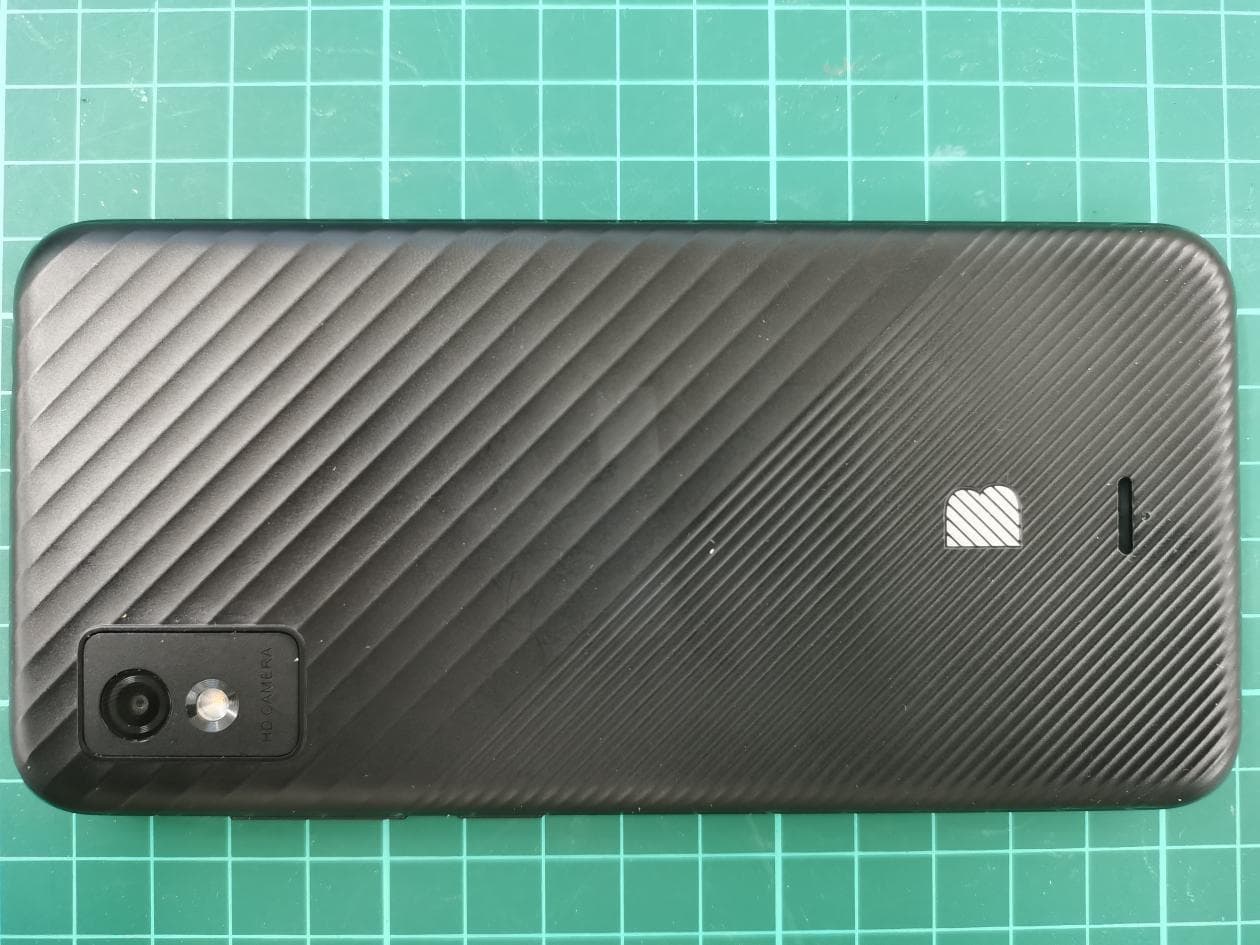
Click to zoom
Application Details
- Equipment Class
- PCE - PCS Licensed Transmitter held to ear
- Date of Grant
- Nov 30, 2022
- Application Purpose
- Original Equipment
- Date of Application
- Nov 22, 2022
- Equipment Note
- Smart Phone
- Frequency Range
- 673.00000000 - 688.00000000
- Company
- BLU Products, Inc.
- Country
- United States
Documents & Files
Document Text
Text extracted from the exhibit documents filed with the FCC. Open a document above to read the original.
Users Manual
STUDIO MINI 2023 Quick Guide | Guía Rápida | Guía Rápido | Guide Rapide For instructions or any questions pertaining to phone usage, please click on the BLU page by visiting the following address: manuals.bluproducts.com Para obtener instrucciones o preguntas relacionadas con el uso del teléfono, por favor haga clic en la página de BLU visitando la siguiente dirección: manuals.bluproducts.com Para obter instruções ou perguntas relacionadas ao uso do telefone, por favor, clique na página de BLU visitando o seguinte endereço: manuals.bluproducts.com Pour des instructions ou pour toutes questions sur l'utilisation du téléphone, veuillez cliquer sur à la page BLU en visitant l'adresse suivante: manuals.bluproducts.com ATTENTION ABOUT YOUR PHONE Transportation Safety Observe all transportation laws and regulations. PLEASE DRIVE RESPONSIBLY - DO NOT TEXT & DRIVE Hospital Safety Follow hospital rules and limitations and turn off your mobile phone when near medical instruments. Airport Safety Remember to follow all airport and flight safety regulations. Water Hazard Your phone is not waterproof. Keep your phone away from water or liquid to avoid damage. Emergency Calls Make sure your mobile phone is switched on and in a service area. On home screen, tap the phone key and dial the emergency number. Battery Usage For better performance and longer battery life, it is recommended that you charge the battery fully before using the mobile phone for the first time and that you initially complete two to three charge cycles. IMEI Information To check your IMEI, press *#06# KEY FUNCTIONS Volume Power On / Off Back Home Recent Apps Front Camera Rear Camera Flash Power On / Off Used to power on/off the device and to lock the screen. » Long press the power button to power on » While the phone is powered on, long press to access the power off menu or click to lock the screen Volume Adjusts the ringer volume, call volume, and multimedia volume. Home The home button pauses any current action and returns to the home screen. Recent Apps Opens a list of recently opened applications that allows you to switch conveniently between them. This option can also close any open applications by swiping to the side. Back Returns to the previous screen; Closes the keyboard, any open program, or any menu option. Headset Port Connect earphones to this port for hands-free capabilities. You may also to listen to music or FM radio. USB Port Charges the device and transfers data such as documents, music, and video between your device and a PC. Front Camera A high-resolution front camera to take pictures and video. This option is ideal for self-portraits. Rear Camera A high-resolution rear camera to take pictures and video. Flash Provides light for pictures in low-light conditions. It also may be used as a flashlight. INTRODUCTION Installation of the SIM Card Warning: Please keep the SIM card out of the reach of children. The SIM card and its contact are easily damaged due to scratching or bending. Please use caution when carrying, installing, or taking out the SIM card. Note: Please contact your cellular phone service provider directly to obtain your SIM card. To insert SIM card: Remove the rear cover. Insert the SIM card. Insert the SD card (For additional storage capacity) Insert the battery, replace the rear cover and power on the phone. SIM Card Slot DEVICE CONFIGURATION When you initially power on your phone, there will be a series of steps to set up basic features. INSERT SIM Insert your SIM card so the phone can register to the network. SELECT LANGUAGE While on the Welcome screen, please scroll to select your language. In this step, you also have the option to adjust Vision Settings such as magnification, font, and display size. You have the ability to place an Emergency Call. CONNECT TO WI-FI This step allows the device to connect to the internet. Click on the desired Wi-Fi network that the device that will be connected. Please note that any unsecured Wi-Fi networks can be connected to without credentials and any secured Wi-Fi networks require a password for credentials prior to connection. It is recommended that you connect to a Wi-Fi network to check for software updates prior to startup to avoid any data overages. COPY APPS & DATA This step allows you to select transfer options such as applications, pictures, music and more from a previous device. You may also setup as new if you choose not to from a previous device. ADD YOUR ACCOUNT Sign in to your Google TM Account in order to keep accounts streamlined with Google services. Your account will be used for Google programs such as Google Play, Google Drive, and Google Pay. If you do not have a Google account, click to create a new account. If the device is not recognized by your Google account, you will have to complete a security verification. GOOGLE SERVICES Click to add Google services that include Backup and Restore, Location Services, Install Updates and Apps. DEVICE PROTECTION Click to setup device protection such as a PIN or Password. This option can be done at a later time. FINALIZE SETUP The last step allows you to setup Google Assistant and Google Pay. You may also add another email address, control what information is visible through the phones lock screen, and lets you also review any additional apps. You may skip this step and setup later. Google, Google Play, Google Maps, YouTube, Gmail, and other marks are trademarks of Google LLC. SOBRE SU TELÉFONO Seguridad de Transporte Siga todas las leyes y regulaciones de transporte. MANEJE RESPONSABLEMENTE - NO USE MENSAJERIA DE TEXTO CUANDO CONDUCIENDO Seguridad de Hospitales Siga todas las leyes y regulaciones de hospital y apague su teléfono móvil cuando cerca de instrumentos médicos. Seguridad de Aeropuertos Por favor, siga todas las normas de seguridad de vuelo y de aeropuerto. Prueba de Agua El teléfono móvil no es impermeable. Manténgalo alejado de agua o líquidos para evitar daño. Llamadas de Eme…
Text truncated - open the document above for the full version.
Users Manual
Studio Mini 2023 1 Contents Safety information ....................................................................................... 3 Getting to know your phone ......................................................................... 5 Setting up your phone .................................................................................. 8 Phone .......................................................................................................... 9 Contacts .................................................................................................... 11 Messages .................................................................................................. 12 Email ......................................................................................................... 13 Chrome browser ........................................................................................ 14 Bluetooth ................................................................................................... 15 Wi-Fi .......................................................................................................... 16 Camera ..................................................................................................... 17 Gallery ....................................................................................................... 18 Calendar .................................................................................................... 19 Calculator .................................................................................................. 20 Clock ......................................................................................................... 21 2 Google Maps ............................................................................................. 22 Google Play Store ..................................................................................... 23 Settings ..................................................................................................... 24 Troubleshooting ......................................................................................... 41 Regulatory Information ..................................................... 错误!未定义书签。 3 Safety information Please carefully read the items bellow: Use Safely Do not use the phone in situations where it might cause danger. Transportation Safety Please observe all transportation laws and regulations. Please drive with both hands on the wheel. DO NOT TEXT AND DRIVE Hospitals Please follow limitations. Please turn off your mobile phone when near medical instruments. Airports Remember to follow all airport and flight safety regulations. Please do not use your phone during flight. 4 Toxic Chemicals Do not use your mobile phone around fuels or chemicals. Hazard Do not use in hazardous areas where explosions may occur. Accessories and Batteries Use only Blu authorized batteries and accessories. Backup Remember to keep a written record of all important information. Water Your phone is not waterproof. Keep it away from water and liquids. SOS Emergency Calls Make sure your mobile phone is switched on and in a service area. In home screen, tap the phone key and dial 911 and send. Plastics content The percentage of post-consumer recycled and biobased plastics content in your phone is 0%. 5 Getting to know your phone 6 Power key • Long press the Power key to power on. • While the phone is powered on, long press to access the power off menu or click to lock the screen. Volume keys Adjust the volume for ringtones, media, notifications, and system sounds. Home The home button pauses any current action and returns to the home screen. Recent Apps Open a list of recently opened applications that allows you to switch conveniently between them. This option can also close any open applications by swiping them up. Back Return to the previous screen; Closes the keyboard, any open program, or any menu option. 7 USB port Charge the device and transfers data such as documents, music, and video between your device and a PC. Headset port Connect earphones to this port for hands-free capabilities. You may also to listen to music or FM radio. Status bar Provide phone and service status information on the right side and notification alerts on the left. Front Camera Take pictures and record videos while facing the screen. This option is ideal for self-portraits. Rear Camera Take pictures and record videos with a 5 MP lens. Flash Provide light for pictures in low-light conditions. It also may be used as a flashlight. 8 Setting up your phone Install a Nano SIM/microSD card Note: Please contact your cellular phone service provider directly to obtain your SIM card if your card is not preinstalled. 1. Gently remove the back cover via the notch at the bottom left corner. 2. Hold the SIM card with metal contacts facing downward and the cut corner at the bottom left. Slide the card into the SIM slot. 3. Hold the microSD card (sold separately) with metal contacts facing downward and the cut side on the top. Slide the card into the microSD slot. 4. Reattach the back cover and be sure to firmly snap all four corners into place. 8 Warning: Please keep the SIM card out of the reach of children. The SIM card and its contact are easily damaged due to scratching or bending. Please use caution when carrying, installing, or taking out the SIM card. Charge the battery 1. Connect one end of the data cable to the USB port located on the bottom of your phone. 2. Connect the other end to the power adapter. 3. Connect the power adapter to an electrical outlet to fully charge your phone. Note: The back cover cannot be removed while the charger is plugged in. Power On and Off Long press the Power key to switch on the phone. To turn off the phone, long press the Power key and tap Power Off on the screen that displayed. 9 Phone Make a call 1. To make a call, tap Phone from the Home screen. 2. Tap Dialer to access the keypad, or select one of t…
Text truncated - open the document above for the full version.
RF Exposure Info
No.I22Z61733-SEM01 ©Copyright. All rights reserved by CTTL. Page 1 of 206 SAR TEST REPORT No. I22Z61733-SEM01 For BLU Products,Inc. Smart Phone Model Name: STUDIO MINI 2023 with Hardware Version: V1.0 Software Version: BLU_ST1020T_V12.0.01.39_ASW_20221109_0005 FCC ID: YHLBLUSTMN22 Issued Date: 2022-11-16 Note: The test results in this test report relate only to the devices specified in this report. This report shall not be reproduced except in full without the written approval of CTTL. The report must not be used by the client to claim product certification, approval, or endorsement by NVLAP, NIST, or any agency of the U.S.Government. Test Laboratory: CTTL, Telecommunication Technology Labs, CAICT No. 52, Huayuan North Road, Haidian District, Beijing, P. R. China 100191. Tel:+86(0)10-62304633-2512, Fax:+86(0)10-62304633-2504 Email: [email protected], website: www.caict.ac.cn No.I22Z61733-SEM01 ©Copyright. All rights reserved by CTTL. Page 2 of 206 REPORT HISTORY Report Number Revision Issue Date Description I22Z61733-SEM01 Rev.0 2022-11-16 Initial creation of test report No.I22Z61733-SEM01 ©Copyright. All rights reserved by CTTL. Page 3 of 206 TABLE OF CONTENT 1 TEST LABORATORY .................................................................................................................... 5 1.1 TESTING LOCATION ........................................................................................................................................ 5 1.2 TESTING ENVIRONMENT................................................................................................................................. 5 1.3 PROJECT DATA ............................................................................................................................................... 5 1.4 SIGNATURE ..................................................................................................................................................... 5 2 STATEMENT OF COMPLIANCE .................................................................................................. 6 3 CLIENT INFORMATION ................................................................................................................ 8 3.1 APPLICANT INFORMATION .............................................................................................................................. 8 3.2 MANUFACTURER INFORMATION ..................................................................................................................... 8 4 EQUIPMENT UNDER TEST (EUT) AND ANCILLARY EQUIPMENT (AE) ................................. 9 4.1 ABOUT EUT ................................................................................................................................................... 9 4.2 INTERNAL IDENTIFICATION OF EUT USED DURING THE TEST ........................................................................ 10 4.3 INTERNAL IDENTIFICATION OF AE USED DURING THE TEST .......................................................................... 10 5 TEST METHODOLOGY .............................................................................................................. 11 5.1 APPLICABLE LIMIT REGULATIONS ................................................................................................................ 11 5.2 APPLICABLE MEASUREMENT STANDARDS ................................................................................................... 11 6 SPECIFIC ABSORPTION RATE (SAR) ...................................................................................... 12 6.1 INTRODUCTION ............................................................................................................................................. 12 6.2 SAR DEFINITION .......................................................................................................................................... 12 7 TISSUE SIMULATING LIQUIDS ................................................................................................. 13 7.1 TARGETS FOR TISSUE SIMULATING LIQUID .................................................................................................... 13 7.2 DIELECTRIC PERFORMANCE ......................................................................................................................... 13 8 SYSTEM VERIFICATION ............................................................................................................ 17 8.1 SYSTEM SETUP ............................................................................................................................................. 17 8.2 SYSTEM VERIFICATION ................................................................................................................................. 18 9 MEASUREMENT PROCEDURES .............................................................................................. 19 9.1 TESTS TO BE PERFORMED ............................................................................................................................. 19 9.2 GENERAL MEASUREMENT PROCEDURE ........................................................................................................ 21 9.3 WCDMA MEASUREMENT PROCEDURES FOR SAR ...................................................................................... 22 9.4 SAR MEASUREMENT FOR LTE ..................................................................................................................... 23 9.5 BLUETOOTH & WI-FI MEASUREMENT PROCEDURES FOR SAR .................................................................... 25 9.6 POWER DRIFT ............................................................................................................................................... 25 10 AREA SCAN BASED 1-G SAR ................................................................................................. 26 10.1 REQUIREMENT OF KDB ......................................................…
Text truncated - open the document above for the full version.
RF Exposure Info
No.I22Z61733-SEM01 ©Copyright. All rights reserved by CTTL. Page 161 of 206 ANNEX G Probe Calibration Certificate Probe 7548 Calibration Certificate No.I22Z61733-SEM01 ©Copyright. All rights reserved by CTTL. Page 162 of 206 No.I22Z61733-SEM01 ©Copyright. All rights reserved by CTTL. Page 163 of 206 No.I22Z61733-SEM01 ©Copyright. All rights reserved by CTTL. Page 164 of 206 No.I22Z61733-SEM01 ©Copyright. All rights reserved by CTTL. Page 165 of 206 No.I22Z61733-SEM01 ©Copyright. All rights reserved by CTTL. Page 166 of 206 No.I22Z61733-SEM01 ©Copyright. All rights reserved by CTTL. Page 167 of 206 No.I22Z61733-SEM01 ©Copyright. All rights reserved by CTTL. Page 168 of 206 No.I22Z61733-SEM01 ©Copyright. All rights reserved by CTTL. Page 169 of 206 No.I22Z61733-SEM01 ©Copyright. All rights reserved by CTTL. Page 170 of 206 ANNEX H Dipole Calibration Certificate 750 MHz Dipole Calibration Certificate No.I22Z61733-SEM01 ©Copyright. All rights reserved by CTTL. Page 171 of 206 No.I22Z61733-SEM01 ©Copyright. All rights reserved by CTTL. Page 172 of 206 No.I22Z61733-SEM01 ©Copyright. All rights reserved by CTTL. Page 173 of 206 No.I22Z61733-SEM01 ©Copyright. All rights reserved by CTTL. Page 174 of 206 No.I22Z61733-SEM01 ©Copyright. All rights reserved by CTTL. Page 175 of 206 No.I22Z61733-SEM01 ©Copyright. All rights reserved by CTTL. Page 176 of 206 900 MHz Dipole Calibration Certificate No.I22Z61733-SEM01 ©Copyright. All rights reserved by CTTL. Page 177 of 206 No.I22Z61733-SEM01 ©Copyright. All rights reserved by CTTL. Page 178 of 206 No.I22Z61733-SEM01 ©Copyright. All rights reserved by CTTL. Page 179 of 206 No.I22Z61733-SEM01 ©Copyright. All rights reserved by CTTL. Page 180 of 206 No.I22Z61733-SEM01 ©Copyright. All rights reserved by CTTL. Page 181 of 206 No.I22Z61733-SEM01 ©Copyright. All rights reserved by CTTL. Page 182 of 206 1800 MHz Dipole Calibration Certificate
RF Exposure Info
No.I22Z61733-SEM01 ©Copyright. All rights reserved by CTTL. Page 183 of 206 No.I22Z61733-SEM01 ©Copyright. All rights reserved by CTTL. Page 184 of 206 No.I22Z61733-SEM01 ©Copyright. All rights reserved by CTTL. Page 185 of 206 No.I22Z61733-SEM01 ©Copyright. All rights reserved by CTTL. Page 186 of 206 No.I22Z61733-SEM01 ©Copyright. All rights reserved by CTTL. Page 187 of 206 No.I22Z61733-SEM01 ©Copyright. All rights reserved by CTTL. Page 188 of 206 1900 MHz Dipole Calibration Certificate No.I22Z61733-SEM01 ©Copyright. All rights reserved by CTTL. Page 189 of 206 No.I22Z61733-SEM01 ©Copyright. All rights reserved by CTTL. Page 190 of 206 No.I22Z61733-SEM01 ©Copyright. All rights reserved by CTTL. Page 191 of 206 No.I22Z61733-SEM01 ©Copyright. All rights reserved by CTTL. Page 192 of 206 No.I22Z61733-SEM01 ©Copyright. All rights reserved by CTTL. Page 193 of 206 No.I22Z61733-SEM01 ©Copyright. All rights reserved by CTTL. Page 194 of 206 2450 MHz Dipole Calibration Certificate No.I22Z61733-SEM01 ©Copyright. All rights reserved by CTTL. Page 195 of 206 No.I22Z61733-SEM01 ©Copyright. All rights reserved by CTTL. Page 196 of 206 No.I22Z61733-SEM01 ©Copyright. All rights reserved by CTTL. Page 197 of 206 No.I22Z61733-SEM01 ©Copyright. All rights reserved by CTTL. Page 198 of 206 No.I22Z61733-SEM01 ©Copyright. All rights reserved by CTTL. Page 199 of 206 No.I22Z61733-SEM01 ©Copyright. All rights reserved by CTTL. Page 200 of 206 2600 MHz Dipole Calibration Certificate No.I22Z61733-SEM01 ©Copyright. All rights reserved by CTTL. Page 201 of 206 No.I22Z61733-SEM01 ©Copyright. All rights reserved by CTTL. Page 202 of 206 No.I22Z61733-SEM01 ©Copyright. All rights reserved by CTTL. Page 203 of 206 No.I22Z61733-SEM01 ©Copyright. All rights reserved by CTTL. Page 204 of 206 No.I22Z61733-SEM01 ©Copyright. All rights reserved by CTTL. Page 205 of 206 No.I22Z61733-SEM01 ©Copyright. All rights reserved by CTTL. Page 206 of 206 ANNEX I Accreditation Certificate
Test Report
TEST REPORT No.B22N02233-HAC T-coil For BLU Products,Inc. Smart Phone Model Name: STUDIO MINI 2023 With Hardware Version: V1.0 Software Version: BLU_ST1020T_V12.0.01.39_ASW_20221109_0005 FCC ID: YHLBLUSTMN22 Results Summary: T Rating = T3 Issued Date: 2022-11-16 Designation Number: CN1210 Note: The test results in this test report relate only to the devices specified in this report. This report shall not be reproduced except in full without the written approval of SAICT. Test Laboratory: SAICT, Shenzhen Academy of Information and Communications Technology Building G, Shenzhen International Innovation Center, No.1006 Shennan Road, Futian District, Shenzhen, Guangdong, P. R. China 518000. Tel:+86(0)755-33322000, Fax:+86(0)755-33322001 Email: [email protected]. www.saict.ac.cn No.B22N02233-HAC T-coil ©Copyright. All rights reserved by SAICT. Page 2 of 123 REPORT HISTORY Report Number Revision Description Issue Date B22N02233-HAC T-coil Rev.0 1st edition 2022-11-16 No.B22N02233-HAC T-coil ©Copyright. All rights reserved by SAICT. Page 3 of 123 CONTENTS 1. SUMMARY OF TEST REPORT ................................................................................................... 5 1.1. TEST ITEMS ............................................................................................................................... 5 1.2. TEST STANDARDS ...................................................................................................................... 5 1.3. TEST RESULT ............................................................................................................................ 5 1.4. TESTING LOCATION .................................................................................................................... 5 1.5. PROJECT DATA .......................................................................................................................... 5 1.6. SIGNATURE ............................................................................................................................... 5 2. CLIENT INFORMATION .............................................................................................................. 6 2.1. APPLICANT INFORMATION ............................................................................................................ 6 2.2. MANUFACTURER INFORMATION .................................................................................................... 6 3. EQUIPMENT UNDER TEST (EUT) AND ANCILLARY EQUIPMENT (AE)................................ 7 3.1. ABOUT EUT .............................................................................................................................. 7 3.2. INTERNAL IDENTIFICATION OF EUT USED DURING THE TEST............................................................. 7 3.3. INTERNAL IDENTIFICATION OF AE USED DURING THE TEST ............................................................... 7 3.4. AIR INTERFACES AND OPERATING MODES ..................................................................................... 7 4. REFERENCE DOCUMENTS ....................................................................................................... 8 5. OPERATIONAL CONDITIONS DURING TEST .......................................................................... 9 5.1. HAC MEASUREMENT SET-UP ...................................................................................................... 9 5.2. AM1D PROBE ........................................................................................................................... 11 5.3. AMCC ..................................................................................................................................... 11 5.4. AMMI ...................................................................................................................................... 11 5.5. TEST ARCH PHANTOM & PHONE POSITIONER ...............................................................................12 5.6. ROBOTIC SYSTEM SPECIFICATIONS .............................................................................................13 5.7. T-COIL MEASUREMENT POINTS AND REFERENCE PLANE .................................................................13 6. T-COIL TEST PROCEDURES ................................................................................................... 15 7. T-COIL PERFORMANCE REQUIREMENTS ............................................................................ 16 7.1. T-COIL COUPLING FIELD INTENSITY ..............................................................................................16 7.2. FREQUENCY RESPONSE .............................................................................................................16 7.3. SIGNAL QUALITY ........................................................................................................................17 8. T-COIL TESTING FOR CMRS VOICE ...................................................................................... 18 8.1. GSM TESTS RESULTS ...............................................................................................................18 8.2. WCDMA TESTS RESULTS..........................................................................................................18 9. T-COIL TESTING FOR VOLTE .................................................................................................. 19 9.1. TEST SYSTEM SETUP FOR VOLTE OVER IMS T-COIL TESTING .......................................................19 9.2. CODEC CONFIGURATION ............................................................................................................20 No.B22N02233-HAC T-coil ©Copyright. All rights reserved by SAICT. Page 4 of 123 9.3. RADIO CONFIGURATION .............................................................................................................20 9.4. VOLTE TESTS RESULTS .........................................................................…
Text truncated - open the document above for the full version.
Test Report
No.I22Z61733-SEM11 ©Copyright. All rights reserved by CTTL. Page 1 of 79 HAC RF TEST REPORT No. I22Z61733-SEM11 For BLU Products,Inc. Smart Phone Model Name: STUDIO MINI 2023 With Hardware Version: V1.0 Software Version: BLU_ST1020T_V12.0.01.39_ASW_20221109_0005 FCC ID: YHLBLUSTMN22 Results Summary: M Category = M4 Issued Date: 2022-11-16 Note: The test results in this test report relate only to the devices specified in this report. This report shall not be reproduced except in full without the written approval of CTTL. Test Laboratory: CTTL, Telecommunication Technology Labs, CAICT No. 51, Xueyuan Road, Haidian District, Beijing, P. R. China 100191. Tel:+86(0)10-62304633-2512, Fax:+86(0)10-62304633-2504 Email: [email protected], website: www.caict.ac.cn No.I22Z61733-SEM11 ©Copyright. All rights reserved by CTTL. Page 2 of 79 REPORT HISTORY Report Number Revision Issue Date Description I22Z61733-SEM11 Rev.0 2022-11-16 Initial creation of test report No.I22Z61733-SEM11 ©Copyright. All rights reserved by CTTL. Page 3 of 79 TABLE OF CONTENT 1 TEST LABORATORY ................................................................................................................... 5 1.1 TESTING LOCATION ........................................................................................................................................ 5 1.2 TESTING ENVIRONMENT ................................................................................................................................. 5 1.3 PROJECT DATA ............................................................................................................................................... 5 1.4 SIGNATURE ..................................................................................................................................................... 5 2 CLIENT INFORMATION ............................................................................................................... 6 2.1 APPLICANT INFORMATION .....................................................................................................................…
Text truncated - open the document above for the full version.
Contact Information
Applicant
Wei Zeng(Senior Manager)
Technical Contact
CTTL, Telecommunication Technology Labs, CAICTXue Xue
[email protected]+861062304633
No. 52, Huayuan Bei Road, Haidian District · Beijing · China
Test Firm
Telecommunication Technology Labs, CAICTYaqin Shen
Technical Specifications
| # | Rule Parts | Frequency Range | Power Output | Emission | Tolerance |
|---|---|---|---|---|---|
| 33 | 27 | 673 MHz - 688 MHz | 50.00 mW | 17M9W7D | 0.1 ppm |
Other Applications from BLU Products, Inc.
YHLBLU96GC
Aug 13, 2026Smart Phone
Equipment Class
CXX - Communications Rcvr for use w/ licensed Tx and CBsYHLBLUB1680V
Aug 03, 2026Smart Phone
Equipment Class
DTS - Digital Transmission SystemYHLBLUT500B
Jun 26, 2026Tablet
Equipment Class
NII - Unlicensed National Information Infrastructure TX
YHLBLU9CMAX
Apr 13, 2026Smart phone
Equipment Class
CXX - Communications Rcvr for use w/ licensed Tx and CBsYHLBLU2KW
Sep 12, 2025Smart Phone
Equipment Class
DSS - Part 15 Spread Spectrum Transmitter