YHLBOLDT5Mobile Phone
BLU Products, Inc.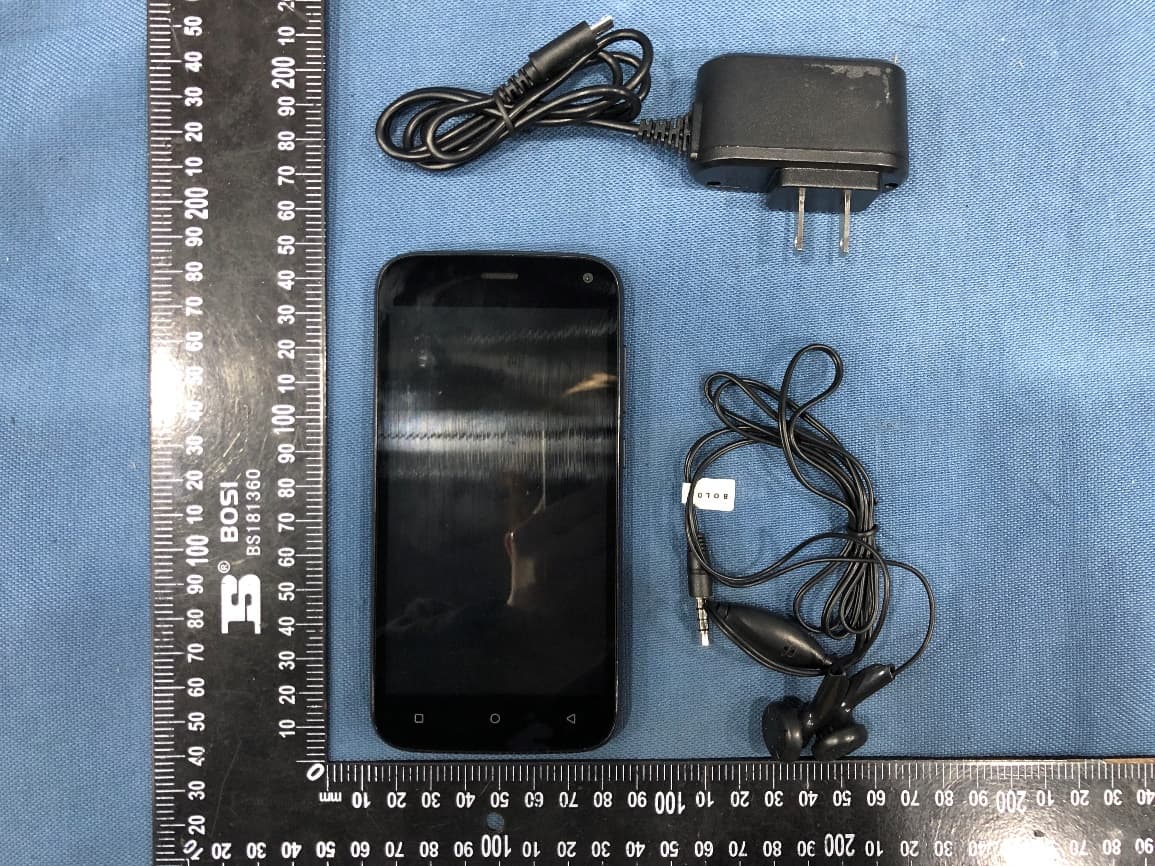
Click to zoom
Application Details
- Equipment Class
- JBP - Part 15 Class B Computing Device Peripheral
- Date of Grant
- Mar 17, 2020
- Application Purpose
- Original Equipment
- Date of Application
- Mar 17, 2020
- Equipment Note
- Mobile Phone
- Company
- BLU Products, Inc.
- Country
- United States
Documents & Files
Document Text
Text extracted from the exhibit documents filed with the FCC. Open a document above to read the original.
Users Manual
1 T5 USER MANUAL 2 Table of Contents Safety Information ............................................................ 4 Appearance and Key Function ...................................... 7 Introduction ...................................................................... 10 Call Functions ................................................................. 12 Notifications Bar ............................................................. 14 Contacts ............................................................................ 16 Messaging ........................................................................ 18 Bluetooth & Wi-Fi ............................................................ 19 3 Gmail .................................................................................. 23 Google Play ...................................................................... 24 Camera .............................................................................. 25 Music .................................................................................. 28 FM Radio ........................................................................... 30 Sound Recorder .............................................................. 31 Files .................................................................................... 33 Calendar ............................................................................ 33 Alarm Clock ...................................................................... 34 4 Settings ............................................................................. 35 Storage .............................................................................. 40 Troubleshooting .............................................................. 41 Safety Information Please carefully read the terms below: Use Safely Do not use the phone in situations where it might cause danger. Transportation Safety Please observe all transportation laws and regulations. Please drive with both hands on the wheel. 5 PLEASE DRIVE RESPONSIBLY - DO NOT TEXT AND DRIVE Hospital Safety Please follow hospital rules and limitations. Please turn off your mobile phone when near medical instruments. Airport Safety Remember to follow all airport and flight safety regulations. Please do not use your phone during flight. Chemical Warning Do not use your mobile phone around fuels or chemicals. Temperature Warning Do not subject your phone to extreme temperature conditions. Water Hazard Your phone is not waterproof. Keep your phone away from water or liquid to avoid damage. Emergency Calls Make sure your mobile phone is switched on and in a service area. In home screen, tap the phone key and dial the emergency number. Accessories and Batteries 6 Use only Blu authorized batteries and accessories. Information Backup Remember to keep a written record of all important information. Battery Safety and Precautions - For better performance and longer battery life, it is recommended that you charge the battery fully before using the mobile phone for the first time. - The optimum performance of a new battery is typically achieved after two or three complete charge cycles. Note: Keep in mind that continuous overcharging will affect long term battery life. - While charging, keep the mobile phone out the reach of children. - Store the battery in a cool and dry place away from direct sunlight and water. - Do not expose batteries to extreme temperatures (below -8°C (18°F) or above 43°C (110°F). - Immediately stop using the battery if it produces an odor, cracks and leaks, overheats, distorts or has any other type of physical damage. - Avoid using the charger near or around liquids. If the charger comes in contact with water or any liquids, immediately unplug it from the outlet to reduce the risk of overheating, charger malfunction, electric shock or fire. Warning: Please be careful with the disposal of used batteries. Do not throw away batteries with daily waste. Please follow local environmental laws and guidelines for proper waste disposal. 7 Cleaning and Maintenance - Avoid using the handset and accessories in excessively moist areas to avoid malfunction. - Use a soft, dry cloth to clean the handset, battery and charger. - Do not use alcohol, thinner, benzene or any other solvent to clean the handset . Appearance and Key Function Front Camera 8 Volume Power Back Home Recent Apps 9 Rear Camera Speaker Flash 10 Introduction Installation of the SIM Card Warning: Please keep the SIM card out of the reach of children. The SIM card and its contact are easily damaged due to scratching or bending. Please use caution when carrying, installing or taking out the SIM card. NB: Please contact your cellular phone service provider directly to obtain your SIM card. To insert SIM card: 1. Remove the rear cover. Insert the SIM card. 2. Insert the SD card. (For additional storage capacity) 3. Insert the battery, replace the rear cover, and power on phone. 11 Power On and Off On - Please ensure the SIM card has been properly inserted into the phone. Long press the Power key to switch the phone on. Off - In standby mode, long press on Power key until an options menu appears. Select Power Off in the menu and confirm in the pop-up prompt to switch off the phone. SIM Slot Memory Card 12 Security You may set a security lock feature as a security measure for the phone. For further information regarding password locks, password revision and other functions please enter into the security option in system settings. Call Functions At the dial keyboard, enter the phone number and then click the dial key. If dialing an extension, you may click the dial pad icon in the bottom of the screen to open the interface and enter the number of the extension. You may also press and hold the 0 key to add a (+) sign when adding an international dialing prefix. 13 Call Log History 14 Call Logs Every telephone number called and received will be saved in the phones call log. All numbers in the c…
Text truncated - open the document above for the full version.
Cover Letter(s)
1 FCC Regulations: This mobile phone complies with part 15 of the FCC Rules. Operation is subject to the following two conditions: (1) This device may not cause harmful interference, and (2) this device must accept any interference received, including interference that may cause undesired operation. This mobile phone has been tested and found to comply with the limits for a Class B digital device, pursuant to Part 15 of the FCC Rules. These limits are designed to provide reasonable protection against harmful interference in a residential installation. This equipment generates, uses and can radiated radio frequency energy and, if not installed and used in accordance with the instructions, may cause harmful interference to radio communications. However, there is no guarantee that interference will not occur in a particular installation if this equipment does cause harmful interference to radio or television reception, which can be determined by turning the equipment off and on, the user is encouraged to try to correct the interference by one or more of the following measures: -Reorient or relocate the receiving antenna. -Increase the separation between the equipment and receiver. -Connect the equipment into an outlet on a circuit different from that to which the receiver is connected. -Consult the dealer or an experienced radio/TV technician for help. 2 Changes or modifications not expressly approved by the party responsible for compliance could void the user‘s authority to operate the equipment. The antenna(s) used for this transmitter must not be co-located or operating in conjunction with any other antenna or transmitter. RF Exposure Information (SAR) This mobile phone meets the government’s requirements for exposure to radio waves. This phone is designed and manufactured not to exceed the emission limits for exposure to radio frequency (RF) energy set by the Federal Communications Commission of the U.S. Government. The exposure standard for wireless mobile phones employs a unit of measurement known as the Specific Absorption Rate, or SAR. The SAR limit set by the FCC is 1.6W/kg. *Tests for SAR are conducted using standard operating positions accepted by the FCC with the phone transmitting at its highest certified power level in all tested frequency bands. Although the SAR is determined at the highest certified power level, the actual SAR level of the phone while operating can be well below the maximum value. This is because the phone is designed to operate at multiple power levels so as to use only the poser required to reach the network. In general, the closer you are to a wireless base station antenna, the lower the power output. 3 The highest SAR value for the model phone as reported to the FCC when tested for use at the ear is 0.98 W/kg and when worn on the body, as described in this user guide, is 1.16 W/kg (Body-worn measurements differ among phone models, depending upon available accessories and FCC requirements.) While there may be differences between the SAR levels of various phones and at various positions, they all meet the government requirement. The FCC has granted an Equipment Authorization for this model phone with all reported SAR levels evaluated as in compliance with the FCC RF exposure guidelines. SAR information on this model phone is on file with the FCC and can be found under the Display Grant section of www.fcc.gov/oet/ea/fccid after searching on FCC ID: YHLBOLDT5 For body worn operation, this phone has been tested and meets the FCC RF exposure guidelines for use with an accessory that contains no metal and the positions the handset a minimum of 1.0 cm from the body. Use of other accessories may not ensure compliance with FCC RF exposure guidelines. If you do not use a body-worn accessory and are not holding the phone at the ear, position the handset a minimum of 1.0 cm from your body when the phone is switched on.
Cover Letter(s)
BLU Products, Inc. Agent Authorization Company: BLU Products, Inc. Address: 10814 NW 33rd St # 100 Doral, FL 33172 ,USA Product Name: Mobile Phone Model Number(s): T5 FCC ID: YHLBOLDT5 Product Description: N/A We authorize MiCOM Labs Inc., 575 Boulder Court, Pleasanton, California 94566, USA, to act on our behalf on all matters concerning the certification of above named equipment. We declare that MiCOM Labs Inc. is allowed to forward all information related to the approval and certification of equipment to the regulatory agencies as required and to discuss any issues concerning the approval application. Any and all acts carried out by MiCOM Labs on our behalf shall have the same effect as acts of our own. Signature: Date: 2020-03-12 Name: Wei Zeng Title: Senior Manager Company: BLU Products, Inc.
Cover Letter(s)
BLU Products, Inc. Office of Engineering Technology Federal Communications Commission 7435 Oakland Mills Road Columbia, MD 21046 USA Date: 2020-03-12 Subject; Request for Confidentiality FCC ID: YHLBOLDT5 To Whom It May Concern, Pursuant to the provisions of the Commission’s rules Title 47 Sections §0.457 and §0.459, we are requesting the Commission to withhold the following attachment(s) as confidential documents from public disclosure indefinitely. These documents contain detailed system and equipment descriptions and are considered as proprietary information in operation of the equipment. The public disclosure of these documents might be harmful to our company and would give competitors an unfair advantage in the market. Schematic Diagram Block Diagram Parts List Operational Description Tune-up Procedure It is our understanding that all measurement test reports, FCC ID label format and correspondence during the certification review process cannot be granted as confidential documents and this information will be available for public review once the grant of equipment authorization is issued. Sincerely, Signature: Name: Wei Zeng Title: Senior Manager
External Photos
Page 1 of 5 FCC ID: YHLBOLDT5 Shenzhen UnionTrust Quality and Technology Co., Ltd. Address: 16/F, Block A, Building 6, Baoneng Science and Technology Park, Qingxiang Road No.1, Longhua New District, Shenzhen, China Tel: +86-755-28230888 Fax: +86-755-2823088 6 E-mail: [email protected] Http://www.uttlab.com APPENDIX 2 PHOTOS OF EUT CONSTRUCTIONAL DETAILS EUT EXTERNAL PHOTOS EUT Photo EUT Photo Page 2 of 5 FCC ID: YHLBOLDT5 Shenzhen UnionTrust Quality and Technology Co., Ltd. Address: 16/F, Block A, Building 6, Baoneng Science and Technology Park, Qingxiang Road No.1, Longhua New District, Shenzhen, China Tel: +86-755-28230888 Fax: +86-755-2823088 6 E-mail: [email protected] Http://www.uttlab.com EUT Photo EUT Photo Page 3 of 5 FCC ID: YHLBOLDT5 Shenzhen UnionTrust Quality and Technology Co., Ltd. Address: 16/F, Block A, Building 6, Baoneng Science and Technology Park, Qingxiang Road No.1, Longhua New District, Shenzhen, China Tel: +86-755-28230888 Fax: +86-755-2823088 6 E-mail: [email protected] Http://www.uttlab.com EUT Photo EUT Photo Page 4 of 5 FCC ID: YHLBOLDT5 Shenzhen UnionTrust Quality and Technology Co., Ltd. Address: 16/F, Block A, Building 6, Baoneng Science and Technology Park, Qingxiang Road No.1, Longhua New District, Shenzhen, China Tel: +86-755-28230888 Fax: +86-755-2823088 6 E-mail: [email protected] Http://www.uttlab.com EUT Photo EUT Photo Page 5 of 5 FCC ID: YHLBOLDT5 Shenzhen UnionTrust Quality and Technology Co., Ltd. Address: 16/F, Block A, Building 6, Baoneng Science and Technology Park, Qingxiang Road No.1, Longhua New District, Shenzhen, China Tel: +86-755-28230888 Fax: +86-755-2823088 6 E-mail: [email protected] Http://www.uttlab.com EUT Photo
Internal Photos
Page 1 of 5 FCC ID: YHLBOLDT5 Shenzhen UnionTrust Quality and Technology Co., Ltd. Address: 16/F, Block A, Building 6, Baoneng Science and Technology Park, Qingxiang Road No.1, Longhua New District, Shenzhen, China Tel: +86-755-28230888 Fax: +86-755-2823088 6 E-mail: [email protected] Http://www.uttlab.com APPENDIX 2 PHOTOS OF EUT CONSTRUCTIONAL DETAILS EUT INTERNAL PHOTOS EUT Photo EUT Photo Page 2 of 5 FCC ID: YHLBOLDT5 Shenzhen UnionTrust Quality and Technology Co., Ltd. Address: 16/F, Block A, Building 6, Baoneng Science and Technology Park, Qingxiang Road No.1, Longhua New District, Shenzhen, China Tel: +86-755-28230888 Fax: +86-755-2823088 6 E-mail: [email protected] Http://www.uttlab.com EUT Photo EUT Photo 2.4G WIFI/BT Antenna LTE Antenna (Aux) GSM/WCDMA/LTE Antenna (Main) (A ) Page 3 of 5 FCC ID: YHLBOLDT5 Shenzhen UnionTrust Quality and Technology Co., Ltd. Address: 16/F, Block A, Building 6, Baoneng Science and Technology Park, Qingxiang Road No.1, Longhua New District, Shenzhen, China Tel: +86-755-28230888 Fax: +86-755-2823088 6 E-mail: [email protected] Http://www.uttlab.com EUT Photo EUT Photo Page 4 of 5 FCC ID: YHLBOLDT5 Shenzhen UnionTrust Quality and Technology Co., Ltd. Address: 16/F, Block A, Building 6, Baoneng Science and Technology Park, Qingxiang Road No.1, Longhua New District, Shenzhen, China Tel: +86-755-28230888 Fax: +86-755-2823088 6 E-mail: [email protected] Http://www.uttlab.com EUT Photo EUT Photo Page 5 of 5 FCC ID: YHLBOLDT5 Shenzhen UnionTrust Quality and Technology Co., Ltd. Address: 16/F, Block A, Building 6, Baoneng Science and Technology Park, Qingxiang Road No.1, Longhua New District, Shenzhen, China Tel: +86-755-28230888 Fax: +86-755-2823088 6 E-mail: [email protected] Http://www.uttlab.com EUT Photo
Test Report
Page 2 of 19 Report No.: 200113001EMC-1 Shenzhen UnionTrust Quality and Technology Co., Ltd. Address: 16/F, Block A, Building 6, Baoneng Science and Technology Park, Qingxiang Road No.1, Longhua New District, Shenzhen, China Tel: +86-755-28230888 Fax: +86-755-28230886 E-mail: [email protected] http://www.uttlab.com UTTR-EMC-FCCPART15B- V1.0 Version Version No. Date Description V1.0 March 12, 2020 Original Page 3 of 19 Report No.: 200113001EMC-1 Shenzhen UnionTrust Quality and Technology Co., Ltd. Address: 16/F, Block A, Building 6, Baoneng Science and Technology Park, Qingxiang Road No.1, Longhua New District, Shenzhen, China Tel: +86-755-28230888 Fax: +86-755-28230886 E-mail: [email protected] http://www.uttlab.com UTTR-EMC-FCCPART15B- V1.0 CONTENTS 1. GENERAL INFORMATION ....................................................................................................................................... 4 1.1 CLIENT INFORMATION ........................................................................................................................................ 4 1.2 EUT INFORMATION ............................................................................................................................................ 4 1.2.1 GENERAL DESCRIPTION OF EUT ............................................................................................................ 4 1.2.2 DESCRIPTION OF ACCESSORIES .............................................................................................................. 4 1.3 DESCRIPTION OF SUPPORT UNITS ...................................................................................................................... 5 1.4 TEST LOCATION ................................................................................................................................................. 5 1.5 TEST FACILITY ................................................................................................................................................... 5 1.6 DEVIATION FROM STANDARDS ............................................................................................................................ 5 1.7 ABNORMALITIES FROM STANDARD CONDITIONS .................................................................................................. 5 1.8 OTHER INFORMATION REQUESTED BY THE CUSTOMER ........................................................................................ 6 1.9 MEASUREMENT UNCERTAINTY ........................................................................................................................... 6 2. TEST SUMMARY ...................................................................................................................................................... 6 3. EQUIPMENT LIST .................................................................................................................................................... 7 4. TEST CONFIGURATION .......................................................................................................................................... 8 4.1 ENVIRONMENTAL CONDITIONS FOR TESTING ........................................................................................................ 8 4.1.1 NORMAL OR EXTREME TEST CONDITIONS ............................................................................................... 8 4.1.2 RECORD OF NORMAL ENVIRONMENT....................................................................................................... 8 4.2 TEST MODES ..................................................................................................................................................... 8 4.3 TEST SETUP ...................................................................................................................................................... 9 4.3.1 FOR RADIATED EMISSIONS TEST SETUP .................................................................................................. 9 4.3.2 FOR CONDUCTED EMISSIONS TEST SETUP ............................................................................................ 10 4.4 SYSTEM TEST CONFIGURATION ........................................................................................................................ 10 5. REFERENCE DOCUMENTS FOR TESTING ......................................................................................................... 11 6. EMC REQUIREMENTS SPECIFICATION .............................................................................................................. 11 6.1 RADIATED EMISSION ........................................................................................................................................ 11 6.2 CONDUCTED EMISSION .................................................................................................................................... 16 APPENDIX 1 PHOTOS OF TEST SETUP ..................................................................................................................... 19 APPENDIX 2 PHOTOS OF EUT CONSTRUCTIONAL DETAILS ................................................................................. 19 Page 4 of 19 Report No.: 200113001EMC-1 Shenzhen UnionTrust Quality and Technology Co., Ltd. Address: 16/F, Block A, Building 6, Baoneng Science and Technology Park, Qingxiang Road No.1, Longhua New District, Shenzhen, China Tel: +86-755-28230888 Fax: +86-755-28230886 E-mail: [email protected] http://www.uttlab.com UTTR-EMC-FCCPART15B- V1.0 1. GENERAL INFORMATION 1.1 CLIENT INFORMATION Applicant: BLU Products, Inc. Address of Applicant: 10814 NW 33rd St # 100 Doral, FL 33172 ,USA Manufacturer: BLU Products, Inc. Address of Manufacturer: 10814 NW 33rd St # 100 Doral, FL 33172 ,USA 1.2 EUT INFORMATION 1.2.1 General Description of EUT Product Name: Mobile Phone Model No.: T5 Trade Mark: BOLD DUT Stage: Identical Prototype Rated Voltage: ☒ Powered by USB port (5Vdc) ☒ 100-240V~50/60Hz, 0.…
Text truncated - open the document above for the full version.
Test Setup Photos
Page 1 of 2 FCC ID: YHLBOLDT5 Shenzhen UnionTrust Quality and Technology Co., Ltd. Address: 16/F, Block A, Building 6, Baoneng Science and Technology Park, Qingxiang Road No.1, Longhua New District, Shenzhen, China Tel: +86-755-28230888 Fax: +86-755-2823088 6 E-mail: [email protected] Http://www.uttlab.com APPENDIX 1 PHOTOS OF TEST SETUP Radiated emission Test Setup (30 MHz~1 GHz) - Mode 1 Radiated emission Test Setup (Above 1 GHz) - Mode 5 Page 2 of 2 FCC ID: YHLBOLDT5 Shenzhen UnionTrust Quality and Technology Co., Ltd. Address: 16/F, Block A, Building 6, Baoneng Science and Technology Park, Qingxiang Road No.1, Longhua New District, Shenzhen, China Tel: +86-755-28230888 Fax: +86-755-2823088 6 E-mail: [email protected] Http://www.uttlab.com Conducted Emission Test Setup - Mode 2
Contact Information
Applicant
Wei Zeng(Senior Manager)
Technical Contact
Test Firm
Shenzhen UnionTrust Quality and Technology Co., LtGeorge Luo
[email protected]+86-755-28230888
Technical Specifications
| # | Rule Parts | Frequency Range | Power Output |
|---|---|---|---|
| 1 | 15B | - | - |
Other Applications from BLU Products, Inc.
YHLBLU96GC
Aug 13, 2026Smart Phone
Equipment Class
CXX - Communications Rcvr for use w/ licensed Tx and CBsYHLBLUB1680V
Aug 03, 2026Smart Phone
Equipment Class
DTS - Digital Transmission SystemYHLBLUT500B
Jun 26, 2026Tablet
Equipment Class
NII - Unlicensed National Information Infrastructure TX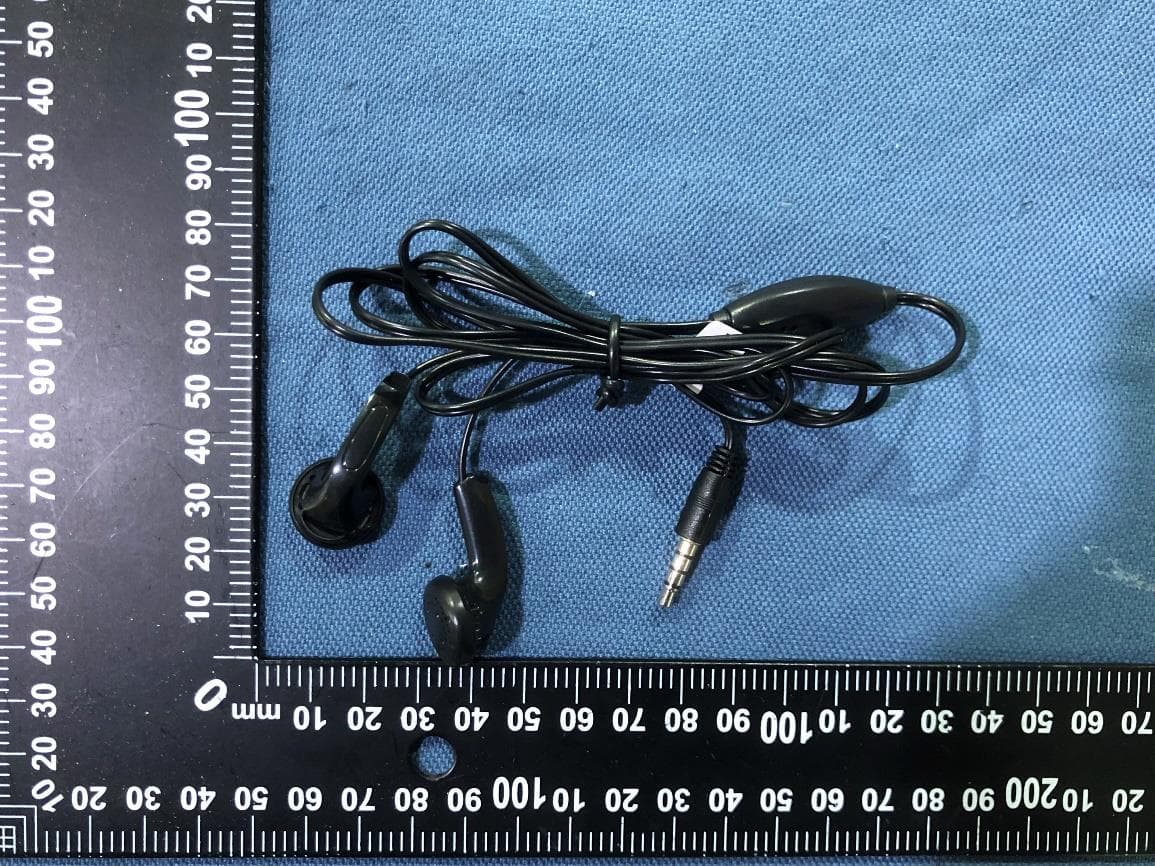
YHLBLU9CMAX
Apr 13, 2026Smart phone
Equipment Class
CXX - Communications Rcvr for use w/ licensed Tx and CBsYHLBLU2KW
Sep 12, 2025Smart Phone
Equipment Class
DSS - Part 15 Spread Spectrum Transmitter