ZAXZT1807AMID
Shenzhen Zenithink Technologies Co., Ltd.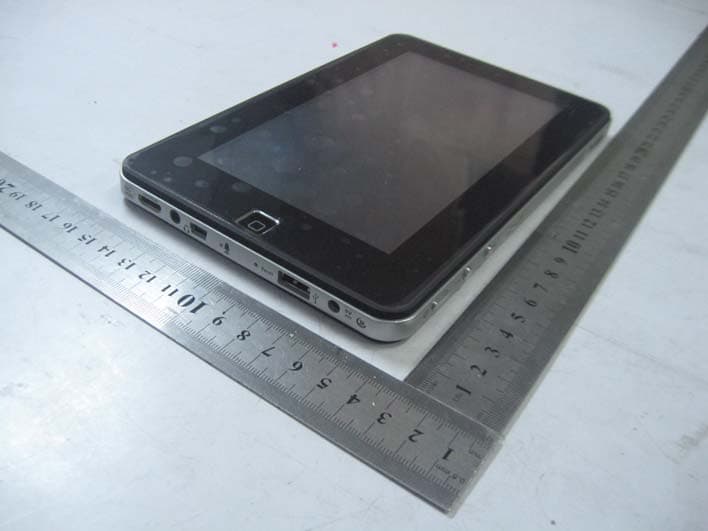
Click to zoom
Application Details
- Equipment Class
- DTS - Digital Transmission System
- Date of Grant
- Mar 29, 2011
- Application Purpose
- Original Equipment
- Date of Application
- Mar 29, 2011
- Equipment Note
- MID
- Frequency Range
- 2422.00000000 - 2452.00000000
- Country
- China
Documents & Files
Document Text
Text extracted from the exhibit documents filed with the FCC. Open a document above to read the original.
Users Manual
Android 2.2 User Manual Directory---------------------------------------------1 1.Use statement------------------------------------2 2.Appearance Description-------------------------2 2.1 Overall structure---------------------------2 2.2 Button, and plug-ins----------------------3 3. The description of menu interface-----------5 3.1 Desktop description-----------------------5 3.2 Status Bar Description -------------------5 4.Basic set of equipment -------------------------6 4.1 Wireless Control ---------------------------6 4.2 Sound and display-------------------------7 4.3 Security and location----------------------7 4.4 Date and time------------------------------8 4.5 Locate and text--------------------------8 4.6 Battery Charging---------------------------9 5. Software installation and management------9 5.1 Browser-------------------------------------9 5.2 E-mail--------------------------------------10 5.3 Google Map ------------------------------10 5.4 Alarm clock -------------------------------11 5.5 Build-in camera--------------------------11 5.6 HDMI digital output---------------------11 6. O / I File Manager ----------------------------11 7.FAQ-----------------------------------------------12 7.1 Can not open the media player--------12 7.2 Screen flashing---------------------------12 7.3 Headphones can not hear sound------12 7.4 Can not copy the file---------------------12 2. Appearance Description Statement: The company are committed to quality innovation and continual improvement of software. If the final version of products has any differences from the description of the user guide, please subject to the final product .Thank you. 2. Appearance Description 2.1 Overall structure 2.2 Button and plug-ins Note: if system halted, please insert one slender material into the reset key ,then system will shutdown insert an external charger, then charge lamp will turn on; When charge is completed, charge lamp will light turn off 3.The description of menu interface 3.1 Desktop description With Pressing the icon" ", you can enter menu and choose the options you need, such as email settings and so on 3.2 Status Bar Description The status bar is located on the top screen On the top screen, it shows the followings from left to right: 3G singnals, residual battery, current time, lock, home key, return key, menu key, current time, two volume adjustment keys. 4. Basic settings of e-pad devices 4.1 Wireless Control press the set-up" " in the menu page to enter set-up interface WI-FI settings: set up and manage the notice of access point to the wireless .When The icon showed on the right is “ " with gray color ,that means WIFI is in the state of close click network notification .When the right icon shows““,it means device is scanning the network that is available. The device will search automatically and add the nearby wi-fi network which can be connected. click wireless network port and then you can connect network. 4.2 Sound and display silent mode: All sound will become silent except for media and alarm The Volume of media: Adjust the volume of media by dragging the move point to right or left Direction: It will change the direction automatically when you rotate the MID Cartoon: It will show cartoon when you open or close a window Brightness: Adjust the brightness of screen by dragging the point to the right or left Idle screen: There are six kinds of time interval for your choose for idle screen: 15 seconds,30 seconds,1 minutes,2 minutes,10 minutes and 30 minutes. 4.3 Security and location safety and location: set up my location and password selections, Using of wireless network: you can check the location of application by using wireless network Visible password: it will show your password when you typing them 4.4 Date and time Date and time: set up date, time ,time zone and format Set up date and time: enter the interface of date setting to set up the date and time Select time zone: enter the interface of time zone to set up the time zone Set up time format: set up the display format of time Choose date format: Choose different display format of date 4.5 Locate and text set up the locate (language and area),text entry and automatic error correction Select area: There are 54 kinds of language for choice 4.6 Battery Charging There is a built-in battery, when the battery level is low, the system will recommend you to charge Way of charging: One end of the adaptor connected to power socket, another end connected to the power port of the device. 1, When the indicator light of battery charging turns on, it means device is charging. When the indicator light turns to green. It means battery is fully charged. 2, During the charging period, user can still use the Pc. Note: In the boot of state, .it takes long time for charging. 5. Software installation and management 5.1Browser Click" ” and open the following web page. Start: enter website by inputting web address 5.2 E-mail Click E-mail icon” ” and enter the e-mail, You can proceed as follows: 1、 Set an e-mail account 2、 Open a new e-mail 3、 Send and receive e-mails Note: Shortcut menu will popup when clicking the menu button.. 5.3 Google map Click” ” and enter Google Map --Click the zoom icons on the touch screen to zoom in and zoom out images --Drag touch screen, move the image up-and-down and right-and-left Click Menu : --search: search maps by entering address --Line : search drive circuit by entering starting and finishing address --Map mode: three modes for choice, map mode、satellite mode and traffic mode. --My position: Find out my current location by setting up "My Location" --more: more information about Google Map 5.4 Alarm clock Click " " and enter the alarm clock settings Set up time : Enter the interface of time settings to set up time. Set up hour format: set up displaying format of time Select the format of date: choose different format to show date. 5.5 Build-in camera Autodyne or video chat, you can enjoy the happiness Which was brou…
Text truncated - open the document above for the full version.
Block Diagram
55 44 33 22 11 D D C C B B A A ZT180 ARM11 CPU DC-DC 1.2VDC-DC 1.8VDC-DC 3.3V USB_H0 USB_S0 AUDIO CODEC WM8988 I2S BUS RL AMP STEREO SPEAKER TSC2007 TOUCH PAD RGB888 DC-DC +5V TF CARD SDIO2 16M Wordsx16bit DDR_CK/DDR_CKN DDR_D0~D15 DDR_CTL/DDR_MA DDR2-667 DDR2-667 16M Wordsx16bit DDR_D16~D31 256KB NOR EXP BUS 8GB iNAND SDIO1SDIO0 WIFI LVDS TCON LVDS CONN I2S BUS I2S BUS CAMERAS 3GPS UART0 E2PROM I2C BUS USBCHARGECHARGEPROTECTION POWERMANAGEMENTUNIT POWER_ON POWERKEY POWER_IND DC9V_DET MIC JTAG 3-AXIAL SENSOR HDMI TitleSize Document Number Rev Date: Sheet of Zenithink Technologies Co. M07-020240 1.0 BLOCK DIAGRAM Custom 216 Wednesday, November 17, 2010 TitleSize Document Number Rev Date: Sheet of Zenithink Technologies Co. M07-020240 1.0 BLOCK DIAGRAM Custom 216 Wednesday, November 17, 2010 TitleSize Document Number Rev Date: Sheet of Zenithink Technologies Co. M07-020240 1.0 BLOCK DIAGRAM Custom 216 Wednesday, November 17, 2010
External Photos
Shenzhen Zenithink Technologies Co., Ltd Model: ZT-180 7A REPORT NO.: STR11038025I-1 FCC PART 15.247 EXHIBIT 2 - EUT EXTERNAL PHOTOGRAPHS EUT View 1 EUT View 2 Shenzhen Zenithink Technologies Co., Ltd Model: ZT-180 7A REPORT NO.: STR11038025I-1 FCC PART 15.247 EUT View 3
ID Label/Location Info
Shenzhen Zenithink Technologies Co., Ltd Model: ZT-180 7A REPORT NO.: STR11038025I-1 FCC PART 15.247 EXHIBIT 1- PRODUCT LABELING Proposed FCC ID Label Format FCC ID: ZAXZT1807A This device complies with Part 15 of the FCC Rules. Operation is subject to the following two conditions: (1) This device may not cause harmful interference, and (2) This device must accept any interference received, including interference that may cause undesired operation. Specifications : Text is Black in color and justified. Labels are printed in indelible ink on permanent adhesive silk-screened onto the EUT or shall be affixed at a conspicuous location on the EUT. Proposed Label Location on EUT FCC ID Label Location
ID Label/Location Info
Shenzhen Zenithink Technologies Co., Ltd Model: ZT-180 7A REPORT NO.: STR11038025I-1 FCC PART 15.247 EXHIBIT 1- PRODUCT LABELING Proposed FCC ID Label Format FCC ID: ZAXZT1807A This device complies with Part 15 of the FCC Rules. Operation is subject to the following two conditions: (1) This device may not cause harmful interference, and (2) This device must accept any interference received, including interference that may cause undesired operation. Specifications : Text is Black in color and justified. Labels are printed in indelible ink on permanent adhesive silk-screened onto the EUT or shall be affixed at a conspicuous location on the EUT. Proposed Label Location on EUT FCC ID Label Location
Internal Photos
Shenzhen Zenithink Technologies Co., Ltd Model: ZT-180 7A REPORT NO.: STR11038025I-1 FCC PART 15.247 EXHIBIT 3 - EUT INTERNAL PHOTOGRAPHS EUT Housing and Board View Solder Board-Component View 1 Shenzhen Zenithink Technologies Co., Ltd Model: ZT-180 7A REPORT NO.: STR11038025I-1 FCC PART 15.247 Solder Board-Component View 2 Solder Board-Component View 3 Shenzhen Zenithink Technologies Co., Ltd Model: ZT-180 7A REPORT NO.: STR11038025I-1 FCC PART 15.247 Solder Board-Component View 4 Solder Board-Component View 5 Shenzhen Zenithink Technologies Co., Ltd Model: ZT-180 7A REPORT NO.: STR11038025I-1 FCC PART 15.247 Solder Board-Component View 6 Solder Board-Component View 7 Shenzhen Zenithink Technologies Co., Ltd Model: ZT-180 7A REPORT NO.: STR11038025I-1 FCC PART 15.247 Solder Board-Component View 8
RF Exposure Info
RF Exposure Requirements Product Description: MID Model No.: ZT-180 7A FCC ID: ZAXZT1807A Acorrding to the KDB-447498, the following RF exposure evaluation shall to demonstrate RF exposure compliance. Tx frequency range: 2412~2462MHz Antenna-to-tissue separation: <20 cm Maximum Output Power: 23.39mW (at the 2462MHz channel of 802.11b mode) Maximum Duty Factor: 100% 60/f(GHz) mW = 24.37 mW Source-based time-averaged conducted output power is 23.39 mW =< 60/f So the transmitter is comply the RF exposure requirements and the SAR in not required.
Schematics
55 44 33 22 11 D D C C B B A A * ZENITHINK CONFIDENTIAL *PAGE 56 TITLE PAGEBLOCK DIAGRAMCPU DDR2CPU LCD, USB, SDCPU KB, SSI, UART, JTAG, GPIOCPU POWER PINS, PLLDDR TERMINATIONCHANGE NOTETOCPOWER SUPPLYCONTENT DESCRIPTION 4320789101112131415161 NOR FLASH AND iNANDCAMERA, GPS, 3G AND GSENSORAUDIO CODEC AND AMPINTERFACE CONNECTORPOWER MANAGEMENTPANEL TCON PENIRQ#GSENSOR_INTLCD_PWMETH_25M INTERRUPT USAGEDEVICE FUNCTION ADDRESS PLL OUT USAGEDEVICE ADDRESS FUNCTION HDMI TRANSMITTER GPIO USAGE PINCPU GPIO USAGE HOME_KEYBKL_ONAUDIO_PWRNOR_RB_CAMERA_ENGPS_EN SD_CD0# VOL+VOL-DC9V_DETSPK_ENPANEL_PWR HP_DET# BUS 0 FUNCTION ADDRESS DEVICEI2C DEVICE USAGEBUS 1 XUTXD0XURXD03G_ENWIFI_ENWLAN_WAKEUPRESET_OUT3G_RESETn3G_PWRON GPA[0]/EINT1[0]GPA[1]/EINT1[1]GPA[2]/EINT1[2]GPA[3]/EINT1[3]GPA[7]/EINT1[7]GPO[12]GPO[14]GPO[15]GPB[1]/EINT2[1]GPB[2]/EINT2[2]GPB[3]/EINT2[3]GPB[4]/EINT2[4]GPE[10]/EINT4[10]GPE[9]/EINT4[9]GPE[7]/EINT4[7]GPE[6]/EINT4[6]GPE[4]/EINT4[4]GPE[5]/EINT4[5]GPE[0]/EINT4[0] HDMI_INT XEINT1XEINT2XEINT3XEINT4XEINT5 DM2016MMA7660CAMEROHDCPHDMIAUDIO CODECTSC2007I B18D14B17C15C16 P1P2 P4T1U1V2U2T2T4R4R3P5M5M4M3N1L1M1N2 TitleSize Document Number Rev Date: Sheet of Zenithink Technologies Co. M07-020240 1.0 TOC Custom 116 Wednesday, November 17, 2010 TitleSize Document Number Rev Date: Sheet of Zenithink Technologies Co. M07-020240 1.0 TOC Custom 116 Wednesday, November 17, 2010 TitleSize Document Number Rev Date: Sheet of Zenithink Technologies Co. M07-020240 1.0 TOC Custom 116 Wednesday, November 17, 2010 55 44 33 22 11 D D C C B B A A * ZENITHINK CONFIDENTIAL * XPADWENXPACLKXPANCLKXPACKEXPADDR2ODT XPADCSN0 XPAADDR14XPAADDR13XPAADDR4XPAADDR10XPAADDR9XPAADDR7XPAADDR6XPAADDR5XPAADDR8XPAADDR12XPAADDR11XPAADDR3XPAADDR2XPAADDR1XPAADDR0 XPADBANK0XPADBANK1XPADBANK2XPADRASNXPADCASN XPADQS0XPADQSN0XPADATA7XPADATA6XPADATA5XPADATA4XPADATA3XPADATA2XPADATA1XPADATA0XPADQM0XPADATA15XPADATA12XPADATA11XPADATA10XPADATA9XPADATA8XPADATA14XPADATA13XPADQS1XPADQSN1XPADQM1XPADQS2XPADQSN2XPADQM2XPADATA23XPADATA22XPADATA21XPADATA20XPADATA19XPADATA18XPADATA17XPADATA16XPADATA28XPADATA27XPADATA26XPADATA25XPADATA24XPADATA31XPADATA30XPADATA29XPADQSN3XPADQS3XPADQM3 XFHDATA0XFHDATA1XFHDATA2XFHDATA3XFHDATA4XFHDATA5XFHDATA6XFHDATA7XFHDATA8XFHDATA9XFHDATA10XFHDATA11XFHDATA12XFHDATA13XFHDATA14XFHDATA15 XPADBANK2 7 XPADBANK1 7 XPADBANK0 7 XPADCASN 7 XPADRASN 7 XPADWEN 7 XPACLK 7 XPANCLK 7 XPACKE 7 XPADDR2ODT 7 XPADCSN0 7 XPAADDR14 7 XPAADDR13 7 XPAADDR11 7 XPAADDR12 7 XPAADDR9 7 XPAADDR7 7 XPAADDR8 7 XPAADDR10 7 XPAADDR6 7 XPAADDR3 7 XPAADDR5 7 XPAADDR4 7 XPAADDR1 7 XPAADDR0 7 XPAADDR2 7 XPADQS0 7 XPADQM0 7 XPADQSN0 7 XPADATA7 7 XPADATA6 7 XPADATA4 7 XPADATA5 7 XPADATA0 7 XPADATA3 7 XPADATA2 7 XPADATA1 7 XPADQM1 7 XPADATA8 7 XPADATA14 7 XPADQSN1 7 XPADATA13 7 XPADATA11 7 XPADATA9 7 XPADATA12 7 XPADATA10 7 XPADATA15 7 XPADQS1 7 XPADATA18 7 XPADATA19 7 XPADATA16 7 XPADQS2 7 XPADATA22 7 XPADATA23 7 XPADATA17 7 XPADQM2 7 XPADQSN2 7 XPADATA20 7 XPADATA21 7 XPADATA25 7 XPADATA30 7 XPADQS3 7 XPADQSN3 7 XPADQM3 7 XPADATA24 7 XPADATA27 7 XPADATA29 7 XPADATA26 7 XPADATA28 7 XPADATA31 7 XFHDATA1 8 XFHDATA5 8 XFHDATA2 8 XFHDATA0 8 XFHDATA4 8 XFHDATA7 8 XFHDATA6 8 XFHDATA3 8 XFHDATA9 8 XFHDATA13 8 XFHDATA10 8 XFHDATA8 8 XFHDATA12 8 XFHDATA15 8 XFHDATA14 8 XFHDATA11 8 TitleSize Document Number Rev Date: Sheet of Zenithink Technologies Co. E07-020240 1.0 CPU DDR2 B 316 Wednesday, November 17, 2010 TitleSize Document Number Rev Date: Sheet of Zenithink Technologies Co. E07-020240 1.0 CPU DDR2 B 316 Wednesday, November 17, 2010 TitleSize Document Number Rev Date: Sheet of Zenithink Technologies Co. E07-020240 1.0 CPU DDR2 B 316 Wednesday, November 17, 2010 ZT180 U1A ZT180 U1A XPAADDR1 N21 XPADBANK1 P21 XPADRASN R20 XPADCASN R21 XPAADDR14 R17 XPADDR2ODT T18 XPADBANK2 T19 XPAADDR6 T20 XPAADDR11 T21 XPALPCKE T17 XPACLK U18 XPANCLK U19 XPADCSN0 U20 XPADQSN3 W21 XPADATA18 Y18 XPADATA23 AA17 XPADQSN2 AA19 XPADATA26 Y20 XPADQS3 W20 XPADATA31 W19 XPADATA21 W17 XPADATA16 V18 XPADQS2 Y19 XPADATA29 AA21 XPADATA24 U21 XPADATA30 AA20 XPADATA19 AA18 XPADATA17 V17 XPADATA22 Y17 XPADQM3 V21 XPADATA25 V20 XPADATA20 W16 XPADQM2 W18 XPADATA27 Y21 XPADATA28 V19 XPADQS1 G20 XPACLK1 F17 XPADATA15 H20 XPADATA8 E21 XPADQSN1 G21 XPADQM1 F20 XPANCLK1 G17 XPADATA10 F19 XPADATA13 H18 XPADATA14 H21 XPADATA12 G19 XPADCSN1 H17 XPADQSN0 J18 XPADQS0 J19 XPADATA9 F21 XPADATA6 K18 XPADDR2ODT1 F18 XPADATA7 L20 XPADATA0 H19 XPADATA11 G18 XPADATA1 K17 XPADDROP0 L17 XPADATA2 J20 XPADATA5 K19 XPADQM0 J21 XPADATA3 K21 XPADDROP1 J17 XPADATA4 K20 XPADWEN M20 XPADDROP2 V16 XPACKE L21 XPADDROP3 U17 XNDCSN V3 XNDCLE U3 XFHDAT6 T7 XCFIORD W4 XCFIORY V4 XNDWEN W1 XNDCS1N W2 XNDRNB U4 XFHDAT4 W6 XFHDAT9 AA8 XFHDAT13 V6 XCFCS0N U5 XCFPWRN AA2 XCFCD1N Y3 XFHDAT1 R6 XFHDAT3 W5 XFHDAT12 V5 XFHDAT15 Y7 XCFADD2 T6 XCFRSTN Y2 XCFINT AA1 XNDALE W3 XFHDAT0 Y4 XFHDAT5 Y5 XFHDAT8 AA6 XFHDAT11 U6 XCFADD1 P6 XCFCS1N R5 XNDREN Y1 XCFIOWR AA3 XFHDAT2 AA4 XFHDAT7 AA5 XFHDAT10 Y6 XFHDAT14 AA7 XCFADD0 T5 XPAADDR7 L19 XPAADDR3 L18 XPAADDR0 M18 XPAADDR2 M19 XPAADDR10 N20 XPAADDR4 N18 XPAADDR8 N19 XPADBANK0 M21 XPAADDR9 P20 XPAADDR13 P17 XPAADDR5 P18 XPAADDR12 P19 55 44 33 22 11 D D C C B B A A * ZENITHINK CONFIDENTIAL * USB_S_DM2 USB_H1_DP1USB_H1_DM1 B3B4B5B6B7G4G5G6G7G3R3R4R5R6R7 USB_H0_DP1USB_H0_DM1 USBID2USB_S_DP2 G2 XSD0DAT0XSD0DAT1XSD0DAT2XSD0DAT3XSD0CMDXSD0CLK B2R2B1G1R1 XCICLKXCIVSYNCXCINRSTXCIPCLKXCIHREFXCIYDAT7XCIYDAT6XCIYDAT5XCIYDAT4XCIYDAT3XCIYDAT2XCIYDAT1XCIYDAT0 B0G0R0 iNAND_CMDiNAND_CLKiNAND_DAT0iNAND_DAT1iNAND_DAT3iNAND_DAT2 iNAND_DAT0 8 iNAND_DAT1 8 iNAND_DAT2 8 iNAND_DAT3 8 iNAND_CLK 8 iNAND_CMD 8 XSD0DAT0 11 XSD0DAT1 11 XSD0DAT2 11 XSD0DAT3 11 XSD0CLK 11 XSD0CMD 11 XCICLK 9 XCISYNC 9 XCINRST 9 XCIPCLK 9 XCIHREF 9 XCIYDAT7 9 XCIYDAT6 9 XCIYDAT5 9 XCIYDAT4 9 XCIYDAT1 9 XCIYDAT3 9 XCIYDAT2 9 XCIYDAT0 9 LCD_B0 14,15 LCD_B1 14,15 LCD_B2 14,15 LCD_B3 14,15 LCD_B6 14,15 LCD_B5 14,15 LCD_B4 14,15 LCD_B7 14,15 LCD_G0 14,15 LCD_G1 14,15 LCD_G2 14,15 LCD_G3 14,15 LCD_G6 14,15 LCD_G5 14,15 LCD_G4 14,15 LCD_G7 14,15 L…
Text truncated - open the document above for the full version.
Test Report
Shenzhen Zenithink Technologies Co., Ltd Model: ZT-180 7A REPORT NO.: STR11038025I-1 PAGE 1 OF 80 FCC PART 15.247 FCC Part 15C Measurement and Test Report For Shenzhen Zenithink Technologies Co., Ltd 2nd Floor, Building M-3, Maqueling Industrial zone, Nanshan District, Shenzhen, P.R. China FCC ID: ZAXZT1807A Report Concerns: Original Report Equipment Type: MID Model: ZT-180 7A Report No.: STR11038025I-1 Test Date: 2011-03-02 to 2011-03-28 Issue Date: 2011-03-29 Tested By: Jason chen/ Engineer Reviewed By: Lahm Peng / EMC Manager Approved & Authorized By: Jandy so/PSQ Manager Prepared By: SEM.Test Compliance Service Co., Ltd 3/F, Jinbao Commerce Building, Xin'an Fanshen Road, Bao'an District, Shenzhen, P.R.C.(518101) Tel.: +86-755-33663308 Fax.: +86-755-33663309 Website: www.semtest.com.cn Note: This test report is limited to the above client company and the product model only. It may not be duplicated without prior permitted by SEM.Test Compliance Service Co., Ltd . Shenzhen Zenithink Technologies Co., Ltd Model: ZT-180 7A REPORT NO.: STR11038025I-1 PAGE 2 OF 80 FCC PART 15.247 TABLE OF CONTENTS 1. GENERAL INFORMATION ...................................................................................................................................3 1.1 PRODUCT DESCRIPTION FOR EQUIPMENT UNDER TEST (EUT)...............................................................................3 1.2 TEST STANDARDS...................................................................................................................................................3 1.3 TEST METHODOLOGY.............................................................................................................................................4 1.4 TEST FACILITY.......................................................................................................................................................4 1.5 EUT EXERCISE SOFTWARE....................................................................................................................................4 1.6 ACCESSORIES EQUIPMENT LIST AND DETAILS.......................................................................................................4 1.7 EUT CABLE LIST AND DETAILS.............................................................................................................................4 2. SUMMARY OF TEST RESULTS ...........................................................................................................................5 3. CONDUCTED EMISSIONS ....................................................................................................................................6 3.1 MEASUREMENT UNCERTAINTY..............................................................................................................................6 3.2 TEST EQUIPMENT LIST AND DETAILS.....................................................................................................................6 3.3 TEST PROCEDURE...................................................................................................................................................6 3.4 BASIC TEST SETUP BLOCK DIAGRAM.....................................................................................................................6 3.5 ENVIRONMENTAL CONDITIONS..............................................................................................................................7 3.6 SUMMARY OF TEST RESULTS/PLOTS......................................................................................................................7 3.7 CONDUCTED EMISSIONS TEST DATA......................................................................................................................7 4. §15.203 - ANTENNA REQUIREMENT................................................................................................................10 4.1 STANDARD APPLICABLE.......................................................................................................................................10 4.2 TEST RESULT........................................................................................................................................................10 5. POWER SPECTRAL DENSITY ...........................................................................................................................11 5.1 STANDARD APPLICABLE.......................................................................................................................................11 5.2 TEST EQUIPMENT LIST AND DETAILS...................................................................................................................11 5.3 TEST PROCEDURE.................................................................................................................................................11 5.4 ENVIRONMENTAL CONDITIONS............................................................................................................................11 5.5 SUMMARY OF TEST RESULTS/PLOTS....................................................................................................................12 6. 6-DB BANDWIDTH ................................................................................................................................................19 6.1 STANDARD APPLICABLE.......................................................................................................................................19 6.2 TEST EQUIPMENT LIST AND DETAILS...................................................................................................................19 6.3 TEST PROCEDURE.................................................................................................................................................19 6.4 ENVIRONMENTAL CONDITIONS............................................................................................................................19 6.5 SUMMARY OF T…
Text truncated - open the document above for the full version.
Test Setup Photos
Shenzhen Zenithink Technologies Co., Ltd Model: ZT-180 7A REPORT NO.: STR11038025I-1 FCC PART 15.247 EXHIBIT 4 - TEST SETUP PHOTOGRAPHS Conduction Emission Test Setup Radiation Emission Test Setup (30MHz to 1GHz) Shenzhen Zenithink Technologies Co., Ltd Model: ZT-180 7A REPORT NO.: STR11038025I-1 FCC PART 15.247 Radiation Emission Test Setup (Above 1GHz)
Contact Information
Applicant
Ani Yi(Sales)
Test Firm
SEM.Test Compliance Service Co., Ltd.Jandy So
Technical Specifications
| # | Rule Parts | Frequency Range | Power Output |
|---|---|---|---|
| 2 | 15C | 2.42 GHz - 2.45 GHz | 12.00 mW |
Other Applications from Shenzhen Zenithink Technologies Co., Ltd.
ZAXZT280-C91
Oct 11, 2011MID
Equipment Class
DTS - Digital Transmission System
ZAXE98
Jul 10, 2011MID
Equipment Class
DTS - Digital Transmission System
Mar 16, 2011
Equipment Class
JBP - Part 15 Class B Computing Device Peripheral