ZUKWM7102.4GHz Wireless Optical Mouse
Wintop Electronics Co., Ltd.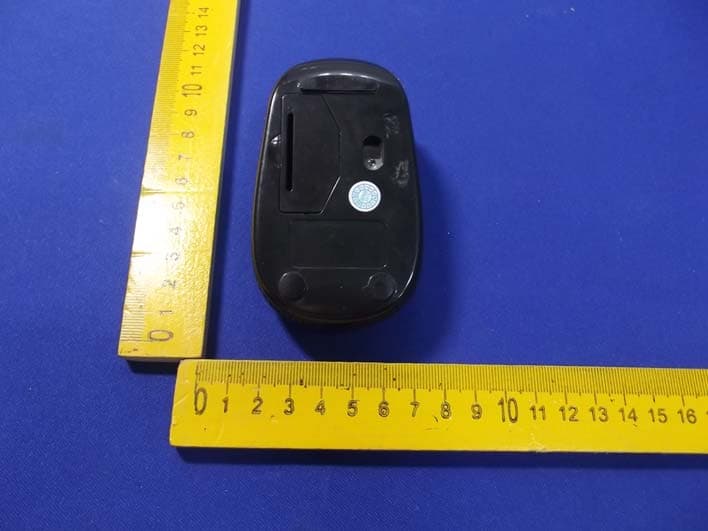
Click to zoom
Application Details
- Equipment Class
- DXX - Part 15 Low Power Communication Device Transmitter
- Date of Grant
- Nov 17, 2013
- Application Purpose
- Original Equipment
- Date of Application
- Nov 17, 2013
- Equipment Note
- 2.4GHz Wireless Optical Mouse
- Frequency Range
- 2402.00000000 - 2480.00000000
- Company
- Wintop Electronics Co., Ltd.
- Country
- China
Documents & Files
Document Text
Text extracted from the exhibit documents filed with the FCC. Open a document above to read the original.
Users Manual
PID #: 111379/80/81/82/-109342 Rev. 131009 Optical 2.4GHz Wireless Nano Mouse Model #: WM-710 User’s Manu 3 PACKAGE CONTENTS: Your new Wireless Optical Mouse will ship with the following items. - Wireless Optical Nano Mouse - Nano Receiver - 2 AAA Batteries - User’s Manual - Warranty Information SYSTEM REQUIREMENTS: Please be sure that you meet all of the system requirements below to avoid difficulties during installation PC & Mac ® Computer Compatible works with: - Windows ® XP, Windows ® Vista , Windows ® 7 and Windows ® 8 operating systems - MacOS X ® 10.3 and Above - An Available USB Port SPECIFICATIONS: Your new Wireless Optical Mouse complies with the following specifications. - USB Interface 4 INSTALLING BATTERIES: To properly install batteries into your Mouse, please follow the instructions below: 1. Pull the Battery Compartment Release Latch at the bottom of your Mouse and remove the Battery Compartment Cover from your Mouse. Note: Remove the Battery Compartment Cover from your Mouse gently, otherwise the Nano Receiver stowed inside the battery bay will pop out. 2. Install two AAA Batteries into your Mouse following the battery orientation guide in the battery bay, make sure the guide is under the batteries so that you can remove the batteries out of the battery bay easily, then replace the Battery Compartment Cover back onto your Mouse until it securely locks. Note: The LED at the bottom of your mouse will flash one time after Batteries have been installed into your Mouse properly, the LED will remain on when the Nano Receiver is connected to your computer. Nano Receiver LED 5 INSTALLATION: For All Operating Systems 1. Make sure you have successfully installed the Batteries into your Mouse, refer to the Installing Batteries section in this manual if necessary. 2. Turn on your computer, plug the enclosed Nano Receiver into an available USB port on your computer. (TIP: If you are not able to find an available USB port on your computer, please refer to the user’s manual of your computer for more detail. 3. Your wireless optical mouse is now ready to be used. 6 CHANGING THE SPEED OF YOUR MOUSE: To adjust the speed of the cursor or the scroll button features on your computer, please follow the instructions below: NOTE: The screenshots show in this section are for demonstration only and your screen may look slightly different but with similar options. For Windows ® operating systems Open the “Control Panel”, and double-click the “Mouse” icon to open the mouse properties screen, and then select the “Pointer Options”. After you have made your changes; select “Apply”, and then “OK”. For Mac OS X ® 10.3 and Above Open the “System Preferences”. At the System Preferences screen, click the “Keyboard & Mouse” icon to open the Keyboard & Mouse screen, and then select the “Mouse” tab and make your changes. - Windows ® operating systems Mac OS X ® 10.3 and Above
Cover Letter(s)
Wintop Electronics Co., Ltd. FCC Confidentiality Request Number: CF303 Version: V05 Date: 21-05-2012 (Permanent or also called long term confidentiality is the normal method to keep certain docuements confidential, and may apply to schematics, block diagrams, operational description and bill of materials.) To: Federal Communications Commission Equipment Authorization Branch 7435 Oakland Mills Road Columbia, MD 21046 Pursuant to 47 CFR Section 0.459(a) & (b), we, (the applicant / grantee) Company name Wintop Electronics Co., Ltd. Address Huaguan Industrial Park, Xinhe Road, Shangmugu, Pinghu Town, Longgang District, City Shenzhen Cit y, Country China request for this certification filing under: Grantee Code Product Number FCC ID: ZU K WM710 to maintain permanent confidentiality for the following documents submitted within this application: (please cross what is applicable, or add other documents, provide the file name and description) Exhibit File Name Description √ Operational Description Operational Description explaining the functioning of the block diagram √ Block Diagrams Block Diagrams showing the systematic building blocks of the EUT √ Schematics Diagrams Schematics showing components, their values and interconnection Bill of Materials List of components used on the PCB’s of the EUT Above materials crossed contain secrets, proprietary and technical information, which would customarily be guarded from competitors under 47 CFR, section 0.457(d)(2). Disclosure or publication or any portion of this company confidential material to other parties could cause substantial competitive harm and provide unjustified benefits for competitors. We understand that pursuant to 47 CFR section 0.457(d)(1)(ii) disclosure of the applicant and all accompanying documentation will not be made before the date of the grant. The documents indicated as confidential above, are not publicly available elsewhere. Attestation: City and Country: Date: Name: (this must be a person) Function:Signature: (or official company stamp) Shenzhen, China 2013-11-08 Shirly LeeSales
External Photos
Figure 1 The EUT-Front View Figure 2 The EUT-Back View
ID Label/Location Info
Label Location On EUT
ID Label/Location Info
Product Name: 2.4GHz Wireless Optical Mouse Model No.: WM-710 FCC ID: ZUKWM710 This device complies with Part 15 of the FCC Rules. Operation is subject to the following two conditions: (1) This device may not cause harmful interference, and (2) This device must accept any interference received, including interference that may cause undesired operation.
Internal Photos
Figure 3 The EUT-Inside View Figure 4 PCB of the EUT View Figure 5 PCB of the EUT View Figure 6 PCB of the EUT View
Test Report
Shenzhen Anbotek Compliance Laboratory Limited FCC ID: ZUKWM710 Page 1 of 27 Report No.: 201310701F Shenzhen Anbotek Compliance Laboratory Limited Tel: (86)755-26066544 Fax: (86)755-26014772 www.anbotek.com FCC TEST REPORT for Wintop Electronics Co., Ltd. 2.4GHz Wireless Optical Mouse Model No.: WM-710 Report Number : 201310701F Date of Test : Oct. 11~ Nov. 06, 2013 Date of Report : Nov. 07, 2013 Prepared for : Wintop Electronics Co., Ltd. Address : Huaguan Industrial Park, Xinhe Road, Shangmugu, Pinghu Town, Longgang District, Shenzhen City, China Prepared By : Shenzhen Anbotek Compliance Laboratory Limited Address : 1/F., Building 1, SEC Industrial Park, No.0409 Qianhai Road, Nanshan District, Shenzhen, Guangdong, China Tel: (86) 755-26066544 Fax: (86) 755-26014772 Shenzhen Anbotek Compliance Laboratory Limited FCC ID: ZUKWM710 Page 2 of 27 Report No.: 201310701F Shenzhen Anbotek Compliance Laboratory Limited Tel: (86)755-26066544 Fax: (86)755-26014772 www.anbotek.com TABLE OF CONTENTS Description Page Test Report 1. GENERAL INFORMATION ......................................................................................................... 4 1.1. Description of Device (EUT) .................................................................................................................... 4 1.2. Auxiliary Equipment Used during Test .................................................................................................... 5 1.3. Description of Test Facility ...................................................................................................................... 6 1.4. Measurement Uncertainty ......................................................................................................................... 6 2. TEST PROCEDURE ....................................................................................................................... 7 3. CONDUCTED LIMITS .................................................................................................................. 8 3.1. Block Diagram of Test Setup ................................................................................................................... 8 3.2. Power Line Conducted Emission Measurement Limits (15.207) ............................................................. 8 3.3. Configuration of EUT on Measurement ................................................................................................... 8 3.4. Operating Condition of EUT .................................................................................................................... 9 3.5. Test Procedure .......................................................................................................................................... 9 3.6. Power Line Conducted Emission Measurement Results .......................................................................... 9 4. RADIATION INTERFERENCE .................................................................................................. 12 4.1. Requirements (15.249, 15.209): ............................................................................................................. 12 4.2 Test Procedure ......................................................................................................................................... 12 4.3 Test Results .............................................................................................................................................. 13 5. OCCUPIED BANDWIDTH .......................................................................................................... 18 5.1. Requirements (15.249): .......................................................................................................................... 18 5.2. Test Procedure ........................................................................................................................................ 18 5.3. Test Configuration: ................................................................................................................................. 19 5.4. Test Results ............................................................................................................................................. 20 6. PHOTOGRAPH ............................................................................................................................. 23 6.1. Photo of Power Line Conducted Emission Measurement ...................................................................... 23 6.2. Photo of Radiation Emission Test .......................................................................................................... 24 APPENDIX I (External Photos) (1 Pages) APPENDIX II (Internal Photos) (2 Pages) Shenzhen Anbotek Compliance Laboratory Limited FCC ID: ZUKWM710 Page 3 of 27 Report No.: 201310701F Shenzhen Anbotek Compliance Laboratory Limited Tel: (86)755-26066544 Fax: (86)755-26014772 www.anbotek.com TEST REPORT Applicant : Wintop Electronics Co., Ltd. Manufacturer : Shenzhen Wintop Electronics Co. Limited EUT : 2.4GHz Wireless Optical Mouse Model No. : WM-710 Serial No. : N/A Trade Mark : N/A Rating : DC 3V, 8mA Measurement Procedure Used: FCC Part15 Subpart C, Paragraph 15.207, 15.249 & 15.209 The device described above is tested by Shenzhen Anbotek Compliance Laboratory Limited to determine the maximum emission levels emanating from the device and the severe levels of the device can endure and its performance criterion. The measurement results are contained in this test report and Shenzhen Anbotek Compliance Laboratory Limited is assumed full of responsibility for the accuracy and completeness of these measurements. Also, this report shows that the EUT (Equipment Under Test) is technically compliant with the FCC Part 15 Subpart C requirements. This report applies to above tested sample only and shall not be reproduced in part without written approval of Shenzhen Anbotek Compliance Laboratory Li…
Text truncated - open the document above for the full version.
Test Setup Photos
1. Photo of Power Line Conducted Emission Test 2. Photo of Radiated Emission Test
Contact Information
Applicant
Shirly Lee(Sales)
Technical Contact
Test Firm
Shenzhen Anbotek Compliance Laboratory LimitedDaniel zhu
[email protected]86-755-26014771
Technical Specifications
| # | Rule Parts | Frequency Range | Power Output |
|---|---|---|---|
| 1 | 15C | 2.40 GHz - 2.48 GHz | - |
Other Applications from Wintop Electronics Co., Ltd.

ZUK-KB812M
Nov 25, 2015Wireless Keyboard
Equipment Class
DXX - Part 15 Low Power Communication Device Transmitter
ZUKBT588
May 28, 2015Sport Bluetooth Earphone
Equipment Class
DSS - Part 15 Spread Spectrum Transmitter
ZUKWM660-1
Apr 03, 20122.4 GHz Wireless Mouse Receiver
Equipment Class
JBP - Part 15 Class B Computing Device PeripheralZUKWM660
Apr 01, 20122.4 GHz Wireless Optical Mouse
Equipment Class
DXX - Part 15 Low Power Communication Device Transmitter
ZUKWM605
Aug 02, 2011Bluetooth Wireless Optical Mouse
Equipment Class
DXX - Part 15 Low Power Communication Device Transmitter