2AB7K-A7908Bluetooth Speaker
Anker Technology Co., Limited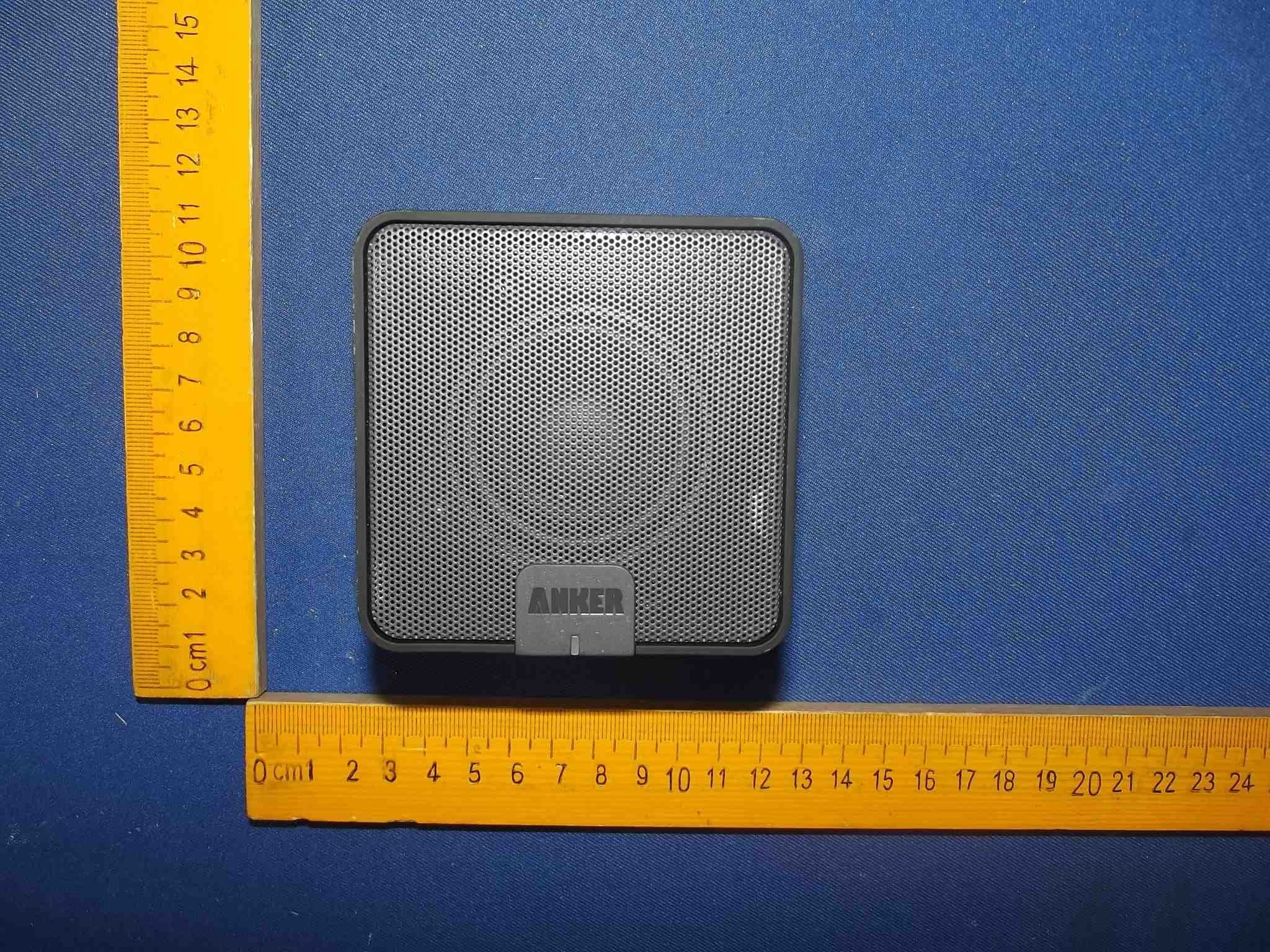
Click to zoom
Application Details
- Equipment Class
- DTS - Digital Transmission System
- Date of Grant
- Jun 04, 2015
- Application Purpose
- Original Equipment
- Date of Application
- Jun 03, 2015
- Equipment Note
- Bluetooth Speaker
- Frequency Range
- 2402.00000000 - 2480.00000000
- Country
- Hong Kong
Documents & Files
Document Text
Text extracted from the exhibit documents filed with the FCC. Open a document above to read the original.
Users Manual
Anker Portable Bluetooth Speaker Model No: A7908 Instruction Manual Package Contents Anker Portable Bluetooth Speaker Micro USB cable 3.5mm audio cable Travel pouch Instruction manual Product Features ● Huge 1800mAh capacity delivers 15-20 hours of play time, outlasting even your iPhone 5s. ● Powerful 4W acoustic driver pumps out clear, room-filling sound. ● Latest Bluetooth 4.0 standards enables high definition audio, backward compatible with all Bluetooth versions. ● Built-in high-sensitivity microphone with advanced CVC (Clear Voice Capture) technology captures clear sound within a 2-foot (60cm) radius, perfect for use as a speaker phone. ● 3.5mm line-in port for connecting to your non-Bluetooth devices. ● Automatically turns off after 10 minutes when no device is connected. ● Automatically connects to the last-connected device when turned on (both device’s Bluetooth functions need to be enabled). Specifications Bluetooth Standard 4.0 Product Weight 280 ± 10 g / 9.9 ± 0.4oz Product Size 80 × 80 × 60mm / 3.1 × 3.1 × 2.7in Lithium Battery Capacity 2100mAh Play Time 15 - 20 hours Charge Time 5 hours Operating Range 10m / 33ft Speaker Output Power 4W × 1 Audio Cable Type 3.5mm audio cable Supported Bluetooth Profiles HSP, HFP, A2DP and AVRCP Product Overview 1. Volume Down 2. Volume Up 3. Play/Pause 4. Micro USB Input 5. Audio Input 6. Power Switch 7. Status Indicator 8. Battery Indicator How to Pair with Your Device 1. Turn the Power Switch on. The Status Indicator will light up. The speaker will enter pairing mode automatically within 3 seconds, and the Status Indicator will begin to flash. 2. Activate your device’s Bluetooth function and search for the device. 3. Once the Bluetooth speaker has been detected, select the product name “Anker MP141” to connect. (For devices with Bluetooth versions below 3.0, press “Yes” to confirm pairing. Enter a passkey or PIN code “0000” (4 zeros), then press the “Yes” or “OK” key to finish pairing.) 4. When the Bluetooth speaker and your device are successfully paired, the Status Indicator will go on and remain on while connected. Note: The speaker will automatically connect to the last-connected device once Bluetooth function is enabled. When pairing with an additional device, disable the Bluetooth function on the previous device and shut off the speaker, or simply delete the pairing record. Then, repeat the pairing process. How to Use Turning the speaker on/off Slide the switch to the “on” or “off” position to turn the speaker on or off. Music play/pause First, make sure your device is connected to the speaker successfully. Open your music software to play your music from the speaker. Press the “Play/Pause” button to pause music. Adjusting volume Press the “Volume Up” or “Volume Down” button to increase or decrease the volume. Voice dialing Please ensure your mobile phone supports voice dialing and voice tag recognition to use this feature. Press the “Play/Pause” button for 2 seconds, then give your voice command. Your device should then repeat the name to confirm before calling. (On iPhone, this will activate Siri.) Answering a call Press the “Play/Pause” button to answer a call, or answer directly from the phone. Ending a call Press the “Play/Pause” button to end a call, or end directly from the phone. Rejecting an incoming call Press the “Play/Pause” button for 2 seconds to reject an incoming call. Microphone Use the microphone directly on the speaker to talk after answering a call. The distance between your mouth and the speaker should not exceed 2ft/60cm. Deleting pairing records When the speaker is in standby mode, press the “Volume Down” and “Volume Up” buttons for 2 seconds to delete pairing records. Note: Basic functions may be restricted depending on Bluetooth software compatibility or setting limitations of your device. How to Recharge When the speaker’s battery is low, the speaker will announce, “Battery low”, and the Battery Indicator will flash 10 times every 5 minutes to remind you. 1. Plug the micro USB cable into the input port of the speaker. 2. Insert the remaining end of the USB power wire into (a) a USB AC adapter (not included) connected to a wall socket, or (b) a charging computer USB port. A steady red Battery Indicator will show that it is charging. 3. The red Battery Indicator will go off when the speaker is fully charged. LED Indicator Instructions LED indicator Meaning Blue Status Indicator rapidly flashing Pairing mode Steady Blue Status Indicator Connected to a device Red Battery Indicator flashing 10 times every 5 minutes Low Battery Steady Red Battery Indicator Charging Red Battery Indicator goes off Fully charged Usage Tips 1. Power off the speaker when not in use and before storing. 2. The operational range of the speakers may be influenced by obstructions, such as walls, pillars, etc. To ensure a stable connection, we recommend avoiding such obstructions whenever possible and/or shortening the distance during use. 3. To protect the long-term performance of the battery, please do not place the speaker in high temperatures above 140°F/60, such as in a hot vehicle or under direct sunlight.°C 4. Do not expose the speaker or any of its supplied parts to rain or other liquids. FA Q 1. Why can’t the speaker connect to my device? a. Check to ensure your device’s Bluetooth function is enabled. b. Make sure your device is within 3ft/1m of the speaker. c. Delete the pairing record(s) on the speaker or your device. 2. Can I use the speaker to play music while charging? No. Concurrently charging and using the speaker will cause damage to the speaker’s circuit and affect the long-term performance of the battery. 3. Can I Skype using this speaker? Skype is only available when using iOS 6. It cannot currently be used under other operating systems (Android, iOS versions excluding iOS 6 ). FCC STATEMENT : This device complies with Part 15 of the FCC Rules. Operation is subject to the following two conditions: (1) This device may not …
Text truncated - open the document above for the full version.
Cover Letter(s)
SCS-F19:ConfidentialityRequestLetterPage 1 of 2 Rev4.0 775MontagueExpressway Milpitas,CA95035 Tel:408-526-1188 Fax:408-526-1088 Email:[email protected] Confidentiality RequestLetter ReasonforAmendment(current/obsolete) RevisionHistory ApprovedDate FromTo InitialRelease(obsolete)1.01.0Nov-14-2006 AddingCFR2.459(obsolete)1.02.0August–11-2008 Updatedcompanytemplate&Addedtextbox (obsolete) 2.03.0Jan-31-2012 AddedICconfidentialityletterform(current)3.04.0March-26-2015 SCS-F19:ConfidentialityRequestLetterPage 2 of 2 Rev4.0 (AnkerTechnologyCo.,Limited) (2015-05-26) To: FederalCommunicationsCommission AuthorizationandEvaluationDivision 7435OaklandMillsRoad Columbia,MD Subject:PermanentConfidentialityRequestforFCCID:2AB7K-A7908 Weherebyrequestconfidentialtreatmentofinformationaccompanyingthisapplicationasoutlinedbelow: -BlockDiagram -Schematics -OperationalDescription Theabovematerialscontaintradesecretsandproprietaryinformationnotcustomarilyreleasedtothepublic.The publicdisclosureofthesematerialsmaybeharmfultotheapplicantandprovideunjustifiedbenefitstoits competitors. TheapplicantunderstandsthatpursuanttoSection0.457&0.459oftheRules,disclosureofthisapplicationand allaccompanyingdocumentationwillnotbemadebeforethedateoftheGrantforthisapplication. Sincerely, Client’ssignature SimonZhang/ProductManager CompanyName:AnkerTechnologyCo.,Limited Address:Room1318-19,HollywoodCommercialCenter,610NathanRoad,Mongkok,Kowloon,Hongkong Email:[email protected]
External Photos
Figure1 TheEUT-OverallView Figure2 TheEUT-TopView Figure3 TheEUT-BottomView Figure4 TheEUT-FrontView Figure5 TheEUT-BackView Figure6 TheEUT-RightView Figure7 TheEUT-LeftView
ID Label/Location Info
LabelLocationOnEUT
ID Label/Location Info
ProductName:BluetoothSpeaker ModelNo.:A7908 FCCID:2AB7K-A7908 ThisdevicecomplieswithPart15oftheFCCRules.Operation issubjecttothefollowingtwoconditions: (1)Thisdevicemaynotcauseharmfulinterference,and (2)Thisdevicemustacceptanyinterferencereceived,including interferencethatmaycauseundesiredoperation.
Internal Photos
Figure8 TheEUT-InsideView Figure9 TheEUT-InsideView Figure10 PCBoftheEUT-FrontView Figure11 PCBoftheEUT-FrontView Figure12 PCBoftheEUT-BackView Figure13 PCBoftheEUT-ModuleView Antenna
RF Exposure Info
RFEXPOSUREEVALUATION FCCID : 2AB7K-A7908 AccordingtoFCC1.1310:Thecriterialistedinthefollowingtableshallbeused toevaluatetheenvironmentimpactofhumanexposuretoradiofrequency(RF) Radiationasspecifiedin§1.1307(b): RoutineSARevaluationreferstothatspecificallyrequiredby§2.1093,using measurementsorcomputersimulation.WhenroutineSARevaluationisnot required,portabletransmitterswithoutputpowergreaterthantheapplicable lowthresholdrequireSARevaluationtoqualifyforTCBapproval. Themaximumoutputpowerforlowchannelis:1.07dBm=1.28mW Tuneuptoleranceis:1.07 ± 1dBm TheMax.TuneupPower=2.07dBm=1.61mW Thecalculationresults=1.61/5*√2.402=0.499 < 3 Themaximumoutputpowerformiddlechannelis:2.26dBm=1.68mW Tuneuptoleranceis:2.26 ± 1dBm TheMax.TuneupPower=3.26dBm=2.12mW Thecalculationresults=2.12/5*√2.440=0.663 < 3 Themaximumoutputpowerforhighchannelis:2.34dBm=1.71mW Tuneuptoleranceis:2.34 ± 1dBm TheMax.TuneupPower=3.34dBm=2.16mW Thecalculationresults=2.16/5*√2.480=0.681 < 3 TestResults:PASS.
Test Report
Shenzhen Anbotek Compliance Laboratory Limited FCC ID: 2AB7K-A7908 Page 1 of 51 Report No.: R011503174E Shenzhen Anbotek Compliance Laboratory Limited Tel:(86)755-26066544Fax:(86)755-26014772www.anbotek.com FCC TEST REPORT for Anker Technology Co., Limited Bluetooth Speaker Model No.: A7908 ReportNumber:R011503174E DateofTest:May04~27,2015 DateofReport:May28,2015 Preparedfor:AnkerTechnologyCo.,Limited Address: Room 1318-19, Hollywood Commercial Center, 610 Nathan Road,Mongkok,Kowloon,Hongkong PreparedBy:ShenzhenAnbotekComplianceLaboratoryLimited Address: 1/F., Building 1, SEC Industrial Park, No.0409 Qianhai Road, NanshanDistrict,Shenzhen,Guangdong,China Tel:(86)755-26066544 Fax:(86)755-26014772 Shenzhen Anbotek Compliance Laboratory Limited FCC ID: 2AB7K-A7908 Page 2 of 51 Report No.: R011503174E Shenzhen Anbotek Compliance Laboratory Limited Tel:(86)755-26066544Fax:(86)755-26014772www.anbotek.com TABLE OF CONTENT Description Page Test Report 1. GENERAL INFORMATION......................................................................................................4 1.1. Description of Device (EUT)................................................................................................................4 1.2. Auxiliary Equipment Used during Test................................................................................................5 1.3. Description of Test Facility.................................................................................................................. 5 1.4. Measurement Uncertainty.....................................................................................................................5 2. TEST METHODOLOGY............................................................................................................6 2.1. Summary of Test Results......................................................................................................................6 2.2. Description of Test Modes....................................................................................................................6 3. CONDUCTED EMISSION TEST.............................................................................................. 7 3.1. Block Diagram of Test Setup................................................................................................................7 3.2. Power Line Conducted Emission Measurement Limits (15.207).........................................................7 3.3. Configuration of EUT on Measurement............................................................................................... 7 3.4. Operating Condition of EUT................................................................................................................ 7 3.5. Test Procedure...................................................................................................................................... 8 3.6. Test equipment......................................................................................................................................8 3.7. Power Line Conducted Emission Measurement Results...................................................................... 8 4. FCC PART 15.247 REQUIREMENTS FOR DSSS & OFDM MODULATION................. 11 4.1 Test Setup.............................................................................................................................................11 4.2 6dB Bandwidth.................................................................................................................................... 11 4.3. Maximum Peak output power test...................................................................................................... 14 4.4. Band Edges Measurement...................................................................................................................17 4.5. Peak Power Spectral Density..............................................................................................................28 4.6. Radiated Emissions.............................................................................................................................31 5. ANTENNA APPLICATION......................................................................................................42 5.1. Antenna requirement...........................................................................................................................42 5.2. Result.................................................................................................................................................. 42 6. PHOTOGRAPH......................................................................................................................... 43 6.1 Photo of Conducted Emission Test......................................................................................................43 6.2 Photo of Radiation Emission Test........................................................................................................43 APPENDIX I (EXTERNAL PHOTOS)........................................................................................45 APPENDIXII(INTERNAL PHOTOS)...................................................................................... 49 Shenzhen Anbotek Compliance Laboratory Limited FCC ID: 2AB7K-A7908 Page 3 of 51 Report No.: R011503174E Shenzhen Anbotek Compliance Laboratory Limited Tel:(86)755-26066544Fax:(86)755-26014772www.anbotek.com TEST REPORT Applicant: Anker Technology Co., Limited Manufacturer: Anker Technology Co., Limited EUT: Bluetooth Speaker Model No.: A7908 Serial No.: N.A. Trade Mark: ANKER Rating: DC 5V, 900-1000mA Measurement Procedure Used: FCC Part15 Subpart C 2014, Paragraph 15.247 The device described above is tested by Shenzhen Anbotek Compliance Laboratory Limited to determine the maximum emission levels emanating from the device and the severe levels of the device can endure and its performance criterion. The measurement resu…
Text truncated - open the document above for the full version.
Test Setup Photos
1PhotoofConductedEmissionTest 2PhotoofRadiationEmissionTest
Contact Information
Applicant
Simon Zhang(Product Manager)
Test Firm
Shenzhen Anbotek Compliance Laboratory LimitedDaniel zhu
[email protected]86-755-26014771
Technical Specifications
| # | Rule Parts | Frequency Range | Power Output |
|---|---|---|---|
| 1 | 15C | 2.40 GHz - 2.48 GHz | 1.71 mW |
Other Applications from Anker Technology Co., Limited

2AB7K-98AN01BA
Dec 07, 2015Anker Wireless Mouse Black NO.01(ET-2240)
Equipment Class
DXT - Part 15 Low Power Transceiver, Rx Verified
2AB7K-98AN02BA
Dec 07, 2015Anker Wireless Mouse Black NO.2
Equipment Class
DXT - Part 15 Low Power Transceiver, Rx Verified
2AB7K-A3102
Nov 17, 2015Bluetooth Speaker
Equipment Class
DTS - Digital Transmission System
2AB7K-A3233
Nov 02, 2015Bluetooth Headset
Equipment Class
DTS - Digital Transmission System
2AB7K-A3182
Oct 25, 2015Outdoor Speaker
Equipment Class
DSS - Part 15 Spread Spectrum Transmitter