2AB7KTC980Anker folio keyboard case for iPad Air
Anker Technology Co., Limited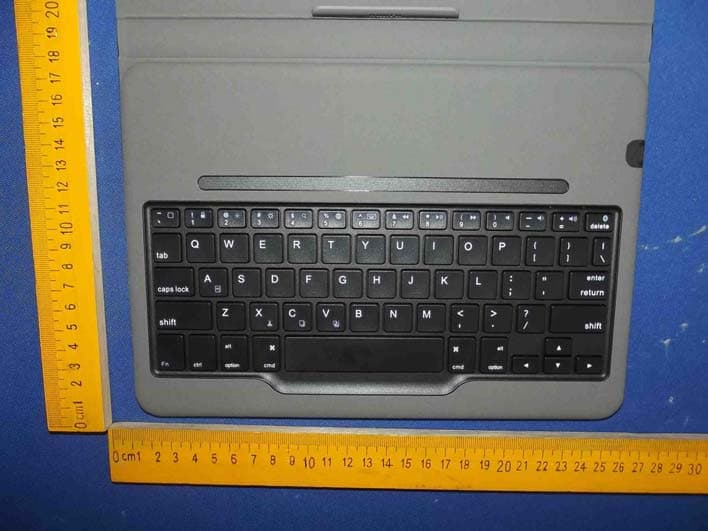
Click to zoom
Application Details
- Equipment Class
- DXX - Part 15 Low Power Communication Device Transmitter
- Date of Grant
- Nov 04, 2014
- Application Purpose
- Original Equipment
- Date of Application
- Nov 04, 2014
- Equipment Note
- Anker folio keyboard case for iPad Air
- Frequency Range
- 2402.00000000 - 2480.00000000
- Country
- Hong Kong
Documents & Files
Document Text
Text extracted from the exhibit documents filed with the FCC. Open a document above to read the original.
Users Manual
Bluetooth Folio Keyboard Case for iPad Air Welcome Guide 1 Package Contents ■ Anker Bluetooth Folio Keyboard Case for iPad Air ■ USB charging cable ■ Welcome guide Features ■ ■ ■ ■ ■ ■ ■ Notebook design resembles a laptop and complements your iPad Air. Premium exterior synthetic leather cover with inner microfiber unibody keyboard delivers a unique touch experience. Once paired via Bluetooth, iPad connects to the keyboard automatically whenever snapped to the embedded magnetic strip. iPad Air snaps to a built-in magnetic viewing angle designed for typing and media playback. Opening and closing the case automatically triggers sleep or wake modes. Rechargeable high capacity lithium battery lasts for over 6 months between charges (based on 2 hours of use per day). Molded key caps deliver whisper-quiet and comfortable typing. 2 Product Overview (1) Back to Home (2) Screen Lock / Unlock (3) Brightness Down ( for the UK keyboard) (4) Brightness Up( for the UK keyboard) (5) Search (6) Switch Input Language (7) Keyboard Display (8) Previous Song (9) Play/Pause (10) Next Song (11) Mute (12) Volume Down (13) Volume Up ctrl 123456789 1011121314 15181617 192021 3 (14) Bluetooth Pairing (15) Cut (16) Copy (17) Paste (18) Select All (19) Magnet (20) Caps Lock / Bluetooth Indicator (21) Power Indicator Specifications Bluetooth SpecificationBluetooth 3.0 Product Dimensions251 × 178 × 18mm / 9.9 × 7.0 × 0.7in Product Weight402g / 14.2oz Operating RangeUp to 10m / 33ft Modulation SystemGFSK Standby Time300 days Charge Time2.5 hours Uninterrupted Work Time300 hours Working Temperature-10 - +55 °C Lithium Battery Capacity800mAh Battery’s Lifespan 400 charge cycles Key Life5 million clicks 4 Pairing Instructions 1. 2. 3. 4. 5. 6. 7 . After pairing for the first time, your device will connect to the keyboard automatically when snapping the tablet to the keyboard. Note: In case of connection failure, delete the pairing record from your device, and repeat the procedures above. Power Saving Mode The keyboard case will enter sleep mode after being idle for 10 minutes. To activate it, press any key and wait for 2 seconds. Once installed in the case, release the bottom half of the iPad Air from the lower edge bracket while keeping the top half installed in the corner brackets. Lock the lower edge of the iPad Air into position on the magnetic strip to create an upright viewing angle. The green Power Indicator will go on for 2 seconds. Simultaneously press the Fn and Bluetooth keys to enter pairing mode. The blue Bluetooth Indicator will start to flash rapidly. Activate your device’s Bluetooth function and search for the keyboard case. Once the Bluetooth keyboard case has been found, click on its name to connect. Enter the password code as displayed on the screen. Once the Bluetooth keyboard case has successfully connected to your device, the Bluetooth Indicator will turn off. 5 Charging Instructions When battery power is low, the Power Indicator will turn red and begin to blink, indicating that it is time to recharge the keyboard case. 1. 2. 3. Usage Tips ■ ■ ■ ■ ■ Connect the micro end of the USB power cable to the micro USB port on the keyboard case. Connect the other end of the cable to a power adapter or computer USB port. The Power Indicator will turn red while the keyboard case is charging. Once it is fully charged, the Power Indicator will turn green. Do not place heavy objects on the keyboard case. Do not drop the product, bump it against hard surfaces, or dismantle it. Keep the product away from oil, chemicals, and liquids. Clean the keyboard by lightly wiping it with a slightly damp cloth. Dispose of batteries according to local laws. 6 Warranty Our company provides customers with a warranty of 18 MONTHS from the date of purchase. Contact Us For any inquiries or comments concerning our products, please send an email to [email protected], and we will respond to you as soon as possible. If there is any quality-related issue with the product, you may request a REPLACEMENT OR REFUND by submitting a request form at www.ianker.com/support. Statement ■ We’re only able to provide after-sales service for purchases made directly from Anker. If you purchased through a different retailer, please contact them for any exchange or refund requests. ■ Please note that unauthorized reselling of Anker products is prohibited. 7 Packungsinhalt ■ Anker Bluetooth Keyboard Case für iPad Air ■ USB Ladekabel ■ Bedienungsanleitung Features ■ ■ ■ ■ ■ ■ ■ Notebook Design lässt Ihr iPad Air wie einen Laptop aussehen. Die Kombination aus PU Leder auf der Aussenseite und Mikrofaser im Innenteil liefert soliden Halt beim Tragen. Tastatur verbindet sich automatisch mit Ihrem iPad Air. iPad Air rastet dank magnetischer Halterung automatisch ein um direkt einen idealen Blickwinkel zum Schreiben und für Medienwiedergabe. Einsetzen und Herausnehmen des Geräts schaltet das Keyboard automatisch ein und aus. Wiederaufladbare Lithium Batterie kann das Keyboard 6 Monate mit Strom versorgen (basierend auf einer täglichen Verwendungszeit von 2 Stunden). Geformte Tasten bieten leises und geräuscharmes Schreiben. 8 Produktübersicht (1) Home Button (2) Bildschirm sperren / Entsperren (3) Helligkeit runter (4) Helligkeit hoch (5) Suche (6) Eingabemethode (Sprachspezifisches Tastaturlayout) ändern (7) Keyboard Display (8) Vorheriger Track (9) Play/Pause (10) Nächster Track (11) Stumm (12) Lautstärke Runter (13) Lautstärke Hoch (14) Bluetooth Pairing 123456789 1011121314 15181617 192021 ctrl 9 Spezifikationen Bluetooth SpezifikationenBluetooth 3.0 Produktmaße251 × 178 × 18mm Produktgewicht402g Arbeitsreichweitebis zu 10m ModulationssystemGFSK Standby Zeit300 Tage Ladedauer2. 5 Stunden Ununterbrochene Betriebsdauer300 Stunden Arbeitstemperatur-10 - +55 °C Kapazität des Akkus800mAh Lebensdauer der Batterie400 Ladezyklen Lebensdauer der Tasten5 Millionen Klicks (15) Ausschneiden (16) Kopieren (17) Einfügen (18) Alles auswählen (19) Magnet (20) Caps Lock / Bl…
Text truncated - open the document above for the full version.
Cover Letter(s)
Anker Technology Co., Limited FCC Confidentiality Request Number:CF303 Version:V05 Date: 21-05-2012 (Permanent or also called long term confidentiality is the normal method to keep certain docuements confidential, and may apply to schematics, block diagrams, operational description and bill of materials.) To: Federal Communications Commission Equipment Authorization Branch 7435 Oakland Mills Road Columbia, MD 21046 Pursuant to 47 CFR Section 0.459(a) & (b), we, (the applicant / grantee) Company nameAnker Technology Co., Limited AddressRM703 KOWLOON BUILDING 555 NATHAN RD CityKL CountryHONG KONG request for this certification filing under: Grantee CodeProduct Number FCC ID:2AB7KTC980 to maintainpermanent confidentialityfor the following documents submitted within this application: (please cross what is applicable, or add other documents, provide the file name and description) ExhibitFile NameDescription √ Operational DescriptionOperational Descriptionexplaining the functioning of the block diagram √ Block DiagramsBlock Diagramsshowing the systematic building blocks of the EUT √ Schematics DiagramsSchematicsshowing components, their values and interconnection Bill of MaterialsList of components used on the PCB’s of the EUT Above materials crossed contain secrets, proprietary and technical information, which would customarily be guarded from competitors under 47 CFR, section 0.457(d)(2). Disclosure or publication or any portion of this company confidential material to other parties could cause substantial competitive harm and provide unjustified benefits for competitors. We understand that pursuant to 47 CFR section 0.457(d)(1)(ii) disclosure of the applicant and all accompanying documentation will not be made before the date of the grant. The documents indicated as confidential above, are not publicly available elsewhere. Attestation: City and Country:Date:Name: (this must be a person) Function:Signature: (or official company stamp) KL HONG KONG2014-10-24 Simon ZhangProduct Manager
Cover Letter(s)
Anker Technology Co., We, (the approval holder) Company name Address City Country declare that the following representative (agerii ) Tom Chen Name (person) Company name Addresss City Country Shenzhen Anbotek Compliance Laboratory Limited Shenzhen is hereby authorized to apply the following ec;ir;piir:i:t , Product Description Anker folio keyboard case for iPad Air Type or Model(s) Tradename or Brand(s) Anker We also authorize Teleconformity (Mr M. Koop Netherlands) to apply and sign this applicatiorr certifier). i:llici',ren 3'1 , l/534NH Enschede, the ::g Dii oLr i:e iraif (as representative agent or Signatule: (or official company stamp) Product Manager Gity and Gountry:
External Photos
Figure 1 The EUT-Outside View Figure 2 The EUT- Front View Figure 3 The EUT- Back View Figure 4 The EUT- Partial View Figure 5 The EUT- Port View
ID Label/Location Info
Label Location On EUT
ID Label/Location Info
Product Name:Anker folio keyboard case for iPad Air Model No.:TC980 FCC ID:2AB7KTC980 This device complies with Part 15 of the FCC Rules. Operation is subject to the following two conditions: (1) This device may not cause harmful interference, and (2) This device must accept any interference received, including interference that may cause undesired operation.
Internal Photos
Figure 6 The EUT-Inside View Figure 7 The EUT-Inside View Figure 8 PCB of the EUT-Front View Figure 9 PCB of the EUT-Back View Figure 10 PCB of the EUT-Front View Figure 11 PCB of the EUT-Back View
Test Report
Shenzhen Anbotek Compliance Laboratory Limited FCC ID: 2AB7KTC980 Page 1 of 30 Report No.: R011409070E Shenzhen Anbotek Compliance Laboratory Limited Tel:(86)755-26066544 Fax:(86)755-26014772 www.anbotek.com FCC TEST REPORT for Anker Technology Co., Limited Anker folio keyboard case for iPad Air Model No.: TC980, A7719, 98AP9803A-BTA Report Number:R011409070E Date of Test:Sept. 09 ~24, 2014 Date of Report:Oct. 20, 2014 Prepared for:Anker TechnologyCo., Limited Address:RM703 KOWLOON BUILDING 555 NATHAN RD KL HONG KONG Prepared By:Shenzhen Anbotek Compliance Laboratory Limite d Address:1/F., Building 1, SEC Industrial Park, No.0409 Qianhai Road, Nanshan District, Shenzhen, Guangdong, China Tel: (86) 755-26066544 Fax: (86) 755-26014772 Shenzhen Anbotek Compliance Laboratory Limited FCC ID: 2AB7KTC980 Page 2 of 30 Report No.: R011409070E Shenzhen Anbotek Compliance Laboratory Limited Tel:(86)755-26066544 Fax:(86)755-26014772 www.anbotek.com TABLE OF CONTENTS Description Page Test Report 1. GENERAL INFORMATION......................................................................................................4 1.1. Description of Device (EUT)................................................................................................................4 1.2. Auxiliary Equipment Used during Test................................................................................................ 5 1.3. Description of Test Facility.................................................................................................................. 5 1.4. Measurement Uncertainty.....................................................................................................................5 2. TEST PROCEDURE....................................................................................................................6 3. CONDUCTED LIMITS...............................................................................................................7 3.1. Block Diagram of Test Setup................................................................................................................7 3.2. Power Line Conducted Emission Measurement Limits (15.207).........................................................7 3.3. Configuration of EUT on Measurement............................................................................................... 7 3.4. Operating Condition of EUT................................................................................................................ 7 3.5. Test Procedure...................................................................................................................................... 7 3.6. Power Line Conducted Emission Measurement Results...................................................................... 8 4. RADIATION INTERFERENCE.............................................................................................. 11 4.1. Requirements (15.249, 15.209):..........................................................................................................11 4.2. Test Procedure.................................................................................................................................... 11 4.3. Test Configuration:............................................................................................................................. 12 4.4. Test Results.........................................................................................................................................13 5. OCCUPIED BANDWIDTH...................................................................................................... 19 5.1. Requirements (15.249):.......................................................................................................................19 5.2. Test Procedure.................................................................................................................................... 19 5.3. Test Configuration:............................................................................................................................. 19 5.4. Test Results.........................................................................................................................................19 6. PHOTOGRAPH......................................................................................................................... 23 6.1. Photo of Conducted Emission Test.....................................................................................................23 6.2. Photo of Radiation Emission Test.......................................................................................................23 APPENDIX I (EXTERNAL PHOTOS)........................................................................................25 APPENDIX II(INTERNAL PHOTOS)........................................................................................28 Appendix I (3 Pages) Appendix II (3 Pages) Shenzhen Anbotek Compliance Laboratory Limited FCC ID: 2AB7KTC980 Page 3 of 30 Report No.: R011409070E Shenzhen Anbotek Compliance Laboratory Limited Tel:(86)755-26066544 Fax:(86)755-26014772 www.anbotek.com TEST REPORT Applicant: Anker Technology Co., Limited Manufacturer: Anker Technology Co., Limited EUT: Anker folio keyboard case for iPad Air Model No.: TC980, A7719, 98AP9803A-BTA Serial No.: N.A. Trade Mark: Anker Rating: DC 5V, 350mA Measurement Procedure Used: FCC Part15 Subpart C, Paragraph 15.207, 15.249 & 15.209 The device described above is tested by Shenzhen Anbotek Compliance Laboratory Limited to determine the maximum emissionlevels emanating from the device and the severe levels of the device can endure and itsperformance criterion. The measurement results are contained in this test report andShenzhen Anbotek Compliance Laboratory Limited is assumed full of responsibility for the accuracy and completeness of these measurements. Also, this report shows that the EUT (Equipment Under Test)…
Text truncated - open the document above for the full version.
Test Setup Photos
1. Photo of Conducted Emission Test 2. Photo of Radiation Emission Test
Contact Information
Applicant
Simon Zhang(Product Manager)
Test Firm
Shenzhen Anbotek Compliance Laboratory LimitedDaniel zhu
[email protected]86-755-26014771
Technical Specifications
| # | Rule Parts | Frequency Range | Power Output |
|---|---|---|---|
| 1 | 15C | 2.40 GHz - 2.48 GHz | - |
Other Applications from Anker Technology Co., Limited

2AB7K-98AN01BA
Dec 07, 2015Anker Wireless Mouse Black NO.01(ET-2240)
Equipment Class
DXT - Part 15 Low Power Transceiver, Rx Verified
2AB7K-98AN02BA
Dec 07, 2015Anker Wireless Mouse Black NO.2
Equipment Class
DXT - Part 15 Low Power Transceiver, Rx Verified
2AB7K-A3102
Nov 17, 2015Bluetooth Speaker
Equipment Class
DTS - Digital Transmission System
2AB7K-A3233
Nov 02, 2015Bluetooth Headset
Equipment Class
DTS - Digital Transmission System
2AB7K-A3182
Oct 25, 2015Outdoor Speaker
Equipment Class
DSS - Part 15 Spread Spectrum Transmitter