2AMFC-GS1-AETH1RSIndustrial-grade Wireless Smart Multi-Sensor Device GS1
Dalian Cloud Force Technologies Co., Ltd.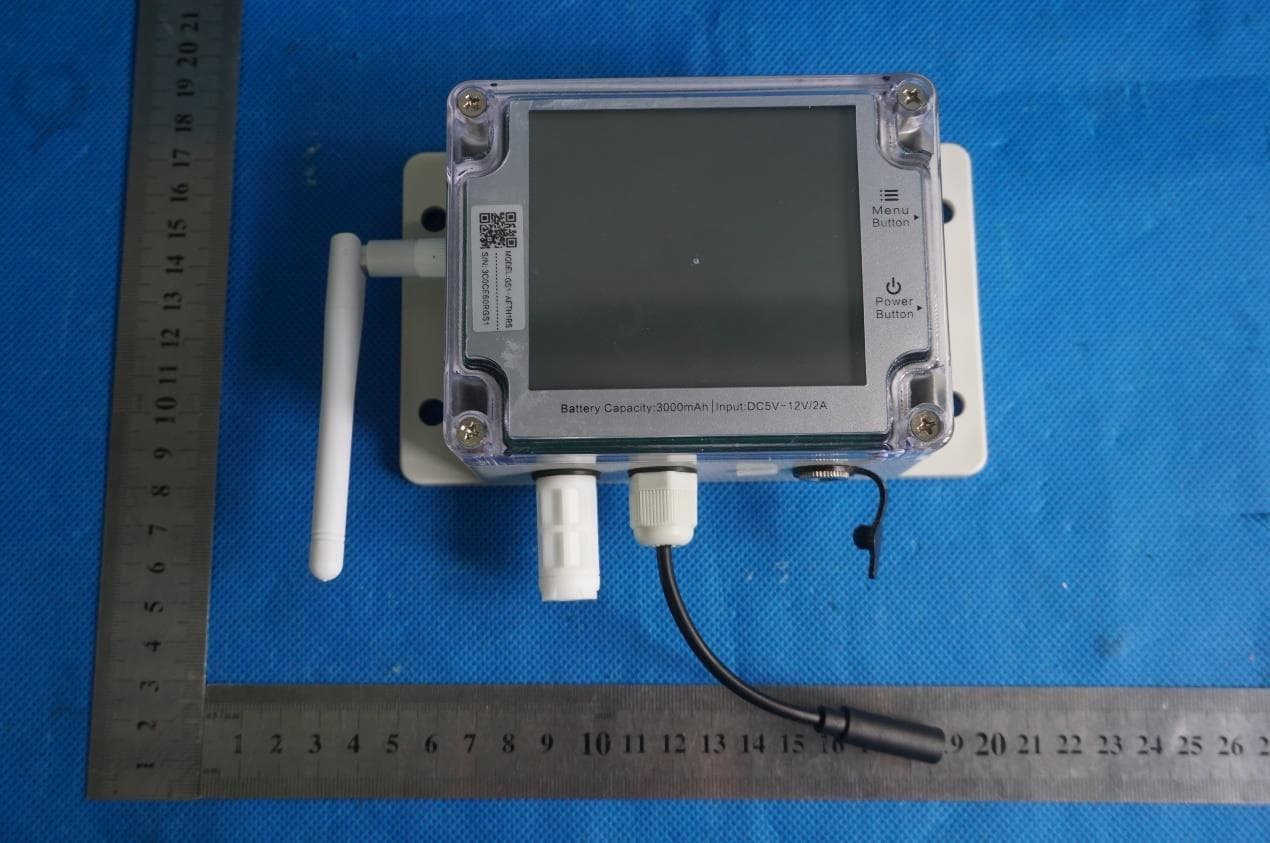
Click to zoom
Application Details
- Equipment Class
- DTS - Digital Transmission System
- Date of Grant
- Mar 05, 2020
- Application Purpose
- Original Equipment
- Date of Application
- Mar 05, 2020
- Equipment Note
- Industrial-grade Wireless Smart Multi-Sensor Device GS1
- Frequency Range
- 2412.00000000 - 2462.00000000
- Country
- China
Documents & Files
Document Text
Text extracted from the exhibit documents filed with the FCC. Open a document above to read the original.
Users Manual
【Introduction】 【App INSTALLATION】 1. Appearance Introduction 2. Screen Icons Introduction 3. Device Operations 1. App INSTALLATION 2. PC Offline Tools Installation 3. WiFi Setup 4. ETH network Setup ( suits AETH1RS version) This manual book is a general guidance for all types of our Industrial-grade GS1 devices. Some features which are marked with asterisk are available for specific versions. Please refer to related instructions according to the version you purchased. Industrial-grade Wireless Smart Multi-Sensor Device GS1 User Guide Menu button Light sensor* External power plugged in DC5V-12V Power port Temperature & humidity sensor WiFi/GPRS antenna* Power button USB Type-C Ethernet cable port* RS485 interface* SIM T/H E-T/H S-T/H E -T LIGHT WS CO 2 PH AP × × SIM m/s CO 2 PH RH% T/H Lux X100 PPM X100 Usage S-T/HE-T/HE -TLIGHTWSCO 2 PH AP PH sensor* Storage status CO2 sensor* Wind speed sensor* Light sensor * External temperature sensor * Soil temperature and humidity sensor* External temperature and humidity sensor* Internal temperature and humidity sensor Ethernet cable connected* Error code Device setup mode SIM card installed* Mobile data strength* Sending data Network connection/ failure Press and hold the power button for 3 seconds until the screen is lit up. Release the button and the device is now on. Press the menu button once to toggle between the internal sensor readings and external probe readings. Download the App from www.ubibot.io/setup Or Search for “UbiBot” on the App Store or Google Play. Launch the App, register an account if needed and log in. On the home screen click the “+” to add your device. Scan the QR code on the back of the device, or manually enter the serial number. Download the tool from www.ubibot.io/setup Please note that this tool is for professional use only to export offline data to PC. Press the menu button twice in quick succession to enable or disable the voice guide. This will also refresh the last sensing data. Press the power button twice to toggle between displaying Celsius or Fahrenheit. This will also refresh the last sensing data. Pressing either of the buttons will switch on the display backlight for a short time. Pressing both the two buttons at the same time will keep the backlight alight constantly. Pressing another time will switch off the backlight. Switch the device off. Now press and hold the menu button and power buttons together for at least 8 seconds. Release the buttons when you hear the voice guidance “ The device will now reset”. Press and hold the power button for 3 seconds until the screen is off. The device is now off. With the device switched on, press and hold the menu button for 3 seconds. Release the button until the AP icon flashes on the screen. With the device switched on, press the power button once to trigger a manual data sync. The icon will flash while the data is being transferred. You can also hear the voice guidance. WiFi connection/ failure Battery level Switch On Switch Off Device Setup Mode Manual Data Synchronisation Toggle Screen Readings Toggle Celsius or Fahrenheit* Display Backlight * Reset to Default Settings Switch On/Off Voice Guide* 123456 STEP1. Put your device into device setup mode . The AP icon should flash on the screen. STEP2. Plug in the Ethernet cable into the port on the left side of the device. STEP1. Launch the app, register if needed and log in. On the main screen, click the “+” to add your device. Scan the QR code on the back of the device, or manually enter the serial number. Follow the onscreen guidance to complete the setup. STEP2. The device will ask you to enter your WiFi password. Check that the correct SSID is selected and enter the password.The App will now prompt you to go to your phone settings screen. Change to the UbiBot-xxx network and return to the App. The device will now complete the setup process, register with the server and do the initial data sync. Your phone will automatically switch back to its normal WiFi network. If the connection failed, please repeat the process and ensure you entered the correct WiFi details in step 3. STEP3. STEP4. IMPORTANT ALL STORED DATA WILL BE LOST IF YOU RESET YOUR DEVICE TO DEFAULT SETTINGS! REMEMBER TO SYNCHRONISE THE SENSING DATA TO THE UBIBOT® IoT PLATFORM OR EXPORT THE DATA TO YOUR COMPUTER BEFORE RESETTING IT. Device Management Αδδ ψουρ δεπιχεΣχαν τηε ΘΡ χοδε Next Step Serial No. SSID Password 789101112 【TROUBLESHOOTING 】 【PRODUCT CARE 】 【WARRANTY INFORMATION 】 【WARRANTY CARD】 【REPAIR HISTORY】 【ERROR CODES 】 【Device Deployment】 01 System Protection Please follow the instructions to properly configure the device. Unconfigured devices will revert to system protection mode to save power. 1. Device setup failure when using the UbiBot App There are several factors that can affect the setup process. The followings are common issues: ①WiFi frequency: The Device can only connect to 2.4GHz networks, channels 1-13. 2. Failure to Sync Data Please check the following: ①With the device swithced on, press the power button once to trigger a manual data sync. You can hear " sync completed" after the data being transferred. If it says "sync failed", try the next steps. ②Check that the device has sufficient battery power for the WiFi to work. WiFi takes a lot of power -- the device may be on, but unable to connect to the WiFi. Please check the battery icon on the screen. Recharge the device before it runs out of the power. ③Make sure your device's WiFi router has a working Internet connection (for instance, try to access www.ubibot.io using a mobile connected to the same WiFi). 3.Can I Use the Device without a Network Connection? How do I Access the Data? The device will continue working without a network connection and can store up to 300,000 readings in its memory. Real-time readings are displayed on screen and you can access the data in the following ways: ①Move the device to an area where there is a WiFi connection which the device can connect t…
Text truncated - open the document above for the full version.
Cover Letter(s)
Dalian Cloud Force Technologies Co., Ltd. Unit1,Block B,6th Floor, No.23 Honggang Rd. Ganjingzi Distr.Dalian, Liaoning Province Date: 2020-01-10 FCC ID: 2AMFC-GS1-AETH1RS Dear Sir/Madam, We, Dalian Cloud Force Technologies Co., Ltd. Hereby declares the following statement for Federal Communications Commission, PCB board, circuit, structure and internal of these model(s) are the same, Only model number is different for these model: Product name: Industrial-grade Wireless Smart Multi-Sensor Device GS1 Model no.: GS1-AETH1RS, GS1-A, GS1-AL4G1RS Sincerely, (Signed) Name / Title: wang mao / Manager Company: Dalian Cloud Force Technologies Co., Ltd. Address: Unit1,Block B,6th Floor, No.23 Honggang Rd. Ganjingzi Distr. Dalian, Liaoning Province Phone: +86 041186686675 E-Mail: [email protected]
Cover Letter(s)
Dalian Cloud Force Technologies Co., Ltd. Unit1,Block B,6th Floor, No.23 Honggang Rd. Ganjingzi Distr.Dalian, Liaoning Province FCC ID: 2AMFC-GS1-AETH1RS IC: 24405-GS1AETH1RS Model Number: GS1-AETH1RS, GS1-A, GS1-AL4G1RS Date: 2020-01-10 To Federal Communications Commission 7435 Oakland Mills Road Columbia, MD 21046 We, Dalian Cloud Force Technologies Co., Ltd. declare that this EUT (FCC ID: 2AMFC-GS1-AETH1RS, IC: 24405-GS1AETH1RS) doesn’t have Ad Hoc mode function on “non-US/Canada frequencies”. In addition. The frequency selection feature is disabled by firmware for devices marked to the US/Canada. For DTS part of this device, only channels 1-11 will be used in North America, Country code selection is disabled. Best Regards! (Signed) Name / Title: wang mao / Manager Company: Dalian Cloud Force Technologies Co., Ltd. Address: Unit1,Block B,6th Floor, No.23 Honggang Rd. Ganjingzi Distr. Dalian, Liaoning Province Phone: +86 041186686675 E-Mail: [email protected]
Cover Letter(s)
CONFIDENTIALITY REQUEST for Certification Service in USA Federal Communication Commission Equipment Authorization Division, Application Processing Branch 7435 Oakland Mills Road Columbia, MD 21046 < 2020-01-10> TO WHOM IT MAY CONCERN Pursuant to Paragraphs §0.457 and 0.459 of the Commission’s Rules (47 C.F.R.) and Section §552(b)(4) of the Freedom of Information Act, we requests confidentiality for the following products: FCC ID Model name 2AMFC-GS1-AETH1RS GS1-AETH1RS, GS1-A, GS1-AL4G1RS For the product stated above, we request that the following information be held confidential; Exhibits Long-Term Confidentiality Short-Term Confidentiality Short-Term Confidentiality Days External Photos Internal Photos Block Diagram Schematics Test Setup Photos User’s Manual Parts List Tune Up Operational Descriptions The long-term confidentiality exhibits contain our trade secrets and proprietary information that could be of benefit to our competitors. The short-term confidentiality on the basis of ensuring that business sensitive information remains confidential until the actual marketing of our new device. If you have any questions, please feel free to contact me at the address shown below. Sincerely, (Signed) Name / Title: wang mao / Manager Company: Dalian Cloud Force Technologies Co., Ltd. Address: Unit1,Block B,6th Floor, No.23 Honggang Rd. Ganjingzi Distr. Dalian, Liaoning Province Phone: +86 041186686675 E-Mail: [email protected]
Cover Letter(s)
Dalian Cloud Force Technologies Co., Ltd. Unit1,Block B,6th Floor, No.23 Honggang Rd. Ganjingzi Distr.Dalian, Liaoning Province Federal Communications Commission Authorization and Evaluation Division Equipment Authorization Branch 7435 Oakland Mills Road Columbia, MD 21046 1/10/2020 To whom it may concern: We, Dalian Cloud Force Technologies Co., Ltd. the undersigned, hereby authorize Eurofins Product Service GmbH to act on our behalf in all matters relating to applications for equipment authorization FCC ID: 2AMFC-GS1-AETH1RS, including the signing of all documents related to these matters. Any and all acts carried out by Eurofins Product Service GmbH on our behalf shall have the same effect as acts of our own. We also hereby certify that no party to this application is subject to a denial of benefits, including FCC benefits, pursuant to Section 5301 of the Anti-Drug Abuse Act of 1988, 21 U.S.C. 862. Sincerely, (Signed) Name / Title: wang mao / Manager Company: Dalian Cloud Force Technologies Co., Ltd. Address: Unit1,Block B,6th Floor, No.23 Honggang Rd. Ganjingzi Distr. Dalian, Liaoning Province Phone: +86 041186686675 E-Mail: [email protected]
External Photos
GTS201911000086-01 Product Name: Industrial-grade Wireless Smart Multi-Sensor Device GS1 Test Model No.: GS1-AETH1RS EUT Constructional Details External Photo GTS201911000086-01 GTS201911000086-01
ID Label/Location Info
Label And Location Industrial-grade Wireless Smart Multi-Sensor Device GS1 Model No.: GS1-AETH1RS FCC ID : 2AMFC-GS1-AETH1RS IC : 24405-GS1AETH1RS DC 3.7V by Rechargeable Li-ion Battery This device complies with part 15 of the FCC Rules. Operation is subject to the following two conditions: (1) This device may not cause harmful interference, and (2) this device must accept any interference received, including interference that may cause undesired operation. Industrial-grade Wireless Smart Multi-Sensor Device GS1 Model No.: GS1-A FCC ID : 2AMFC-GS1-AETH1RS IC : 24405-GS1AETH1RS DC 3.7V by Rechargeable Li-ion Battery This device complies with part 15 of the FCC Rules. Operation is subject to the following two conditions: (1) This device may not cause harmful interference, and (2) this device must accept any interference received, including interference that may cause undesired operation. Industrial-grade Wireless Smart Multi-Sensor Device GS1 Model No.: GS1-AL4G1RS FCC ID : 2AMFC-GS1-AETH1RS IC : 24405-GS1AETH1RS DC 3.7V by Rechargeable Li-ion Battery This device complies with part 15 of the FCC Rules. Operation is subject to the following two conditions: (1) This device may not cause harmful interference, and (2) this device must accept any interference received, including interference that may cause undesired operation. Label and Location
Internal Photos
GTS201911000086-01 Product Name: Industrial-grade Wireless Smart Multi-Sensor Device GS1 Test Model No.: GS1-AETH1RS EUT Constructional Details Internal Photo EUT Constructional Details GTS201911000086-01 GTS201911000086-01 GTS201911000086-01 GTS201911000086-01 GTS201911000086-01 GTS201911000086-01
RF Exposure Info
Maximum Permissible Exposure Report FCC ID: 2AMFC-GS1-AETH1RS Exposure category: General population/uncontrolled environment EUT Type: Production Unit Device Type: Mobile Device 1. Reference According to §1.1307(b)(1), systems operating under the provisions of this section shall be operated in a manner that ensures that the public is not exposed to radio frequency energy level in excess of the Commission’s guidelines. According to §1.1310 and §2.1091 RF exposure is calculated. KDB447498 D01: Mobile and Portable Devices RF Exposure Procedures and Equipment Authorization Policies 2. Limit Limits for Maximum Permissible Exposure (MPE)/Controlled Exposure Frequency Range(MHz) Electric Field Strength(V/m) Magnetic Field Strength(A/m) Power Density (mW/cm²) Averaging Time (minute) Limits for Occupational/Controlled Exposure 0.3 – 3.0 3.0 – 30 30 – 300 300 – 1500 1500 – 100,000 614 1842/f 61.4 / / 1.63 4.89/f 0.163 / / (100) * (900/f 2 )* 1.0 f/300 5 6 6 6 6 6 Limits for Maximum Permissible Exposure (MPE)/Uncontrolled Exposure Frequency Range(MHz) Electric Field Strength(V/m) Magnetic Field Strength(A/m) Power Density (mW/cm²) Averaging Time (minute) Limits for Occupational/Controlled Exposure 0.3 – 3.0 3.0 – 30 30 – 300 300 – 1500 1500 – 100,000 614 824/f 27.5 / / 1.63 2.19/f 0.073 / / (100) * (180/f 2 )* 0.2 f/1500 1.0 30 30 30 30 30 F=frequency in MHz *=Plane-wave equivalent power density 3. MPE Calculation Method Predication of MPE limit at a given distance Equation from page 18 of OET Bulletin 65, Edition 97-01 S=PG/4πR² Where: S=power density P=power input to antenna G=power gain of the antenna in the direction of interest relative to an isotropic radiator R=distance to the center of radiation of the antenna 4. Antenna Information GS1-AETH1RS can only use antennas certificated as follows provided by manufacturer; Internal Identification Antenna Identification in Internal photos Antenna type and antenna number Operate frequency band Maximum antenna gain Antenna 2.4G External Antenna 2.4GHz – 2.5 GHz 3.0dBi 5. Conducted power [2.4GHz WLAN] Mode Channel Frequency Peak Conducted Output Power (dBm) IEEE 802.11b 1 2412 13.86 6 2437 13.98 11 2462 14.06 IEEE 802.11g 1 2412 13.97 6 2437 13.49 11 2462 12.32 IEEE 802.11n HT20 1 2412 12.44 6 2437 12.38 11 2462 10.61 6. Manufacturing Tolerance 2.4GHz WLAN Frequency (MHz) IEEE 802.11b (Peak) 2412 2437 2462 Target (dBm) 13.0 13.0 13.5 Tolerance ± (dB) 1.0 1.0 1.0 Frequency (MHz) IEEE 802.11g (Peak) 2412 2437 2462 Target (dBm) 13.0 13.0 12.0 Tolerance ± (dB) 1.0 1.0 1.0 Frequency (MHz) IEEE 802.11n HT20 (Peak) 2412 2437 2462 Target (dBm) 12.0 12.0 10.0 Tolerance ± (dB) 1.0 1.0 1.0 7. Standalone MPE Result As declared by the Applicant, the EUT is a wireless device used in a fix application, at least 20 cm from any body part of the user or nearby persons; from the maximum EUT RF output power, the minimum separation distance, r =20cm, as well as the gain of the used antenna is 2dBi, the RF power density can be obtained. 2.4GHz WLAN Modulation Type Output power Antenna Gain (dBi) Antenna Gain (linear) Duty Cycle MPE (mW/cm 2 ) MPE Limits (mW/cm 2 ) dBm mW IEEE 802.11b 14.50 28.1838 3.00 1.9953 100% 0.0112 1.0000 IEEE 802.11g 14.00 25.1189 3.00 1.9953 100% 0.0100 1.0000 IEEE 802.11n HT20 13.00 19.9526 3.00 1.9953 100% 0.0079 1.0000 Remark: 1. Output power (Peak) including turn-up tolerance; 2. Output power was adjust to duty cycle at 100% if measured duty cycle less than 98%; 3. MPE evaluate distance is 20cm from user manual provide by manufacturer. 8. Conclusion The measurement results comply with the FCC Limit per 47 CFR 2.1091 for the uncontrolled RF Exposure of mobile device. ----------------THE END OF REPORT---------------
Test Report
Global United Technology Services Co., Ltd. Report No.: GTS201911000086-01 Authorized Signature: Robinson Lo Laboratory Manager This results shown in this test report refer only to the sample(s) tested, this test report cannot be reproduced, except in full, without prior written permission of the company. The report would be invalid without specific stamp of test institute and the signatures of compiler and approver. Page 1 of 42 TEST REPORT Applicant: Dalian Cloud Force Technologies Co., Ltd. Address of Applicant: Unit1,Block B,6th Floor, No.23 Honggang Rd. Ganjingzi Distr. Dalian, Liaoning Province Manufacturer: Dalian Cloud Force Technologies Co., Ltd. Address of Manufacturer: Unit1,Block B,6th Floor, No.23 Honggang Rd. Ganjingzi Distr. Dalian, Liaoning Province Equipment Under Test (EUT) Product Name: Industrial-grade Wireless Smart Multi-Sensor Device GS1 Model No.: GS1-AETH1RS, GS1-A, GS1-AL4G1RS Trade Mark: UbiBot FCC ID: 2AMFC-GS1-AETH1RS IC: 24405-GS1AETH1RS Applicable standards: FCC Part 15.247 RSS 247 Issue 2, February 2017 RSS-GEN Issue 5 ANSI C63.10: 2013 Date of sample receipt: Nov.20,2019 Date of Test: Nov.20,2019-Dec.20,2019 Date of report issued: Dec.20,2019 Test Result : PASS * * In the configuration tested, the EUT complied with the standards specified above. Report No.: GTS201911000086-01 Global United Technology Services Co., Ltd. No. 123-128, Tower A, Jinyuan Business Building, No.2, Laodong Industrial Zone, Xixiang Road, Baoan District, Shenzhen, Guangdong, China 518102 Telephone: +86 (0) 755 2779 8480 Fax: +86 (0) 755 2779 8960 Page 2 of 42 2 Version Version No. Date Description 00 Dec.20,2019 Original Prepared By: Date: Dec.20,2019 Project Engineer Check By: Date: Dec.20,2019 Reviewer Report No.: GTS201911000086-01 Global United Technology Services Co., Ltd. No. 123-128, Tower A, Jinyuan Business Building, No.2, Laodong Industrial Zone, Xixiang Road, Baoan District, Shenzhen, Guangdong, China 518102 Telephone: +86 (0) 755 2779 8480 Fax: +86 (0) 755 2779 8960 Page 3 of 42 3 Contents Page 1 COVER PAGE ........................................................................................................................................... 1 2 VERSION ...................................................................................................................................................2 3 CONTENTS ...............................................................................................................................................3 4 TEST SUMMARY ......................................................................................................................................4 5 GENERAL INFORMATION .......................................................................................................................5 5.1 GENERAL DESCRIPTION OF EUT ..........................................................................................................5 5.2 TEST MODE .........................................................................................................................................7 5.3 DESCRIPTION OF SUPPORT UNITS ........................................................................................................7 5.4 DEVIATION FROM STANDARDS ..............................................................................................................7 5.5 ABNORMALITIES FROM STANDARD CONDITIONS ....................................................................................7 5.6 TEST FACILITY ....................................................................................................................................7 5.7 TEST LOCATION ..................................................................................................................................7 5.8 ADDITIONAL INSTRUCTIONS ..................................................................................................................7 6 TEST INSTRUMENTS LIST ......................................................................................................................8 6.1 ANTENNA REQUIREMENT ....................................................................................................................10 6.2 CONDUCTED EMISSIONS ....................................................................................................................11 6.3 CONDUCTED PEAK OUTPUT POWER ...................................................................................................14 6.4 CHANNEL BANDWIDTH & 99% OCCUPY BANDWIDTH...........................................................................15 6.5 POWER SPECTRAL DENSITY ..............................................................................................................19 6.6 BAND EDGES .....................................................................................................................................22 6.6.1 Conducted Emission Method ......................................................................................................22 6.6.2 Radiated Emission Method .........................................................................................................25 6.7 SPURIOUS EMISSION .........................................................................................................................28 6.7.1 Conducted Emission Method ......................................................................................................28 6.7.2 Radiated Emission Method .........................................................................................................34 7 TEST SETUP PHOTO .............................................................................................................................42 8 EUT CONSTRUCTIONAL DETAILS .......................................................................................................42 Report No.: GTS201911000086-01 Global United Technology Services Co., Ltd. No. 123-12…
Text truncated - open the document above for the full version.
Test Setup Photos
GTS201911000086-01 Global United Technology Services Co., Ltd. No. 123-128, Tower A, Jinyuan Business Building, No.2, Laodong Industrial Zone, Xixiang Road, Baoan District, Shenzhen, Guangdong, China 518102 Telephone: +86 (0) 755 2779 8480 Fax: +86 (0) 755 2779 8960 Page 1 of 2 Product Name: Industrial-grade Wireless Smart Multi-Sensor Device GS1 Test Model No.: GS1-AETH1RS Test Setup Photo Radiated Emission GTS201911000086-01 Global United Technology Services Co., Ltd. No. 123-128, Tower A, Jinyuan Business Building, No.2, Laodong Industrial Zone, Xixiang Road, Baoan District, Shenzhen, Guangdong, China 518102 Telephone: +86 (0) 755 2779 8480 Fax: +86 (0) 755 2779 8960 Page 2 of 2 Conducted Emission ------End------
Contact Information
Applicant
wang mao
Test Firm
Global United Technology Services Co. Ltd.Robinson Lo
Technical Specifications
| # | Rule Parts | Frequency Range | Power Output |
|---|---|---|---|
| 1 | 15C | 2.41 GHz - 2.46 GHz | 25.50 mW |
Other Applications from Dalian Cloud Force Technologies Co., Ltd.
2AMFC-NR1
Aug 07, 2024Smart Network Relay
Equipment Class
DTS - Digital Transmission System
2AMFC-AQS1
Sep 18, 2023Air Quality Sensor
Equipment Class
DTS - Digital Transmission System
2AMFC-MS1P
May 22, 2021Wireless Motion Sensor
Equipment Class
DSS - Part 15 Spread Spectrum Transmitter
2AMFC-SP1
Dec 28, 2020Ubibot Smart Plug
Equipment Class
DTS - Digital Transmission System