2APA9-IMILAB-KW66IMILAB Smart Watch KW66
Shanghai Imilab Technology Co.,Ltd.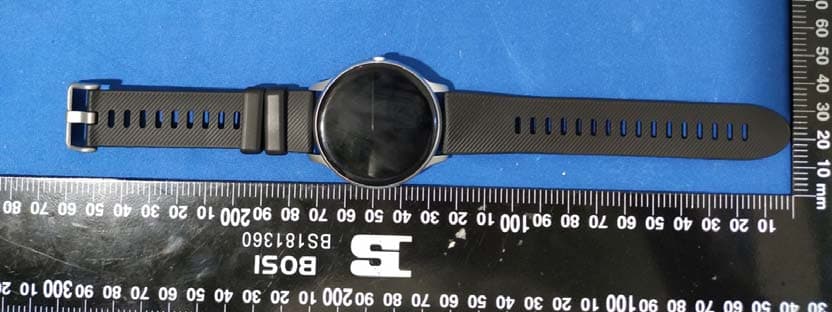
Click to zoom
Application Details
- Equipment Class
- DTS - Digital Transmission System
- Date of Grant
- Oct 27, 2020
- Application Purpose
- Original Equipment
- Date of Application
- Oct 27, 2020
- Equipment Note
- IMILAB Smart Watch KW66
- Frequency Range
- 2402.00000000 - 2480.00000000
- Country
- China
Documents & Files
Document Text
Text extracted from the exhibit documents filed with the FCC. Open a document above to read the original.
Users Manual
And also check if the message can show up on your phone's notification bar or not. If not, please allow the APP notifications to pop-up in the notification bar in the system setting: Setting- Notifications- Notification style-Tick the "Banners". If the messages can still not be displayed on the watch even after trying the above steps, please exit the Gl oryFit APP and restart the mobile phone and the watch. 3. How to synchronize the watch data to my phone? Auto synchronization: When the watch is connected to the APP, it will automatically synchronize data; Manual synchronization: After the watch is connected to the APP successfully, you can manually synchronize the data by swiping down the screen from the APP homepage or data interface; If the data cannot be synchronized, please try to disable and enable the Bluetooth function again on your mobile phone, or restart your mobile phone; (Note: In case of any common problems in operation, please refer to the Common problem in My profile of the APP, which can help you solve some problems) As shown in the figure below: KW66 User Manual CONTENTS English01-07 Read this manual carefully before use, and retain it for future reference. Product Introduction Touch screen Wrist strap Charging port Heart rate sensor Charging cable Power button (Press and hold the Power button for 5 seconds to turn it on Press the power button to wake the screen or return to the previous interface) Wearing Wear the wristband about one finger away from the wrist bone and adjust the tightness of the wristband to a comfortable position. Tip: If you wear the strap too loose, the data acquisition of heart rate sensor may be affected. Connection and binding 1. Scan the QR code on the watch display (Settings-APP Download) by your mobile phone, and then install the APP Runto Sport. You can also scan the QR code below to download and install GloryFit from the mobile APP store. EN-01 EN-02EN-03 EN-04EN-05 EN-06EN-07 FCC ID: 2APA9-IMILAB-KW66 Model: KW66 MADE IN CHINA 2. After installing the APP, open and log in GloryFit, then select (device KW66 to be added) on the device page so as to connect it. In the process of pairing, check if the Bluetooth functionon your mobile phone is enabled, so that the watch can be connected to your mobile phone. If the device cannot be found in the pairing process, or the device cannot be connected during use, please click "Settings - Reset" on the watch, then try to start the pairing again. If the watch still can not be found, please exit and re-open the APP. The connection status of the watch is as shown in the figures below : Tips: Operation 1. Open the control panel: Swipe the screen on the main interface downwards from the top 2. Open the messages/notifications: Swipe the screen on the main interface upwards from the bottom 3. Open the main menu:Swipe the screen on the main interface from left to right (Note: On other interfaces, slide your finger from left to right to return to the previous interface) 4. Open the status interface: Swipe the screen on the main interface from right to left 5. Quick dial change: Press and hold the dial interface for 3 seconds, and the watch vibrates once; then you can slide your finger to left or right to select the dial. 6. Power on: Press and hold the Power button for 5 seconds to switch it on (Power off: You need to press and hold the button for 3 seconds when the display is on to select whether to power off) 7. Quick sports pause/continue: Press the power button. 8. Press the power button to return to the homepage (Note: If you are on the level 2 interface, you will return to the level 1 interface). Note: The battery power will be shown as 5 different levels on the watch (0%-25%-50%-75%-100%) Not connectedConnected Features 13 sport modes (Running, Walking, Cycling, Alpinism, Yoga, Skipping, Tennis, Baseball, Basketball, Badminton, Football, Rugby, Table Tennis) In running, walking, Alpinism and other sports modes, you can click the screen to view the sports data (steps, pace, calories, distance and duration). Heart Rate Monitor: The watch will continuously track your heart rate for 24 hours(Need to turn on the “Heart rate monitoring” in the APP at first), you can also view the historical heart rate data in the APP. Note: When this feature is enabled, the power consumption will be increased, and the battery endurance will be reduced. Status Interface: The steps, distance and calories will be recorded in detail and displayed on watch everyday. Sleep: The watch will monitor your sleep status from 6:00 pm to the 11:59 am of the next day. Note: The sleep data on watch will be cleared at 6:00pm everyday. But you still can check the historical sleep data in the GloryFitAPP. Music: The watch can be used to control the music player of the mobile phone, you can use it to play/pause or skip songs (it is only compatible with the in-built music player of the mobile phone, may not be compatible with third party’s player, and the volume cannot be adjusted on the watch) Stopwatch: The watch can be used to count time (slide your finger to the right after pressing the pause button to exit and return to the previous menu) Message: The watch will receive and display texts/ messages/ social media notifications from your phone. Setting: You can shut down or reset the watch from setting, and you can also check the info about the watch and App download QR code. Charging 1. Place the watch on the magnetic charger, please make sure the charging contacts on the back of the watch are fully adsorbed the metal contacts of the charger. It can be fully charged within about 3.5 hours. 2. Plug the charging cable into a standard USB charger purchased via official channels. The output voltage is 5V and the output current is 1A. If the watch cannot be turned on after being out of use for a long time, please wipe the charging contacts of the charging NOTE: This equipment has been tested and found to comply with the limits for a Class B digital d…
Text truncated - open the document above for the full version.
Attestation Statements
Shanghai Imilab Technology Co.,Ltd. Add: Room 001A, Floor 11, Block 1, No. 588 Zixing Road, Minhang District, Shanghai, China Tel: 021-61890898 Fax: 021-64088898 Email: [email protected] Date: 2020-10-22 FEDERAL COMMUNICATIONS COMMISSION Authorization and Evaluation Division 7435 Oakland Mills Road Columbia, MD 21046 Dear Sir/Madam, We, Shanghai Imilab Technology Co.,Ltd., hereby authorize Bay Area Compliance Laboratories Corp. to act as a laboratory for testing and test report generation for the following project(s): (Product name: IMILAB Smart Watch KW66, FCC ID:2APA9-IMILAB-KW66, Model name: KW66, IMILAB W10) The chipset RTL8762CK supports BT and BLE Mode, but for this device, BDR(GFSK), EDR(π/4-DQPSK, 8DPSK) and BLE (2M) Mode was disable by software. Sincerely Yours, Client’s signature Printed Name: wang hesong Title: Manager
Cover Letter(s)
Shanghai Im ilab Technology Co.,Ltd. Add: Room 001A, Floor 11, Block 1, No. 588 Zixing Road,Minhang District, Shanghai, China Tel: 021-61890898 Fax: 021-64088898 Email: [email protected] DECLARATION OF SIMILARITY Date: 2020-10-22 FEDERAL COMMUNICATIONS COMMI SSION Authorization and Evaluation Division 7435 Oakland Mills Road C olumbia, MD 21046 Dear Sir or Madam: We, Shanghai Imilab Technology Co.,Ltd ., hereby declare that the product: IMILAB Smart Watch KW66, FCC ID:2APA9-IMILAB-KW66. model: IMILAB W10 is electrically identical with the model: KW66 which was tested by BACL with the same electromagnetic emissions and electromagnetic compatibility characteristics. A description of the differences between those mo dels and that are declared similar are as follows: Th ey are the same product, and just the different model name, the rest are the same. Please contact me should there be need for any additional clarification or information. Best Regards, Signature: Printed Name: wang hesong Title: Manager
Cover Letter(s)
QA-FR-170-B Shanghai Imilab Technology Co.,Ltd. Add: Room 001A, Floor 11, Block 1, No. 588 Zixing Road, Minhang District, Shanghai, China Tel: 021-61890898 Fax: 021-64088898 Email: [email protected] FCC Authorization Date: 2020-10-22 FEDERAL COMMUNICATIONS COMMISSION Authorization and Evaluation Division 7435 Oakland Mills Road Columbia, MD 21046 Subject: Agent Authorization To whom it may concern: We , Shanghai Imilab Technology Co.,Ltd., Hereby authorizes Bay Area Compliance Laboratories Corporation to act on its behalf in all matters relating to application for Equipment authorization, including the signing of all documents relating to these matters. All acts carried out by Bay Area Compliance Laboratory Corporation on our behalf shall have the same effect as our own action. We, the undersigned, hereby certify that we are not subject to a denial of federal benefits, that includes FCC benefits, pursuant to Section 5301 of the Anti-Drug Abuse Act of 1988, 21 U.S.C. 862. This authorization is valid until further written notice from the applicant. Sincerely Yours, Client’s signature Printed Name: wang hesong Title: Manager
Cover Letter(s)
FCC ID: 2APA9-IMILAB-KW66 QA-FR-171-A Shanghai Imilab Technology Co.,Ltd. Add: Room 001A, Floor 11, Block 1, No. 588 Zixing Road, Minhang District, Shanghai, China Tel: 021-61890898 Fax: 021-64088898 Email: [email protected] FCC Confidential Authorization Date: 2020-10-22 FEDERAL COMMUNICATIONS COMMISSIONS Authorization and Evaluation Division 7435 Oakland Mills Road Columbia, MD 21046 Subject: Confidentiality Request regarding application for certification of In accordance with Sections 0.457 and 0.459 of the Commission’s Rules, Shanghai Imilab Technology Co.,Ltd. hereby requests long-term confidential treatment of information accompanying this application as outlined below: Block Diagram Schematics Operation Description The above materials contain proprietary and confidential information not customarily released to the public. The public disclosure of these materials provides unjustified benefits to its competitors in the market. Sincerely, Signature: Printed Name: wang hesong Title: Manager
External Photos
EXHIBIT B - EUT EXTERNAL PHOTOGRAPHS
Test Report
FCC PART 15.247 TEST REPORT For Shanghai Imilab Technology Co.,Ltd. Room 001A, Floor 11, Block 1, No. 588 Zixing Road, Minhang District, Shanghai,China Report Type: Original Report Product Name: IMILAB Smart Watch KW66 Re port Number: RDG200909001-00B Re port Date: 2020-10-09 Reviewed By: Ivan Cao Assistant Manager Test Laboratory: Bay Area Compliance Laboratories Corp. (Dongguan) No.69 Pulongcun, Puxinhu Industry Area, Tangxia, Dongguan, Guangdong, China Tel: +86-769-86858888 Fax: +86-769-86858891 www.baclcorp.com.cn FCC ID: 2APA9-IMILAB-KW66 Bay Area Compliance Laboratories Corp. (Dongguan) Report No.: RDG200909001-00B Page 2 of 34 TABLE OF CONTENTS GENERAL INFORMATION ....................................................................................................................................... 4 PRODUCT DESCRIPTION FOR EQUIPMENT UNDER TEST (EUT) ..................................................................................... 4 OBJECTIVE ................................................................................................................................................................... 4 RELATED SUBMITTAL(S)/GRANT(S) ............................................................................................................................. 4 TEST METHODOLOGY .................................................................................................................................................. 4 MEASUREMENT UNCERTAINTY .................................................................................................................................... 5 TEST FACILITY ............................................................................................................................................................. 5 DECLARATIONS ............................................................................................................................................................ 5 SYSTEM TEST CONFIGURATION .......................................................................................................................... 6 DESCRIPTION OF TEST CONFIGURATION ...................................................................................................................... 6 EQUIPMENT MODIFICATIONS ....................................................................................................................................... 6 EUT EXERCISE SOFTWARE .......................................................................................................................................... 6 SUPPORT EQUIPMENT LIST AND DETAILS .................................................................................................................... 7 SUPPORT CABLE LIST AND DETAILS ............................................................................................................................ 7 BLOCK DIAGRAM OF TEST SETUP ................................................................................................................................ 8 SUMMARY OF TEST RESULTS ............................................................................................................................... 9 FCC §15.247 (i) & §1.1310 & §2.1093- RF Exposure ............................................................................................... 10 APPLICABLE STANDARD ............................................................................................................................................ 10 FCC §15.203 - ANTENNA REQUIREMENT ........................................................................................................... 11 APPLICABLE STANDARD ............................................................................................................................................ 11 ANTENNA INFORMATION AND CONNECTOR CONSTRUCTION ..................................................................................... 11 FCC §15.207 (a)– AC LINE CONDUCTED EMISSIONS ...................................................................................... 12 APPLICABLE STANDARD ............................................................................................................................................ 12 EUT SETUP ................................................................................................................................................................ 12 EMI TEST RECEIVER SETUP ....................................................................................................................................... 12 TEST PROCEDURE ...................................................................................................................................................... 13 CORRECTED AMPLITUDE & MARGIN CALCULATION ................................................................................................. 13 TEST EQUIPMENT LIST AND DETAILS ......................................................................................................................... 13 TEST DATA ................................................................................................................................................................ 14 FCC §15.209, §15.205, §15.247(d) - SPURIOUS EMISSIONS ................................................................................. 17 APPLICABLE STANDARD ............................................................................................................................................ 17 EUT SETUP ................................................................................................................................................................ 17 EMI TEST RECEIVER & SPECTRUM ANALYZER SETUP .............................................................................................. 18 TEST PROCEDURE .................................................................................................................…
Text truncated - open the document above for the full version.
Test Setup Photos
EXHIBIT D - TEST SETUP PHOTOGRAPHS Conducted Emissions Front View Conducted Emissions Side View Radiated Emission Below 1GHz View Radiated Emission Above 1GHz View
Contact Information
Applicant
yan siyang
Test Firm
Bay Area Compliance Laboratories Corp.(Dongguan)David Zhang
[email protected]0086 0769 86858888
Technical Specifications
| # | Rule Parts | Frequency Range | Power Output |
|---|---|---|---|
| 1 | 15C | 2.40 GHz - 2.48 GHz | 2.00 mW |
Other Applications from Shanghai Imilab Technology Co.,Ltd.
2APA9-A331D
Aug 12, 2026WiFi Smart Camera
Equipment Class
DTS - Digital Transmission System2APA9-CMSXJ115A
Sep 03, 2024IMILAB EC6 Panorama
Equipment Class
DTS - Digital Transmission System
2APA9-CMSXJ56F
Nov 19, 2023IMILAB C21
Equipment Class
DTS - Digital Transmission System
2APA9-CMSXJ33B
Apr 28, 2022IMILAB Doorbell Hub
Equipment Class
DTS - Digital Transmission System
2APA9-CMSXJ33A
Apr 24, 2022IMILAB Video Doorbell
Equipment Class
DTS - Digital Transmission System