A3LSMC115MPortable Handset with Multi-Band GSM/EDGE/WCDMA/LTE, WLAN, Bluetooth and RFID
Samsung Electronics Co Ltd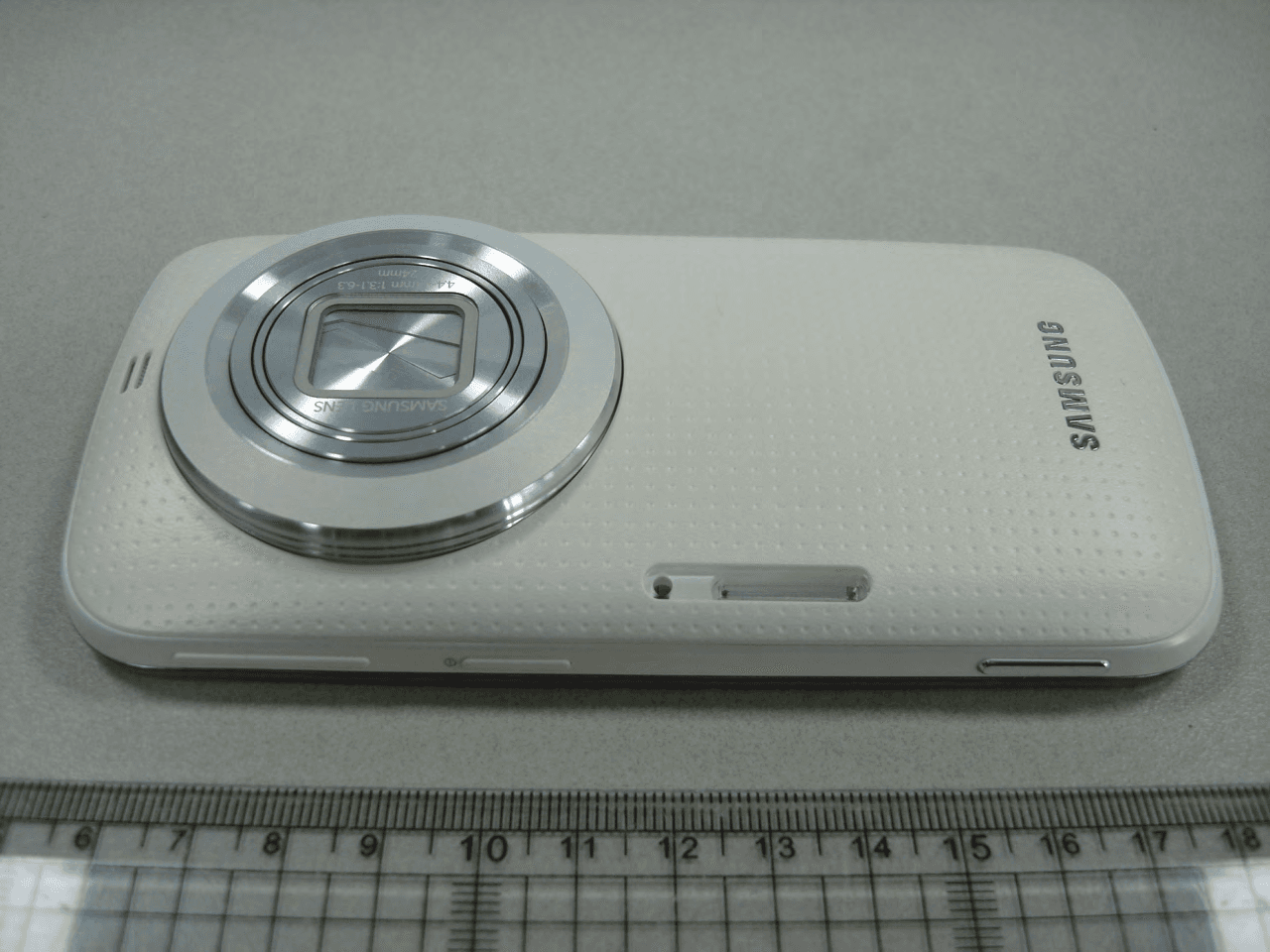
Click to zoom
Application Details
- Equipment Class
- PCE - PCS Licensed Transmitter held to ear
- Date of Grant
- May 01, 2014
- Application Purpose
- Original Equipment
- Date of Application
- May 01, 2014
- Equipment Note
- Portable Handset with Multi-Band GSM/EDGE/WCDMA/LTE, WLAN, Bluetooth and RFID
- Frequency Range
- 1860.00000000 - 1900.00000000
- Company
- Samsung Electronics Co Ltd
- Country
- United States
Documents & Files
Document Text
Text extracted from the exhibit documents filed with the FCC. Open a document above to read the original.
Users Manual
User manual SM-C115 M This device is capable of operating in Wi-Fi mode in the 2.4 and 5 GHz bands. The FCC requires that devices operating within 5.15-5.25 GHz may only be used indoors, not outside, in order to avoid interference with MobileSatellite Services (MSS). Therefore, do not use this device outside as a Wi-Fi hotspot or in Wi-Fi Direct mode outside when using the 5.15- 5.25 GHz frequencies. Draft 6.1 2014-04-20 Only for Approval 2 Table of Contents Read me first Getting started 8 Device layout 9 Buttons 10 Package contents 11 Installing the SIM or USIM card and batter y 14 Charging the battery 17 Inserting a memory card 19 Attaching a hand strap 19 Turning the device on and off 20 Holding the device 20 Locking and unlocking the device Basics 21 Using the touch screen 24 Indicator icons 25 Notifications and quick setting panels 29 Home and Apps screens 33 Opening apps 33 Installing or uninstalling apps 35 Entering text 37 Using the power saving fea ture 39 Accessing help informa tion Personalising 40 Switching to easy mode 40 Managing the Home and Apps screens 43 Changing the screen lock method 44 Setting wallpaper 44 Changing ringtones 45 Setting up accounts 45 Moving contacts from other devices to your device Network connectivity 48 Connecting to a mobile network 48 Connecting to a Wi-Fi network 50 Using Smart network switch 50 Tethering devices and using mobile hotspots Phone 53 Making calls 56 Receiving calls 57 During a call Table of Contents 3 Studio 106 Using Photo studio 107 Using Collage studio 108 Using Shot & more 109 Using Video clip studio 110 Using Video trimmer Internet & SNS 111 Internet 112 Chrome 113 Hangouts 113 ChatON Voice features 115 S Voice 117 Voice Recorder 119 Voice Search Multimedia 120 Music 123 Video 125 YouTube 126 Flipboard 126 Google+ 126 Photos 127 Play Games 127 Play Music 127 Play Newsstand Motions & usability features 59 Control motions 62 Toolbox 63 Increasing touch screen sensitivity Contacts 64 Adding contacts 65 Managing contacts Messages & email 68 Messages 71 Email 73 Google Mail Camera 75 Launching Camera 81 Using the camera studio widget 82 Separating the exposure area and the focus area 83 Using the shooting mode 93 Configuring settings 101 Configuring general settings Gallery 102 Viewing content on the device 104 Accessing additional options 104 Tagging faces 105 Using Tag buddy Table of Contents 4 Device & data manager 158 Upgrading the device 159 Transferring files between the device and a computer 160 Backing up and restoring data 161 Performing a data r eset Settings 162 About Settings 162 QUICK SETTINGS 162 NETWORK CONNECTIONS 167 CONNECT AND SHARE 168 SOUND AND DISPLAY 172 PERSONALISATION 173 MOTION 174 USER AND BACKUP 175 SYSTEM 182 APPLICATIONS 189 Google Settings Accessibility 190 Accessibility 191 Using the Home button to open accessibility menus 191 TalkBack 202 Changing the font size 203 Magnifying the screen 203 Setting notification reminders 203 Turning off all sounds 204 Customising caption settings Safety 128 Emergency mode 130 Sending help messages 131 Severe weather notifica tion (Geo News) Utilities 133 S Finder 134 S Planner 137 Calculator 137 Clock 139 Drive 139 Dropbox 140 Google 141 Maps 141 Memo 142 My Files 144 Torch Connecting with other devices 145 NFC 147 Bluetooth 150 S Beam 151 Quick connect 155 Screen mirroring 157 Using the mobile printing feature Table of Contents 5 205 Adjusting the sound balance 205 Using mono audio 205 Using auto haptic 206 Using the assistive menus 208 Using the smart scroll feature 208 Setting tap and hold delay options 209 Using interaction control mode 209 Answering or ending calls 210 Using single tap mode 210 Configuring accessibility settings 211 Using other useful features Troubleshooting 6 Read me first This device provides mobile communication and media services using Samsung’s latest standards and technological expertise. This user manual and the information available at www.samsung.com contain details about the device’s functions and features. • Please read this manual before using the device to ensure safe and proper use. • Descriptions are based on the device’s default settings. • Some content may differ from your device depending on the region, service provider, or device’s software. • Content (high quality content) that requires high CPU and RAM usage will affect the overall performance of the device. Apps related to the content may not work properly depending on the device’s specifications and the environment that it is used in. • Samsung is not liable for performance issues caused by apps supplied by providers other than Samsung. • Samsung is not liable for performance issues or incompatibilities caused by edited registry settings or modified operating system software. Attempting to customise the operating system may cause the device or apps to work improperly. • Software, sound sources, wallpapers, images, and other media provided with this device are licensed for limited use. Extracting and using these materials for commercial or other purposes is an infringement of copyright laws. Users are entirely responsible for illegal use of media. • You may incur additional charges for data services, such as messaging, uploading and downloading, auto-syncing, or using location services. To avoid additional charges, select an appropriate data tariff plan. For details, contact your service provider. • Default apps that come with the device are subject to updates and may no longer be supported without prior notice. If you have questions about an app provided with the device, contact a Samsung Service Centre. For user-installed apps, contact service providers. • Modifying the device’s operating system or installing softwares from unofficial sources may result in device malfunctions and data corruption or loss. These actions are violations of your Samsung licence agreement and will void your warranty. Read me first 7 Instructional icons Warning: situations that could cause in…
Text truncated - open the document above for the full version.
Users Manual
120 Multimedia Music Playing music Tap Music on the Apps screen. Select a music category, and then select a song to play. Add the song to a playlist. Skip to the next song. Tap and hold to move forwards quickly. Pause and resume playback. Access additional options. Change the repeat mode. Skip to the previous song. Tap and hold to move backwards quickly. Turn on shuffle. Open the playlist. Search for other devices to play the file. Set the file as your favourite song. Adjust the volume. Multimedia 121 To listen to songs at equal volume levels, tap → Settings, and then tick Smart volume. When Smart volume is activated, the volume may end up louder than the device volume level. Use caution to avoid long-term exposure to loud sounds to prevent damage to your hearing. Smart volume may not be activated for some files. To set a personalised sound while listening to songs with a headset, tap → Settings → Adapt Sound → On. When you activate this option for the first time, tap Start to adjust the sound. The device starts a series of sound tests to adjust the sound level and starts to beep. Tap Ye s if you can hear the beep or No if you cannot. Repeat this step for each test until the sound adjustment is finished. Then, tick Music sound to apply the option when you listen to music. When you turn the volume up to level 14 or higher, the adapt sound option is not applied to music playback. If you turn the volume down to level 13 or lower, the option is reapplied. Setting a song as ringtone or alarm tone To use the currently-playing song as a ringtone or an alarm tone, tap → Set as → From the beginning or Auto recommendations, select an option, and then tap Done. Creating playlists Make an own selection of songs. Tap Music on the Apps screen. Tap Playlists → → Create playlist. Enter a title and tap OK. Tap , select songs to include, and then tap Done. To add the currently-playing song to a playlist, tap and select the playlist. Multimedia 122 Playing music by mood Use this feature to play music that suits your mood. Tap Music on the Apps screen. Tap Music square. Songs are automatically categorised by mood. Tap a mood cell or drag multiple cells to listen to the music in the cells. Song categories are based on available information about the song. Some songs may not be categorised in mood cells. Playing music stored on other devices Search for music that is stored on other devices and play it on your device. Tap Music on the Apps screen. Accessing music on a registered device Tap Devices and select a device in REGISTERED DEVICES to access and play music. You can play the song on the devices that are registered to Samsung link. Visit link.samsung.com for more information. Ensure that the registered devices are turned on and connected to a Wi-Fi or mobile network. You may incur additional charges when you view content stored on other devices via the mobile network. To avoid additional charges, use the Wi-Fi feature. Accessing music on a nearby device Tap Devices and select a device in NEARBY DEVICES to access and play music. You can play the song on the devices with content sharing feature activated. To activate the feature, on the Apps screen, tap Settings → Nearby devices, and then drag the Nearby devices switch to the right. Refer to Nearby devices for more settings. Multimedia 123 Video Playing videos Tap Video on the Apps screen. Select a video to play. Change screen ratio. Move forwards or backwards by dragging the bar. Search for other devices to play the file. Skip to the previous video. Tap and hold to move backwards quickly. Skip to the next video. Tap and hold to move forwards quickly. Access additional options. Switch to the pop-up video player. Pause and resume playback. Adjust the volume. To customise the control panel location during playback, tap → Settings, tick Mini controller , and then tap Close. Then, tap or to move the control panel to either side of the screen. This feature is available only in landscape orientation. Using the pop-up video player Use this feature to use other apps without closing the video player. While watching videos, tap to use the pop-up video player. Spread two fingers apart on the screen to enlarge the player or pinch to reduce it. To move the player, drag the player to another location. Multimedia 124 Capturing images To use this feature, during playback, tap → Settings, tick Capture, and then tap Close. Tap to capture an image from the video during playback. Sharing or deleting videos Tap Video on the Apps screen. Tap → Select, select videos, tap → Share via, and then select a sharing method. Tap → Delete, select videos, and then tap Done. Editing videos Tap Video on the Apps screen. Select a video, tap → Edit → Video trimmer. Move the start bracket to the desired starting point, move the end bracket to the desired ending point, tap Done, enter a filename, and then tap OK to save the video. To edit videos using a video editor app, tap Video Editor. Playing videos stored on other devices Search for videos that are stored on other devices and play them on your device. Tap Video on the Apps screen. Accessing a video on a registered device Tap Devices and select a device in REGISTERED DEVICES to access and play the video. You can play the video on the devices that are registered to Samsung link. Visit link.samsung.com for more information. Ensure that the registered devices are turned on and connected to a Wi-Fi or mobile network. You may incur additional charges when you view content stored on other devices via the mobile network. To avoid additional charges, use the Wi-Fi feature. Multimedia 125 Accessing a video on a nearby device Tap Devices and select a device in NEARBY DEVICES to access and play the video. You can play the video on devices that have the content sharing feature activated. To activate the content sharing feature, on the Apps screen, tap Settings → Nearby devices, and then drag the Nearby devices switch to the right. Refer to Nearby device…
Text truncated - open the document above for the full version.
Attestation Statements
Samsung Electronics America, Inc 19 Chapin Rd, Building D. Pine Brook, NJ 07058 Date: April 28, 2014 To whom it may concern: We, the undersigned, hereby authorize PCTEST Engineering Laboratory Inc., to act on our behalf in all matters relating to applications for equipment authorization, including the signing of all documents relating to these matters. Any and all acts carried out by PCTEST Engineering Laboratory, Inc. on our behalf shall have the same effect as acts of our own. We also hereby certi fy that no party to any application is subject to a denial of benefits, including FCC benefits, pursuant to Section 5301 of the Anti-Drug Abuse Act of 1988, 21 U.S. C. 862. Sincerely, Signature Sang Kyung (Peter), Ra General Manager Samsung Electronics America, Inc FCC ID: A3LSMC115M
Attestation Statements
Date: April. 25, 2014 PCTEST TCB/CB Div. of PCTEST Engineering Lab., Inc. 6660-B Dobbin Road Columbia, MD 21045 Samsung Electronics Co., LTD. 129, Samsung-ro, Yeongtong-gu Suwon-City, Gyeonggi-do, 443-742, Korea Subject: Samsung Electronics Co., Ltd. FCC ID: A3LSMC115M To Whom it May Concern We attest the following regarding FCC ID: A3LSMC115M 1. MPR is permanently implemented for all channel BWs, modulations, frequency bands and RB sizes. 2. A-MPR was disabled for all SAR test samples for SAR testing purposes only. 3. We confirm the specific MPR targets and tolerances shown in the SAR Report. Should you have any questions or comments concerning the above, please contact the undersigned. Sincerely, Engineer Minwook Kim Samsung Electronics CO. LTD TEL: +82-10-6470- 7017 E-mail: [email protected]
Cover Letter(s)
April 1, 2014 Federal Communications Commission 7435 Oakland Mills Road Columbia MD 21046 Subject: Request for Confidentiality FCC ID: A3LSMC115M To Whom It May Concern: Pursuant to the provisions of Sections 0.457 and 0.459 of the Commission's rules ( 47 CFR §§ 0.457, 0.459), we are requesting the Commission to withhold the following attachments as confidential document from public disclosure indefinitely. Schematics Block Diagram Operational Description Antenna Specification Parts List Tune-Up Procedure Above mentioned document contains detailed system and equipment description are considered as proprietary information in operation of the equipment. The public disclosure of above documents might be harmful to our company and would give competitor an unfair advantage in the market. In additional to above mentioned documents, pursuant to Public Notice DA 04-1705 of the Commi ssion's policy, in order to comply with the marketing regulations in 47 CFR §2.803 and the importation rules in 47 CFR §2.1204, while ensuring that business sensitive information remains confidential until the actual marketing of newly authorized devices. We are requesting the commission to grant short-term confidentiality request on the following attachments until 180 days External Photos Internal Photos Test Setup Photos User Manual It is our understanding that all measurement test reports, FCC ID label format and correspondence during certification review process cannot be granted as confidential documents and such information will be available for public review once the grant of equipment authorization is issued. Best Regards Sang Kyung (Peter), Rat General Manager Samsung Electronics CO. LTD TEL: 973-808-6362 FAX: 973-808-6361 E-mail: [email protected]
Cover Letter(s)
SAMSUNG ELECTRONICS CO., LTD 129, Samsung-ro,Yeongtong-gu Suwon-si,Gyeonggi-do, 443-742 Korea April 1, 2014 Federal Communications Commission 7435 Oakland Mills Road Columbia, MD 21046 SUBJECT : Label Statement FCC ID : A3LSMC115M Gentlemen: We hereby provide the label statement letter for the above-mentioned device by the label statement policy of KDB 784748 D01. The label statement is as follows: The FCC ID label is located in the battery compartment. While the battery cover is installed when the unit is shipped from the factory, the battery is never installed prior to sale, so the user must remove the cover in order to install the battery and operate the device. At this time the FCC ID is readily visible to the user. The label is permanently attached by acrylic glue and not easily removed from the device. This statement could not be included in the label. So we inform you of it through this letter. Should you have any questions or comments concerning the above, please contact the undersigned. Sincerely Yours, Seoung Ho Park Senior Manager SAMSUNG ELECTRONICS CO.,LTD Telecommunication Network Business Mobile Communication Division Regulatory Compliance Group.
ID Label/Location Info
Label and Location Model: SM-C115M FCC I D: A3LSMC115M Label: Location: Top Back of d evice Bottom Label is placed in side of t he battery compartment. Label
RF Exposure Info
FCC ID: A3LSMC115M SAR EVALUATION REPORT Reviewed by: Quality Manager Document S/N: Test Dates: DUT Type: Page 1 of 55 0Y1404070710-R1.A3L 04/07/14 - 04/21/14 Portable Handset © 2014 PCTEST Engineering Laboratory, Inc. REV 13.4 M 03/24/2014 Applicant Name: Date of Testing: Samsung Electronics, Co. Ltd. 04/07/14 - 04/21/14 129, Samsung-ro, Maetan dong, Test Site/Location: Yeongtong-gu, Suwon-si PCTEST Lab, Columbia, MD, USA Gyeonggi-do 443-742, Korea Document Serial No.: 0Y1404070710-R1.A3L FCC ID: A3LSMC115M APPLICANT: SAMSUNG ELECTRONICS, CO. LTD. DUT Type: Portable Handset Application Type: Certification FCC Rule Part(s): CFR §2.1093 Model(s): SM-C115M, SM-C111M 1 gm Head (W/kg) 1 gm Body- Worn (W/kg) 1 gm Hotspot (W/kg) PCEGSM/GPRS/EDGE 850824.20 - 848.80 MHz 0.310.470.74 PCEUMTS 850826.40 - 846.60 MHz0.23 0.360.37 PCEGSM/GPRS/EDGE 19001850.20 - 1909.80 MHz0.41 0.420.53 PCEUMTS 19001852.4 - 1907.6 MHz0.49 0.681.09 PCELTE Band 17706.5 - 713.5 MHz0.23 0.360.44 PCELTE Band 5 (Cell)824.7 - 848.3 MHz0.23 0.360.36 PCELTE Band 4 (AWS)1710.7 - 1754.3 MHz0.63 0.761.03 PCELTE Band 2 (PCS)1850.7 - 1909.3 MHz0.42 0.490.71 DTS2.4 GHz WLAN2412 - 2462 MHz0.20 0.110.22 DTS5.8 GHz WLAN5745 - 5825 MHz< 0.10.28-1.00 NII5.2 GHz WLAN5180 - 5240 MHz< 0.10.20-1.00 NII5.3 GHz WLAN5260 - 5320 MHz< 0.10.34-1.00 NII5.5 GHz WLAN5500 - 5700 MHz< 0.10.35-1.00 DSS/DTSBluetooth2402 - 2480 MHzN/A SAR Band & ModeTx Frequency Simultaneous SAR per KDB 690783 D01v01r02: Equipment Class 1.10 This wireless portable device has been shown to be capable of compliance for localized specific absorption rate (SAR) for uncontrolled environment/general population exposure limits specified in ANSI/IEEE C95.1-1992 and has been tested in accordance with the measurement procedures specified in Section 1.8 of this report; for North American frequency bands only. Note: This revised Test Report (S/N: 0Y1404070710-R1.A3L) supersedes and replaces the previously issued test report on the same subject device for the same type of testing as indicated. Please discard or destroy the previously issued test report(s) and dispose of it accordingly. I attest to the accuracy of data. All measurements reported herein were performed by me or were made under my supervision and are correct to the best of my knowledge and belief. I assume full responsibility for the completeness of these measurements and vouch for the qualifications of all persons taking them. Test results reported herein relate only to the item(s) tested. PCTEST ENGINEERING LABORATORY, INC. 7185 Oakland Mills Road, Columbia, MD 21046 USA Tel. +1.410.290.6652 / Fax +1.410.290.6654 http://www.pctestlab.com SAR EVALUATION REPORT FCC ID: A3LSMC115M SAR EVALUATION REPORT Reviewed by: Quality Manager Document S/N: Test Dates: DUT Type: Page 2 of 55 0Y1404070710-R1.A3L 04/07/14 - 04/21/14 Portable Handset © 2014 PCTEST Engineering Laboratory, Inc. REV 13.4 M 03/24/2014 TABLE OF CONTENTS 1 DEVICE UNDER TEST ................................................................................................................... 3 2 LTE INFORMATION ........................................................................................................................ 8 3 INTRODUCTION ............................................................................................................................. 9 4 DOSIMETRIC ASSESSMENT ...................................................................................................... 10 5 DEFINITION OF REFERENCE POINTS ...................................................................................... 11 6 TEST CONFIGURATION POSITIONS FOR HANDSETS ............................................................ 12 7 RF EXPOSURE LIMITS ................................................................................................................ 16 8 FCC MEASUREMENT PROCEDURES ........................................................................................ 17 9 RF CONDUCTED POWERS ......................................................................................................... 22 10 SYSTEM VERIFICATION .............................................................................................................. 35 11 SAR DATA SUMMARY ................................................................................................................. 37 12 FCC MULTI-TX AND ANTENNA SAR CONSIDERATIONS ......................................................... 45 13 SAR MEASUREMENT VARIABILITY ........................................................................................... 49 14 EQUIPMENT LIST ......................................................................................................................... 50 15 MEASUREMENT UNCERTAINTIES ............................................................................................ 51 16 CONCLUSION ............................................................................................................................... 53 17 REFERENCES .............................................................................................................................. 54 APPENDIX A: SAR TEST PLOTS APPENDIX B: SAR DIPOLE VERIFICATION PLOTS APPENDIX C: PROBE AND DIPOLE CALIBRATION CERTIFICATES APPENDIX D: SAR TISSUE SPECIFICATIONS APPENDIX E: SAR SYSTEM VALIDATION APPENDIX F: SAR TEST SETUP PHOTOGRAPHS FCC ID: A3LSMC115M SAR EVALUATION REPORT Reviewed by: Quality Manager Document S/N: Test Dates: DUT Type: Page 3 of 55 0Y1404070710-R1.A3L 04/07/14 - 04/21/14 Portable Handset © 2014 PCTEST Engineering Laboratory, Inc. REV 13.4 M 03/24/2014 1 DEVICE UNDER TEST 1.1 Device Overview GSM/GPRS/EDGE 850Voice/Data824.20 - 848.80 MHz UMTS 850Voice/Data826.40 - 846.60 MHz GSM/GPRS/EDGE 1900Voice/Data1850.20 - 1909.80 MHz UMTS 1900Voice/Data1852.4 - 1907.6 MHz LTE Band 17Data706.5 - 713.5 MHz LTE Band 5 (Cell)Data824.7 - 848.3 MHz LTE Band 4 (AWS)Data1710.7 - 1754.3 MHz LTE Band 2 (PCS)Data1850.7 -…
Text truncated - open the document above for the full version.
Test Report
FCC ID: A3LSMC115M FCC Pt. 22 & 24 GSM / EDGE / WCDMA MEASUREMENT REPORT (CERTIFICATION) Reviewed by: Quality Manager Test Report S/N: Test Dates: EUT Type: Page 1 of 60 0Y1404070711.A3L 4/9-4/24/2014 Portable Handset © 2014 PCTEST Engineering Laboratory, Inc. V 5.0 01/13/2014 Applicant Name: Date of Testing: Samsung Electronics, Co. Ltd. 4/9-4/24/2014 129, Samsung-ro, Maetan dong, Test Site/Location: Yeongtong-gu, Suwon-si PCTEST Lab., Columbia, MD, USA Gyeonggi-do 443-742, Korea Test Report Serial No.: 0Y1404070711.A3L FCC ID: A3LSMC115M APPLICANT: SAMSUNG ELECTRONICS, CO. LTD. Application Type: Certification Model(s): SM-C115M EUT Type: Portable Handset FCC Classification: PCS Licensed Transmitter Held to Ear (PCE) FCC Rule Part(s): §2 §22(H) §24(E) Test Procedure(s): ANSI/TIA-603-C-2004, KDB 971168 v02r01 Test Device Serial No.: identical prototype [S/N: FL-130-D, FL-130-C, FL-130-A] GSM850824.2 - 848.8249KGXW0.51927.15 EDGE850824.2 - 848.8246KG7W0.26424.22 GSM19001850.2 - 1909.8245KGXW0.50927.07 EDGE19001850.2 - 1909.8241KG7W0.38725.88 WCDMA850826.4 - 846.64M09F9W0.05717.59 WCDMA1900 1852.4 - 1907.64M08F9W0.17022.30 Emission Designator Tx Frequency (MHz) Mode ERP/EIRP Max. Power (W) Max. Power (dBm) This equipment has been shown to be capable of compliance with the applicable technical standards as indicated in the measurement report and was tested in accordance with the measurement procedures specified in §2.947. Test results reported herein relate only to the item(s) tested. I attest to the accuracy of data. All measurements reported herein were performed by me or were made under my supervision and are correct to the best of my knowledge and belief. I assume full responsibility for the completeness of these measurements and vouch for the qualifications of all persons taking them. PCTEST ENGINEERING LABORATORY, INC. 7185 Oakland Mills Road, Columbia, MD 21046 USA Tel. 410.290.6652 / Fax 410.290.6654 http://www.pctestlab.com MEASUREMENT REPORT FCC Part 22 & 24 FCC ID: A3LSMC115M FCC Pt. 22 & 24 GSM / EDGE / WCDMA MEASUREMENT REPORT (CERTIFICATION) Reviewed by: Quality Manager Test Report S/N: Test Dates: EUT Type: Page 2 of 60 0Y1404070711.A3L 4/9-4/24/2014 Portable Handset © 2014 PCTEST Engineering Laboratory, Inc. V 5.0 01/13/2014 TABLE OF CONTENTS FCC PART 22 & 24 MEASUREMENT REPORT .......................................................................................... 3 1.0 INTRODUCTION .............................................................................................................................. 4 1.1 SCOPE ................................................................................................................................................ 4 1.2 TESTING FACILITY ............................................................................................................................. 4 2.0 PRODUCT INFORMATION .............................................................................................................. 5 2.1 EQUIPMENT DESCRIPTION .............................................................................................................. 5 2.2 DEVICE CAPABILITIES....................................................................................................................... 5 2.3 TEST CONFIGURATION ..................................................................................................................... 5 2.4 EMI SUPPRESSION DEVICE(S)/MODIFICATIONS ........................................................................... 5 3.0 DESCRIPTION OF TESTS .............................................................................................................. 6 3.1 EVALUATION PROCEDURE .............................................................................................................. 6 3.2 CELLULAR - BASE FREQUENCY BLOCKS ....................................................................................... 6 3.3 CELLULAR - MOBILE FREQUENCY BLOCKS ................................................................................... 6 3.4 PCS - BASE FREQUENCY BLOCKS .................................................................................................. 6 3.5 PCS - MOBILE FREQUENCY BLOCKS .............................................................................................. 7 3.6 RADIATED MEASUREMENTS ............................................................................................................ 7 4.0 TEST EQUIPMENT CALIBRATION DATA ...................................................................................... 8 5.0 SAMPLE CALCULATIONS .............................................................................................................. 9 6.0 TEST RESULTS ............................................................................................................................. 10 6.1 SUMMARY ......................................................................................................................................... 10 6.2 OCCUPIED BANDWIDTH ................................................................................................................. 11 6.3 SPURIOUS AND HARMONIC EMISSIONS AT ANTENNA TERMINAL ............................................ 15 6.4 BAND EDGE EMISSIONS AT ANTENNA TERMINAL ...................................................................... 30 6.5 PEAK-AVERAGE RATIO ................................................................................................................... 36 6.6 RADIATED POWER (ERP/EIRP) ...................................................................................................... 39 6.7 RADIATED SPURIOUS EMISSIONS MEASUREMENTS ................................................................. 43 6.8 FREQUENCY STABILITY / TEMPERATURE VARIATION ............................................................... 51 7.0 CONCLUSION ...............................................................…
Text truncated - open the document above for the full version.
Test Report
FCC ID: A3LSMC115M FCC Pt. 22, 24, & 27 LTE MEASUREMENT REPORT (CERTIFICATION) Reviewed by: Quality Manager Test Report S/N: Test Dates: EUT Type: Page 1 of 163 0Y1404070712.A3L 4/9-4/24/2014 Portable Handset © 2014 PCTEST Engineering Laboratory, Inc. V5.0 01/13/2014 Applicant Name: Date of Testing: Samsung Electronics, Co. Ltd. 4/9-4/24/2014 129, Samsung-ro, Maetan dong, Test Site/Location: Yeongtong-gu, Suwon-si PCTEST Lab., Columbia, MD, USA Gyeonggi-do 443-742, Korea Test Report Serial No.: 0Y1404070712.A3L FCC ID : A3LSMC115M APPLICANT: SAMSUNG ELECTRONICS, CO. LTD. FCC Classification: PCS Licensed Transmitter Held to Ear (PCE) FCC Rule Part(s): §2; §22; §24; §27 Test Procedure(s): ANSI/TIA-603-C-2004, KDB 971168 v02r01 EUT Type: Portable Handset Model(s): SM-C115M Test Device Serial No.: identical prototype [S/N: FL-130-D, FL-130-C, FL-130-A] Class II Permissive Change: Please see FCC change document Original G rant Date: N/A LTE Band 17706.5 - 713.54M52G7DQPSK0.09019.56 LTE Band 17706.5 - 713.54M53W7D16QAM0.07618.83 LTE Band 17709 - 7119M00G7DQPSK0.08919.51 LTE Band 17709 - 7118M93W7D16QAM0.07518.77 LTE Band 5824.7 - 848.31M20G7DQPSK0.08519.27 LTE Band 5824.7 - 848.31M24W7D16QAM0.06718.25 LTE Band 5825.5 - 847.52M72G7DQPSK0.08319.20 LTE Band 5825.5 - 847.52M73W7D16QAM0.07018.42 LTE…
Text truncated - open the document above for the full version.
Contact Information
Applicant
Jenni Chun(General Manager)
Technical Contact
PCTEST Engineering Lab., Inc.Randy Ortanez
[email protected]410-290-6652
6660-B Dobbin Road · Columbia, Maryland · United States
Test Firm
PCTEST Engineering Laboratory, Inc.Randy Ortanez
Technical Specifications
| # | Rule Parts | Frequency Range | Power Output | Emission | Tolerance |
|---|---|---|---|---|---|
| 42 | 24E | 1.86 GHz - 1.90 GHz | 164.00 mW | 18M0W7D | 2.5 ppm |
Other Applications from Samsung Electronics Co Ltd
A3LSMS741B
Aug 05, 2026Portable Handset
Equipment Class
6VL - 15E 6 GHZ Very Low Power DeviceA3LSMX940
Jul 31, 2026BT,BLE Tablet DTS,UNII a,b,g,n,ac,ax,be and digitizer
Equipment Class
DTS - Digital Transmission SystemA3LSMS741U
Jul 30, 2026Portable Handset
Equipment Class
6CD - 15E 6 GHz Low Power Dual ClientA3LSMX840
Jul 27, 2026BT,BLE Tablet DTS,UNII a,b,g,n,ac,ax and Digitizer
Equipment Class
DSS - Part 15 Spread Spectrum TransmitterA3LSMX848U
Jul 27, 2026WCDMA, LTE, 5G NR Tablet BT,BLE, DTS,UNII a b g n ac ax and Digitizer
Equipment Class
JBP - Part 15 Class B Computing Device Peripheral