A6RMCX1000AMusicCAST Digital Audio Server
Yamaha Corporation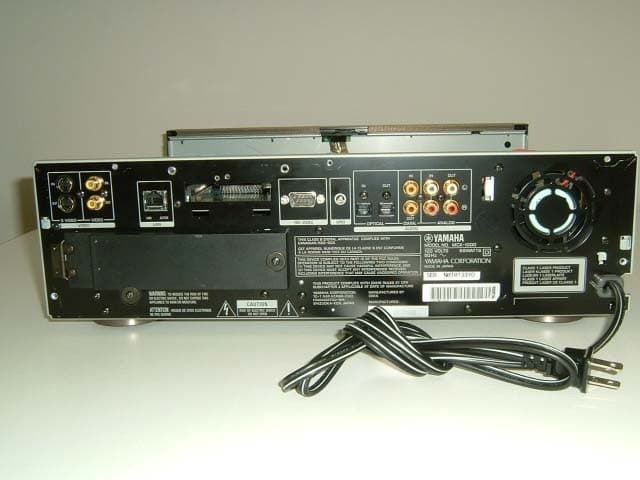
Click to zoom
Application Details
- Equipment Class
- DTS - Digital Transmission System
- Date of Grant
- May 19, 2003
- Application Purpose
- Original Equipment
- Date of Application
- May 19, 2003
- Equipment Note
- MusicCAST Digital Audio Server
- Frequency Range
- 2412.00000000 - 2462.00000000
- Company
- Yamaha Corporation
- Country
- Japan
Documents & Files
Document Text
Text extracted from the exhibit documents filed with the FCC. Open a document above to read the original.
Users Manual
11 About the Quick Manual About the Quick Manual The Quick Manual is aimed at first time users of the MusicCAST system, and contains an easy to under- stand explanation of the general system functions. You can gain an basic understanding of how to use the MusicCAST system just by reading the Quick Manual alone. The MusicCAST system has a great many abilities, ranging from Music Server, to Music Player. You must carry out various settings to use each function. Consequently, this Quick Manual is divided into the fol- lowing sections: 1. Storing CDs on the MusicCAST server, 2. Using the MusicCAST client to play back songs recorded on the MusicCAST server, 3. Creating a CD by selecting tracks from those stored on the MusicCAST server. Please refer to the main MusicCAST Server manual or MusicCAST Client manual for explanations on other functions. Using the MusicCAST, you can store all of the CDs in your collection on the internal hard disk in the MusicCAST, and play them back however you want, rather like a juke box. The MusicCAST server can store more than 1000 (*1) music CDs on its internal hard disk drive. It also records the album name, artist name, and music genre at the time of storage, allowing easy creation of a list of the recorded music without requiring you to enter any data. Because this list contains the song, artist, genre, and album names, you can quickly and easily select the song you want to listen to for playback. You can also set the MusicCAST to play songs at random, repeat one particular song, or select from a number of other playback options. You can use MusicCAST clients to play music stored in the MusicCAST server, as shown in the illustration below. *1 This figure assumes that all songs are stored in Mp3 format only. The MusicCAST server can store approximately 100 CDs if all songs are stored in PCM format (assuming it is equipped with an 80GB hard disk drive). The MusicCAST client connects to the MusicCAST server, acting as a player for the songs stored on the MusicCAST server. Since the MusicCAST client can connect to the MusicCAST server through a wireless connection, you can install it with- out having to install any connecting cables. You can, for example, install a MusicCAST server in your living room, and MusicCAST clients in your bedroom and childrens' rooms, then connect and listen to the music stored in the MusicCAST server from each location. The MusicCAST client allows you to search for songs in the same manner as the MusicCAST server, by selecting song, album, artist, or genre. Additionally, because the MusicCAST server is capable of connecting to up to 7 MusicCAST clients simultaneously, you can play different songs, on multiple MusicCAST clients at the same time. What is the MusicCAST system? What is the MusicCAST Client? MusicCAST client SpeakerSpeaker MusicCAST serverTV/Monitor About the Quick Manual 2 Use the remote control and the television connected to your MusicCAST server to carry out the procedures described in this Quick Manual. If you connect your MusicCAST server to a television, you can easily search for CD titles, artist names, and other data on screen. You can also set all the other paramters used to operate the MusicCAST system from this On Screen Display. This Quick Manual assumes that you have connected your MusicCAST server to a TV/Monitor, and uses illustra- tions of the On Screen Display to explain operations where appropriate. Most of the explanations in this manual center on using the remote control to operate MusicCAST components, but you can also access most functions directly from the MusicCAST server and client units. Refer to the illustra- tions provided with each explanation for information on which keys or buttons are applicable, and use those con- trols indicated for each numbered step to carry out procedures. Operating the MusicCAST server About the Quick Manual 3 About the Quick Manual This section contains an explanation of the terminology used to explain operations and functions in the Music- CAST quick manual. The MusicCAST server can store songs in both PCM and MP3 formats, and is set to store both by default. • PCM format • Songs stored in this format have CD quality sound, however because it requires a lot of data to do so, it takes a lot of space on the Mus- icCAST server hard disk drive. • MP3 format Songs stored in this format require little data. Because MP3 songs require less hard disk space (roughly 8 to 9 times less, depending on the quality of the data), you can store more songs in this format. Why does the MusicCAST server store songs in both formats? Because the MusicCAST server can only broadcast songs in PCM format to one MusicCAST client, and because MP3 songs in general take less space than PCM songs, the MusicCAST server and client mainly use the MP3 format. However, because the MusicCAST can only record songs to a CD-R in PCM format, it stores both PCM and MP3 data when you store a CD. After you record a song to a CD- R, the MusicCAST server erases the PCM version of the song (see page XX in the main MusicCAST server manual), reducing the amount of space taken on the hard disk drive. Song formats are displayed to the right of the song title. Some CDs have text information such as their song titles, album names, and genre names encoded on them. This information is called CD TEXT. The MusicCAST server will read and display this text if it is set to do so, and if it cannot find informa- tion on the CD in its built-in database or by connecting to the CDDB site (see page XX), when you load a CD. However, since the MusicCAST server cannot read or display some kinds of CD TEXT, we recommend that you use the CDDB by default (see page XXX). Additionally, you must set certain parameters if you want your MusicCAST server to read CD TEXT. See page XXX in the MusicCAST server manual for more information. Check the terminology used in the MusicCAST system MusicCAST server data storage formats CD TEXT Format 4 Get…
Text truncated - open the document above for the full version.
Cover Letter(s)
American Telecommunications Certification Body Inc. 6731 Whittier Ave, McLean, VA 22101 May 7, 2003 RE: FCC ID: A6RMCX1000A Attention: Hiroka Umeyama / Kanako Sanda I have a few comments on this Application. 1. It is not clear from the pictures and description if the rf card used in the device is removable by the user, or if it requires tools etc to remove. If it is removable (as in a typical PCMCIA card in a laptop) then the system is not certifiable as (i.e. the PCMCIA card would have an ID and it would be used like any PCMCIA device). If it requires disassembly and the use of tools indicating the rf card is not intended to be removed, then the device is certifiable. Please clarify if the transmitter is a permanent part of the unit or if it is easily removed by the user. 2. Please note that a drawing of the transmitter location is not sufficient as an operational description. The operational description should provide an indication of the use of the device. Please provide an adequate operational description for the device in question as it pertains to the transmitter. 3. Please note that the frequencies listed on page 7 of the report (particularly channel 11 listed as 2468MHz) and the actual measured frequencies (particularly channel 11 at 2462MHz) do not match. Please correct page 7 of your report to reflect the actual frequencies involved in the device. Dennis Ward mailto:[email protected] The items indicated above must be submitted before processing can continue on the above referenced application. Failure to provide the requested information may result in application termination. Correspondence should be considered part of the permanent submission and may be viewed from the Internet after a Grant of Equipment Authorization is issued. Please do not respond to this correspondence using the email reply button. In order for your response to be processed expeditiously, you must submit your documents through the AmericanTCB.com website. Also, please note that partial responses increase processing time and should not be submitted. Any questions about the content of this correspondence should be directed to the sender.
Cover Letter(s)
19 May, 2003 Subject : FCC ID: A6RMCX1000A Dear Mr. Dennis Ward, Regarding to your comments for FCC ID: A68MCX1000A on may 7, 2003, please find the following replies; 1. Please see the “Declaration of Dedicated RF card requirement” on the website and Internal photos which we have already uploaded. 2. Please find the Flow of data transmission on the website. 3. Please find the revised test report on the website. 4. Please find the revised test report on the website. Sincerely yours, Kanako Sanda (Ms.) UL Apex Co., Ltd.
External Photos
External Photo YAMAHA CORPORATION FCC ID: A6RMCX1000A front Back External Photo YAMAHA CORPORATION FCC ID: A6RMCX1000A Back without card
Internal Photos
Internal Photo YAMAHA CORPORATION FCC ID: A6RMCX1000A RF PWB Side RF PWB Side (Close up) Internal Photo YAMAHA CORPORATION FCC ID: A6RMCX1000A LAN Card back LAN Card front Internal Photo YAMAHA CORPORATION FCC ID: A6RMCX1000A Inside with card inserted Pattern Antenna (4λ) with cover Internal Photo YAMAHA CORPORATION FCC ID: A6RMCX1000A Pattern Antenna (4λ) front Pattern Antenna (4λ) back Internal Photo YAMAHA CORPORATION FCC ID: A6RMCX1000A Rod Antenna
RF Exposure Info
RF Exposure Statement No. : 23GE0067-HO-2 Applicant : YAMAHA CORPORATION Type of Equipment : DIGITAL AUDIO SERVER Model No. : MCX-1000 FCC ID : A6RMCX1000A RF Exposure Statement: YAMAHA CORPORATION declares that Model : MCX-1000 complies with FCC radiation exposure requirement specified in the FCC Rules 2.1093(2). MCX-1000 has 117.49mW of conducted Peak output power and 186.21mW of EIRP. (Antenna gain : 2.0dBi) According to RF output power of this module transmitter, values for both Conducted peak output power and EIRP are below 5mW.This kind of equipment hardly ever go over SAR value limited of 1.6W/Kg for public resident which is regulated by "OET Bulletin 65, Supplement C". RF Exposure Calculations: The following information provides the minimum separation distance for the highest gain antenna provided with the “MCX-1000” as calculated from FCC OET 65 Appendix B, Table (B) Limits for General Population / Uncontrolled Exposure. This calculation is based on the highest EIRP possible from the system, considering maximum power and antenna gain, and considering a 1.0m W/cm^2 uncontrolled exposure limit. The Friis formula used was: S = (P * G) / (4* π * r^2) or r = (P * G) / (4 * π* S) Where S = 1.0 mW/cm^2 for 2400 MHz P = 117.49mW (Maximum Conducted Power) G = 1.58(Numerical Antenna gain; equal to 2.0 dBi) r = Minimum safe distance from antenna (cm) For: MCX-1000 r = 3.84cm Notes in Installation Manual: For FCC: This equipment complies with FCC radiation exposure limits set forth for uncontrolled equipment. This equipment should be installed and operated with a minimum distance of at least 20cm between the radiator and the persons body (excluding extremities: hands, wrists, feet, and legs) and must not be co-located or operated with any other antenna or transmitter. For Industry Canada: The installer of the radio equipment must ensure that the antenna is located or pointed such that it does not emit RF field in excess of Health Canada limits for the general population: consult Safety Code 6, obtainable from Health Canada’s website www.hc-sc.gc.ca/rpb UL Apex Co., Ltd. Head Office EMC Lab. 4383-326 Asama-cho, Ise-shi, Mie-ken 516-0021 JAPAN Telephone : +81 596 24 8116 Facsimile : +81 596 24 8124
Contact Information
Applicant
Kenji Kawasaki
Technical Contact
UL Apex Co., Ltd.Hiroka Umeyama
[email protected]81-596-24-8116
4383-326 Asama-cho, · Ise-shi, Mie-ken · Japan
Test Firm
UL Japan, IncMitsuru Fujimura
Technical Specifications
| # | Rule Parts | Frequency Range | Power Output |
|---|---|---|---|
| 1 | 15C | 2.41 GHz - 2.46 GHz | 117.50 mW |
Other Applications from Yamaha Corporation
A6RRMWAP16
Feb 09, 2021Microphone Accesspoint
Equipment Class
PUB - Part 15 Unlicensed PCS Base Station
A6RRMWCH8
Feb 09, 2021Microphone Charger
Equipment Class
PUB - Part 15 Unlicensed PCS Base Station
A6RRMWAP8
Feb 09, 2021Microphone Accesspoint
Equipment Class
PUB - Part 15 Unlicensed PCS Base Station
A6RRMWMIC
Feb 09, 2021Wireless Microphone
Equipment Class
PUB - Part 15 Unlicensed PCS Base Station
A6RTSXN237
Feb 08, 2021Desktop Audio System
Equipment Class
DCD - Part 15 Low Power Transmitter Below 1705 kHz