AZ489FT7027Handheld Computer w/ Dual-Band GPRS, WLAN & BT
Motorola Solutions, Inc.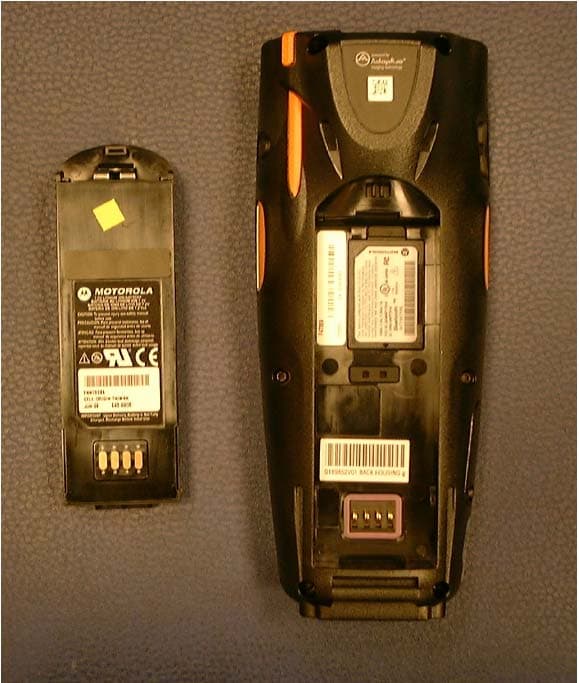
Click to zoom
Application Details
- Equipment Class
- DSS - Part 15 Spread Spectrum Transmitter
- Date of Grant
- Mar 14, 2007
- Application Purpose
- Original Equipment
- Date of Application
- Mar 14, 2007
- Equipment Note
- Handheld Computer w/ Dual-Band GPRS, WLAN & BT
- Frequency Range
- 2402.00000000 - 2480.00000000
- Company
- Motorola Solutions, Inc.
- Country
- United States
Documents & Files
Document Text
Text extracted from the exhibit documents filed with the FCC. Open a document above to read the original.
Users Manual
HC700-G & HCe700-G Handheld Computers Models: F4708A (HC700-G) & F4707A (HCe700-G) Quick Start Guide a Enhanced IMD Users.book Page 1 Monday, February 12, 2007 11:46 AM Enhanced IMD Users.book Page 2 Monday, February 12, 2007 11:46 AM i COMPUTER SOFTWARE COPYRIGHTS The Motorola products described in this instruction manual may include copyrighted Motorola computer programs stored in semicon- ductor memories or other media. Laws in the United States and other countries preserve for Motorola certain exclusive rights for copy- righted computer programs, including the exclusive right to copy or reproduce in any form the copyrighted computer program. Accord- ingly, any copyrighted Motorola computer programs contained In the Motorola products described in this instruction manual may not be copied or reproduced in any manner without the express written per- mission of Motorola. Furthermore, the purchase of Motorola products shall not be deemed to grant either directly or by implication, estop- pel. or otherwise. any license under the copyrights, patents or patent applications of Motorola, except for the normal non-exclusive, royalty free license to use that arises by operation of law in the sale of a product. EPS – 34440- B This warranty applies within the fifty (50) United States, the District of Columbia and Canada. Document Copyrights No duplication or distribution of this document or any portion thereof shall take place without the express written permission of Motorola. No part of this manual may be reproduced, distributed, or transmitted in any form or by any means, electronic or mechanical, for any pur- pose without the express written permission of Motorola. Disclaimer The information in this document is carefully examined, and is believed to be entirely reliable. However, no responsibility is assumed for inaccuracies. Furthermore, Motorola reserves the right to make changes to any products herein to improve readability, function, or design. Motorola does not assume any liability arising out of the applications or use of any product or circuit described herein; nor does it cover any license under its patent rights nor the rights of others. Commercial Warranty Limited Warranty MOTOROLA COMMUNICATION PRODUCTS I. What This Warranty Covers And For How Long MOTOROLA INC. (“MOTOROLA”) warrants the MOTOROLA manu- factured Communication Products listed below (“Product”) against defects in material and workmanship under normal use and service for a period of time from the date of purchase as scheduled below: HC700-G unitOne (1) Year Product AccessoriesOne (1) Year Enhanced IMD Users.book Page i Monday, February 12, 2007 11:46 AM ii Motorola, at its option, will at no charge either repair the Product (with new or reconditioned parts), replace it (with a new or reconditioned Product), or refund the purchase price of the Product during the war- ranty period provided it is returned in accordance with the terms of this warranty. Replaced parts or boards are warranted for the bal- ance of the original applicable warranty period. All replaced parts of Product shall become the property of MOTOROLA. This express limited warranty is extended by MOTOROLA to the original end user purchaser only and is not assignable or transferable to any other party. This is the complete warranty for the Product man- ufactured by MOTOROLA. MOTOROLA assumes no obligations or liability for additions or modifications to this warranty unless made in writing and signed by an officer of MOTOROLA. Unless made in a separate agreement between MOTOROLA and the original end user purchaser, MOTOROLA does not warrant the installation, mainte- nance or service of the Product. MOTOROLA cannot be responsible in any way for any ancillary equipment not furnished by MOTOROLA which is attached to or used in connection with the Product, or for operation of the Product with any ancillary equipment, and all such equipment is expressly excluded from this warranty. Because each system which may use the Product is unique, MOTOROLA disclaims liability for range, cov- erage, or operation of the system as a whole under this warranty. II. General Provisions This warranty sets forth the full extent of MOTOROLA’s responsibili- ties regarding the Product. Repair, replacement or refund of the pur- chase price, at MOTOROLA’s option, is the exclusive remedy. THIS WARRANTY IS GIVEN IN LIEU OF ALL OTHER EXPRESS WAR- RANTIES. IMPLIED WARRANTIES, INCLUDING WITHOUT LIMI- TATION, IMPLIED WARRANTIES OF MERCHANTABILITY AND FITNESS FOR A PARTICULAR PURPOSE, ARE LIMITED TO THE DURATION OF THIS LIMITED WARRANTY. IN NO EVENT SHALL MOTOROLA BE LIABLE FOR DAMAGES IN EXCESS OF THE PURCHASE PRICE OF THE PRODUCT, FOR ANY LOSS OF USE, LOSS OF TIME, INCONVENIENCE, COMMERCIAL LOSS, LOST PROFITS OR SAVINGS OR OTHER INCIDENTAL, SPECIAL OR CONSEQUENTIAL DAMAGES ARISING OUT OF THE USE OR INABILITY TO USE SUCH PRODUCT, TO THE FULL EXTENT SUCH MAY BE DISCLAIMED BY LAW. III. State Law Rights SOME STATES DO NOT ALLOW THE EXCLUSION OR LIMITA- TION OF INCIDENTAL OR CONSEQUENTIAL DAMAGES OR LIMI- TATION ON HOW LONG AN IMPLIED WARRANTY LASTS, SO THE ABOVE LIMITATION OR EXCLUSIONS MAY NOT APPLY. This warranty gives specific legal rights, and there may be other rights which may vary from state to state. Enhanced IMD Users.book Page ii Monday, February 12, 2007 11:46 AM iii IV. How To Get Warranty Service You must provide proof of purchase (bearing the date of purchase and Product item serial number) in order to receive warranty service and, also, deliver or send the Product item, transportation and insur- ance prepaid, to an authorized warranty service location. Warranty service will be provided by Motorola through one of its authorized warranty service locations. If you first contact the company which sold you the Product, it can facilitate your obtaining warranty service. You can also call Motorola at 1-888-567-7347 US/Canada. V. What This Warranty Does Not Cover A. Defects or damage resul…
Text truncated - open the document above for the full version.
Users Manual
16 Key assignment Table 3: HC700-G - Key Assignment KeyFunction Use the <TAB/Send> key to make & answer phone calls. The key also serves as <TAB> key when editing text. Use the <Esc> key to exit from a menu or an application. The <End> key turns the phone off and ends a call. The Main Scan Button is used for scanning barcodes (refer to “Scanning Barcodes” on page 23). The 4 Way Navigation key is used for screen navigation. The <Up bump> and <Down bump> keys are used to scroll up and down. The <Right bump> and <Left bump> are used for horizontal navigation between action buttons and entry fields. The <ENT> key is used to continue to the next field/screen (i.e., continue processing). The <SP> key enables entering blank space(s) within a text field. The <SP> key is active only on those text entry screens which contain fields that allow spaces to be entered. The <BKSP> key moves the cursor to the previ- ous character in the field, and while doing so, erases the character. Any remaining characters to the right of the cursor are shifted to the left. If there are no more characters to erase, the unit beeps. The <BKSP> key is only active on data entry screens. TAB ESC Enhanced IMD Users.book Page 16 Monday, February 12, 2007 11:46 AM 17 On-screen keypad To display the on-screen keypad - hold down the <SHIFT> and <SP> keys and toggle the Scan button to display or remove the virtual keyboard. The Function <Fn> key changes the alphabetic keypad to preset function keys. For example, the <A> key in <Fn> mode becomes <F1>. Pressing the <Fn> key produces the function icon on the lower Taskbar. When pressed once, the orange <SHIFT> key toggles between alphabetic and numeric keypad modes, shifting between letter entry and digit entry. Pressing the <SHIFT> key produces the alphabetic mode or numeric mode icon on the lower Taskbar. For example, pressing the <SHIFT> key and then the <P> key displays the digit “8”. Pressing the <SHIFT> again and then the <P> key displays the letter “P”. Hold down the <SHIFT> key and press on any alphabet key for uppercase letter (default mode is lowercase letters). The <SHIFT> is also used for screen and keypad illumination (see page 17). The Application <P1/P2> key functionality is set by the software application running on the HC700-G. Use the <SHIFT> key to toggle between P1 and P2. To learn more about these keys, consult the software application guide. To set the Application key functionality, go to: Start Menu -> Settings -> Personal -> Buttons. Table 3: HC700-G - Key Assignment KeyFunction F N Enhanced IMD Users.book Page 17 Monday, February 12, 2007 11:46 AM 18 Keypad Backlight Turning backlight on/off Hold down the <SHIFT> key for four seconds - the keypad backlight will turn on. To turn off - hold down the <SHIFT> key for another two sec- onds. When not in use, the backlight turns off automatically. To configure the keypad illumination duration, go to: Start Menu -> Settings -> System -> Backlight. Backlight adjustment The keypad backlight can be adjusted by holding down the <SHIFT> key and pressing the right or left arrows to increase or decrease the keypad backlight. Screen Backlight Turning backlight on/off Hold down the <SHIFT> for two seconds - the screen back- light will turn on. To turn off - hold down for another two sec- onds. When not in use, the backlight turns off automatically. To configure the screen illumination duration, go to: Start Menu -> Settings -> System -> Backlight. Backlight adjustment The screen backlight can be adjusted by holding down the <SHIFT> key and pressing the up or down arrows to increase or decrease the screen backlight. Calibrating the Touch Screen To calibrate the touch screen - hold down the <SHIFT> and <SP> and <C> keys and follow the calibrate application instructions to complete your touch screen calibration. Enhanced IMD Users.book Page 18 Monday, February 12, 2007 11:46 AM 19 Adjusting Earpiece/Speaker Volume You can adjust the Earpiece/Speaker volume for sounds, such as the sound you hear when you make a phone call, replay audio, scan barcodes or when you tap on the screen. Important: Phone calls are routed only through the earpiece. Earpiece/Speaker volume can be adjusted by one of the fol- lowing methods: 1.Using the Earpiece/Speaker Volume keys (see Figure 1): •Press the up and down keys to increase or decrease volume during a call or when playing sound. 2.Using your stylus: •Tap . •Under , move the volume slider to the desired volume level. •Select On or Off to quickly enable/dis- able volume. 3.Using the keypad: •Hold down the <SHIFT> and <SP> keys •Press the up and down arrows on the 4-Way Naviga- tion key. The volume may also be adjusted in Function mode as fol- lows: •Hold down the <Fn> key •Use the <F6> key to increase or <F7> key to decrease volume. Voice Recording To record sound, press the Voice Recording button - the Notes application will run, enabling you to record and play sounds. To assign different functionality to this button, go to: Start Menu -> Settings -> Personal -> Buttons. Enhanced IMD Users.book Page 19 Monday, February 12, 2007 11:46 AM 20 Resetting the HC700-G You may need to reset the HC700-G; for example, you may need to reset due to communication cut-off, or if the operat- ing system or the application stops responding. If the HC700-G stops responding, perform the steps described on the following page. Step 1: Warm Reset Important Note: When the HC700-G performs Warm Reset, all recorded information remains stored in mem- ory. Hold down the <ESC> and <A> and <F> keys (see Figure 8) for at least 5 seconds - the Motorola logo will show on the screen for about 30 seconds and then Windows Mobile desktop or application screen will appear - the HC700-G functions again. Warm Reset can also be performed in the following way: go to: Start Menu -> TaskManager and tap on “Soft Reset”. If the HC700-G still does not respond, perform “Step 2: Cold Reset”: Step 2: Cold Reset Cold Reset restarts the HC700-…
Text truncated - open the document above for the full version.
Users Manual
Ab HC700-G & HCe700-G Handheld Computer Product Safety and RF Exposure for Handheld Computer with Radios. BEFORE USING THIS DEVICE WITH RADIO, READ THIS BOOKLET WHICH CONTAINS IMPORTANT OPERATING INSTRUCTIONS FOR SAFE USAGE AND RF ENERGY AWARENESS AND CONTROL INFORMATION AND OPERATIONAL INSTRUCTIONS FOR COMPLIANCE WITH RF ENERGY EXPOSURE LIMITS IN APPLICABLE NATIONAL AND INTERNATIONAL STANDARDS. ALSO READ THE OPERATIONAL INSTRUCTIONS FOR SAFE USAGE. RF Energy Exposure This handheld computer is intended for use in general population/uncontrolled environment. This handheld computer uses electromagnetic energy in the radio frequency (RF) spectrum to provide communications between two or more users over a distance. It uses radio frequency (RF) energy or radio waves to send and receive calls. RF energy is one form of electromagnetic energy. Other forms include, but are not limited to, sunlight and x-rays. RF energy, however, should not be confused with these other forms of electromagnetic energy, which when used improperly, can cause biological damage. Very high levels of x-rays, for example, can damage tissues and genetic material. Experts in science, engineering, medicine, health, and industry work with organizations to develop standards for safe exposure to RF energy. These standards provide recommended levels of RF exposure for both workers and the general public. These recommended RF exposure levels include substantial margins of protection. All Motorola radio products are designed, manufactured, and tested to ensure they meet government-established RF exposure levels. In addition, manufacturers also recommend specific operating instructions to users of products with radios. These instructions are important because they inform users about RF energy exposure and provide simple procedures on how to control it. Please refer to the following websites for more information on what RF energy exposure is and how to control your exposure to assure compliance with established RF exposure limits: http://www.fcc.gov/oet/rfsafety/rf-faqs.html http://www.osha.gov/SLTC/radiofrequencyradiation/ index.html Compliance with RF Exposure Standards Your Motorola handheld computer is designed and tested to comply with a number of national and International standards and guidelines (listed below) for human exposure to radio frequency electromagnetic energy. This handheld computer complies with the IEEE (FCC) and ICNIRP exposure limits for general population/uncontrolled environments. Your Motorola handheld computer complies with the following RF energy exposure standards and guidelines: • United States Federal Communications Commission, Code of Federal Regulations; 47 CFR part 2 sub-part J • American National Standards Institute ( ANSI) / Institute of Electrical and El ectronic Engineers (IEEE) C95. 1-1992 • Institute of Electrical and Electronic Engineers ( IEEE) C95.1-1999 Edition • International Commission on Non- Ionizing Radiation Protection (ICNIRP) 1998 • Ministry of Health (Canada) Safety Code 6. Limits of Human Exposure to Radio frequency Electromagnetic Fields in the Frequency Range from 3 kHz to 300 GHz, 1999 • Australian Communications Authority Radiocommunications (Electromagnetic Radiation – Human Exposure) Standard, 2003 • ANATEL ANNEX to Resolution No. 303 of July 2, 2002 "Regulation of limitation of exposure to electrical, magnetic and electromagnetic fields in the radio frequency range between 9 KHz and 300 GHz" and "Attachment to resolution # 303 from July 2, 2002" RF Exposure Operating Instructions To control your exposure and ensure compliance with the general population/uncontrolled environment exposure limits, always adhere to the following procedures: Operating Instructions • When worn on the body, always place the handheld computer in a Motorola-approved clip, holder, holster, case, or body harness for this product. Using approved body-worn accessories is important because the use of non-Motorola-approved accessori es may result in exposure levels, which exceed the IEEE/ICNIRP general population/uncontrolled environment RF exposure limits. • If you are not using a body -worn accessory and are not using the handheld computer in the intended use position, along side the head in the phone mode, in front of the face in the hand held mode, then ensure the handheld computer is kept 2.5 cm (one inch) from the body when transmitting. Keeping the handheld computer at a proper distance is important because RF exposures decrease with increasing distance from the computer. Phone Mode - Operating Instructions • When placing or receiving a phone call, hold the product as you would a wireless telephone, and talk directly into the microphone. Approved Accessories • Use only Motorola-approved supplied or replacement, batteries, and accessories. Use of non–Motorola batteries and accessories may exceed I EEE/ICNIRP RF exposure guidelines. For a list of Motorola-approved batteries and other accessories please see your de aler or local Motorola contact. Your nearest dealer can be found at the following web site: http://www.motorola.com/cgiss/emea/dealerlocator.html Additional Information For additional information on exposure requirements or other training information, visit: http://www.motorola.com/rfhealth. Electromagnetic Interference/Compatibility NOTE: Nearly every electronic device is susceptible to electromagnetic interference (EMI) if inadequately shielded, designed or otherwise configured for electromagnetic compatibility. 6802979C37-B @6802979C37@ Facilities To avoid electromagnetic interference and/or compatibility conflicts, turn off your handheld computer in any facility where posted notices instruct you to do so. Hospitals or health care facilities may be using equipment that is sensitive to external RF energy. Aircraft When instructed to do so, turn off your handheld computer when on board an aircraft. Any use of a handheld computer must be in accordance with applicable regulations per airlin…
Text truncated - open the document above for the full version.
Cover Letter(s)
FCC ID: AZ489FT7027 8000 West Sunrise Boulevard, Fort Lauderdale, Florida 33322. USA CONFIDENTIALITY REQUEST Date: 15 th March 2007 Authorization & Evaluation Division Federal Communications Commission Laboratory 7435 Oakland Mills Road Columbia, MD 21046 Subject: Confidentiality Request for Transmitter with FCC ID: AZ489FT7027. HC700G Model Number: F4708A Dear Sir or Madam: Motorola is requesting that Exhibit 4 (Circuit Descriptions), Exhibit 5 (Schematic Diagrams), Exhibit 10 (Parts List and Tune-Up Procedures), and Exhibit 12 (Operational Description) not be made routinely available for public inspection. Motorola considers the information in these exhibits to be classified as trade secrets, pursuant to 47 CFR Section 0.457(d) and Section 552(b)(4) of the Freedom of Information Act. We are also requesting that the FCC mark Exhibit 3 (External Photos), Exhibit 7 (Test Set Up Photos), Exhibit 8 (Users Manual) and Exhibit 9 (Internal Photos) as Temporary Confidentiality as outlined in Public Notice DA 04-1705, dated June 15, 2004. This provision will give Motorola temporary confidentiality prior to product launch. Please mark Exhibits 4, 5, 10, and 12 as “Confidential” and Exhibits 3, 7, 8 and 9 as “Temporary Confidential”. Please contact me if you require any additional information. Sincerely, /s/ Mike Ramnath (signed) Manager, Regulatory Compliance Tel: (954) 723-5793 E-mail: [email protected] EXHIBIT 13b
Cover Letter(s)
FCC ID: AZ489FT7027 Date: 13 th March 2007 Gregory Czumak PCTEST Engineering Laboratory, Inc. 6660-B Dobbin Road Columbia, MD 21045 Re: Correspondence Number AZ40662 with FCC ID: AZ489FT7027. Confirmation Number: 1610110661/0663 Dear Mr. Czumak; Motorola Inc., 8000 West Sunrise Boulevard, Fort Lauderdale, Florida 33322, herein submits its response to the 19 th October 2006 request for information in Correspondence Number AZ40662. Q1: The FCC requires that SAR system validation tests be performed with brain tissue (not body). Please provide such validation results for each day that the EUT was tested at the head and on the body. R1: According to IEEE Std 1528-2003; Section 8.2 - System check: The purpose of the system check is to verify that the system operates within its specifications at the device test frequency. System check is a simple check of repeatability to make sure that the system works correctly at the time of compliance test; it is not a verification of the system with respect to external standards. According to IEEE std 1528-2003; Section 8.3 - System validation: The system validation procedure evaluates the system against reference SAR values and the performance of probe, readout electronics, and software... And System validation should be performed annually, or when a new system is put into operation, or whenever modifications have been made to the system... And ...The system validation must be performed using head tissue–equivalent liquids... According to FCC Supplement C, OET Bulletin 65 (Edition 97-01, SAR MEASUREMENT SYSTEM DESCRIPTIONS AND REQUIREMENTS (page12) : The SAR measurement should usually be verified daily when SAR measurements are performed....It is recommended that a flat phantom and a half-wave dipole match to the tissue medium be used to verify the accuracy of SAR measurement systems... Therefore, the system validation requires to be performed annually only, not daily. Motorola N&E EME lab has performed the system validation annually using applicable simulated head tissue as indicated in IEEE std 1528-2003. The results for the system validations are indicated in the Appendix D. These FCC ID: AZ489FT7027 system validation results for the test systems are evaluated against the reference SAR values indicated in the IEEE std 1528-2003. To verify that the system operates within its spec at the device test frequency, the system check targets are set yearly as follow: Within the same day of the system validation is done, the lab has performed the measurement for the same dipole using the applicable simulated body tissue. This result and the system validation result are set as targets for the daily system check (we also called system performance check). The daily system check results indicated in this report are within +/- 10% of the applicable system check targets. Q2: Please provide worst case SAR plots for left and right head touch and tilt for both 835MHz and 1900MHz operation, as well as for body worn for 835MHz and 2450MHz (WLAN) operation. Please do not submit hand- SAR results. R2: Please see a new SAR report from PC TEST ENG, 02/142007-02/16-2007. Q3: Please verify that multi (transmit) slot GPRS operation is not available. R3: The radio includes configuration SW, which called Flex. In order to be on the safe side GPRS radio group defined radio part number customized to HC700G by the Flex. In the HC700G customized flex, the Europe bands as well as the EDGE are blocked. Exhibit 10 was revised accordingly to the g24 part number and is attached. Also, a new SAR Report is attached. Q4: The output power levels listed in the Operational Description, the User’s Manual, pages 1 and 4 of the first SAR report and page 1 of the second SAR report do not match the actual measured values (WLAN: 0.193 W, 835GSM: 0.979 W, 1900GSM: 1.905 W). Please address these discrepancies. R4: The discrepancies, as described above, were corrected. See amended Users Manual, Test Report. Q5: It appears that schematics for the WLAN were not submitted- please do so. If they were, please indicate precisely where they are located. R5: Attached please find revised Ex 5 Q6&R6: Please address the following 4 requirements for frequency hopping spread spectrum transmitters (Bluetooth) from Section 15.247(a) (1): a. Is the hopping sequence pseudorandom? Yes b. Are all channels used equally on average? Yes c. Does the receiver input bandwidth approximately equal the transmit bandwidth? Yes d. Does the receiver hop in sequence with the transmit signal? Yes Q7: Please address Sections 15.247(g) and (h) for the Bluetooth FCC ID: AZ489FT7027 transmitter. R7: This is a Frequency Hopping Spread Spectrum radio modem that works in the 2.4GHz band and provides connectivity at a short distance (up to 10m). The channel access technology is a piconet of up to eight devices that uses time slots. The maximum raw data rate is 1Mbit/s. The modulation type is GFSK. Also, in accordance with the Bluetooth Industry Standard, the system is designed to comply with all of the regulations in Section 15.247(g) and (h) when the transmitter is presented with a continuous data (or information) stream. Q8: It appears that the required body-worn SAR warning statement is not in the User’s Manual. Please address. R8: There is pointer into the user manual, which is referring to the Safety Booklet. User Manual p# 8 "General Information leaflet, Motorola publication Number 6802979C37". The Safety booklet is attached. Q9: Please verify that the FCC ID label will be clearly visible at the time of purchase (i.e., the battery will not be installed), as required by the FCC Rules. R9: The customer receive the terminal while the battery is uninstalled. Q10. The schematics submitted are illegible. Please resubmit with a higher resolution. R10: Attached please find revised Ex 5. Q11: Two items in the EMC report appear to be past their cal due dates. Please address. R11: Typo - Please see revised exhibit 6 Q12: FYI: in the future, please su…
Text truncated - open the document above for the full version.
External Photos
Motorola Inc. FCC ID: AZ489FT7027 Exhibit 3 Page 1 of 5 EXTERNAL PHOTOGRAPHS This document contains 4 photographs Motorola Inc. FCC ID: AZ489FT7027 Exhibit 3 Page 2 of 5 Photograph No. 1 HC700G Front View Motorola Inc. FCC ID: AZ489FT7027 Exhibit 3 Page 3 of 5 Photograph No. 2 HC700G Rear View Motorola Inc. FCC ID: AZ489FT7027 Exhibit 3 Page 4 of 5 Photograph No. 3 HC700G Rear View without battery Motorola Inc. FCC ID: AZ489FT7027 Exhibit 3 Page 5 of 5 Photograph No. 4 HC700G Rear View with the Label
ID Label/Location Info
Applicant: Motorola, Inc. FCC ID: AZ489FT7027 Exhibit 1 EXHIBIT 1: FCC IDENTIFICATION LABEL Required Under Section: 47 CFR 2.1033(b) (7), 2.1033(c) 11 FCC ID: AZ489FT7027 Identifier label for the model: F4708A Label Location: Back side of the handheld computer Applicant: Motorola, Inc. FCC ID: AZ489FT7027 Exhibit 1 EXHIBIT 1A: General Information --- 47 CFR 2.1031. 1A.1. Production Plans -- Pursuant 47 CFR 2.1031 Quantity production is planned. 1A.2. Application References: Pursuant to 47 CFR 2.948 and 2.1061 Reference is made to the following Motorola "Application References" 1A.4. Data Submittal Procedure Data located in Exhibit 6 is supplied in accordance with Part 2, Subpart J and Part 15, subpart C of the Commissions ’ rules and will be submitted electronically. 1A.5. Application References: Pursuant to 47 CFR 2.948 and 2.1061 Reference is made to the following Motorola "Application References" Hermon Labs, located in Binyamina Israel is listed with FCC and Industry Canada as follows: 1. FCC OATS registration number is: 102724 2. Industry Canada OATS registration number is: IC 46405-4808 3. Accredited by A2LA. - 16330.1
Internal Photos
Motorola Inc. FCC ID: AZ489FT7027 Exhibit 9 Page 1 of 8 INTERNAL PHOTOGRAPHS This document contains 7 photographs Motorola Inc. FCC ID: AZ489FT7027 Exhibit 9 Page 2 of 8 Photograph No.1 HC700G EPP internal view Motorola Inc. FCC ID: AZ489FT7027 Exhibit 9 Page 3 of 8 Photograph No.2 HC700G EPP internal view Motorola Inc. FCC ID: AZ489FT7027 Exhibit 9 Page 4 of 8 Photograph No.3 PCB with G24 module removed Motorola Inc. FCC ID: AZ489FT7027 Exhibit 9 Page 5 of 8 Photograph No.6 HC700G EPP main PCB front view Motorola Inc. FCC ID: AZ489FT7027 Exhibit 9 Page 6 of 8 Photograph No.7 HC700G EPP main PCB second side view Motorola Inc. FCC ID: AZ489FT7027 Exhibit 9 Page 7 of 8 Photograph No.8 WLAN module with shield Motorola Inc. FCC ID: AZ489FT7027 Exhibit 9 Page 8 of 8 Photograph No.9 WLAN module without shield
Test Report
E E E l l l e e e c c c t t t r r r o o o m m m a a a g g g n n n e e e t t t i i i c c c C C C o o o m m m p p p a a a t t t i i i b b b i i i l l l i i i t t t y y y T T T e e e s s s t t t R R R e e e p p p o o o r r r t t t T T T e e e s s s t t t R R R e e e p p p o o o r r r t t t N N N o o o : : : M M M O O O T T T 0 0 0 6 6 6 0 0 0 9 9 9 0 0 0 6 6 6 Issued on: February 05, 2007 P P P r r r o o o d d d u u u c c c t t t N N N a a a m m m e e e H H H C C C 7 7 7 0 0 0 0 0 0 - - - G G G T T T e e e r r r m m m i i i n n n a a a l l l M M M o o o d d d e e e l l l : : : F F F 4 4 4 7 7 7 0 0 0 8 8 8 A A A F F F C C C C C C I I I D D D : : : A A A Z Z Z 4 4 4 8 8 8 9 9 9 F F F T T T 7 7 7 0 0 0 2 2 2 7 7 7 I I I C C C : : : 1 1 1 0 0 0 9 9 9 U U U - - - 8 8 8 9 9 9 F F F T T T 7 7 7 0 0 0 2 2 2 7 7 7 T T T e e e s s s t t t e e e d d d A A A c c c c c c o o o r r r d d d i i i n n n g g g t t t o o o F F F C C C C C C 4 4 4 7 7 7 C C C F F F R R R , , , P P P a a a r r r t t t 1 1 1 5 5 5 , , , S S S u u u b b b p p p a a a r r r t t t s s s B B B & & & C C C F F F C C C C C C 4 4 4 7 7 7 C C C F F F R R R , , , P P P a a a r r r t t t 2 2 2 2 2 2 & & & P P P a a a r r r t t t 2 2 2 4 4 4 I I I n n n d d d u u u s s s t t t r r r y y y C C C a a a n n n a a a d d d a a a I I I C C C E E E S S S - - - 0 0 0 0 0 0 3 3 3 & & & R R R S S S S S S - - - 2 2 2 1 1 1 0 0 0 T T T e e e s s s t t t s s s P P P e e e r r r f f f o o o r r r m m m e e e d d d f f f o o o r r r M M M o o o t t t o o o r r r o o o l l l a a a I I I s s s r r r a a a e e e l l l L L L t t t d d d . . . 3, Kremenitski Street, Tel Aviv, Israel Tel: (972) 3-565 9581 Q Q Q u u u a a a l l l i i i T T T e e e c c c h h h E E E M M M C C C L L L a a a b b b o o o r r r a a a t t t o o o r r r y y y 30 Hasivim St, Petah-Tikva, 49517, Israel Tel: 972-3-926 8443 Fax: 972-3-928 7490 1633.01 Test Report: MOT 060906 Date: 05.02.2007, Rev. 3 Motorola Israel Ltd. Page 2 of 157 HC700-G EMC Lab The information contained herein is the property of QualiTech, EMC Lab and is supplied without liability for errors …
Text truncated - open the document above for the full version.
Contact Information
Applicant
Arine Lee(Certification Manager)
Technical Contact
PCTEST Engineering Laboratory, Inc.Randy Ortanez
[email protected]410-290-6652
6660-B Dobbin Road · Columbia, Maryland · United States
Test Firm
QualiTech EMC Laboratory (ECI Telecom)Yossi Zucker
Technical Specifications
| # | Rule Parts | Frequency Range | Power Output |
|---|---|---|---|
| 1 | 15C | 2.40 GHz - 2.48 GHz | 2.00 mW |
Other Applications from Motorola Solutions, Inc.
AZ489FT4980
Sep 08, 2026Portable two way radio
Equipment Class
TNF - Licensed Non-Broadcast Transmitter Held to FaceAZ489FT4981
Aug 14, 2026Handheld Portable - TANAPA BPR 45 400-470 MHZ 4W NKP
Equipment Class
TNF - Licensed Non-Broadcast Transmitter Held to Face
AZ489FT7187
Jul 13, 2026Portable 2-Way Radio with Bluetooth, Bluetooth LE, WIFI 2.4GHz, WIFI 5GHz, LTE
Equipment Class
DSS - Part 15 Spread Spectrum TransmitterAZ499FT6031
May 11, 2026Operation Critical Wireless Earpiece PTT
Equipment Class
DSS - Part 15 Spread Spectrum Transmitter
AZ499FT5879
Dec 19, 20252-way Portable Radio with BT, BTLE, WIFI, NFC and LTE
Equipment Class
DSS - Part 15 Spread Spectrum Transmitter