BJML5CNSColor Monitor
Tatung Company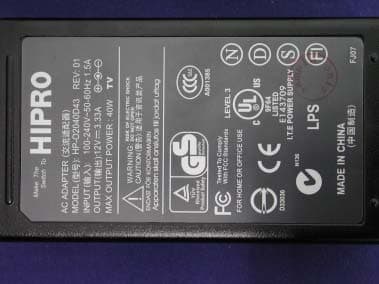
Click to zoom
Application Details
- Equipment Class
- JBP - Part 15 Class B Computing Device Peripheral
- Date of Grant
- Apr 13, 2004
- Application Purpose
- Original Equipment
- Date of Application
- Apr 13, 2004
- Equipment Note
- Color Monitor
- Company
- Tatung Company
- Country
- Taiwan
Documents & Files
Document Text
Text extracted from the exhibit documents filed with the FCC. Open a document above to read the original.
Users Manual
150V5 Color Monitor User’s Manual Contents Introduction ...................................................................................................... 1 Features ..................................................................................................................................1 For Your Safety .......................................................................................................................1 Installation......................................................................................................... 3 Unpacking the Display ............................................................................................3 Locations and Functions of Controls ............................................................................3 Making the Connections ..........................................................................................4 Using Your Display ........................................................................................... 5 Turning the Display On and Off ........................................ ...........................................5 Tilting the Display ..................................................................................................................6 Setting the Video Mode ..........................................................................................................6 Setting the Refresh Rate .................................................................................6 Minimizing Power Consumption ................................................................................7 Caring for and Cleaning the Display ............................................................................7 Adjusting Your Display ........................................................................ 8 Summary of Control Buttons .....................................................................................8 Displaying the OSD “Main Menu” ..............................................................................8 Selecting Items in the OSD Menu ...............................................................................9 ++Doing Adjustment in the OSD Menu .....................................................................10 Using the Direct Keys ...........................................................................................19 Troubleshooting .............................................................................................. 21 Technical Information ................................................................................... 22 Display Information ..............................................................................................22 Video Modes ......................................................................................................23 Unknown Video Modes ........................................................................................................23 FEDERAL COMMUNICATIONS COMMISSION INTERFERENCE STATEMENT ...........................................................................24 Introduction This latest LCD monitor has a 15-inch active matrix TFT (thin film transistor) liquid crystal display module. It is designed for use with any Windows ® -based PC. The monitor’s compact-sized design provides great space savings on your computer desk. Warning To completely disconnect power from your display, you must remove the power cord from the wall outlet and then remove the power cable from the display. Features Important features include: Ö Automatic configuration to the PC video settings with maximum XGA resolution. Ö Three control buttons plus OSD (on-screen display) for monitor settings adjustment and configuration with ease and instant feedback. Ö Support analog video input for direct and immediate replacement of CRT displays. Ö A tilt feature to optimize viewing position. Ö An anti-glare coating on the panel to reduce the reflection of ambient light. Ö Flicker-free performance across all recommended video modes. Ö Support for high refresh rates up to 75 Hz. Ö VESA DDC2B Plug-and-Display compliant. Ö A Power-saving feature that is compatible with Microsoft ® Windows Ö Compliance with Swedish MPR II guidelines for reduced electromagnetic emissions. For Your Safety For your safety and the protection of your monitor, follow these precautions: Ö Use only the factory-supplied power cord that shipped with your monitor. Ö To prevent electrical shock, do not disassemble the display. The cover should be removed only by qualified service personnel. Ö Do not cover the air vents. Ö To avoid the risk of damage to the display and electrical shock to yourself, do not expose the display to rain or moisture. If any of the following conditions occur, unplug the display and contact qualified service personnel: Ö The power cord or plug is frayed or damaged. Ö You have spilled liquid into the display. Ö The display has been exposed to rain or water. Ö The display does not operate correctly when the operating instructions are followed. Ö The display has been dropped or the cabinet has been damaged. * Only for use with supplied adapter, in case of loss or damage contact the retailer for replacement Installation Please follow the instructions in this chapter to install your LCD Monitor. Note: Before connecting your display, first read through the instructions in this chapter and the safety precautions in the previous chapter. Unpacking the Display When you are unpacking the display, make sure that you have the following items: Ö The LCD monitor Ö AC power adapter with attached power cable Ö A power cord Ö Analog video signal cable Ö The User's Manual Note: Place the display on a flat, sturdy surface. Choose an area free from excessive heat, moisture, and sunlight. Locations and Functions of Controls There are three control buttons and one power button on the front panel of the display, as well as a LED for power status indication. You will…
Text truncated - open the document above for the full version.
Block Diagram
Color Monitor 150V5 BLOCK DIAGRAM
External Photos
Report No 043L100F Page: 33 of 47 Version:1.0 Attachement ¾ EUT Photograph (1) EUT Photo (2) EUT Photo Report No 043L100F Page: 34 of 47 Version:1.0 (3) EUT Photo (4) EUT Photo Report No 043L100F Page: 35 of 47 Version:1.0 (5) EUT Photo (6) EUT Photo
ID Label/Location Info
TATUNG CO. FCC ID.: BJML5CNS 22, Chungshan N. Rd., 3rd Sec. Taipei, Taiwan, 104, R.O.C. Tel: 886 2 2592-5252 FCC ID AND DoC Label The FCC ID and DoC Label will be placed on the equipment as shown in the photograph below. Color Monitor Model No.: 150V5 TESTED TO COMPLY WITH FCC STANDARDS FOR HOME OR OFFICE USE S/N: Made in Taiwan Color Monitor Model No.: 150V5 F F C C C C I I D D : : B B J J M M L L 5 5 C C N N S S This device complies with Part 15 of the FCC Rules. Operation is subject to the following two conditions: (1) this device may not cause harmful interference and (2) this device must accept any interference received, including interference that may cause undesired operation. S/N: Made in Taiwan
ID Label/Location Info
TATUNG CO. FCC ID.: BJML5CNS 22, Chungshan N. Rd., 3rd Sec. Taipei, Taiwan, 104, R.O.C. Tel: 886 2 2592-5252 FCC ID AND DoC Label The FCC ID and DoC Label will be placed on the equipment as shown in the photograph below. Color Monitor Model No.: 150V5 TESTED TO COMPLY WITH FCC STANDARDS FOR HOME OR OFFICE USE S/N: Made in Taiwan Color Monitor Model No.: 150V5 F F C C C C I I D D : : B B J J M M L L 5 5 C C N N S S This device complies with Part 15 of the FCC Rules. Operation is subject to the following two conditions: (1) this device may not cause harmful interference and (2) this device must accept any interference received, including interference that may cause undesired operation. S/N: Made in Taiwan
Internal Photos
Report No 043L100F Page: 36 of 47 Version:1.0 (7) EUT Photo (8) EUT Photo Report No 043L100F Page: 37 of 47 Version:1.0 (9) EUT Photo (10) EUT Photo Report No 043L100F Page: 38 of 47 Version:1.0 (11) EUT Photo (12) EUT Photo Report No 043L100F Page: 39 of 47 Version:1.0 (13) EUT Photo (14) EUT Photo Report No 043L100F Page: 40 of 47 Version:1.0 (15) EUT Photo (16) EUT Photo Report No 043L100F Page: 41 of 47 Version:1.0 (17) EUT Photo (18) EUT Photo Report No 043L100F Page: 42 of 47 Version:1.0 (19) EUT Photo (20) EUT Photo Report No 043L100F Page: 43 of 47 Version:1.0 (21) EUT Photo (22) EUT Photo Report No 043L100F Page: 44 of 47 Version:1.0 (23) EUT Photo (24) EUT Photo Report No 043L100F Page: 45 of 47 Version:1.0 (25) EUT Photo (26) EUT Photo Report No 043L100F Page: 46 of 47 Version:1.0 (27) EUT Photo
Operational Description
Display Information LCD Module 15-in, active matrix TFT, anti-glare coating, 0.297 mm pixel pitch Display Size 304.1 mm x 228.1 mm Viewing Angle Left/Right Up/Down -60° / 60° -55° / 45° Display Colors 262144 Power Input 100 ~ 240 V AC Full Range, 50/60 Hz (External AC adapter) Power consumption Operation Mode : 30W max Off Mode : 2W max Signal Input Video Signal Sync signals RGB positive 0.7V PP , 75ohm Separate & Composite, TTL Level Line (horizontal) frequency 31.5 kHz ~ 60 kHz Raster (vertical) frequency 56 Hz ~ 75 Hz Pixel dot clock 80 MHz (maximum) Recommended mode 1024 x 768 @ 60 Hz Pedestal tilt 20° forward, -5°backward Dimensions (W x H x D) 341mm x 317mm x 140mm 341mm x 338mm x68mm (pedestal fold) Net Weight 3.0 kg Gross Weight 4.5 kg Operating Conditions Temperature Humidity Altitude 5° ~ 40°C at altitude 0 ~ 2000m 5° ~ 30°C at altitude 2000 ~ 3000m 20% ~ 85% RH, non-condensing 3000m Max. Storage Conditions Temperature Humidity Altitude -20° ~ 60°C 5% ~ 95% RH 10000m Max. Video Modes Your LCD monitor supports the following industry-standard combinations of screen resolution and refresh rates. Other combinations are possible, but may require adjustments to the image.
Test Report
Report No 043L100F Page: 1 of 24 Version:1.0 Test Report Compliance with Industry Canada Interface-Causing Equipment Standard ICES-003 Product Name Color Monitor Model No. 150V5 FCC ID. BJML5CNS Applicant TATUNG CO. Address 22, Chungshan N. Rd., 3rd Sec. Taipei, Taiwan, 104, R.O.C. Date of Receipt2003/11/07 Date of Test 2003/11/19 Report No. 043L100F The test results relate only to the samples tested. The test report shall not be reproduced except in full without the written approval of QuieTek Corporation. This report must not be used to claim product endorsement by NVLAP any agency of the U.S. Government Report No 043L100F Page: 2 of 24 Version:1.0 Test Report Certification Test Date : 2003/11/19 Report No. : 043L100F Product Name Color Monitor Applicant TATUNG CO. Address 22, Chungshan N. Rd., 3rd Sec. Taipei, Taiwan, 104, R.O.C. Manufacturer TATUNG CO. Model No. 150V5 FCC ID. BJML5CNS Rated Voltage AC 120 V / 60 Hz Trade Name Philips Measurement Standard FCC CFR Title 47 Part 15 Subpart B: 2003, CISPR 22:1997 Measurement Procedure ANSI.C63.4:2001 Classification B Test Result Complied The test results relate only to the samples tested. The test report shall not be reproduced except in full without the written approval of QuieTek Corporation. This report must not be used to claim product endorsement by NVLAP any agency of the U.S. Government Documented By ( Gina Chen ) Tested By ( River Chuang ) Approved By ( Gene Chang ) Accredited by NIST (NVLAP) NVLAP Lab Code: 200533-0 Report No 043L100F Page: 3 of 24 Version:1.0 TABLE OF CONTENTS Description Page 1. General Information.................................................................................................................4 1.1. EUT Description..........................................................................................................................4 1.2. Test Mode....................................................................................................................................5 1.3. Tested System Details................................................................................................................6 1.4. Configuration of tested System................................................................................................7 1.5. EUT Exercise Software..............................................................................................................8 1.6. Test Facility..................................................................................................................................9 2. Conducted Emission.............................................................................................................10 2.1. Test Equipment List..................................................................................................................10 2.2. Test Setup..................................................................................................................................10 2.3. Limits...........................................................................................................................................11 2.4. Test Procedure..........................................................................................................................11 2.5. Uncertainty.................................................................................................................................11 2.6. Test Result.................................................................................................................................12 2.7. Test Photo..................................................................................................................................14 3. Radiated Emission.................................................................................................................15 3.1. Test Equipment List..................................................................................................................15 3.2. Test Setup..................................................................................................................................15 3.3. Limits...........................................................................................................................................16 3.4. Test Procedure..........................................................................................................................17 3.5. Uncertainty.................................................................................................................................17 3.6. Test Result.................................................................................................................................18 3.7. Test Photo..................................................................................................................................20 Attachement.........................................................................................................................................................21 EUT Photograph.......................................................................................................................21 Reference : Laboratory of License Report No 043L100F Page: 4 of 24 Version:1.0 1. General Information 1.1. EUT Description Product Name Color Monitor Trade Name Philips Model No. 150V5 EUT Voltage AC 100-240 V / 50- 60 Hz Component Power Adapter HIPRO, HP-02040D43 Input: AC 100-240v/50-60Hz Output:12V ,3.33A Cable IN: Non-shielded, 1.8m Cable Out: Non-shielded, 1.5m, with one ferrite core bonded. Power Cord Non-shielded, 1.7m D-SUB Cable Shielded, 1.8m Report No 043L100F Page: 5 of 24 Version:1.0 1.2. Test Mode QuieTek has verified the construction and function in typical operation. All the test modes were carried out with the EUT in normal operation, which was shown in this test report and defined as: Pre-Test Mode EMI Mode 1:D-SUB (1024*768/75Hz), Adapter (HIPRO) Final Test Mode EMI Mo…
Text truncated - open the document above for the full version.
Test Setup Photos
Report No 043L100F Page: 18 of 47 Version:1.0 2.7. Test Photo Test Mode Mode 1:D-SUB (1024*768/75Hz), Adapter (LITE ON) Description Front View of Conducted Test -Mode1 Test Mode Mode 1:D-SUB (1024*768/75Hz), Adapter (LITE ON) Description Back View of Conducted Test -Mode1 Report No 043L100F Page: 19 of 47 Version:1.0 Test Mode Mode 2:D-SUB (1024*768/75Hz), Adapter (LI SHIN) Description Front View of Conducted Test -Mode2 Test Mode Mode 2:D-SUB (1024*768/75Hz), Adapter (LI SHIN) Description Back View of Conducted Test -Mode2 Report No 043L100F Page: 20 of 47 Version:1.0 Test Mode Mode 3:D-SUB (1024*768/75Hz), Adapter (HIPRO) Description Front View of Conducted Test -Mode3 Test Mode Mode 3:D-SUB (1024*768/75Hz), Adapter (HIPRO) Description Back View of Conducted Test -Mode3 Report No 043L100F Page: 30 of 47 Version:1.0 3.7. Test Photo Test Mode Mode 1:D-SUB (1024*768/75Hz), Adapter (LITE ON) Description Front View of Radiated Test -Mode1 Test Mode Mode 1:D-SUB (1024*768/75Hz), Adapter (LITE ON) Description Back View of Radiated Test -Mode1 Report No 043L100F Page: 31 of 47 Version:1.0 Test Mode Mode 2:D-SUB (1024*768/75Hz), Adapter (LI SHIN) Description Front View of Radiated Test -Mode2 Test Mode Mode 2:D-SUB (1024*768/75Hz), Adapter (LI SHIN) Description Back View of Radiated Test -Mode2 Report No 043L100F Page: 32 of 47 Version:1.0 Test Mode Mode 3:D-SUB (1024*768/75Hz), Adapter (HIPRO) Description Front View of Radiated Test -Mode3 Test Mode Mode 3:D-SUB (1024*768/75Hz), Adapter (HIPRO) Description Back View of Radiated Test -Mode3
Contact Information
Applicant
Chung Chang(Director)
Test Firm
DEKRA Testing and Certification Co., Ltd.Sky Hsu
Technical Specifications
| # | Rule Parts | Frequency Range | Power Output |
|---|---|---|---|
| 1 | 15B | - | - |
Other Applications from Tatung Company

BJM-TH1WD
Oct 05, 2021TUF GAMING H1 WIRELESS DONGLE
Equipment Class
DXX - Part 15 Low Power Communication Device Transmitter
BJM-RSGB
Mar 22, 2021Gaming headset
Equipment Class
DTS - Digital Transmission System
BJM-TUFH3WLD
Jan 03, 2021TUF Gaming H3 Wireless dongle
Equipment Class
DXX - Part 15 Low Power Communication Device Transmitter
BJM-TUFH3WL
Dec 23, 2020TUF GAMING H3 WIRELESS
Equipment Class
DXX - Part 15 Low Power Communication Device Transmitter
BJM-TIH-F1500
May 26, 2015Induction Cooker
Equipment Class
8CC - Part 18 Consumer Device