CB2SAHL5Universal Garage Door Opener Transmitter
Johnson Controls Interiors L.L.C.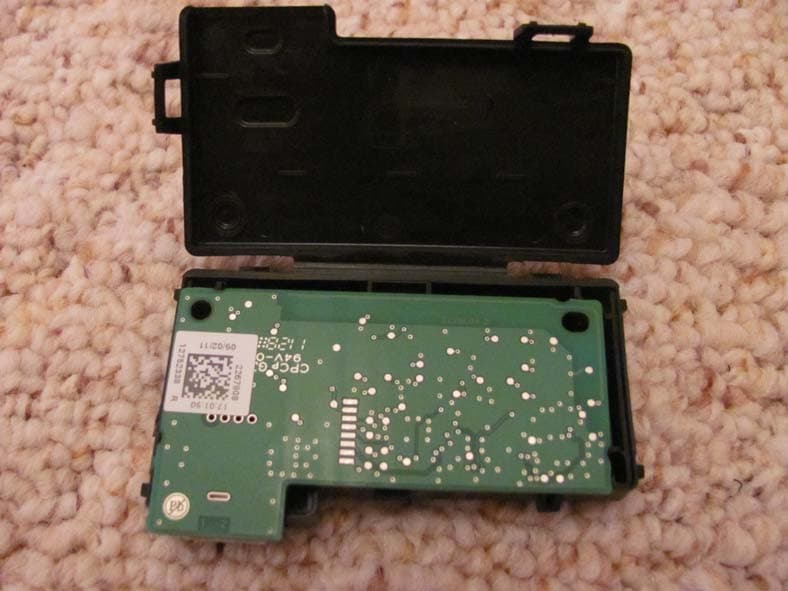
Click to zoom
Application Details
- Equipment Class
- DSR - Part 15 Remote Control/Security Device Transceiver
- Date of Grant
- Feb 12, 2012
- Application Purpose
- Original Equipment
- Date of Application
- Feb 09, 2012
- Equipment Note
- Universal Garage Door Opener Transmitter
- Frequency Range
- 411.00000000 - 440.00000000
- Country
- United States
Documents & Files
Document Text
Text extracted from the exhibit documents filed with the FCC. Open a document above to read the original.
Users Manual
JOBNAME: CHRY OM (Contenta pu PAGE: 1 SESS: 1 OUTPUT: Tue Jan 3 09:31:46 2012 SUM: 254B7795 /chry_pdm/chrysler/owners/ctx/sim03.40.00 GARAGE DOOR OPENER — EVIC HomeLinktreplaces up to three hand-held transmitters that operate devices such as garage door openers, motor- ized gates, lighting or home security systems. The HomeLinktunit is powered by your vehicles 12 Volt battery. The HomeLinktbuttons that are located in the overhead console designate the three different HomeLinktchan- nels. NOTE:HomeLinktis disabled when the Vehicle Secu- rity Alarm is active. Before You Begin Programming HomeLinkT Be sure that your vehicle is parked outside of the garage before you begin programming. HomeLinktButtons 1 art=033906001.tifNO TRANS JOBNAME: CHRY OM (Contenta pu PAGE: 2 SESS: 1 OUTPUT: Tue Jan 3 09:31:46 2012 SUM: 23A213ED /chry_pdm/chrysler/owners/ctx/sim03.40.00 For more efficient programming and accurate transmis- sion of the radio-frequency signal it is recommended that a new battery be placed in the hand-held transmitter of the device that is being programmed to the HomeLinkt system. Erase all channels before you begin programming. To erase the channels place the ignition in the ON/RUN position and press and hold the two outside HomeLinkt buttons (I and III) for up 20 seconds. The Electronic Vehicle Information Center (EVIC) will display “CLEAR- ING CHANNELS”. Release the buttons when the EVIC displays “CHANNELS CLEARED”. NOTE: •Erasing all channels should only be performed when programming HomeLinktfor the first time. Do not erase channels when programming additional buttons. •If you have any problems, or require assistance, please call toll-free 1–800–355–3515 or, on the Internet at www.HomeLink.com for information or assistance. Programming A Rolling Code For programming garage door openers that were manu- factured after 1995. These garage door openers can be identified by the “LEARN” or “TRAIN” button located where the hanging antenna is attached to the garage door opener. It is NOT the button that is normally used to open and close the door. The name and color of the button may vary by manufacturer. 2 JOBNAME: CHRY OM (Contenta pu PAGE: 3 SESS: 1 OUTPUT: Tue Jan 3 09:31:46 2012 SUM: 1C395F54 /chry_pdm/chrysler/owners/ctx/sim03.40.00 1. Turn the ignition switch to the ON/RUN position. 2. Place the hand-held transmitter 1 to 3 inches (3 to 8 cm) away from the HomeLinktbutton you wish to program. 3. Simultaneously press and hold both the Homelinkt button you want to program and the hand-held transmit- ter button. 4. Continue to hold buttons until the EVIC display changes from “CHANNEL # TRAINING” to “CHAN- NEL # TRAINED”, then release both buttons. NOTE: •It may take up to 30 seconds or longer in some cased for the channel to train. •If the EVIC displays “DID NOT TRAIN” repeat from Step 2. 5. At the garage door opener motor (in the garage), locate the “LEARN” or “TRAINING” button. This can usually be found where the hanging antenna wire is attached to the garage door opener/device motor. Firmly press and release the “LEARN” or “TRAINING” button. Training The Garage Door Opener 1 — Door Opener 2 — Training Button 3 art=034000356.tifNO TRANS JOBNAME: CHRY OM (Contenta pu PAGE: 4 SESS: 1 OUTPUT: Tue Jan 3 09:31:46 2012 SUM: 2125D1AA /chry_pdm/chrysler/owners/ctx/sim03.40.00 On some garage door openers/devices there may be a light that blinks when the garage door opener/device is in the LEARN/TRAIN mode. NOTE:You have 30 seconds in which to initiate the next step after the LEARN button has been pressed. 6. Return to the vehicle and press the programmed HomeLinktbutton twice (holding the button for two seconds each time). The EVIC will display “CHANNEL # TRANSMIT”. If the garage door opener/device activates, programming is complete. NOTE:If the garage door opener/device does not activate, press the button a third time (for two seconds) to complete the training. To program the remaining two HomeLinktbuttons, repeat each step for each remaining button. DO NOT erase the channels. Reprogramming A Single HomeLinktButton To reprogram a channel that has been previously trained, follow these steps: 1. Turn the ignition switch to the ON/RUN position. 2. Press and hold the desired HomeLinktbutton until the EVIC displays “CHANNEL # TRAINING”Do not release the button. 3.Without releasing the buttonproceed with “Program- ming A Rolling Code” Step 2 and follow all remaining steps. Programming A Non-Rolling Code For programming Garage Door Openers manufactured before 1995. 1. Turn the ignition switch to the ON/RUN position. 4 JOBNAME: CHRY OM (Contenta pu PAGE: 5 SESS: 1 OUTPUT: Tue Jan 3 09:31:46 2012 SUM: 1A86A505 /chry_pdm/chrysler/owners/ctx/sim03.40.00 2. Place the hand-held transmitter 1 to 3 inches (3 to 8 cm) away from the HomeLinktbutton you wish to program. 3. Simultaneously press and hold both the Homelinkt button you want to program and the hand-held transmit- ter button. 4. Continue to hold buttons until the EVIC display changes from “CHANNEL # TRAINING” to “CHAN- NEL # TRAINED”, then release both buttons. NOTE: •It may take up to 30 seconds or longer in some cased for the channel to train. •If the EVIC displays “DID NOT TRAIN” repeat from Step 2. 5. Press and hold the programmed HomeLinktbutton. The EVIC will display “CHANNEL # TRANSMIT”. If the garage door opener/device activates, programming is complete. To program the remaining two HomeLinktbuttons, repeat each step for each remaining button. DO NOT erase the channels. Reprogramming A Single HomeLinktButton To reprogram a channel that has been previously trained, follow these steps: 1. Turn the ignition switch to the ON/RUN position. 2. Press and hold the desired HomeLinktbutton until the EVIC displays “CHANNEL # TRAINING”Do not release the button. 3.Without releasing the buttonproceed with “Program- ming A Non-Rolling Code” Step 2 and follow all remain- ing steps. 5 JOBNAME: CHRY OM (Contenta pu PAGE: 6 SESS: 1 OUTPUT: Tue Jan 3 09:31:46 2…
Text truncated - open the document above for the full version.
External Photos
Exterior Photograph Front View Rear View Homelink inside housing Rear View with HL apart from Assembly Unit Front View with HL apart from Assembly Unit
Internal Photos
Interior Photographs Internal View- Front Internal View- Rear PCB side Close-up of Homelink RF
Test Report
Johnson Controls Interiors, LLC. Page 1 of 30 Model: SAHL5 Technical Report to the FCC and Industry Canada Regarding Johnson Controls Interiors, L.L.C. Homelink© V Model: SAHL5 FCC ID: CB2SAHL5 IC: 279B- SAHL5 Emission Designator : 89KL1D 2/9/12 A report concerning approval for Johnson Controls Homelink® model SAHL5 Please issue grant immediately upon review. Measurements Made by: Measurements Reviewed by: Bolay Elgersma Edward Thomsen RF Test Site Technician Test / EMC Engineer Johnson Controls Interiors, LLC. Johnson Controls Interiors, LLC Report and Application Prepared by: Report Submitted by: Bolay Elgersma Edward Thomsen RF Test Site Technician Test / EMC Engineer Johnson Controls Interiors, LLC. Johnson Controls Interiors, LLC. Johnson Controls Interiors, LLC. Page 2 of 30 Model: SAHL5 1. General Information 1.1. Product Description: The Johnson Controls Interiors HomeLink® HL5 Universal Garage Door Opener is a low-power transceiver OEM device that is installed into an overhead area of the automobile. The installation is provided by trained technicians during the course of the manufacture of the automobile. It is powered by the 12 Volt system of the automobile. This Universal Garage Door Opener has the capability to 1. Learn the frequency and bit code format of the user’s existing garage door remote control devices and 2. Reproduce and transmit the frequency and bit code format to remotely operate the user’s garage door. The unit is designed for the periodic operation of a control signal, which typically activates a garage door opener receiver. The unit is supplied to the automobile manufacturer without harness. For testing purposes a typical assembly and 2-conductor cable harness were used to power to the unit. The unit is only operational when the user depresses the control button. It becomes inactive after release of the control button. The three-button HomeLink® unit replaces up to three hand-held transmitters. In addition to the typical operation of the garage door, the unit will learn the radio frequency codes of other transmitter types to activate entry door locks, estate gates, security systems, and home or office lighting. The antenna system is an integral part of the unit. It cannot be altered nor replaced by the user. Service of this system is only available from the Automobile Manufacturer’s Dealerships and Johnson Controls Interiors, LLC. 1.2. Related Grants None. 1.3. Test Methodology Radiated Emissions testing was performed according to ANSI C63.4-2003. The power source for this product is a 12V automotive vehicle battery, thus conducted emissions measurements are not required. The unit is supplied to the automobile manufacturer without harness. For testing purposes a 2-conductor cable harness was used to interface to the unit. Johnson Controls Interiors, LLC. Page 3 of 30 Model: SAHL5 1.4. Test Facility The Open Area Test Site where these measurements were taken is located on the grounds of Johnson Controls Automotive Interiors System’s Edgar D. Prince Technical Campus, in the city of Holland, county of Ottawa, state of Michigan, United States of America. The site is a fully enclosed 10m weather-protected OATS. All structure materials above the conducting ground-plane are non-metallic and consist of wood, laminated lumber, fiberglass, glue, plastic, or fiberglass reinforced plastic. The site contains a 15-foot diameter turntable capable of supporting large cars and light trucks under test. Tabletop testing was conducted on a smaller 3m turntable described in the site recertification report. The test site has been fully described in a reports filled with the FCC and Industry Canada. The report filed with the FCC is dated December 20, 2011, was accepted by the FCC in a letter dated January 10, 2012. The report filled with Industry Canada, dated June 7, 2011, was accepted via a letter dated June 7, 2011 . Our OATS is registered with the IC under file number IC# 279B-1. 1.5. Accreditation The Johnson Controls, Inc. - Electronics Validation Lab is accredited to ISO 17025 by the American Association for Laboratory Accreditation (A2LA). Our laboratory scope and accreditation certificate (# 1425.02) are available from their web site www.a2la.org . Our scope of accreditation covers ANSI C63.4 Radiated Emissions at 3m, FCC 47 CFR Part 15, and IC RSS-210. 2. Product Labeling The FCC Identifier assigned is FCC ID: CB2SAHL5. The Industry Canada certification number is 279B-SAHL5. These identifiers will be labeled on the product housing. The label will be placed on the exterior of the HL5 housing using an acrylic adhesive that will permanently affix the label. Because of the small size of the device and because the installation is inside a portion of the automobile, the following statements will appear in the user’s manual. Refer to attachment “Users Manual.pdf” for the entire text of the user’s manual. “This device complies with Part 15 of the FCC rules and with RSS-210 of the Industry Canada. Operation is subject to the following two conditions: (1) This device may not cause harmful interference, (2) This device must accept any interference that may be received including interference that may cause undesired operation. WARNING: The transmitter has been tested and complies with FCC and Industry Canada rules. Changes or modifications not expressly approved by the party responsible for the compliance could void the user’s authority to operate the device.” 2.1. Label Drawing and Location on Product. The label drawing is included in the “FCC ID Label Artwork.pdf” attachment. A diagram showing the location of the label on the assembly is included in the “Label_Location.pdf” attachment. Johnson Controls Interiors, LLC. Page 4 of 30 Model: SAHL5 3. Test Configuration Radiated Emission measurements presented in the report were made in accordance with ANSI C63.4 Figure 9(c). The EUT was placed on a 1 x 1.5m non-metallic table elevated 80cm above a conducting ground plane. The harness w…
Text truncated - open the document above for the full version.
Test Report
Johnson Controls Interiors L.L.C. Electronics Test Laboratory 915 East 32 nd Street, Holland MI 49423. Tel: 616-394-6194, Fax: 616-394-6100 FCC ID: CB2 SAHL5 & IC 279B- SAHL5 Certification Application. Noise floor levels from 1860 MHz to 4330 MHz
Test Setup Photos
Test Set Up Test Set Up Flat Test Set Up Side Test Set Up End
Contact Information
Applicant
Rick Markiewicz(Electronics Engineering Manager)
Technical Contact
Johnson ControlsEdward Allen Thomsen
[email protected]616-394-1729
915 East 32nd Street · Holland, Michigan · United States
Test Firm
Johnson Controls Interiors LLCEdward Thomsen
Technical Specifications
| # | Rule Parts | Frequency Range | Power Output |
|---|---|---|---|
| 4 | 15.231 | 411 MHz - 440 MHz | - |
Other Applications from Johnson Controls Interiors L.L.C.

CB2-BLUE15M-TCU
Mar 20, 2014Automotive Telematics Module with Handsfree Bluetooth
Equipment Class
DSS - Part 15 Spread Spectrum Transmitter
CB2-BLUE15M
Jan 19, 2014Bluetooth Telematics Device
Equipment Class
DSS - Part 15 Spread Spectrum Transmitter
CB262932
Jul 15, 2013Automotive Electronics Infotainment Head Unit with Bluetooth and WLAN
Equipment Class
DTS - Digital Transmission System
CB2775AHL5
Apr 29, 2013Universal Garage Door Opener w/ FHSS TX
Equipment Class
DSR - Part 15 Remote Control/Security Device Transceiver
CB2440AHL5
Feb 24, 2013Universal Garage Door TX w/ FHSS TX
Equipment Class
DSS - Part 15 Spread Spectrum Transmitter