CCT71597TBaby Monitor
Fisher-Price Inc.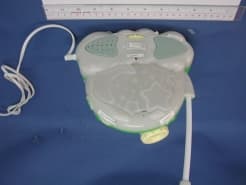
Click to zoom
Application Details
- Equipment Class
- DXX - Part 15 Low Power Communication Device Transmitter
- Date of Grant
- Aug 16, 2001
- Application Purpose
- Original Equipment
- Date of Application
- Aug 16, 2001
- Equipment Note
- Baby Monitor
- Frequency Range
- 49.82000000 - 49.90000000
- Company
- Fisher-Price Inc.
- Country
- United States
Documents & Files
Document Text
Text extracted from the exhibit documents filed with the FCC. Open a document above to read the original.
Users Manual
w w w . f i s h e r - p r i c e . c o m Model Number: 71597 For proper set-up and use, read these instructions. Please keep this instruction sheet for future reference, as it contains important information. Transmitter is electically powered. Remote control/receiver is powered by the AC adaptor (included - standard household outlets 120V AC) or battery (9V alkaline batttery - not included). An adult must install the battery (if used). Soothing Dreams Monitor with Remote Control TM This product cannot replace responsible adult supervision. CAUTION IMPORTANT! 2 • This product is not intended to be used as a medical monitor and its use should notreplace adult supervision. • Test sound remote control/receiver before first-time use and whenever you change location of transmitter. • To prevent entanglement: - Never place transmitter in a crib or playpen. Keep transmitter and receiver out of baby’s reach. - Never use extension cords with the AC adaptor. • Never use transmitter or remote control/receiver near water (ie.: bathtub, sink, laundry tub or wet basement, etc.). • Always use transmitter and remote control/receiver where there is adequate ventilation. To prevent overheating, keep transmitter and remote control/receiver away from heat sources such as radiators, heat registers, direct sunlight, stoves, amplifiers, or other appliances which produce heat. Occasionally a consumer may experience a problem with one of our products. If this should happen, please call us toll-free, rather than return this product to the store. Usually, we can solve the problem over the telephone or send you replacement parts. Please call Fisher-Price® Consumer Relations, toll-free at 1-800-432-KIDS, between 8 AM - 6 PM EST, Monday through Friday. Hearing-impaired consumers using TTY/TDD equipment, please call 1-800-382-7470. Or write to: Fisher-Price® Consumer Relations 636 Girard Avenue East Aurora, New York 14052 Consumer Information Remote Control/Receiver Battery Installation (optional) 3 Battery Compartment Door • Locate battery compartment door on the back of remote control/receiver. • Loosen the screw in the battery compartment door with a Phillips screwdriver. Lift to remove the battery compartment door. • Snap the terminals of a fresh, 9V alkalinebattery into the remote control/receiver connectors. • Replace the battery compartment door and tighten the screw. Do not over-tighten. Battery Tips • Remove the battery during long periods of non-use. Always remove an exhausted battery from the product. Battery leakage and corrosion can damage this product. Dispose of battery safely. • Do not dispose of batteries in a fire. The batteries may explode or leak. • Never short circuit the battery terminals. • A non-rechargeable battery is not to be recharged. • Only a battery of the same or equivalent type as recommended in the “Battery Installation” instructions is to be used. • If a removable rechargeable battery is used, it is only to be charged under adult supervision. • A rechargeable battery is to be removed from the product before it is charged. • If you use a battery charger, it should be examined regularly for damage to the cord, plug, enclosure and other parts. Do not use a damaged battery charger until it has been properly repaired. 9V (6LR61) SHOWN ACTUAL SIZE Testing Sound Reception 4 Test transmitter transmission and remote control/receiver reception. Place transmitter in room in which you intend to use it. Slide transmitter power switch to turn power on. Turn on a radio. Place remote control/receiver in room in which you intend to use it. Rotate power/volume dial to turn power on. Adjust remote control/ receiver location. If you experience interference (buzzing or static, etc.) while using one channel setting, switchbothunits to other channel. Selecting a channel is usually a one time adjustment. Notes: • Variable light display lights when sound is received by remote control/receiver. • If all four dots in variable light display light: - Remote control/receiver power is on and transmitter power is off. - Remote control/receiver is too far away from transmitter. - Remote control/receiver and trans- mitter are not on same channel. - Loud sounds are transmitting. Hint:If you turn remote control/receiver power on before transmitter power, you will hear a static noise and all four dots in variable light display light. Simply turn volume down and turn transmitter power on. Setup and Use 5 1 1 2 3 4 IMPORTANT!Test sound reception of this monitor before first time use and whenever you change location of transmitter (see page 4). Set transmitter channel switch to same channel as receiver. Choose a soothing mode: Lights Music Light and Nighttime Nature Sounds/Music Choose a light mode (only if you have selected Lights or Light and Nighttime Nature Sounds/Music in soothing mode) Ceiling Light Show Night Light Press the soothing button to activate your selection. Light(s); Music; Light and Nighttime Nature Sounds/Music will turn on for about five minutes and then automatically turn off. 1 2 3 4 Setup and Use Hint:If you do not want light(s) and music/sound effects on, do not press the soothing button on the transmitter. 6 SFX SFX SFX Setup and Use 5 8 6 7 7 9 10 Setup and Use Point microphone directly toward crib or play area. Unwrap and fully extend power cord for best transmission. Insert power cord plug into wall outlet. Rotate transmitter power/volume dial to turn power on. Power indicator lights. Place receiver where you will see or hear it. Unwrap and fully extend AC adaptor cord for best reception. Insert AC adaptor jack into receiver socket and plug into wall outlet. Note:To use a 9V alkaline battery for power source, refer to “Remote Control/Receiver Battery Installation” instructions on page 3. Rotate remote control/receiver power/volume dial to turn power on. Power indicator lights. Rotate power/volume dial to adjust volume. 5 6 7 8 10 8 If you have any questions about this product: In Canada,call1-800…
Text truncated - open the document above for the full version.
External Photos
Test SetupFCCID : CCT71597T External Photo -front External Photo - rear
Test Report
• The test results rep orted in this test rep ort shall refer only to the samp le actually tested and shall not refer or be deemed to refer to bulk from which such a samp le may be said to have been obtained. • This rep ort shall not be rep roduced excep t in full without p rior authorization from Intertek Testing Services Hong Kong Limit ed • For Terms And Conditions of the services, it can be p rovided up on request. Inte rte k Te sting Se rvice s Hong Kong Ltd. 2/F., Garment Centre, 576 Castle Peak Road, Kowloon, Hong Kong. Tel: (852) 2173 8888 Fax: (852) 2785 5487 Fisher Price Application For Certification (FCC ID: CCT71597T) Transmitter WO# 0108005 WL/Sandy August 8, 2001 INTERTEK TESTING SERVICES FCC ID: CCT71597T i LIST OF EXHIBITS INTRODUCTION EXHIBIT 1 :General Description EXHIBIT 2 :System Test Configuration EXHIBIT 3 :Emission Results EXHIBIT 4 :Equipment Photographs EXHIBIT 5 :Product Labelling EXHIBIT 6 :Technical Specifications EXHIBIT 7 :Instruction Manual EXHIBIT 8 :Miscellaneous Information INTERTEK TESTING SERVICES FCC ID: CCT71597T ii MEASUREMENT/TECHNICAL REPORT Fisher Price - MODEL: Fisher Price 71597 FCC ID: CCT71597T August 8, 2001 This report concerns (check one:)Original Grant X Class II Change Equipment Type: Low Power Transmitter (example: computer, printer, modem, etc.) Deferred grant requested per 47 CFR 0.457(d)(1)(ii)?Yes No X If yes, defer until: date Company Name agrees to notify the Commission by: date of the intended date of announcement of the product so that the grant can be issued on that date. Transition Rules Request per 15.37?Yes No X If no, assumed Part 15, Subpart C for intentional radiator - the new 47 CFR [10-1-96 Edition] provision. Report prepared by:Wilson Loke Intertek Testing Services 2/F., Garment Center, 576, Castle Peak Road, HONG KONG Phone: 852-2173-8575 Fax:852-2745-8306 INTERTEK TESTING SERVICES FCC ID: CCT71597T iii Table of Contents 1.0 General Description ................................................................................................................ 2 1.1 Product Description ............................................................................................................... 2 1.2 Related Submittal(s) Grants ................................................................................................... 2 1.3 Test Methodology .................................................................................................................. 3 1.4 Test Facility............................................................................................................................ 3 2.0 System Test Configuration ...................................................................................................... 5 2.1 Justification ............................................................................................................................ 5 2.2 EUT Exercising Software ....................................................................................................... 5 2.3 Special Accessories ................................................................................................................ 5 2.4 Equipment Modification ........................................................................................................ 6 2.5 Support Equipment List and Description ............................................................................... 6 3.0 Emission Results ...................................................................................................................... 8 3.1 Field Strength Calculation ...................................................................................................... 9 3.2 Radiated Emission Configuration Photograph ..................................................................... 11 3.3 Radiated Emission Data ....................................................................................................... 12 3.4 Line Conducted Configuration Photograph (cont’d) ........................................................... 14 3.5 Line Conducted Emission Data............................................................................................ 15 4.0 Equipment Photographs ....................................................................................................... 17 5.0 Product Labelling .................................................................................................................. 19 6.0 Technical Specifications ........................................................................................................ 21 7.0 Instruction Manual ................................................................................................................ 23 8.0 Miscellaneous Information ................................................................................................... 25 8.1 Emissions Test Procedures...................................................................................................26 8.2 Bandwidth Plot..................................................................................................................... 28 INTERTEK TESTING SERVICES FCC ID: CCT71597T iv List of attached file Exhibit typeFile Descriptionfilename Test ReportTest Reportreport.doc Operation DescriptionTechnical Descriptiondescri.pdf Test Setup PhotoRadiated EmissionRconfig photos.doc Test Setup PhotoConducted Emissionconfig photos.doc Test ReportConducted Emission Test Resultconduct.pdf Test ReportBandwidth Plotbw.pdf External PhotoExternal Photoexternal photos.doc Internal PhotoInternal Photointernal photos.doc Block DiagramBlock Diagramblock.pdf SchematicsCircuit Diagramcircuit.pdf ID Label/LocationLabel Artwork and Locationlabel.pdf User ManualUser Manualmanual.pdf INTERTEK TESTING SERVICES FCC ID: CCT71597T 1 EXHIBIT 1 GENERAL DESCRIPTION INTERTEK TESTING SERVICES FCC ID: CCT71597T 2 1.0 General Description 1.1Product Description The Equipment Under Test (EUT) is a ba…
Text truncated - open the document above for the full version.
Test Setup Photos
Test SetupFCCID : CCT71597T Conduct Photo - 1 Conduct Photo - 2 Test SetupFCCID : CCT71597T Conduct Photo – 3
Test Setup Photos
Test SetupFCCID : CCT71597T Radiated -front Radiated - rear
Contact Information
Applicant
Jerry Miller(Quality Staff Engineer)
Technical Contact
Intertek Testing ServicesWilson Loke
[email protected]852 2173 8575
2/F, Garment Centre · Kowloon · Hong Kong
Non-Technical Contact
Intertek Testing ServicesWilson Loke
[email protected]852 2173 8575
Test Firm
Intertek Testing Services Hong KongBilly Chow
Technical Specifications
| # | Rule Parts | Frequency Range | Power Output |
|---|---|---|---|
| 1 | 15C | 49.82 MHz - 49.9 MHz | - |
Other Applications from Fisher-Price Inc.

CCT-DNV31-15
Sep 29, 2015Smart Toy Bear (DNV31), Smart Toy Panda (DNV30), Smart Toy Monkey (DNV32)
Equipment Class
DXX - Part 15 Low Power Communication Device Transmitter
CCT-CBV76-14
Jun 22, 2014Mattel Bluetooth Low Energy Module
Equipment Class
DTS - Digital Transmission System
CCTT4841T-10
Jul 27, 2010Digital Audio Monitor (Baby Unit)
Equipment Class
DSS - Part 15 Spread Spectrum Transmitter
CCTT4256T-10
Jul 22, 2010Digital Video Monitor (Baby Unit)
Equipment Class
DSS - Part 15 Spread Spectrum Transmitter
CCTT4256R-10
Jul 21, 2010Digital Video Monitor (Parent Unit)
Equipment Class
DSS - Part 15 Spread Spectrum Transmitter