FKGT8NYTablet PC
Twinhead International CorporationApplication Details
- Equipment Class
- DSS - Part 15 Spread Spectrum Transmitter
- Date of Grant
- Jan 08, 2008
- Application Purpose
- Original Equipment
- Date of Application
- Dec 12, 2007
- Equipment Note
- Tablet PC
- Frequency Range
- 2402.00000000 - 2480.00000000
- Country
- Taiwan
Documents & Files
Document Text
Text extracted from the exhibit documents filed with the FCC. Open a document above to read the original.
Users Manual
U U s s e e r r ’ ’ s s M M a a n n u u a a l l Table Of Contents CHAPTER 1 GETTING STARTED 1 Getting Started ................................................................................... 2 Inventory ............................................................................................. 3 Safety and Maintenance .................................................................... 4 Checklists ........................................................................................... 5 Features .............................................................................................. 6 Where to Look For Information......................................................... 6 Quick Start .......................................................................................... 7 Loading Windows .............................................................................. 8 Adjusting the Volume and Brightness............................................. 9 Turning off Your Computer ............................................................. 10 CHAPTER 2 GETTING STARTED 11 Hardware and Software ................................................................... 12 Front View ......................................................................................... 13 Right View ......................................................................................... 14 Top View............................................................................................ 15 Bottom View...................................................................................... 16 Power Indicators .............................................................................. 17 Front View buttons........................................................................... 18 Function Keys .................................................................................. 19 Touch Pen ......................................................................................... 20 Connecting the Floppy Disk Drive ................................................. 20 Disk Drives........................................................................................ 20 The CD-ROM, DVD-ROM, or Combo Drive..................................... 21 Connecting the Printer .................................................................... 21 The PCMCIA Card Slot..................................................................... 21 CF (Compact Flash) Card Slot ........................................................ 22 Memory.............................................................................................. 22 Communication Components ......................................................... 25 CHAPTER 3 MAKING CONNECTIONS 27 Making Connections ........................................................................ 28 Right Side Connectors .................................................................... 28 ii Top Side Connectors ....................................................................... 30 CHAPTER 4 SYSTEM SOFTWARE 33 System Software .............................................................................. 34 System Recovery ............................................................................. 34 CHAPTER 5 POWER MANAGEMENT AND USING SOFTWARE 37 Power Management......................................................................... 38 When to Replace the Battery .......................................................... 40 Heat Considerations ........................................................................ 40 Using Software ................................................................................. 41 APPENDIX A STATEMENTS 43 Statements ........................................................................................ 44 European Notice............................................................................... 46 Safety CAUTION ............................................................................... 46 Canadian Department of Communications ................................... 47 Battery Disposal............................................................................... 48 CAUTION FOR ADAPTER................................................................ 48 BATTERY CAUTION......................................................................... 48 iii C C h h a a p p t t e e r r 1 1 I I n n t t r r o o d d u u c c t t i i o o n n Chapter 1 — Introduction Getting Started Congratulations on your purchase of a Tablet PC. The Tablet PC is a fully functional PC with built-in LAN, and wireless Connectivity. With your Tablet PC you will be able to organize and access important business and personal information. In addition, you will be able to send and receive e-mail and access the Internet. This Manual contains all the information you need to set up and use your Tablet PC. It describes all the features of the Tablet PC in an easy-to-read yet thorough manner. 2 Introduction — Inventory Inventory This Tablet PC is designed for years of productive and pleasurable computing. Use this section to keep details of your purchase. This information will be required should you need to make repairs to your Tablet PC during the warranty period. Update this section when you add new options. DATE OF PURCHASE: PLACE OF PURCHASE: DEALER'S NAME: DEALER'S ADDRESS: TELEPHONE: E-MAIL ADDRESS/WWW: CONTACT PERSON: MODEL NUMBER: SERIAL NUMBER: 3 Chapter 1 — Introduction Safety and Maintenance You can use your Tablet PC under a wide range of environmental conditions. However, to ensure long use and continued high performance, consider the following factors when setting up your Tablet PC: • Follow all warnings and instructions noted in this documentation and in the Windows Help program. • The first time you use your Tablet PC, we recommend that you carefully read the Making Connections section of this manual and initialize the battery to ensure optimum battery …
Text truncated - open the document above for the full version.
Attestation Statements
TWINHEAD INTERNATIONAL CORP. FCC ID.: FKGT8NY 10F, 550 RUEIGUAN RD NEIHU, TAIPEI, Taiwan 114, ROC. Tel : 886-2-5589-9999 Federal Communications Commission Oct. 18 , 2007 Authorization and Evaluation Division ATTESTATION FCC ID: FKGT8NY Product: Tablet PC Model: T8NY, InfoTablet 5500, xTablet ® T8700 We don't provide any controls or software to allow operation outside the USA frequency band when we sell this product in USA. Sincerely, ---------------------------------------- James Lai / Engineer . TWINHEAD INTERNATIONAL CORP.
Cover Letter(s)
TWINHEAD INTERNATIONAL CORP. FCC ID.: FKGT8NY 10F, 550 RUEIGUAN RD NEIHU, TAIPEI, Taiwan 114, ROC. Tel : 886-2-5589-9999 TWINHEAD INTERNATIONAL CORP. 10F, 550 RUEIGUAN RD NEIHU, TAIPEI, Taiwan 114, ROC. Tel : 886-2-5589-9999 Fax: 886-2-5557-7777 Federal Communications Commission Oct. 18 , 2007 Authorization and Evaluation Division Confidentiality Request Pursuant to Sections 0.457 and 0.459 of the Commission’s Rules, the Applicant Hereby requests confidential treatment of information accompanying this Application As outlined below: Schematics: (FKGT8NY) Schem Block Diagram : (FKGT8NY) BlkDia The above materials contain trade secrets and proprietary information not customarily Released to the public. The public disclosure of these matters might be harmful to the Applicant and provide unjustified benefits to its competitors. The Applicant understands that pursuant to Rule 0.457, disclosure of this Application and all accompanying documentation will not be made before the date of the Grant for this application. Sincerely, ------------------------------------ James Lai / Engineer . TWINHEAD INTERNATIONAL CORP.
Cover Letter(s)
RF_160, Issue 01 Declaration of Authorization We Name: TWINHEAD INTERNATIONAL CORP. Address: 10F, 550 RUEIGUAN RD NEIHU, TAIPEI, Taiwan 114, ROC. City: Taipei .................................................................. . Country: Taiwan ..................................................................... . Declare that: Name: QuieTek Corp. Address: Fl.2, No.345, Xin-hu 2 nd Rd., Nei-hu District City: Taipei Country Taiwan R.O.C. is authorized to apply for Certification of the following product(s): Product description: Tablet PC ................................................... . Type designation: T8NY, InfoTablet 5500, xTablet ® T8700..... ........................ . Trademark: Twinhead on our behalf. Date: ...... 2007/11/18 ............... .. City: ...... Taipei .................. .. Name: ... ... James Lai ............... ...... . Signature:
ID Label/Location Info
TWINHEAD INTERNATIONAL CORP. FCC ID.: FKGT8NY 10F, 550 RUEIGUAN RD NEIHU, TAIPEI, Taiwan 114, ROC. Tel : 886-2-5589-9999 FCC ID Label The FCC ID Label will be placed on the equipment as shown in the photograph below.
Operational Description
Report No. 079257R-RFUSP06V01 Page: 7 of 61 Version:1.0 1.2. Operational Description The EUT is an Tablet PC with a built-in 2.4GHz BluetoothVer.2.0+EDR transceiver. The number of the channels is 79 in 2402-2480MHz. The device adapts the frequency hopping spread spectrum modulation. The antenna is connector-type and provides diversity function to improve the receiving function. This device provides wireless technology that revolutionizes personal connectivity. It is the solution for the seamless integration of Bluetooth technology into personal computer enabling short-range wireless connections between desktop/laptop computers, Bluetooth-enabled peripherals, and portable handheld devices. Test Mode Mode 1: Transmitter - 1Mbps (GFSK) Mode 2: Transmitter - 3Mbps (8DPSK)
Test Report
Report No. 079257R-RFUSP06V01 Page: 1 of 60 Version:1.0 Test Report Product Name Tablet PC Model No. T8NY, InfoTablet 5500, xTablet ® T8700 FCC ID. FKGT8NY Applicant TWINHEAD INTERNATIONAL CORP. Address 10F, 550 RUEIGUAN RD NEIHU, TAIPEI, Taiwan 114, ROC. Date of Receipt Sep. 20, 2007 Issued Date Nov. 06, 2007 Report No. 079257R-RFUSP06V01 The Test Results relate only to the samples tested. The test report shall not be reproduced except in full without the written approval of QuieTek Corporation. This report must not be used to claim product endorsement by NVLAP any agency of the U.S. Government Report No. 079257R-RFUSP06V01 Page: 2 of 60 Version:1.0 Test Report Certification Issued Date: Nov. 06, 2007 Report No.: 079257R-RFUSP06V01 Product Name Tablet PC Applicant TWINHEAD INTERNATIONAL CORP. Address 10F, 550 RUEIGUAN RD NEIHU, TAIPEI, Taiwan 114, ROC. Manufacturer TWINHEAD INTERNATIONAL CORP. Model No. T8NY, InfoTablet 5500, xTablet ® T8700 FCC ID. FKGT8NY Rated Voltage AC 120V/60Hz Working Voltage DC 5V Trade Name Twinhead Applicable Standard FCC CFR Title 47 Part 15 Subpart C: 2006 ANSI C63.4: 2003 Test Result Complied The Test Results relate only to the samples tested. The test report shall not be reproduced except in full without the written approval of QuieTek Corporation. This report must not be used to claim product endorsement by NVLAP any agency of the U.S. Government Documented By: ( Engineering Adm. Specialist / Rita Huang ) Tested By : (Engineer /Tim Sung) Approved By : ( Deputy Manager / Vincent Lin) Report No. 079257R-RFUSP06V01 Page: 3 of 60 Version:1.0 TABLE OF CONTENTS Description Page 1. GENERAL INFORMATION ...............................................................................................................5 1.1. EUT Description......................................................................................................................................5 1.2. Operational Description...........................................................................................................................7 1.3. Tested System Details..............................................................................................................................8 1.4. Configuration of Tested System ..............................................................................................................8 1.5. EUT Exercise Software ...........................................................................................................................8 1.6. Test Facility .............................................................................................................................................9 2. CONDUCTED EMISSION ................................................................................................................10 2.1. Test Equipment ......................................................................................................................................10 2.2. Test Setup ..............................................................................................................................................10 2.3. Limits.....................................................................................................................................................11 2.4. Test Procedure .......................................................................................................................................11 2.5. Uncertainty ............................................................................................................................................11 2.6. Test Result of Conducted Emission .......................................................................................................12 3. PEAK POWER OUTPUT ..................................................................................................................16 3.1. Test Equipment ......................................................................................................................................16 3.2. Test Setup ..............................................................................................................................................16 3.3. Limit .....................................................................................................................................................16 3.4. Test Procedure .......................................................................................................................................16 3.5. Uncertainty ............................................................................................................................................16 3.6. Test Result of Peak Power Output .........................................................................................................17 4. RADIATED EMISSION .....................................................................................................................19 4.1. Test Equipment ......................................................................................................................................19 4.2. Test Setup ..............................................................................................................................................20 4.3. Limits.....................................................................................................................................................20 4.4. Test Procedure .......................................................................................................................................21 4.5. Uncertainty ............................................................................................................................................21 4.6. Test Result of Radiated Emission ..........................................................................................................22 5. BAND EDGE ...........................................…
Text truncated - open the document above for the full version.
Contact Information
Applicant
James Lai(Manager, Systems Engineering Dept)
Technical Contact
Quietek CorporationEmily Chen
[email protected]886-2-8792-6802
2F,No.345,Xinhu 2nd Rd., · Taipei · Taiwan
Test Firm
DEKRA Testing and Certification Co., Ltd.Sky Hsu
Technical Specifications
| # | Rule Parts | Frequency Range | Power Output |
|---|---|---|---|
| 1 | 15C | 2.40 GHz - 2.48 GHz | 4.30 mW |
Other Applications from Twinhead International Corporation
FKGCA10
Feb 04, 2013Tablet PC
Equipment Class
DSS - Part 15 Spread Spectrum Transmitter
FKGTA10I
Dec 06, 2012Tablet PC
Equipment Class
DTS - Digital Transmission System
FKGT7Q
Jun 27, 2012Tablet PC
Equipment Class
DSS - Part 15 Spread Spectrum Transmitter
FKGPN1H
Sep 18, 2011Plug-In PC
Equipment Class
DTS - Digital Transmission System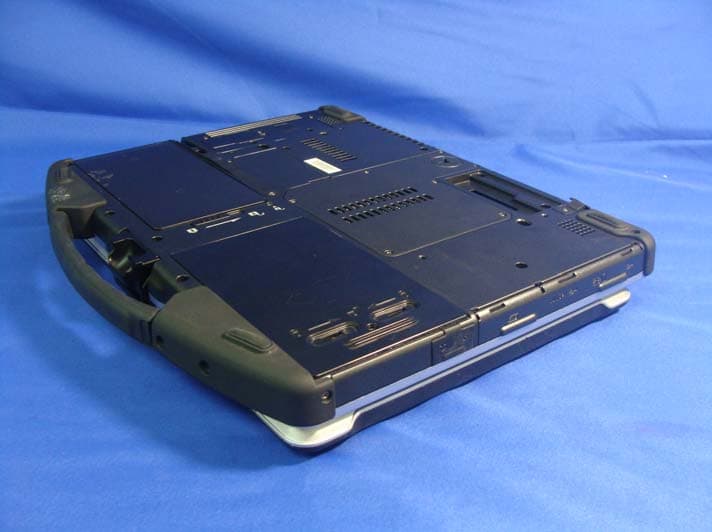
FKGU12C
Nov 03, 2010Notebook PC
Equipment Class
DTS - Digital Transmission System