GKRP5TH6300Pocket PC
Compal Electronics Inc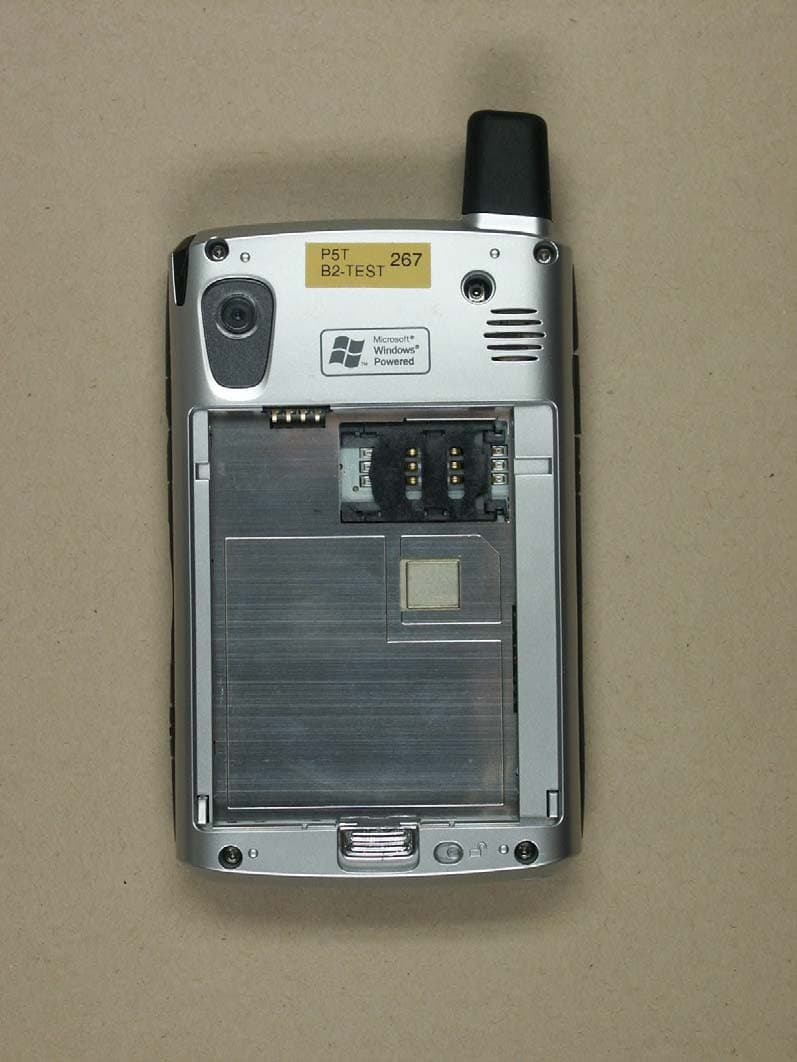
Click to zoom
Application Details
- Equipment Class
- PCE - PCS Licensed Transmitter held to ear
- Date of Grant
- Jun 13, 2004
- Application Purpose
- Original Equipment
- Date of Application
- Jan 15, 2004
- Equipment Note
- Pocket PC
- Frequency Range
- 1850.20000000 - 1909.80000000
- Company
- Compal Electronics Inc
- Country
- Taiwan
Documents & Files
Document Text
Text extracted from the exhibit documents filed with the FCC. Open a document above to read the original.
Users Manual
hp CONFIDENTIAL DRAFT Revised: 11/26/03 DRAFT User’s Guide HP iPAQ Pocket PC h6300 Series Document Part Number: 353283-001 February 2004 DRAFT - hp CONFIDENTIAL hp CONFIDENTIAL November 26, 2003 11:47 am File: Intro.fm DRAFT © 2003 Hewlett-Packard Company © 2003 Hewlett-Packard Development Company, L.P. HP, Hewlett Packard, and the Hewlett-Packard logo are trademarks of Hewlett-Packard Company in the U.S. and other countries. iPAQ is a trademark of Hewlett-Packard Development Company, L.P. in the U.S. and other countries. Microsoft, Windows, the Windows logo, Outlook, and ActiveSync are trademarks of Microsoft Corporation in the U.S. and other countries. HP iPAQ Pocket PC is Powered by Microsoft® Windows®. SD Logo is a trademark of Secure Digital. Bluetooth TM is a trademark owned by the Bluetooth SIG, Inc. All other product names mentioned herein may be trademarks of their respective companies. Hewlett-Packard Company shall not be liable for technical or editorial errors or omissions contained herein or for incidental or consequential damages in connection with the furnishing, performance, or use of this material. The information in this document is provided “as is” without warranty of any kind, including, but not limited to, the implied warranties of merchantability and fitness for a particular purpose, and is subject to change without notice. The warranties for HP products are set forth in the express limited warranty statements accompanying such products. Nothing herein should be construed as constituting an additional warranty. This document contains proprietary information that is protected by copyright. No part of this document may be photocopied, reproduced, or translated to another language without the prior written consent of Hewlett-Packard Company. Å WARNING: Text set off in this manner indicates that failure to follow directions could result in bodily harm or loss of life. Ä CAUTION: Text set off in this manner indicates that failure to follow directions could result in damage to equipment or loss of information. User’s Guide HP iPAQ Pocket PC h6300 Series First Edition (February 2004) Document Part Number: 353283-001 Revised: 11/24/03 User’s Guidewww.hp.comiii hp CONFIDENTIAL 11/26/03 File: iPAQ_PhoneTOC.fm PN: 353283-001 Contents 1 Getting to Know Your HP iPAQ Pocket PC Using the Stylus . . . . . . . . . . . . . . . . . . . . . . . . . . . . . . . . 1–4 Setting the Date and Time . . . . . . . . . . . . . . . . . . . . . . . . 1–5 Setting the Time for Home and Locations You Are Visiting . . . . . . . . . . . . . . . . . . . . . . . . . . . . 1–6 Setting the Date . . . . . . . . . . . . . . . . . . . . . . . . . . . . . 1–6 Entering Owner Information . . . . . . . . . . . . . . . . . . . . . . 1–7 Setting a Password. . . . . . . . . . . . . . . . . . . . . . . . . . . 1–7 Resetting the Unit. . . . . . . . . . . . . . . . . . . . . . . . . . . . . . . 1–8 Performing a Soft Reset. . . . . . . . . . . . . . . . . . . . . . . 1–8 Performing a Hard Reset . . . . . . . . . . . . . . . . . . . . . . 1–8 Aligning the Screen . . . . . . . . . . . . . . . . . . . . . . . . . . . . . 1–9 Routine Care. . . . . . . . . . . . . . . . . . . . . . . . . . . . . . . . . . 1–10 2 Using the Phone Functions Your SIM Card. . . . . . . . . . . . . . . . . . . . . . . . . . . . . . . . . 2–1 Activating Your Phone Service . . . . . . . . . . . . . . . . . . . . 2–2 Your PIN . . . . . . . . . . . . . . . . . . . . . . . . . . . . . . . . . . . . . 2–3 Phone Buttons and Icons . . . . . . . . . . . . . . . . . . . . . . . . . 2–5 Checking Your Connection and Signal Strength . . . . . . . 2–6 Turning the Phone Functions On and Off . . . . . . . . . . . . 2–7 HP Profiles . . . . . . . . . . . . . . . . . . . . . . . . . . . . . . . . . . . . 2–8 Making and Receiving Phone Function Calls . . . . . . . . . . . . . . . . . . . . . . . . . . . . . . . . . 2–8 Making a Call . . . . . . . . . . . . . . . . . . . . . . . . . . . . . . 2–8 Contents User’s Guidewww.hp.comiv DRAFT - Revised 11/24/03 hp CONFIDENTIAL 11/26/03 File: iPAQ_PhoneTOC.fm PN: 353283-001 Answering a Call . . . . . . . . . . . . . . . . . . . . . . . . . . . . 2–9 Ending a Call . . . . . . . . . . . . . . . . . . . . . . . . . . . . . . . 2–9 Making a Call from Contacts. . . . . . . . . . . . . . . . . . . 2–9 Creating a Speed Dial Entry . . . . . . . . . . . . . . . . . . 2–10 Making a Call Using Speed Dial . . . . . . . . . . . . . . . 2–11 Making a Call from Call History . . . . . . . . . . . . . . . 2–11 Making a Conference Call . . . . . . . . . . . . . . . . . . . . 2–11 Adjusting Phone Function Volume . . . . . . . . . . . . . 2–11 Enabling the Mute Function . . . . . . . . . . . . . . . . . . 2–12 Setting Ring Tones . . . . . . . . . . . . . . . . . . . . . . . . . 2–13 Enabling Speakerphone Mode. . . . . . . . . . . . . . . . . 2–13 Taking Notes During a Call. . . . . . . . . . . . . . . . . . . 2–14 Messaging . . . . . . . . . . . . . . . . . . . . . . . . . . . . . . . . 2–14 Using Voice Mail. . . . . . . . . . . . . . . . . . . . . . . . . . . 2–16 Putting a Call on Hold . . . . . . . . . . . . . . . . . . . . . . . 2–16 Using Call Waiting . . . . . . . . . . . . . . . . . . . . . . . . . 2–16 Displaying Caller ID . . . . . . . . . . . . . . . . . . . . . . . . 2–17 Blocking Calls . . . . . . . . . . . . . . . . . . . . . . . . . . . . . 2–17 Forwarding Calls . . . . . . . . . . . . . . . . . . . . . . . . . . . 2–17 Change the System Volume . . . . . . . . . . . . . . . . . . 2–18 Change the Ringer Volume . . . . . . . . . . . . . . . . . . . 2–19 Changing the Phone Settings . . . . . . . . . . . . . . . . . . . . . 2–19 Securing Your Phone Functions. . . . . . . . . . . . . . . . . . . 2–20 Changing Services Settings . . . . . . . . . . . . . . . . . . . . . . 2–21 Viewing Available GSM/GPRS Networks . . . . . . . . . . 2–21 Changing Network Settings . . . . . . . . . . . . . . . . . . . . . . 2–21 Manually Selecting a Network…
Text truncated - open the document above for the full version.
Users Manual
November 26, 2003 11:47 am User’s Guide10–1 10 Managing the Battery Installing the Battery Your iPAQ Pocket PC is shipped with the rechargeable battery partially charged. It is recommended that you fully charge the Pocket PC battery before setting up the unit, and recharge regularly. Your Pocket PC uses some power to maintain files in RAM and the clock. While working at your desk, keep the Pocket PC and Charger Adapter connected through the desktop cradle. When you travel, it is recommended that you carry the AC Adapter, Charger Adapter plug, or an optional spare battery with you. Ä CAUTION: Use only an HP approved battery for your iPAQ Pocket PC. Inserting a battery that does not comply with HP requirements may cause the Pocket PC to malfunction. The iPAQ Pocket PC also has a small internal backup battery that allows you to change the main battery without losing RAM data (user-installed programs and data) as long as it is replaced immediately. User’s Guide10–2 Managing the Battery November 26, 2003 11:47 am Installing the Battery To install the removable/rechargeable battery in the HP iPAQ Pocket PC h6300 Series: 1. Insert the two tabs 1 on the top of the battery into the latches in the top of the battery compartment on the back of the Pocket PC. 2. Snap the bottom of the battery into place 2. 3. Insert the stylus into the battery lock 3 and slide it to the left or locked position. Ä CAUTION: The cover must be tightly latched in place and the battery lock must be locked for the Pocket PC to operate. Managing the Battery User’s Guide10–3 November 26, 2003 11:47 am NOTE: If the battery is not fully charged, you must connect the AC Adapter to the Pocket PC to fully charge it before continuing. It takes up to four hours to fully charge a completely drained battery. Removing the Battery NOTE: Before removing the battery, use ActiveSync to back up data on your Pocket PC. If you need to clear the memory during the removal process, you will be able to restore the data. To remove the battery from the iPAQ Pocket PC h6300 Series: 1. Insert the stylus into the battery lock 1 and slide it to the right or unlocked position. 2. Slide the battery latch down 2 to release the battery. 3. Remove the battery 3. User’s Guide10–4 Managing the Battery November 26, 2003 11:47 am Ä CAUTION: Because most of the applications and data you install on your Pocket PC are held in memory (RAM), you will need to reinstall them if the battery completely discharges or if the battery is removed from the unit for more than 15 minutes. Otherwise, when fully charged, the internal backup battery will save the user installed data for up to 15 minutes when the standard battery is removed. Before removing the battery, check to see that the internal backup battery is fully charged by tapping Start > Settings > System tab > Power Icon. You do not need to reinstall applications and data installed in the iPAQ File Store folder because they are saved in nonvolatile memory. Charging the Battery Battery Saving Tip: Leave your Pocket PC connected to AC power at all times when you’re not using it. Battery Saving Tip: You can program an Application Button to turn off the screen when an MP3 is playing, saving battery power used to run the screen. Tap Start > Windows Media > Tools > Settings > Buttons. From the Select Function drop down list, tap Screen Toggle. Press either the Calendar or Inbox application buttons on the front of your iPAQ Pocket PC, then tap OK. Charging with the AC Adapter The standard AC Adapter works in any household outlet. You can also charge your Pocket PC in your automobile with an automobile adapter that works in your vehicle’s electrical cigarette lighter or a 12-volt power outlet. To purchase a car adapter, refer to the HP Web site at: www.hp.com/products/pocketpc . Ä CAUTION: Use only HP recommended AC adapters. Managing the Battery User’s Guide10–7 November 26, 2003 11:47 am Charging a Spare Battery Battery Saving Tip: To ensure you always have battery power available, invest in an extra Standard Battery or Extended Battery. These batteries can be charged in the desktop cradle. To purchase an extra battery, refer to the HP Web site at www.hp.com/products/pocketpc. To charge an extra battery in the desktop cradle: 1. Plug the AC Adapter into an electrical outlet and connect the other end of the AC Adapter to the AC connector on the desktop cradle. 2. Insert the battery into the battery compartment 1 with the connectors on the top of the battery lined up with the connectors inside the battery compartment, and push in to seat it. 3. When the battery light on the front of the desktop cradle 2 is amber, the battery is charging. When the light is green, the battery is completely charged and ready to use. User’s Guide10–8 Managing the Battery November 26, 2003 11:47 am CHARGING TIP: When charging two batteries simultaneously, turn off/suspend your Pocket PC by pressing the Power button once. This allows two drained extended batteries to be charged within eight hours. Charging with the Optional USB Autosync Cable You can charge your iPAQ Pocket PC using the optional USB Autosync Cable. Connect the Autosync Cable to the Pocket PC and your personal computer. The Pocket PC will be charged using power from the personal computer. Managing the Battery User’s Guide10–9 November 26, 2003 11:47 am For more information on charging your Pocket PC using the optional USB Autosync Cable, from the To d a y screen, tap Start> Settings > System tab > Power > USB Charging tab, and select Use USB Charging. NOTE: USB charging is slower and provides less power when compared to charging with the AC adapter. The USB Slow Charge option can often deliver less power than is being consumed by the Pocket PC resulting in the battery gradually losing capacity instead of gaining it. If this happens, the charging LED does not blink. To ensure the battery is being charged, turn off/suspend your Pocket PC by pressing the power button once during slow …
Text truncated - open the document above for the full version.
Users Manual
User’s Guide13–1 13 Troubleshooting Use the following suggestions to troubleshoot problems with the Pocket PC. Common Problems ProblemSolution I cannot see anything on the screen. ■Be sure the Pocket PC is powered on. ■Be sure the Pocket PC is connected to the AC Adapter and the Desktop Cradle. ■Reset the device by using the stylus to lightly press the Reset button. ■Remove and replace the battery. I cannot keep my battery charged. ■Always keep the Pocket PC connected to the AC Adapter when you are not using it. ■Tap Start > Settings > System tab > Power > backlight settings. In backlight settings, adjust the bar to a lower level to conserve more battery power. ■Tap Start > Settings > System tab > Power > Advanced tab. In battery power settings, set the battery power To turn off device if not used for 2 minutes. ■Turn off the Phone, Bluetooth and all wireless connections when not in use. User’s Guide13–2 Troubleshooting (Continued) The backlight keeps turning off. ■In Backlight Settings, increase the amount of time the backlight stays on if not in use. ■Select the option to turn on the backlight when you touch the screen or push a button. I want to ship my Pocket PC to a repair facility. 1. Back up your information. 2. Disconnect all external devices. 3. Pack your Pocket PC and any external devices requested by Customer Support in protective packaging. Include any additional documentation or items as instructed by Customer Support. Problem Solution Troubleshooting User’s Guide13–3 (Continued) I cannot connect to a network. ■Be sure you have added the necessary server information. ■Be sure the network you are attempting to connect to is not busy. ■Check the signal strength. ■Be sure your user name and password are correct. ■Tap Start > Settings > Connections tab > Connections and check your connection settings. Tap OK when you are finished to save your changes. ■Be sure the WEP key is correct. ■Be sure the IP Address is correct. ■Reset the device by using the stylus to lightly press the Reset button. ■Check with your service provider for current connection problems. ■Run the self-test diagnostics. When I try to open the Inbox, I receive an error or the application hangs. Limit the number of e-mail services you create. I get an error when I try to record a note in Calendar or in Tasks. Try using a more compressed recording format in Calendar or Tasks (8,000 Hz, Mono [8 KB/s] is the most compressed format available). To switch to a more compressed recording format, from the Today screen, tap Start > Settings > Input > Options tab. I want to see the current date. 1. From the To day screen, tap Start > Calendar. 2. Tap the Go-to-Today icon to see today’s date. I cannot see all my appointments. Be sure the appointment you created is in the selected category. Problem Solution User’s Guide13–4 Troubleshooting (Continued) I cannot find the document or workbook Isaved. Pocket Word and Excel recognize and display documents in only one folder below My Documents. For example, if you created another folder in the Personal folder in My Documents, the documents in that folder will not be shown. To find your document or workbook, tap Start > Programs > File Explorer. Open the folder you created, then tap the file you’re looking for. My device is always asking me for a password. Tap Start > Settings > Personal tab > Password to be sure the password settings are configured as you wish. I cannot find files sent to me by another device. Check My Documents, which is the default save location used to receive files. Screen freezes, responds slowly, or no response. Try resetting your Pocket PC. Refer to the information on Resetting the Unit in Chapter 8, “Getting to Know Your HP iPAQ Pocket PC.” Stylus taps have inappropriate or slow response. Realign the screen. From the Start menu, tap Settings > System tab > Screen > Align Screen, and follow the instructions. Unit will not turn on. 1. Remove the battery. 2. Connect the unit to the AC adapter connected to an electrical outlet. 3. Go through the setup process after the unit powers on. 4. Reinstall the battery after completing the setup process. Problem Solution Troubleshooting User’s Guide13–5 My device keeps running out of memory. ■Move programs or data to a memory storage card such as an SDIO or MMC expansion card. ■Set some programs (such as Notes or Pocket Word) to automatically save new files on the expansion card. ■Move e-mail attachments to the expansion card. ■Delete old or unncesssary files by tapping Start > Programs > File Explorer. Tap and hold the file, then from the Pop-up menu, tap Delete. ■Remove programs you do not use by tapping Start > Settings > System tab > Remove Programs. Tap the program to be removed and then tap Remove. ■Clear program memory by tapping Start > Settings > System tab > Memory > Running Programs tab. Tap the programs to be cleared and then tap Stop. Problem Solution User’s Guide13–6 Troubleshooting ActiveSync For more information on Microsoft ActiveSync, refer to Chapter 9, “Using ActiveSync.” ProblemSolution I cannot connect to my computer using the Desktop Cradle. ■Be sure you have installed Microsoft ActiveSync 3.7 or a later version on your host computer before connecting your iPAQ Pocket PC to it. ■Be sure your Pocket PC is connected to the Desktop Cradle, and that the cradle is connected to your computer. ■Be sure your Pocket PC is securely seated in the cradle and is making contact with the cradle connector. ■Be sure you are running Microsoft Windows 98SE, Me, 2000, or XP and that you have installed Microsoft ActiveSync 3.7 or a later version on your computer. Also be sure you are connecting directly to a USB port on your computer and not through a USB hub. ■Uninstall and reinstall ActiveSync. ■If you are running personal firewall software, try disabling it. If you are then able to synchronize, contact the software vendor to information on configuring the required exclusions to eliminate this problem. I connected my…
Text truncated - open the document above for the full version.
Cover Letter(s)
COMPAL ELECTRONICS, INC. 2004/1/5 Federal Communications Commission Equipment Authorization Branch 7435 Oakland Mills Road Columbia, MD 21046 Request for Confidentiality Compal Electronics, Inc. FCC ID: GKRP5TH6300 FCC Part 15 C, FCC Part 22, FCC Part 24 Certification Gentlemen, In accordance with 0.459 of CFR 47, Compal Electronics, Inc. hereby requests confidentiality of all attachments for the subject application. These attachments including “Block Diagrams, Circuit Description, Schematics, Parts List, Operational Description, Internal View Images of Product, Antenna Specification”. These documents contain detailed system and equipment description and related information about the product which Compal Electronics, Inc. considers to be proprietary, confidential and a custom design and otherwise would not release to the general public. Since the design is a basis from which future technological products will evolve, Compal Electronics, Inc. considers that this information would be of benefit to its competitors and that the disclosure of the information in these documents would give competitors an unfair advantage in the market. Sincerely, _______________ Name: Jerry Chien Date: 2004/1/5 Title: EMC Design Manager Company: Compal Electronics, Inc. Tel: +886-2-87978599 Fax: +886-2-26586080
Cover Letter(s)
ELECTRONIC TECHNOLOGY SYSTEMS DR.GENZ GMBH ELECTRONIC TECHNOLOGY SYSTEMS DR. GENZ GMBH - ETS - STORKOWER STRASSE 38c, D-15526 REICHENWALDE B. BERLIN Tel: 033631 888 000 FAX: 033631 888 660 Federal Communications Commission 445 12 th Street, SW Washington, DC 20554 USA IHR ZEICHEN / YOUR REF. IHR SCHREIBEN / YOUR INFORM. UNSER ZEICHEN / OUR REF. DATUM / DATE am January 16, 2004 Subject: Application for Certification Applicant: Compal Electronics Inc. Equipment: Pocket PC FCC ID: GKRP5TH6300 Dear Sirs, Submitted herewith, on behalf of Compal Electronics Inc., is an application for certification under FCC Rule 15, 22 and 24 of the following equipment: PDA with Quad-Band GSM/GPRS+WLAN+BT. Attached are the 731Form, Confidentiality request letter, three test reports (TestRpt1=test data, TestRpt2=test plots), FCC ID label and label location information, test setup photographs, internal and external photographs, operational description, part’s list, block diagrams, schematics, antenna specification and declaration, RF exposure SAR information and user manual. In accordance with 0.459 of CFR 47 Compal Electronics Inc. hereby requests confidentiality of all Block Diagrams, Circuit Diagrams (Schematics), Parts List, Internal photographs of Product, Antenna Specification and Operational Description (see attached Confidentiality Request Letter) for the subject application. Should you have any questions or comments concerning the above, please contact the following e-mail addresses: [email protected] Yours faithfully, Axel Müller ___________________________________________________________________________________ ETS Handelsregister: Bankverbindung: Electronic Technology Systems Dr. Genz GmbH Amtsgericht Frankfurt/Oder HRB 5151 Sparkasse Oder-Spree Storkower Strasse 38c Geschäftsführung: Dr. Dietmar Genz BLZ 170 550 50 D-15526 Reichenwalde b. Berlin Norbert Kaspar Kto. Nr. 3105165974
Cover Letter(s)
ELECTRONIC TECHNOLOGY SYSTEMS DR.GENZ GMBH -ETS- DR. GENZ GMBH STORKOWER STRASSE 38c, D-15526 REICHENWALDE B. BERLIN Federal Communications Commission Office of Engineering and Technology 7435 Oakland Mills Road Columbia, Maryland 21046 Attention: Bette Taube Date: 02.02.2004 Subject: CHANGE OF DEFERRAL DATE Dear Mrs. Taube, We, the undersigned, hereby request to do the following changes in our Capital letter.: CHANGES: FCC ID GKRP5TH6300 FRN 0005939574 Old Grant Date 03/05/2004 New Grant Date 03/21/2004 Thank you very much for your support. Sincerely, ETS Dr. Genz GmbH Axel Müller TELEPHONE +49-33631-888 00 TELEFAX +49-33631-888 66
Cover Letter(s)
ELECTRONIC TECHNOLOGY SYSTEMS DR.GENZ GMBH -ETS- DR. GENZ GMBH STORKOWER STRASSE 38c, D-15526 REICHENWALDE B. BERLIN Federal Communications Commission Office of Engineering and Technology 7435 Oakland Mills Road Columbia, Maryland 21046 Attention: Bette Taube Date: 03.15.2004 Subject: CHANGE OF DEFERRAL DATE Dear Mrs. Taube, We, the undersigned, hereby request to do the following changes in our Capital letter.: CHANGES: FCC ID GKRP5TH6300 Old Grant Date 03/21/2004 New Grant Date 05/03/2004 Thank you very much for your support. Sincerely, ETS Dr. Genz GmbH Axel Müller TELEPHONE +49-33631-888 00 TELEFAX +49-33631-888 66 FRN 0005939574 Form731 Confirmation N umber EA273312
Cover Letter(s)
ELECTRONIC TECHNOLOGY SYSTEMS DR.GENZ GMBH -ETS- DR. GENZ GMBH STORKOWER STRASSE 38c, D-15526 REICHENWALDE B. BERLIN Federal Communications Commission Office of Engineering and Technology 7435 Oakland Mills Road Columbia, Maryland 21046 Attention: Bette Taube Date: 04.22.2004 Subject: CHANGE OF DEFERRAL DATE Dear Mrs. Taube, We, the undersigned, hereby request to do the following changes in our Capital letter.: CHANGES: FCC ID GKRP5TH6300 Old Grant Date 05/03/2004 New Grant Date 06/01/2004 Thank you very much for your support. Sincerely, ETS Dr. Genz GmbH Axel Müller TELEPHONE +49-33631-888 00 TELEFAX +49-33631-888 66 FRN 0005939574 Form731 Confirmation N umber EA273312
Cover Letter(s)
COMPAL ELECTRONICS, INC. Declaration concerning Antenna Specification It ́s hereby declared that the product: HSTNH-C01C fulfills the requirement in FCC test relating to the antenna type. The ........... WPANTHAM 007C.............confirm to FCC recommendation with: external antenna type: example: WPANTHAM 007C Helical antenna Which is screwed to the Housing Peak gain of the antenna ...0/0/-2/-5. dBi frequency range .....824-894/880-960/1710-1880/1850- 1990......MHz. The mounting of the antenna is fixed to the radio module and no other antenna should be used. Company: Compal Electronics, Inc. Address: 7F, No.500, Juikuang Rd., Neihu, Taipei, Taiwan, R.O.C. City: Taipei ZIP / Postal code: 114 Country: Republic Of China Place: Taipei, Taiwan Date: 2004-05-14 Signature:__________________ Name: Jerry Chien Tittle: EMC Design Manager Tel: +886-2-87978599 Fax: +886-2-26586080
External Photos
ELECTRONIC TECHNOLOGY SYSTEMS DR.GENZ GMBH ETS Dr. Genz GmbH, Germany Registration number: G6M203110012 Page 1 of 13 Appendix A. Picture ELECTRONIC TECHNOLOGY SYSTEMS DR.GENZ GMBH ETS Dr. Genz GmbH, Germany Registration number: G6M203110012 Page 2 of 13 ELECTRONIC TECHNOLOGY SYSTEMS DR.GENZ GMBH ETS Dr. Genz GmbH, Germany Registration number: G6M203110012 Page 3 of 13 ELECTRONIC TECHNOLOGY SYSTEMS DR.GENZ GMBH ETS Dr. Genz GmbH, Germany Registration number: G6M203110012 Page 4 of 13
External Photos
ELECTRONIC TECHNOLOGY SYSTEMS DR.GENZ GMBH ETS Dr. Genz GmbH, GermanyRegistration number: G6M204040022Page 1 of 10 Appendix A. Pictures ELECTRONIC TECHNOLOGY SYSTEMS DR.GENZ GMBH ETS Dr. Genz GmbH, GermanyRegistration number: G6M204040022Page 2 of 10 ELECTRONIC TECHNOLOGY SYSTEMS DR.GENZ GMBH ETS Dr. Genz GmbH, GermanyRegistration number: G6M204040022Page 3 of 10
ID Label/Location Info
8 8 7 7 6 6 5 5 4 4 3 3 2 2 1 1 EE DD C C BB AA REVISIONS REV DESCRIPTION SIGNATURE AND DATE CHKENGR SHEET OF REMARK Compal Electronics, Inc. TITLE DATE DRN BY. CHK BY. PRJ ENGP ENGR APPO SIZE SCALE MATERIAL: FINISH: TOL. UNIT 1 PLC2 PLCANGLE REV DRAWING NO. SIGNATURE Stacy Lo MODEL : P5T PART NO. A4 P5T-PDA RATING Label/ P5T Battery Rating label 01/07-04" 1 1 : 1 7 EJ4T00P0000 N ote : S/N:TWG3WWZZZZ UPN: 350524-001 IMEI: NNXXXXYYZZZZZZA Regulatory Model Number HSTNH-C01C TM GKRP5TH6300 2533B-P5TH6300
ID Label/Location Info
8 8 7 7 6 6 5 5 4 4 3 3 2 2 1 1 EE DD C C BB AA REVISIONS REV DESCRIPTION SIGNATURE AND DATE CHKENGR SHEET OF REMARK Compal Electronics, Inc. TITLE DATE DRN BY. CHK BY. PRJ ENGP ENGR APPO SIZE SCALE MATERIAL: FINISH: TOL. UNIT 1 PLC2 PLCANGLE REV DRAWING NO. SIGNATURE Stacy Lo MODEL : P5T PART NO. A4 P5T-PDA RATING Label/ P5T Battery Rating label 01/07-04" 1 1 : 1 7 EJ4T00P0000 N ote : S/N:TWG3WWZZZZ UPN: 350524-001 IMEI: NNXXXXYYZZZZZZA Regulatory Model Number HSTNH-C01C TM GKRP5TH6300 2533B-P5TH6300
ID Label/Location Info
8 8 7 7 6 6 5 5 4 4 3 3 2 2 1 1 EE DD C C BB AA REVISIONS REV DESCRIPTION SIGNATURE AND DATE CHKENGR SHEET OF REMARK Compal Electronics, Inc. TITLE DATE DRN BY. CHK BY. PRJ ENGP ENGR APPO SIZE SCALE MATERIAL: FINISH: TOL. UNIT 1 PLC2 PLCANGLE REV DRAWING NO. SIGNATURE Stacy Lo MODEL : P5T PART NO. A4 P5T-PDA RATING Label/ P5T Battery Rating label 01/07-04" 1 1 : 1 7 EJ4T00P0000 N ote : S/N:TWG3WWZZZZ UPN: 350524-001 IMEI: NNXXXXYYZZZZZZA Regulatory Model Number HSTNH-C01C TM GKRP5TH6300 2533B-P5TH6300
Internal Photos
ELECTRONIC TECHNOLOGY SYSTEMS DR.GENZ GMBH ETS Dr. Genz GmbH, Germany Registration number: G6M203110012 Page 5 of 13 ELECTRONIC TECHNOLOGY SYSTEMS DR.GENZ GMBH ETS Dr. Genz GmbH, Germany Registration number: G6M203110012 Page 6 of 13 ELECTRONIC TECHNOLOGY SYSTEMS DR.GENZ GMBH ETS Dr. Genz GmbH, Germany Registration number: G6M203110012 Page 7 of 13 ELECTRONIC TECHNOLOGY SYSTEMS DR.GENZ GMBH ETS Dr. Genz GmbH, Germany Registration number: G6M203110012 Page 8 of 13
Internal Photos
To p Vi e w Bottom View Upper Case Main Board Top Lower Case Wireless LAN Antenna Wireless LAN Module Blue Tooth Antenna Blue Tooth Module Main Board Bottom GPRS/GSM Antenna GPRS/GSM Antenna Connector GPRS/GSM Module
Internal Photos
ELECTRONIC TECHNOLOGY SYSTEMS DR.GENZ GMBH ETS Dr. Genz GmbH, GermanyRegistration number: G6M204040022Page 4 of 10 ELECTRONIC TECHNOLOGY SYSTEMS DR.GENZ GMBH ETS Dr. Genz GmbH, GermanyRegistration number: G6M204040022Page 5 of 10 ELECTRONIC TECHNOLOGY SYSTEMS DR.GENZ GMBH ETS Dr. Genz GmbH, GermanyRegistration number: G6M204040022Page 6 of 10 ELECTRONIC TECHNOLOGY SYSTEMS DR.GENZ GMBH ETS Dr. Genz GmbH, GermanyRegistration number: G6M204040022Page 7 of 10
Operational Description
COMPAL ELECTRONICS, INC. Declaration concerning Antenna Specification It ́s hereby declared that the product: HSTNH-C01C fulfills the requirement in FCC test relating to the antenna type. The ........... AH083F245001.............confirm to FCC recommendation with: internal antenna type: example: AH083F245001 Multilayer Chip antenna Which is soldered into the PCB Peak gain of the antenna ... 2. dBi frequency range ..... 2.4-2.5......GHz. The mounting of the antenna is fixed to the radio module and no other antenna should be used. Company: Compal Electronics, Inc. Address: 7F, No.500, Juikuang Rd., Neihu, Taipei, Taiwan, R.O.C. City: Taipei ZIP / Postal code: 114 Country: Republic Of China Place: Taipei, Taiwan Date: 2004-01-06 Signature: __________________ Name: Jerry Chien Title: EMC Design Manager Tel: +886-2-87978599 Fax: +886-2-26586080
Operational Description
COMPAL ELECTRONICS, INC. Declaration concerning Antenna Specification It ́s hereby declared that the product: HSTNH-C01C fulfills the requirement in FCC test relating to the antenna type. The ........... WPANTHAM 007A.............confirm to FCC recommendation with: external antenna type: example: WPANTHAM 007A Helical antenna Which is screwed to the Housing Peak gain of the antenna ...0/0/-2/-4. dBi frequency range .....824-894/880-960/1710-1880/1850- 1990......MHz. The mounting of the antenna is fixed to the radio module and no other antenna should be used. Company: Compal Electronics, Inc. Address: 7F, No.500, Juikuang Rd., Neihu, Taipei, Taiwan, R.O.C. City: Taipei ZIP / Postal code: 114 Country: Republic Of China Place: Taipei, Taiwan Date: 2004-01-06 Signature:__________________ Name: Jerry Chien Tittle: EMC Design Manager Tel: +886-2-87978599 Fax: +886-2-26586080
Operational Description
COMPAL ELECTRONICS, INC. Declaration concerning Antenna Specification It ́s hereby declared that the product: ............ HSTNH-C01C.................... fulfills the requirement in FCC test relating to the antenna type. The ........... KCC-1 Antenna.............confirm to FCC recommendation with: internal antenna type: example: KCC-1 Antenna Metal PIFA antenna Has a unique connector gain of the antenna ... 3.. dBi frequency range ..... 2.4-2.4835......GHz. The mounting of the antenna is fixed to the radio module and no other antenna should be used. Company: Compal Electronics, Inc. Address: 7F, No.500, Juikuang Rd., Neihu, Taipei, Taiwan, R.O.C. City: Taipe…
Text truncated - open the document above for the full version.
Contact Information
Applicant
Joyce Ting(Senior RF Regulatory Compliance Engineer)
Test Firm
Eurofins Product Service GmbHRobert Kschiwan-Kaspar
Technical Specifications
| # | Rule Parts | Frequency Range | Power Output | Emission | Tolerance |
|---|---|---|---|---|---|
| 2 | 24E | 1.85 GHz - 1.91 GHz | 683.00 mW | 248KGXW | 1 ppm |
Other Applications from Compal Electronics Inc
GKRRXLN4N
May 26, 2026LGA Module
Equipment Class
CBE - Citizens Band End User DevicesGKRCMMG3L
May 08, 20265G Module
Equipment Class
CBE - Citizens Band End User DevicesGKRRMMG4
Jan 23, 20265G Module
Equipment Class
CBE - Citizens Band End User DevicesGKRRXLN3
Dec 08, 2024LGA Module
Equipment Class
CBE - Citizens Band End User DevicesGKRRMMT1
Aug 14, 2024NTN miniPCIE module
Equipment Class
TNB - Licensed Non-Broadcast Station Transmitter