GKRPA3275U-1BTMPDA With 2.4GHz Bluetooth Module
Compal Electronics Inc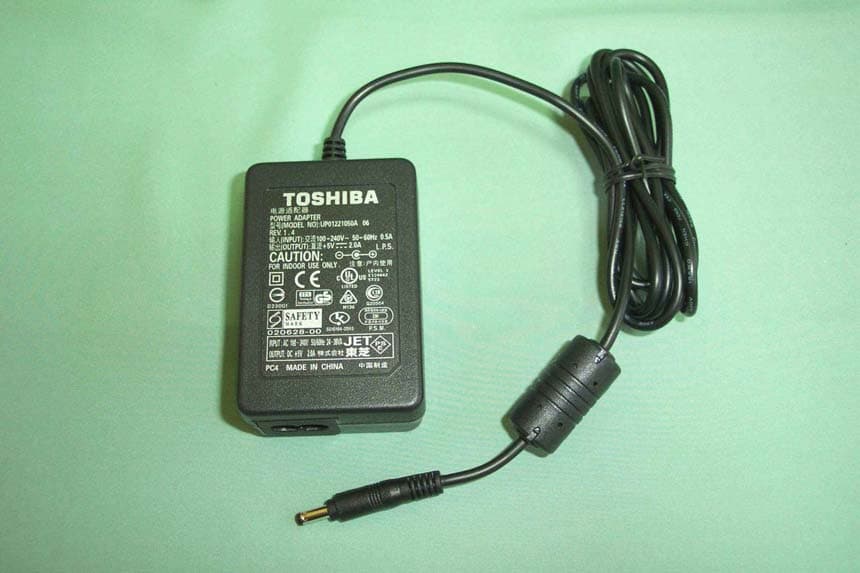
Click to zoom
Application Details
- Equipment Class
- DSS - Part 15 Spread Spectrum Transmitter
- Date of Grant
- Feb 20, 2003
- Application Purpose
- Original Equipment
- Date of Application
- Feb 20, 2003
- Equipment Note
- PDA With 2.4GHz Bluetooth Module
- Frequency Range
- 2402.00000000 - 2480.00000000
- Company
- Compal Electronics Inc
- Country
- Taiwan
Documents & Files
Document Text
Text extracted from the exhibit documents filed with the FCC. Open a document above to read the original.
Users Manual
TOSHIBA Pocket PC e750/e755 User’s Guide 2 Introduction Thank you very much for your purchase of this Toshiba Pocket PC. Please be sure to read this user’s guide before using the Toshiba Pocket PC, and ensure that you are aware of correct the handling procedures. •Please be sure to read the “Safety precautions” section in this docu- ment to learn about important safety issues. •After reading this document, keep it in a convenient place for future reference. Copyright Information © 2003 by Toshiba Corporation. All rights reserved. Under the copyright laws, this manual cannot be reproduced in any form without the prior written permission of Toshiba. No patent liability is assumed, with re- spect to the use of the information contained herein. Toshiba Pocket PC e750/e755 User’s Guide First edition March 2003 Trademarks Microsoft, ActiveSync, Outlook, Pocket Outlook, Windows, Windows CE, and the Windows logo are either registered trademarks or trademarks of Microsoft Corporation in the United States and/or other countries. Microsoft products are licensed to OEMs by Microsoft Licensing, Inc., a wholly owned subsidiary of Microsoft Corporation. Safety precautions •Please carefully read “Safety precautions” before using the Toshiba Pocket PC and ensure that you are aware of correct handling proce- dures. •The precautions provide essential information for the protection of the user and others from possible injury and property damage. They also provide information on the safe handling of this product. •Please check that you fully understand the definition of the following messages (signs and graphical symbols) before reading the text, and always follow the instructions provided. 3 Safety instructions Please carefully read “Safety precautions” before using the Toshiba Pocket PC and ensure that you are aware of correct handling proce- dures. The precautions provide essential information for the protection of the user and others from possible injury and property damage. They also provide information on the safe handling of this product. Please check that you fully understand the definition of the following messages (signs and graphical symbols) before reading the text, and always follow the instructions provided. There are two categories of Safety Instructions included in this manual: Product Warnings, (i.e., what must never be done to assure avoiding those hazards that could cause bodily injury or property damage); and User Directions (i.e., what must always be done to assure the safe use of your Pocket PC). The Safety Instructions contained in this manual have been categorized in accordance with the seriousness of the potential hazards through the use of Signal Words. Those Signal Words, and their intended meanings, are as follows: Signal WordMeaning DANGERIndicates that a failure to observe the Safety Instructions could result in serious bodily in- jury. CAUTIONIndicates that a failure to observe the Safety Instructions could result in minor bodily injury or property damage. WARNINGDesignates important information that relates to the safe use of your Pocket PC. Your Pocket PC produces low levels of RF energy due to the generation of digital timing pulses by its clock oscillator circuits. Your Pocket PC has been equipped with internal shielding to minimize any stray emissions of RF energy. Airlines may nevertheless prohibit the on-board use of all portable PCs (and all other portable electronic devices that could potentially emit stray RF energy), particularly during take-offs and landings, to prevent any pos- sible interference with the reception of signals by airborne electronic navi- gational devices. WARNING Always request and obtain prior consent and approval of an authorized airline representative before using your Pocket PC aboard an aircraft. Always follow the instructions of the airline representative whenever us- ing your Pocket PC aboard an aircraft, to prevent any possible interfer- ence with airborne electronic equipment. 4 WARNING Certain locations, such as hospitals, may restrict the use of Pocket PCs and other devices that emit low-level RF energy. Always comply was posted prohibitions of the use of RF-emitting de- vices, such as in hospitals. Failure to follow such directives could result in the interference with medical equipment and/or devices. Never come closer than 16cm (6inches) to a person with a heart pace- maker implant when using this Pocket PC in combination with a mobile cellular telephone. Failure to do so could result in interference with the function of the pacemaker. WARNING Never use a Pocket PC while driving an automobile or any other moving vehicle. Always pull out of traffic and come to a stop in a legally permis- sible and safe location before using your Pocket PC. Failure to do so could result in serious bodily injury in a traffic accident. Never use your Pocket PC while walking. Usage while walking could result in bodily injury caused by inattention to automobile traffic or other pedestrian hazards. WARNING Never allow metallic objects, such as staples and paper clips, to enter inside your Pocket PC. Metallic objects, such as staples and paper clips, if allowed to enter your Pocket PC, could cause the generation of excess heat or fire. Never connect terminals (metal parts) to metallic objects (such as wires). Connecting terminals to metal objects could cause excessive heat or fire. Always immediately turn the battery switch to the “off” position and dis- connect the AC Adaptor from the power outlet in the event the Pocket PC emits an unusual odor or sound or generates smoke. WARNING Never use or store your Pocket PC in the following locations: Anywhere it may be exposed to water, such as a bathroom or sauna; In conditions of high humidity, such as in the rain or fog; Where your Pocket PC will be exposed to high temperatures, such as near a fire or equipment that emits high temperatures; In direct sunlight; or In a sealed automobile left in the sun and subject…
Text truncated - open the document above for the full version.
Users Manual
Pocket PC Bluetooth TM User’s Guide Getting Started Thank you very much for your purchase of this Bluetooth Card. Please be sure to read this User’s Guide before using the Bluetooth Card. ● Please be sure to read “Safety Precautions” in this document since these describe important safety issues. ● After reading this document, keep it in a convenient place for future reference. ● The screens used in this User’s Guide are based on the Microsoft® Pocket PC 2002,2003 operating system. ● Please read the following information about equipment license displays. This equipment has received technology standard conformity certification as radio equipment for a low power data communication system radio station based on the Radio Regulation of Japan. A radio license is not required to operate this equipment; however, performing the following could constitute a violation of the law: - Modifying or changing the features or functions of the original design. - Removing the certification label on the reverse side of the equipment. • Trademarks Bluetooth is a trademark owned by its proprietor and used by Toshiba under license. Microsoft, ActiveSync, Outlook, Pocket Outlook, Windows, Windows NT, the Windows logo, and the MSN logo are either registered trademarks or trademarks of Microsoft Corporation in the United States and/or other countries. The official name of Windows is Microsoft Windows Operating System. CompactFlash is a registered trademark of SanDisk Corporation in the United States. The names of products contained herein are used as either the trademark or registered trademark of their respective companies. Signs Meaning of signs War n i n g This indicates a potentially hazardous situation, which could result in death or serious injury¹ if you do not follow instructions. Caution This indicates a potentially hazardous situation, which if not avoided, could result in minor injury² or property damage³ . Safety Precautions ● Please be sure to read “Safety Precautions” outlined here carefully before using the Bluetooth Card and ensure that you are aware of the correct handling procedures. ● The precautions stated here provide essential information for the protection of the user and others from possible injury and property damage, and essential information on the safe handling of the product you have purchased. ● Please check that you fully understand the definition of the following messages (signs and graphical symbols) before going on to read the text, and always follow the instructions. ■ Explanation of signs 1: Serious injury refers to an injury that leaves some after-effects, and requires hospitalization or long-term treatment, such as blindness, injuries, burns (high or low temperature burns), electric shock, fractures, or poisoning. 2: Minor injury refers to an injury that does not require hospitalization or long-term treatment, such as light burns, or electric shock. 3: Property damage refers to extensive damage of property, such as a structure, household effects, livestock, or pets. ■ Explanation of symbols ■ Limitation of liability ● Toshiba Corporation is in no way liable for any damage resulting from earthquakes, lightning, wind, flood; or fire, actions on the part of a third party, or other accidents beyond the control of Toshiba Corporation; intentional acts, negligence or misuse on the part of the user, or any usage under abnormal conditions. ● Toshiba Corporation is in no way liable for any damage, including but not limited to change or loss of stored data, loss of business profit, loss of earnings, interruption of business, or lost communication opportunities that are caused by usage or unusability of this product. ● Toshiba Corporation is in no way liable for any damage resulting from failure to comply with the contents of this user’s guide. ● Toshiba Corporation is in no way liable for any damage resulting from malfunction due to use with connection devices or software other than those provided by Toshiba Corporation. • Toshiba Corporation cannot guarantee any data recorded in memory devices, such as internal memory and memory cards, regardless of the cause of damage or malfunction. Symbols Explanation of symbols DO NOT This indicates an action that you must not do. The prohibited action is described in the symbol or adjacent picture or text DO This indicates an action that you must do. The action is described in the symbol or adjacent picture or text. ■ Usage conditions The Bluetooth Card was not developed or produced for use with equipment in systems that directly support the medical welfare of individuals¹ or systems that are critical for the maintenance of public welfare and safety². Do not use the Bluetooth Card for these purposes. 1: These include life-support systems, surgery room equipment, and other medical devices. 2: These include the main equipment control systems and safety protection systems at nuclear power facilities, other critical safety systems, fleet transportation operating control systems, and air traffic control systems. Do not disassemble, modify or try to service this product yourself. This may cause injury. Unapproved changes or modifications to this product could void your authority to operate this product. Please contact the dealer from whom you purchased this product and request repair service. Do not use this product in areas where the use of electrical devices is prohibited, such as on board an aircraft and in a hospital. If you are uncertain whether electrical devices are prohibited, please consult the proper authorities and follow all instructions. Usage in prohibited areas can cause an accident due to radio interference with equipment such as aviation and medical equipment. Failure to maintain this distance can cause a malfunction of the pacemaker due to radio interference. Do not use the Bluetooth Card near an automated controlling device, such as an automatic door or fire alarm. Failure to do so can cause an accident due to radio interference with …
Text truncated - open the document above for the full version.
Block Diagram
Block Diagram Compal-DB Product Specifications Version 1.0 1 No. 10-1 , Li-hsin Road I Science-based Industrial Park , Hsinchu 300,Taiwan, R.O.C. Tel: 886-3-6667799 Fax: 886-3-6667711 Web site: www.wneweb.com Details of Block Diagram BPF FL100 TMF2450W100A82 Balun T100 HHM-1520 Antena Swith Low Noise Amplifier Power Amplifier (PA) Power voltage control Mixer Mixer Mixer Mixer 0 90 Phase Amplifer 0 90 Phase Amplifer LPF LPF LPF LPF ADC ADC DAC DAC GFSK Modulate/ Demodulate VCOLPF Phase ditector Clock Divider Clock Divider VCO/PLL Driver Driver Modulate/Demodulate IC U100 Siw1502 Reference Osicilator X100 32MHz crystal oscilator X101 32kHz System Control Logic Data control Unit Bus Interface Unit Clock oscillator USB Interface Unit Link control IC U400 SiW1602 Main control *EEPROM Main control IC U300 H8S/2238 To HOST RF Block Diagram With the identify code (prevent form jamming) The Range of Radio Frequency Block exclude Antena USB Interface Regulator Power supply U201 R5321D DC3.0V DC3.3V Antena Tx/Rx Frequency 2402-2480MHz Frq:2402-2480MHz Freq:2402-2480MHz Freq:2402-2480MHz Freq 2402-2480MHz Bandwidth : 500kHz Bandwidth : 500kHz TO 55 44 33 22 11 D D C C B B A A Buffer JTAG PDA System Block Diagram Mic VGA OUT Earphone 802.11b & BTConnector20pin SD Slot MobileSDRAM64MB SPK PCMCIA TouchPanel IRDA IRDA USB Host JTAG W3O LED Jack GrayScale I2C LCD WM9705 USB I/F Keyboard Mobile IOC2 ACLink Keyboard HoldKey NAND FlashMemory32MB USB A W100 LCDController CF Slot A 3.8" TFTLCM System Bus Connector Microphone UART CPUXscale USB Client CradleConnector26pin Page 10 Flash ROM32MB Page 3Page 4Page 4 Page 5 Page 6 Page 6 Page 12 Page 7 Page 10 Page 6 Page 10 Page 5 Page 9 Page 8 Page 8 Page 3 Page 10Page 12 EthernetDebug port Page 1. System Block Daigram 0.5 e750,e755 Actual C 215 Tuesday, January 21, 2003 COMPAL ELECTRONICS, INC. TitleSize Document Number Rev Date: Sheet of
External Photos
C&C Laboratory Co. Ltd. REPORT NO: 030007-RF-ID FCC ID: GKRPA3275U-1BTM DATE: 1/21/2003 All of EUT Front View of PDA C&C Laboratory Co. Ltd. REPORT NO: 030007-RF-ID FCC ID: GKRPA3275U-1BTM DATE: 1/21/2003 Back View of PDA Lift View of PDA C&C Laboratory Co. Ltd. REPORT NO: 030007-RF-ID FCC ID: GKRPA3275U-1BTM DATE: 1/21/2003 Right View of PDA Top View of PDA C&C Laboratory Co. Ltd. REPORT NO: 030007-RF-ID FCC ID: GKRPA3275U-1BTM DATE: 1/21/2003 Bottom View of PDA Front View of Docking C&C Laboratory Co. Ltd. REPORT NO: 030007-RF-ID FCC ID: GKRPA3275U-1BTM DATE: 1/21/2003 Back View of Docking Front View of Adaptor C&C Laboratory Co. Ltd. REPORT NO: 030007-RF-ID FCC ID: GKRPA3275U-1BTM DATE: 1/21/2003 Back View of Adaptor View of EUT
ID Label/Location Info
FCC ID LABEL FORMAT AND LOCATION Applicant: Compal Electronics, Inc. FCC ID: GKRPA3275U-1BTM FCC ID: GKRPA3275U-1BTM This device complies with part 15 of the FCC Rules. Operation is subject to the following two conditions: (1) This device may not cause harmful interference, and (2) this device must accept any interference received, including interference that may cause undesired operation. FCC ID LABEL AREA
Internal Photos
C&C Laboratory Co. Ltd. REPORT NO: 030007-RF-ID FCC ID: GKRPA3275U-1BTM DATE: 1/21/2003 Internal of PDA-1 Internal of PDA-2 C&C Laboratory Co. Ltd. REPORT NO: 030007-RF-ID FCC ID: GKRPA3275U-1BTM DATE: 1/21/2003 Internal of PDA-3 Internal of PDA-4 C&C Laboratory Co. Ltd. REPORT NO: 030007-RF-ID FCC ID: GKRPA3275U-1BTM DATE: 1/21/2003 Internal of PDA-5 Internal of PDA-6 C&C Laboratory Co. Ltd. REPORT NO: 030007-RF-ID FCC ID: GKRPA3275U-1BTM DATE: 1/21/2003 Front of RF Module and Antenna Back of RF Module and Antenna C&C Laboratory Co. Ltd. REPORT NO: 030007-RF-ID FCC ID: GKRPA3275U-1BTM DATE: 1/21/2003 Back of Docking
Parts List/Tune Up Info
Bluetooth Antenna Spec. 1.Average gain @ azimuth plane 2.VSWR <=2 from 2.4GHz to 2.5GHz Average Gain (dBi) 2.4GHz 2.45GHz 2.5GHz -4.5 -4.5 -4.5 WNC Confidential KUC Ceramic antenna radiation pattern @2.45GHz Peak gain 0.39dBi Average power gain -3.84dBi 90 0 270
Test Report
C&C Laboratory Co. Ltd. REPORT NO: 030007-RF-ID FCC ID: GKRPA3275U-1BTM DATE: 1/21/2003 Page 1 of 66 Rev. 00 ELECTROMAGNETIC EMISSIONS COMPLIANCE REPORT INTENTIONAL RADIATOR CERTIFICATION TO FCC PART 15 SUBPART C REQUIREMENT OF PDA built-in 2.4GHz Bluetooth Module MODEL No.: PA3275U-1BTM BRAND NAME: Toshiba FCC ID: GKRPA3275U-1BTM REPORT NO: 030007-RF-ID ISSUE DATE: Jan. 21, 2003 Prepared for Compal Electronics, Inc. No. 581, Juikuang Rd., Neihu, Taipei, Taiwan, R.O.C. Prepared by C&C LABORATORY, CO., LTD. #B1, 1 st Fl., Universal Center, No. 183, Sec. 1, Tatung Rd., Hsi Chih, Taipei Hsien, Taiwan, R.O.C. TEL: (02)8642-2071~3 FAX: (02) 8642-2256 C&C Laboratory Co. Ltd. REPORT NO: 030007-RF-ID FCC ID: GKRPA3275U-1BTM DATE: 1/21/2003 Page 2 Rev. 00 VERIFICATION OF COMPLIANCE Applicant: Compal Electronics, Inc. No. 581, Juikuang Rd., Neihu, Taipei, Taiwan, R.O.C. Equipment Under Test: PDA built-in 2.4GHz Bluetooth Module BRAND NAME: Toshiba MODEL No.: PA3275U-1BTM Model Difference: The both models are same except the model designed Serial Number: N/A File Number: 030007-RF-ID Date of test: Jan 16 ~ Jan. 28, 2003 We hereby certify that: The above equipment was tested by C&C Laboratory Co., Ltd. The test data, data evaluation, test procedures, and equipment configurations shown in this report were made in accordance with the procedures given in ANSI C63.4 (1992) and the energy emitted by the sample EUT tested as described in this report is in compliance with conducted and radiated emission limits of FCC Rules Part 15. The test results of this report relate only to the tested sample identified in this report. Approved By ________________________________ Vincent Su / RF Dept. Vice Manager C&C Laboratory Co., Ltd C&C Laboratory Co. Ltd. REPORT NO: 030007-RF-ID FCC ID: GKRPA3275U-1BTM DATE: 1/21/2003 Page 3 Rev. 00 Table of Contents GENERAL INFORMATION ................................................................................................................5 1.1 Product Description ............................................................................................................................5 1.2 Related Submittal(s) / Grant (s) ..........................................................................................................5 1.3 Test Methodology ...............................................................................................................................5 1.4 Test Facility.........................................................................................................................................5 1.5 Special Accessories .............................................................................................................................5 1.6 Equipment Modifications....................................................................................................................5 2. SYSTEM TEST CONFIGURATION ............................................................................................6 2.1 EUT Configuration .............................................................................................................................6 2.2 EUT Exercise ......................................................................................................................................6 2.3 Test Procedure.....................................................................................................................................6 2.4 Configuration of Tested System..........................................................................................................7 3. SUMMARY OF TEST RESULTS .................................................................................................9 4. DESCRIPTION OF TEST MODES ..............................................................................................9 5. CONDUCTED EMISSION TEST................................................................................................10 5.1 Standard Applicable ..........................................................................................................................10 5.2 EUT Setup.........................................................................................................................................10 5.3 Measurement Procedure....................................................................................................................10 5.4 Measurement Equipment Used: ........................................................................................................11 5.5 Measurement Result..........................................................................................................................11 6. PEAK OUTPUT POWER MEASUREMENT............................................................................14 6.1 Standard Applicable ..........................................................................................................................14 6.2 Measurement Procedure....................................................................................................................14 6.3 Measurement Result..........................................................................................................................14 6.4 Measurement Equipment Used: ........................................................................................................14 7. 20dB BAND WIDTH .....................................................................................................................17 7.1 Standard Applicable ..........................................................................................................................17 7.2 Measurement Procedure....................................................................................................................17 7.3 Measurement Result..........................................................................................................................17 7.4 Measurement …
Text truncated - open the document above for the full version.
Test Setup Photos
C&C Laboratory Co. Ltd. REPORT NO: 030007-RF-ID FCC ID: GKRPA3275U-1BTM DATE: 1/21/2003 Radiated Emission Set up Photos C&C Laboratory Co. Ltd. REPORT NO: 030007-RF-ID FCC ID: GKRPA3275U-1BTM DATE: 1/21/2003 Conducted Emission Set Up Photos
Contact Information
Applicant
Joyce Ting(Senior RF Regulatory Compliance Engineer)
Test Firm
Compliance Certification Services Inc.Kurt Chen
Technical Specifications
| # | Rule Parts | Frequency Range | Power Output |
|---|---|---|---|
| 1 | 15C | 2.40 GHz - 2.48 GHz | 600.00 µW |
Other Applications from Compal Electronics Inc
GKRRXLN4N
May 26, 2026LGA Module
Equipment Class
CBE - Citizens Band End User DevicesGKRCMMG3L
May 08, 20265G Module
Equipment Class
CBE - Citizens Band End User DevicesGKRRMMG4
Jan 23, 20265G Module
Equipment Class
CBE - Citizens Band End User DevicesGKRRXLN3
Dec 08, 2024LGA Module
Equipment Class
CBE - Citizens Band End User DevicesGKRRMMT1
Aug 14, 2024NTN miniPCIE module
Equipment Class
TNB - Licensed Non-Broadcast Station Transmitter